
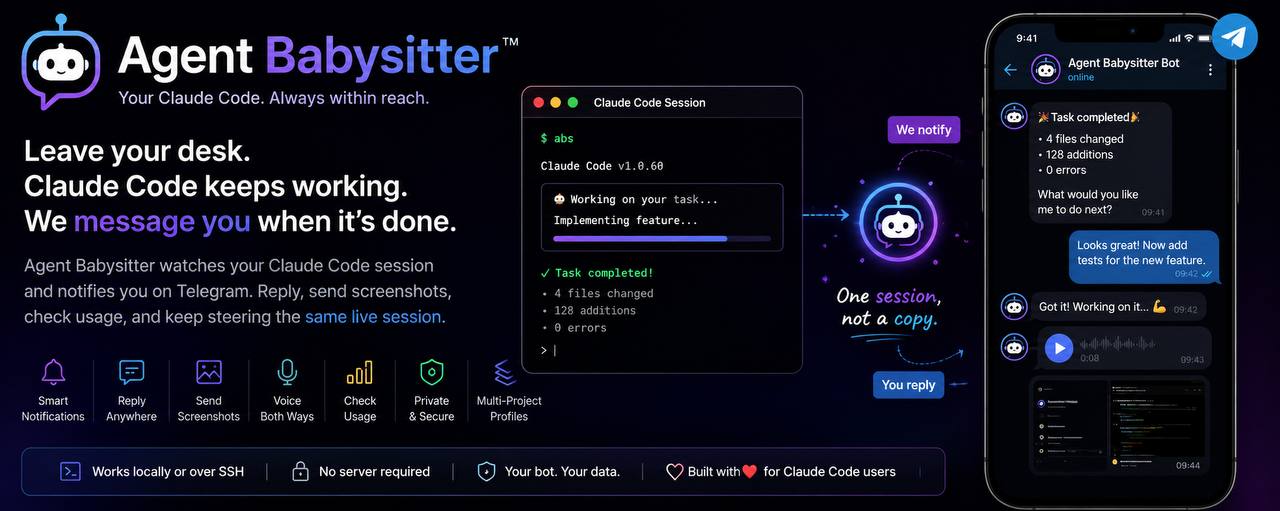




Start a task, close the laptop, and let Claude keep coding. Agent Babysitter messages your phone when work finishes, takes your reply straight back into the same live session, and lets you send screenshots, use voice, and check your usage — all from Telegram.
Claude Code already does the work. Agent Babysitter is the piece that lets you walk away from it — a thin bash script wrapped around Anthropic's official Telegram plugin. No daemon, no webhook, no second copy of your session.
✨ Why you'll love it
- 🔔 Leave your desk — get pinged when Claude finishes or needs a decision.
- 📱 Reply from your phone — your message lands in the same live session.
- 🖼 Send screenshots — attach an image and Claude reads it directly.
- 🎤 Voice both ways — send a voice note, or ask for the answer spoken back.
- 📊 Check usage remotely — your Claude limits, one tap away, no browser.
- 🔒 Your own private bot — PIN-paired, so only you can reach it.
- 🖥 Runs anywhere — laptop, SSH,
tmux, a headless Linux server. - 🗂 Multiple projects — one bot per project, babysat side by side.
🚀 Quick start
# 1. Install
git clone https://github.com/Pranjalab/AgentBabysitter
cd AgentBabysitter
./install.sh

# 2. Launch Claude Code with Telegram wired in
abs
About two minutes, once per bot:
- 🤖 Create a bot — message @BotFather, send
/newbot, and paste the token back (it stays hidden and never leaves your machine). - 📲 Pair your phone —
absprints a short PIN; send it to your bot. That proves the phone is yours, and from then on the bot answers only you. - ✅ Done — Claude Code starts. Walk away; you'll get a message when a task finishes.
After setup it's just abs, from whatever project you're in. Setup is once per
bot, not once per project.
Prerequisites:
claude,bun,jq,curl. The installer checks for them and tells you what's missing rather than installing anything behind your back.
🧩 Features
🔔 Notifications — know when Claude needs you
A task finishing sends a short summary to your phone: what happened, and anything that needs a decision. Stop babysitting the spinner; the spinner tells you when it's done.
💬 Remote control — steer the same session from your phone
Reply in plain English and it arrives in the live session as if you'd typed it at the desk. Approve a step, change direction, ask a question — the terminal and Telegram are one session, not two conversations.
🖼 Screenshots — hand Claude an image without the terminal
Pasting an image into a terminal is awkward. Attach it in Telegram instead and Claude reads it directly — a broken UI, a stack trace you photographed, a design to match.
🎤 Voice — talk to Claude, and have it talk back
Send a voice note and it's transcribed; ask for the answer spoken and it replies with a real voice message. Both run locally — no audio ever leaves your machine.
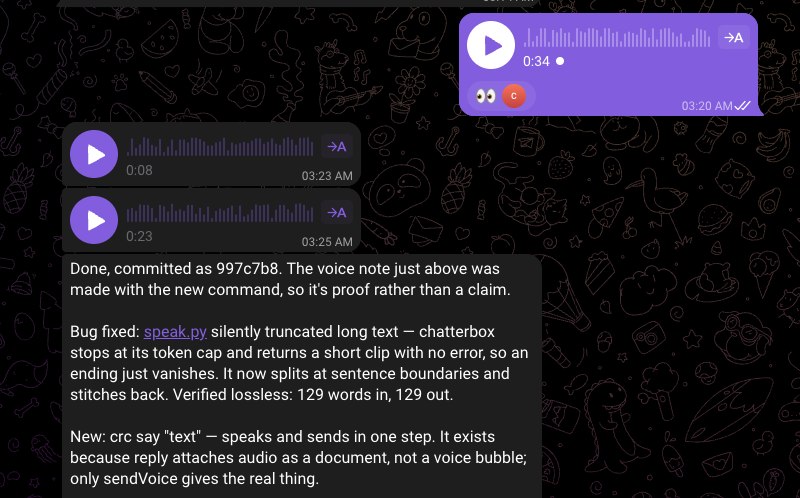
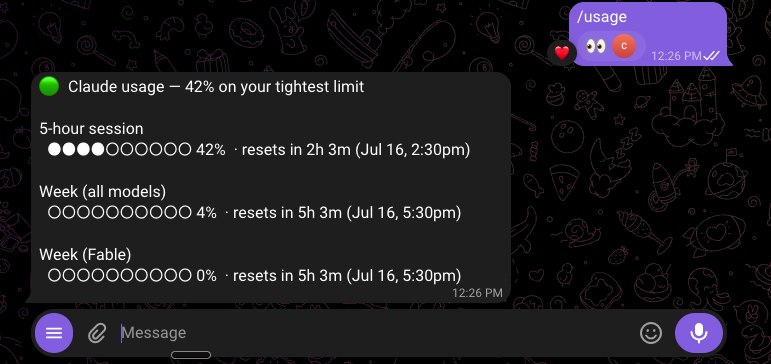
📊 Usage — check your Claude limits without leaving the chat
Tap /usage and your subscription limits and reset times come to Telegram — no
browser, no app, no breaking focus before a big task.
🗂 Profiles — babysit several projects at once
Each project gets its own bot, so you can run more than one session in parallel
without them fighting over messages — abs --profile work.
🔒 Security — a private bot only you can reach
Pairing writes your Telegram ID to an allowlist; anyone else who finds the bot is ignored before Claude ever sees the message. Full model in SECURITY.md.
🤔 Why Agent Babysitter?
Claude Code can already talk to Telegram — Anthropic ships an official plugin for it. But the bare plugin is just a pipe: it forwards messages and nothing more. Agent Babysitter is the workflow around that pipe.
| Official Telegram plugin, alone | With Agent Babysitter | |
|---|---|---|
| Chat with the session from Telegram | ✅ | ✅ |
| Guided bot setup & token validation | Manual | ✅ One command |
| Only you can reach the bot | Basic | ✅ PIN pairing + allowlist |
| "Task finished" reports to your phone | ❌ | ✅ |
| Check Claude usage from Telegram | ❌ | ✅ |
| Voice notes in and out, processed locally | ❌ | ✅ |
| Send screenshots Claude reads | Raw | ✅ Built in |
| Run multiple projects at once | ❌ Single bot | ✅ Profiles |
| Mute / hard-off controls | ❌ | ✅ |
It complements Claude Code — it doesn't replace or fork it. Your session,
your CLAUDE.md, and your permissions are all untouched.
🎯 Perfect for
- 🌙 Overnight jobs and long refactors you don't want to watch.
- 🛠 Bug-fixing sessions where you step away between turns.
- 🖥 Remote servers — run it over SSH on a VPS or home box and close the laptop.
- ☕ Coffee breaks and working from another room.
- 🗂 Multi-project days — a bot per project, all reporting to one phone.
💡 Why I built it
Three ordinary frustrations, all from using Claude Code every day:
- I was chained to my desk. The moment I walked away I'd start worrying — is it waiting on me to approve something? Has it finished? Did it go the wrong way ten minutes ago while I was making coffee? So I just… sat there.
- I kept checking my usage. Before a big task I'd open the browser again to see how much of my limit was left. Ten seconds, every time, breaking my focus.
- Handing Claude a screenshot was a pain. Pasting into the terminal is awkward, and the image was usually on my phone anyway.
Agent Babysitter fixes all three — and it's stayed a single bash script the whole way, because the point was to remove friction, not add a platform.
⌨️ Commands
abs                     # start a session (first run does setup)
abs --model opus        # any claude flag is passed straight through
| Command | What it does |
|---|---|
📋 abs status |
What's paired, inbound state, whether it's live |
📊 abs usage |
Your Claude limits — in the terminal and on Telegram |
🗂 abs profiles |
List your bots and which are in use |
🔕 abs quiet on / off |
Mute / unmute reports (inbound still works) |
🛑 abs off / on |
Drop / re-enable all inbound Telegram |
🎤 abs say "text" |
Speak it and send as a voice note |
♻️ abs reset |
Remove this profile's token, allowlist, and state |
❓ abs help |
The full list |
You can also just say it in chat — "mute the reports", "what's my usage" — and it runs the same commands. For voice setup, profiles, servers, and troubleshooting, see the full guide.
🏗 Architecture
Telegram polls outbound, so nothing listens on a port and no webhook is needed — which is why it works the same on a laptop, over SSH, or on a headless server.
flowchart LR
    You["📱 You (Telegram)"] <--> Bot["Your private bot"]
    Bot <--> Plugin["Official Telegram plugin"]
    Plugin <--> ABS["Agent Babysitter (abs.sh)"]
    ABS <--> Claude["Claude Code session"]
    Claude --> Project[("Your project")]
Agent Babysitter validates your token, pairs your phone, injects the "report when done" behavior per session, manages profiles, and reports usage. The plugin owns the inbound polling; Claude Code does the work.
🔒 Security
Only you can message your bot. Pairing records your Telegram user ID in an
allowlist, and anyone else who finds the bot is ignored before Claude sees the
message. The PIN pairing proves the phone is yours; the bot token is kept out of
ps and stored owner-only.
It is not a sandbox, though — within your paired account, Claude has whatever power Claude Code gives it on your machine. Read SECURITY.md for the full model, including what it deliberately does not protect against.
❓ FAQ
Does it expose my code? No. It's your own private bot, and only your paired account can reach it. One honest caveat: Telegram itself sees the messages (they're not end-to-end encrypted), so don't use it for work where that matters.
Can anyone else message my bot? No. Unpaired accounts are dropped before Claude ever sees them.
Does voice processing stay local? Yes. Transcription and speech both run on your machine — no cloud speech vendor is involved. (The audio still travels over Telegram, like any message.)
Can I run multiple projects? Yes — one bot per project, via profiles.
Does it work over SSH / on a server?
Yes. Telegram polls outbound, so no public IP, open port, or webhook is needed.
Run it in tmux and close the laptop.
Does it require a server? No. It runs anywhere Claude Code runs — a server is just one option.
Can I stop Claude remotely? Not yet. Messages are read between turns, so you can steer the next step but not interrupt the current one.
Which platforms are supported?
Built and tested on Linux. It should run anywhere with bash; macOS may need GNU
coreutils (readlink -f and date -d are used). Contributions welcome.
🙏 Acknowledgements
Agent Babysitter stands on two things it doesn't reinvent:
- Claude Code — the AI coding agent doing the actual work.
- Anthropic's official Telegram plugin (
telegram@claude-plugins-official) — it owns the inbound polling and thedownload_attachment/replytools this builds on.
🤝 Contributing
Issues, ideas, and pull requests are all welcome — bug reports and "it broke on my setup" notes especially. See CONTRIBUTING.md for how to test a change, and our Code of Conduct for the ground rules. Version history lives in CHANGELOG.md.
If Agent Babysitter saves you from waiting around for Claude Code, a ⭐ genuinely helps other developers find it.
📄 License
MIT — see LICENSE. Do what you like with it.
1 maintainer

Download files
Download the file for your platform. If you're not sure which to choose, learn more about installing packages.
Source Distribution
Built Distribution
Filter files by name, interpreter, ABI, and platform.
If you're not sure about the file name format, learn more about wheel file names.
Copy a direct link to the current filters
File details
Details for the file agent_babysitter-2.0.0.tar.gz.
File metadata
- Download URL: agent_babysitter-2.0.0.tar.gz
- Upload date:
- Size: 270.6 kB
- Tags: Source
- Uploaded using Trusted Publishing? No
- Uploaded via:
twine/6.2.0 CPython/3.11.15
File hashes
| Algorithm | Hash digest | |
|---|---|---|
| SHA256 |
e147385bbc6dd23e13b10fe4b6b49d5c0c2518e9598ef3ece3c56c4310fa86c3
|
|
| MD5 |
9054bc690207300fad165537796d1113
|
|
| BLAKE2b-256 |
22f15950c8ee56ca63c4f1cd239f198187644c8e9248c4755d0060d3748e81f5
|
File details
Details for the file agent_babysitter-2.0.0-py3-none-any.whl.
File metadata
- Download URL: agent_babysitter-2.0.0-py3-none-any.whl
- Upload date:
- Size: 26.7 kB
- Tags: Python 3
- Uploaded using Trusted Publishing? No
- Uploaded via:
twine/6.2.0 CPython/3.11.15
File hashes
| Algorithm | Hash digest | |
|---|---|---|
| SHA256 |
e15ec6f9dea80b49dcebb1404122cf8216a667358938e0f4d5e692a4561283ec
|
|
| MD5 |
4c53415d276f7f4751418125c2ec597e
|
|
| BLAKE2b-256 |
1f3ce23fb1c3cf21df53fa2fac8db61e93577337b876f3df3a0f9128c7e44a4c
|













