
AI Bill of Materials (AI-BOM) generator — CVE scanning, blast radius, enterprise remediation plans, OWASP LLM Top 10 + MITRE ATLAS + NIST AI RMF threat mapping, LLM-powered enrichment, OpenClaw discovery, MCP runtime introspection, and MCP registry for AI agents.
Verified details
These details have been verified by PyPIProject links
GitHub Statistics
Maintainers

Project description







Generate AI Bills of Materials. Scan AI agents and MCP servers for CVEs. Map blast radius. Enterprise remediation with named assets and risk narratives. OWASP LLM Top 10 + MITRE ATLAS + NIST AI RMF.
Why agent-bom?
|
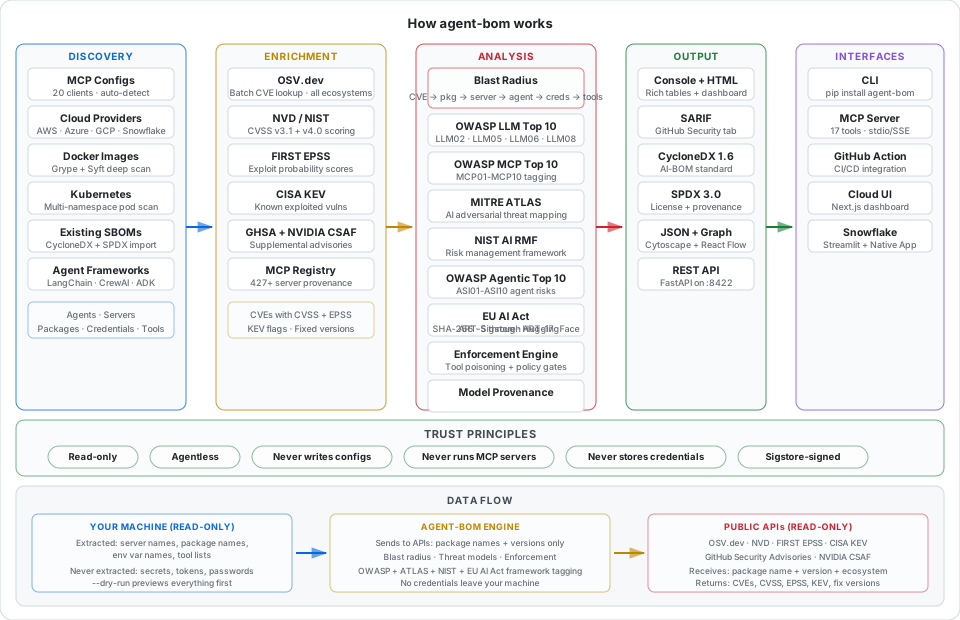
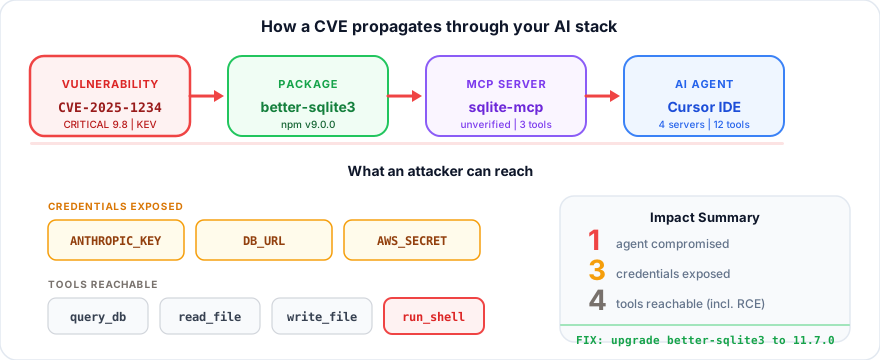
Not just "this package has a CVE." agent-bom answers the question security teams actually need:
|
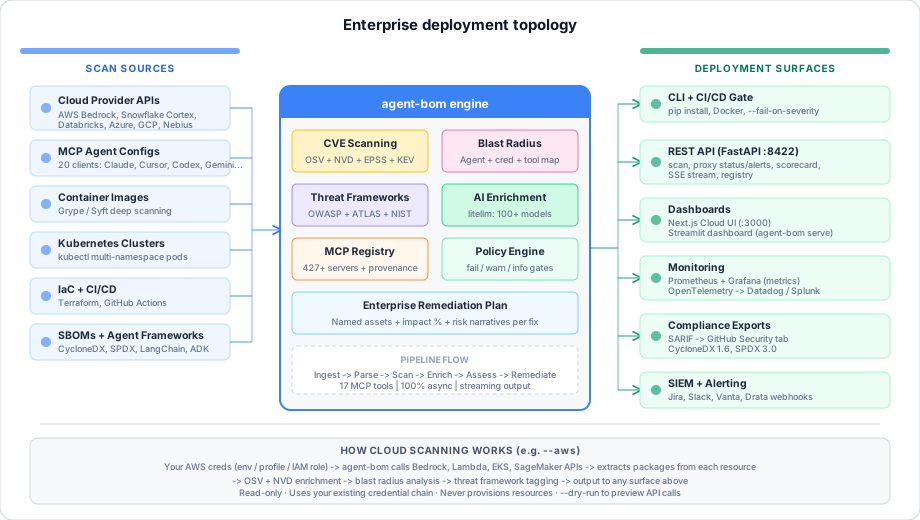
What it scans:
What it outputs: Console, HTML dashboard, SARIF, CycloneDX 1.6, SPDX 3.0, Prometheus, OTLP, JSON, REST API |
Quick links
- Install —
pip install agent-bomor Docker - Get started — scan in 30 seconds
- AI-BOM export — CycloneDX, SPDX, JSON, SARIF, HTML
- Remediation plan — named assets, risk narratives
- Cloud UI — enterprise aggregate dashboard
- CI integration — GitHub Actions + SARIF upload
- REST API — FastAPI on port 8422
- Skills — downloadable workflow playbooks (AI-BOM, cloud audit, OWASP, incident response)
- MCP Registry — 109 known servers with metadata
- PERMISSIONS.md — auditable trust contract
- Roadmap — what's coming next
Get started
pip install agent-bom

# Auto-discover and scan local AI agents
agent-bom scan

# HTML dashboard with severity donut + blast radius chart
agent-bom scan -f html -o report.html && open report.html

# CI gate — fail on critical/high CVEs
agent-bom scan --fail-on-severity high -q
No config needed. Auto-discovers Claude Desktop, Claude Code, Cursor, Windsurf, Cline, VS Code Copilot, Continue, Zed, Cortex Code, and OpenClaw on macOS, Linux, and Windows.
Install
| Mode | Command |
|---|---|
| Core CLI | pip install agent-bom |
| AWS discovery | pip install 'agent-bom[aws]' |
| Databricks | pip install 'agent-bom[databricks]' |
| Snowflake | pip install 'agent-bom[snowflake]' |
| Nebius GPU cloud | pip install 'agent-bom[nebius]' |
| All cloud | pip install 'agent-bom[cloud]' |
| REST API | pip install 'agent-bom[api]' |
| Dashboard | pip install 'agent-bom[ui]' |
| OpenTelemetry | pip install 'agent-bom[otel]' |
| Docker | docker run --rm -v ~/.config:/root/.config:ro agentbom/agent-bom scan |
Core capabilities
CVE scanning + blast radius
agent-bom scan --enrich                    # OSV + NVD CVSS + EPSS + CISA KEV
agent-bom scan --image myapp:latest        # Docker image (all ecosystems via Grype)
agent-bom scan --k8s --all-namespaces      # Every pod in the cluster
agent-bom scan --sbom syft-output.cdx.json # Pipe in existing SBOMs
Every vulnerability is mapped to: which agents are affected, which credentials are exposed, which MCP tools an attacker can reach.
OWASP LLM Top 10 tagging
| Code | Triggered when |
|---|---|
| LLM05 | Any package CVE (always) |
| LLM06 | Credential env var exposed alongside CVE |
| LLM08 | Server with >5 tools + CRITICAL/HIGH CVE |
| LLM02 | Tool with shell/exec semantics |
| LLM07 | Tool that reads files or prompts |
| LLM04 | AI framework + HIGH+ CVE |
MITRE ATLAS threat mapping
Every finding is also mapped to MITRE ATLAS adversarial ML techniques:
| Technique | Triggered when |
|---|---|
| AML.T0010 | Any package CVE (always — supply chain compromise) |
| AML.T0062 | Credentials exposed alongside vulnerability |
| AML.T0061 | >3 tools reachable through compromised path |
| AML.T0051 | Tools can access prompts/context (injection surface) |
| AML.T0056 | Tools can read files (meta prompt extraction) |
| AML.T0043 | Tools with shell/exec capability (adversarial data) |
| AML.T0020 | AI framework + HIGH+ CVE (training data poisoning) |
| AML.T0058 | AI framework + creds + HIGH+ (agent context poisoning) |
NIST AI RMF compliance mapping
Every finding is also mapped to the NIST AI Risk Management Framework (AI RMF 1.0) — covering all four functions:
| Subcategory | Triggered when |
|---|---|
| GOVERN-1.7 | Any package CVE (always — third-party component risk) |
| MAP-3.5 | Any package CVE (always — supply chain risk assessed) |
| GOVERN-6.1 | Shell/exec tools reachable (third-party assessment) |
| GOVERN-6.2 | AI framework + creds + HIGH+ (contingency planning) |
| MAP-1.6 | >3 tools reachable (interface mapping) |
| MAP-5.2 | Data/file access tools reachable (deployment impact) |
| MEASURE-2.5 | AI framework + HIGH+ CVE (security testing) |
| MEASURE-2.9 | Fix available (mitigation effectiveness) |
| MANAGE-1.3 | CISA KEV finding (documented risk response) |
| MANAGE-2.2 | Credentials exposed (anomalous event detection) |
| MANAGE-2.4 | AI framework + creds + HIGH+ (remediation) |
| MANAGE-4.1 | Credentials + tools exposed (post-deployment monitoring) |
MCP runtime introspection
Connect to live MCP servers to discover their actual runtime capabilities:
agent-bom scan --introspect                 # introspect all discovered servers
agent-bom scan --introspect --introspect-timeout 15  # custom timeout per server
Introspection is read-only — it only calls tools/list and resources/list (never tools/call). It enables:
- Runtime tool discovery — see actual tools exposed by running servers
- Drift detection — compare config-declared tools vs runtime reality
- Hidden capability discovery — find tools not declared in configs
- Server enrichment — merge runtime data into the AI-BOM inventory
Requires the MCP SDK: pip install mcp
Threat framework coverage matrix
After every scan, agent-bom shows which OWASP + ATLAS + NIST AI RMF categories were triggered — and how many findings per category:
CLI — print_threat_frameworks() renders three Rich tables with bar charts:
┌───────────── OWASP LLM Top 10 ──────────────┐    ┌─────── NIST AI RMF 1.0 ────────┐
│ LLM05  Supply Chain Vulnerabilities    12 ████│    │ GOVERN-1.7  Third-party risk 12 ████│
│ LLM06  Sensitive Information Disclosure 4 ██  │    │ MAP-3.5     Supply chain    12 ████│
│ LLM08  Excessive Agency                2 █   │    │ MANAGE-2.2  Event detection  4 ██  │
│ LLM01  Prompt Injection                —     │    │ MEASURE-2.5 Security test    2 █   │
│ ...                                          │    │ ...                               │
└──────────────────────────────────────────────┘    └─────────────────────────────────┘
JSON — threat_framework_summary section with per-category counts:
{
  "threat_framework_summary": {
    "owasp_llm_top10": [{"code": "LLM05", "name": "Supply Chain Vulnerabilities", "findings": 12, "triggered": true}],
    "mitre_atlas": [{"technique_id": "AML.T0010", "name": "ML Supply Chain Compromise", "findings": 12, "triggered": true}],
    "nist_ai_rmf": [{"subcategory_id": "MAP-3.5", "name": "AI supply chain risks assessed", "findings": 12, "triggered": true}],
    "total_owasp_triggered": 4,
    "total_atlas_triggered": 5,
    "total_nist_triggered": 6
  }
}
Cloud UI — three-column threat matrix grid with hit/miss indicators and finding counts per category.
AI-BOM export
Every scan produces a complete AI Bill of Materials — a structured document listing all agents, MCP servers, packages, credentials, tools, and vulnerabilities. Export in any standard format:
agent-bom scan -f cyclonedx -o ai-bom.cdx.json   # CycloneDX 1.6
agent-bom scan -f spdx -o ai-bom.spdx.json       # SPDX 3.0
agent-bom scan -f json -o ai-bom.json             # Full AI-BOM (document_type: "AI-BOM")
agent-bom scan -f sarif -o results.sarif           # GitHub Security tab
agent-bom scan -f html -o report.html              # Interactive HTML dashboard
The JSON output includes "document_type": "AI-BOM" and "spec_version": "1.0" at the top level for programmatic identification. Console output shows an export hint panel after every scan.
Enterprise remediation plan
Each remediation tells you exactly what will be protected when you fix it:
 3. upgrade python 3.11.14 → 3.13.10
    clears 2 vuln(s) • impact score: 14
    agents:       claude-desktop-agent (100%)
    credentials:  YOUTUBE_API_KEY (100%)
    tools:        read_file, execute_command, web_search (3 of 8 — 38%)
    mitigates:    LLM05 LLM06 AML.T0010 AML.T0062
    ⚠ if not fixed: attacker exploiting CVE-2025-1234 can reach
      claude-desktop-agent → YOUTUBE_API_KEY → execute_command
- Named assets — which specific agents, credentials, and tools are at risk
- Percentages — what fraction of your total inventory each fix protects
- Threat tags — which OWASP LLM + MITRE ATLAS + NIST AI RMF categories are mitigated
- Risk narratives — plain-text explanation of what happens if you don't remediate
Policy-as-code
agent-bom scan --policy policy.json --fail-on-severity high
[
  {"id": "no-unverified-high", "unverified_server": true, "severity_gte": "HIGH", "action": "fail"},
  {"id": "warn-excessive-agency", "min_tools": 6, "action": "warn"},
  {"id": "block-kev", "severity_gte": "CRITICAL", "action": "fail"}
]
Cloud provider discovery
Discover AI agents directly from cloud provider APIs — no manual inventory files needed. Customer pays for compute; scans run in your environment with your credentials.
# AWS — Bedrock agents + Lambda + EKS + Step Functions + EC2
agent-bom scan --aws --aws-region us-east-1
agent-bom scan --aws --aws-include-lambda --aws-include-eks --aws-include-step-functions

# Snowflake — Cortex Agents, MCP Servers, Search, Snowpark, Streamlit, query history
agent-bom scan --snowflake

# Databricks — cluster libraries, model serving endpoints
agent-bom scan --databricks

# Nebius — GPU cloud K8s clusters + container services
agent-bom scan --nebius --nebius-project-id my-project

# CoreWeave — K8s-native, use the --k8s flag with your cluster context
agent-bom scan --k8s --context=coreweave-cluster --all-namespaces

# Combine with local scans
agent-bom scan --aws --databricks --snowflake --image myapp:latest --enrich
| Provider | What's discovered | Install |
|---|---|---|
| AWS | Bedrock agents, Lambda functions, EKS clusters, Step Functions workflows, EC2 instances, ECS images, SageMaker endpoints | pip install 'agent-bom[aws]' |
| Snowflake | Cortex Agents, native MCP Servers (with tool specs), Cortex Search Services, Snowpark packages, Streamlit apps, query history audit trail, custom functions/procedures | pip install 'agent-bom[snowflake]' |
| Databricks | Cluster PyPI/Maven packages, model serving endpoints | pip install 'agent-bom[databricks]' |
| Azure | AI Foundry agents, Container Apps | pip install 'agent-bom[azure]' |
| GCP | Vertex AI endpoints, Cloud Run services | pip install 'agent-bom[gcp]' |
| Nebius | Managed K8s clusters, container services + images | pip install 'agent-bom[nebius]' |
| CoreWeave | K8s-native — use --k8s --context=coreweave-cluster |
(core CLI) |
AWS deep discovery flags
| Flag | Discovers |
|---|---|
--aws |
Bedrock agents, ECS images, SageMaker endpoints (default) |
--aws-include-lambda |
Standalone Lambda functions (filtered by AI runtimes) |
--aws-include-eks |
EKS clusters → reuses --k8s pod image scanning per cluster |
--aws-include-step-functions |
Step Functions workflows → extracts Lambda/SageMaker/Bedrock ARNs |
--aws-include-ec2 |
EC2 instances (requires --aws-ec2-tag KEY=VALUE for safety) |
Snowflake deep discovery
Snowflake discovery covers the full Cortex AI stack:
- Cortex Agents —
SHOW AGENTS IN ACCOUNTdiscovers agentic orchestration systems - Native MCP Servers —
SHOW MCP SERVERS IN ACCOUNT+DESCRIBE MCP SERVERparses YAML tool specs.SYSTEM_EXECUTE_SQLtools are flagged as [HIGH-RISK] - Query History Audit — scans
INFORMATION_SCHEMA.QUERY_HISTORY()forCREATE MCP SERVERandCREATE AGENTstatements to catch objects created outside standard flows - Custom Tools — inventories
INFORMATION_SCHEMA.FUNCTIONSandINFORMATION_SCHEMA.PROCEDURESwith language annotation (Python/Java/JavaScript) for attack surface analysis - Cortex Search + Snowpark + Streamlit — existing discovery for search services, packages, and apps
Cloud SDKs are optional extras — install only what you need. Authentication uses each provider's standard credential chain (env vars, config files, IAM roles).
Attack flow diagrams
Drill into any CVE with an interactive per-CVE blast radius diagram — showing the exact attack chain from vulnerability through packages, MCP servers, agents, credentials, and tools:
# Via the REST API
GET /v1/scan/{job_id}/attack-flow?cve=CVE-2024-1234&severity=critical
- Interactive React Flow canvas — zoom, pan, minimap, click-to-inspect detail panel
- Filter by CVE, severity, framework tag, or agent — isolate specific attack chains
- Color-coded nodes — red (CVE), gray (package), blue (server), green (agent), yellow (credential), purple (tool)
- Export — download graph data as JSON for audit evidence
- Linked from scan results — "View Attack Flow" button in every blast radius section
Skill file scanning
Scan AI coding assistant instruction files (CLAUDE.md, .cursorrules, skill.md, AGENTS.md, etc.) for embedded MCP server references, package dependencies, and credential env vars:
# Explicit file
agent-bom scan --skill CLAUDE.md --skill .cursorrules

# Auto-discovery — scans all well-known skill files in the project
agent-bom scan
Auto-discovers: CLAUDE.md, .claude/CLAUDE.md, .cursorrules, .cursor/rules/*.md, skill.md, skills/*.md, .github/copilot-instructions.md, .windsurfrules, AGENTS.md
Extracts:
npx/bunxpackage references → npm ecosystemuvx/uv run/uv tool runpackage references → pypi ecosystempip installandnpm installcommands- MCP server JSON config blocks (
mcpServers) - Credential env var names (API keys, tokens, secrets)
Skill security audit
Skill files are a supply chain attack vector — a malicious CLAUDE.md or .cursorrules could contain typosquatted packages, unverified MCP servers, or credential-harvesting env vars. agent-bom audits skill scan results with 7 security checks:
| Check | Severity | What it detects |
|---|---|---|
| Typosquat detection | HIGH | Package name within edit distance of a known registry entry (fuzzy match ≥80%) |
| Shell/exec access | HIGH | Server command is bash/sh/cmd/powershell, or args contain --allow-exec |
| Dangerous server names | HIGH | Server names containing exec, shell, terminal, command |
| Unverified MCP server | MEDIUM | Server not found in registry or marked as unverified |
| Excessive credentials | MEDIUM | Server with ≥5 env vars, or skill files referencing ≥8 credential vars total |
| External URL | MEDIUM | SSE/HTTP server pointing to a non-localhost URL (data exfiltration risk) |
| Unknown package | LOW | Package not found in any registry entry |
Findings are shown inline during the scan and included in JSON output (skill_audit key) and the REST API (GET /v1/scan/{id}/skill-audit).
CLI attack flow tree
Visualize the full CVE → Package → Server → Agent → Credentials → Tools attack chain directly in your terminal:
💥 Attack Flow Chains

CVE-2024-1234 [CRITICAL] CVSS 9.8 · EPSS 72% · KEV
 └─ express@4.18.2 (npm)
      └─ github-mcp (MCP Server)
           ├─ claude-desktop (Agent)
           ├─ cursor (Agent)
           ├─ 🔑 GITHUB_TOKEN
           └─ 🔧 create_issue, push_code
- Severity-colored output (red for CRITICAL/HIGH, yellow for MEDIUM)
- Top 15 findings by risk score
- Shows exposed credentials and MCP tools per chain
- Disable with
--no-tree
Graph visualization
Cloud and local agents are visualized as an interactive dependency graph in the HTML dashboard. Provider nodes connect to agents, which connect to servers and packages. CVE nodes are attached to vulnerable packages with severity coloring.
Export the raw graph for use in Cytoscape, Sigma.js, or other tools:
agent-bom scan --aws -f graph -o agent-graph.json
OpenClaw scanning
OpenClaw (214k+ stars) is the most popular open-source personal AI assistant. agent-bom auto-discovers OpenClaw configs and scans them for vulnerabilities — including 12 known CVEs (CWD injection, container escape, SSRF, XSS, secret leakage) from OpenClaw's published security advisories.
# Auto-discovers ~/.openclaw/openclaw.json and project-level .openclaw/openclaw.json
agent-bom scan

# Combine with live introspection
agent-bom scan --introspect
AI-powered enrichment
Use LLMs to generate contextual risk analysis beyond template-based output. Supports 100+ LLM providers via litellm — OpenAI, Anthropic, Ollama (local), and more.
pip install 'agent-bom[ai-enrich]'

# Enrich with GPT-4o-mini (default)
agent-bom scan --ai-enrich

# Use a different model
agent-bom scan --ai-enrich --ai-model anthropic/claude-3-haiku-20240307

# Use local Ollama
agent-bom scan --ai-enrich --ai-model ollama/llama3
What --ai-enrich generates:
- Risk narratives — contextual 2-3 sentence analysis per finding (why this CVE matters in your agent's tool chain)
- Executive summary — one-paragraph CISO brief with risk rating and actions
- Threat chains — red-team-style attack chain analysis through MCP tools
MCP Server Registry (109 servers)
Ships with a curated registry of 109 known MCP servers — including OpenClaw, ClickHouse, Figma, Prisma, Browserbase, and E2B. Each entry includes: package name + version pin, ecosystem, risk level, risk justification (why this server has its risk level), tool names, credential env vars, license, category, latest version, known CVEs, and source URL.
The Cloud UI provides a full registry browser with search, risk/category filters, and drill-down detail pages showing tools, credentials, CVEs, and risk justification for each server.
Unverified servers in your configs trigger a warning. Policy rules can block them in CI.
Deployment models
| Mode | Command | Best for |
|---|---|---|
| Developer CLI | agent-bom scan |
Local audit, pre-commit checks |
| Pre-install check | agent-bom check express@4.18.2 -e npm |
Before running any MCP server |
| GitHub Action | uses: agent-bom/agent-bom@v0.19.0 |
CI/CD gate + Security tab |
| Docker | docker run agentbom/agent-bom scan |
Isolated, reproducible scans |
| REST API | agent-bom api |
Dashboards, SIEM, scripting |
| Dashboard | agent-bom serve |
Team-visible security dashboard |
| Prometheus | --push-gateway or --otel-endpoint |
Continuous monitoring |
| K8s CronJob | Helm chart + CronJob | Cluster-wide auditing |
GitHub Action
Use agent-bom directly in your CI/CD pipeline:
- name: AI supply chain scan
  uses: agent-bom/agent-bom@v0.19.0
  with:
    severity-threshold: high
    upload-sarif: true
Full options:
- uses: agent-bom/agent-bom@v0.19.0
  with:
    severity-threshold: high        # fail on high+ CVEs
    policy: policy.json             # policy-as-code gates
    enrich: true                    # NVD CVSS + EPSS + CISA KEV
    upload-sarif: true              # results in GitHub Security tab
    fail-on-kev: true               # block actively exploited CVEs
Outputs: sarif-file, exit-code, vulnerability-count for downstream steps.
SARIF output includes OWASP LLM tags, MITRE ATLAS techniques, and NIST AI RMF subcategories in result.properties — visible directly in GitHub Advanced Security.
AI enrichment (Ollama)
Generate risk narratives, executive summaries, and threat chain analysis using local open-source LLMs — no API keys, no cost:
# Install and start Ollama (one-time)
curl -fsSL https://ollama.com/install.sh | sh
ollama pull llama3.2

# Scan with AI enrichment (auto-detects Ollama)
agent-bom scan --ai-enrich
agent-bom auto-detects Ollama at localhost:11434. No extra Python dependencies needed — uses httpx (already included).
For cloud LLMs (OpenAI, Anthropic, Mistral, etc.), install litellm:
pip install agent-bom[ai-enrich]
export OPENAI_API_KEY=sk-...
agent-bom scan --ai-enrich --ai-model openai/gpt-4o-mini
REST API
pip install agent-bom[api]
agent-bom api   # http://127.0.0.1:8422  →  /docs for Swagger UI
| Endpoint | Description |
|---|---|
GET /health |
Liveness + X-Agent-Bom-Read-Only: true header |
POST /v1/scan |
Start async scan (returns job_id) |
GET /v1/scan/{job_id} |
Poll status + results |
GET /v1/scan/{job_id}/stream |
SSE real-time progress |
GET /v1/scan/{job_id}/attack-flow |
Per-CVE attack flow graph (filterable) |
GET /v1/scan/{job_id}/skill-audit |
Skill file security audit findings |
GET /v1/registry |
Full MCP server registry (109 servers) |
GET /v1/registry/{id} |
Single registry entry |
Cloud UI
The Next.js dashboard (ui/) provides an enterprise-grade web interface on top of the REST API:
- Security posture dashboard — fleet-wide severity distribution, scan source breakdown, top vulnerable packages across all scans
- Vulnerability explorer — group by severity, package, or agent with full-text search
- Scan detail — per-job blast radius table, threat framework matrix, remediation plan with impact bars, collapsible sections
- Attack flow diagrams — per-CVE interactive blast radius chain: CVE → Package → Server → Agent → Credentials/Tools, filterable by CVE, severity, framework tag, or agent, with exportable JSON for audit evidence
- Supply chain graph — interactive React Flow visualization: Agent → MCP Server → Package → CVE with color-coded nodes, click-to-inspect detail panel, hover tooltips, zoom/pan, minimap, and job selector
- Registry browser — searchable 109-server catalog with risk/category filters, drill-down detail pages (risk justification, tools, credentials, CVEs, versions), verified badges
- Agent discovery — auto-discovered agents with stats bar (servers, packages, credentials, ecosystems), collapsible agent cards
- Enterprise scan form — bulk Docker image input (one-at-a-time, bulk paste, .txt file upload), K8s, Terraform, GitHub Actions, Python agents
- Severity chart — stacked bar chart with critical/high/medium/low percentage breakdown
- Source tracking — each finding tagged by source (MCP agents, container images, K8s pods, SBOMs)
- Live API health check — nav bar shows real-time backend status with version display
cd ui && npm install && npm run dev # http://localhost:3000
Requires the REST API backend running on port 8422.
Skills
Downloadable workflow playbooks in skills/ — structured instructions for common security workflows. Each skill is a self-contained markdown document with goals, steps, decision points, and output artifacts.
| Skill | What it does |
|---|---|
| AI-BOM Generator | Full asset discovery + scan + enrich + AI Bill of Materials generation across all sources |
| Cloud Security Audit | Multi-cloud AI asset discovery and vulnerability assessment (AWS, Azure, GCP, Snowflake, Databricks, Nebius, CoreWeave) |
| OWASP LLM Assessment | Systematic OWASP LLM Top 10 + MITRE ATLAS threat assessment with per-category remediation |
| Incident Response | Given a CVE, find all affected agents, map blast radius, triage, and remediate |
| Pre-Deploy Gate | CI/CD security gate — block deployments with critical CVEs or policy violations |
| MCP Server Review | Evaluate an MCP server before adopting — registry lookup, CVE scan, tool risk analysis |
| Compliance Export | Generate audit-ready CycloneDX, SPDX, SARIF with threat framework coverage reports |
AI supply chain coverage
agent-bom covers the AI infrastructure landscape through multiple scanning strategies:
| Layer | How agent-bom covers it | Examples |
|---|---|---|
| GPU clouds | --k8s --context=<cluster> |
CoreWeave, Lambda Labs, Paperspace, DGX Cloud |
| AI platforms | Cloud provider modules | AWS Bedrock/SageMaker, Azure AI Foundry, GCP Vertex AI, Databricks, Snowflake Cortex, HuggingFace Hub, W&B, MLflow, OpenAI |
| Container workloads | --image via Grype/Syft |
NVIDIA Triton, NIM, vLLM, TGI, Ollama, any OCI image |
| K8s-native inference | --k8s discovers pods |
KServe, Seldon Core, Kubeflow, Ray Serve, BentoML |
| AI frameworks | Dependency scanning (PyPI/npm) | LangChain, LlamaIndex, AutoGen, CrewAI, PyTorch, Transformers, NeMo |
| Vector databases | --image for self-hosted |
Weaviate, Qdrant, Milvus, ChromaDB, pgvector |
| LLM providers | API key detection + SDK scanning | OpenAI, Anthropic, Cohere, Mistral, Gemini |
| MCP ecosystem | Auto-discovery (10 clients) + registry (109 servers) | Claude Desktop, Cursor, Windsurf, Cline, OpenClaw |
| IaC + CI/CD | --tf-dir and --gha |
Terraform AI resources, GitHub Actions AI workflows |
agent-bom vs ToolHive
These tools solve different problems and are complementary.
| agent-bom | ToolHive | |
|---|---|---|
| Purpose | Scan + audit AI supply chain | Deploy + manage MCP servers |
| CVE scanning | OSV, NVD, EPSS, CISA KEV, Grype | No |
| Blast radius | Agents, credentials, tools | No |
| OWASP + ATLAS + NIST | Triple-framework tagging on every finding | No |
| MCP server isolation | No (scanner only) | Yes (containers + seccomp) |
| Secret injection | No | Yes (Vault, AWS SM) |
| Read-only | Yes | No (manages processes) |
Together: ToolHive runs your MCP servers securely. agent-bom audits whether the packages they depend on have known CVEs and what the blast radius would be.
Trust & permissions
--dry-run— shows every file and API URL that would be accessed, then exits- PERMISSIONS.md — auditable contract: what is read, what APIs are called, what is never done
- API headers — every response includes
X-Agent-Bom-Read-Only: true - Sigstore signing — releases v0.7.0+ signed via cosign
- Credential redaction — only env var names appear in reports as
***REDACTED***
Roadmap
- MITRE ATLAS adversarial ML threat mapping
- SLSA provenance + SHA256 integrity verification
- Threat framework coverage matrix (CLI + JSON + UI)
- Enterprise remediation plan with named assets + risk narratives
- Enterprise aggregate dashboard (Cloud UI)
- AI-BOM export identity (CycloneDX, SPDX, JSON, SARIF)
- Cloud provider discovery (AWS, Azure, GCP, Databricks, Snowflake, Nebius, CoreWeave)
- Deep cloud scanning — Snowflake Cortex Agents/MCP Servers, AWS Lambda/EKS/Step Functions/EC2
- Graph visualization (provider → agent → server → package → CVE)
- Security skills — downloadable workflow playbooks for AI-BOM, cloud audit, OWASP, incident response
- AI platform discovery — HuggingFace Hub, Weights & Biases, MLflow, OpenAI
- NIST AI RMF compliance mapping (Govern, Map, Measure, Manage)
- MCP runtime introspection — connect to live servers for tool/resource discovery + drift detection
- OpenClaw discovery — auto-scan OpenClaw configs, 12 known CVEs from published security advisories
- AI-powered enrichment — LLM-generated risk narratives, executive summaries, and threat chains via litellm
- CLI posture summary — aggregate security posture panel with ecosystem breakdown and credential exposure
- Interactive supply chain graph — click-to-inspect detail panel, hover tooltips, pane click dismiss
- Registry enrichment — 109 servers with risk justifications, drill-down detail pages, category filters
- Enterprise scan form — bulk Docker image input (paste, file upload) for fleet-scale scanning
- Collapsible UI — agents, blast radius, remediation, and inventory sections collapse/expand
- Attack flow diagrams — per-CVE interactive blast radius chain with filters and audit export
- Skill file scanning — CLAUDE.md, .cursorrules, AGENTS.md parsing for packages, MCP servers, credentials
- Skill security audit — 7 checks: typosquat detection, shell access, unverified servers, excessive credentials, external URLs
- CLI attack flow tree — terminal-native CVE → Package → Server → Agent → Credentials/Tools chain visualization
- Jupyter notebook AI library scanning
- ToolHive integration (
--toolhiveflag for managed server scanning) - License compliance engine (SPDX license detection + copyleft chain analysis)
Contributing
git clone https://github.com/agent-bom/agent-bom.git && cd agent-bom
pip install -e ".[dev]"
pytest && ruff check src/
See CONTRIBUTING.md | SECURITY.md
Apache 2.0 — LICENSE
Project details
Verified details
These details have been verified by PyPIProject links
GitHub Statistics
Maintainers
Release history Release notifications | RSS feed


Download files
Download the file for your platform. If you're not sure which to choose, learn more about installing packages.
Source Distribution
Built Distribution
Filter files by name, interpreter, ABI, and platform.
If you're not sure about the file name format, learn more about wheel file names.
Copy a direct link to the current filters
File details
Details for the file agent_bom-0.19.0.tar.gz.
File metadata
- Download URL: agent_bom-0.19.0.tar.gz
- Upload date:
- Size: 265.9 kB
- Tags: Source
- Uploaded using Trusted Publishing? Yes
- Uploaded via: twine/6.1.0 CPython/3.13.7
File hashes
| Algorithm | Hash digest | |
|---|---|---|
| SHA256 |
1365374ef401d8b6fdd74223e70e5ff6339454c2042d27ca3b98b183dc6987b4
|
|
| MD5 |
33aa47ddd5b884a3473d78e9f483bad8
|
|
| BLAKE2b-256 |
25d613a8d680eca973efa1bb3b41e2809249d192e04e02d7741dbebf8bb5671b
|
Provenance
The following attestation bundles were made for agent_bom-0.19.0.tar.gz:
Publisher:
release.yml on agent-bom/agent-bom
-
Statement:
-
Statement type:
https://in-toto.io/Statement/v1 -
Predicate type:
https://docs.pypi.org/attestations/publish/v1 -
Subject name:
agent_bom-0.19.0.tar.gz -
Subject digest:
1365374ef401d8b6fdd74223e70e5ff6339454c2042d27ca3b98b183dc6987b4 - Sigstore transparency entry: 975898426
- Sigstore integration time:
-
Permalink:
agent-bom/agent-bom@442b24510a5e7d5cc1cc5db3ecfa5a4252547341 -
Branch / Tag:
refs/tags/v0.19.0 - Owner: https://github.com/agent-bom
-
Access:
public
-
Token Issuer:
https://token.actions.githubusercontent.com -
Runner Environment:
github-hosted -
Publication workflow:
release.yml@442b24510a5e7d5cc1cc5db3ecfa5a4252547341 -
Trigger Event:
push
-
Statement type:
File details
Details for the file agent_bom-0.19.0-py3-none-any.whl.
File metadata
- Download URL: agent_bom-0.19.0-py3-none-any.whl
- Upload date:
- Size: 213.7 kB
- Tags: Python 3
- Uploaded using Trusted Publishing? Yes
- Uploaded via: twine/6.1.0 CPython/3.13.7
File hashes
| Algorithm | Hash digest | |
|---|---|---|
| SHA256 |
4eda1eeb5a3fcd751b35bc8ce7d29807e5a87f5ae8f5406e815b59e90b162509
|
|
| MD5 |
4ec7f7a423e43d510c0cd681127d81e3
|
|
| BLAKE2b-256 |
ae4a15030425d269bc846da41d407be8c0e3d568e0e25b8fb922b7e6f3fe23c7
|
Provenance
The following attestation bundles were made for agent_bom-0.19.0-py3-none-any.whl:
Publisher:
release.yml on agent-bom/agent-bom
-
Statement:
-
Statement type:
https://in-toto.io/Statement/v1 -
Predicate type:
https://docs.pypi.org/attestations/publish/v1 -
Subject name:
agent_bom-0.19.0-py3-none-any.whl -
Subject digest:
4eda1eeb5a3fcd751b35bc8ce7d29807e5a87f5ae8f5406e815b59e90b162509 - Sigstore transparency entry: 975898427
- Sigstore integration time:
-
Permalink:
agent-bom/agent-bom@442b24510a5e7d5cc1cc5db3ecfa5a4252547341 -
Branch / Tag:
refs/tags/v0.19.0 - Owner: https://github.com/agent-bom
-
Access:
public
-
Token Issuer:
https://token.actions.githubusercontent.com -
Runner Environment:
github-hosted -
Publication workflow:
release.yml@442b24510a5e7d5cc1cc5db3ecfa5a4252547341 -
Trigger Event:
push
-
Statement type:






