
Agent-Causality




Causal debugging for branching multi-agent systems — plus capture adapters for OpenCode and LangGraph.
Agent-Causality records what your agents did as a causal event graph, then explains failures with grounded evidence instead of guesses.
This README is identical on both registries. The full system needs both packages:
- Python (
agent-causalityon PyPI) — SDK, CLI, ingest receiver (causality-opencode-ingest), and Visual DAG Explorer (causality-explorer). Installing only this gives you the offline demo but no live OpenCode capture.- JavaScript (
@psionic-labs/opencode-agent-causalityon npm) — OpenCode plugin (telemetry capture only). Installing only this gives you events with nowhere to persist or view them.
Demo video · Install · 30-second demo · Single-run capture · Explorer · OpenCode · LangGraph · Docs
Demo video
Full walkthrough, click the thumbnail to watch on YouTube.
The Video follows the Single-run capture given below
Why it exists
Logs and traces show what happened. When several agents branch, merge, and share state, that isn't enough to tell what actually caused a bad outcome.
Agent-Causality adds three things ordinary observability lacks:
| Gap in ordinary observability | What Agent-Causality records |
|---|---|
| Scattered logs, no links | Explicit causal parents for every event |
| Decisions with no reference point | Decision contracts with baselines |
| Guesses about "what if" | Counterfactual replay that tests which inputs flip the outcome |
Agent execution → event capture → causal graph → slice / provenance / interaction → grounded diagnosis
Install — you need BOTH packages
Published as agent-causality==0.1.4
(PyPI) and
@psionic-labs/opencode-agent-causality==0.1.4
(npm).
Requires Python 3.11+ and uv
for source checkouts; PyPI/npm consumers only need pip/opencode.
# 1. Python side (SDK + receiver + explorer + CLI)
pip install agent-causality
# or, inside a uv project:
uv add agent-causality

# 2. JavaScript side (OpenCode capture plugin — telemetry only)
opencode plugin add @psionic-labs/opencode-agent-causality
npm-only installers: you still need the PyPI package — the Visual DAG Explorer and the
causality-opencode-ingestreceiver ship only inagent-causality, not in this npm package.PyPI-only installers: you still need the npm package for live OpenCode capture —
pip install agent-causalityalone cannot observe an OpenCode session without the plugin.
Optional — AI explanation extra. Only needed for LLM-grounded explain /
Generate AI analysis (needs httpx + OPENROUTER_API_KEY):
# pip consumer
pip install "agent-causality[explain]"
# uv project
uv add "agent-causality[explain]"
# source checkout
uv sync --extra explain
Try it in 30 seconds (no server, key, or network)
uv run python examples/customer_approval.py
It captures two agent results and a wrong approval, then explains the failure:
Outcome: approved
Diagnosis: The terminal event is marked 'failure' because the decision returned
'approved' with customer_status='eligible' and risk_score=0.2.
Evidence:
- Minimal tested chain: customer_status + risk_score -> decision -> terminal failure
- Canonical baselines were 'ineligible' and 0.8
- Interaction between customer_status and risk_score: 1.0
Limitations: the evidence does not establish why the upstream tools produced these values.
Single-run capture: ingest → opencode → explorer
The minimal end-to-end loop. One isolated SQLite file per run keeps traces
separate (.causality/single-run.db below is just an example — any path
works) and port 8797 avoids clashing with the default 8766 explorer.
Terminal 1 — start the receiver:
# PyPI install
causality-opencode-ingest --db .causality/single-run.db
# Source checkout
uv run causality-opencode-ingest --db .causality/single-run.db
Terminal 2 — run one instrumented agent task (plugin posts automatically):
opencode run "Run the existing tests before editing. Diagnose and fix the bug in discount.py so both tests pass. Do not modify the tests. Rerun the tests and summarize the change."
Optional — enable AI explanations for this project:
uv add "agent-causality[explain]"
# pip equivalent: pip install "agent-causality[explain]"
Terminal 3 — inspect the trace in the Visual DAG Explorer:
# PyPI install
causality-explorer --db .causality/single-run.db --port 8797
# Source checkout
uv run python -m explorer.server --db .causality/single-run.db --port 8797
Then open http://127.0.0.1:8797. Each opencode run appends to the same
--db file; use a fresh --db path per task for one-trace-per-file
(any filename works).
See it: Visual DAG Explorer
Open any capture as an interactive causal graph — no API key needed.
The Explorer ships inside the agent-causality PyPI wheel (no clone needed):
# PyPI install
pip install agent-causality
causality-explorer
causality-explorer --db .causality/opencode.db --port 8766
# Source checkout
uv run python -m explorer.server
uv run python -m explorer.server --db .causality/opencode.db --port 8766
# Single-run variant from the section above:
uv run python -m explorer.server --db .causality/single-run.db --port 8797
Then open http://127.0.0.1:8766 (or :8797 for the single-run variant).
The bundled demo trace loads: a failing test, the fix edit, and the passing
retry, with the failure path highlighted.
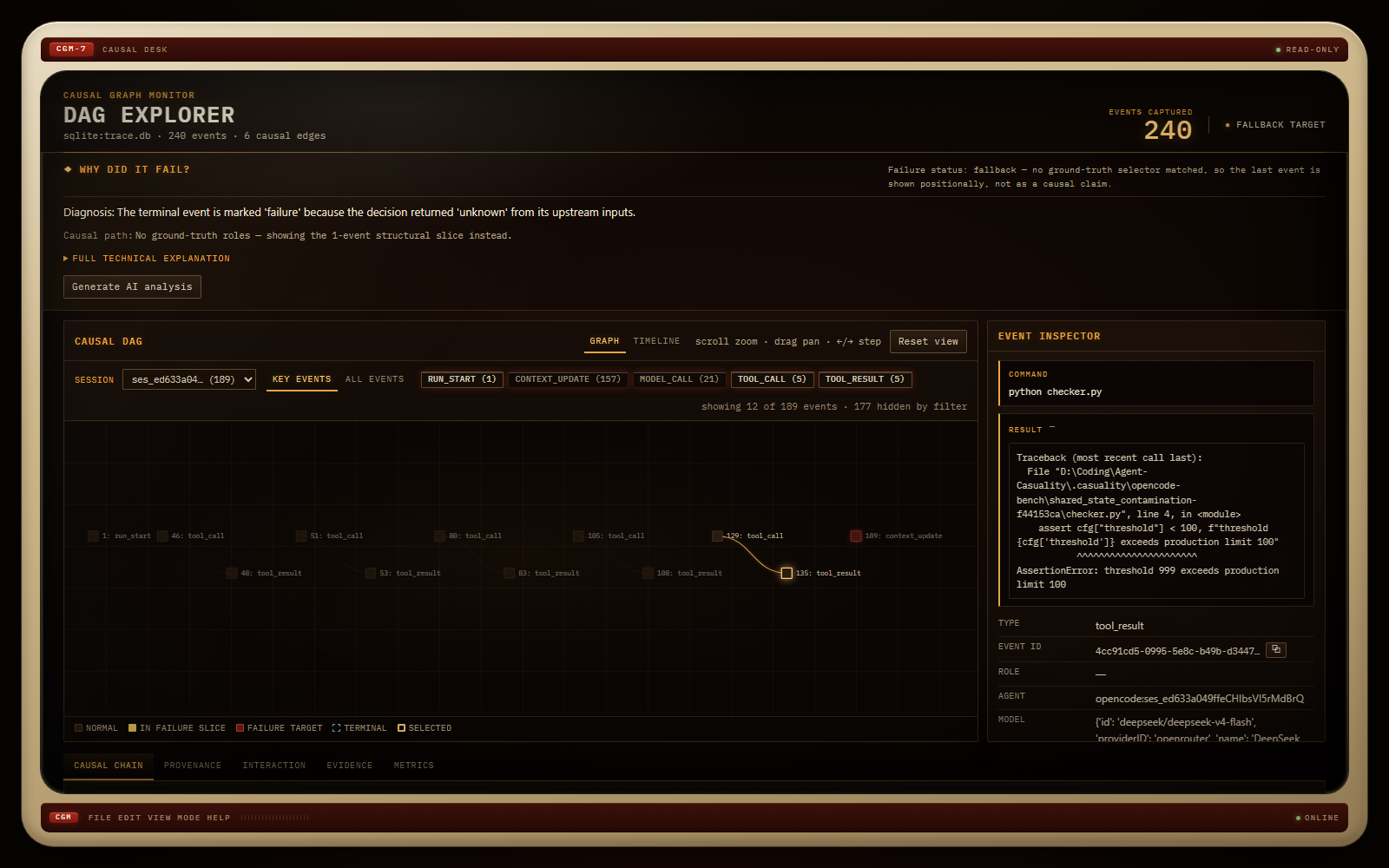
Freshly captured shared_state_contamination run (240 events, 6 causal
edges) — the checker's failure node selected, its causal chain in the
inspector.
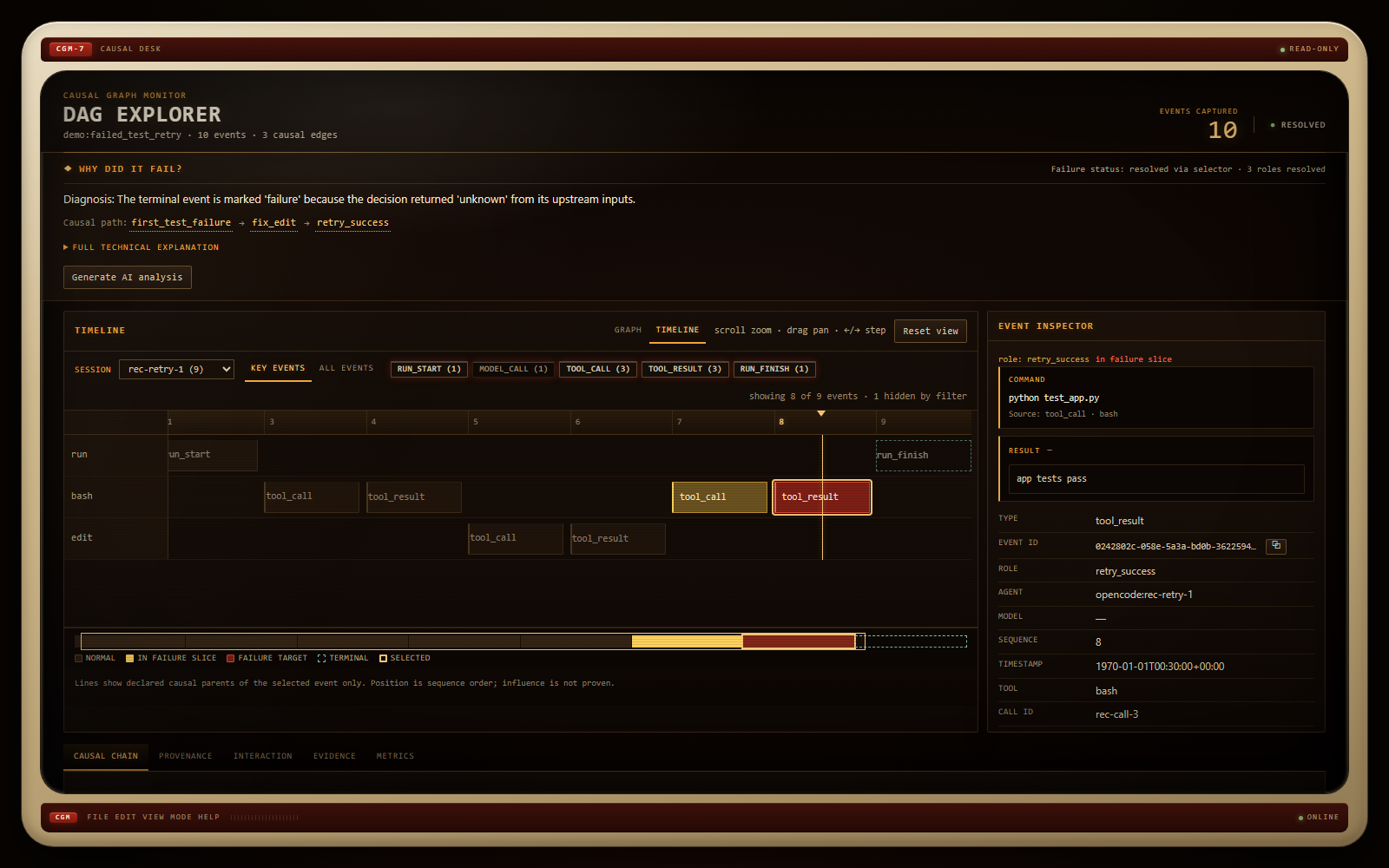
Bundled demo trace in the Timeline view — per-agent lanes (run, bash, edit),
the retry's tool_result ("app tests pass") selected as the failure target,
with the "Why did it fail?" strip and event inspector alongside.
What you get:
- Graph + Timeline views of the declared causal parents — every edge was recorded at capture time, none inferred.
- Event inspector — click any node for its command, result, parents, and children.
- Analysis tabs (chain, provenance, interaction, evidence, metrics) stay informative even with no ground truth, built from capture facts.
- Your own runs: point it at a live capture —
causality-explorer --db .causality/opencode.db(source checkout:uv run python -m explorer.server --db .causality/opencode.db). - Optional AI interpretation: install the
explainextra (pip install "agent-causality[explain]"/uv add "agent-causality[explain]"), setOPENROUTER_API_KEY(and optionallyOPENROUTER_MODEL, defaultnvidia/nemotron-3-ultra-550b-a55b:free), then click Generate AI analysis in the "Why did it fail?" strip. The model text lives in its own labeled block — never mixed with the evidence.
Full acceptance procedure: TEST.md §29.
Use it with your agents
import causality

causality.init(".causality/events.db")

@causality.agent(role="risk_checker")
def check_risk(customer): ...

@causality.merge_decision(...)
def approve(customer_status, risk_score): ...
See
examples/customer_approval.py
for a complete runnable example.
Works with OpenCode
Capture live coding-agent sessions. Telemetry is fail-open: it never interrupts your agent. Requires both packages (receiver from PyPI, plugin from npm).
# Terminal 1: receiver (PyPI install; source checkout: uv run causality-opencode-ingest ...)
causality-opencode-ingest --db .causality/opencode.db
# Terminal 2: agent (plugin posts automatically)
opencode run "Read RESEARCH.md, implement sort_items in task.py as recommended, run the test script."
# Terminal 3: Visual DAG
causality-explorer --db .causality/opencode.db
Full consumer flow: install agent-causality (PyPI) → install the OpenCode
plugin (opencode plugin add @psionic-labs/opencode-agent-causality, npm) →
start the receiver → run OpenCode → launch causality-explorer → inspect the
recorded trace. No repository clone is needed.
Representative committed result (
stale_research, OpenCode1.19.0):completed (exit 0), 331 events, capture coverage 1.0, diagnosis scored(seebenchmark/results/opencode/opencode.md). No video artifact ships with this release. Setup guide →
What the plugin captures
The npm plugin forwards OpenCode's global event stream plus explicit hooks
(tool.execute.before/after, permission.ask, command.execute.before,
chat.message, chat.params). The Python receiver maps these onto canonical
events, registers file writes with Resource-Version machinery, and redacts
secrets before SQLite persistence. It is telemetry capture only — the
Explorer and CLI live in the PyPI distribution.
Works with LangGraph
CausalityCallbackHandler is a LangChain callback handler: point your
graph's config at it and every node, tool, and LLM run lands in the
causal graph — fail-open, with parent_run_id containment converted into
explicit causal edges (unknown parents are dropped, never invented).
from adapters.langgraph import CausalityCallbackHandler
from storage.sqlite import SQLiteEventStore

store = SQLiteEventStore(".causality/langgraph.db")
handler = CausalityCallbackHandler(store)

app.invoke(inputs, config=handler.config())
Worked example: a deterministic replay of the documented July 2025 Replit
incident — freeze violated, production rows deleted, fabricated data
written, false rollback claim — captured as 22 causally-validated events
in
examples/replit_incident.py
(write-up:
docs/case-study-replit.md).
Adapter guide →
Benchmarks
Offline, provider-neutral suite (uv run causality-benchmark ...) plus a
real OpenCode coding-agent benchmark. Full results in
docs/benchmarks.md
and benchmark/results/.
- Five deterministic scenarios: 5/5 pass.
- Experiment 2 (shared-state recovery): 100/100.
- Experiment 3 (semantic-port vs raw deletion): 20/20 semantic-port successes; raw-deletion failure rate met target.
- Experiment 1 (offline): passes; external Fastino run is provider-blocked/deferred (no structured-output capability).
- Real OpenCode benchmark (5 runs / 5 tasks, OpenCode
1.19.0): capture micro/macro-average1.0; cause recall mean0.3(structural-slice ancestry under explicit-evidence edges only); joint ancestry0.0— genuine causal interaction is unsupported from live traces.
Terminology is precise: live-trace branch results are reported as
joint ancestry (not causal interaction), and minimal slices as a
required-cause preservation proxy (not causal minimality).
Documentation
| Topic | Link |
|---|---|
| Getting started | GETTING_STARTED.md |
| OpenCode integration | docs/opencode.md |
| LangGraph integration | docs/langgraph.md |
| Replit incident case study | docs/case-study-replit.md |
| CLI and Python reference | docs/reference.md |
| Benchmarks and results | docs/benchmarks.md |
| Scope and limits | docs/reference.md |
| Research background | docs/thesis.md, docs/research-memo.md |
| Contributing and tests | TEST.md, CONTRIBUTING.md |
| Release notes | CHANGELOG.md |
1 maintainer

Metadata
1 maintainer
Release files for agent-causality 0.2.0
For a detailed explanation of source distributions (sdists) and built distributions (wheels), please see the package formats documentation.
Source distribution (sdist)
| File | Size | Uploaded | Provenance | |
|---|---|---|---|---|
| agent_causality-0.2.0.tar.gz | 459.4 kB | With provenance | Details |
Built distribution (wheel)
| File | Interpreter | ABI | Platform | Reset |
|---|---|---|---|---|
| agent_causality-0.2.0-py3-none-any.whl | Python 3 | none | any | Details |
Total release size: 898.9 kB
Release files / agent_causality-0.2.0.tar.gz
| Download URL | agent_causality-0.2.0.tar.gz |
|---|---|
| Size | 459.4 kB |
| Tags | Source |
|
SHA-256 checksum How to use checksums |
64a9479f741c399c37abb4ba9e1e980ed0914c10c53ac8c50813927a9603caf5
|
|
BLAKE2b-256 checksum How to use checksums |
512ff6ca72778be72807f7333e2e406c0c86fb31b3ca5aa619935ba83af15322
|
| Upload date | |
|
Uploaded using Trusted Publishing? What is trusted publishing? |
Yes |
| Uploaded via |
twine/7.0.0 CPython/3.13.14
|
Provenance
Provenance describes where a file came from. On PyPI, provenance is shared via attestations, which provide a verifiable record of the build or publishing details. View details, limitations and caveats.


PyPI Publish Attestation
PyPI verified that this artifact, at this checksum, originated from the publisher listed below.
Signed by GitHub Actions, verified by PyPI on Oct 19, 2026.
Transparency logRelease files / agent_causality-0.2.0-py3-none-any.whl
| Download URL | agent_causality-0.2.0-py3-none-any.whl |
|---|---|
| Size | 439.5 kB |
| Tags | Python 3 |
|
SHA-256 checksum How to use checksums |
76f2d07068e8a313edee6e8c7a8428e9d40c14e1c2b3afadd1fbdcc27622a608
|
|
BLAKE2b-256 checksum How to use checksums |
b397a653241b6b8f994e1570cc6e9423c48e7e8fe03e58a6294f7314caa95452
|
| Upload date | |
|
Uploaded using Trusted Publishing? What is trusted publishing? |
Yes |
| Uploaded via |
twine/7.0.0 CPython/3.13.14
|
Provenance
Provenance describes where a file came from. On PyPI, provenance is shared via attestations, which provide a verifiable record of the build or publishing details. View details, limitations and caveats.
PyPI Publish Attestation
PyPI verified that this artifact, at this checksum, originated from the publisher listed below.
Signed by GitHub Actions, verified by PyPI on Oct 19, 2026.
Transparency logSecurity for agent-causality 0.2.0
Provenance
Provenance describes where a file came from. On PyPI, provenance is shared via attestations, which provide a verifiable record of the build or publishing details. View details, limitations and caveats.
Full provenance
All 2 files in this release have been uploaded with provenance metadata.
Attestation for agent_causality-0.2.0.tar.gz
PyPI Publish Attestation
PyPI verified that this artifact, at this checksum, originated from the publisher listed below.
Signed by GitHub Actions, verified by PyPI on Oct 19, 2026.
Transparency logA note on package security
PyPI is a repository for distributing packages, not a service for auditing them. While third-party security researchers and our staff do their best to detect and remove malicious packages, PyPI cannot guarantee the quality, security or suitability of any given package.
To learn more about protecting yourself from malicious actors, visit our package security documentation.














