
The Pitch
Coral brings sanity to coding with AI agents without disrupting your workflow. The goal is to augment, not take over. Activity across all your agents is visible so you can see which ones need attention at a glance.
Stop losing track of what your AI coding agents are doing. As you scale your workflow, the chaos of scattered terminals, lost context, and untracked changes slows you down. Coral is the mission control center you need to effortlessly orchestrate your entire AI workforce. Maintain total visibility over every agent's progress, organize your history, and automate routine tasks so you can focus on building. Stop fighting your tools and start multiplying your productivity—with all your data completely secure and private on your own machine.
Coral is an MIT-licensed multi-agent orchestration application built with tmux, FastAPI, and vanilla HTML5/JS for easy extensibility and modification. We welcome feedback and contributions.
Features
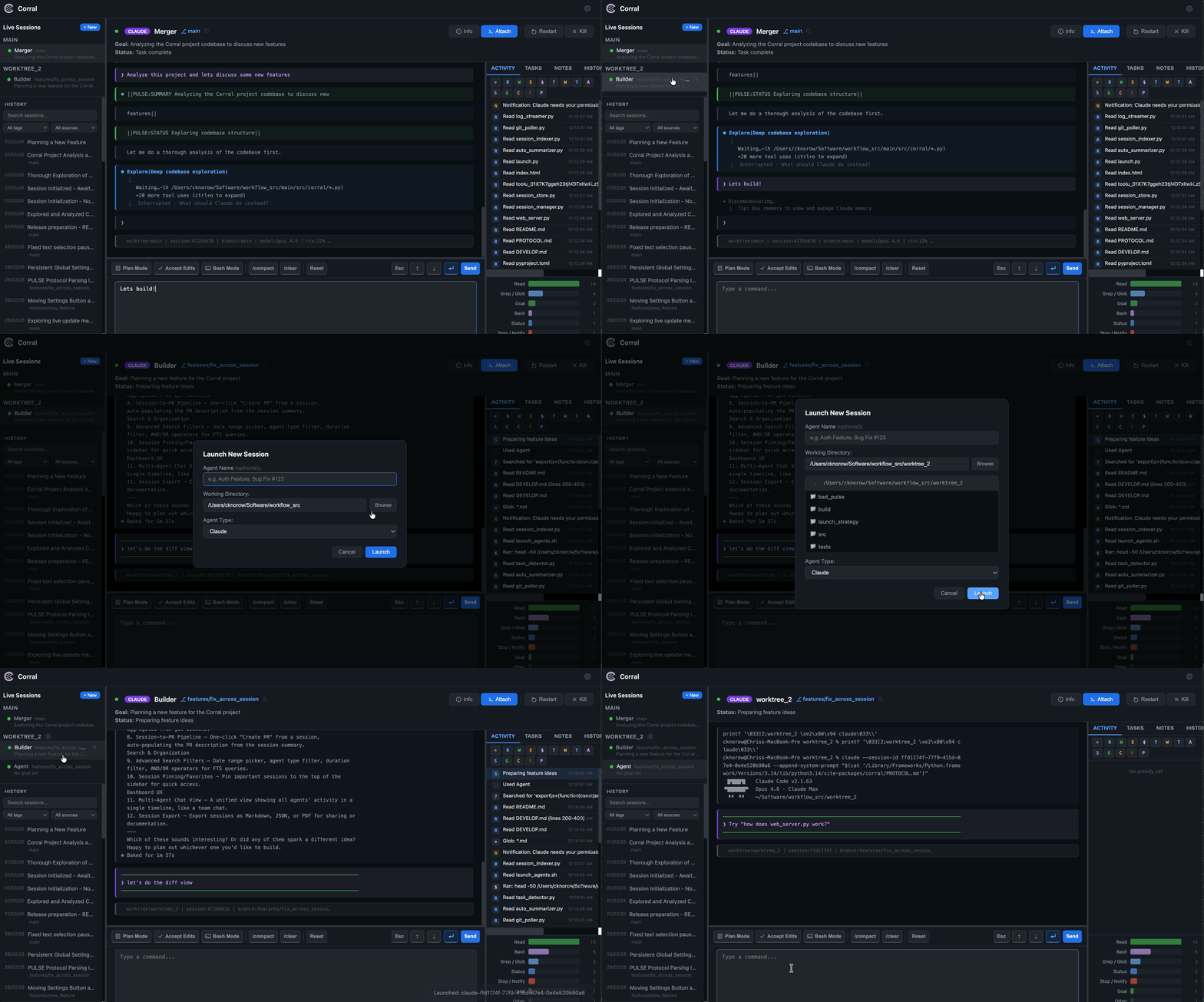
- Multi-agent support — Launch and manage both Claude and Gemini agents side-by-side across worktrees
- Agent teams & message board — Launch coordinated teams of agents on a shared message board with per-agent roles and prompts
- Web dashboard — Real-time monitoring with pane capture, status tracking, and command input
- Session history — Browse past sessions with advanced filters (date range, agent type, tags, full-text search)
- Full-text search — Search across all session content using SQLite FTS5 with porter stemming
- Auto-summarization — Sessions are automatically summarized and indexed for search
- Scheduled jobs — Create cron-scheduled tasks that launch agents in isolated worktrees, send prompts, and clean up automatically
- Webhook notifications — Get notified via webhook when agents need input or complete work
- Session notes & activity — Add markdown notes and track activity that occurred in each session, live and historically
- Remote control — Send commands, navigate modes, and manage agents from the dashboard
- Attach/Kill/Restart/Resume — Open a terminal attached to any agent's tmux session, kill it, or relaunch as a new session
- Git integration & PR linking — Tracks commits, branches, and remote URLs per agent and session
- Themes & customization — Customize the dashboard appearance with built-in themes, import/export, or AI-generated themes
- Custom macros — Add configurable toolbar buttons for frequently used commands
Installation
pip
pip install agent-coral
Launch agents and web dashboard
You can launch the web server directly using coral or coral-dashboard:
# Start the web dashboard directly (default: http://localhost:8420)
coral

# Custom host/port
coral --host 127.0.0.1 --port 9000
Note: This system is currently mostly tested with Claude Code and to some extent Gemini CLI. However, the underlying architecture is extensible to any cli based agents.
Session history search and filtering
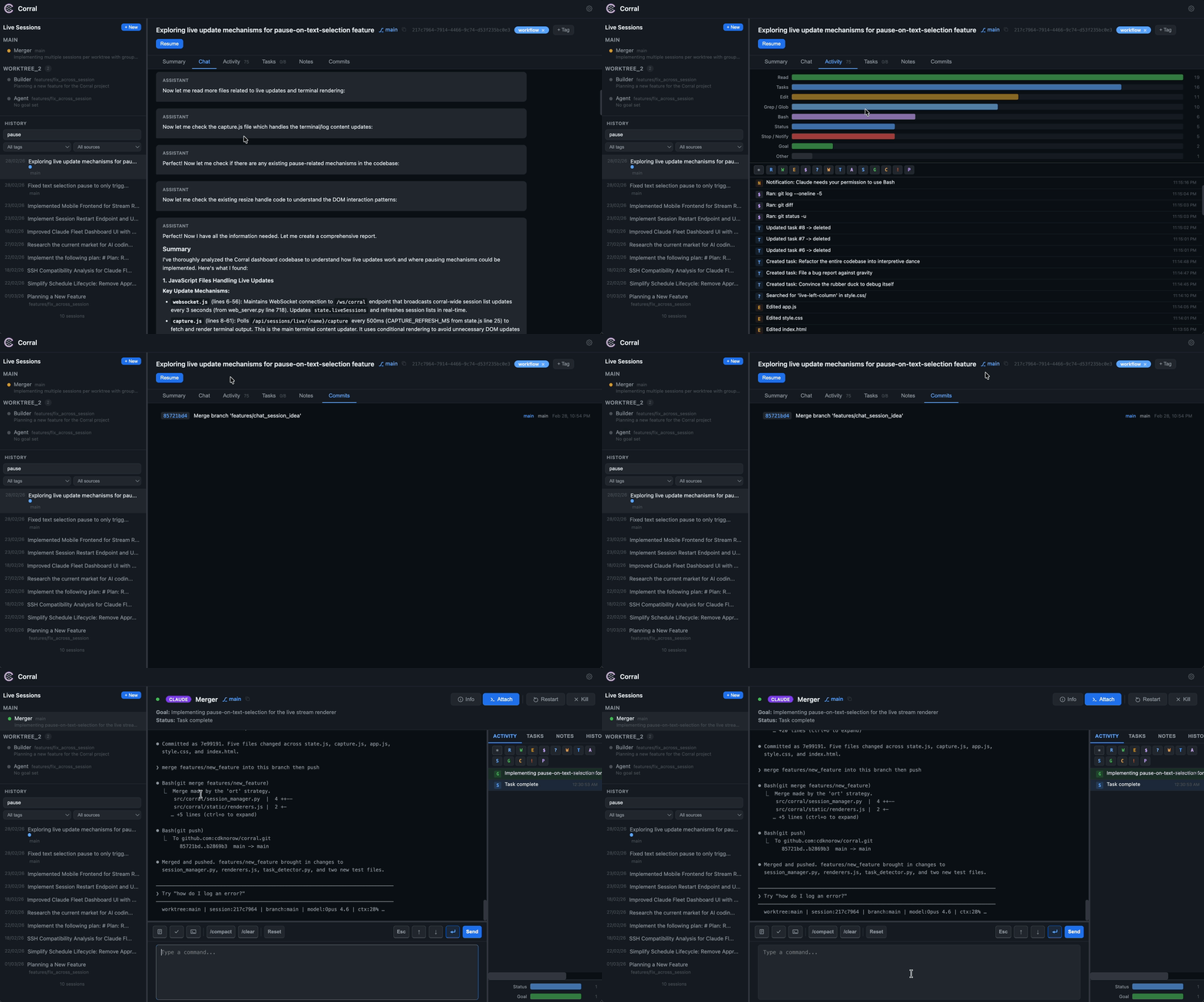
The sidebar History section includes a search bar and filters for browsing your entire AI coding session history along with activity, notes, and git commit tracking
On startup, the server launches three background services:
- Session indexer (every 2 min) — Indexes all Claude sessions from
~/.claude/projects/**/*.jsonland Gemini sessions from~/.gemini/tmp/*/chats/session-*.json, builds a full-text search index (FTS5), and queues new sessions for auto-summarization - Batch summarizer — Continuously processes the summarization queue using Claude CLI
- Git poller (every 2 min) — Polls git branch, commit, and remote URL for each live agent and stores snapshots in SQLite
Features:
- Search — Type in the search bar to find sessions by content (uses SQLite FTS5 with porter stemming)
- Filter by tag — Select a tag from the dropdown to narrow results
- Filter by source — Show only Claude or Gemini sessions
- Filter by date — Narrow results to a specific date range
- Pagination — Browse through all sessions with prev/next controls
- URL bookmarking — Session URLs use hash routing (
#session/<id>) so you can bookmark or share links - Notes & tags — Add markdown notes and color-coded tags to any session, stored in
~/.coral/sessions.db
Managing sessions from the dashboard
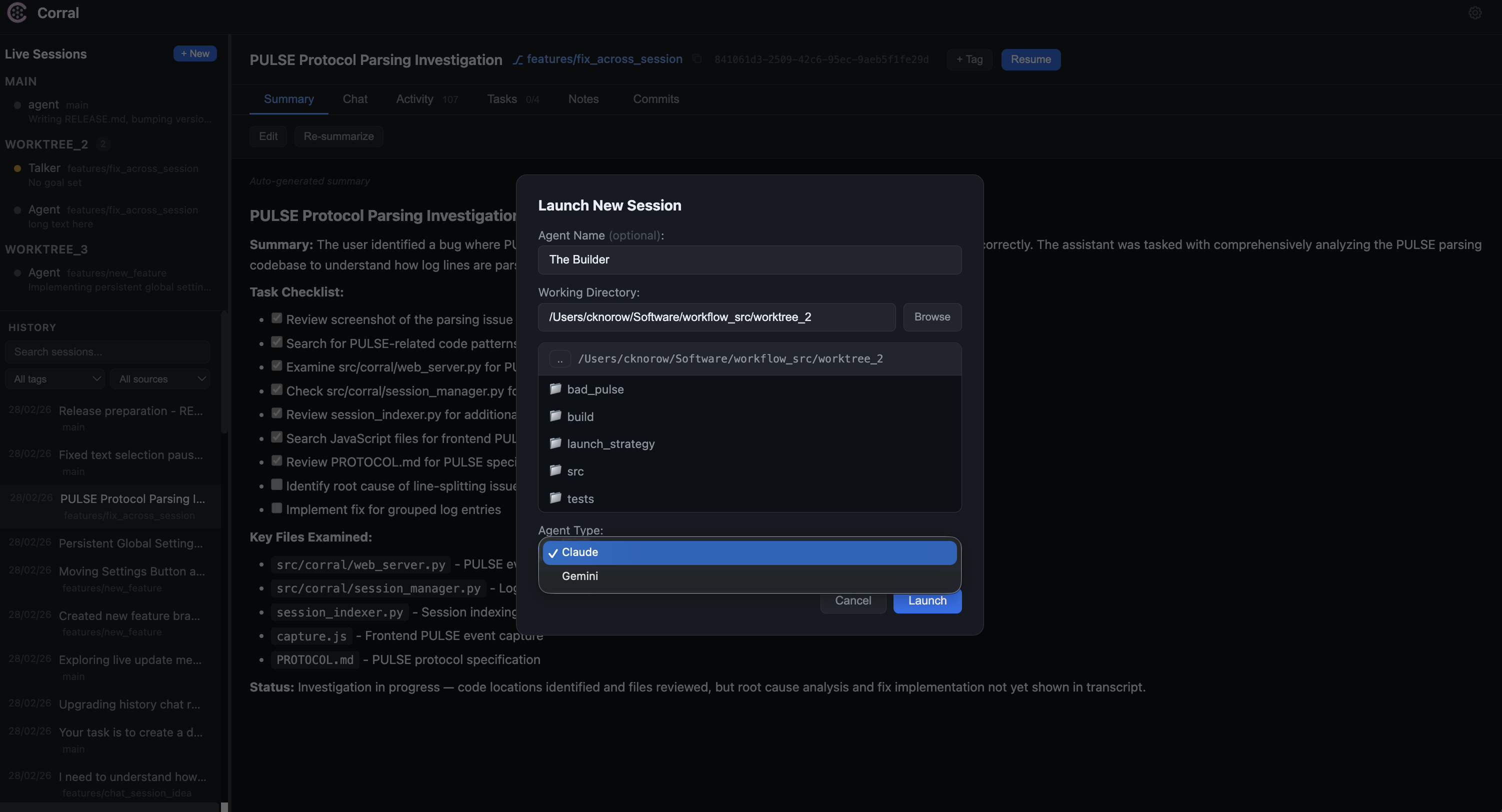
The web dashboard provides a toolbar and context menu for each live session:
| Action | Description |
|---|---|
| Esc / Arrow / Enter | Send navigation keys to the agent |
| Mode | Cycle through Claude Code modes (Plan → Accept Edits → Normal) |
| /compact / /clear | Send compress or clear commands (adapts per agent type) |
| Custom macros | Add your own one-click command buttons |
| Attach | Open a local terminal attached to the agent's tmux session |
| Restart | Restart the agent in the same tmux pane |
| Kill | Terminate the tmux session |
Type arbitrary commands in the input bar and send them to the selected agent.
Scheduled Jobs
Coral supports cron-scheduled jobs that automatically launch agents in isolated git worktrees. Create and manage them from the Scheduled section in the sidebar.
Each scheduled job:
- Creates a fresh git worktree from the specified branch
- Launches an agent (Claude or Gemini) with optional CLI flags
- Sends the configured prompt to the agent
- Monitors the session with a configurable timeout
- Cleans up the worktree on completion (optional)
- Tags the session as "scheduled" for easy filtering in history
Run history is tracked per job with links to view each session's full history.
Webhook Notifications
Configure webhooks from the dashboard to receive HTTP notifications when agents need input or when other events occur. Supports Slack, Discord, and generic HTTP endpoints with retry logic and circuit breaker.
Bulk agent launcher
Use the launcher to discover worktree subdirectories, create an agent for each one, and start the dashboard:
# Launch Claude agents and web dashboard for worktrees in the current directory
launch-coral

# Launch Gemini agents from a specific path
launch-coral <path-to-root> gemini
Remote server development (SSH port forwarding)
If you're running Coral on a remote server, forward the dashboard port over SSH to access it in your local browser:
# Forward remote port 8420 to localhost:8420
ssh -L 8420:localhost:8420 user@remote-host

# If using a custom port
ssh -L 9000:localhost:9000 user@remote-host
Then open http://localhost:8420 (or your custom port) in your local browser. You can add this to your ~/.ssh/config to make it persistent:
Host my-dev-server
    HostName remote-host
    User user
    LocalForward 8420 localhost:8420
Manual tmux management
# Attach to a specific agent session (use the tmux name from the Info modal)
tmux attach -t claude-<session-uuid>

# Switch between windows
Ctrl+b n  # next
Ctrl+b p  # previous

# Detach from tmux
Ctrl+b d
Agent Protocol
Agents emit structured markers using the ||PULSE:<EVENT_TYPE> <payload>|| format. The dashboard parses these from agent output in real time:
||PULSE:STATUS <Short description of current task>||
||PULSE:SUMMARY <One-sentence high-level goal>||
||PULSE:CONFIDENCE <Low|High> <specific reason>||
The protocol is automatically injected via PROTOCOL.md when launching agents. See src/coral/PROTOCOL.md for the full specification.
Advanced Information
For information on project structure, API endpoints, and the database schema, please see DEVELOP.md.
Dependencies
- Python 3.8+
- FastAPI + Uvicorn — Web server
- Jinja2 — HTML templating
- aiosqlite — Async SQLite (WAL mode)
- tmux — Session management
- Claude CLI (optional) — Powers auto-summarization
Contributing
We welcome contributions! Whether it's adding support for new AI coding agents natively or improving the web dashboard, please feel free to open an issue or submit a pull request.
License
This project is licensed under the MIT License.
1 maintainer

Release files for agent-coral 4.4.1
For a detailed explanation of source distributions (sdists) and built distributions (wheels), please see the package formats documentation.
Source distribution (sdist)
| File | Size | Uploaded | |
|---|---|---|---|
| agent_coral-4.4.1.tar.gz | 13.3 MB | Details |
Built distribution (wheel)
| File | Interpreter | ABI | Platform | Reset |
|---|---|---|---|---|
| agent_coral-4.4.1-py3-none-any.whl | Python 3 | none | any | Details |
Total release size: 26.7 MB
Release files / agent_coral-4.4.1.tar.gz
| Download URL | agent_coral-4.4.1.tar.gz |
|---|---|
| Size | 13.3 MB |
| Tags | Source |
|
SHA-256 checksum How to use checksums |
fb229be8ed1a6e8927e538fdfa58a6bed5179af0b7a36149af11250f5ead1df5
|
|
BLAKE2b-256 checksum How to use checksums |
6afd1ae357c3645853bd449b8ba172d4b1db23c6f300d1a91dcbc2967239b21b
|
| Upload date | |
|
Uploaded using Trusted Publishing? What is trusted publishing? |
Yes |
| Uploaded via |
twine/6.1.0 CPython/3.13.7
|
Provenance
Provenance describes where a file came from. On PyPI, provenance is shared via attestations, which provide a verifiable record of the build or publishing details. View details, limitations and caveats.


PyPI Publish Attestation
PyPI verified that this artifact, at this checksum, originated from the publisher listed below.
Signed by GitHub Actions, verified by PyPI on Mar 21, 2026.
Transparency logRelease files / agent_coral-4.4.1-py3-none-any.whl
| Download URL | agent_coral-4.4.1-py3-none-any.whl |
|---|---|
| Size | 13.3 MB |
| Tags | Python 3 |
|
SHA-256 checksum How to use checksums |
fefc3ba7640fd406149fec93bbcd2b2c07273731bf65e38eaeab804c1c942d4d
|
|
BLAKE2b-256 checksum How to use checksums |
e672b5ebac3703fd9a8b14b88da660c1556203741d7467b4c9d360c70f1962fd
|
| Upload date | |
|
Uploaded using Trusted Publishing? What is trusted publishing? |
Yes |
| Uploaded via |
twine/6.1.0 CPython/3.13.7
|
Provenance
Provenance describes where a file came from. On PyPI, provenance is shared via attestations, which provide a verifiable record of the build or publishing details. View details, limitations and caveats.
PyPI Publish Attestation
PyPI verified that this artifact, at this checksum, originated from the publisher listed below.
Signed by GitHub Actions, verified by PyPI on Mar 21, 2026.
Transparency log













