
A multi-agent orchestration system for managing AI coding agents (Claude and Gemini) in parallel git worktrees with a real-time web dashboard.

Project description
Corral
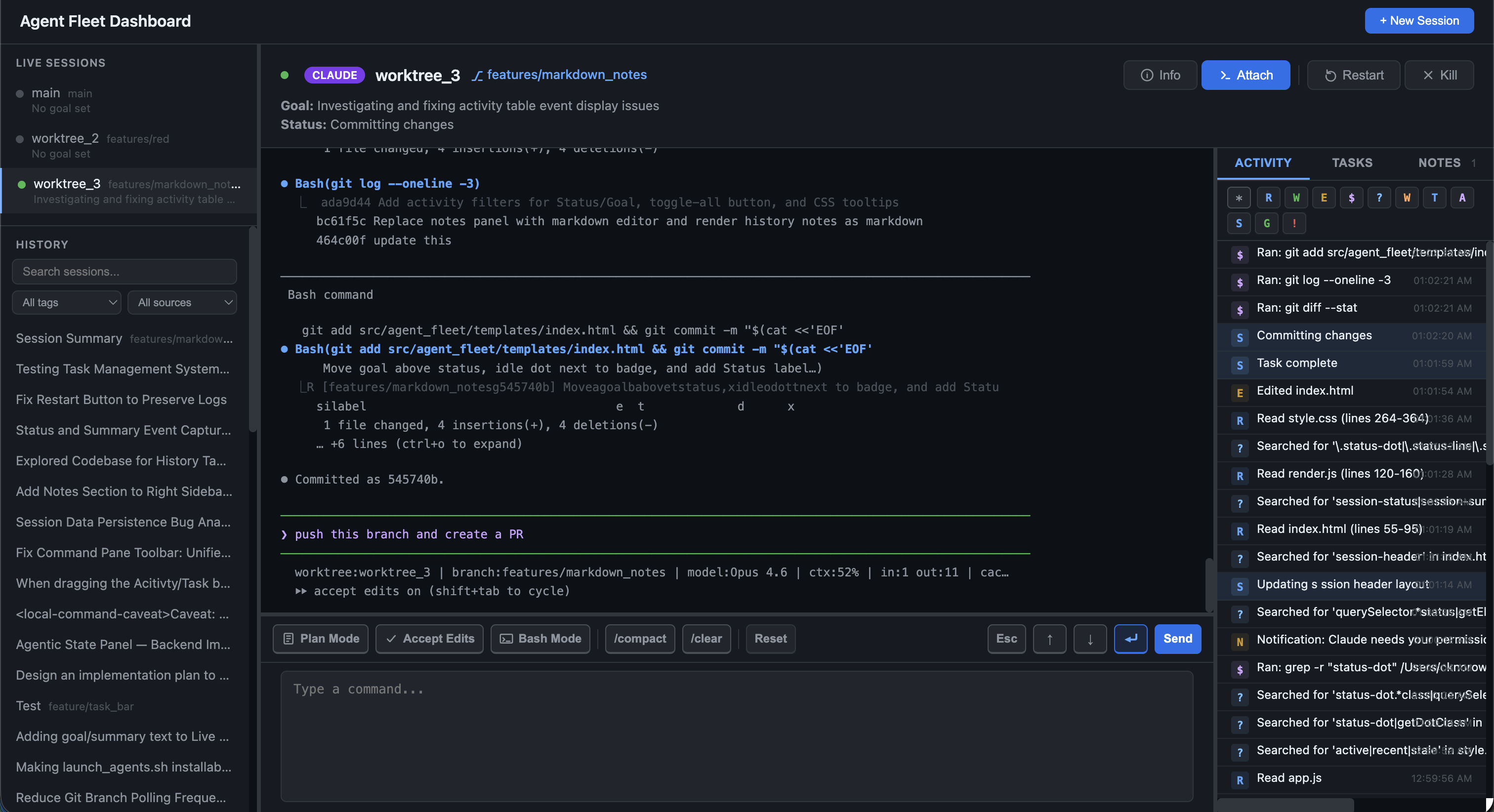
Take back some control and fight ai agent fatigure with corral. A multi-agent orchestration system for managing AI coding agents (Claude and Gemini) running in parallel git worktrees using tmux.
Note: This system is currently mostly tested with Claude Code and to some extent Gemini CLI. However, the underlying architecture is designed to support other agents, which can be integrated with some additional work from others.
Features
- Multi-agent support — Launch and manage both Claude and Gemini agents side-by-side
- Parallel worktrees — Each agent runs in its own git worktree and tmux session
- Web dashboard — Real-time monitoring with pane capture, status tracking, and command input
- Session history — Browse past sessions from both Claude (
~/.claude/projects/) and Gemini (~/.gemini/tmp/) - Full-text search — Search across all session content using FTS5
- Auto-summarization — Background summarization of sessions using Claude
- Session notes & tags — Add markdown notes and color-coded tags to any session
- Remote control — Send commands, navigate modes, and manage agents from the dashboard
- Attach / Kill — Open a terminal attached to any agent's tmux session, or kill it directly from the UI
- Git integration — Background polling tracks branch, commits, and remote URL per agent
- PR linking — Stored remote URLs enable linking sessions to pull requests
- Stale session cleanup — Dead sessions are automatically detected and removed
Installation
Install from PyPI:
pip install agent-corral
Or install directly from GitHub:
pip install git+https://github.com/cdknorow/Corral.git
For local development:
git clone https://github.com/cdknorow/Corral.git
cd Corral
pip install -e ".[dev]"
Usage
Claude Code Hooks (settings.json)
To fully integrate Claude Code's agentic state and task management into the Corral dashboard, configure the provided corral-hook scripts in your Claude Code settings.json (usually located at ~/.claude.json or ~/.claude/settings.json).
If you are already using other configuration options like a custom statusLine or other hooks, simply merge these hook definitions into your existing JSON:
{
  "agenticStateHook": {
    "type": "command",
    "command": "corral-hook-agentic-state"
  },
  "taskStateHook": {
    "type": "command",
    "command": "corral-hook-task-sync"
  }
}
Launch agents and web dashboard
The launcher discovers worktree subdirectories, creates a tmux session with an agent for each one, and starts the web dashboard in its own tmux session:
# Launch Claude agents and web dashboard for worktrees in the current directory
./src/corral/launch_agents.sh .

# Launch Gemini agents from a specific path
./src/corral/launch_agents.sh <path-to-root> gemini

# Override the default web dashboard port (default: 8420)
CORRAL_PORT=9000 ./src/corral/launch_agents.sh .

# Skip launching the web server
SKIP_WEB_SERVER=1 ./src/corral/launch_agents.sh .
Web dashboard (standalone)
# Start the web dashboard directly (default: http://localhost:8420)
corral

# Custom host/port
corral --host 127.0.0.1 --port 9000

# Auto-reload for development
corral --reload
Managing sessions from the dashboard
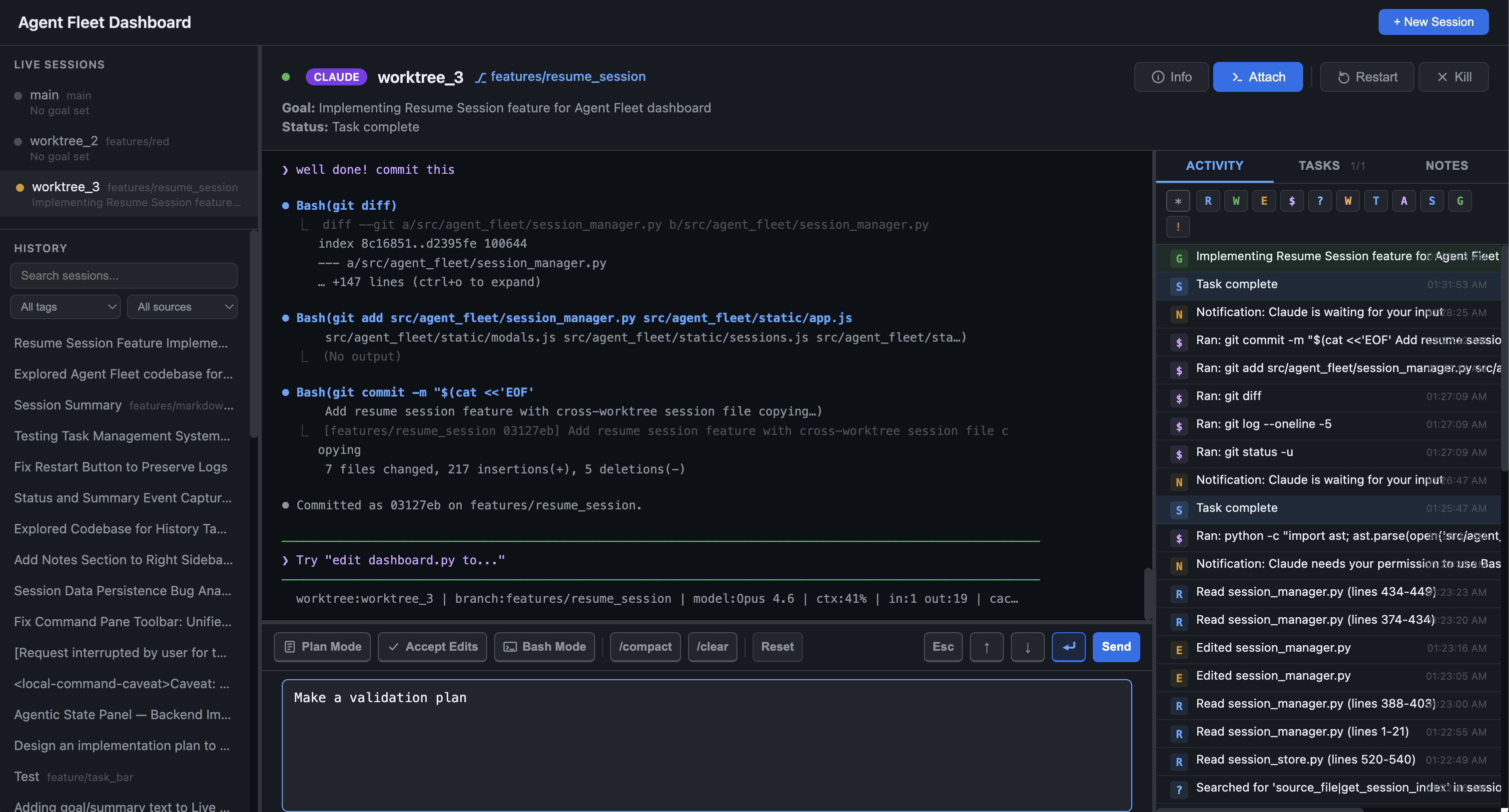
The web dashboard provides quick-action buttons for each live session:
| Action | Description |
|---|---|
| Esc / Arrow / Enter | Send navigation keys to the agent |
| Plan Mode | Toggle Claude Code plan mode |
| Accept Edits | Toggle Claude Code auto-accept mode |
| Bash Mode | Send ! command to enter bash mode |
| Base Mode | Toggle base mode |
| /compact / /clear | Send compress or clear commands (adapts per agent type) |
| Reset | Compress then clear the session |
| Attach | Open a local terminal window attached to the agent's tmux session |
| Restart | Restart the agent in the same tmux pane |
| Kill | Terminate the tmux session and remove it from the dashboard |
You can also type arbitrary commands in the input bar and send them to the selected agent.
Session history search and filtering
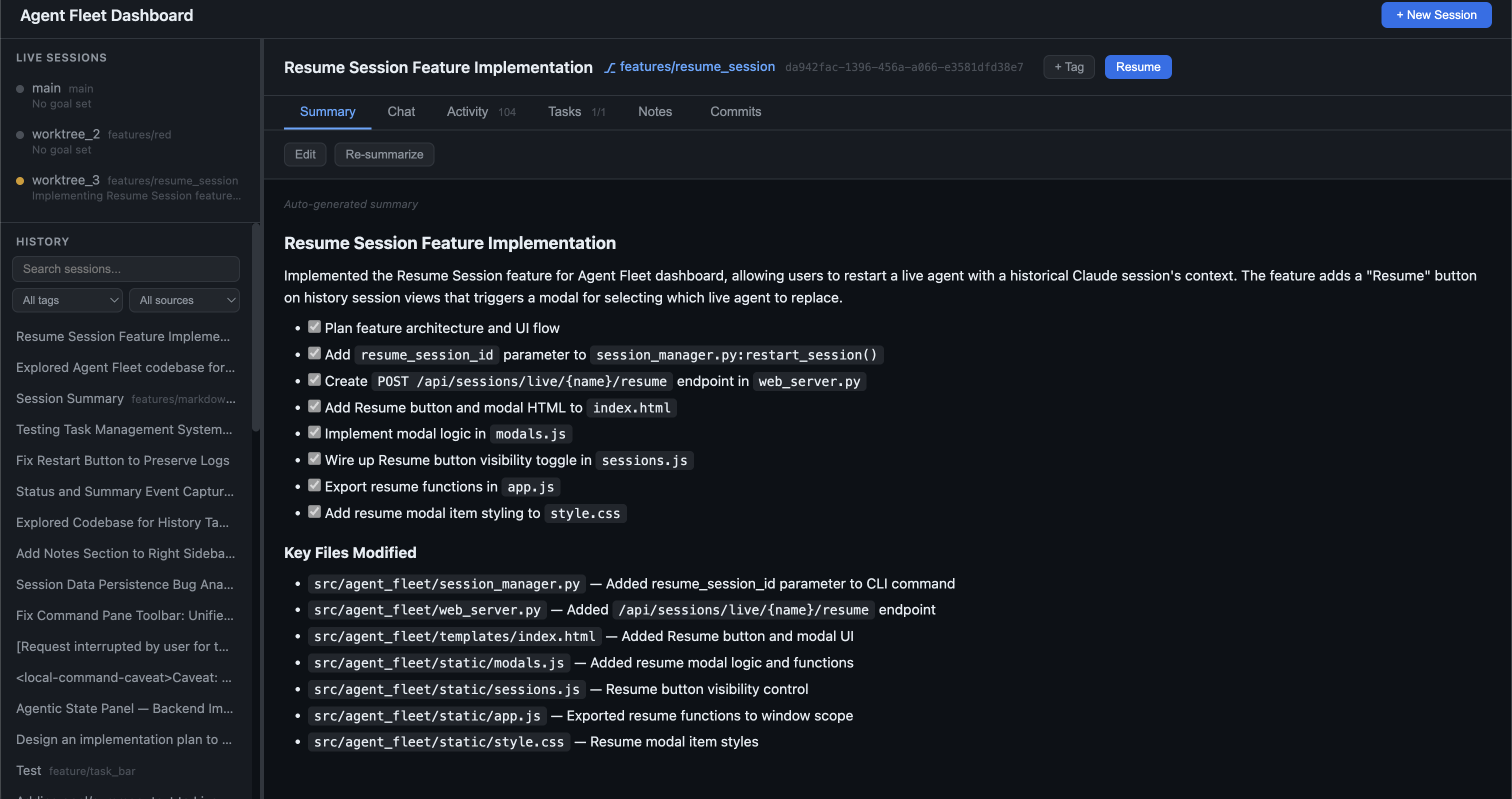
The sidebar History section includes a search bar and filters for browsing your entire AI coding session history.
On startup, the server launches three background services:
- Session indexer (every 2 min) — Indexes all Claude sessions from
~/.claude/projects/**/*.jsonland Gemini sessions from~/.gemini/tmp/*/chats/session-*.json, builds a full-text search index (FTS5), and queues new sessions for auto-summarization - Batch summarizer — Continuously processes the summarization queue using Claude CLI
- Git poller (every 2 min) — Polls git branch, commit, and remote URL for each live agent and stores snapshots in SQLite
Features:
- Search — Type in the search bar to find sessions by content (uses SQLite FTS5 with porter stemming)
- Filter by tag — Select a tag from the dropdown to narrow results
- Filter by source — Show only Claude or Gemini sessions
- Pagination — Browse through all sessions with prev/next controls
- URL bookmarking — Session URLs use hash routing (
#session/<id>) so you can bookmark or share links - Notes & tags — Add markdown notes and color-coded tags to any session, stored in
~/.corral/sessions.db
Manual tmux management
# Attach to a specific agent session
tmux attach -t claude-agent-1

# Switch between windows
Ctrl+b n  # next
Ctrl+b p  # previous

# Detach from tmux
Ctrl+b d
Agent Protocol
Agents emit structured markers that the dashboard parses for live status:
||STATUS: <Short description of current task>||
||SUMMARY: <One-sentence high-level goal>||
The protocol is automatically injected via PROTOCOL.md when launching agents. See src/corral/PROTOCOL.md for the full specification.
Advanced Information
For information on project structure, API endpoints, and the database schema, please see DEVELOP.md.
Dependencies
- Python 3.8+
- FastAPI + Uvicorn — Web server
- Jinja2 — HTML templating
- tmux — Session management
- Claude CLI (optional) — Powers auto-summarization
Contributing
We welcome contributions! Whether it's adding support for new AI coding agents natively or improving the web dashboard, please feel free to open an issue or submit a pull request.
License
This project is licensed under the MIT License.
Release history Release notifications | RSS feed


Download files
Download the file for your platform. If you're not sure which to choose, learn more about installing packages.
Source Distribution
Built Distribution
Filter files by name, interpreter, ABI, and platform.
If you're not sure about the file name format, learn more about wheel file names.
Copy a direct link to the current filters
File details
Details for the file agent_corral-0.1.1.tar.gz.
File metadata
- Download URL: agent_corral-0.1.1.tar.gz
- Upload date:
- Size: 78.9 kB
- Tags: Source
- Uploaded using Trusted Publishing? No
- Uploaded via: twine/6.2.0 CPython/3.14.3
File hashes
| Algorithm | Hash digest | |
|---|---|---|
| SHA256 |
06cb7c36c6e100e56244613505859b008d799dfcf5fdeb5895b583a6e4b2b0fc
|
|
| MD5 |
70f398b7ebb1b230697e615bad3b3f0c
|
|
| BLAKE2b-256 |
506c07a1e5c945d87bdc1af2058533e3fe81f743c741040070e9016c2cb3effa
|
File details
Details for the file agent_corral-0.1.1-py3-none-any.whl.
File metadata
- Download URL: agent_corral-0.1.1-py3-none-any.whl
- Upload date:
- Size: 88.4 kB
- Tags: Python 3
- Uploaded using Trusted Publishing? No
- Uploaded via: twine/6.2.0 CPython/3.14.3
File hashes
| Algorithm | Hash digest | |
|---|---|---|
| SHA256 |
ef8cffb8fdc2b02a9205f9f5e5f47b07f5bbcb43cfc0aeb16ee400e1d4af07fa
|
|
| MD5 |
2db9d9cf7966c325d660c55a622e2919
|
|
| BLAKE2b-256 |
3616fa66e275e8dfbf02ea603c123e471cfddd8f4e07452af9bc62e83621b38b
|






