
MCP server giving AI agents eyes and hands inside Android devices via ADB

Project description







Agent Droid Bridge
Agent Droid Bridge is an MCP server that connects AI agents to Android devices and emulators over ADB. It is built for mobile automation, app testing, dynamic analysis, and reverse engineering: exposing the full surface of ADB as structured tools that any MCP-compatible AI client can call directly. If ADB can do it, an agent can do it.
Purpose-built tools return structured, minimal responses. No raw XML dumps, no wasted context — agents stay fast across long sessions.

Demo
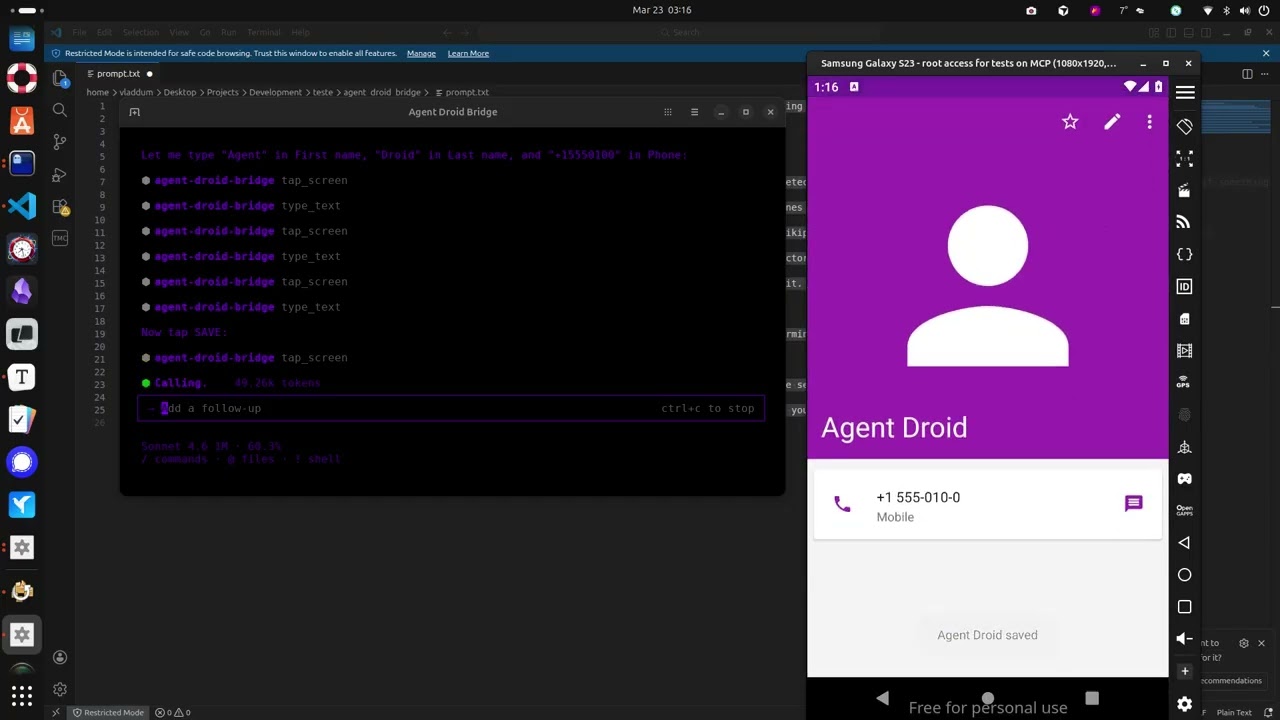
The demo above runs through a few straightforward tasks to show what a connected agent can do, and this is just scratching the surface:
- Installs the Paint app, opens it, and draws a house by calculating pixel coordinates for the walls and roof
- Opens the device browser, searches for "MCP Wikipedia", navigates to the result page, and takes a screenshot
- Opens the Calculator, computes 1337 × 42, and extracts the result to the host machine
- Opens Contacts, creates a new entry with a name and phone number, and confirms it saved
- Opens the Calendar and schedules an appointment for a specific date
- Opens Settings and toggles dark mode
- Extracts the Calculator APK from the device to the host machine
- Installs Notepad, writes a one-sentence summary of every task completed, and takes a final screenshot
What it does
Tools
- 14 built-in tools for screen capture, UI inspection, text reading, element extraction, touch and swipe input, text entry, keycode events, app launching, ADB commands, and device inspection
app_managerpack adds 9 tools for package management, app lifecycle, APK extraction, permissions, and intent injection. Load it withADB_EXTRA_TOOL_PACKS=app_manager- Tool availability is reflected in the server's startup instructions. Agents receive an accurate catalog at connect time
Device handling
- Auto-detects a single connected device; prompts for selection when multiple devices are present
- Runs over stdio, compatible with any MCP-capable AI client
- Structured responses instead of raw XML dumps, keeping agent context lean across long automation runs
Security
- Two execution modes:
unrestricted(full ADB access, optional denylist) andrestricted(allowlist-only, blocks everything not explicitly permitted) - Set
ADB_ALLOW_SHELL=falseto disable all shell commands regardless of mode - Hide specific tools from the agent with
ADB_DENIED_TOOLS - All commands parsed via
shlex. No shell injection possible
Observability
- Optional session recorder logs every tool call, ADB command, and security event to structured JSONL files. Enable with
MCP_LOG_ENABLED=trueandMCP_LOG_DIR
Use cases
Mobile QA and test automation Automate UI flows across real devices and emulators without modifying the app or writing test code. Tap, swipe, type, read screen content, take screenshots — all from a natural language prompt.
App security research Extract APKs, inspect declared permissions, fire arbitrary intents, and observe runtime behavior on screen. No instrumentation, no jailbreak required.
Dynamic analysis Launch apps in controlled states, drive UI interactions, capture screen state at each step, and pull artifacts — all scriptable through an AI agent.
Development and debugging Install builds, verify UI states, check app info, and run ADB commands without leaving your coding environment.
Install
uvx agent-droid-bridge
No cloning or virtual environments needed. Requires Python 3.11+ and ADB installed on your host.
uvx is provided by uv. If you don't have it: curl -LsSf https://astral.sh/uv/install.sh | sh
To install from source instead, see docs/setup.md — Option B.
To verify the install: uvx agent-droid-bridge --help
Quick start
- Install ADB — see docs/setup.md for platform-specific instructions
- Connect an Android device or start an emulator
- Add the server to your MCP client config:
{
  "mcpServers": {
    "agent-droid-bridge": {
      "command": "uvx",
      "args": ["agent-droid-bridge"],
      "env": {
        "ADB_EXECUTION_MODE": "unrestricted",
        "ADB_ALLOW_SHELL": "true",
        "ADB_PATH": "adb",
        "ADB_EXTRA_TOOL_PACKS": "",
        "MCP_LOG_ENABLED": "false",
        "MCP_LOG_DIR": "~/logs/agent-droid-bridge"
      }
    }
  }
}
To enable session logging, set MCP_LOG_ENABLED to "true" and update MCP_LOG_DIR to a writable path on your machine.
| Variable | Default | Description |
|---|---|---|
ADB_EXECUTION_MODE |
unrestricted |
Security mode. unrestricted allows all shell commands (with optional denylist); restricted allows only commands in ADB_SHELL_ALLOWLIST. |
ADB_ALLOW_SHELL |
true |
Set to false to block all adb shell commands regardless of execution mode. |
ADB_PATH |
adb |
Path to the ADB binary. Replace with a full path if adb is not on your system PATH (e.g. C:\platform-tools\adb.exe on Windows). |
ADB_EXTRA_TOOL_PACKS |
(empty) | Comma-separated list of extra tool packs to load. Set to app_manager to enable 9 additional app management tools. |
MCP_LOG_ENABLED |
false |
Set to true to enable session logging. Requires MCP_LOG_DIR. |
MCP_LOG_DIR |
(none) | Directory where session logs are written. Required when MCP_LOG_ENABLED is true. |
- Prompt your agent to use the
agent-droid-bridgeMCP tools
Full setup guide and environment variable reference: docs/setup.md
Tools
| Tool | What it does |
|---|---|
get_ui_hierarchy |
Returns the current screen as an XML UI hierarchy |
take_screenshot |
Captures the screen as a base64-encoded PNG |
tap_screen |
Sends a tap gesture at pixel coordinates |
swipe_screen |
Sends a swipe gesture between two points over a given duration |
type_text |
Types text into the focused input field |
press_key |
Sends an Android keycode event (Back, Home, Enter, etc.) |
launch_app |
Launches an app by its package/activity component name |
execute_adb_command |
Runs an arbitrary ADB or ADB shell command |
list_devices |
Lists all Android devices currently visible to ADB with their serial, state, and model |
snapshot_ui |
Takes a lightweight UI snapshot and returns a token for use with detect_ui_change |
detect_ui_change |
Polls for a UI change after an action; accepts a snapshot token as baseline; returns hierarchy only when requested |
get_screen_elements |
Parses the UI hierarchy and returns structured elements with coordinates and interaction properties; supports tappable, interactive, input, and all modes |
get_screen_text |
Returns all visible text on screen sorted top-to-bottom, as plain text |
check_device_capabilities |
Returns structured device information — identity, security posture, and hardware specs — in a single call; supports identity, security, hardware, and all modes |
Extra tool packs
Optional packs extend the core toolset. Enable them by setting ADB_EXTRA_TOOL_PACKS in your MCP client config. See docs/extra-tool-packs.md.
app_manager
Package management, app lifecycle control, APK extraction, permission management, and intent injection.
| Tool | What it does |
|---|---|
list_packages |
Lists installed packages with optional filtering, search, and detail levels |
get_app_info |
Returns full static metadata for a single installed app |
install_app |
Installs an APK from a host path onto the device |
uninstall_app |
Removes an installed app by package name |
pull_apk |
Extracts the installed APK from the device to the host |
manage_permission |
Grants, revokes, checks, or lists runtime permissions for an app |
launch_app_extra |
Launches an app by package name, auto-resolving the launcher activity |
manage_app |
Controls app runtime state — stop, clear data, clear cache, enable, disable |
inject_intent |
Fires an intent at a component via am start, am broadcast, or am startservice |
Full parameter reference: docs/tools.md
Configuration
Configure the server entirely from your MCP client's env block. No files to edit. The env block in the Quick Start above covers the most common settings. For the full reference including security filtering, tool visibility, and timeouts, see docs/configuration.md.
To use a YAML config file instead, set ADB_CONFIG_SOURCE=yaml. See docs/configuration.md for details.
Session recording is separate. Enable it with MCP_LOG_ENABLED=true and MCP_LOG_DIR. Full reference: docs/logging.md.
Documentation
| File | Description |
|---|---|
| docs/setup.md | Prerequisites, installation, and MCP client configuration |
| docs/tools.md | Full parameter reference for all tools |
| docs/configuration.md | Reference for environment variables and adb_config.yaml |
| docs/logging.md | Session recorder — log files, levels, retention, and activation |
| docs/extra-tool-packs.md | Extra tool packs — enabling packs, the pack contract, and writing your own |
| docs/troubleshooting.md | Common setup issues and ADB problems |
| docs/workflows.md | Common multi-tool workflows with examples |
| CHANGELOG.md | Release history and version changes |
Contributing
Contributions are welcome. See CONTRIBUTING.md for guidelines on setup, code standards, and submitting pull requests.
To report a security vulnerability, follow the process in SECURITY.md — do not open a public issue.
Release history Release notifications | RSS feed


Download files
Download the file for your platform. If you're not sure which to choose, learn more about installing packages.
Source Distribution
Built Distribution
Filter files by name, interpreter, ABI, and platform.
If you're not sure about the file name format, learn more about wheel file names.
Copy a direct link to the current filters
File details
Details for the file agent_droid_bridge-0.6.1.tar.gz.
File metadata
- Download URL: agent_droid_bridge-0.6.1.tar.gz
- Upload date:
- Size: 36.5 kB
- Tags: Source
- Uploaded using Trusted Publishing? No
- Uploaded via: twine/6.1.0 CPython/3.13.13
File hashes
| Algorithm | Hash digest | |
|---|---|---|
| SHA256 |
e8134741e3ea52c18c9d49a8e1c00a6180a57497c68dff514e99eb82f624a586
|
|
| MD5 |
c4ac0ff45204cdde8f4e801c9a8c640d
|
|
| BLAKE2b-256 |
3cbf09cf350ea1f0b897454e67ea51a86d3909cb2febfbafb720d1992c1634d9
|
File details
Details for the file agent_droid_bridge-0.6.1-py3-none-any.whl.
File metadata
- Download URL: agent_droid_bridge-0.6.1-py3-none-any.whl
- Upload date:
- Size: 48.0 kB
- Tags: Python 3
- Uploaded using Trusted Publishing? No
- Uploaded via: twine/6.1.0 CPython/3.13.13
File hashes
| Algorithm | Hash digest | |
|---|---|---|
| SHA256 |
0d0f57af48c74c15f9eba1cf69c2ae79345e8a51c9773669b0afd4444d4b87ac
|
|
| MD5 |
6a47f559b9e560834c1995b12920a758
|
|
| BLAKE2b-256 |
ef9aa3938fb373c9214aef4b31143adda818a7b9b8b1e7dedf120646ef43ab39
|






