
CLI for installing AGENTS.md, .agents rules, AI coding workflows, and client adapters into software projects.
Verified details
These details have been verified by PyPIProject links
GitHub Statistics
Maintainers

Project description
Agent Feed
Repository-owned workflow governance for AI coding agents.
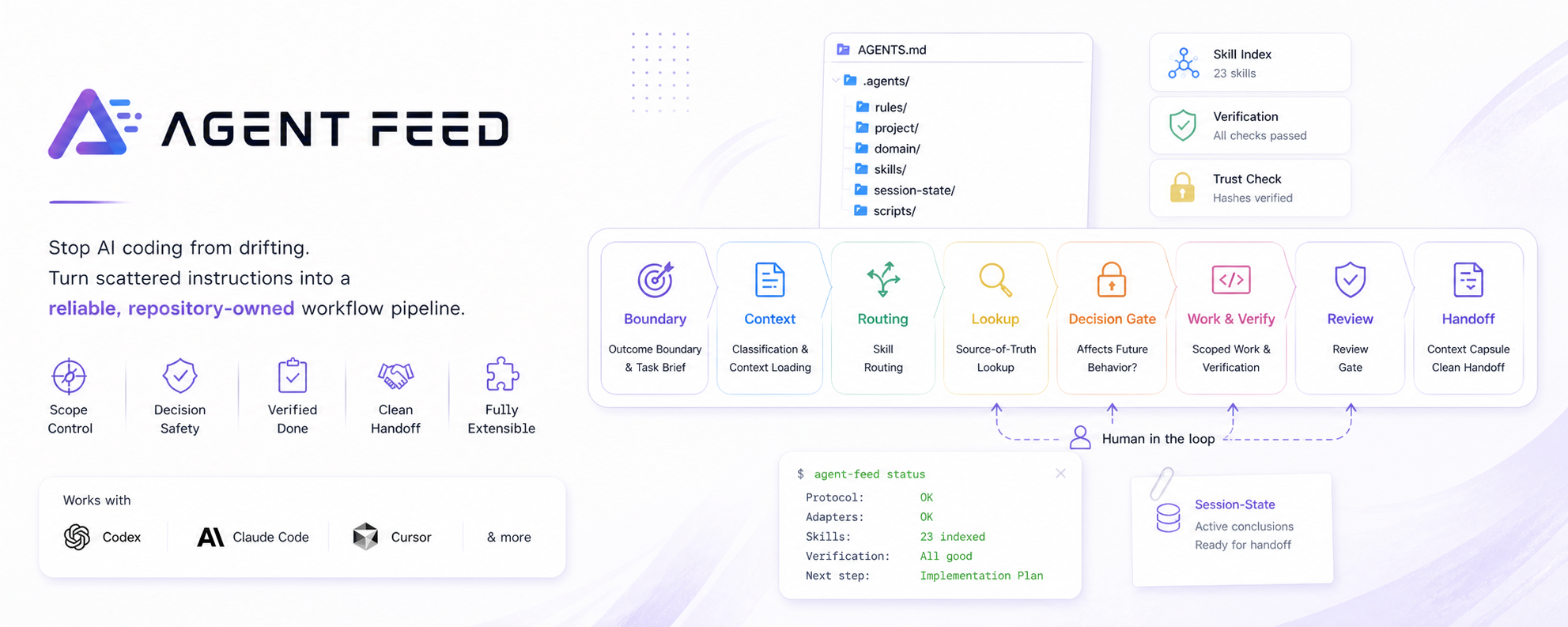
Stop AI coding from drifting.
Turn scattered instructions into a reliable workflow pipeline for Codex, Claude Code, Cursor, verification, review, and handoff.





Why · Problems · Quick Start · How It Works · Usage Guide · Commands · Docs
Your AI coding assistant is not broken. It is usually missing a shared workflow.
Agent Feed installs AGENTS.md plus a standardized .agents/ protocol into your repository, giving Codex, Claude Code, Cursor, verification, review, and handoff one unified source of truth. Teams can then extend that foundation without changing the core protocol by layering in project-specific constraints, domain knowledge, and imported skills from skill-hub.
No more drifting conversations, scope creep, invented architecture decisions, or lost context after compression.
Read the Usage Guide
Setup, first AI prompt, project/domain customization, skill imports, upgrades, and troubleshooting.
💡 Why You'll Feel The Difference
Agent Feed turns the recurring failure modes of AI coding into visible advantages:
- Focused context: the assistant loads the rules, project constraints, domain docs, and skills needed for the current task instead of flooding the prompt or guessing from stale chat.
- Scope control: outcome boundaries and Task Briefs keep a small request from turning into an unsolicited redesign.
- Decision safety: architecture, contract, verification, and source-of-truth choices stop at a human confirmation gate instead of becoming accidental code.
- Evidence-backed completion: "done" is tied to the verification profile, docs checks, review gates, and the actual task boundary.
- Clean handoff: Context Capsules and session-state rules preserve only result-affecting conclusions, so long sessions can resume without replaying the whole conversation.
- Flexible customization: keep the core workflow standardized, then layer in project-specific constraints and imported skills for your language, stack, review style, or team habits.
🎯 Problems It Solves
| Pain point | Without Agent Feed | With Agent Feed |
|---|---|---|
| Inconsistent behavior across AI tools | Rules live in chat, CLAUDE.md, Cursor rules, and scattered docs. |
One canonical AGENTS.md plus thin adapters. |
| Small tasks become redesigns | The assistant keeps expanding scope. | Outcome boundaries, Task Briefs, and task routing. |
| Important decisions are invented silently | Architecture, contracts, or verification choices appear from chat. | Decision gates require human confirmation. |
| "Done" has weak evidence | Tests, docs checks, or review are skipped. | Verification and review gates are part of the loop. |
| Long sessions lose direction | Context compression drops active conclusions. | Session-state handoff and Context Capsule rules. |
| Skills or scripts drift unexpectedly | Trusted AI assets can change without a clear checkpoint. | External trust hashes and stop-before-use checks. |
| Teams need their own methods | Generic prompts do not capture project-specific review or implementation habits. | Project/domain layers plus skill-hub imports extend the protocol without replacing the core workflow. |
In short: Agent Feed turns chaotic AI-assisted coding into a repeatable, controllable, and team-friendly engineering process.
🚀 Quick Start
Install Agent Feed:
brew install fqmyysjjd/tap/agent-feed
# or
uv tool install agent-feed
# or
pipx install agent-feed
# or
npm install -g @yysjjd/agent-feed
The npm package is a thin wrapper around the Python CLI. It requires Python 3.11+ on the machine and installs the matching PyPI package during npm install.
Initialize a project:
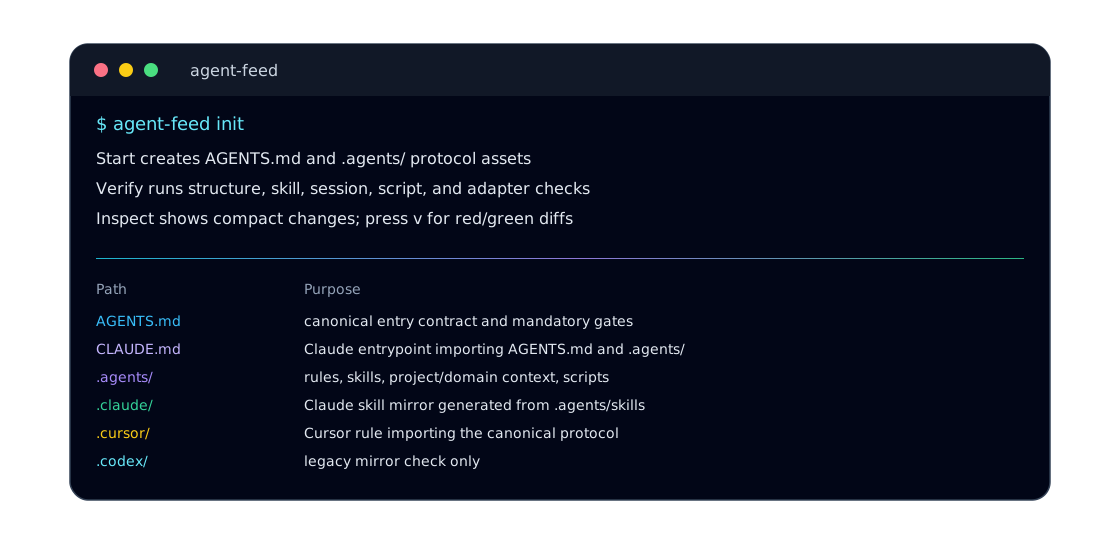
agent-feed init      # install the protocol into the current project
agent-feed check     # validate structure, references, scripts, skills, and adapters
agent-feed status    # see current state and the next recommended action
If the project already has AI instructions, init backs them up into
.feed-backup/<timestamp>/ and installs Agent Feed without destroying the old
workflow. The generated migration guide tells your AI assistant how to preserve
decisive legacy rules into .agents/project/ and .agents/domain/.
🤝 Start AI-Assisted Development
After initialization, open your AI coding assistant in the repository and begin with the following task prompt:
First, review the development guidelines for the project, and then, start to carry out our tasks:

1. [Describe the first concrete result you want to achieve]
2. [Describe the second concrete result you want to achieve]
⚙️ How It Works
Instruction In. Verified Handoff Out.
The core workflow enforces a strict, linear pipeline instead of an open-ended chat:
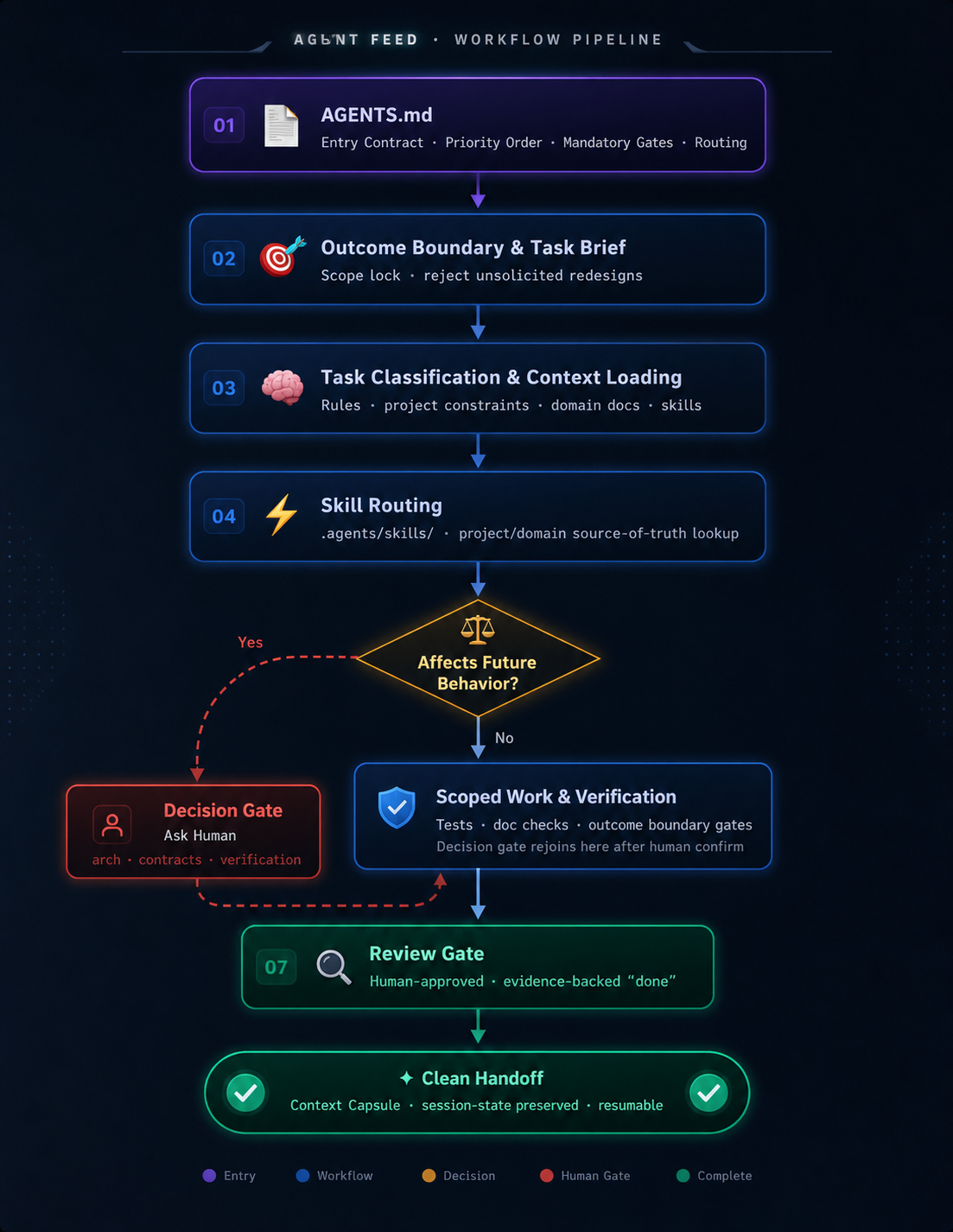
The protocol is intentionally split by responsibility while remaining customizable:
| Layer | Responsibility |
|---|---|
AGENTS.md |
Repository entry contract, priority order, mandatory gates, and routing. |
.agents/rules/ |
Reusable workflow constraints for boundary, context, testing, review, git, and handoff. |
.agents/project/ |
User-maintained repository constraints such as architecture, layout, milestones, and verification commands. |
.agents/domain/ |
Stable project knowledge: concepts, contracts, and source-of-truth ownership. |
.agents/skills/ |
Task workflows for architecture, implementation, fixes, reviews, and imported/custom methods. |
.agents/session-state/ |
Compact handoff state for context compression, not a transcript or product memory. |
.agents/scripts/ |
Protocol checks, skill indexing, adapter sync, trust checks, and verification entrypoints. |
| Client adapters | CLAUDE.md, .claude/skills/, and .cursor/rules/agent-feed.mdc point tools back to the canonical protocol. |
The Bottom Line:
Agent Feed adds workflow governance without becoming a heavy runtime service. It is tool-neutral (Codex, Claude Code, Cursor), safe and auditable (external hash storage), and extensible without forking (import skills via skill-hub). Reusable protocol rules stay strictly separated from your project-specific constraints.
🌍 Ecosystem Fit
Agent Feed sits beside the AI coding tools and rule formats developers already use.
| Tool or format | How Agent Feed relates |
|---|---|
AGENTS.md |
Uses AGENTS.md as the canonical entrypoint, then adds rules, skills, checks, adapters, and handoff around it. |
| Codex | Uses AGENTS.md and .agents/skills/ directly. |
| Claude Code | Gets a thin CLAUDE.md adapter and a .claude/skills/ mirror. |
| Cursor | Gets a thin always-on rule that imports @AGENTS.md. |
| Continue and other AI tooling | Can coexist with Agent Feed as the repository-owned workflow layer around local AI-assisted development. |
💻 Common Commands
agent-feed                 # interactive menu in a TTY
agent-feed init            # initialize the current project; backs up old AI instructions
agent-feed status          # compact health and drift summary
agent-feed check -a        # run every protocol and adapter check
agent-feed sync -a         # update all supported client adapters
agent-feed index-skills    # regenerate the skill index after local or imported skill changes
agent-feed skills list     # inspect installed local skills
agent-feed skills remove   # remove one installed skill and refresh derived assets
agent-feed skill-hub       # browse and import curated public skills for team-specific workflows
agent-feed config check    # validate project and user-level config
agent-feed config prune    # remove stale user-level project records
agent-feed --help          # full CLI reference
All path arguments are optional. When omitted, commands operate on the current directory.
📚 Documentation
- AI Development Protocol Flow: the full governance loop, trigger points, file responsibilities, and pain points solved.
- Agent Feed Usage Guide: practical setup, daily workflow, customization, skills, upgrades, and troubleshooting.
- Template Model: canonical structure, adapters, skill index, project settings, and trust-state ownership.
- Basic Generated Output: the directory layout created by
agent-feed init. - Live Protocol Example: the real
AGENTS.md,CLAUDE.md,.agents/project/,.agents/domain/, and skill index used to develop this repository.
📂 Repository Tour
src/agent_feed/              Python CLI, checks, prompts, adapters, trust, settings, and templates
npm/                         thin npm wrapper that delegates to the Python CLI
package.json                 npm wrapper package contract
docs/                        public protocol and template docs
examples/                    generated output and live protocol examples
tests/                       Python CLI behavior and protocol regression coverage
.agents/                     development protocol for this repository itself
Project details
Verified details
These details have been verified by PyPIProject links
GitHub Statistics
Maintainers


Download files
Download the file for your platform. If you're not sure which to choose, learn more about installing packages.
Source Distribution
Built Distribution
Filter files by name, interpreter, ABI, and platform.
If you're not sure about the file name format, learn more about wheel file names.
Copy a direct link to the current filters
File details
Details for the file agent_feed-1.1.5.tar.gz.
File metadata
- Download URL: agent_feed-1.1.5.tar.gz
- Upload date:
- Size: 97.3 kB
- Tags: Source
- Uploaded using Trusted Publishing? Yes
- Uploaded via: twine/6.1.0 CPython/3.13.12
File hashes
| Algorithm | Hash digest | |
|---|---|---|
| SHA256 |
60cfe593114a2e38522177f3f24451877d0c765c3e4bcd35d231da238f3d317a
|
|
| MD5 |
6ba6615f65e8e038fd61e8875bc0ea23
|
|
| BLAKE2b-256 |
482ee17ddf78c98db8fbb06abbc53c46c25b8e8b57b601e706065b0945e766be
|
Provenance
The following attestation bundles were made for agent_feed-1.1.5.tar.gz:
Publisher:
publish.yml on fqmyysjjd/agent-feed
-
Statement:
-
Statement type:
https://in-toto.io/Statement/v1 -
Predicate type:
https://docs.pypi.org/attestations/publish/v1 -
Subject name:
agent_feed-1.1.5.tar.gz -
Subject digest:
60cfe593114a2e38522177f3f24451877d0c765c3e4bcd35d231da238f3d317a - Sigstore transparency entry: 1439775332
- Sigstore integration time:
-
Permalink:
fqmyysjjd/agent-feed@0834f6466cee33bc08d2fab3c70ba58b9cb586e8 -
Branch / Tag:
refs/tags/v1.1.5 - Owner: https://github.com/fqmyysjjd
-
Access:
public
-
Token Issuer:
https://token.actions.githubusercontent.com -
Runner Environment:
github-hosted -
Publication workflow:
publish.yml@0834f6466cee33bc08d2fab3c70ba58b9cb586e8 -
Trigger Event:
release
-
Statement type:
File details
Details for the file agent_feed-1.1.5-py3-none-any.whl.
File metadata
- Download URL: agent_feed-1.1.5-py3-none-any.whl
- Upload date:
- Size: 135.5 kB
- Tags: Python 3
- Uploaded using Trusted Publishing? Yes
- Uploaded via: twine/6.1.0 CPython/3.13.12
File hashes
| Algorithm | Hash digest | |
|---|---|---|
| SHA256 |
86abc39b21c9034284da06b7e629ee7b4b88a5afae54b4d1b5eee0009e40e38a
|
|
| MD5 |
25718e91cdcf2d043dbafb7ff8ec5c20
|
|
| BLAKE2b-256 |
46aa9c11603d9ee7ae8a1b67c4822a5467c67518f7e512e93c7e9104df181767
|
Provenance
The following attestation bundles were made for agent_feed-1.1.5-py3-none-any.whl:
Publisher:
publish.yml on fqmyysjjd/agent-feed
-
Statement:
-
Statement type:
https://in-toto.io/Statement/v1 -
Predicate type:
https://docs.pypi.org/attestations/publish/v1 -
Subject name:
agent_feed-1.1.5-py3-none-any.whl -
Subject digest:
86abc39b21c9034284da06b7e629ee7b4b88a5afae54b4d1b5eee0009e40e38a - Sigstore transparency entry: 1439775347
- Sigstore integration time:
-
Permalink:
fqmyysjjd/agent-feed@0834f6466cee33bc08d2fab3c70ba58b9cb586e8 -
Branch / Tag:
refs/tags/v1.1.5 - Owner: https://github.com/fqmyysjjd
-
Access:
public
-
Token Issuer:
https://token.actions.githubusercontent.com -
Runner Environment:
github-hosted -
Publication workflow:
publish.yml@0834f6466cee33bc08d2fab3c70ba58b9cb586e8 -
Trigger Event:
release
-
Statement type:






