
 Agent Flywheel
Built and Maintained by PerceptEye
Your agent gets better at its own job. You don't run any of the training.
Ship one line. Your agent keeps running in your process, behind your firewall, on your credentials — unchanged — and the model it calls keeps improving.







Hosted control plane · free plan · no credit card · your first key in about a minute
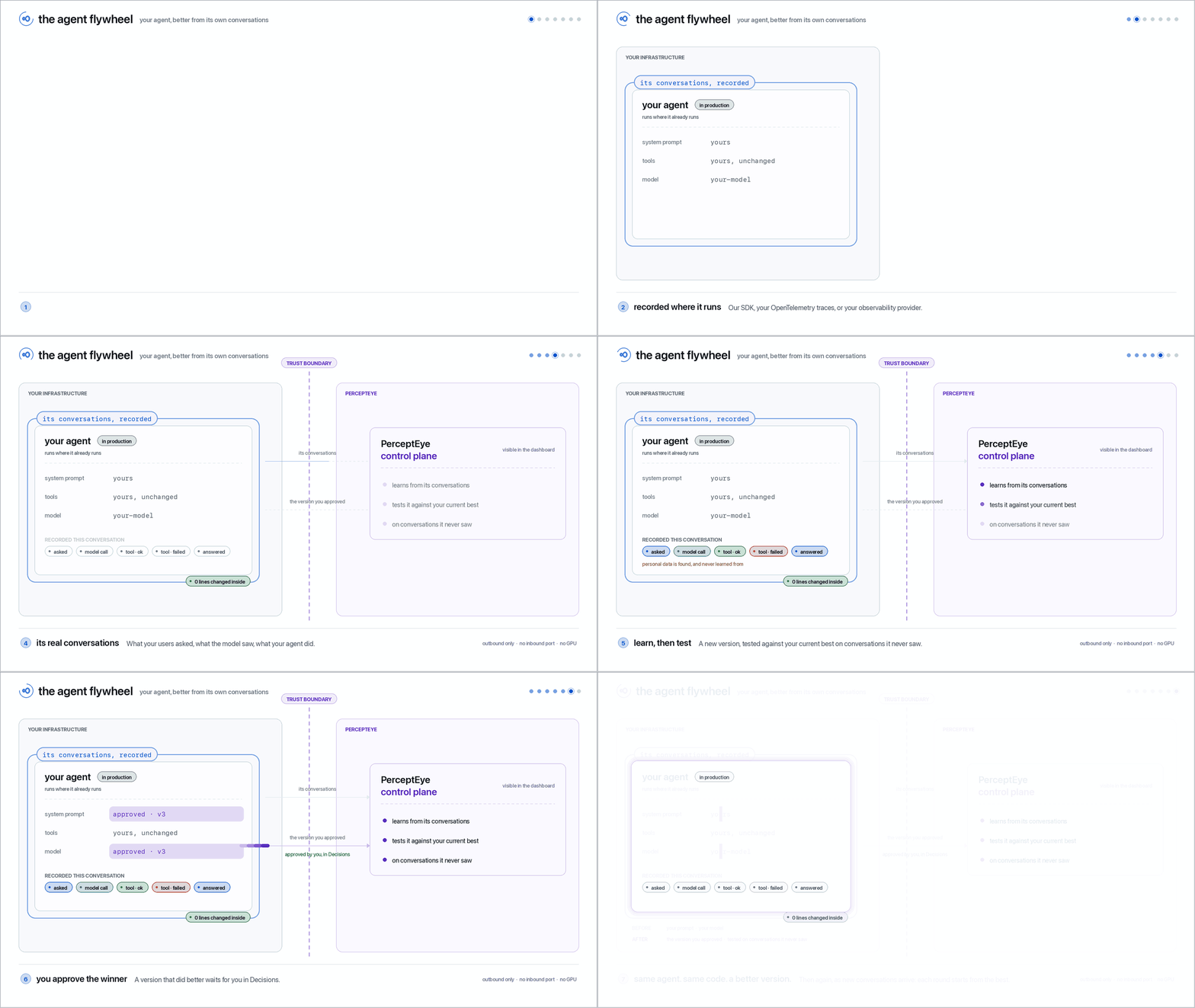
Quickstart · Control plane · Harnesses · How the loop closes · Training vs production · Production capture · Docs
A continual-learning loop around the agent you already have
Your agent already does real work. This turns that work into training data, and delivers what it learns back as an endpoint your agent already calls.
That is the whole product. Not a dashboard you read, not a benchmark you run — a loop that closes on its own and leaves your agent measurably better than the one you deployed.
| you get | what it actually means |
|---|---|
| 📈 An agent that improves in place | a policy trained on this agent's own trajectories — its prompt, its tools, its failure modes — not a generic model |
| 🤖 Post-training you never operate | task generation, grading, reinforcement learning, promotion gates: run by the control plane, on our GPUs |
| 🧠 A prompt that improves too | training co-optimizes the system prompt and ships the approved one back beside the model |
| 🔭 Honest evidence | every tool call is recorded as ok, failed, or unknown — the third is legal, expected, and never rounded up to ok, so a verifier abstains instead of learning from a lie |
| 🔒 Nothing moves | no container, no cluster, no GPU, no inbound port; every connection is dialled out from your side |
🌐 The control plane
pip install agent-flywheel is half of the flywheel. The other half writes the tasks, grades every rollout and trains the model. That half is the control plane at launch.percepteye.ai. PerceptEye runs it on PerceptEye's GPUs, so there is nothing for you to deploy, scale or keep on call. It is also where you watch every lap, and where you approve what ships.
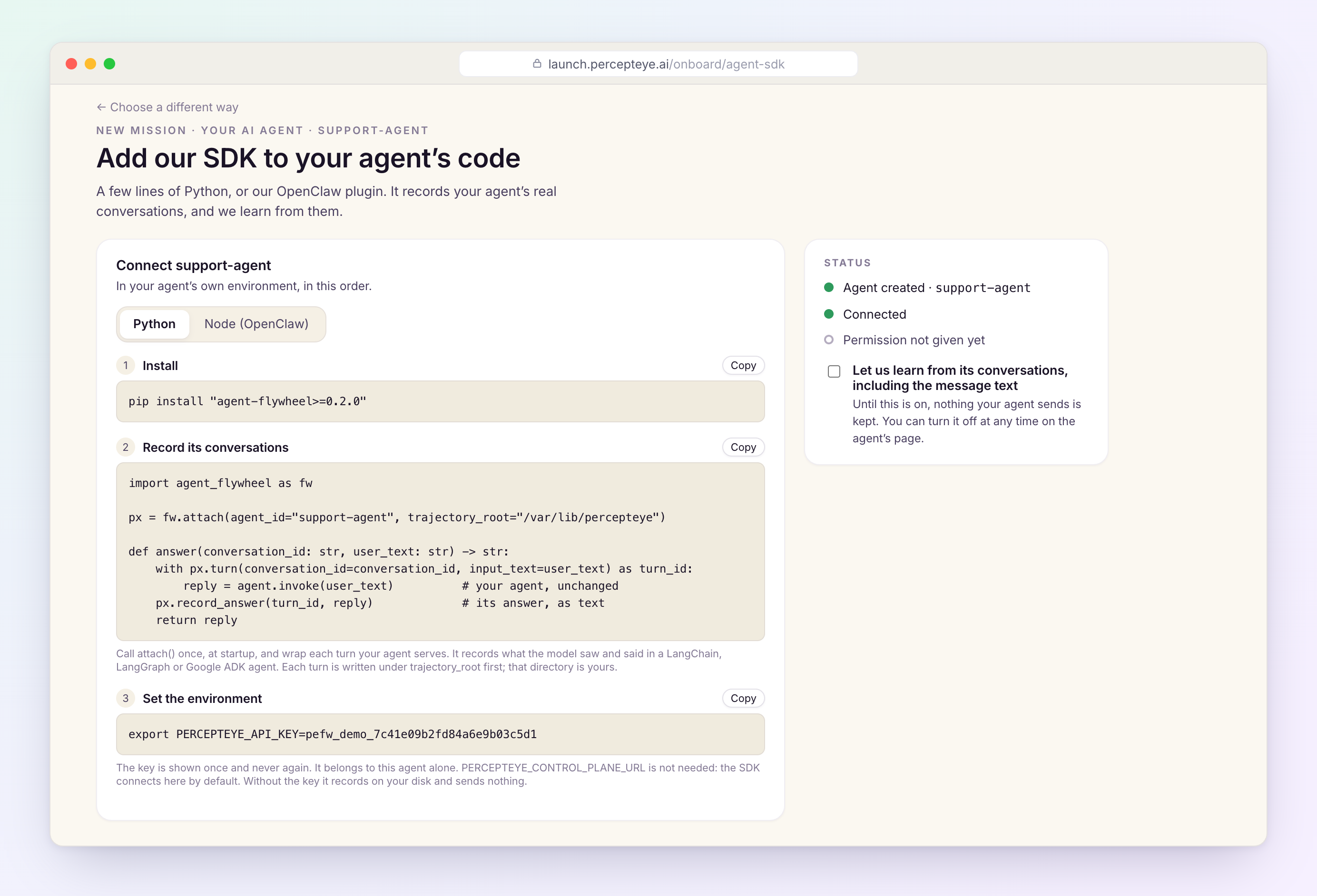
Connecting an agent at launch.percepteye.ai. The screens on this page show a sample agent.
| the SDK · this package | the control plane · launch.percepteye.ai | |
|---|---|---|
| runs | in your process, beside your agent | hosted by PerceptEye |
| does | runs rollouts, records every tool outcome, captures the turns you serve, picks up the approved model | writes tasks from your agent's real tools, grades every rollout, trains the policy, measures each candidate against the model you run today |
| shows you | one log line per lap | every agent, what it could read of each, every candidate against the champion, and the switch that moves an agent between them |
| you bring | pip install agent-flywheel |
an email address |
A key joins the two halves. Without one, serve() stops before the first rollout and attach() keeps every turn on your own disk: nothing is sent, so nothing is trained. Both say so in one line, and the line names the page where you get a key.
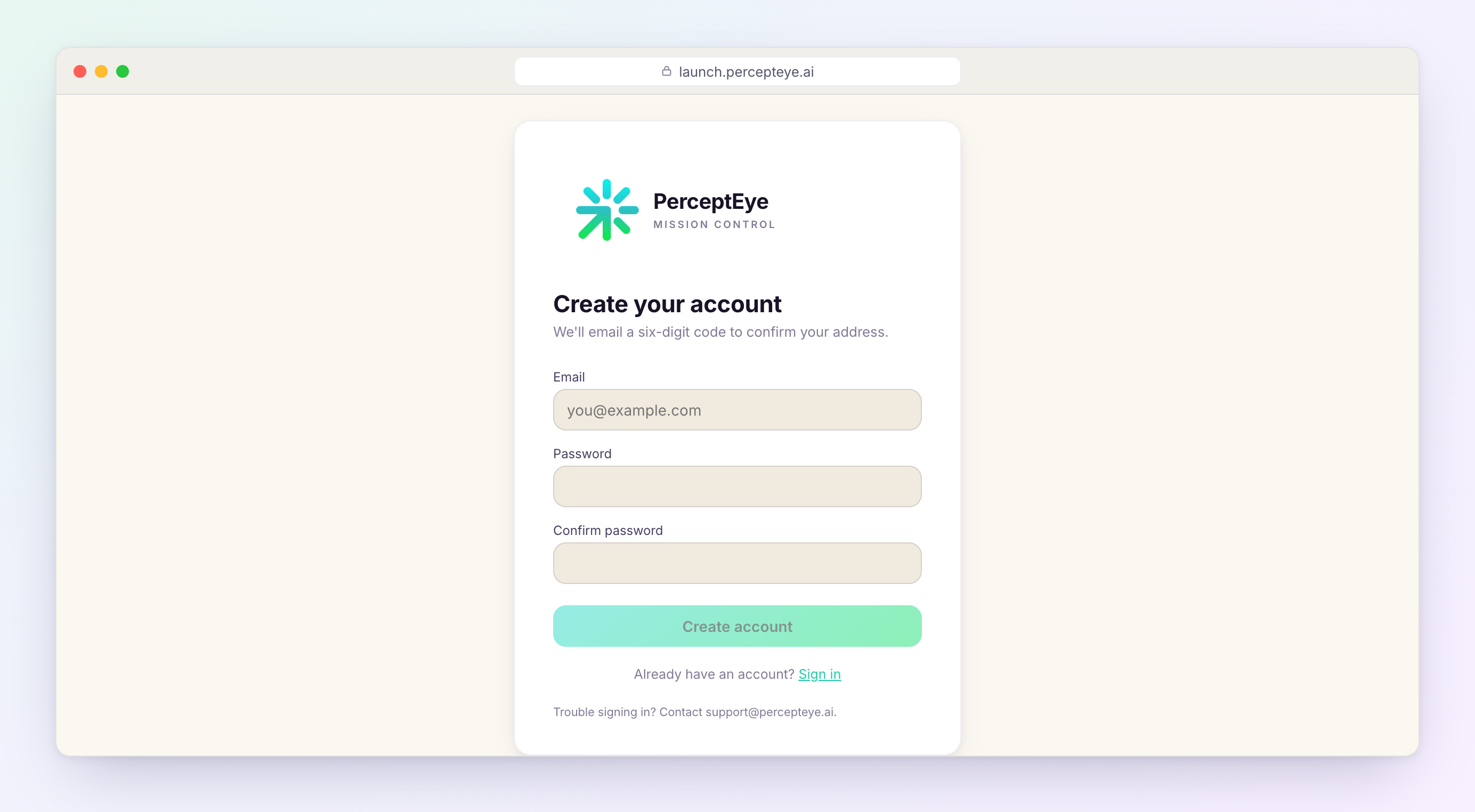 ① Create a workspace. An email, a password and a six-digit code. Free plan, no credit card. |
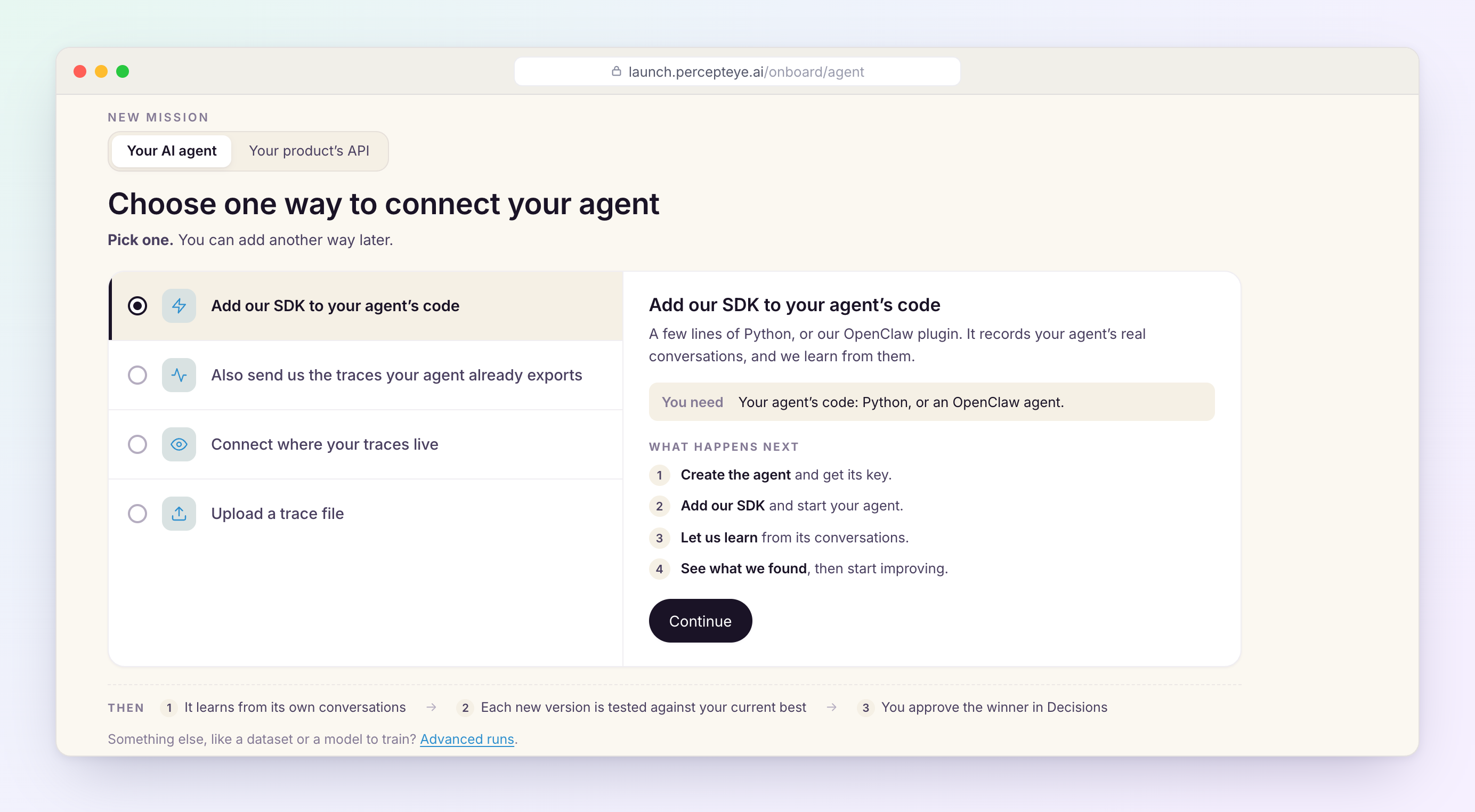 ② Connect your agent. Add the SDK, or start from the traces you already export. Name the agent and get its pefw_ key, shown once and scoped to that one agent.
|
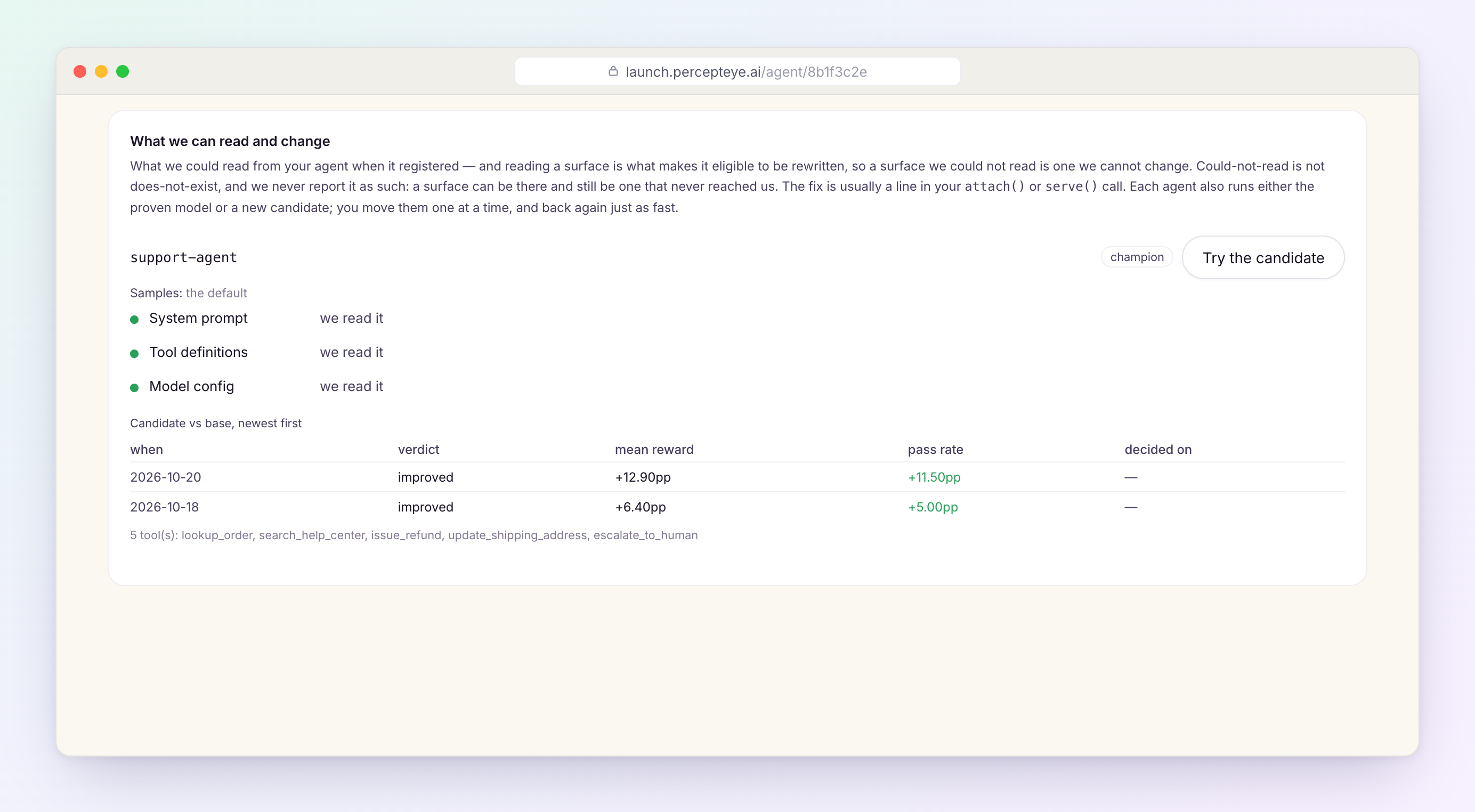 ③ Watch, then approve. Every candidate is measured against the model you run today. Nothing moves until a person clicks Try the candidate, and moving back is the same click. |
⚡ Quickstart
1 · Get a key. Sign up at launch.percepteye.ai, name your agent, and copy its pefw_ key. It is shown once and scoped to that one agent.
2 · Install it, and export the key.
pip install agent-flywheel      # one runtime dependency: httpx
export PERCEPTEYE_API_KEY=pefw_...
Or skip the browser tab. Once the package is installed, the terminal can get the key for you:
agent-flywheel login --agent-id my-coding-agent
It prints a short code and opens launch.percepteye.ai with the code filled in. Sign up or sign in, check that the code matches, and click Approve. The key comes back to the terminal and is stored in ~/.percepteye/credentials.json (or $PERCEPTEYE_HOME/credentials.json), readable only by you, for that one agent on that one control plane. serve(), attach(), current_policy(), current_prompt() and policy_source() use it whenever no api_key= is passed and PERCEPTEYE_API_KEY is unset, and say so once when they first do. A stored key is consent to send, exactly as the variable is. agent-flywheel logout --agent-id my-coding-agent forgets it here; revoking it in Mission Control (Settings) stops it everywhere.
serve() offers the same thing when it starts with no key in a terminal: No PerceptEye key found for agent 'my-coding-agent'. Create one now (free)? [Y/n]. Answer yes and it continues with the new key. It asks only a person: in CI (CI, GITHUB_ACTIONS and the other usual CI variables), with PERCEPTEYE_NO_PROMPT=1, or when stdin or stderr is not a terminal, it raises the missing-key error exactly as before.
3 · Serve.
import agent_flywheel as fw

fw.serve("my_package.agent:build", agent_id="my-coding-agent", input_shape="text")
That is the integration. You pass an importable "module:attr" factory so each rollout can rebuild your agent in a fresh child process. serve() claims rollouts, runs them, reports outcomes, and blocks until you stop it. Pass the agent_id you named in the dashboard: the key is bound to it.
4 · Watch the first lap land. The dashboard marks your agent Connected on its first call, and every rollout after that is graded where you can see it. Already serving users? attach() records the turns you serve instead, and the dashboard shows that snippet too.
The key is the only thing your environment has to supply. The control plane's address defaults to https://launch.percepteye.ai/api/flywheel/v1; set PERCEPTEYE_CONTROL_PLANE_URL, or pass control_plane_url=, to point somewhere else. With no key at all, serve() offers to create one when a person is at the terminal, and otherwise raises before the first rollout, naming agent-flywheel login and the page where you get one.
Everything that can be misconfigured — entrypoint, credential, contract version, isolation mode — is checked before the first rollout and raises there, never mid-run.
Your agent is a binary? Pass its command line.
Any CLI agent is an argv list — no protocol to implement, no change to the binary:
fw.serve(["my-agent", "run"], agent_id="my-cli-agent", input_shape="text")
The task arrives on stdin and as PERCEPTEYE_TURN_INPUT; ordinary stdout is the final text. Structured JSONL is interpreted only when you pass an explicit command_output_adapter, so core never guesses a customer's event vocabulary. Mark an argv position with fw.TASK if your CLI takes the task as an argument.
🧩 Harnesses supported
| harness | surface | integration |
|---|---|---|
| LangChain · LangGraph · Google ADK | 🐍 Python | adapter auto-binds — zero code in your agent |
| any CLI agent | ⌘ CLI | fw.serve(["my-agent", "run"], ...) — nothing added to the binary |
| any structured CLI | ⌘ CLI | provide a CommandOutputAdapter; the generic StreamFormat parser can reconcile tool lifecycles |
| prime-agent (optional example) | ⌘ CLI | argv + explicit PrimeAgentOutputAdapter — worked example → |
Adapters are on by default (adapters="auto") and bind every built-in whose framework is installed. No adapter imports its framework until you bind it, so they add zero dependencies. Shipping your own is one entry-point factory in the agent_flywheel.adapters group.
The command adapter is explicit and optional. Capture from it survives clean exits, non-zero exits and timeout kills — a rollout that died is exactly the one you need the tool calls from. With no adapter, structured stdout remains ordinary stdout and makes no telemetry or model-call-count claim.
Running OpenClaw or DeepSeek Harness? Those are the Node plugin → percepteye-ai/agent-flywheel-node.
🔁 How the loop closes
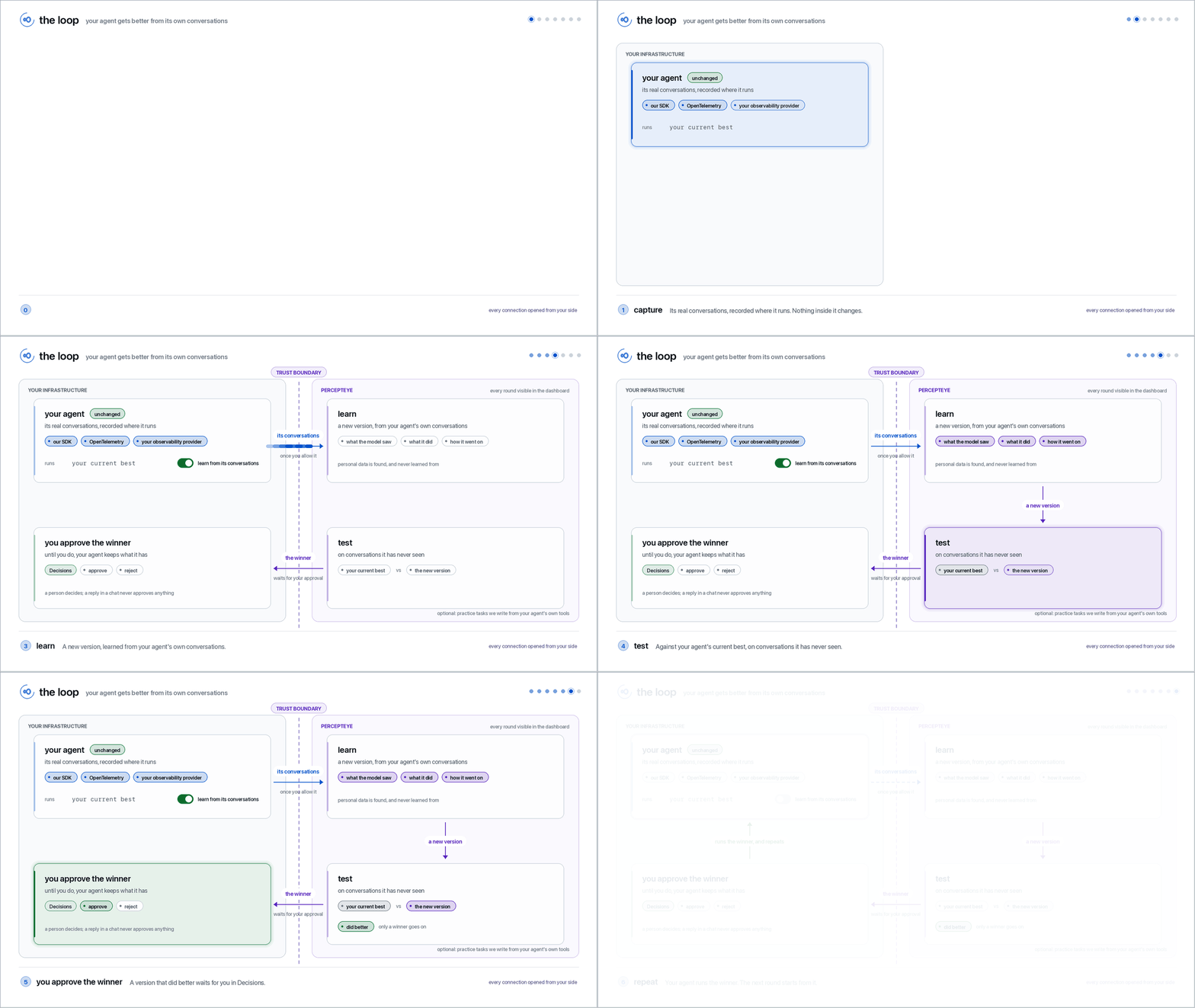
Register once, then loop forever. Every lane crosses the trust boundary outbound, opened from your side.
| beat | what happens | who does the work |
|---|---|---|
| ⓪ Onboard | the SDK describes your agent from inside its own process and registers it — once, before the first rollout | automatic; introspect=False opts out |
| ① Claim | your process long-polls for a rollout; leases heartbeat, and held results are delivered before more work is claimed | you dial out |
| ② Run | fresh child process, own environment, single-use credential, own trajectory | your agent, unchanged |
| ③ Record | every tool call lands as ok / failed / unknown; artifacts collected on every path |
adapters, from the outside |
| ④ Score & train | tasks generated from your real tool surface, graded against compiled checks, then trained | PerceptEye — you build none of it |
| ⑤ Improve | your production agent picks up the promoted policy; the next lap runs on the better agent | one call at startup |
That last beat is what makes it a flywheel rather than a pipeline: the better agent generates the better evidence.
🧷 An outcome is never silently lost
A rollout that ran must leave a record, or say why it could not. Both halves of that are mechanisms, not intentions:
- Spooled before the first send. The outcome is written to a durable outbox
under your
artifacts_dirbefore the result is POSTed, so a process killed mid-request still delivers. The next process over the same directory drains it, and that drain runs before the next claim — so a held result can never be starved by new work. - A permanent refusal is retired, never deleted. If the control plane refuses in a way redelivery cannot fix, the reason is written into the record and the file is renamed out of the retry set — it is not unlinked, and the rollout's trajectory is kept beside it. You are told, in one line, where both are. Retired names are uniquified, so a second refusal of the same rollout cannot overwrite the first.
- Your agent's turn is bounded well inside the episode.
serve()derives a per-call ceiling from the episode budget and leaves a delivery reserve, so a provider that accepts a connection and never answers costs you one timeout instead of the whole episode. Adapters translate that ceiling into whatever their harness understands; the arithmetic lives in one place. - No bearer credential is written to disk. The outbox sits inside the directory your agent runs in, so the lease token is held only in memory.
The reason this is spelled out: a delivery path that fails silently is
indistinguishable from an idle queue. on_event is how you tell them apart —
claim_empty is an empty queue, claim_failed is a broken route, and
outcome_spooled / outcome_undeliverable name a result that is being held or
has been retired.
Beat ⓪ is why you never write a task list. Tasks come from the tool surface you actually have — read after templating and conditional registration, so it is the prompt your agent really assembled, the tools it really registered, the sub-agents it really built. A CLI agent with no object to read is warmed up once, well under a second, and described from that.
🎚 Two modes, one image
One variable decides whether a deployment does training work. The same container does either, with no code edit.
PERCEPTEYE_AGENT_MODE=training      # the default when unset
PERCEPTEYE_AGENT_MODE=production
training |
production |
|
|---|---|---|
| pick it for | a machine you're happy to lend to rollouts | the deployment serving your users |
fw.serve(...) |
claims and runs rollouts | returns 0 immediately, before opening any connection |
| needs a key (the URL has a default) | yes | no |
An unrecognised value raises rather than guessing: a typo that silently picked training would keep spending your credentials with nothing printed. (train, rollout, fine-tuning also mean contribute; prod and serving mean don't. mode= in code beats the variable, and the printed line says when that happened.)
Contribute nothing, still get the trained model. No serve(), no attach(), no registration:
kw = fw.apply_current_policy(agent_id="my-agent")
if kw:                                   # {} means keep your current config
    client = OpenAI(base_url=kw["base_url"], api_key=kw["api_key"])
    model = kw["model"]

served = fw.current_prompt(agent_id="my-agent")          # the approved prompt
decision = fw.prompt_decision(served)                   # may I apply it?
if decision.apply:
    system_prompt = decision.text
else:
    log.info("keeping the current prompt: %s", decision.reason)

src = fw.policy_source(agent_id="my-agent", on_change=reconfigure)
snap = src.current()                     # per turn; between refreshes it's a cache read
Nothing polls in the background. The refresh runs inside your call — no timer, no poller — so a promotion or a rollback reaches production with no redeploy. After its first success policy_source() keeps serving the last good policy, so a network blip can never silently demote production back to the untrained model.
prompt_decision() is the whole rule in one call, and the SDK never applies a prompt for you: it checks that a prompt is actually being served, that your own baseline prompt has not changed since the pair was certified, that the bundle's status is one a person approved, and that the prompt's identity matches the checkpoint it was certified against. apply is false unless all four hold, reason says which one failed, and text is None rather than "" — so a refusal can never blank the instructions your agent is already running on. The Node SDK asks the identical question, and tests/test_prompt_decision_parity.py drives one table of cases through both implementations and asserts every field of the answer agrees.
✋ Nothing reaches your users until a person approves it
Both halves of an improvement — the model and the prompt — require a human decision. Not a threshold, not a scheduler, not a language model reading a report and deciding it looks good.
The model. Your agent keeps serving the model it is on today — the champion — until all three of these are true, and every one of them fails closed back to it:
- A person with the operator role moves that agent onto the candidate, from the dashboard. It is an explicit, role-gated call on that one agent. No promotion applies it, no percentage rollout applies it, and there is no automatic path to it — moving back is the same call with the other value, which is what makes rollback fast enough to use during an incident.
- The candidate's certification did not go against it. A verdict of regressed, inconclusive or escalated makes it unservable — the same set the promotion gate itself refuses on, so a candidate your agent could be moved onto is one that gate would also have accepted.
- It is genuinely deployed somewhere your agent can call. An address that is a stored artifact rather than a running endpoint — a bucket or file path — is refused, so an approved candidate that nobody has served yet keeps the champion in place instead of pointing your agent at something that answers nothing. The SDK re-checks this itself rather than trusting the answer:
endpoint_kwargs()— the one place a served policy becomes client arguments, and what bothapply_current_policy()andpolicy_source()go through — returns{}and logs why, on the same prefix set the Node SDK refuses on.tests/test_served_model_is_servable.pydrives both implementations and asserts the two agree.
The prompt is a separate chain with its own approval: the control plane serves a prompt only from a delivery a person approved, and prompt_decision() above re-checks that status on your side before anything is applied.
And no language model can grant either approval. Promoting a model, delivering a prompt pair, and promoting a research result are all marked irreversible in the approval system: only the explicit approve or reject control can resolve them. A model reading free-form text and interpreting "sure, go ahead" as consent is recorded as answered and never as approved, so it cannot promote, deliver, or roll anything out.
🔭 Production observability
attach() records the turns you are already serving — same adapters, same tri-state outcomes, same trajectory format as a rollout.
px = fw.attach(agent_id="support-agent", trajectory_root="/var/lib/percepteye")

with px.turn(task_id=case_id, conversation_id=conv_id,
             input_text=user_text) as turn_id:
    reply = agent.invoke(user_text)      # your agent, unmodified

px.record_answer(turn_id, reply)         # after the scope closes — the answer exists now
It captures. It never reroutes. Adapters bind with no endpoint at all, so attaching cannot re-point a single byte of production traffic. Everything fails open: an unreachable control plane costs you the observation and nothing else.
For identity-bound production analysis, pass the same live Python agent as
execution_entrypoint= together with adapter-authored
attested_execution_components. The SDK emits
agent_fingerprint.execution_sha256 only when its prompt/tools/model/sub-agent
discovery is exact and the opaque component evidence is valid; otherwise the
field stays absent. It is persisted per turn and projected to OTel as
percepteye.agent.execution_sha256. attach() does not claim a policy identity:
the policy it reads is informational and does not prove what your application ran.
task_id= is optional, opaque correlation evidence for your own case, job, or
work item. The SDK persists it, includes it in the turn upload, and projects it
as percepteye.task.id; it does not interpret the value or generate advice.
Supplying it grants no training eligibility. Control-plane clustering and
dataset services validate any later trace-to-task binding.
input_text= and record_answer() are the two lines that carry the turn's text, and both are yours to pass — they are your end user's message and the answer your code returned, which no adapter can tell apart from the rest of a model call. Once capture is on, uploading is automatic: answered turns go every 32 turns on a short-lived daemon thread, and an atexit hook sends the rest. Uploads never raise into your process and never block a turn on the network.
Production turns are graded advisory, always — they were produced by whatever you run, so they inform training rather than being scored as rollouts are. Training capacity still comes from serve().
Your Product's workflow rules travel with rules=[...] on attach() or serve() — prose rules such as "ask for the widget colour before placing any order", declared once after the registration and filed under the one Product that declares the agent, as training guidance for the decisions they apply to. Nothing your agent is served changes. None sends nothing, [] retracts, the last writer wins, and a refusal never stops the agent: px.rulebook_refusal says why, in the control plane's own words. See A Product's workflow rules in the configuration docs.
🧪 Zero instrumentation, concretely
This LangChain agent contains no reference to Agent Flywheel of any kind:
# lc_agent.py — your existing agent, untouched
from langchain_core.tools import tool

@tool
def lookup(q: str) -> str:
    """Look something up."""
    return f"found: {q}"

class Agent:
    tools = [lookup]
    def invoke(self, task: str) -> str:
        return str(lookup.invoke({"q": task}))

def build():
    return Agent()
Served with the two-line fw.serve() integration from the Quickstart, the rollout reports:
"tool_calls": [{"name": "lookup", "arguments": {"q": "count to three"},
                "outcome": "unknown", "status_code": null,
                "output": "found: count to three", "latency_ms": 0.199}]
Not one agent_flywheel import produced that record, and it is enforced by tests/test_zero_instrumentation.py. One record_tool_call where you do know the answer gets you the rest:
from agent_flywheel import record_tool_call

record_tool_call("charge_card", {"amount": 4200}, outcome="ok", status_code=201)
⚙️ Configuration
| variable | meaning |
|---|---|
PERCEPTEYE_CONTROL_PLANE_URL |
control-plane base URL; unset, it defaults to https://launch.percepteye.ai/api/flywheel/v1 |
PERCEPTEYE_API_KEY |
your flywheel key, from launch.percepteye.ai |
PERCEPTEYE_AGENT_MODE |
training (default) or production — one switch, both ways |
PERCEPTEYE_INTROSPECT |
0 disables agent discovery |
PERCEPTEYE_TRAJECTORY_DIR |
one explicit trajectory directory, for a single run |
Two of them change behaviour; the rest are an address, a credential and a location, and the first two are overridable in code as control_plane_url= and api_key=. serve() also takes isolation ("subprocess" is the default and the only mode with a real timeout), concurrency, method, rollout_timeout_s, execution_snapshot (a generic adapter-owned prepare/attest/release lifecycle), attested_execution_components (opaque adapter-owned SHA-256 evidence for exact OPSD execution identity), volatile_command_values (command options whose VALUE is transport rather than identity — name --daemon-socket and a restart that moves the socket keeps the same execution_sha256, which matters because an OPSD run refuses every episode attested with a different one), rules (your Product's workflow rules, declared once after registration), and on_event for a synchronous event callback — claim_empty versus claim_failed is how you tell an empty queue from a broken route.
Wire on_event in production. It is the only way the delivery path is visible: without it, a claim loop that is failing every request, a heartbeat that has stopped renewing, and an idle queue all look identical from the outside. That is not hypothetical — it is how a week of rollouts that produced nothing at all went unnoticed.
Your agent must sample through an OpenAI-compatible client, because the per-rollout gateway speaks that API. Provider variables we cannot point at it are stripped from the child, and serve() warns at startup if it finds any.
Agent discovery — what is sent, and how to turn it off
Once at startup the SDK reads the shape of the agent you handed serve(): system prompt (the registration projection is truncated at 20k, while an available full observation is hashed before projection), tool names/descriptions/JSON Schemas, provider and model name, sub-agents to depth 4, and the framework matched. Never sent: your tools' source or return values, your credentials, your data, or anything observed during a rollout. An agent nothing can read — a custom class, no framework the SDK knows — declares itself with describe={"system_prompt": ..., "tools": [...]} (the tools you already send the model); what you declare wins over reflection, and it never anchors an execution identity. Turn it off with fw.serve(..., introspect=False) or PERCEPTEYE_INTROSPECT=0 — and only a deliberate value (0, false, no, off) disables it, so a typo leaves it on. Disabled, unreadable, or lossy discovery produces no affirmative agent_fingerprint.execution_sha256, so an OPSD consumer fails closed.
OpenTelemetry — optional, egress only
pip install "agent-flywheel[otel]" and every outcome is additionally emitted as a span, so it lands in whatever you already run. The extra is the API only, never the SDK: this package emits into your registered TracerProvider and never installs one. Spans carry the GenAI semantic conventions plus percepteye.tool.outcome, and an unknown leaves the span status unset.
🛠 Development
python -m venv .venv
.venv/bin/pip install -e ".[dev,adapters-test,otel,otel-test]"
.venv/bin/pytest
./scripts/cross_language_abi_check.sh     # the cross-language contract, both ways
The last one is not the Node package's own suite — that lives in the Node repository and runs there with npm test. This drives records through the Node writer and asserts the Python Trajectory reads them back with the same meaning, which is the half only this repo can check. It needs a Node checkout: point PERCEPTEYE_NODE_SDK at one, or keep it as a sibling directory. Without one it prints SKIPPED and exits 0, and the cross-language tests in the suite above skip with it.
1440 tests, and CI permits zero skips — a skipped test and a passing test look identical in a green check mark. CI names PERCEPTEYE_NODE_SDK and PRIME_AGENT_PACKAGE_ROOT and installs both, so neither the cross-language half nor the tests that execute the real prime-agent binary can go green by skipping there. Other jobs assert that a bare install still works on Python 3.10→3.13, that the runtime dependency list never grows past httpx, and that the Node plugins never drift from the Python reader.
schema/flywheel-1.json is the wire contract and this repository owns it. Absence is never collapsed into zero: tool_calls=None means "I did not report tool calls"; [] means "I observed zero", a positive claim. The animations above are generated, not drawn — docs/assets/render.sh rebuilds them.
Your agent already does the work. Let it learn from it.
Contributing — issues and PRs welcome; a new adapter must not import its framework at module scope, must report unknown rather than guess, and must fail loudly at bind time. ·
Security — please report vulnerabilities privately to security@percepteye.ai. ·
License — MIT © PerceptEye.
1 maintainer

Metadata
1 maintainer
Release files for agent-flywheel 0.3.0
For a detailed explanation of source distributions (sdists) and built distributions (wheels), please see the package formats documentation.
Source distribution (sdist)
| File | Size | Uploaded | Provenance | Actions |
|---|---|---|---|---|
| agent_flywheel-0.3.0.tar.gz | 644.8 kB | With provenance | Details for agent_flywheel-0.3.0.tar.gz |
Built distribution (wheel)
| File | Interpreter | ABI | Platform | Actions Reset |
|---|---|---|---|---|
| agent_flywheel-0.3.0-py3-none-any.whl | Python 3 | none | any | Details for agent_flywheel-0.3.0-py3-none-any.whl |
Total release size: 955.4 kB
Release files / agent_flywheel-0.3.0.tar.gz
| Download URL | agent_flywheel-0.3.0.tar.gz |
|---|---|
| Size | 644.8 kB |
| Tags | Source |
|
SHA-256 checksum How to use checksums |
ee398507c0b6b37034f2311816f37d45dd1e5412771aeea78aa93a650441bd98
|
|
BLAKE2b-256 checksum How to use checksums |
71c4540c565e2f1eb2e2be0e4aefe7b04d8aeb75e26429996b614517d686935b
|
| Upload date | |
|
Uploaded using Trusted Publishing? What is trusted publishing? |
Yes |
| Uploaded via |
twine/7.0.0 CPython/3.13.16
|
Provenance
Provenance describes where a file came from. On PyPI, provenance is shared via attestations, which provide a verifiable record of the build or publishing details. View details, limitations and caveats.


PyPI Publish Attestation
PyPI verified that this artifact, at this checksum, originated from the publisher listed below.
Signed by GitHub Actions, verified by PyPI on Oct 20, 2026.
Transparency logRelease files / agent_flywheel-0.3.0-py3-none-any.whl
| Download URL | agent_flywheel-0.3.0-py3-none-any.whl |
|---|---|
| Size | 310.6 kB |
| Tags | Python 3 |
|
SHA-256 checksum How to use checksums |
b5659be31169491a5d65b83a5a6b3ee44a51437867912e11666c5c46c9ec437a
|
|
BLAKE2b-256 checksum How to use checksums |
14f5aa13bc261fbd291107999b875c913b26cb15e41a437583b41ea76e4ab8b7
|
| Upload date | |
|
Uploaded using Trusted Publishing? What is trusted publishing? |
Yes |
| Uploaded via |
twine/7.0.0 CPython/3.13.16
|
Provenance
Provenance describes where a file came from. On PyPI, provenance is shared via attestations, which provide a verifiable record of the build or publishing details. View details, limitations and caveats.
PyPI Publish Attestation
PyPI verified that this artifact, at this checksum, originated from the publisher listed below.
Signed by GitHub Actions, verified by PyPI on Oct 20, 2026.
Transparency logSecurity for agent-flywheel 0.3.0
Provenance
Provenance describes where a file came from. On PyPI, provenance is shared via attestations, which provide a verifiable record of the build or publishing details. View details, limitations and caveats.
Full provenance
Both files in this release have been uploaded with provenance metadata.
Attestation for agent_flywheel-0.3.0.tar.gz
PyPI Publish Attestation
PyPI verified that this artifact, at this checksum, originated from the publisher listed below.
Signed by GitHub Actions, verified by PyPI on Oct 20, 2026.
Transparency logA note on package security
PyPI is a repository for distributing packages, not a service for auditing them. While third-party security researchers and our staff do their best to detect and remove malicious packages, PyPI cannot guarantee the quality, security or suitability of any given package.
To learn more about protecting yourself from malicious actors, visit our package security documentation.














