
agent-groupchat

A group chat between you and your AI agents, running on your own computer. Bring the AIs you already have (Claude Code, Codex, Gemini CLI, Aider, or any OpenAI-compatible chat API), run several copies of the same one, and give each a role with permissions its CLI really enforces.
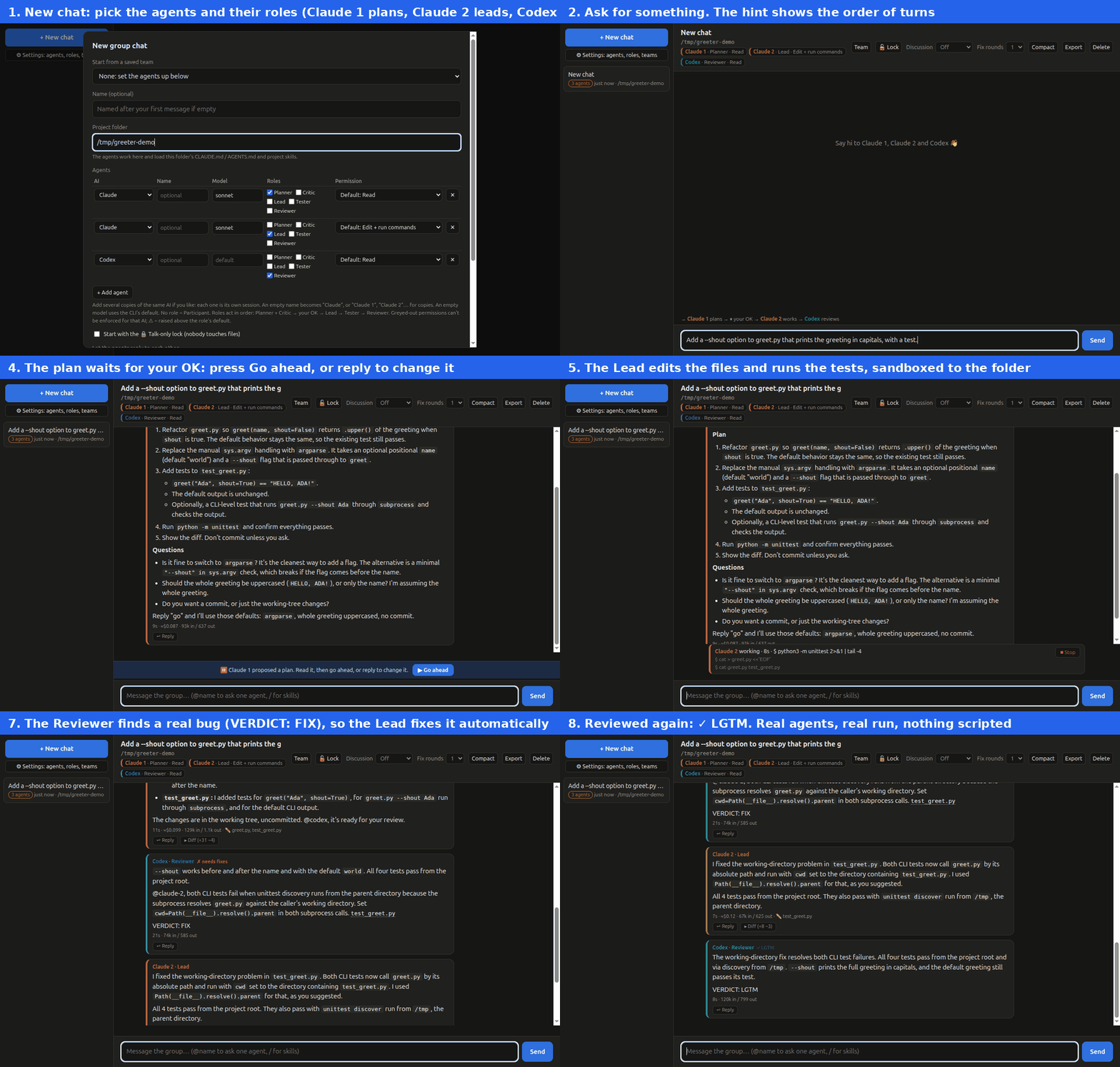
A real, unscripted run: Claude 1 plans, you press Go ahead, Claude 2 edits and tests, Codex finds a real bug (VERDICT: FIX), Claude 2 fixes it automatically, and Codex approves.
- Any mix of agents: e.g. Claude 1 (Opus) leads, Claude 2 (a cheaper model) tests, Codex reviews, and a local Llama via Ollama gives a second opinion.
- Roles that act in order: Planner + Critic → ⏸️ your OK → Lead → Tester → Reviewer, with automatic fix rounds when the Tester or Reviewer finds problems.
- ⚡ Race and 🧩 Split: several agents work at the same time, each in its own copy of the project. Race: they all do the same task and you pick the best. Split: each builds a different part, and the parts are merged, tested and reviewed. Your folder isn't touched until you choose.
- Real permissions, never quietly loosened: Talk only, Read, Edit files, Edit + run commands (sandboxed to the project folder) or Auto. Each agent's level maps to its CLI's own permission flags, and a level an AI can't enforce is greyed out.
- Real sessions: every agent is a real CLI session in your project folder, so CLAUDE.md / AGENTS.md, skills, hooks and MCP servers work as usual, and you can continue any session from a terminal.
- Standard library only: Python 3.10+, no dependencies. Runs on Linux, macOS and Windows.
Install
pipx install agent-groupchat      # or: uvx agent-groupchat
agent-groupchat                   # opens http://127.0.0.1:8765 in your browser
You also need at least one AI: a CLI you're already logged into (Claude Code, Codex CLI, Gemini CLI, Aider) or a chat API (see Agents).
From source: git clone https://github.com/MohammedAtya/agent-groupchat && cd agent-groupchat && python3 -m agent_groupchat.
Options: --port 9000, --no-browser, --version. If the port is taken it uses the next free
one; if agent-groupchat is already running, it just opens it. Stop it with Ctrl+C.
Quick start
- + New chat: pick a project folder and the agents. For each one choose the AI, an optional name and model, its roles and (optionally) a different permission. Or start from a saved Team, and 💾 Save as team to reuse a setup.
- Write a message. The hint above the box says who will answer, e.g.
→ Claude 1 plans → ⏸️ your OK → Claude 2 works → Codex reviews. - @name asks one agent directly:
@claude-2,@codex;@claudereaches every Claude copy. - While they work you see what each one is doing (
✏️ editing app.py,$ pytest). ■ Stop ends the turn; ▸ Diff under a reply shows exactly what it changed.
Agents
| AI | What you need | Permission levels it can enforce |
|---|---|---|
| Claude Code | claude, logged in |
all five |
| Codex CLI | codex, logged in |
Talk*, Read, Edit + run commands, Auto |
| Gemini CLI | gemini, logged in |
Talk, Read, Edit, Edit + run commands (needs Docker/Podman; Seatbelt on macOS) |
| Aider | aider + a model name (e.g. sonnet) |
Talk*, Read, Edit |
| Chat API | an OpenAI-compatible endpoint | Talk only (it sees the chat, not your files) |
* can't be stopped from reading files: it stays read-only and is told to only discuss.
⚙ Settings → Agents shows which CLIs are installed (with a Test button) and lets you add
chat APIs: OpenAI, Ollama, OpenRouter, Groq, LM Studio… They're saved in
~/.agent-groupchat/config.json:
{"apis": [
  {"id": "llama", "name": "Llama", "base_url": "http://localhost:11434/v1", "model": "llama3.1"},
  {"id": "gpt", "name": "GPT", "base_url": "https://api.openai.com/v1", "model": "gpt-4.1",
   "key_env": "OPENAI_API_KEY"}
]}
key_env is the name of the environment variable holding the API key. The key itself is never
stored, and Settings refuses a value that looks like a key.
Aider runs with every prompt answered automatically, so everything risky it would agree to is
switched off: shell commands, git commits, .gitignore edits, self-updates. Its history files live
in ~/.agent-groupchat/sessions/, not in your project.
Roles and the order of turns
| Role | Job | Default permission |
|---|---|---|
| Planner | breaks the request into steps and asks questions before any work starts | Read |
| Critic | challenges the idea, looks for what everyone missed | Read |
| Lead | does the work | Edit + run commands |
| Tester | writes and runs tests; must not change the code under test | Edit + run commands |
| Reviewer | checks the Lead's changes, says what to fix or LGTM | Read |
| Participant | no special job (agents without a role) | Edit + run commands |
- A plain message runs the roles in order: Planner + Critic → ⏸️ your OK → Lead → Tester → Reviewer. Roles nobody holds are skipped; agents without a role answer directly.
- After the plan, the chat waits: press ▶ Go ahead, or reply to change the plan.
- The Tester and Reviewer end with
VERDICT: LGTMorVERDICT: FIX. On FIX the Lead fixes it automatically (0–3 rounds, default 1), then it comes back to you. - An agent can hold several roles (it gets the highest default); several agents can share a role. The same agent can't be Lead and Reviewer of its own work (two copies of one AI can).
- Several agents in one role? Give each a focus, e.g. Tester 1 "login", Tester 2 "database", or Lead 1 "backend", Lead 2 "frontend". Each one is told its own area and the others', and Leads take turns: the second sees what the first did and builds on it.
- Overlap warning: if two agents in the same role would do the same work (no focus, or the same focus), New chat and the Team dialog warn you before you start. ⚠ for Leads and Testers (they'd edit the same things), ℹ for Reviewers and others (two opinions can be on purpose).
- ⚙ Settings → Roles: copy a built-in role or write your own (name, job, default permission).
⚡ Race and 🧩 Split
Two buttons next to Send let agents work at the same time, each in its own copy of the
project (a git worktree in ~/.agent-groupchat/worktrees/). Your project folder isn't touched
until you press Use this one.
| ⚡ Race (quality) | 🧩 Split (speed) | |
|---|---|---|
| What | every agent that can edit does the same task its own way | the task is divided; each agent builds a different part |
| Cost / time | about one turn per agent, in the time of one | about one agent's worth, but faster |
| Then | the Tester runs the tests in every copy, the Reviewer compares them and marks ⭐ its pick | the parts are merged (the Lead fixes clashes), then tested and reviewed, with fix rounds |
| You | Use this one, Combine two copies, or Discard | Use the 🧩 Result |
- Who takes part: Leads and agents without a role that can edit files. You need at least 2.
- Split asks the Planner to divide the task (you OK the parts, or reply to change them), or you write each agent's part yourself. If the task can't be split into independent parts, the Lead does it the normal way.
- The project must be a git repo. If it isn't, an Initialize git here button does
git init+ a first commit (your files don't change, nothing is uploaded). - Each copy starts from your folder exactly as it is now, uncommitted and new files included. Every agent works in a fresh session in its copy, given the chat so far (or one shared summary of a long chat).
- Use this one puts the changes into your folder uncommitted, byte for byte. If you edited the same lines meanwhile, it refuses and names the files; edits on different lines are merged. It never overwrites a file your git ignores, and if anything fails half-way, your folder is put back as it was.
- Limits: copies share your git stash and branches (agents are told not to touch them; stash entries made in a copy are removed, and if one of yours disappears the chat shows how to get it back). Submodules aren't copied. Projects with symlinks that lead outside them can't use Race or Split.
Permissions
| Permission | Claude Code | Codex | Gemini CLI | Aider | Chat API |
|---|---|---|---|---|---|
| Talk only | no tools at all | read-only sandbox, told to only discuss | every tool denied | ask mode, told to only discuss | ✓ |
| Read | read/search tools, git diff/log/status, tests (in the sandbox) |
read-only sandbox | read/search tools | ask mode | – |
| Edit files | edit tools in the folder, no commands | – | auto_edit: edits, no shell |
code mode, no shell, no commits | – |
| Edit + run commands | edits + commands, sandboxed to the folder | workspace-write sandbox |
yolo inside Gemini's sandbox |
– | – |
| Auto | auto mode: a classifier blocks risky actions | "approve for me": an automatic reviewer | – | – | – |
- Under Team you can raise or lower any agent's permission; ⚠ marks a raised one, and Auto asks you to confirm.
- 🔒 Lock drops every agent to Talk only at once, and unlocking restores them.
- Agents that can edit take turns (one at a time); read-only agents work in parallel.
- After every reply the folder is compared before and after: a read-only agent that changed files, or a Tester that changed non-test code, gets a ⚠ under its reply.
Safety
- It acts on your files. Edit and Edit + run commands let agents change your project. Use git, and start with the 🔒 Lock or read-only roles if you're unsure.
- Auto lets an agent decide on its own (risky actions are blocked by Claude Code's classifier or Codex's reviewer). Use it in folders you can afford to have changed.
- Sandboxes: commands are confined to the project folder by the agents' own sandboxes. If a sandbox isn't available, the affected levels drop down (the agent's chip says (limited)); they never run unconfined.
- More agents = more cost. Every agent reads the chat on each turn. Compact summarizes a long chat so fresh sessions continue from the summary.
- Local only: the server listens on 127.0.0.1, and only its own page can drive it (Host and
Origin checks plus a token that's new on every launch). Your chats stay in
~/.agent-groupchat/; nothing is sent anywhere except to the AIs you chose.
Platforms
| OS | What works |
|---|---|
| Linux | Everything. Commands run in a bubblewrap sandbox (see below). |
| macOS | Everything. Claude Code and Codex use the built-in macOS sandbox. |
| Windows, in WSL | Everything (it's Linux). |
| Windows, native | Talk, Read and Edit. Commands and Auto need a sandbox the agents don't have on native Windows, so they're greyed out and the page suggests WSL. |
Enable the sandbox (Linux)
Claude Code and Codex confine commands with bubblewrap. Install it if it's missing
(sudo apt install bubblewrap, sudo dnf install bubblewrap, …). On Ubuntu 23.10+ / 24.04
AppArmor also blocks it (bwrap: setting up uid map: Permission denied). The one-time fix:
sudo tee /etc/apparmor.d/bwrap >/dev/null <<'EOF'
abi <abi/4.0>,
include <tunables/global>

profile bwrap /usr/bin/bwrap flags=(unconfined) {
  userns,
  include if exists <local/bwrap>
}
EOF
sudo apparmor_parser -r /etc/apparmor.d/bwrap
bwrap --ro-bind / / true && echo "sandbox OK"
This lets bwrap (and only bwrap) create user namespaces again, which is the setup Ubuntu
documents for sandboxing tools. The page notices within about a minute.
More features
- Discussion rounds: after they all answer, agents can reply to each other for 1–3 rounds
(each stays quiet if it has nothing to add). Hand-offs: an agent that addresses another
(
@codex …,Claude 2, can you …) gets an answer from it. - Skills: type
/for the skills your agents have; a skill runs on the agents that have it. - Live preview, reply stats (time, ≈ cost, tokens, files changed), ↻ Retry for failed replies, ↩ Reply to one agent, Markdown with Copy buttons, Export as Markdown.
- Continue in a terminal: the bottom of each chat shows
claude -r <id>,codex resume <id>orgemini --resume <id>for every agent. - Old chats: if you used the earlier single-folder version (
~/groupchat), the page offers to import copies of its chats once.
Your data
Everything lives in ~/.agent-groupchat/ (set AGENT_GROUPCHAT_HOME to move it): chats/,
sessions/ (chat-API and Aider history), logs/ and config.json (chat APIs, your roles,
teams). Deleting a chat on the page doesn't delete the agents' own sessions.
Development
python3 -m unittest discover -s tests -t .    # ~220 tests, under a minute, no AI calls
python3 -m agent_groupchat --no-browser       # run from the source folder
The tests use a fake agent CLI (tests/bin/fake_agent.py) that speaks each real CLI's output
format, so they cost nothing. GitHub Actions runs them on Linux, macOS and Windows (Python 3.10 and
3.13) and installs the package with pipx on all three on every push.
Layout: agent_groupchat/server.py (chat engine + web server, incl. Race/Split), copies.py
(the git copies), roles.py, config.py, platform_support.py, adapters/ (one file per AI: claude.py, codex.py, gemini.py,
aider.py, openai_api.py), static/index.html (the page). Adding an AI means writing one
adapter (see adapters/base.py). The design is in SPEC.md.
Credits
Works well with Matt Pocock's skills (/grill-me,
/tdd, …): install them for your agents and type / in the chat.
License
1 maintainer

Metadata
1 maintainer
Release files for agent-groupchat 0.3.0
For a detailed explanation of source distributions (sdists) and built distributions (wheels), please see the package formats documentation.
Source distribution (sdist)
| File | Size | Uploaded | Provenance | Actions |
|---|---|---|---|---|
| agent_groupchat-0.3.0.tar.gz | 136.5 kB | With provenance | Details for agent_groupchat-0.3.0.tar.gz |
Built distribution (wheel)
| File | Interpreter | ABI | Platform | Actions Reset |
|---|---|---|---|---|
| agent_groupchat-0.3.0-py3-none-any.whl | Python 3 | none | any | Details for agent_groupchat-0.3.0-py3-none-any.whl |
Total release size: 242.7 kB
Release files / agent_groupchat-0.3.0.tar.gz
| Download URL | agent_groupchat-0.3.0.tar.gz |
|---|---|
| Size | 136.5 kB |
| Tags | Source |
|
SHA-256 checksum How to use checksums |
27566c3fd02aac9f438451ec635a7d507255006a773a8051b77aa0be01db00fe
|
|
BLAKE2b-256 checksum How to use checksums |
b7b78616525cc01230b58031b3c1d2dfb56f22909daab9451086e813b159741e
|
| Upload date | |
|
Uploaded using Trusted Publishing? What is trusted publishing? |
Yes |
| Uploaded via |
twine/7.0.0 CPython/3.13.16
|
Provenance
Provenance describes where a file came from. On PyPI, provenance is shared via attestations, which provide a verifiable record of the build or publishing details. View details, limitations and caveats.


PyPI Publish Attestation
PyPI verified that this artifact, at this checksum, originated from the publisher listed below.
Signed by GitHub Actions, verified by PyPI on Nov 23, 2026.
Transparency logRelease files / agent_groupchat-0.3.0-py3-none-any.whl
| Download URL | agent_groupchat-0.3.0-py3-none-any.whl |
|---|---|
| Size | 106.3 kB |
| Tags | Python 3 |
|
SHA-256 checksum How to use checksums |
4e3bf64dc0155fc499e6baebad0b4258becc5f75907a356897bbcf1a7f40b2dd
|
|
BLAKE2b-256 checksum How to use checksums |
a2685612e031db64b33a964c49fd4f02304cf4a1ea2cc051d0460d9f31dd042c
|
| Upload date | |
|
Uploaded using Trusted Publishing? What is trusted publishing? |
Yes |
| Uploaded via |
twine/7.0.0 CPython/3.13.16
|
Provenance
Provenance describes where a file came from. On PyPI, provenance is shared via attestations, which provide a verifiable record of the build or publishing details. View details, limitations and caveats.
PyPI Publish Attestation
PyPI verified that this artifact, at this checksum, originated from the publisher listed below.
Signed by GitHub Actions, verified by PyPI on Nov 23, 2026.
Transparency logSecurity for agent-groupchat 0.3.0
Provenance
Provenance describes where a file came from. On PyPI, provenance is shared via attestations, which provide a verifiable record of the build or publishing details. View details, limitations and caveats.
Full provenance
Both files in this release have been uploaded with provenance metadata.
Attestation for agent_groupchat-0.3.0.tar.gz
PyPI Publish Attestation
PyPI verified that this artifact, at this checksum, originated from the publisher listed below.
Signed by GitHub Actions, verified by PyPI on Nov 23, 2026.
Transparency logA note on package security
PyPI is a repository for distributing packages, not a service for auditing them. While third-party security researchers and our staff do their best to detect and remove malicious packages, PyPI cannot guarantee the quality, security or suitability of any given package.
To learn more about protecting yourself from malicious actors, visit our package security documentation.














