
Agent Hooks

No more swipe-and-sweep context switching for multi-session AI coding.
Agent Hooks gives Claude Code and Codex one local callback layer: a macOS-ready CLI for native permission dialogs and notifications, plus a FastAPI-like framework when you want to own the policy in Python.
Install
Use the standalone CLI. See the Built-in CLI docs for wiring it into your provider config.
uv tool install agent-hooks
Or install it inside a Python project:
uv pip install agent-hooks
What It Looks Like
Claude Code
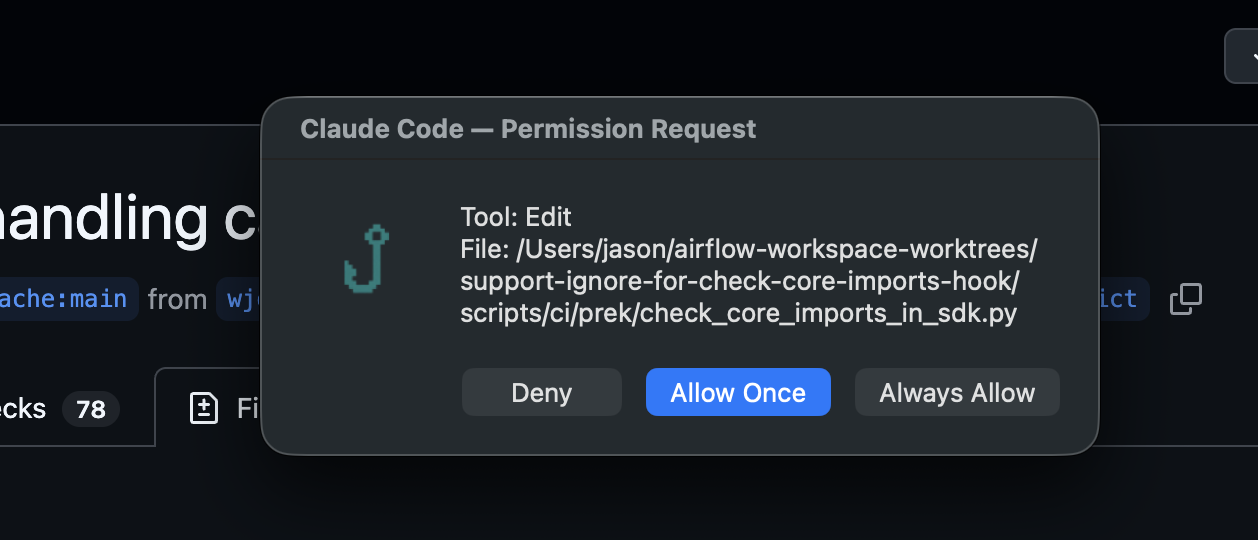
Claude Code permission requests become a native local dialog. When Claude offers permission suggestions, each one is rendered as its own choice in a picker (Allow once plus one entry per suggestion, shown exactly as Claude sent it) so you persist only the scope you pick; otherwise a Deny / Allow Once / session-scoped Always Allow dialog is shown.
Codex
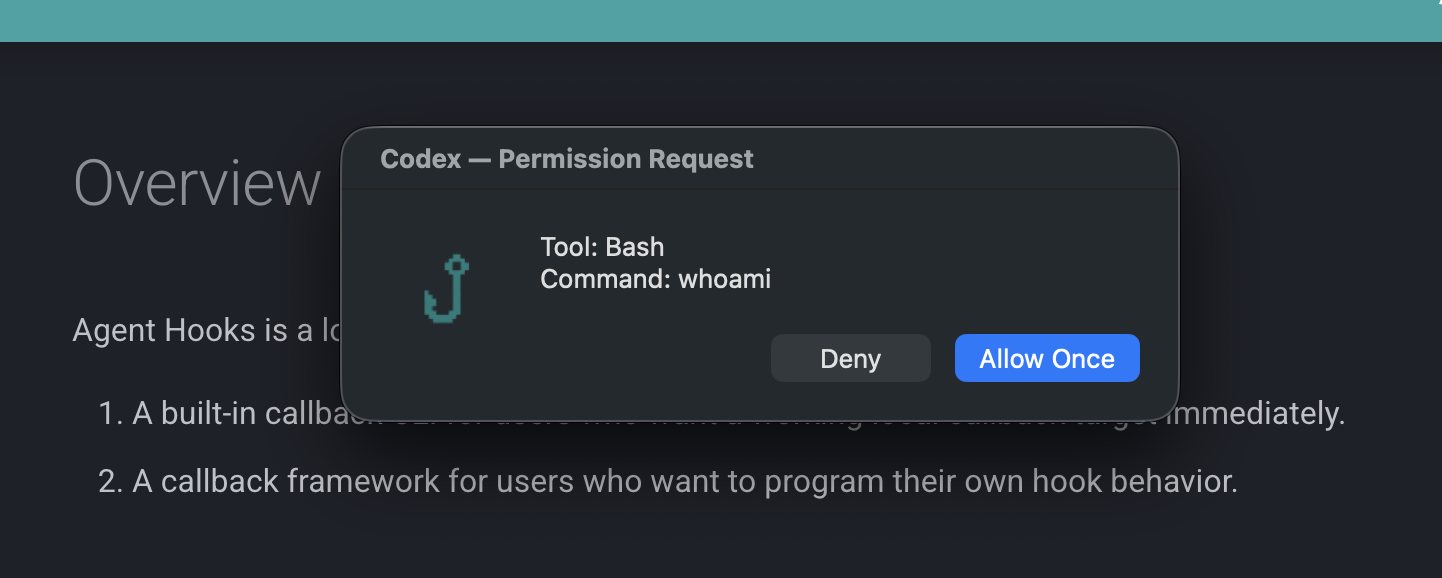
Codex PreToolUse requests become the same local dialog flow, with Deny, Allow Once, and optional execpolicy short-circuiting for already-allowed Bash commands.
AgentHook Framework
from agent_hooks import AgentHook, PermissionRequestEvent, build_permission_response
from agent_hooks.enums import DialogButton

app = AgentHook()


@app.permission()
def permission_handler(hook_event: PermissionRequestEvent):
    if hook_event.tool_name == "Bash":
        return build_permission_response(DialogButton.ALLOW_ONCE, hook_event)
    return build_permission_response(DialogButton.DENY, hook_event)
agent-hooks run my_hooks.py --provider codex
A single typed handler can serve Claude Code's PermissionRequest and Codex's PreToolUse without requiring provider-specific schema glue.
You can also factor reusable route inputs with one-level dependencies:
from agent_hooks import CallbackRequest, Depends


def build_command(request: CallbackRequest) -> str:
    return request.payload.tool_input.command


@app.permission()
def permission_handler(command: str = Depends(build_command)):
    ...
Yield-based dependencies are also supported for scoped resources:
def get_db():
    db = connect_db()
    try:
        yield db
    finally:
        db.close()


@app.permission()
def permission_handler(db = Depends(get_db)):
    ...
Why It Exists
Multi-session AI coding tends to break flow in the same places:
- permission prompts appear in separate sessions
- provider payloads differ
- local hook responses need provider-specific wire shapes
- stop and notification events want OS-local behavior, not more terminal noise
Agent Hooks normalizes those problems into one package.
Two Products In One Package
Use agent-hooks callback when you want a working local callback target immediately.
Use AgentHook when you need to define custom permission, notification, or stop behavior in Python.
Built-in CLI
The built-in app is exposed as agent_hooks.cli_app.app:app and can be run with:
agent-hooks callback
This path is designed for local-first usage on macOS:
- permission dialogs
- notifications
- provider-aware response rendering
- rotating logs and audit logs
Framework
The framework is centered on AgentHook, a decorator-based router that looks and feels closer to FastAPI than to handwritten hook glue.
You register handlers with route decorators such as:
@app.notification()@app.permission()@app.session_start()@app.user_prompt_submit()@app.post_tool_use()@app.stop()@app.stop_failure()
Provider-Neutral Core
Internally, incoming payloads are normalized into shared models before dispatch. That gives you one app-level programming model even when providers use different raw event names.
Examples:
- Claude
PermissionRequestand CodexPreToolUseboth route through@app.permission() - both providers share the same
HookPayloadbase model - provider-specific response wire formats are handled by adapters
Start Here
If you want the fastest path, install the tool and wire the built-in callback into your provider config.
Claude Code
Install the CLI:
uv tool install agent-hooks
Put this in ~/.claude/settings.json:
{
  "hooks": {
    "PermissionRequest": [
      {
        "hooks": [
          {
            "type": "command",
            "command": "agent-hooks callback --provider claude-code"
          }
        ]
      }
    ],
    "Notification": [
      {
        "matcher": "permission_prompt",
        "hooks": [
          {
            "type": "command",
            "command": "agent-hooks callback --provider claude-code"
          }
        ]
      }
    ],
    "Stop": [
      {
        "hooks": [
          {
            "type": "command",
            "command": "agent-hooks callback --provider claude-code"
          }
        ]
      }
    ],
    "StopFailure": [
      {
        "hooks": [
          {
            "type": "command",
            "command": "agent-hooks callback --provider claude-code"
          }
        ]
      }
    ]
  }
}
This is enough to route Claude Code permission, notification, and stop events into the built-in callback.
Codex
Install the CLI:
uv tool install agent-hooks
If your Codex build still requires the feature flag, add this to ~/.codex/config.toml:
[features]
codex_hooks = true
Put this in ~/.codex/hooks.json:
{
  "hooks": {
    "PreToolUse": [
      {
        "matcher": "Bash",
        "hooks": [
          {
            "type": "command",
            "command": "agent-hooks callback --provider codex",
            "timeout": 30
          }
        ]
      }
    ],
    "Stop": [
      {
        "hooks": [
          {
            "type": "command",
            "command": "agent-hooks callback --provider codex",
            "timeout": 30
          }
        ]
      }
    ]
  }
}
This is enough to route Codex Bash permission checks and stop notifications into the built-in callback.
Recommended setup: pass --provider explicitly in your provider config when you can. The built-in callback can infer providers from payload markers, but the explicit flag keeps local setup easier to reason about and debug.
If you want to build your own hook app, start with AgentHook and then run it with agent-hooks run.
Docs Map
Maintainers
Scope
Agent Hooks currently supports only two providers:
- Claude Code
- Codex
The docs stay aligned with the current implementation. They describe supported behavior that exists today, not placeholder integrations for future providers.
License
Agent Hooks is licensed under Apache 2.0. See LICENSE.
1 maintainer

Download files
Download the file for your platform. If you're not sure which to choose, learn more about installing packages.
Source Distribution
Built Distribution
Filter files by name, interpreter, ABI, and platform.
If you're not sure about the file name format, learn more about wheel file names.
Copy a direct link to the current filters
File details
Details for the file agent_hooks-0.2.0.tar.gz.
File metadata
- Download URL: agent_hooks-0.2.0.tar.gz
- Upload date:
- Size: 508.3 kB
- Tags: Source
- Uploaded using Trusted Publishing? Yes
- Uploaded via:
twine/6.1.0 CPython/3.13.13
File hashes
| Algorithm | Hash digest | |
|---|---|---|
| SHA256 |
3111cc64d389b91395f2d589443cf383935d5f76465614ce8e9c0c7897445e0c
|
|
| MD5 |
b9c29e107de5b21aafc5720d6bb97590
|
|
| BLAKE2b-256 |
fbae83580bc171967dec4f963bcb037168c6d4d5027cdab8fb2c9a0136e7af9e
|
Provenance
The following attestation bundles were made for agent_hooks-0.2.0.tar.gz:
Publisher:
release-pypi.yml on jason810496/agent-hooks
-
Statement:
-
Statement type:
https://in-toto.io/Statement/v1 -
Predicate type:
https://docs.pypi.org/attestations/publish/v1 -
Subject name:
agent_hooks-0.2.0.tar.gz -
Subject digest:
3111cc64d389b91395f2d589443cf383935d5f76465614ce8e9c0c7897445e0c - Sigstore transparency entry: 1912862060
- Sigstore integration time:
-
Permalink:
jason810496/agent-hooks@f0f660d94508d4abf5224248094f3d160212be88 -
Branch / Tag:
refs/tags/v0.2.0 - Owner: https://github.com/jason810496
-
Access:
public
-
Token Issuer:
https://token.actions.githubusercontent.com -
Runner Environment:
github-hosted -
Publication workflow:
release-pypi.yml@f0f660d94508d4abf5224248094f3d160212be88 -
Trigger Event:
push
-
Statement type:
File details
Details for the file agent_hooks-0.2.0-py3-none-any.whl.
File metadata
- Download URL: agent_hooks-0.2.0-py3-none-any.whl
- Upload date:
- Size: 91.4 kB
- Tags: Python 3
- Uploaded using Trusted Publishing? Yes
- Uploaded via:
twine/6.1.0 CPython/3.13.13
File hashes
| Algorithm | Hash digest | |
|---|---|---|
| SHA256 |
3cc0c0b686604d5bcc8ccbb91fa1064eb0f7ab44b3176090e819dbfb3dbc43cb
|
|
| MD5 |
b45423334084763a7ad120bae1b6a9c4
|
|
| BLAKE2b-256 |
73e7b657e5252c1a497038384e2646c73fe0d8681413b70653ad0d275a2de937
|
Provenance
The following attestation bundles were made for agent_hooks-0.2.0-py3-none-any.whl:
Publisher:
release-pypi.yml on jason810496/agent-hooks
-
Statement:
-
Statement type:
https://in-toto.io/Statement/v1 -
Predicate type:
https://docs.pypi.org/attestations/publish/v1 -
Subject name:
agent_hooks-0.2.0-py3-none-any.whl -
Subject digest:
3cc0c0b686604d5bcc8ccbb91fa1064eb0f7ab44b3176090e819dbfb3dbc43cb - Sigstore transparency entry: 1912862430
- Sigstore integration time:
-
Permalink:
jason810496/agent-hooks@f0f660d94508d4abf5224248094f3d160212be88 -
Branch / Tag:
refs/tags/v0.2.0 - Owner: https://github.com/jason810496
-
Access:
public
-
Token Issuer:
https://token.actions.githubusercontent.com -
Runner Environment:
github-hosted -
Publication workflow:
release-pypi.yml@f0f660d94508d4abf5224248094f3d160212be88 -
Trigger Event:
push
-
Statement type:














