
agent-interlude
English · 繁體中文
agent-interlude intercepts the traffic between an AI coding agent (Claude Code,
Codex) and its API, persisting the prompt structure (system / tools /
messages) of every request/response pair as JSONL. Use it to analyze the
fixed skeleton vs. dynamic slots of a prompt, and to compare across agents.
Screenshots
The built-in web UI (agent-interlude-report serve) is a dark monitoring console
for browsing captured traffic.
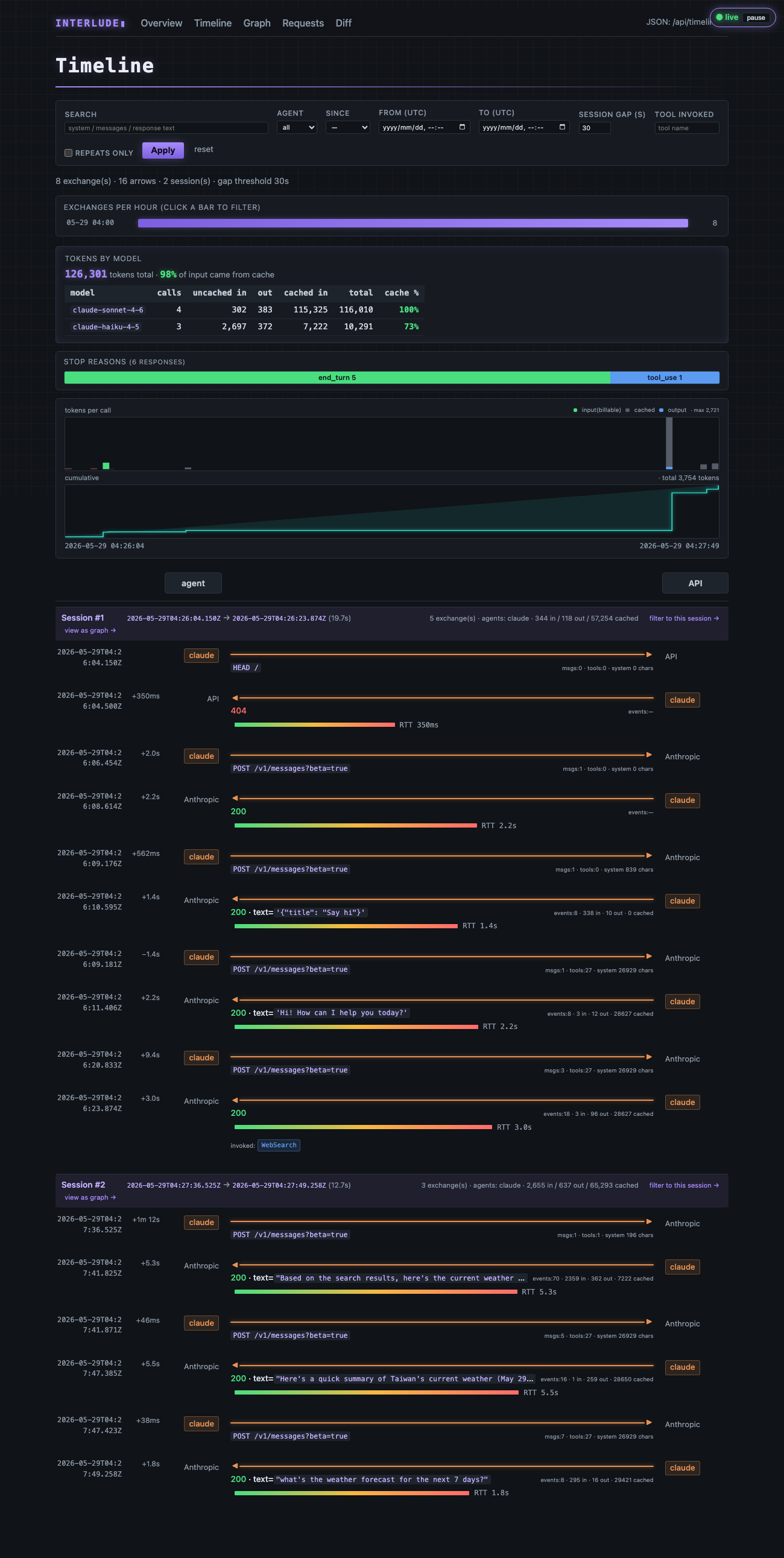
Timeline — per-model token usage and cache-hit rate, stop-reason breakdown, a token-usage chart, and every request/response grouped into sessions and threads.
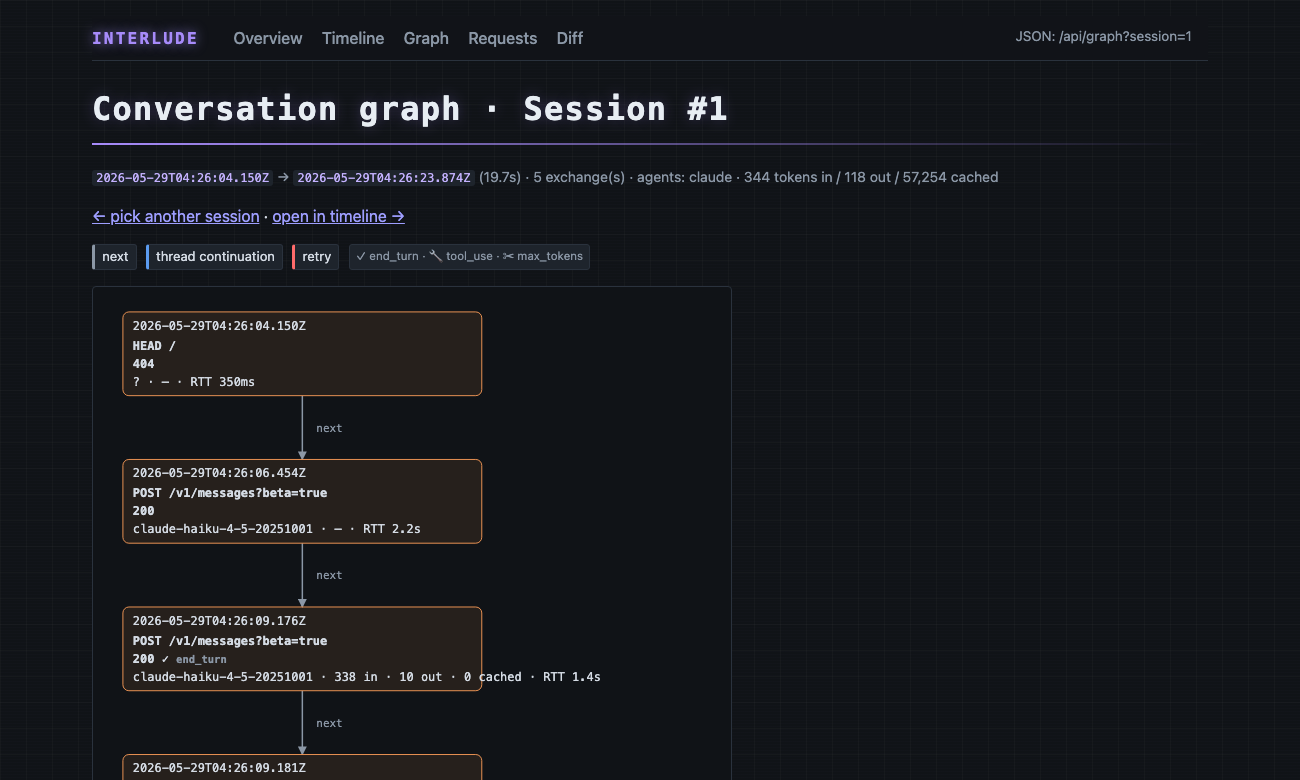
Conversation graph — one session projected as nodes and edges: continuations, retries, and the tools invoked at each step.
How it works
Both agents let you override the API base URL via an environment variable, so no transparent MITM or certificate forgery is needed. agent-interlude is an explicit reverse proxy:
Claude Code ──(A) plain HTTP──▶ agent-interlude proxy ──(B) normal HTTPS──▶ api.anthropic.com
              localhost:8788                      (proxy re-encrypts as the client)
Segment (A) has no TLS, so the proxy reads the plaintext body straight off the socket — that's the interception point, and it never touches credentials. Responses are copied as they stream through a relay, then the SSE events are reassembled and archived once the stream ends. The agent notices nothing.
Install
Install once with pipx (recommended) or
uv tool — both put the
agent-interlude command on your PATH in an isolated environment, no
project-level setup needed:
pipx install agent-interlude
# or
uv tool install agent-interlude
Requires Python 3.11+ and the agent CLIs you want to capture
(claude and/or codex). Zero runtime dependencies — agent-interlude is
stdlib-only.
For contributors hacking on agent-interlude itself, see Development setup below.
Quick start
# 1. One command: starts the 3 proxy listeners AND the web UI on :8000
agent-interlude

# 2. In another terminal, point Claude Code at it
ANTHROPIC_BASE_URL=http://localhost:8788 claude

# 3. Open the live browser UI as captures stream in
open http://127.0.0.1:8000/timeline
On startup the bundled launcher prints:
[agent-interlude] claude: http://127.0.0.1:8788 -> https://api.anthropic.com
[agent-interlude] codex:  http://127.0.0.1:8789 -> https://api.openai.com   (Codex + API key)
[agent-interlude] codex:  http://127.0.0.1:8790 -> https://chatgpt.com      (Codex + ChatGPT login)
[agent-interlude] logging to .agent-interlude/log-<timestamp>.jsonl
[agent-interlude] web UI: http://127.0.0.1:8000/timeline (auto-started; disable with --no-ui)
[agent-interlude-report] http://127.0.0.1:8000
[agent-interlude-report] watching .agent-interlude/log-*.jsonl
[agent-interlude-report] auto-reload on (disable with --no-reload)
.agent-interlude/log-<timestamp>.jsonl lands under your current working
directory (not next to the installed module), so run agent-interlude from
wherever you want the logs collected.
The web UI runs in a child process. Ctrl-C on agent-interlude tears down
both proxy and UI cleanly.
Each launch opens a fresh log file; every request prints one line such as
[claude] POST /v1/messages.
Variants:
agent-interlude --no-ui            # proxy-only (e.g. CI / headless capture)
agent-interlude --ui-port 9000     # bind the UI on a different port
agent-interlude-report serve       # UI only, against existing logs
agent-interlude-analyze            # text report, no server
python -m agent_interlude          # module-form, equivalent to `agent-interlude`
Development setup
To hack on agent-interlude itself, clone and use the source layout directly:
git clone https://github.com/zondatw/agent-interlude.git
cd agent-interlude
uv sync                              # installs the package in editable mode
uv run agent-interlude                     # runs from src/agent_interlude/
For contributors: install pre-commit and
gitleaks (brew install pre-commit gitleaks),
then run pre-commit install once. Subsequent git commit will auto-run
ruff lint+format, hygiene checks (trailing whitespace, EOF, private keys,
yaml/toml syntax), codespell, and gitleaks. Run pre-commit run --all-files
to check the whole tree at once.
Release flow (PyPI Trusted Publishing via the beta and release
branches) is documented in docs/release.md.
Pointing an agent at the proxy
Claude Code
An environment variable is enough (Claude Code appends /v1/messages to the
base URL itself):
ANTHROPIC_BASE_URL=http://localhost:8788 claude
# Non-interactive:
ANTHROPIC_BASE_URL=http://localhost:8788 claude -p "say hi"
Codex
Codex's built-in openai provider does not honor a base-URL override
(OPENAI_BASE_URL is ignored), so you must define a custom provider. Pick the
route that matches your login method.
A. ChatGPT login (recommended, no API key)
Point the custom provider at the proxy's chatgpt.com listener (port 8790,
path /backend-api/codex). Codex sends your ChatGPT token, the proxy forwards
to the real https://chatgpt.com/backend-api/codex/responses, and the response
is recorded too:
codex exec -s read-only \
  -c model_provider=agent-interlude \
  -c 'model_providers.agent-interlude.base_url="http://localhost:8790/backend-api/codex"' \
  -c 'model_providers.agent-interlude.wire_api="responses"' \
  "say hi"
For a durable setup, write it into ~/.codex/config.toml:
[model_providers.agent-interlude]
name = "agent-interlude"
base_url = "http://localhost:8790/backend-api/codex"
wire_api = "responses"
Then switch to it per-invocation with -c model_provider=agent-interlude (do not
set a top-level model_provider, or Codex breaks whenever the proxy is down):
codex -c model_provider=agent-interlude exec -s read-only "say hi"
B. OpenAI API key
If you have an OPENAI_API_KEY with the api.responses.write scope, point at
the proxy's api.openai.com listener instead (port 8789, path /v1):
codex exec -s read-only \
  -c model_provider=agent-interlude \
  -c 'model_providers.agent-interlude.base_url="http://localhost:8789/v1"' \
  -c 'model_providers.agent-interlude.wire_api="responses"' \
  "say hi"
Note — Using ChatGPT login but pointing at
api.openai.com(route B without a key) returns 401 (the ChatGPT token lacks theapi.responses.writescope). The request is still recorded in full; you just get no response back — switch to route A instead.
What gets recorded
Logs live in .agent-interlude/log-<timestamp>.jsonl. Each exchange is two lines
paired by id:
// kind="request"
{"id":"ab12…","kind":"request","agent":"claude","wire":"claude-messages",
 "headers_kept":{…},                  // authorization / x-api-key already filtered out
 "request":{…full parsed body…},
 "extract":{"system":…,"tools":…,"messages":…}}

// kind="response" (same id)
{"id":"ab12…","kind":"response","agent":"claude","status":200,
 "stream":true,"event_count":7,"event_types":{…},
 "reconstructed":{"model":"…","text":"…","usage":{…},"tool_uses":[…]}}
A non-streaming response (e.g. Codex's 401) is recorded as
"stream":false,"body":{…} instead.
Supported wire formats: claude-messages (/v1/messages), codex-responses
(/responses), codex-chat (/chat/completions).
Analysis
agent-interlude-analyze                    # read every log in .agent-interlude
agent-interlude-analyze --agent claude     # one agent only
agent-interlude-analyze --max-slots 30     # print more dynamic slots
agent-interlude-analyze path/to/log.jsonl  # a specific file / glob
The report covers:
- Each agent's system size and fixed skeleton vs. dynamic slots (e.g. the
git statusand date that Claude injects are flagged as dynamic slots). - The tools list, count, and schema key (Claude=
input_schema/ Codex=parameters). - A cross-agent structure comparison table.
To surface Codex's dynamic slots, run a few sessions with different prompts / at different times (multiple retries of the same prompt share one system prompt and count as just 1 distinct sample).
Web UI
For a browsable view of the same data — with per-request drill-in, skeleton-vs-slot highlighting in context, and a tools schema browser — launch the local web UI:
agent-interlude-report serve                  # http://127.0.0.1:8000 (default)
agent-interlude-report serve --port 9000
agent-interlude-report serve --logs "other/path/log-*.jsonl"
Routes:
| Path | What it shows |
|---|---|
/ |
Cross-agent overview + per-agent stats |
/timeline[?agent=…&since=…&from=…&to=…&session_gap=…] |
Sequence-diagram view of every exchange: agent ↔ API lanes, two arrows per exchange (request + response), auto-grouped into sessions (gap-threshold configurable), per-hour density histogram on top, RTT bars on every response arrow. Click an arrow to expand only that half (request → system/tools/messages; response → reassembled text/usage/event_types). |
/requests[?agent=…] |
Sortable list of exchanges with model / token columns |
/requests/<id> |
Collapsible system / tools / messages + paired reassembled response |
/skeleton/<agent> |
Canonical system sample with fixed lines greyed and dynamic slots highlighted in yellow |
/tools/<agent> |
Collapsible JSON schema per tool |
Every HTML page has a matching /api/<same path> endpoint that returns the
same data as JSON — built in from day one so future features (token usage
charts, search/filter, live update) consume a stable backend instead of
re-scraping HTML. The page nav surfaces the JSON URL on every view.
Bound to 127.0.0.1 only (the logs hold full prompts; never expose them on
LAN). The JSONL loader is mtime-cached, so re-reads stay cheap while the
proxy keeps appending — just refresh the page to see new captures.
One-command end-to-end verification
./dogfood.sh
Starts the proxy → fires one Claude and one Codex call → verifies both request
and response were recorded with zero credential leakage → tears the proxy down,
and finally prints RESULT: PASS.
Manual verification (step by step)
To confirm each link in the chain by hand (rather than just running
dogfood.sh):
Terminal 1 — start the proxy:
agent-interlude
Terminal 2 — send one message through Claude Code; it should reply PONG
(proving the relay + streaming are intact):
ANTHROPIC_BASE_URL=http://localhost:8788 claude -p "Reply with exactly the word PONG and nothing else."
Back in Terminal 1, the proxy console should show a line:
[claude] POST /v1/messages.
Check the log landed (a structural summary that does not dump prompt contents):
LOG=$(ls -t .agent-interlude/log-*.jsonl | head -1)
uv run python - "$LOG" <<'PY'
import json, re, sys
recs = [json.loads(l) for l in open(sys.argv[1], encoding="utf-8")]
for r in recs:
    if r.get("kind", "request") == "request":
        ex = r.get("extract") or {}
        present = [k for k in ("system", "tools", "messages") if ex.get(k) is not None]
        print(f"REQ  {r['agent']:<7} {r['wire']:<16} extract={present}")
    else:
        txt = (r.get("reconstructed") or {}).get("text")
        info = f"text={txt!r}" if r.get("stream") else f"body={type(r.get('body')).__name__}"
        print(f"RESP {r['agent']:<7} status={r['status']:<3} {info[:70]}")
blob = "\n".join(json.dumps(r) for r in recs)
leaks = re.findall(r"Bearer\s+\S{20,}|sk-ant-\S{20,}|eyJ[\w-]{10,}\.eyJ[\w-]{10,}", blob)
print("\ncredential leaks:", len(leaks))
PY
You should see at least one pair:
REQ  claude  claude-messages  extract=['system', 'tools', 'messages']
RESP claude  status=200 text='PONG'

credential leaks: 0
(The first line may be REQ claude unknown → RESP claude status=404; that's
Claude Code's connection pre-check HEAD / and can be ignored.)
View the structure analysis:
agent-interlude-analyze
When done, press Ctrl-C in Terminal 1 to shut the proxy down.
Security notes
.agent-interlude/contains the full prompt (your code, possibly secrets) → it is gitignored; do not commit or share it.- Auth headers (
authorization/x-api-key/cookie) are forwarded only and never written to the log;headers_keptretains an allowlist of fields only. - The proxy strips the request's
accept-encoding, so the recorded bytes are always plaintext (no gzip/br to deal with). - To check for rogue connections:
lsof -nP -iTCP -sTCP:ESTABLISHED | grep Python, and confirm the proxy only connects toapi.anthropic.com/api.openai.com/chatgpt.com.
Adding a new agent
Edit the LISTENERS list at the top of src/agent_interlude/proxy.py and add a
row (port, upstream_host, label). Wire detection lives in detect_wire(),
and field normalization in extract() (requests) and reconstruct()
(responses).
Troubleshooting
| Symptom | Cause / fix |
|---|---|
port 8788 already in use |
A previous proxy is still running. lsof -nP -iTCP:8788 -sTCP:LISTEN to find the PID → kill <PID> |
Codex isn't recorded, startup prints provider: openai |
You used the OPENAI_BASE_URL shortcut, which the built-in provider ignores. Use a custom provider instead |
Codex returns 401 (missing api.responses.write scope) |
You're on ChatGPT login but pointing at api.openai.com (8789). Switch to route A (8790 + /backend-api/codex); see "Pointing an agent at the proxy › Codex" |
Agent refuses http:// |
Fall back to TLS: the proxy terminates TLS with a self-signed CA, and Claude Code trusts it via NODE_EXTRA_CA_CERTS (not needed currently) |
Files
| Path | Purpose |
|---|---|
src/agent_interlude/proxy.py |
Three-listener reverse proxy, streaming relay + SSE tee/reassembly. Entry point: agent-interlude |
src/agent_interlude/analyze.py |
Cross-request diff, fixed skeleton vs. dynamic slots, cross-agent comparison (text report). Entry point: agent-interlude-analyze |
src/agent_interlude/report.py |
Local web UI (HTML + JSON) over the same analysis. Entry point: agent-interlude-report |
dogfood.sh |
One-command end-to-end verification (contributor-facing, not shipped in the wheel) |
docs/release.md |
PyPI Trusted Publishing setup + per-release flow |
.github/workflows/ |
beta.yml (push to beta → test.pypi.org), release.yml (push to release → pypi.org) |
.agent-interlude/ |
JSONL output, written under the user's cwd (gitignored, sensitive) |
1 maintainer

Metadata
1 maintainer
Release files for agent-interlude 0.2.1
For a detailed explanation of source distributions (sdists) and built distributions (wheels), please see the package formats documentation.
Source distribution (sdist)
| File | Size | Uploaded | Provenance | Actions |
|---|---|---|---|---|
| agent_interlude-0.2.1.tar.gz | 552.0 kB | With provenance | Details for agent_interlude-0.2.1.tar.gz |
Built distribution (wheel)
| File | Interpreter | ABI | Platform | Actions Reset |
|---|---|---|---|---|
| agent_interlude-0.2.1-py3-none-any.whl | Python 3 | none | any | Details for agent_interlude-0.2.1-py3-none-any.whl |
Total release size: 614.1 kB
Release files / agent_interlude-0.2.1.tar.gz
| Download URL | agent_interlude-0.2.1.tar.gz |
|---|---|
| Size | 552.0 kB |
| Tags | Source |
|
SHA-256 checksum How to use checksums |
f175f7882baf26007f7d970d7b3f7dcaec0453e9be6a04089c48e91edc94e9d9
|
|
BLAKE2b-256 checksum How to use checksums |
641fe8a550d4a1ee8c4a7d2a2810c79157c7b89b8f33691a670b29985e35abb3
|
| Upload date | |
|
Uploaded using Trusted Publishing? What is trusted publishing? |
Yes |
| Uploaded via |
twine/6.1.0 CPython/3.13.12
|
Provenance
Provenance describes where a file came from. On PyPI, provenance is shared via attestations, which provide a verifiable record of the build or publishing details. View details, limitations and caveats.


PyPI Publish Attestation
PyPI verified that this artifact, at this checksum, originated from the publisher listed below.
Signed by GitHub Actions, verified by PyPI on Jun 21, 2026.
Transparency logRelease files / agent_interlude-0.2.1-py3-none-any.whl
| Download URL | agent_interlude-0.2.1-py3-none-any.whl |
|---|---|
| Size | 62.1 kB |
| Tags | Python 3 |
|
SHA-256 checksum How to use checksums |
27b45fcb78b4a73bf3778667e0164bede2c3d9c23d9c7ce77cc4e174c355853f
|
|
BLAKE2b-256 checksum How to use checksums |
0fcfedfe042239299fda66e5aa37004efd08520b3c14a9877adfb7b7610ecdf0
|
| Upload date | |
|
Uploaded using Trusted Publishing? What is trusted publishing? |
Yes |
| Uploaded via |
twine/6.1.0 CPython/3.13.12
|
Provenance
Provenance describes where a file came from. On PyPI, provenance is shared via attestations, which provide a verifiable record of the build or publishing details. View details, limitations and caveats.
PyPI Publish Attestation
PyPI verified that this artifact, at this checksum, originated from the publisher listed below.
Signed by GitHub Actions, verified by PyPI on Jun 21, 2026.
Transparency logSecurity for agent-interlude 0.2.1
Provenance
Provenance describes where a file came from. On PyPI, provenance is shared via attestations, which provide a verifiable record of the build or publishing details. View details, limitations and caveats.
Full provenance
Both files in this release have been uploaded with provenance metadata.
Attestation for agent_interlude-0.2.1.tar.gz
PyPI Publish Attestation
PyPI verified that this artifact, at this checksum, originated from the publisher listed below.
Signed by GitHub Actions, verified by PyPI on Jun 21, 2026.
Transparency logA note on package security
PyPI is a repository for distributing packages, not a service for auditing them. While third-party security researchers and our staff do their best to detect and remove malicious packages, PyPI cannot guarantee the quality, security or suitability of any given package.
To learn more about protecting yourself from malicious actors, visit our package security documentation.














