

AgentLens
See what your AI agents are actually doing.
Local-first tracing and debugging for AI agents — every LLM call, tool call, retrieval step and handoff, on a timeline you can actually read.




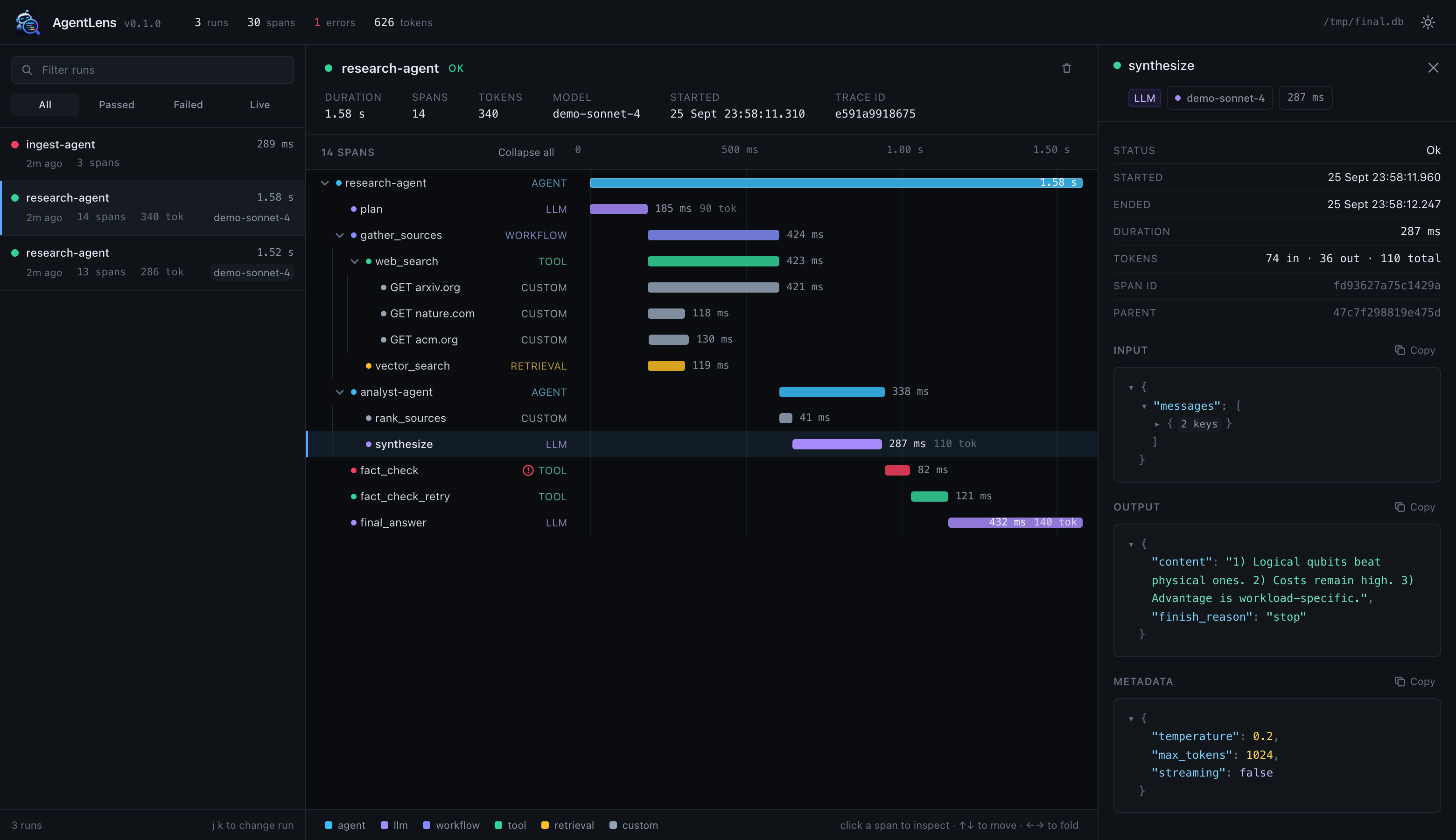
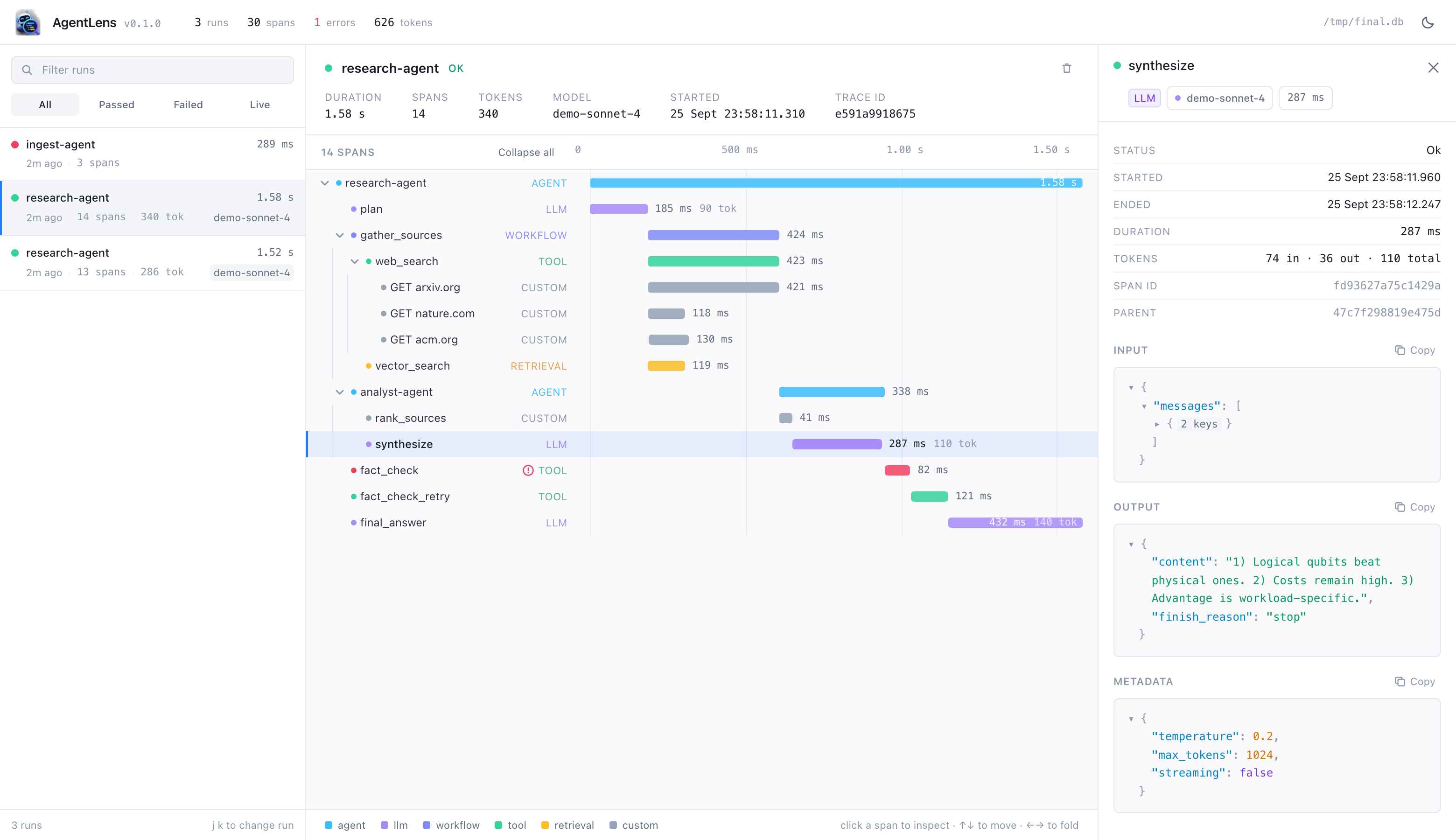
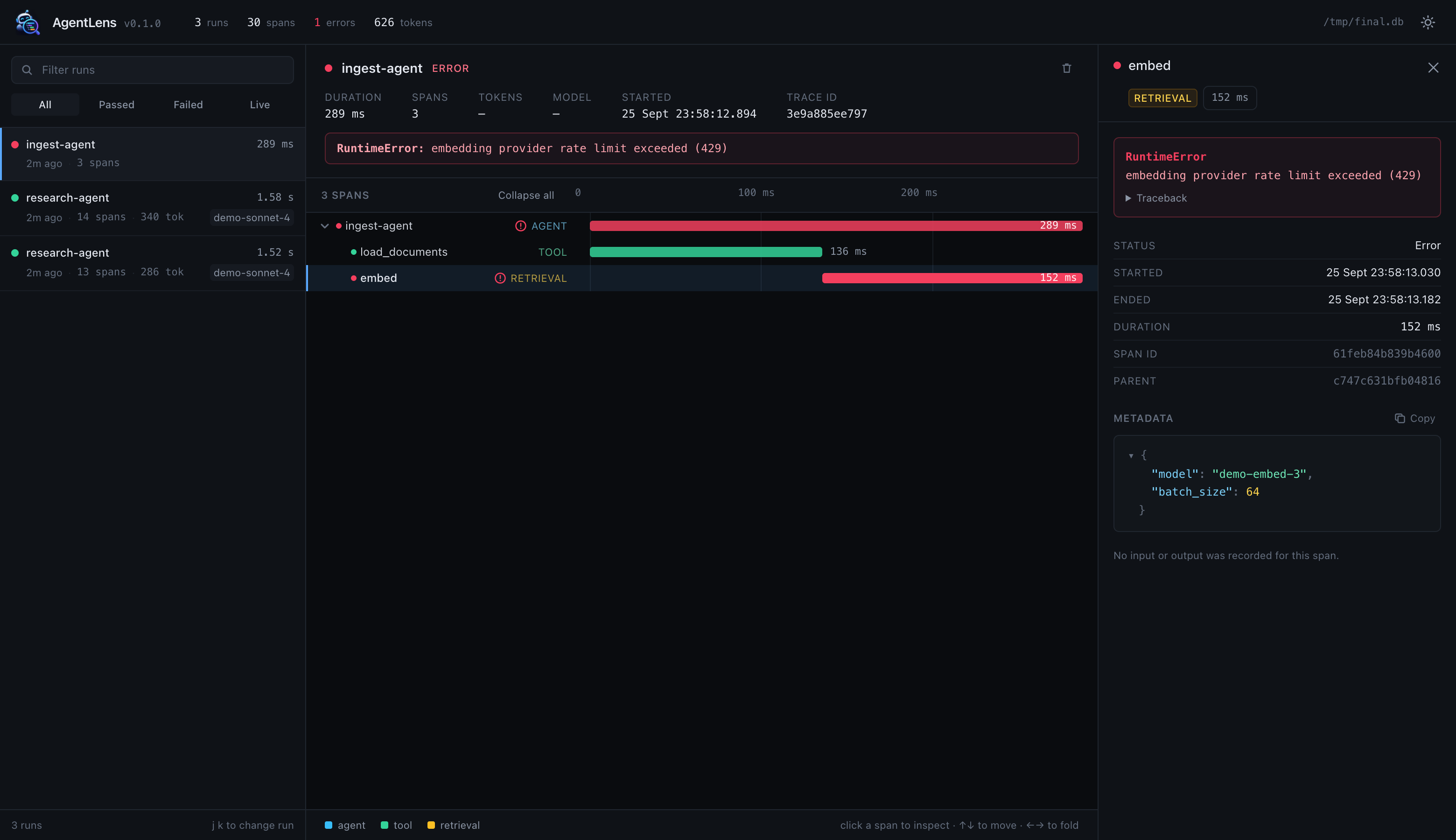
Light mode, and what a failure looks like
Why AgentLens?
An agent run is a tree: it plans, calls three tools (two of them concurrently),
hands off to a sub-agent, retries something that failed, and answers. When the
answer is wrong — or takes nine seconds — print() and a wall of logs will not
tell you which step went wrong.
AgentLens records that tree. Two lines of code, one local command, and you can see every step, how long it took, what went in and what came out.
- Local-first. Traces go to a SQLite file on your machine. Nothing is uploaded.
- Framework-agnostic. The core knows nothing about any agent framework.
- Tiny API. A decorator and a context manager. That's the whole thing.
- Sync and async. Correct nesting across
awaitpoints and concurrent tasks.
Quickstart
pip install agent-lense
The package installs as
agent-lenseand imports asagentlens— the shorter name was already taken on PyPI by an unrelated project.
Installing from a source checkout
git clone https://github.com/uoparaji/agentlens
cd agentlens
pip install -e .
The dashboard ships prebuilt, so you do not need Node to use AgentLens. (You only need it to change the dashboard — see CONTRIBUTING.md.)
Instrument a function:
from agentlens import trace, span


@trace
def research_agent(topic: str) -> str:
    with span("search", span_type="tool", metadata={"query": topic}) as s:
        results = search(topic)
        s.set_output(results)

    with span("summarize", span_type="llm") as s:
        s.set_model("claude-sonnet-4")
        answer = summarize(results)
        s.set_tokens(prompt_tokens=1_200, completion_tokens=180)
        s.set_output(answer)

    return answer


research_agent("quantum error correction")
Then look at it:
agentlens ui # opens http://localhost:4180
No agent of your own yet? Generate a real trace in one command:
agentlens demo && agentlens ui
What you can inspect
| Runs | status, start time, duration, span count, model, total tokens |
| Execution tree | the full nesting of agents, tools, LLM calls and retrievals |
| Timeline | a waterfall where slow steps and concurrent work are obvious |
| Spans | type, status, exact start/end, duration, input, output, metadata |
| LLM calls | model name and prompt / completion / total tokens |
| Errors | exception type, message and traceback, on the exact failing span |
| Live runs | in-flight runs appear immediately and update as they progress |
Example
One run, as AgentLens records it:
research-agent                          1.58 s   agent
├── plan                                185 ms   llm         90 tokens
├── gather_sources                      423 ms   workflow
│   ├── web_search                      422 ms   tool
│   │   ├── GET arxiv.org               420 ms   custom     ← the slow one
│   │   ├── GET nature.com               91 ms   custom
│   │   └── GET acm.org                 131 ms   custom
│   └── vector_search                   110 ms   retrieval
├── analyst-agent                       329 ms   agent      ← handoff
│   ├── rank_sources                     41 ms   custom
│   └── synthesize                      287 ms   llm       110 tokens
├── fact_check                           83 ms   tool      ✗ ConnectionError
├── fact_check_retry                    121 ms   tool
└── final_answer                        432 ms   llm       140 tokens
The three GET spans ran concurrently — in the dashboard their bars overlap,
and one of them is visibly three times longer than the others.
The API
There are three things to learn.
from agentlens import trace, span, current_span
@trace marks one agent run. It works bare, with arguments, on sync
functions, on coroutines, and as a context manager.
@trace  # name comes from the function
def agent(topic): ...


@trace("research-agent", metadata={"v": 2})
async def agent(topic): ...


with trace("research-agent") as run:
    run.set_metadata(user_id=42)
A @trace-decorated function called inside another trace records a nested
agent handoff rather than starting a second run.
span(...) marks one step inside a run. Spans nest automatically.
with span("search", span_type="tool", metadata={"query": q}) as s:
    s.set_input(q)
    s.set_output(results)
    s.set_model("claude-sonnet-4")
    s.set_tokens(prompt_tokens=1200, completion_tokens=180)
Built-in span types are agent, llm, tool, retrieval, workflow and
custom — but any string works, and the dashboard colours the known ones.
current_span() reaches the active span from anywhere, which is handy deep
inside a callback or a provider wrapper:
if s := agentlens.current_span():
    s.set_tokens(prompt_tokens=response.usage.input_tokens)
Exceptions are recorded automatically and re-raised untouched — AgentLens never changes your control flow.
Async
Tracing works identically with async def, and nesting stays correct under
concurrency because context is tracked with contextvars, not globals:
@trace
async def agent(question: str) -> str:
    async with span("gather", span_type="workflow"):
        pages = await asyncio.gather(fetch(a), fetch(b), fetch(c))
    return await summarize(pages)


# Two runs at once produce two clean, separate traces.
await asyncio.gather(agent("q1"), agent("q2"))
Integrations
| Framework | Status |
|---|---|
| Custom Python agents | ✅ Supported — the core is framework-agnostic |
| LlamaIndex | ✅ Supported — pip install 'agent-lense[llamaindex]' |
| CrewAI | Planned |
| LangChain / LangGraph | Planned |
| OpenAI Agents SDK | Planned |
LlamaIndex
from agentlens.integrations.llamaindex import instrument

instrument()

index.as_query_engine().query("what changed?")
Captured automatically: every LlamaIndex span (query engines, retrievers, LLMs, embeddings, agents, workflows) with its own parent/child structure preserved, a span type inferred from the class and method, call arguments and return values, the model name and token counts reported by LLM events, and exceptions. LlamaIndex work started inside one of your own traces nests underneath it; otherwise it becomes a run of its own.
An error inside the integration is logged once and never propagates into your application.
Local-first and private
Agent traces contain prompts, documents and user data. AgentLens treats them accordingly.
- Traces are written to
~/.agentlens/traces.db(override with$AGENTLENS_DB). - Nothing is sent anywhere. There is no account, no server, no telemetry.
- The dashboard binds to
127.0.0.1by default.
Turn payload capture off, or filter it:
import agentlens

agentlens.configure(
    capture_io=False,  # keep timings, drop payloads
    redactor=agentlens.redact_keys(["api_key", "email"]),
)
A redactor is any (field, value, span) -> value callable, applied to every
input, output and metadata value before anything is written to disk:
def redactor(field, value, span):
    return "<redacted>" if span.span_type == "llm" and field == "input" else value
Environment variables work too, which is useful in CI and shared machines:
AGENTLENS_DISABLED=1      # tracing becomes a no-op
AGENTLENS_CAPTURE_IO=0    # names, timings and tokens only
AGENTLENS_DB=./traces.db  # where to store traces
CLI
agentlens ui                 # launch the dashboard (--port, --host, --db, --no-open)
agentlens demo               # generate example traces  (--ui to open straight away)
agentlens list               # recent runs, in the terminal
agentlens clear              # delete every stored run
agentlens --version
How it works
your code ──▶ SDK (contextvars) ──▶ Tracer ──▶ Storage ──▶ SQLite file
                                                  ▲
 integrations ────────────────────────────────────┘
                                                  │
                                    FastAPI (read-only) ──▶ React dashboard
- SDK (
trace,span) — tracks the active trace/span withcontextvars. - Tracer — builds
SpanandTracemodels, times them, records errors. Storage failures are caught and logged; they never reach your agent. - Storage — an abstract interface with a SQLite implementation. The tracing API does not depend on SQLite, so another backend can be added later.
- Server — a small read-only FastAPI app that also serves the dashboard.
- Integrations — adapters that use only the public SDK.
Roadmap
- CrewAI, LangChain/LangGraph and OpenAI Agents SDK integrations
- Cost estimation from token counts and model pricing
- Trace comparison (diff two runs of the same agent)
- Search across span inputs and outputs
- Export to OpenTelemetry
Contributing
Contributions are very welcome — especially integrations, since each one is self-contained. See CONTRIBUTING.md; the setup is:
pip install -e ".[dev]"
pytest
License
MIT — see LICENSE.
1 maintainer

Metadata
1 maintainer
Release files for agent-lense 0.1.1
For a detailed explanation of source distributions (sdists) and built distributions (wheels), please see the package formats documentation.
Source distribution (sdist)
| File | Size | Uploaded | |
|---|---|---|---|
| agent_lense-0.1.1.tar.gz | 225.0 kB | Details |
Built distribution (wheel)
| File | Interpreter | ABI | Platform | Reset |
|---|---|---|---|---|
| agent_lense-0.1.1-py3-none-any.whl | Python 3 | none | any | Details |
Total release size: 443.5 kB
Release files / agent_lense-0.1.1.tar.gz
| Download URL | agent_lense-0.1.1.tar.gz |
|---|---|
| Size | 225.0 kB |
| Tags | Source |
|
SHA-256 checksum How to use checksums |
c4069f93b46f8c83c24f8e72bb7374e1d7b60b3bdb5422853eaaf00622901b42
|
|
BLAKE2b-256 checksum How to use checksums |
e9f677be241566b19a9f341da6f4097d99d7963580cd2225a89ccea9995de948
|
| Upload date | |
|
Uploaded using Trusted Publishing? What is trusted publishing? |
Yes |
| Uploaded via |
twine/7.0.0 CPython/3.13.14
|
Provenance
Provenance describes where a file came from. On PyPI, provenance is shared via attestations, which provide a verifiable record of the build or publishing details. View details, limitations and caveats.


PyPI Publish Attestation
PyPI verified that this artifact, at this checksum, originated from the publisher listed below.
Signed by GitHub Actions, verified by PyPI on Sep 26, 2026.
Transparency logRelease files / agent_lense-0.1.1-py3-none-any.whl
| Download URL | agent_lense-0.1.1-py3-none-any.whl |
|---|---|
| Size | 218.5 kB |
| Tags | Python 3 |
|
SHA-256 checksum How to use checksums |
19c06d340576922a502c8220d3d555b17e0b819ee36682bb308390aff528984b
|
|
BLAKE2b-256 checksum How to use checksums |
2c6355aaa8536bbf39e79c784354a332596f931c3feaac2e1787430982100ea8
|
| Upload date | |
|
Uploaded using Trusted Publishing? What is trusted publishing? |
Yes |
| Uploaded via |
twine/7.0.0 CPython/3.13.14
|
Provenance
Provenance describes where a file came from. On PyPI, provenance is shared via attestations, which provide a verifiable record of the build or publishing details. View details, limitations and caveats.
PyPI Publish Attestation
PyPI verified that this artifact, at this checksum, originated from the publisher listed below.
Signed by GitHub Actions, verified by PyPI on Sep 26, 2026.
Transparency log













