
Local runtime guard for coding agents with loop detection and explainable policy decisions.
Verified details
These details have been verified by PyPIProject links
GitHub Statistics
Maintainers

Project description
Agent Loop Guard





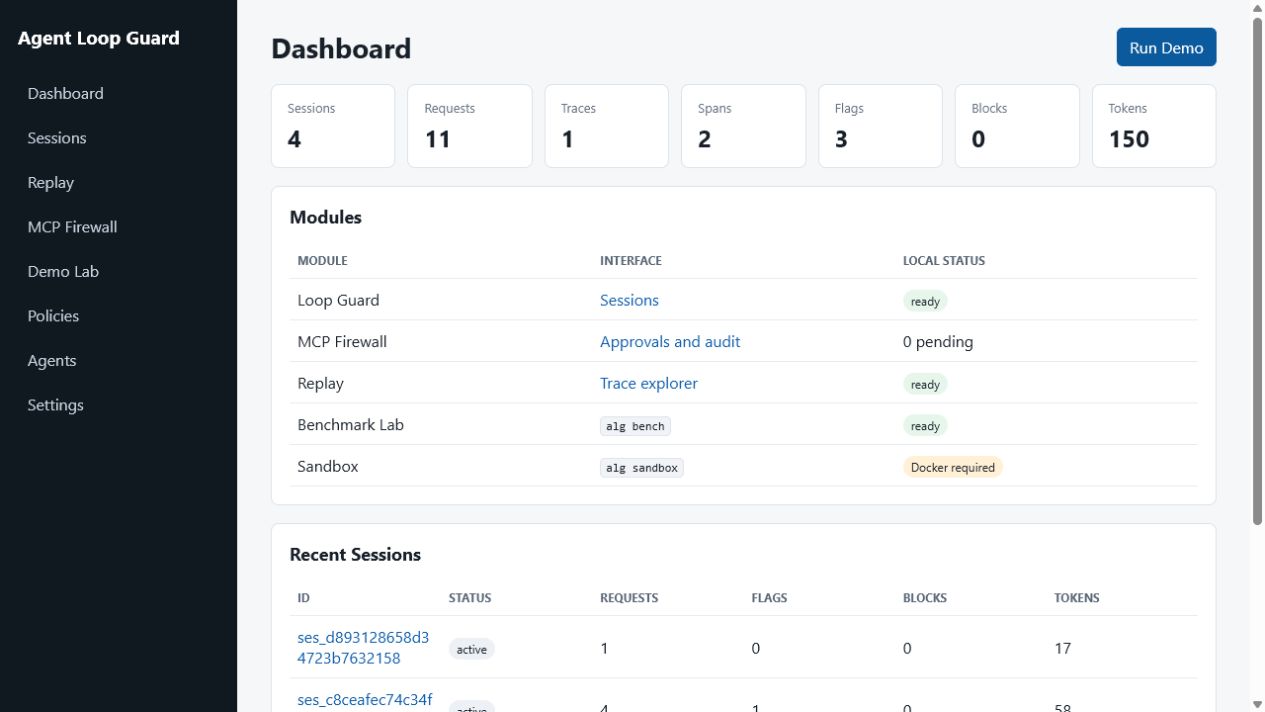
Agent Loop Guard is an Apache-2.0 local safety and observability toolkit for coding agents. It combines a loop guard, MCP permission firewall, session replay, deterministic benchmark lab, and a Docker-backed sandbox technical preview.
The default setup uses a local mock provider, so the demo works without an external API key.
Install
Install the current alpha directly from GitHub. The installed command is alg:
pipx install git+https://github.com/RIMUMURUDEV/agent-loop-guard.git
# or
uv tool install git+https://github.com/RIMUMURUDEV/agent-loop-guard.git
Run once without a permanent installation:
uvx --from git+https://github.com/RIMUMURUDEV/agent-loop-guard.git alg doctor
PyPI publication under the distribution name agent-loop-guard-runtime is planned after trusted publishing is configured. The project does not claim that an unpublished package is available.
For development from this checkout:
python -m venv .venv
.venv\Scripts\activate
pip install -e ".[dev]"
alg setup
alg doctor
alg guard run
Open http://127.0.0.1:8787, then run Demo Lab or:
alg demo exact-loop
Default local gateway key:
alg_demo_key
Proxy Endpoints
OpenAI-compatible:
POST /v1/responses
POST /v1/chat/completions
GET  /v1/models
Anthropic-compatible:
POST /v1/messages
POST /v1/messages/count_tokens
Connectivity probe:
HEAD /
Use Authorization: Bearer alg_demo_key or x-api-key: alg_demo_key.
alg setup creates a local YAML configuration and connection profiles for Codex, Claude Code, Cline, and OpenCode under .agent-loop-guard/profiles. Open http://127.0.0.1:8787, then run Demo Lab or alg demo exact-loop.
Modules
alg setup | doctor | status | open
alg guard run
alg mcp run | serve | validate-policy | test-server
alg replay import | export
alg bench dataset validate | run | compare | regression-check
alg sandbox create | exec | diff | apply | discard | export
- Guard detects exact request, tool, error, and sequence loops with Shadow and Enforce modes.
- MCP Firewall proxies stdio and Streamable HTTP, validates schemas, filters discovery, and applies YAML policies.
- Replay stores redacted traces, spans, events, costs, deterministic failure tags, and JSONL/OpenTelemetry exports.
- Benchmark Lab runs the bundled 30-task dataset through mock, HTTP, or CLI adapters and computes paired bootstrap confidence intervals.
- Sandbox Preview runs a copied workspace in a resource-limited Docker container and applies no changes before explicit approval.
Read the public documentation, Architecture, Threat Model, Benchmark Guide, and Sandbox Guide. A Russian overview is also available.
Guard Behavior
The guard implements:
- exact repeated request detection
- repeated tool call detection
- repeated upstream error detection
- repeated request sequence detection
- request and token limits
- project-level Shadow and Enforce modes
- manual session and agent pause/resume
- metadata-only logging by default
- JSON session export and aggregate CSV export
- trace runs, spans, events, replay UI, JSON export, and run comparison
Shadow Mode flags suspicious requests without blocking. Enforce Mode blocks requests when a blocking rule triggers.
MCP Firewall
Validate and run a stdio policy proxy:
alg mcp validate-policy app/mcp/presets/filesystem.yml
alg mcp run --policy app/mcp/presets/filesystem.yml -- your-mcp-server
For Streamable HTTP, configure a server under mcp.servers, run alg mcp serve, and connect to /mcp/{server_id}. Approval requests appear at /mcp. Raw arguments and secrets are redacted; audit records store hashes and policy metadata.
Session Replay
Every proxied model request now creates a replay trace automatically. Open:
http://127.0.0.1:8787/replay
The Replay view shows trace runs, model request spans, policy decision events, token totals, duration, source session links, JSON export, and a simple two-run comparison.
Replay ingest API:
POST /api/v1/traces
POST /api/v1/spans
POST /api/v1/events/batch
GET  /api/v1/runs
GET  /api/v1/runs/{trace_id}
GET  /api/v1/runs/{trace_id}/export?format=json|jsonl|otel
POST /api/v1/runs/import
POST /api/v1/runs/{trace_id}/pin
POST /api/v1/compare
CLI transfer:
alg replay export TRACE_ID --format jsonl --output trace.jsonl
alg replay import trace.jsonl
Benchmark Lab
alg bench dataset validate
alg bench run --adapter mock --candidate baseline --output baseline.jsonl
alg bench run --adapter mock --variant regressed --candidate candidate --output candidate.jsonl
alg bench regression-check baseline.jsonl candidate.jsonl
Parquet, DuckDB, and MLflow are optional:
pip install -e ".[bench]"
The regression command exits 0 for no regression, 1 for a statistically supported regression, and 2 when the result is inconclusive.
Sandbox Preview
Docker must be installed and running first. The original project is not mounted into the container; the sandbox uses a private copy.
alg sandbox create .
alg sandbox exec SANDBOX_ID -- pytest -q
alg sandbox diff SANDBOX_ID
alg sandbox apply SANDBOX_ID --path app/example.py
alg sandbox discard SANDBOX_ID
Network is disabled by default. This is a defense-in-depth development tool, not a certified security boundary; read the threat model before using it with untrusted code.
Minimal trace ingest example:
curl -X POST http://127.0.0.1:8787/api/v1/traces ^
  -H "Content-Type: application/json" ^
  -d "{\"trace_id\":\"demo_trace\",\"task_id\":\"demo\",\"spans\":[{\"name\":\"tool.call\",\"start_ns\":1,\"end_ns\":2000000}]}"
Agent Setup
Codex CLI:
model = "demo-model"
model_provider = "agent_loop_guard"

[model_providers.agent_loop_guard]
name = "Agent Loop Guard"
base_url = "http://127.0.0.1:8787/v1"
env_key = "ALG_GATEWAY_KEY"
Claude Code:
set ANTHROPIC_BASE_URL=http://127.0.0.1:8787
set ANTHROPIC_AUTH_TOKEN=alg_demo_key
OpenCode:
{
  "provider": {
    "alg": {
      "npm": "@ai-sdk/openai-compatible",
      "name": "Agent Loop Guard",
      "options": {
        "baseURL": "http://127.0.0.1:8787/v1",
        "apiKey": "{env:ALG_GATEWAY_KEY}"
      },
      "models": {
        "demo-model": {"name": "Guarded model"}
      }
    }
  },
  "model": "alg/demo-model"
}
Cline:
API Provider: OpenAI Compatible
Base URL: http://127.0.0.1:8787/v1
API Key: alg_demo_key
Model ID: demo-model
VS Code Extension
The VS Code extension starts the local guard daemon, shows health in the status bar, opens dashboard and replay views, and copies agent connection settings.
Install it from the VS Code Marketplace or from the command line:
code --install-extension RIMUMURUDEV.agent-loop-guard-vscode
Install the Python runtime first, then use Agent Loop Guard: Setup Current Workspace:
pipx install git+https://github.com/RIMUMURUDEV/agent-loop-guard.git
Run the extension from source:
cd extensions/vscode
npm run check
Then open this repository in VS Code, press F5, and run Agent Loop Guard: Start Guard in the Extension Development Host.
Package and install a local .vsix:
cd extensions/vscode
npm run package
code --install-extension agent-loop-guard-vscode-0.2.0.vsix
If alg is installed globally, keep agentLoopGuard.startMode as cli. To run from this checkout instead, set:
{
  "agentLoopGuard.startMode": "source",
  "agentLoopGuard.pythonPath": ".venv\\Scripts\\python.exe",
  "agentLoopGuard.sourcePath": "C:\\path\\to\\agent-loop-guard"
}
After the guard is running, point agents at:
OpenAI base URL: http://127.0.0.1:8787/v1
Anthropic base URL: http://127.0.0.1:8787
API key: alg_demo_key
See extensions/vscode/README.md for all commands and settings.
Configuration
Create a config file:
alg init --path agent-loop-guard.yml
Run with it:
alg run --config agent-loop-guard.yml
Environment overrides include:
ALG_HOSTALG_PORTALG_STORAGE_URLALG_MODEALG_PROVIDERALG_GATEWAY_KEYALG_OPENAI_BASE_URLOPENAI_API_KEYALG_ANTHROPIC_BASE_URLANTHROPIC_API_KEY
Development
pip install -e ".[dev,docs]"
pytest -q
ruff check .
mkdocs build --strict
Run the documentation site locally:
mkdocs serve
The full contributor workflow is in CONTRIBUTING.md. Security assumptions and private reporting guidance are in SECURITY.md.
Docker:
docker compose up --build
Project Status
This repository is developed as an educational open-source project. Guard, MCP, Replay, and Benchmark are locally testable. Sandbox is a technical preview and its real Docker smoke-test runs only on Linux CI; it could not be executed on the current Windows machine because Docker is not installed. The VS Code extension is publicly available; PyPI publication still requires trusted-publisher account setup.
There is no telemetry, paid cloud, subscription, SLA, or closed feature set. Optional donations may be added later, but they do not influence architecture or priorities.
Limits
The toolkit only sees traffic routed through it. It does not provide enterprise IAM, distributed leases, legal audit guarantees, a kernel-level isolation guarantee, or hidden chain-of-thought capture. Full Content Logging is off by default and should not be enabled for sensitive data unless the data owner understands the risk.
Project details
Verified details
These details have been verified by PyPIProject links
GitHub Statistics
Maintainers
Release history Release notifications | RSS feed


Download files
Download the file for your platform. If you're not sure which to choose, learn more about installing packages.
Source Distribution
Built Distribution
Filter files by name, interpreter, ABI, and platform.
If you're not sure about the file name format, learn more about wheel file names.
Copy a direct link to the current filters
File details
Details for the file agent_loop_guard_runtime-0.6.0a2.tar.gz.
File metadata
- Download URL: agent_loop_guard_runtime-0.6.0a2.tar.gz
- Upload date:
- Size: 77.9 kB
- Tags: Source
- Uploaded using Trusted Publishing? Yes
- Uploaded via: twine/6.1.0 CPython/3.13.12
File hashes
| Algorithm | Hash digest | |
|---|---|---|
| SHA256 |
594d8570718565728a5756c38a0170aa217360493d0dab12224321b15f703fbc
|
|
| MD5 |
8b09c779086b248feb85de8bc670906b
|
|
| BLAKE2b-256 |
01eef129a693ff0638efbaabf74aef0298e67bc3ccee8bd6da8cef2a1dff00e1
|
Provenance
The following attestation bundles were made for agent_loop_guard_runtime-0.6.0a2.tar.gz:
Publisher:
publish-pypi.yml on RIMUMURUDEV/agent-loop-guard
-
Statement:
-
Statement type:
https://in-toto.io/Statement/v1 -
Predicate type:
https://docs.pypi.org/attestations/publish/v1 -
Subject name:
agent_loop_guard_runtime-0.6.0a2.tar.gz -
Subject digest:
594d8570718565728a5756c38a0170aa217360493d0dab12224321b15f703fbc - Sigstore transparency entry: 2174253131
- Sigstore integration time:
-
Permalink:
RIMUMURUDEV/agent-loop-guard@d5e7a057555e7dcfe9e2e519dc8573f6b637f9b2 -
Branch / Tag:
refs/heads/main - Owner: https://github.com/RIMUMURUDEV
-
Access:
public
-
Token Issuer:
https://token.actions.githubusercontent.com -
Runner Environment:
github-hosted -
Publication workflow:
publish-pypi.yml@d5e7a057555e7dcfe9e2e519dc8573f6b637f9b2 -
Trigger Event:
workflow_dispatch
-
Statement type:
File details
Details for the file agent_loop_guard_runtime-0.6.0a2-py3-none-any.whl.
File metadata
- Download URL: agent_loop_guard_runtime-0.6.0a2-py3-none-any.whl
- Upload date:
- Size: 99.6 kB
- Tags: Python 3
- Uploaded using Trusted Publishing? Yes
- Uploaded via: twine/6.1.0 CPython/3.13.12
File hashes
| Algorithm | Hash digest | |
|---|---|---|
| SHA256 |
6aca1f1a8e2598809dd65ad8125c521bbda87bd7b36e774ba737ddf524e2ebae
|
|
| MD5 |
692808aad1c70392eb52f5ad8ca8f584
|
|
| BLAKE2b-256 |
8d3ea3dba7b577c154c821194fdab7666cd594afe290e4f6583fcc438df42bd5
|
Provenance
The following attestation bundles were made for agent_loop_guard_runtime-0.6.0a2-py3-none-any.whl:
Publisher:
publish-pypi.yml on RIMUMURUDEV/agent-loop-guard
-
Statement:
-
Statement type:
https://in-toto.io/Statement/v1 -
Predicate type:
https://docs.pypi.org/attestations/publish/v1 -
Subject name:
agent_loop_guard_runtime-0.6.0a2-py3-none-any.whl -
Subject digest:
6aca1f1a8e2598809dd65ad8125c521bbda87bd7b36e774ba737ddf524e2ebae - Sigstore transparency entry: 2174253161
- Sigstore integration time:
-
Permalink:
RIMUMURUDEV/agent-loop-guard@d5e7a057555e7dcfe9e2e519dc8573f6b637f9b2 -
Branch / Tag:
refs/heads/main - Owner: https://github.com/RIMUMURUDEV
-
Access:
public
-
Token Issuer:
https://token.actions.githubusercontent.com -
Runner Environment:
github-hosted -
Publication workflow:
publish-pypi.yml@d5e7a057555e7dcfe9e2e519dc8573f6b637f9b2 -
Trigger Event:
workflow_dispatch
-
Statement type:






