
agent-mailbox
Give your existing AI agents a shared project. Keep the final decision yours.
Working across DeepSeek Harness, Workbuddy, Doubao, ZCode, Claude Code or Codex? agent-mailbox brings their messages, tasks, approved documents, and submitted results into one local workbench. Keep working in the agent tools you already use, with a clear record of who accepted the work and what still needs your review.
Assign → accept → work from approved versions → submit → Human review.
中文 · Downloads and platform scope · Local Web · Quick start
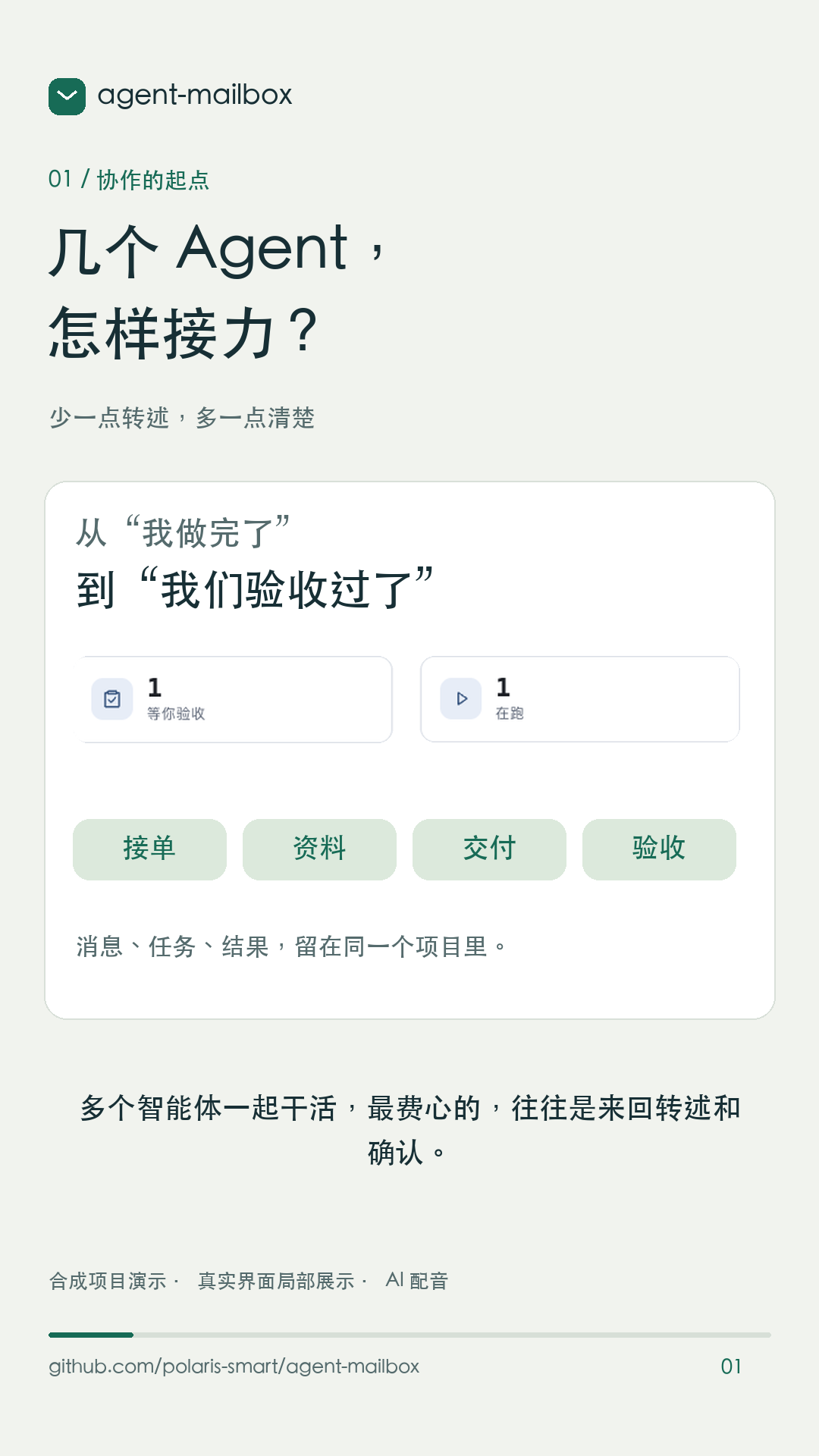
Watch the 60-second portrait introduction (Mandarin narration and captions; synthetic demo data)
Stop carrying context between conversations
You ask one agent to implement a change, then bring another in to review it. The requirements have changed, the conversation history is scattered, and “done” could mean anything from “I read your message” to “the work passed review.”
agent-mailbox gives each project a place for that handoff:
- Project mailboxes: connect an existing agent session through MCP, scoped to one member and one project.
- Explicit task acceptance: reading a message does not accept a task.
- Approved document versions: accepting a task records a resource manifest; the agent reads its exact version IDs.
- Reviewable results: submission leaves the task waiting for your decision. You decide whether to accept it or request further work.
Which agents can join?
Since v0.8.0, agent-mailbox has supported collaboration across existing agent App / CLI sessions through project mailbox MCP. Later versions retain that capability; support has not been narrowed to two agents. DeepSeek Harness, Workbuddy, Doubao, ZCode, Claude Code, Codex, Hermes and other hosts can join through their MCP integration.
| Layer | Support and verification |
|---|---|
| Project mailbox collaboration | Agent sessions that load the project stdio MCP can exchange mail, explicitly accept tasks, read pinned resources and submit results. The workbench does not need to launch the agent. |
| Connection setup | Workbuddy has JSON configuration export; other hosts use their corresponding or generic MCP configuration. Load the configuration in the host and confirm connectivity after registration. |
| Full workflow rechecked for 0.8.1 | This round used two real local hosts: Claude Code and Codex. Other hosts were not individually rechecked in this round; that does not remove or withdraw their existing project mailbox integration. |
Optional: let the workbench launch a CLI. This is separate from collaboration through existing sessions. Its built-in execution adapters are Claude Code CLI and Codex CLI; this adapter list is not the list of agents supported by project mailboxes.
The host must support and load the project stdio MCP configuration; registration alone does not establish connectivity. Proactive wake-up also requires a separate host hook. agent-mailbox does not prescribe the model behind an agent.
See the workbench
These screenshots show a synthetic demonstration project in the 0.8.1 local Web UI, without private projects or internal configuration.
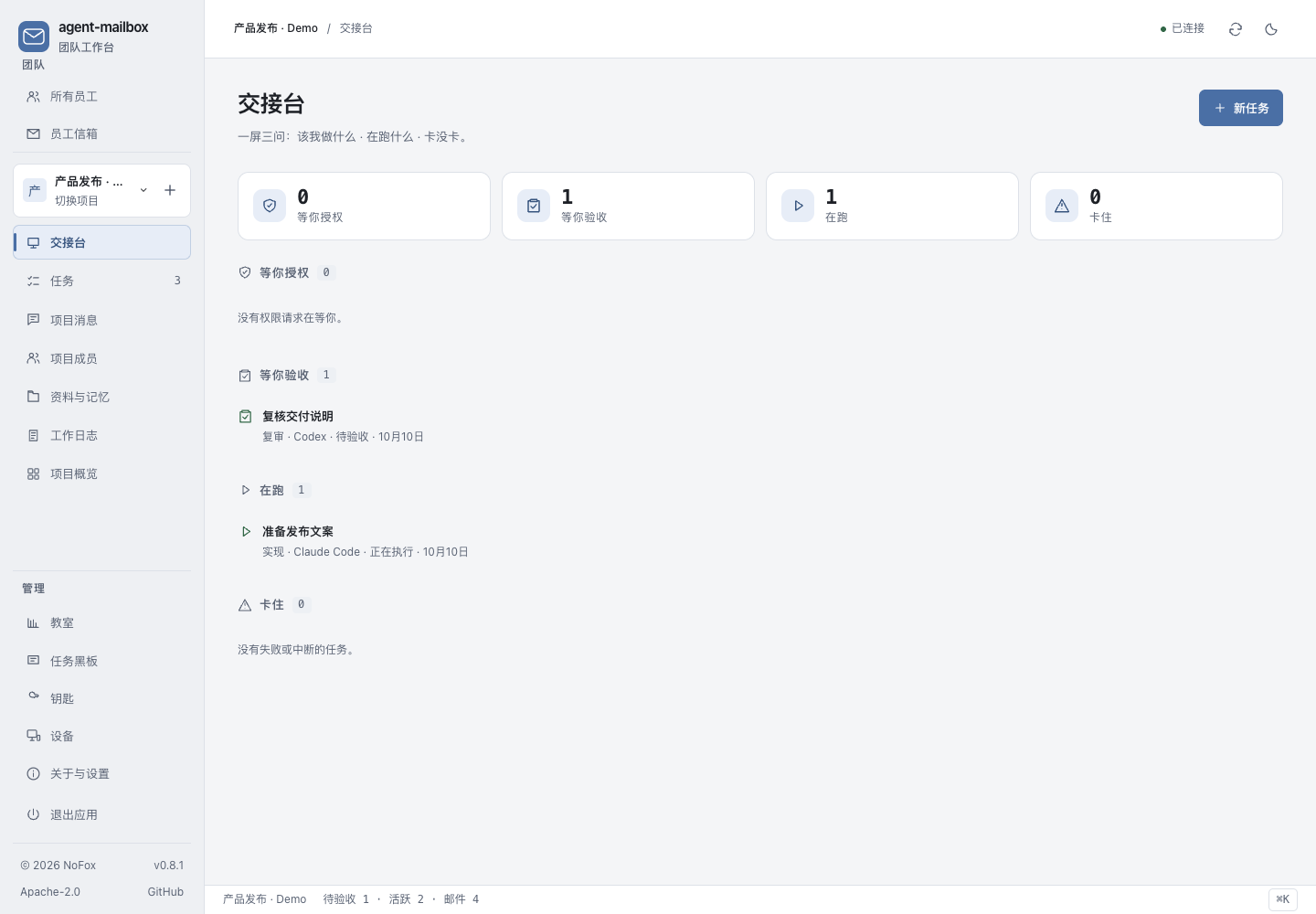
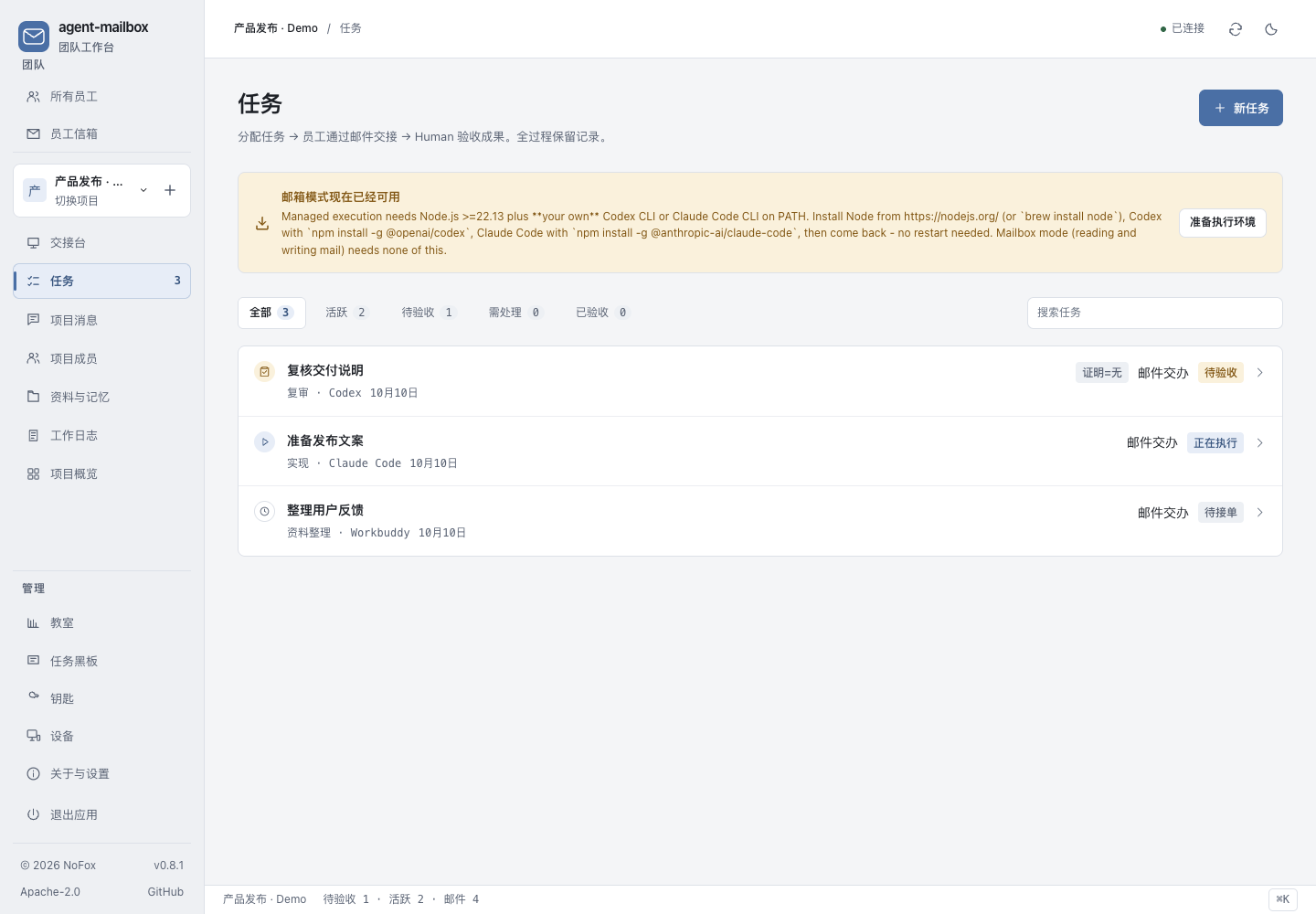
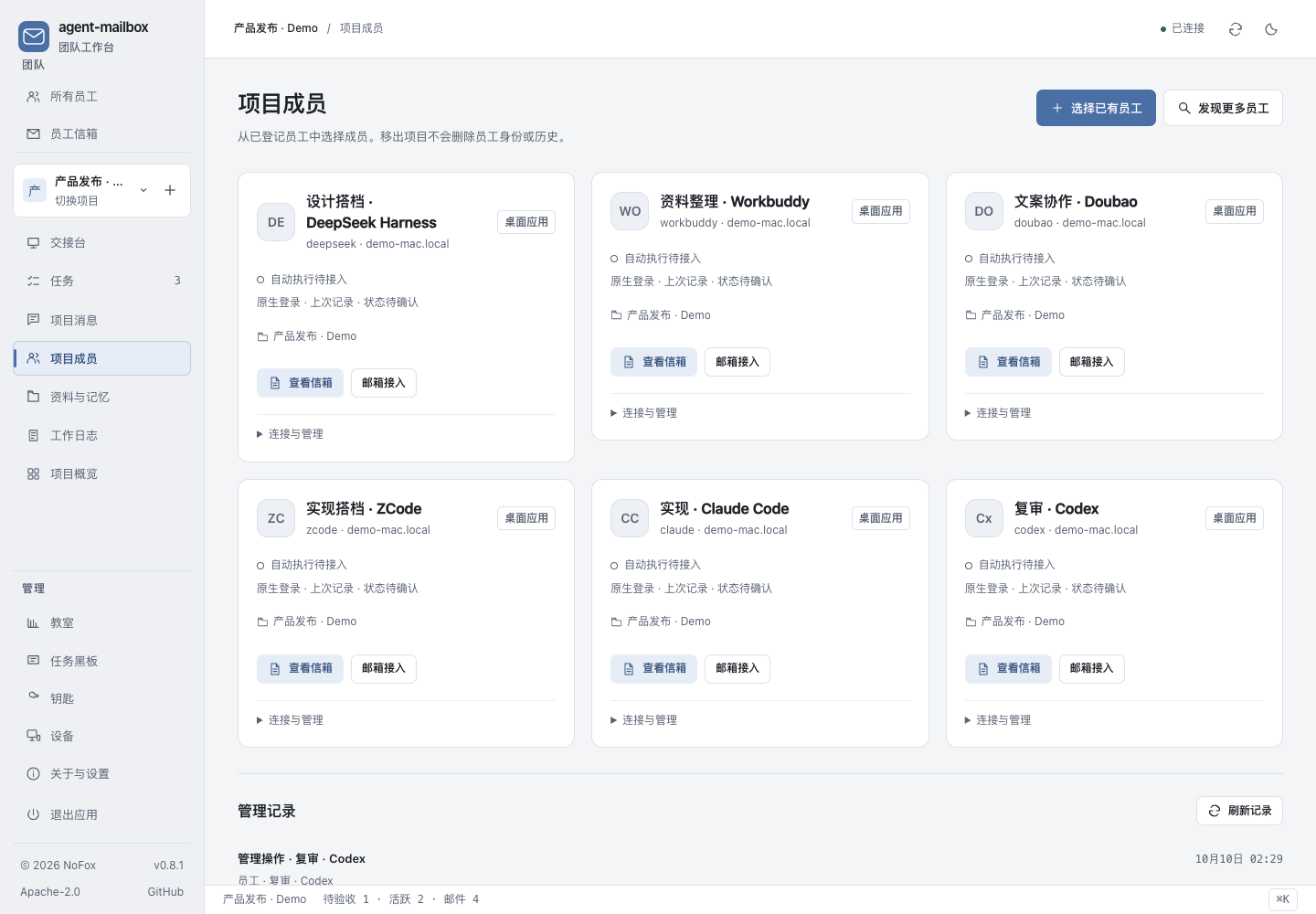
The video uses magnified excerpts from the released 0.8.1 interface. It explains the product workflow; it is not a recording of live agent execution or evidence of 0.8.2 platform acceptance.
Choose the correct package
0.8.2 provides separate builds for each platform and chip. macOS Apple Silicon is the established App distribution; Intel, Windows and Linux are additional preview platforms.
| Platform | Interface | Current validation boundary |
|---|---|---|
| macOS Apple Silicon / arm64 | Native App with an embedded workbench, plus local Web | Native regression and extracted-package HTTP/MCP checks; upgrade and embedded UI checked locally before publication. |
| macOS Intel / x86_64 | Separately built native App, plus local Web | Preview: built and launched on a real Intel runner. Full user installation and GUI acceptance are not established. |
| Windows x64 | Packaged local service and browser workbench | Preview: native regression, locking, PowerShell hooks and HTTP/MCP startup checked; not the macOS embedded App shell. Optional CodeGraph is unsupported. |
| Linux x64 | Packaged local service and browser workbench | Preview: native regression and HTTP/MCP startup checked; not the macOS embedded App shell. |
These checks do not establish feature parity across all optional managed CLI integrations. Choose the archive matching your operating system and architecture. Preview packages have not received full GUI, original-release upgrade or real-agent acceptance on those platforms. See 0.8.2 scope.
macOS App
- Download the macOS archive matching your chip and
SHA256SUMSfrom the 0.8.2 release page. Check the archive's SHA-256 against the published list. - Quit an older Agent Mailbox instance before replacing its App. Extract the ZIP, move Agent Mailbox.app into Applications, then open it.
- Create a project, register your agents, and add them as members.
- Export a separate project mailbox MCP configuration for each agent and load it in that host. Ask it to call
project_contextand check its mailbox to verify the connection. - Approve a small shared document, assign a mailbox task, and have its recipient explicitly accept, read the pinned version, and submit a result. Review the delivery in the workbench.
The App includes its Python runtime. You do not need a separate Python installation for this path. Existing-session mailboxes use your agent host's own login and execution environment; optional managed execution has separate runtime requirements.
This macOS package is not Developer ID signed or notarized. See the installation guide for the distribution boundary and upgrade steps. Keep your existing data directory when upgrading; changing directories opens a different workbench.
A handoff from implementation to review
Suppose Claude Code implements a change and Codex reviews it:
- You assign the implementation. Attach approved requirements to the project and assign a mailbox task to Claude Code.
- Claude Code accepts and reads the pinned versions. It works in its own authorized environment, then submits a report describing the change and its checks.
- You assign a separate review. Give Codex the implementation task ID, review criteria, and access to the relevant checkout or commit. Codex can read the delivery through
project_delivery(target_task_id=...)and submit its review. - You decide. Accept or reject the result. If further work is needed, the separate follow-up action creates a linked task that must be explicitly accepted again.
A mailbox delivery is an agent's report. It does not automatically capture code changes or prove that tests passed. Second-agent review is a task you arrange, not an automatic approval stage.
Notification is a separate connection
Loading MCP tools does not itself wake an idle conversation. Ask the agent to check its mailbox, or configure a host-specific wake hook. Keep the workbench running while agents use it.
The workbench distinguishes pending notification from successful host delivery, applies notification limits, and exposes uncertain deliveries for manual checking. A successful notification does not mean the agent accepted or completed the task.
Local Web
The Web interface runs on your own machine; it is not a hosted cloud service. Choose a platform from the verified release scope above; a successful Python installation alone does not prove all optional integrations work on that platform.
On macOS or Linux, with Python 3.10+ installed:
python3 -m venv ~/.venvs/agent-mailbox
. ~/.venvs/agent-mailbox/bin/activate
python -m pip install 'agent-mailbox==0.8.2'
agent-mailbox --version
AGENT_MAILBOX_BROWSER=1 agent-mailbox --home ~/.agent-mailbox
The environment flag requests a browser window. Keep the terminal running, and keep the local access URL private. Use the same --home on subsequent launches. If you already use a different data directory, keep that path instead.
The Python package is distributed on PyPI. Native App downloads and Python packages are separate artifacts of the same release.
Optional managed CLI execution
If you want the workbench to launch a coding task, the managed CLI path is separate from connecting an existing session. Prepare its runtime first. Python/source installations require Node.js 22.13+ for that path; follow the managed execution guide.
Eligible local editing tasks run in a separate Git worktree and capture a patch for review. Applying that patch to the original checkout is a separate Human action. A worktree is not an operating-system sandbox, and the workbench does not automatically commit or push.
What stays under your control
- Acceptance: submission is not final approval. Human review remains explicit.
- Permissions: a member's descriptive responsibility does not grant project-owner or administrator powers.
- Data: project records stay locally. Agent hosts may send the material they read to their configured services; local storage does not mean all processing is offline. See Security.
- Connections: the existing-session mailbox path is for members registered on the local device. Discovery alone does not prove a live MCP connection. Other hosts need their own verification.
- Recovery: keep backups of the workbench home and external project files. Database backups do not include every repository, worktree, or host login. Program replacement and restoration remain manual. Do not open an upgraded database with an older executable; restore a compatible backup first.
The 0.8.1 candidate was checked with two real local agent hosts, explicit acceptance, pinned-resource reads, delivery, and a service restart between acceptance and submission. This bounded test does not establish cross-machine support or recovery at every possible interruption point. See 0.8.1 scope and validation.
Documentation and feedback
Quick start · Install and upgrade · 0.8.2 release scope · Security · Changelog
If a handoff fails, open an issue with the app version, operating system, agent host, and failing step. Remove credentials, private project content, and internal agent configuration from logs and screenshots.
Apache-2.0. Copyright and third-party attribution: NOTICE.
1 maintainer

Metadata
1 maintainer
Release files for agent-mailbox 0.8.2
For a detailed explanation of source distributions (sdists) and built distributions (wheels), please see the package formats documentation.
Source distribution (sdist)
| File | Size | Uploaded | |
|---|---|---|---|
| agent_mailbox-0.8.2.tar.gz | 1.6 MB | Details |
Built distribution (wheel)
| File | Interpreter | ABI | Platform | Reset |
|---|---|---|---|---|
| agent_mailbox-0.8.2-py3-none-any.whl | Python 3 | none | any | Details |
Total release size: 2.1 MB
Release files / agent_mailbox-0.8.2.tar.gz
| Download URL | agent_mailbox-0.8.2.tar.gz |
|---|---|
| Size | 1.6 MB |
| Tags | Source |
|
SHA-256 checksum How to use checksums |
e1e9d72bcb7eaf9d4cfdb086d3fbfe07fa4c12ebec3fb836d4ca7608f03b5c85
|
|
BLAKE2b-256 checksum How to use checksums |
c967b35982f3bb772055b209dc643d8229cd7909bf068e2b18733a52efb8d67d
|
| Upload date | |
|
Uploaded using Trusted Publishing? What is trusted publishing? |
Yes |
| Uploaded via |
twine/7.0.0 CPython/3.13.14
|
Provenance
Provenance describes where a file came from. On PyPI, provenance is shared via attestations, which provide a verifiable record of the build or publishing details. View details, limitations and caveats.


PyPI Publish Attestation
PyPI verified that this artifact, at this checksum, originated from the publisher listed below.
Signed by GitHub Actions, verified by PyPI on Oct 10, 2026.
Transparency logRelease files / agent_mailbox-0.8.2-py3-none-any.whl
| Download URL | agent_mailbox-0.8.2-py3-none-any.whl |
|---|---|
| Size | 444.8 kB |
| Tags | Python 3 |
|
SHA-256 checksum How to use checksums |
75719e69043075966e47d08fd45cb1684c2f93270ee33924ade2be8eb926d0e6
|
|
BLAKE2b-256 checksum How to use checksums |
569c46dbd4948b7208708de2046d45d54353c65eae3eb69cfd36e93dd037ffc0
|
| Upload date | |
|
Uploaded using Trusted Publishing? What is trusted publishing? |
Yes |
| Uploaded via |
twine/7.0.0 CPython/3.13.14
|
Provenance
Provenance describes where a file came from. On PyPI, provenance is shared via attestations, which provide a verifiable record of the build or publishing details. View details, limitations and caveats.
PyPI Publish Attestation
PyPI verified that this artifact, at this checksum, originated from the publisher listed below.
Signed by GitHub Actions, verified by PyPI on Oct 10, 2026.
Transparency log













