
🚀 Nexus
Elite Autonomous AI Coding Agent Powered by LangGraph & MCP











An intelligent, autonomous CLI coding agent with multi-modal operational modes, persistent context management, and seamless MCP server integration for production workflows.
Features • Architecture • Installation • Usage • Documentation
📋 Overview
Nexus is a cutting-edge autonomous AI coding agent built on top of LangChain and LangGraph, designed to revolutionize how developers interact with code. It combines the power of large language models with a sophisticated state machine architecture, enabling it to plan, execute, and iterate on complex coding tasks with minimal human intervention.
Unlike traditional AI assistants, Nexus features:
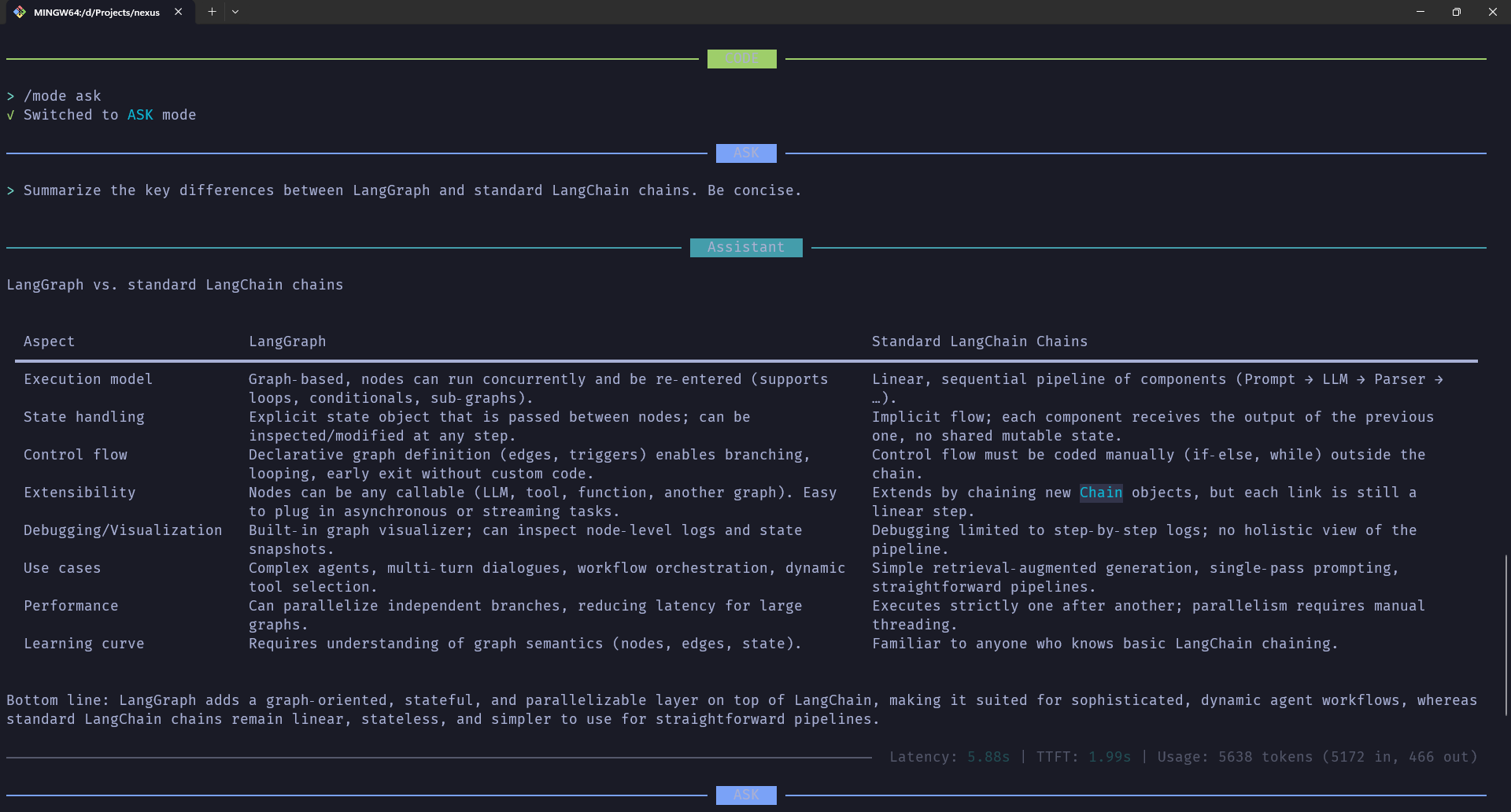
- Multi-Modal Operations - Switch between CODE, ARCHITECT, and ASK modes for different workflows
- Persistent Context - SQLite-based checkpoint system maintains conversation history across sessions
- MCP Integration - Dynamically loads and manages Model Context Protocol servers for extended capabilities
- Human-in-the-Loop Safety - Optional approval workflow for critical operations
- Real-Time Metrics - Track token usage, latency, and performance across conversations
- Intelligent Tool Execution - Validates and restricts tool usage based on operational mode
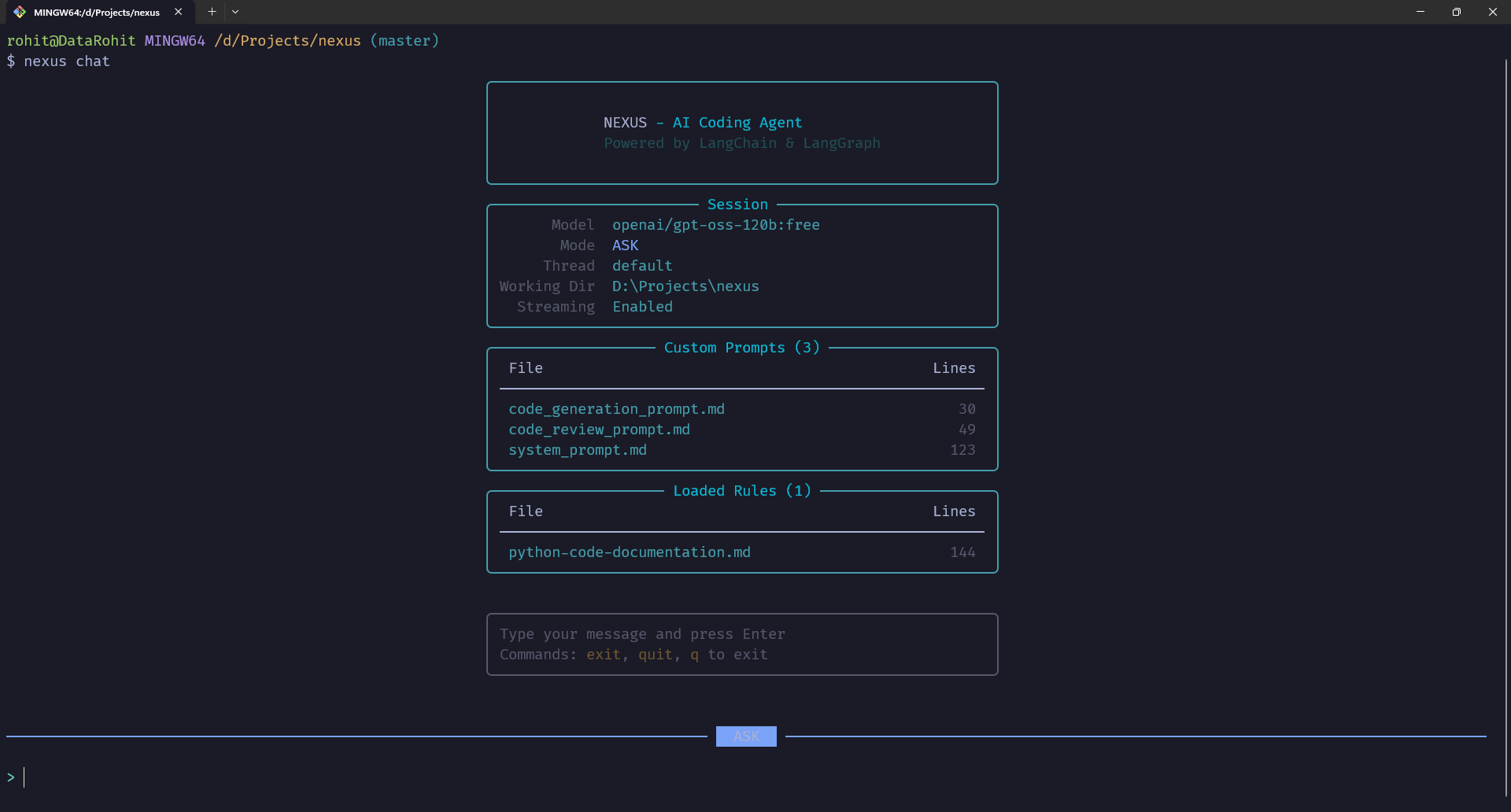
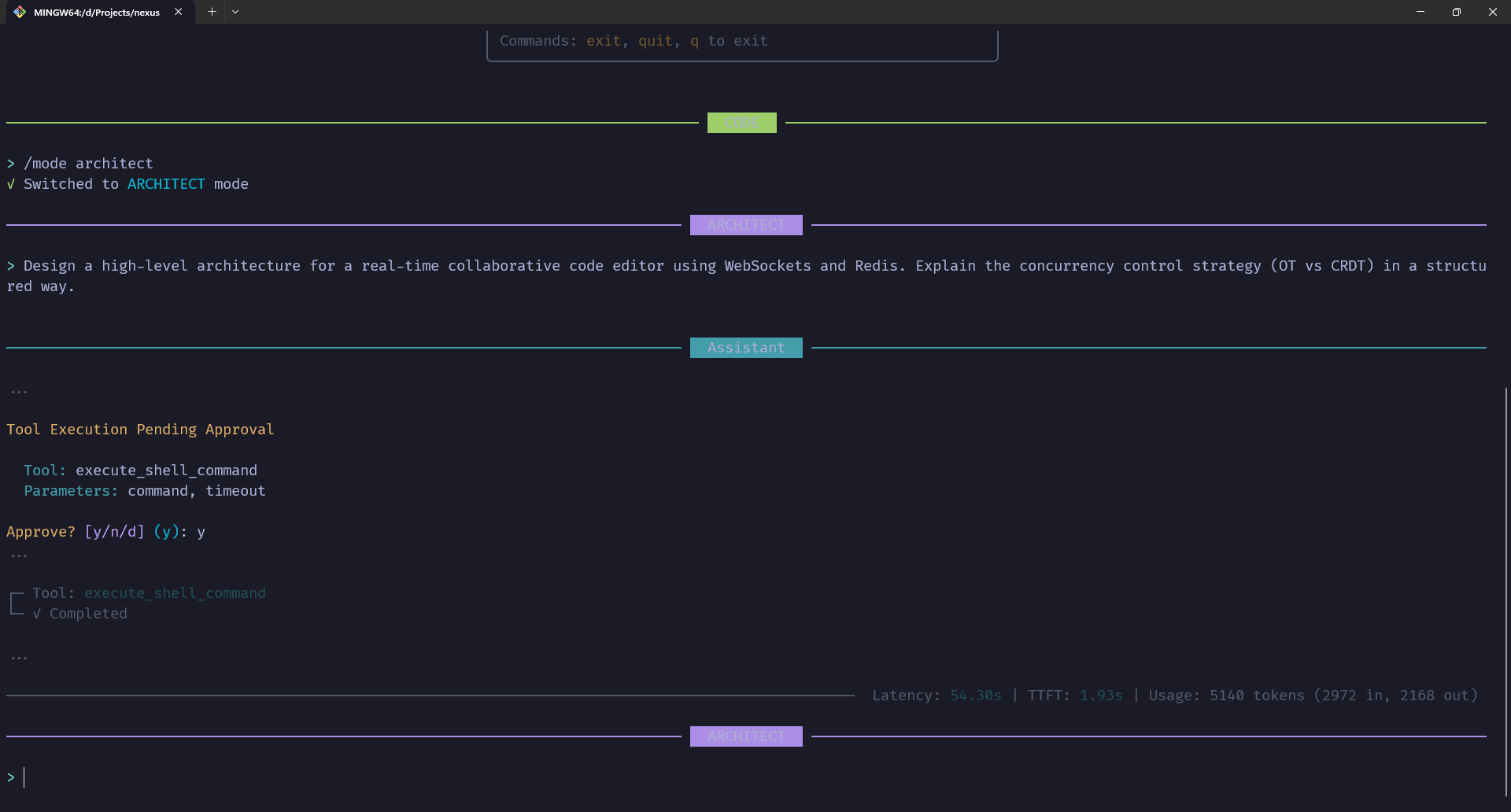
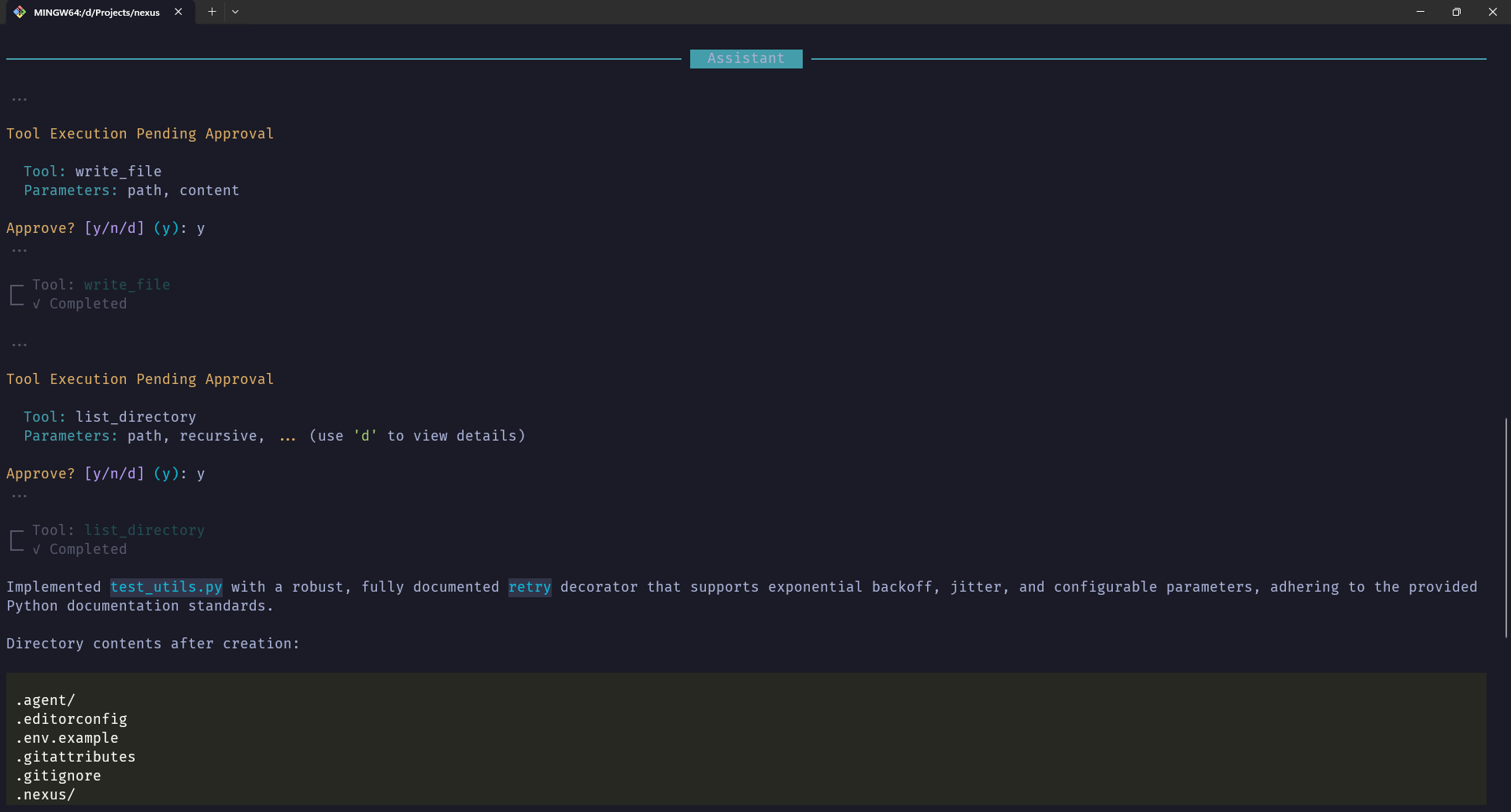
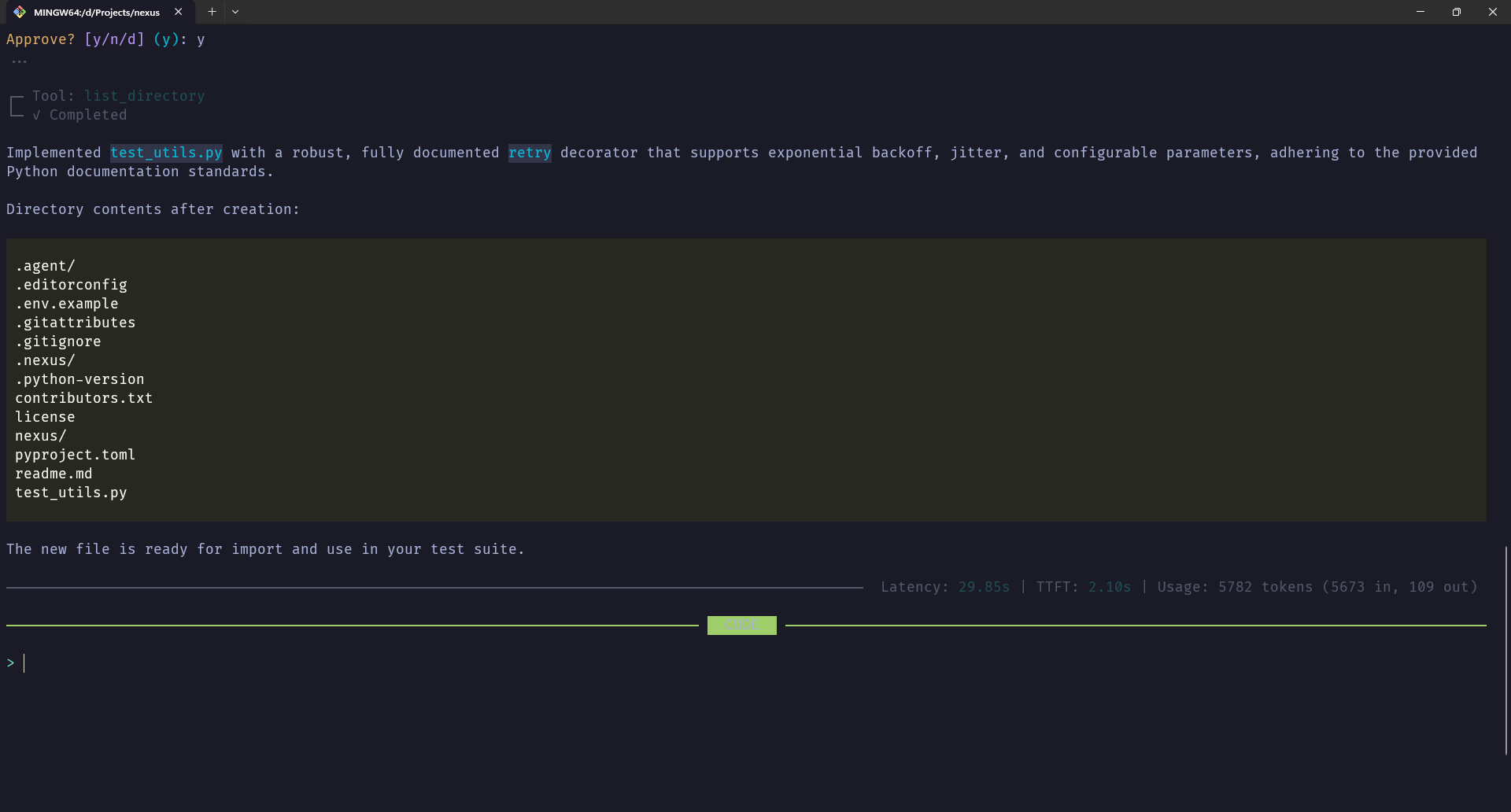
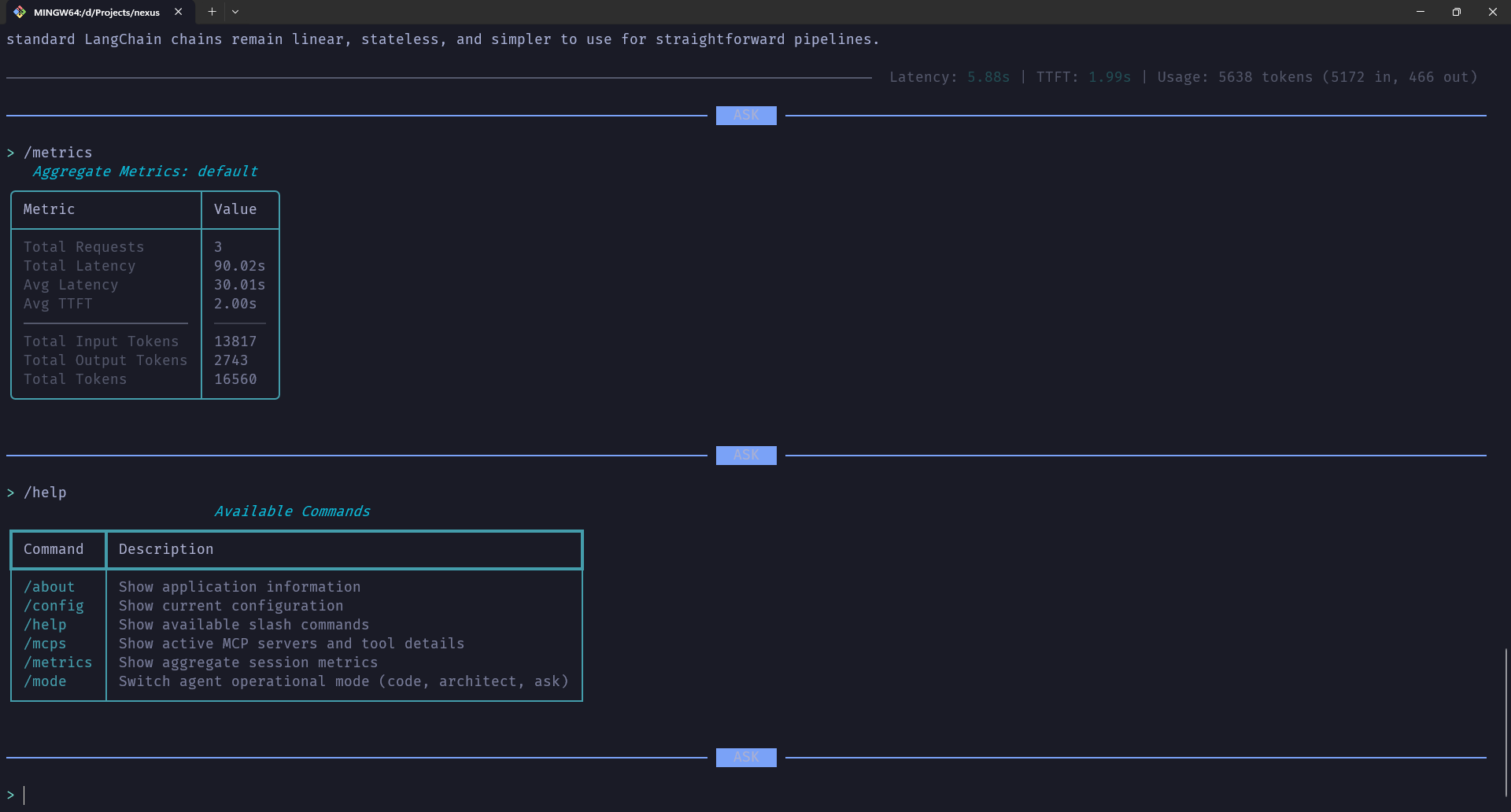
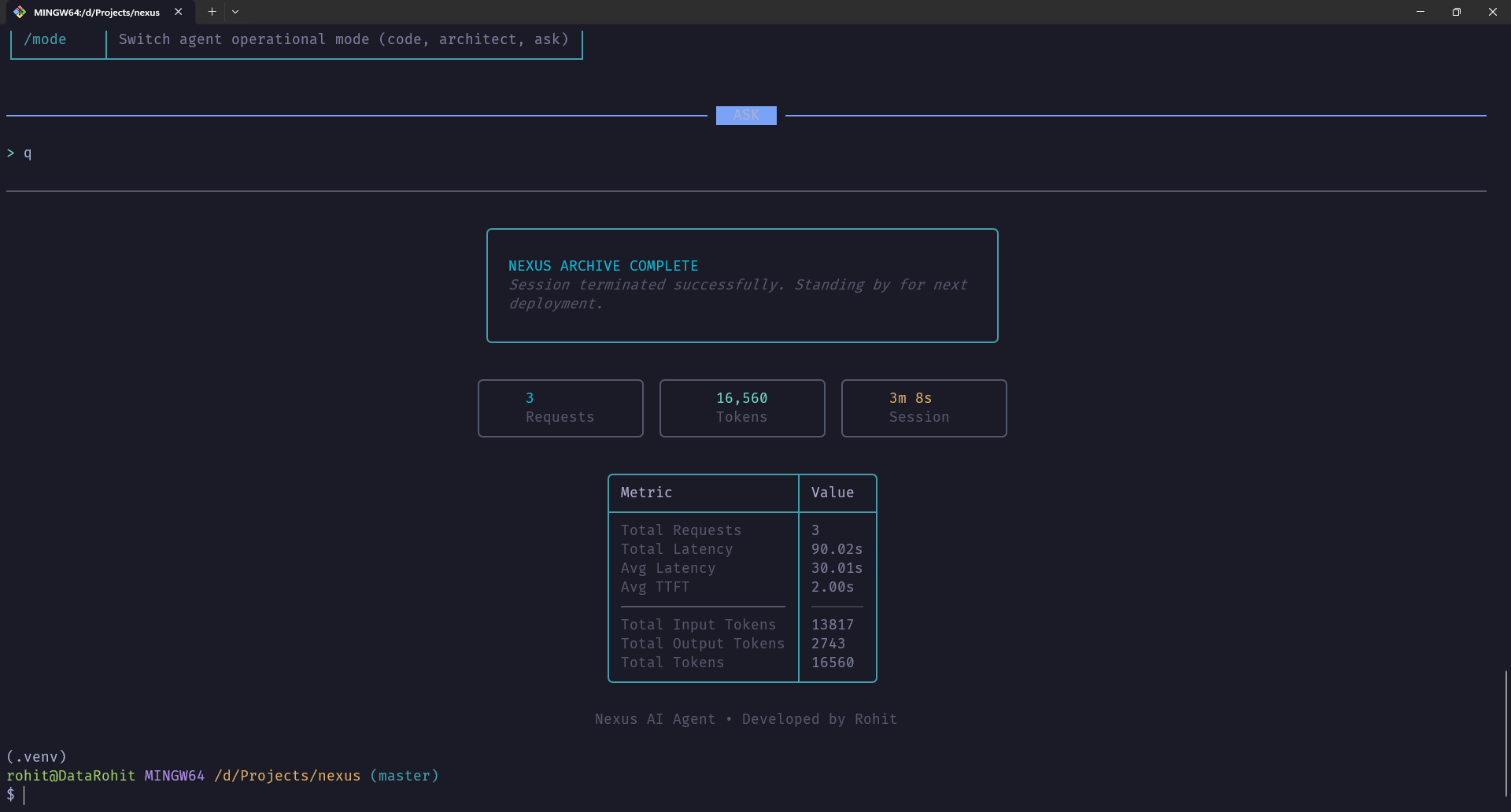
⚡ Project Showcase ⚡
 |
 |
 |
 |
 |
 |
✨ Key Features
🧠 Intelligent Agent System
- LangGraph State Machine - Sophisticated workflow management with conditional edges
- Dynamic Tool Loading - Automatic discovery and integration of MCP server tools
- Context-Aware Reasoning - Maintains conversation history with intelligent truncation
- Iterative Planning - Multi-step task execution with configurable iteration limits
- Mode-Based Restrictions - Tool validation and filtering based on current operational mode
🎯 Multi-Modal Operations
CODE Mode (Full Access)
- Complete file system operations (read, write, list)
- Shell command execution with safety checks
- Unrestricted access to all tools and MCP servers
- Ideal for implementation, debugging, and system tasks
ARCHITECT Mode (Planning-Focused)
- File operations restricted to
.nexus/plans/directory - Enforces architectural planning separation
- Prevents accidental modification of implementation code
- Perfect for design documents, technical specs, and planning
ASK Mode (Research & Conversation)
- Read-only access to information
- No file modifications or shell execution
- MCP tools only for research and analysis
- Optimal for learning, documentation, and Q&A
🛠️ Built-In Tools
File Operations
read_file- Read file contents with optional line range selectionwrite_file- Create or overwrite files with automatic directory creationlist_directory- List directory contents respecting.gitignorepatterns
Shell Integration
execute_shell_command- Safe shell command execution with output capture- Dangerous pattern detection (prevents destructive operations)
- Configurable timeout and output truncation
- Automatic blocking of redirections and pipes
Mode Management
switch_mode- Dynamic mode switching between CODE, ARCHITECT, ASK- Automatic validation and approval workflows
- Context-aware mode suggestions
Web Search
web_search- DuckDuckGo integration for real-time information- Configurable result limits
- Formatted output with titles, URLs, and descriptions
🔌 Model Context Protocol (MCP) Support
- Dynamic Server Loading - Automatically discovers and connects to MCP servers
- Multi-Server Management - Supports multiple concurrent MCP connections
- Tool Auto-Discovery - Dynamically loads tools from connected servers
- Context Injection - Automatically adds MCP tool descriptions to agent prompts
- Flexible Configuration - JSON-based server configuration in
.nexus/mcp_config.json
📊 Performance & Monitoring
- Real-Time Metrics Tracking - Request latency, TTFT (Time to First Token), token usage
- SQLite Metrics Storage - Persistent performance data across sessions
- Session Summaries - Aggregated statistics per thread
- Detailed Breakdowns - Input/output tokens, cached tokens, total usage
- Rich Visualizations - Beautiful terminal tables and panels via Rich library
🎨 Premium CLI Experience
- Rich Terminal UI - Beautiful, responsive interface with Rich library
- Streaming Responses - Real-time token streaming with live updates
- Markdown Rendering - Full markdown support in agent responses
- Syntax Highlighting - Code blocks with syntax highlighting
- Interactive Prompts - User-friendly approval workflows
- Progress Indicators - Spinners and status messages for long operations
🔒 Safety & Validation
- Human-in-the-Loop - Optional approval for all tool executions
- Mode Validation - Tools validated against current operational mode
- Path Restrictions - Enforced directory boundaries in ARCHITECT mode
- Dangerous Pattern Detection - Blocks potentially harmful shell commands
- Gitignore Compliance - Respects
.gitignorepatterns in file operations
💾 Persistence & Configuration
- Checkpoint System - SQLite-based conversation state persistence
- Thread Management - Multiple concurrent conversation threads
- Custom Prompts - Load custom system prompts from
.nexus/prompts/ - Rule Enforcement - User-defined rules from
.nexus/rules/ - Environment-Based Config - Pydantic settings with
.envsupport
🏛️ Architecture
graph TB
    subgraph "User Interface Layer"
        CLI[Rich CLI Interface]
        Commands[Slash Commands]
        Prompts[Interactive Prompts]
    end

    subgraph "Agent Core"
        Graph[LangGraph State Machine]
        Agent[Agent Node]
        Tools[Tool Node]
        Approval[Approval Node]
    end

    subgraph "Tool System"
        FileOps[File Operations]
        Shell[Shell Commands]
        Mode[Mode Management]
        Search[Web Search]
        MCP[MCP Tools]
    end

    subgraph "State Management"
        Checkpoint[SQLite Checkpointer]
        State[Agent State]
        Metrics[Metrics Manager]
    end

    subgraph "Configuration"
        Settings[Pydantic Settings]
        Prompts_Config[Custom Prompts]
        Rules[User Rules]
        MCP_Config[MCP Servers]
    end

    subgraph "External Services"
        OpenAI[OpenAI API]
        MCP_Servers[MCP Servers]
        LangSmith[LangSmith Tracing]
    end

    CLI --> Graph
    Commands --> Agent
    Prompts --> Approval

    Graph --> Agent
    Graph --> Tools
    Graph --> Approval

    Agent --> FileOps
    Agent --> Shell
    Agent --> Mode
    Agent --> Search
    Agent --> MCP

    Agent --> State
    State --> Checkpoint
    Agent --> Metrics

    Settings --> Agent
    Prompts_Config --> Agent
    Rules --> Agent
    MCP_Config --> MCP

    Agent --> OpenAI
    MCP --> MCP_Servers
    Agent --> LangSmith
Agent Workflow
- User Input - Message entered via Rich CLI interface
- State Initialization - Current state loaded from SQLite checkpoint
- Agent Reasoning - LLM processes input with system prompt and context
- Tool Selection - Agent decides which tools to use based on mode
- Approval (Optional) - Human approval requested for tool execution
- Tool Execution - Selected tools execute with validated parameters
- State Update - New state persisted to checkpoint database
- Response Streaming - Real-time token streaming back to user
- Metrics Logging - Performance data saved to metrics database
🔧 Tech Stack
Core Framework
| Technology | Version | Purpose |
|---|---|---|
| Python | 3.14.2 | Programming Language |
| LangChain | 1.2.7 | LLM Framework |
| LangChain Core | 1.2.7 | Core Abstractions |
| LangChain Community | 0.4.1 | Community Components |
| LangChain OpenAI | 1.1.7 | OpenAI Integration |
| LangGraph | 1.0.7 | State Machine Framework |
| LangGraph Checkpoint | 4.0.0 | Checkpointing System |
| LangGraph Checkpoint SQLite | 3.0.3 | SQLite Checkpointer |
| LangGraph Prebuilt | 1.0.7 | Pre-built Nodes |
AI & ML
| Technology | Version | Purpose |
|---|---|---|
| OpenAI | 2.15.0 | LLM Provider |
| Tiktoken | 0.12.0 | Token Counting |
| LangSmith | 0.6.4 | Tracing & Debugging |
Data & Storage
| Technology | Version | Purpose |
|---|---|---|
| SQLAlchemy | 2.0.46 | ORM & Database Toolkit |
| aiosqlite | 0.22.1 | Async SQLite Driver |
| Pydantic | 2.12.5 | Data Validation |
| Pydantic Core | 2.41.5 | Core Validation Logic |
| Pydantic Settings | 2.12.0 | Settings Management |
CLI & UI
| Technology | Version | Purpose |
|---|---|---|
| Rich | 14.2.0 | Terminal UI Framework |
| Rich Click | 1.9.6 | Click Integration for Rich |
| Structlog | 25.5.0 | Structured Logging |
MCP & Tools
| Technology | Version | Purpose |
|---|---|---|
| MCP | 1.25.0 | Model Context Protocol |
| LangChain MCP Adapters | 0.2.1 | MCP-LangChain Bridge |
| DDGS | 9.10.0 | DuckDuckGo Search |
| Pathspec | 1.0.3 | Gitignore Pattern Matching |
Utilities
| Technology | Version | Purpose |
|---|---|---|
| HTTPX | 0.28.1 | HTTP Client |
| Requests | 2.32.5 | HTTP Requests |
| Python-dotenv | 1.2.1 | Environment Variables |
| PyYAML | 6.0.3 | YAML Parser |
| Tenacity | 9.1.2 | Retry Logic |
| Orjson | 3.11.5 | Fast JSON |
Development Tools
| Technology | Version | Purpose |
|---|---|---|
| Ruff | 0.14.14 | Linting & Formatting |
| isort | 7.0.0 | Import Sorting |
| Setuptools | 80.10.1+ | Package Building |
| Wheel | 0.46.3+ | Package Distribution |
📁 Project Structure
nexus/
├── .agent/                       # Agent configuration (legacy)│
│   └── rules/                    # Coding standards
├── .github/                      # GitHub workflows
│   └── workflows/               # CI/CD pipelines
│       ├── ci.yml              # Continuous integration
│       ├── publish.yml         # PyPI publishing
│       └── release.yml         # Release automation
├── .nexus/                       # Nexus configuration directory
│   ├── db/                      # SQLite databases
│   │   ├── checkpoints.db      # Conversation checkpoints
│   │   └── metrics.db          # Performance metrics
│   ├── plans/                   # Architectural plans (ARCHITECT mode)
│   ├── prompts/                 # Custom system prompts
│   │   ├── system_prompt.md    # Main system prompt
│   │   ├── code_review_prompt.md
│   │   └── code_generation_prompt.md
│   ├── rules/                   # User-defined rules
│   │   └── python-code-documentation.md
│   └── mcp_config.json         # MCP server configuration
├── nexus/                        # Main package directory
│   ├── agent/                   # Agent core components
│   │   ├── approval.py         # Human approval workflow
│   │   ├── graph.py            # LangGraph state machine
│   │   ├── metrics.py          # Performance tracking
│   │   ├── modes.py            # Operational mode definitions
│   │   ├── nodes.py            # Graph node implementations
│   │   ├── restrictions.py     # Mode-based validation
│   │   ├── state.py            # Agent state definition
│   │   └── __init__.py
│   ├── commands/                # Slash command system
│   │   ├── base.py             # Command protocol
│   │   ├── core.py             # Core command implementations
│   │   ├── registry.py         # Command registry
│   │   └── __init__.py
│   ├── config/                  # Configuration management
│   │   ├── prompts.py          # Prompt loading & management
│   │   ├── settings.py         # Pydantic settings
│   │   └── __init__.py
│   ├── tools/                   # LangChain tool implementations
│   │   ├── file_ops.py         # File operation tools
│   │   ├── mcp.py              # MCP server management
│   │   ├── mode.py             # Mode switching tool
│   │   ├── shell.py            # Shell command tool
│   │   ├── web_search.py       # Web search tool
│   │   └── __init__.py
│   ├── ui/                      # User interface
│   │   ├── cli.py              # Rich-Click CLI
│   │   ├── console.py          # Rich console instance
│   │   └── __init__.py
│   ├── main.py                  # Application entry point
│   └── __init__.py
├── .editorconfig                # Editor configuration
├── .env.example                 # Example environment file
├── .gitattributes               # Git attributes
├── .gitignore                   # Git ignore patterns
├── .python-version              # Python version file
├── contributors.txt             # Project contributors
├── license                      # MIT License
├── pyproject.toml              # Project configuration & dependencies
└── readme.md                    # This file
🚀 Installation
Prerequisites
- Python 3.14.2+ - Latest Python release
- Git - Version control system
- OpenAI API Key - For LLM access
- pip or uv - Package manager
Quick Install
# Clone the repository
git clone https://github.com/DataRohit/nexus.git
cd nexus

# Create virtual environment
python -m venv .venv

# Activate virtual environment
# On Windows (Git Bash)
source .venv/Scripts/activate

# On Windows (PowerShell)
.venv\Scripts\Activate.ps1

# On Linux/macOS
source .venv/bin/activate

# Install dependencies
pip install -e .

# Or with uv (faster)
uv pip install -e .
Configuration
- Create Environment File
cp .env.example .env
- Edit
.envwith your settings
# OpenAI Configuration
OPENAI_API_KEY=sk-your-api-key-here
OPENAI_BASE_URL=https://api.openai.com/v1

# Model Settings
MODEL_NAME=gpt-4o
TEMPERATURE=0.7
MAX_TOKENS=4096

# LangSmith (Optional)
LANGSMITH_API_KEY=ls__your-api-key-here
LANGSMITH_PROJECT=nexus
LANGSMITH_TRACING=true

# Agent Settings
MAX_ITERATIONS=50
APPROVAL_REQUIRED=true

# Logging
LOG_LEVEL=INFO
DEBUG=false
- Configure MCP Servers (Optional)
Create .nexus/mcp_config.json:
{
  "mcpServers": {
    "context7": {
      "command": "npx",
      "args": ["-y", "@upstash/context7-mcp"]
    },
    "filesystem": {
      "command": "npx",
      "args": ["-y", "@modelcontextprotocol/server-filesystem", "/path/to/allowed/directory"]
    }
  }
}
Verify Installation
# Check installation
nexus --version

# Run help
nexus --help

# Start interactive chat
nexus chat
💻 Usage
Basic Commands
# Start interactive chat session
nexus chat

# Chat with specific thread ID
nexus chat --thread-id my-project

# Disable streaming (static responses)
nexus chat --no-stream

# Send single message
nexus chat "Explain async/await in Python"

# View conversation history
nexus history --thread-id default --limit 10

# Show configuration
nexus config
Interactive Chat
$ nexus chat

╭──────────────────────────────────────────────────╮
│ NEXUS - AI Coding Agent                          │
│ Powered by LangChain & LangGraph                 │
╰──────────────────────────────────────────────────╯

╭───────────── Session ──────────────╮
│ Model      : gpt-4o                │
│ Mode       : CODE                  │
│ Thread     : default               │
│ Working Dir: /path/to/project      │
│ Streaming  : Enabled               │
╰────────────────────────────────────╯

> How do I create a FastAPI endpoint?

[Agent responds with streaming output...]

> exit
Slash Commands
Available in interactive chat:
/help       # Show all available commands
/about      # Application information
/config     # Show current configuration
/mcps       # Display active MCP servers and tools
/mode       # Switch operational mode
/metrics    # Show session performance metrics
Mode Switching
# Switch to ARCHITECT mode for planning
/mode architect

# Switch to CODE mode for implementation
/mode code

# Switch to ASK mode for conversation
/mode ask

# Check current mode
/mode
Example Workflows
Planning & Implementation
# Start in ARCHITECT mode
/mode architect

> Create a design document for a REST API with authentication

[Agent creates planning documents in .nexus/plans/]

# Switch to CODE mode
/mode code

> Implement the authentication system we designed

[Agent creates implementation files]
Code Review
> Review this Python code for security issues:
> [paste code]

[Agent provides detailed code review]
Web Research
/mode ask

> What are the latest best practices for React Server Components?

[Agent searches web and provides summary]
📖 Documentation
Agent Modes
CODE Mode
- Purpose: Full development and implementation
- Permissions: All tools enabled
- Use Cases:
- Writing and modifying code
- Running shell commands
- File system operations
- Debugging and testing
ARCHITECT Mode
- Purpose: High-level planning and design
- Permissions: File writes restricted to
.nexus/plans/ - Use Cases:
- Creating design documents
- Writing technical specifications
- Planning system architecture
- Documenting requirements
ASK Mode
- Purpose: Research and conversation
- Permissions: No file modifications or shell execution
- Use Cases:
- Learning and Q&A
- Code explanation
- Best practice discussions
- Web research via MCP tools
Configuration Files
.env - Environment Variables
# Required
OPENAI_API_KEY=sk-...              # OpenAI API key

# Optional
OPENAI_BASE_URL=...                # Custom API endpoint
MODEL_NAME=gpt-4o                  # LLM model to use
TEMPERATURE=0.7                    # Response randomness (0-2)
MAX_TOKENS=4096                    # Max response length
MAX_ITERATIONS=50                  # Max agent iterations
APPROVAL_REQUIRED=true             # Require approval for tools
LOG_LEVEL=INFO                     # Logging verbosity
DEBUG=false                        # Debug mode
.nexus/mcp_config.json - MCP Servers
{
  "mcpServers": {
    "server-name": {
      "command": "command-to-run",
      "args": ["arg1", "arg2"],
      "env": {
        "ENV_VAR": "value"
      }
    }
  }
}
Custom Prompts
Place markdown files in .nexus/prompts/:
system_prompt.md- Main system instructionscode_review_prompt.md- Code review guidelinescode_generation_prompt.md- Code generation rules
User Rules
Place markdown files in .nexus/rules/:
- Rules are automatically loaded and enforced
- Example:
python-code-documentation.md
Tool Documentation
File Operations
# Read file
read_file(path="example.py")
read_file(path="example.py", start_line=10, end_line=20)

# Write file
write_file(path="new_file.py", content="print('Hello')")
write_file(path="nested/file.py", content="...", create_dirs=True)

# List directory
list_directory(path="src")
list_directory(path=".", recursive=True)
list_directory(path=".", include_gitignored=True)
Shell Commands
# Execute command
execute_shell_command(command="ls -la")
execute_shell_command(command="python script.py", timeout=60)

# Safety features
# - Blocks dangerous patterns (rm -rf /, etc.)
# - No support for redirections or pipes
# - Output truncation for large outputs
Web Search
# Search web
web_search(query="Python async best practices")
web_search(query="FastAPI tutorial", max_results=10)
MCP Integration
Supported MCP Servers
Nexus works with any MCP-compliant server:
@upstash/context7-mcp- Documentation retrieval@modelcontextprotocol/server-filesystem- File system access@modelcontextprotocol/server-postgres- PostgreSQL integration@modelcontextprotocol/server-brave-search- Web search@modelcontextprotocol/server-github- GitHub integration- Any custom MCP server
Adding MCP Servers
- Install MCP server globally or locally
- Add to
.nexus/mcp_config.json - Restart Nexus
- Tools automatically available
Example:
{
  "mcpServers": {
    "github": {
      "command": "npx",
      "args": ["-y", "@modelcontextprotocol/server-github"],
      "env": {
        "GITHUB_TOKEN": "ghp_your_token_here"
      }
    }
  }
}
Performance Metrics
Metrics are automatically tracked and stored in .nexus/db/metrics.db:
- Request Latency - Total time for request
- Time to First Token (TTFT) - Time until streaming starts
- Token Usage - Input, output, and cached tokens
- Session Summaries - Aggregated statistics per thread
View metrics:
/metrics
Sample output:
┌──────────────────────────────────────────┐
│         Session Metrics Summary          │
├──────────────────────┬───────────────────┤
│ Metric               │ Value             │
├──────────────────────┼───────────────────┤
│ Total Requests       │ 15                │
│ Total Latency        │ 45.32s            │
│ Avg Latency          │ 3.02s             │
│ Avg TTFT             │ 0.85s             │
├──────────────────────┼───────────────────┤
│ Total Input Tokens   │ 12,450            │
│ Total Output Tokens  │ 8,320             │
│ Total Tokens         │ 20,770            │
│ Total Cached Tokens  │ 3,200             │
└──────────────────────┴───────────────────┘
🛡️ Safety & Security
Built-in Safety Features
- Human Approval - Optional approval for all tool executions
- Dangerous Pattern Detection - Blocks harmful shell commands
- Path Restrictions - Enforces directory boundaries in ARCHITECT mode
- Gitignore Compliance - Respects
.gitignorein file operations - Output Truncation - Prevents context overflow from large outputs
- Mode Validation - Tools validated against current operational mode
Dangerous Patterns Blocked
rm -rf /                    # Recursive deletion from root
:(){ :|:& };:               # Fork bomb
mkfs                        # Filesystem creation
Approval Workflow
When APPROVAL_REQUIRED=true:
Tool Execution Pending Approval

  Tool: write_file
  Action: Write content to file
  Parameters: path, content, ... (use 'd' to view details)

Approve? [y/n/d] (y):
Options:
y- Approve and executen- Deny and canceld- View detailed parameters
Mode Restrictions
| Tool | CODE | ARCHITECT | ASK |
|---|---|---|---|
| read_file | ✅ | ✅ | ✅ |
| write_file | ✅ | ⚠️ (plans only) | ❌ |
| list_directory | ✅ | ✅ | ✅ |
| execute_shell_command | ✅ | ✅ | ❌ |
| web_search | ✅ | ✅ | ✅ |
| switch_mode | ✅ | ✅ | ✅ |
| MCP Tools | ✅ | ✅ | ✅ |
🔧 Advanced Configuration
Custom System Prompts
Create .nexus/prompts/system_prompt.md:
# Custom System Identity

You are a specialized Python expert...

## Core Capabilities
- Expert in async/await patterns
- Django and FastAPI specialist
...
Coding Standards
Create .nexus/rules/coding-standards.md:
# Coding Standards

## Python
- Use type hints everywhere
- Maximum line length: 120 characters
- Follow PEP 8 with Ruff
...
Environment Variables
Full list of supported environment variables:
# OpenAI
OPENAI_API_KEY              # Required: OpenAI API key
OPENAI_BASE_URL             # Optional: Custom API endpoint

# Model
MODEL_NAME                  # Default: gpt-4o
TEMPERATURE                 # Default: 0.7 (range: 0-2)
MAX_TOKENS                  # Default: 4096

# LangSmith
LANGSMITH_API_KEY           # Optional: LangSmith API key
LANGSMITH_PROJECT           # Default: nexus
LANGSMITH_TRACING           # Default: true

# Agent
MAX_ITERATIONS              # Default: 50
APPROVAL_REQUIRED           # Default: true

# Logging
LOG_LEVEL                   # Default: INFO
DEBUG                       # Default: false
SQLite Databases
Nexus uses two SQLite databases:
-
.nexus/db/checkpoints.db- Stores conversation checkpoints
- Enables resuming conversations
- Thread-based organization
-
.nexus/db/metrics.db- Performance metrics
- Token usage tracking
- Request latency data
📊 Performance Optimization
Token Management
- Context Truncation - Messages automatically truncated to prevent overflow
- Message History Limit - Only last 15 messages sent to LLM
- Output Limits - Shell and file outputs capped to 2048 characters
- Cached Tokens - Automatic prompt caching for repeated contexts
Streaming Performance
- Time to First Token (TTFT) - Optimized for quick initial response
- Progressive Rendering - Real-time token display with Rich
- Live Updates - 10 refreshes per second for smooth streaming
Database Optimization
- Async SQLite - Non-blocking database operations
- Connection Pooling - Efficient connection management
- Index Optimization - Fast checkpoint and metrics queries
🐛 Troubleshooting
Common Issues
MCP Server Not Loading
# Check if command exists
which npx  # or npm, uv, python

# Test MCP server manually
npx -y @upstash/context7-mcp

# Check logs
DEBUG=true nexus chat
OpenAI API Errors
# Verify API key
echo $OPENAI_API_KEY

# Test with different model
MODEL_NAME=gpt-3.5-turbo nexus chat

# Check base URL
OPENAI_BASE_URL=https://api.openai.com/v1 nexus chat
Permission Issues
# ARCHITECT mode file write failure
# Solution: Ensure path is in .nexus/plans/

# ASK mode tool restriction
# Solution: Switch to CODE mode (/mode code)
Database Locked
# Multiple instances running
# Solution: Close other Nexus instances

# Corrupted database
rm .nexus/db/checkpoints.db
# Restart Nexus (creates new database)
Debug Mode
Enable detailed logging:
DEBUG=true LOG_LEVEL=DEBUG nexus chat
Reset Configuration
# Delete all configuration
rm -rf .nexus/

# Restart to regenerate defaults
nexus chat
🧪 Development
Setup Development Environment
# Clone repository
git clone https://github.com/DataRohit/nexus.git
cd nexus

# Install with dev dependencies
pip install -e ".[dev]"

# Or with uv
uv pip install -e ".[dev]"
Development Tools
# Lint code
ruff check .

# Format code
ruff format .

# Fix auto-fixable issues
ruff check --fix .

# Sort imports
isort .
Code Quality Standards
- Linting: Ruff with strict ruleset
- Formatting: Ruff formatter (120 char line length)
- Type Hints: Required for all functions
- Docstrings: Google-style docstrings mandatory
- Import Sorting: isort with profile "black"
Project Guidelines
- Type Everything - Use type hints everywhere
- Document Everything - Docstrings for all public APIs
- No Bare Exceptions - Always specify exception types
- Use Protocol - For interfaces and abstract classes
- Async First - Prefer async/await for I/O operations
🤝 Contributing
Contributions are welcome! Please follow these guidelines:
How to Contribute
- Fork the Repository
git fork https://github.com/DataRohit/nexus.git
- Create Feature Branch
git checkout -b feature/amazing-feature
- Follow Code Standards
- Run Ruff linting
- Add type hints
- Write docstrings
- Update documentation
- Commit Changes
git commit -m "Add amazing feature"
- Push to Branch
git push origin feature/amazing-feature
- Open Pull Request
- Describe changes clearly
- Link related issues
- Add screenshots if UI changes
Development Workflow
# 1. Setup development environment
pip install -e ".[dev]"

# 2. Make changes
# ... edit files ...

# 3. Run linting
ruff check .
ruff format .

# 4. Test changes
nexus chat

# 5. Commit
git add .
git commit -m "Description of changes"

# 6. Push and create PR
git push origin feature-branch
Code Review Process
All contributions will be reviewed for:
- Code quality and style
- Type safety
- Documentation completeness
- Performance impact
- Security considerations
📝 License
This project is licensed under the MIT License.
The MIT License

Copyright 2026 Rohit Vilas Ingole <rohit.vilas.ingole@gmail.com>

Permission is hereby granted, free of charge, to any person obtaining a copy
of this software and associated documentation files (the "Software"), to deal
in the Software without restriction, including without limitation the rights
to use, copy, modify, merge, publish, distribute, sublicense, and/or sell
copies of the Software, and to permit persons to whom the Software is
furnished to do so, subject to the following conditions:

The above copyright notice and this permission notice shall be included in all
copies or substantial portions of the Software.

THE SOFTWARE IS PROVIDED "AS IS", WITHOUT WARRANTY OF ANY KIND, EXPRESS OR
IMPLIED, INCLUDING BUT NOT LIMITED TO THE WARRANTIES OF MERCHANTABILITY,
FITNESS FOR A PARTICULAR PURPOSE AND NONINFRINGEMENT. IN NO EVENT SHALL THE
AUTHORS OR COPYRIGHT HOLDERS BE LIABLE FOR ANY CLAIM, DAMAGES OR OTHER
LIABILITY, WHETHER IN AN ACTION OF CONTRACT, TORT OR OTHERWISE, ARISING FROM,
OUT OF OR IN CONNECTION WITH THE SOFTWARE OR THE USE OR OTHER DEALINGS IN THE
SOFTWARE.
See the LICENSE file for full details.
👤 Author
Rohit Vilas Ingole
- 📧 Email: rohit.vilas.ingole@gmail.com
- 🐙 GitHub: @DataRohit
- 💼 LinkedIn: Rohit Ingole
🙏 Acknowledgments
This project leverages amazing open-source technologies:
- LangChain - LLM application framework
- LangGraph - State machine framework for agents
- OpenAI - GPT models and API
- Model Context Protocol - Universal tool integration standard
- Rich - Beautiful terminal formatting
- Pydantic - Data validation and settings
- SQLAlchemy - Database toolkit
- Ruff - Fast Python linter
⭐ If you find Nexus helpful, please consider giving it a star! ⭐
Built with ❤️ by Rohit Vilas Ingole
Powered by LangChain, LangGraph & MCP
Nexus: Where AI meets autonomous coding
1 maintainer

Metadata
1 maintainer
Release files for agent-nexus-cli 0.1.31
For a detailed explanation of source distributions (sdists) and built distributions (wheels), please see the package formats documentation.
Source distribution (sdist)
| File | Size | Uploaded | |
|---|---|---|---|
| agent_nexus_cli-0.1.31.tar.gz | 590.1 kB | Details |
Built distribution (wheel)
| File | Interpreter | ABI | Platform | Reset |
|---|---|---|---|---|
| agent_nexus_cli-0.1.31-py3-none-any.whl | Python 3 | none | any | Details |
Total release size: 637.5 kB
Release files / agent_nexus_cli-0.1.31.tar.gz
| Download URL | agent_nexus_cli-0.1.31.tar.gz |
|---|---|
| Size | 590.1 kB |
| Tags | Source |
|
SHA-256 checksum How to use checksums |
70146a69349ca53a769fce57720d87f6e22dcf366aa9c0e23ed18f35bea768c0
|
|
BLAKE2b-256 checksum How to use checksums |
40efc0befa9c0e0e428c5e37e96fc56e558ab713fd0cd72c6e5e46245c7cee04
|
| Upload date | |
|
Uploaded using Trusted Publishing? What is trusted publishing? |
Yes |
| Uploaded via |
twine/6.1.0 CPython/3.13.7
|
Provenance
Provenance describes where a file came from. On PyPI, provenance is shared via attestations, which provide a verifiable record of the build or publishing details. View details, limitations and caveats.


PyPI Publish Attestation
PyPI verified that this artifact, at this checksum, originated from the publisher listed below.
Signed by GitHub Actions, verified by PyPI on Jan 25, 2026.
Transparency logRelease files / agent_nexus_cli-0.1.31-py3-none-any.whl
| Download URL | agent_nexus_cli-0.1.31-py3-none-any.whl |
|---|---|
| Size | 47.5 kB |
| Tags | Python 3 |
|
SHA-256 checksum How to use checksums |
b21e6c9a3ebfa77a90260f516245204ba784dc450e4960d6698084bae07ea840
|
|
BLAKE2b-256 checksum How to use checksums |
65cdc6f2bfd971cdad25faa3f308204ed98d0076c5ece099190d1534e9a73726
|
| Upload date | |
|
Uploaded using Trusted Publishing? What is trusted publishing? |
Yes |
| Uploaded via |
twine/6.1.0 CPython/3.13.7
|
Provenance
Provenance describes where a file came from. On PyPI, provenance is shared via attestations, which provide a verifiable record of the build or publishing details. View details, limitations and caveats.
PyPI Publish Attestation
PyPI verified that this artifact, at this checksum, originated from the publisher listed below.
Signed by GitHub Actions, verified by PyPI on Jan 25, 2026.
Transparency log













