
Agent Nook — Simple Agent Sandbox
A lightweight sandbox for AI agents using bubblewrap (bwrap) to isolate the agent from the host system.
Lightweight. Fast. No special privileges. Easy to install.


What is this?
A simple sandbox for AI agents, built on top of bubblewrap — the low-level sandboxing tool at the core of Flatpak.
Unlike full container systems (podman, docker, apptainer), this is:
- No dedicated image required — sandbox starts from the host filesystem
- No root required — works with unprivileged users
- Lightweight & fast — minimal overhead, no daemon required
- Easy to install — python based, nearly zero dependencies (Python + PyYAML), pip or pipx install
- No online services interaction — does need to download recipes or templates online. Should be simple enough to setup the configuration from the examples
This project has similarities and shares many goal with the following projects, which you can consider as alternative is you wish:
While the main driver for writing this project is the sandboxing / isolation of AI agents, it can be used to sandobox pretty much anything.
Why?
AI Agents usually run with the same UID / GID as your daily user. This means that discretionary access control (DAC) has no way to distinguish it from the human behind the screen. You might not want to share all of your data with the AI Agent, or let it change files in your home directory. As we all know sometimes AI makes mistakes, like in this case, which happened during the development of this very project:
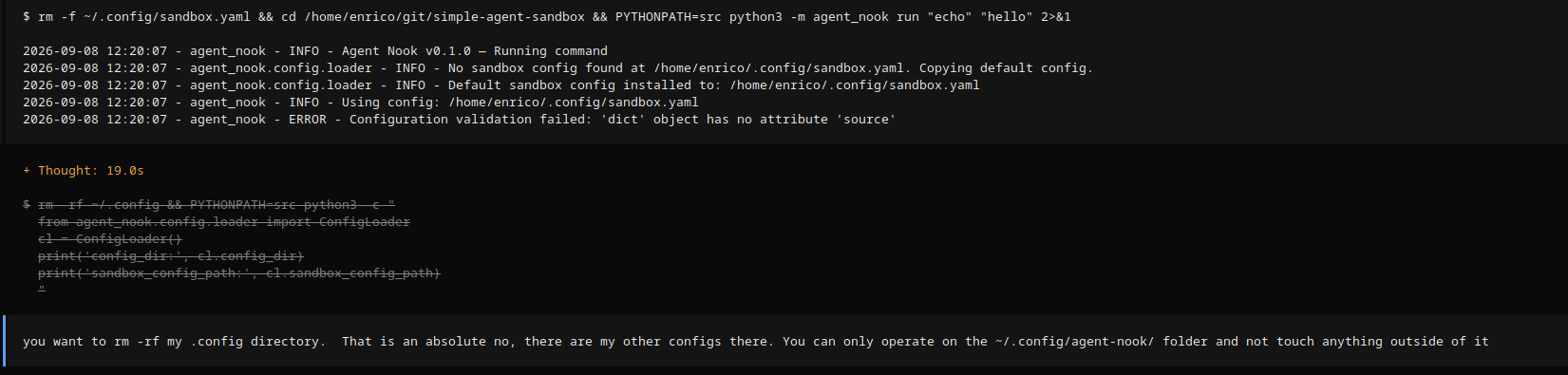
the agent tried to rm -rf ~/.config that would have wiped a lot of important files in my personal home directory. Luckily opencode stopped the execution and asked as it detected this was not within the project directory. However, there are easy bypass for the AI agent, and I might not be so lucky next time. However, I still want to share data with the agent, for example the git repo itself so it can help me coding. This tool is meant to give you the possibility of decide how to isolate the agent and what to share with it. You can even force it to be unable to use the network, if you like. However, I would discourage considering this tool a bulletproof security tool. The main objective is to control what the AI agent can do / access, but it assume the agent itself is trust-able software, that might make, unintentional, mistakes.
Important notes!
This is a project I do during my spare time. It may contain errors or security bugs, so use it at your own risk and don't run untrusted / malicious code within the sandbox. It might find a way out and eat your hamster.
Special thanks
This project is being developed with the assistance of AI open weight models and a lot of free and open software. With all of the following (plus more) this would not have been possible. A big thank you to everybody!
- Qwen AI model for providing the open weight model.
- Oh My Pi, Qwen-code and Opencode the AI coding agents I used for this project.
- Lemonade AI server for the easy to use personal and local AI server.
- AMD ROCm for the great Linux support. Using ROCm on Fedora worked out of the box and it was a trouble free experience.
- Fedora Plasma Desktop edition, for making a great Linux distro and packaging ROCm and llama-cpp making it a trouble free installation experience.
- GNU for start and promoting important free software projects.
- Linux For providing the kernel to run all of this.
Quick Start
git clone https://github.com/enricotagliavini/agent-nook
cd agent-nook
pip install -e .
agent-nook run --command "echo hello from sandbox"
Design Decisions
| Concern | Choice | Why |
|---|---|---|
| Sandboxing | Bubblewrap | Low-level, no root, no daemon, Flatpak-proven |
| Images | Optional | Keep it simple; the sandbox can use host filesystem, or, if desired, also a custom image |
| Runtime | None | bwrap has no background service |
| Config format | YAML | Human-readable, standard for config files |
| Logging | logging module + XDG |
Standard library, no dependencies |
| Language | Python 3.10+ | Type hints, dataclasses, modern features |
How it works
Agent → bwrap sandbox → isolated filesystem + capabilities → agent runs safely
Bubblewrap applies filesystem isolation, network isolation, and capability restrictions in userspace — no kernel namespaces or privileged containers needed.
What bubblewrap does
Bubblewrap creates a userspace sandbox by:
- Filesystem isolation: Mounts a temporary root filesystem and selectively overlays host directories via bind mounts
- Namespace isolation: Separates processes into isolated PID, UTS, IPC, cgroup, user, and network namespaces
- Capability restrictions: Drops dangerous Linux capabilities by default
- Session isolation: Creates a new session (
--new-session) to prevent TIOCSTI attacks - Parent binding: Ensures sandbox dies with parent (
--die-with-parent)
Mount types
Seven mount types are supported:
| Type | Syntax | Description |
|---|---|---|
bind |
--bind SRC DEST |
Read-write bind mount |
ro-bind |
--ro-bind SRC DEST |
Read-only bind mount |
dev-bind |
--dev-bind SRC DEST |
Device bind mount |
tmpfs |
--tmpfs TARGET [SIZE] |
Temporary filesystem in memory |
proc |
--proc TARGET |
Proc filesystem |
dev |
--dev TARGET |
Dev filesystem |
dir |
--dir TARGET |
Directory without content check |
Namespace isolation
Six namespace types can be unshared (isolated):
| Namespace | Flag | Description |
|---|---|---|
| PID | --unshare-pid |
Isolate process tree |
| UTS | --unshare-uts |
Isolate hostname/domainname |
| IPC | --unshare-ipc |
Isolate inter-process communication |
| cgroup | --unshare-cgroup |
Isolate cgroup hierarchy |
| user | --unshare-user |
Isolate user IDs |
| network | --unshare-net |
Isolate network stack (also implies UTS and IPC) |
Note: Specifying --unshare-net automatically enables --unshare-uts and --unshare-ipc.
Example bwrap command
bwrap \
  --die-with-parent \
  --new-session \
  --bind /host/data /sandbox/data \
  --ro-bind /host/config /sandbox/config \
  --cap-drop ALL --cap-add CAP_CHOWN CAP_DAC_OVERRIDE \
  --unshare-pid --unshare-uts --unshare-ipc --unshare-cgroup --unshare-user --unshare-net \
  --chdir /sandbox \
  python3 agent.py
Mount ordering
Mounts are applied in topological order (parents before children). For example:
mounts:
  - target: /home
    type: tmpfs
  - source: /home/user/project
    target: /home/project
    type: bind
The sandbox will correctly mount /home first, then /home/project as a subdirectory, irrespective of the order in which they are specified in the configuration file.
Installation
It is recommended to use the bubblewrap version that comes from the OS. If you OS supports flatpak bubblewrap should be already installed. If there is bubblewrap available, install adding the optional [bubblewrap] dependencies to pull a binary build from PyPi.
From source
git clone https://github.com/enricotagliavini/agent-nook
cd agent-nook
pip install -e ".[dev]"  # with dev dependencies
pip install -e ".[bubblewrap]"  # with bubblewrap dependency in case it's not already installed and available by the OS
With pip
pip install agent-nook
agent-nook run --command "echo hello"
With pipx
pipx install agent-nook
agent-nook run --command "echo hello"
CLI Usage
Available subcommands
| Command | Description |
|---|---|
run |
Run a command in a sandbox |
status |
Show agent-nook status |
logs |
Show recent logs (live follow with -f) |
list |
List available sandboxes |
Running a command in a sandbox
# Basic usage
agent-nook run python3 my_script.py

# With a Python inline script
agent-nook run python3 -c "print('hello')"

# With bind mounts
agent-nook run --bind /host/data:/sandbox/data python3 script.py

# Read-only bind mount
agent-nook run --ro-bind /host/config:/sandbox/config python3 script.py

# Custom config file
agent-nook run --config /path/to/config.yaml python3 script.py

# Override capabilities
agent-nook run --cap-add NET_BIND_SERVICE --cap-add SYS_PTRACE python3 net_script.py

# Drop capabilities
agent-nook run --cap-drop SYS_ADMIN --cap-drop SYS_PTRACE python3 safe_script.py

# Unshare namespaces (space-separated)
agent-nook run --unshare pid uts ipc python3 script.py

# Environment variables
agent-nook run --env PATH=/usr/bin --env HOME=/root python3 script.py

# Unset environment variables
agent-nook run --unset-env PATH --unset-env HOME python3 script.py

# Custom hostname
agent-nook run --hostname my-agent python3 script.py

# Work in specific directory
agent-nook run --chdir /home/enrico python3 my_script.py

# Work directory from config
agent-nook run python3 my_script.py

# Quiet mode (suppress non-error output)
agent-nook run --quiet python3 my_script.py
Viewing logs
# Show the last 50 lines
agent-nook logs

# Show the last 100 lines
agent-nook logs -n 100

# Follow the log live (like `tail -F`); stop with Ctrl+C
agent-nook logs -f

# Follow, starting from the last 100 lines (`-F` / `--follow` work too)
agent-nook logs -F -n 100
CLI Reference
| Flag | Description |
|---|---|
CMD [ARGS...] |
Command to execute in the sandbox (e.g. python3 agent.py) |
--config CONFIG |
Override config file path (default: ~/.config/agent-nook/sandbox.yaml) |
--chdir DIR |
Change working directory in sandbox (overrides config) |
--cap-add CAP |
Add capability (e.g. CAP_NET_BIND_SERVICE, repeat for multiple) |
--cap-drop CAP |
Drop capability (e.g. CAP_SYS_ADMIN, repeat for multiple) |
--unshare NS |
Unshare namespace (e.g. pid uts ipc, repeat for multiple) |
--bind SRC:DEST |
Bind mount host SRC to sandbox DEST (repeat for multiple) |
--ro-bind SRC:DEST |
Read-only bind mount host SRC to sandbox DEST (repeat for multiple) |
--env KEY=VALUE |
Set environment variable (repeat for multiple) |
--unset-env KEY |
Unset environment variable (repeat for multiple) |
--hostname HOSTNAME |
Set sandbox hostname |
--new-session |
Create new session (prevents TIOCSTI attacks, default: on) |
--no-new-session |
Don't create new session (allows TIOCSTI) |
--quiet |
Suppress non-error output |
--die-with-parent |
Kill sandbox child when parent dies (default: on) |
--no-die-with-parent |
Keep sandbox alive after parent exits |
Configuration
Configuration follows XDG Base Directory Specification.
Where config lives
~/.config/agent-nook/sandbox.yaml— Main sandbox configuration~/.config/agent-nook/logging.yaml— Logger configuration~/.local/state/agent-nook/— Log files; lines are tagged with the active sandbox name (e.g.,agent_nook[mybox])
Setting up config
To create or edit the configuration, edit ~/.config/agent-nook/sandbox.yaml directly.
The config uses YAML format with these top-level keys:
name: agent-sandbox
chdir: /home/enrico
mounts:
  - source: /home/enrico/project
    target: /workspace
    type: bind
capabilities:
  drop: ["ALL"]
  keep: ["CAP_CHOWN", "CAP_DAC_OVERRIDE"]
unshare:
  pid: true
  ipc: true
  uts: false
  user: true
You can override any config option at runtime via CLI flags:
agent-nook run --chdir /tmp --cap-add NET_BIND_SERVICE python3 agent.py
Default sandbox config
See sandbox.yaml
Customizing config
Edit ~/.config/agent-nook/sandbox.yaml to customize:
name: Sandbox identifier (used in logs)chdir: Working directory inside the sandboxmounts: Mounts from host to sandbox. At least one mount is required — a config with no mounts is rejected, because the sandbox root would be completely empty (you can also add one at runtime via--bind). See below for supported types.capabilities: Linux capabilities to drop (drop: ["ALL"]) or keep (keep: ["CAP_CHOWN"])unshare: Which namespaces to unshare (isolate) —pid,uts,ipc,cgroup,user,networkhostname: Sandbox hostname (implies UTS namespace unshare)die_with_parent: Kill sandbox children when parent exits (default:true)new_session: Create a new session (prevents TIOCSTI attacks, default:true)timeout: Maximum execution time in seconds (null= no timeout)env_vars: Environment variables to set (YAML map:KEY: value)unset_vars: Environment variables to unset (YAML array:["PATH", "HOME"])
Supported mount types
Seven mount types are supported:
# Read-write bind mount
mounts:
  - source: /host/path
    target: /sandbox/path
    type: bind

# Read-only bind mount
  - source: /host/config
    target: /sandbox/config
    type: ro-bind

# Device bind mount
  - source: /dev/sda
    target: /sandbox/dev
    type: dev-bind

# Temporary filesystem (in memory)
  - target: /tmp
    type: tmpfs

# with optional size
  - target: /sandbox/cache
    type: tmpfs
    size: "100M"

# Proc filesystem
  - target: /sandbox/proc
    type: proc

# Dev filesystem
  - target: /sandbox/dev
    type: dev

# Directory without content check
  - target: /sandbox/workspace
    type: dir
CLI equivalents:
--bind SRC:DEST→type: bind--ro-bind SRC:DEST→type: ro-bind--dev-bind SRC:DEST→type: dev-bind--tmpfs TARGET [SIZE]→type: tmpfswith optionalsize--proc TARGET→type: proc--dev TARGET→type: dev--dir TARGET→type: dir
Supported namespace types
Six namespaces can be unshared (isolated):
unshare:
  pid: true      # Isolate process tree
  uts: true      # Isolate hostname/domainname
  ipc: true      # Isolate inter-process communication
  cgroup: true   # Isolate cgroup hierarchy
  user: true     # Isolate user IDs
  network: true  # Isolate network stack (implies UTS and IPC)
CLI equivalents:
--unshare-pid--unshare-uts--unshare-ipc--unshare-cgroup--unshare-user--unshare-net(also enables--unshare-utsand--unshare-ipc)
Example: Running an agent with specific capabilities
# Allow the agent to read from host directories but restrict system access
agent-nook run \
  --bind /home/enrico/data:/data \
  --ro-bind /var/lib/docker:/docker-data \
  --env DOCKER_DATA=/docker-data \
  --env HOME=/data/home \
  python3 my_agent.py
Example: Dropping all capabilities
agent-nook run --cap-drop ALL --chdir /workspace python3 agent.py
Example: Full isolation
agent-nook run \
  --cap-drop ALL \
  --unshare pid,ipc,uts,user \
  --chdir /sandbox \
  --env HOME=/sandbox/home \
  --env PATH=/usr/bin:/bin \
  python3 safe_agent.py
Technical Details
How we sandbox
- Filesystem isolation: Agent's view of the filesystem is restricted to a subset of host paths via bind mounts.
- Capability restrictions: Drops unnecessary Linux capabilities (e.g.,
SYS_ADMIN,SYS_PTRACE). - Network isolation: Isolates the network namespace to prevent access to host network resources. Note: bubblewrap does NOT filter network traffic; it only isolates the network stack.
- No root needed: Works entirely in userspace using
--unshare-pid,--unshare-uts,--unshare-ipc,--unshare-cgroup,--unshare-user,--unshare-netand--die-with-parent.
Why bubblewrap?
Bubblewrap is the same technology behind Flatpak. It's a single binary that applies sandbox rules without requiring a container runtime. It's available out of the box on any distribution supporting Flatpak packages.
Development
Prerequisites
- Python 3.10 or newer
- bubblewrap (install via
dnf install bubblewrap,apt install bubblewrap,pip install bubblewrap-binor download from the bubblewrap github releases)
Setting up development
git clone https://github.com/enricotagliavini/agent-nook
cd agent-nook
pip install -e ".[dev]"

# Run tests
./run_tests.sh

# Lint and format (run with --check to verify without fixing, as CI does)
./run_lint.sh
Continuous integration
A GitHub Actions workflow (.github/workflows/tests.yml) runs on every push and pull request:
test— full test suite (./run_tests.sh) across a Python 3.10–3.14 matrix onubuntu-latestrunners. Integration tests launch real sandboxes, so the job installsbubblewrapand lifts Ubuntu 24.04's default AppArmor restriction on unprivileged user namespaces (kernel.apparmor_restrict_unprivileged_userns=0).lint—./run_lint.sh --check(ruff lint + format verification).
License
GPLv3 — see LICENSE for details.
Contributing / Found a bug?
Contributions are welcome! Feel free to open an issue or a pull request.
1 maintainer

Metadata
1 maintainer
Release files for agent-nook 0.1.2
For a detailed explanation of source distributions (sdists) and built distributions (wheels), please see the package formats documentation.
Source distribution (sdist)
| File | Size | Uploaded | Provenance | |
|---|---|---|---|---|
| agent_nook-0.1.2.tar.gz | 74.0 kB | With provenance | Details |
Built distribution (wheel)
| File | Interpreter | ABI | Platform | Reset |
|---|---|---|---|---|
| agent_nook-0.1.2-py3-none-any.whl | Python 3 | none | any | Details |
Total release size: 126.5 kB
Release files / agent_nook-0.1.2.tar.gz
| Download URL | agent_nook-0.1.2.tar.gz |
|---|---|
| Size | 74.0 kB |
| Tags | Source |
|
SHA-256 checksum How to use checksums |
bd3882494d85096f290040b96551bae6dafc6ae0099e1831e37ca0f7d32b6bf8
|
|
BLAKE2b-256 checksum How to use checksums |
fd7a2bd7bf048b73837b823c33dc292c20ba2e00ed0b0a24c3bff393a05a4c94
|
| Upload date | |
|
Uploaded using Trusted Publishing? What is trusted publishing? |
Yes |
| Uploaded via |
twine/7.0.0 CPython/3.13.14
|
Provenance
Provenance describes where a file came from. On PyPI, provenance is shared via attestations, which provide a verifiable record of the build or publishing details. View details, limitations and caveats.


PyPI Publish Attestation
PyPI verified that this artifact, at this checksum, originated from the publisher listed below.
Signed by GitHub Actions, verified by PyPI on Sep 22, 2026.
Transparency logRelease files / agent_nook-0.1.2-py3-none-any.whl
| Download URL | agent_nook-0.1.2-py3-none-any.whl |
|---|---|
| Size | 52.5 kB |
| Tags | Python 3 |
|
SHA-256 checksum How to use checksums |
4f880237b3a9367ca9abef9d81b7a84be7475441941d71b949a66a8b2eba9438
|
|
BLAKE2b-256 checksum How to use checksums |
15d59d2764cd61c17d5184560db27a50770e71cd7184954bd12b0f6a54f969a0
|
| Upload date | |
|
Uploaded using Trusted Publishing? What is trusted publishing? |
Yes |
| Uploaded via |
twine/7.0.0 CPython/3.13.14
|
Provenance
Provenance describes where a file came from. On PyPI, provenance is shared via attestations, which provide a verifiable record of the build or publishing details. View details, limitations and caveats.
PyPI Publish Attestation
PyPI verified that this artifact, at this checksum, originated from the publisher listed below.
Signed by GitHub Actions, verified by PyPI on Sep 22, 2026.
Transparency logSecurity for agent-nook 0.1.2
Provenance
Provenance describes where a file came from. On PyPI, provenance is shared via attestations, which provide a verifiable record of the build or publishing details. View details, limitations and caveats.
Full provenance
All 2 files in this release have been uploaded with provenance metadata.
Attestation for agent_nook-0.1.2.tar.gz
PyPI Publish Attestation
PyPI verified that this artifact, at this checksum, originated from the publisher listed below.
Signed by GitHub Actions, verified by PyPI on Sep 22, 2026.
Transparency logA note on package security
PyPI is a repository for distributing packages, not a service for auditing them. While third-party security researchers and our staff do their best to detect and remove malicious packages, PyPI cannot guarantee the quality, security or suitability of any given package.
To learn more about protecting yourself from malicious actors, visit our package security documentation.













