
Agent Project Launchpad
Pick up your work with Codex, Claude Code, or GitHub Copilot CLI.
A keyboard-first terminal picker for your agent projects. See what you were working on, when you last touched it, and where you left off. Switch agents with shared project notes and recent conversation context carried along.
Type claude, codex, or gh copilot as usual. Pick a project and press Enter
to continue. Your existing conversations appear automatically, including projects
you worked on with another agent. The preview shows who you last used;
“Continue with” shows who will pick up the work.
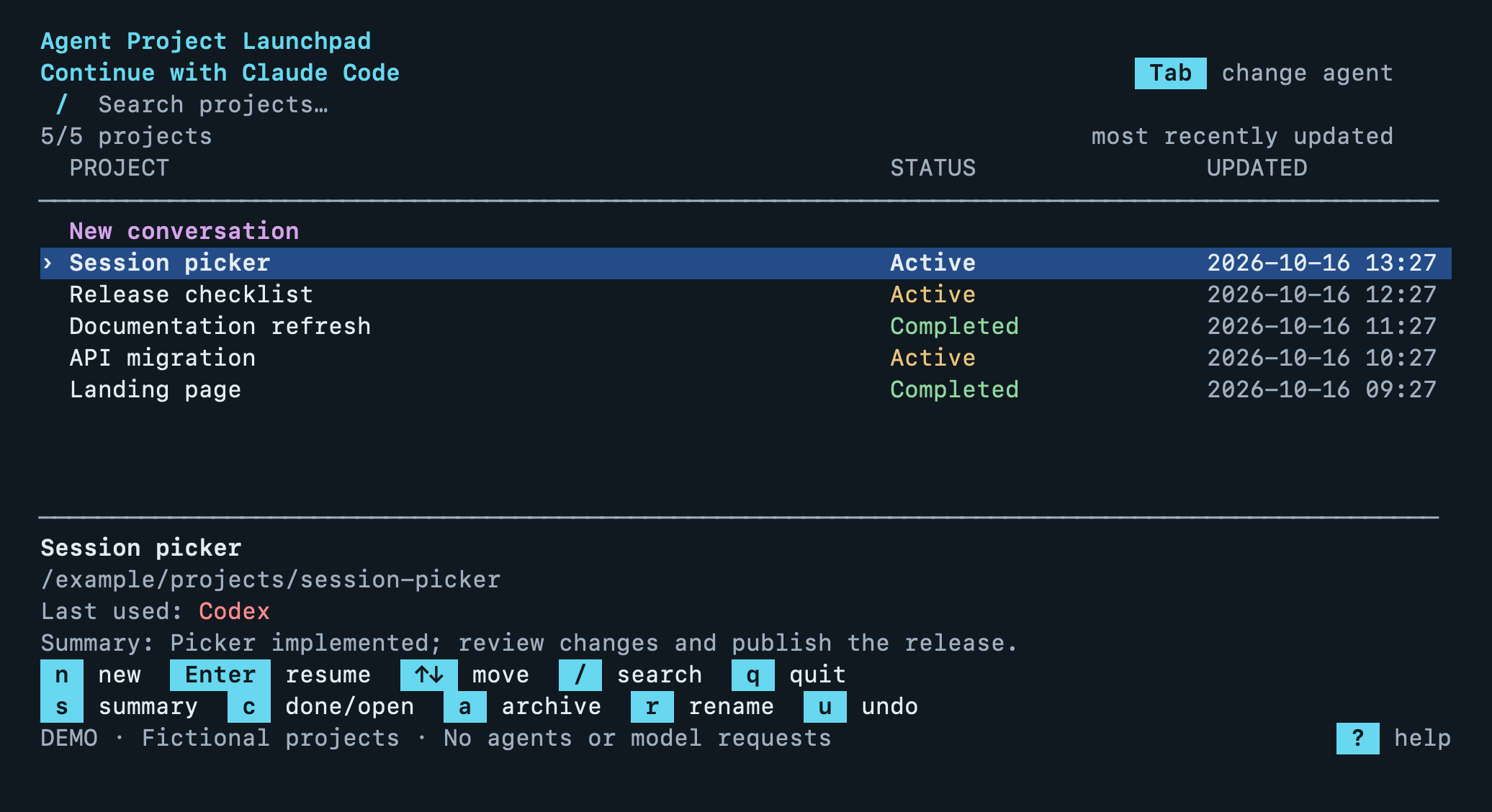
The actual picker renderer with fictional demo projects.
Install and enable
Requires macOS or Linux, Python 3.10+, and an installed agent.
pipx install agent-project-launchpad
agent-launchpad setup
Open a new Terminal and start your agent as usual:
claude       # Open the picker with Claude Code selected
codex        # Open it with Codex selected
gh copilot   # Open it with GitHub Copilot selected
“New conversation” is selected first: press Enter for a fresh session in your
current directory. Use ↑/↓ and Enter to resume a saved project. Press n to
start fresh from anywhere in the list. Resume prompts include the project's
name and saved summary when available.
setup enables the picker for your normal commands in bash/zsh and backs up
the startup file it changes. You only need to run it once.
Check the installation with agent-launchpad check-shell.
Need pipx or prefer a virtual environment? See the installation guide.
Try the demo
agent-launchpad demo
This runs the real picker with fictional projects. It launches no agents, makes no model requests, and leaves your existing sessions alone.
Everyday controls
| Key | Action |
|---|---|
↑ / ↓, Enter |
Start a new conversation or resume a saved project |
Tab |
Change the agent to continue with |
n |
Start something new |
/ |
Search |
s |
Generate a summary and suggested names; review before saving |
r |
Rename manually |
c |
Complete / reopen |
a, u |
Archive / undo archive |
?, Esc |
Help / cancel |
Projects start Active automatically. New conversation activity reopens completed work. Opening an agent and leaving without a new request keeps the project’s name, last agent, date, and completion status. Archiving keeps the original history and can be undone.
What carries over?
Each project has shared notes for decisions, progress, and next steps. Before continuing, the launcher refreshes recent conversation excerpts and source references for the selected agent to read. Full conversations stay in their original agents. Context excerpts are bounded; important gaps still need review.
Data stays on your Mac or Linux machine until an agent reads it as model context. Summaries use your existing agent account and normal usage. Nothing runs in the background. Details and privacy.
To remove startup integration, run agent-launchpad uninstall-shell.
User guide · Troubleshooting · Contributing · Architecture · MIT license
1 maintainer

Metadata
1 maintainer
Release files for agent-project-launchpad 1.0.0
For a detailed explanation of source distributions (sdists) and built distributions (wheels), please see the package formats documentation.
Source distribution (sdist)
| File | Size | Uploaded | |
|---|---|---|---|
| agent_project_launchpad-1.0.0.tar.gz | 264.6 kB | Details |
Built distribution (wheel)
| File | Interpreter | ABI | Platform | Reset |
|---|---|---|---|---|
| agent_project_launchpad-1.0.0-py3-none-any.whl | Python 3 | none | any | Details |
Total release size: 300.0 kB
Release files / agent_project_launchpad-1.0.0.tar.gz
| Download URL | agent_project_launchpad-1.0.0.tar.gz |
|---|---|
| Size | 264.6 kB |
| Tags | Source |
|
SHA-256 checksum How to use checksums |
a31e02a5409d0d2e1acf3866760a28ae28a11cbd0bd375c600fc22b0ee7fb648
|
|
BLAKE2b-256 checksum How to use checksums |
fd067bed20d52a0c42a2bc02302d9a9d09e222874872122d5c8684503d3d2207
|
| Upload date | |
|
Uploaded using Trusted Publishing? What is trusted publishing? |
Yes |
| Uploaded via |
twine/7.0.0 CPython/3.13.14
|
Provenance
Provenance describes where a file came from. On PyPI, provenance is shared via attestations, which provide a verifiable record of the build or publishing details. View details, limitations and caveats.


PyPI Publish Attestation
PyPI verified that this artifact, at this checksum, originated from the publisher listed below.
Signed by GitHub Actions, verified by PyPI on Oct 16, 2026.
Transparency logRelease files / agent_project_launchpad-1.0.0-py3-none-any.whl
| Download URL | agent_project_launchpad-1.0.0-py3-none-any.whl |
|---|---|
| Size | 35.4 kB |
| Tags | Python 3 |
|
SHA-256 checksum How to use checksums |
8af6d4e2634821f3540fd7c01989b54662943a4afe3339ccd8a9a4317cf655bc
|
|
BLAKE2b-256 checksum How to use checksums |
ea7b26dd12faf016d199858bddc2e19b5e24ef98c235f751c98981ce9d706ccc
|
| Upload date | |
|
Uploaded using Trusted Publishing? What is trusted publishing? |
Yes |
| Uploaded via |
twine/7.0.0 CPython/3.13.14
|
Provenance
Provenance describes where a file came from. On PyPI, provenance is shared via attestations, which provide a verifiable record of the build or publishing details. View details, limitations and caveats.
PyPI Publish Attestation
PyPI verified that this artifact, at this checksum, originated from the publisher listed below.
Signed by GitHub Actions, verified by PyPI on Oct 16, 2026.
Transparency log













