
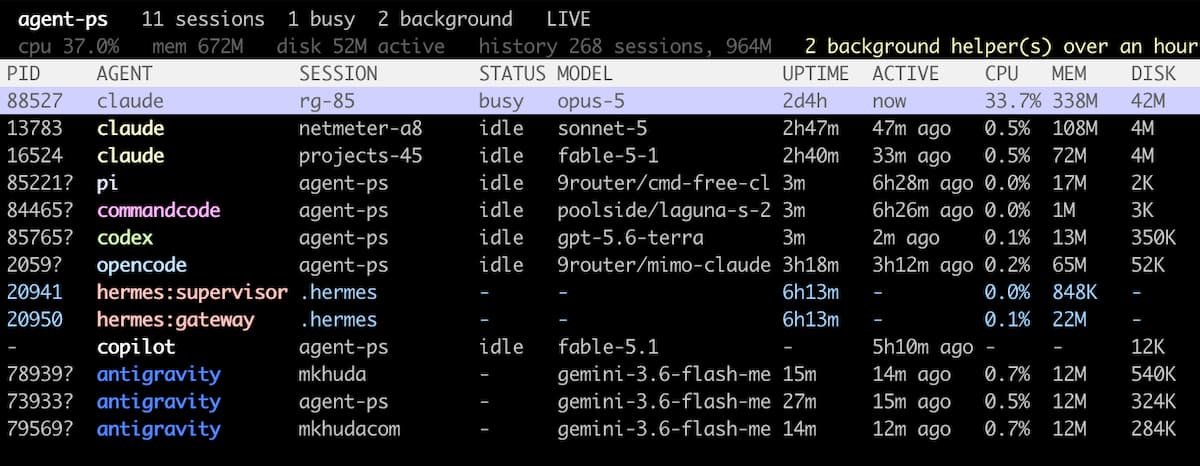
agent-ps
A process table for coding agent sessions, the way ps would look if it knew
what a session was.



Install | Usage | Agents | Scripting | How it works
curl -fsSL https://raw.githubusercontent.com/mkhuda/agent-ps/main/install.sh | sh
ps aux | grep claude gives you PIDs. It will not tell you which one is the
session you are talking to, what model it is spending on, whether it has been
idle for three days, or which rows are background daemons that outlived the
terminal that started them. It also misses the other six agents entirely.
agent-ps lists every session with its agent, model, working directory, uptime, idle time and disk footprint, then stops one process tree, every background helper, or the lot.
One file, no dependencies, reads local files only.
Install
One command
curl -fsSL https://raw.githubusercontent.com/mkhuda/agent-ps/main/install.sh | sh
Takes the latest release, checks it against the checksum published beside it,
makes sure it runs, and puts the single file in ~/.local/bin. Set BIN_DIR to
install elsewhere, or AGENT_PS_REF=v0.1.0 to pin a version.
With a package runner
From PyPI, which installs the program itself:
uvx agent-ps                  # run it once
pipx install agent-ps         # keep it, isolated
pip install agent-ps          # keep it, wherever pip points
From npm, which carries the same single executable and finds an interpreter for it:
npx @mkhuda/agent-ps
pnpm dlx @mkhuda/agent-ps
bunx @mkhuda/agent-ps
The npm package is scoped because the plain name is too close to an existing
one. Either way the command it gives you is agent-ps.
Just the file
If you would rather not pipe a script into a shell, the executable is the whole program:
mkdir -p ~/.local/bin
curl -fsSL -o ~/.local/bin/agent-ps \
  https://github.com/mkhuda/agent-ps/releases/latest/download/agent-ps
chmod +x ~/.local/bin/agent-ps
Every release publishes a
SHA256SUMS next to it.
From a clone
git clone https://github.com/mkhuda/agent-ps && cd agent-ps
./install.sh
Builds from the tree rather than downloading, so you install what you are looking at.
What it needs, and how to remove it
Python 3.8 or later and nothing from PyPI. Tested on 3.8, 3.9, 3.10 and 3.14.
macOS and Linux; Windows is out because curses is not in its standard library.
It shells out to ps, and on macOS to lsof, which is how a process is matched
to a session everywhere except Claude Code.
rm -f ~/.local/bin/agent-ps
That is the whole uninstall. Nothing is written outside that directory, and agent-ps only ever reads the agents' own files.
Agents
Each agent keeps its own colour in the table, and the same colours label the legend above the keys.
| Agent | Sessions in | Paired by | Tokens | Reopened with | |
|---|---|---|---|---|---|
| Claude Code |  |
JSONL | the agent itself | no | claude --resume |
| Pi |  |
JSONL | directory | no | pi --session |
| CommandCode |  |
JSONL | directory | no | cmd --resume |
| Codex CLI |  |
JSONL | directory | no | codex resume |
| OpenCode |  |
SQLite | directory | yes | opencode --session |
| Hermes |  |
SQLite | directory | yes | hermes --resume |
| GitHub Copilot |  |
VS Code storage | no process | yes | in the editor |
Only Claude Code records which process is running which session, so every other pairing is matched on working directory and shown as a guess. OpenCode, Hermes and Copilot count tokens and cost, which the detail panel shows. Agents you have not installed are skipped, not reported as missing.
Copilot is the exception to everything. It runs inside the VS Code extension host, so it has no process of its own: no PID, no uptime, no CPU or memory, and nothing to stop. What it does have is the credits each turn spent, which the free tier meters and nothing else surfaces. A chat counts as open while its workspace is open in the editor.
Usage
Run without arguments for the live table:
agent-ps
It refreshes every two seconds and stays out of the way until you act on something.
| Key | Action |
|---|---|
| up, down | move the selection |
j, K |
down and up, since k is taken by stop |
| home, end | jump to the first or last row |
| enter | details for a live session, or reopen an ended one |
s |
cycle the sort column |
S |
reverse the direction |
k |
stop the selected process and its children, after confirming |
b |
stop every background helper, after confirming |
y, n |
answer a confirmation |
e |
show or hide ended sessions |
/ |
filter by session, title, agent, model, directory, or PID |
| esc | leave filter mode, or close the detail panel |
| space | pause refreshing |
r |
refresh now |
q |
quit |
Those keys live at the bottom of the screen, under a line naming every agent on screen in its own colour and, on the right, what the table is sorted by:

That middle line does three jobs. It is the key to the colours in the AGENT column, it says the sort order in words so the marked heading is never a guess, and it is where a note appears for a few seconds after you act on something.
Backspacing a filter down to nothing leaves filter mode, so the key bar comes back without reaching for escape.
Sorting
s cycles the sort column through agent, active, disk, cpu, mem, uptime,
session and title. The sorted heading is marked in place, and the line above the
keys names it in words:
PID     AGENT             SESSION         STATUS MODEL               UPTIME  ACTIVE    CPU   MEM    DISKv
31771   claude            benchmark       idle   sonnet-5            54m     54m ago   0.2%  51M    127M
-       claude            web-app         ended  sonnet-5            -       16d8h ago -     -      102M
-       claude            notes           ended  opus-5              -       2h22m ago -     -      84M

 agents  claude  codex  commandcode  copilot  hermes  opencode  pi        sorted by disk, high to low
 up/down select   enter details   k stop   b background   e hide ended   s sort   S reverse   / filter   q quit
v means descending and ^ ascending; S flips it. Numbers start at the
largest, names start at A, and rows with nothing in that column go to the end
either way.
Sorting covers running and ended sessions together, since "which session is the
biggest" does not care whether its process is still alive. Press e to include
ended sessions, then s until DISK is marked.
The detail panel
Enter on a live session opens everything known about it, grouped in the order the questions arrive: what the session is, what it is doing to the machine, what it has cost, and the command line last, since it is long and rarely the question.
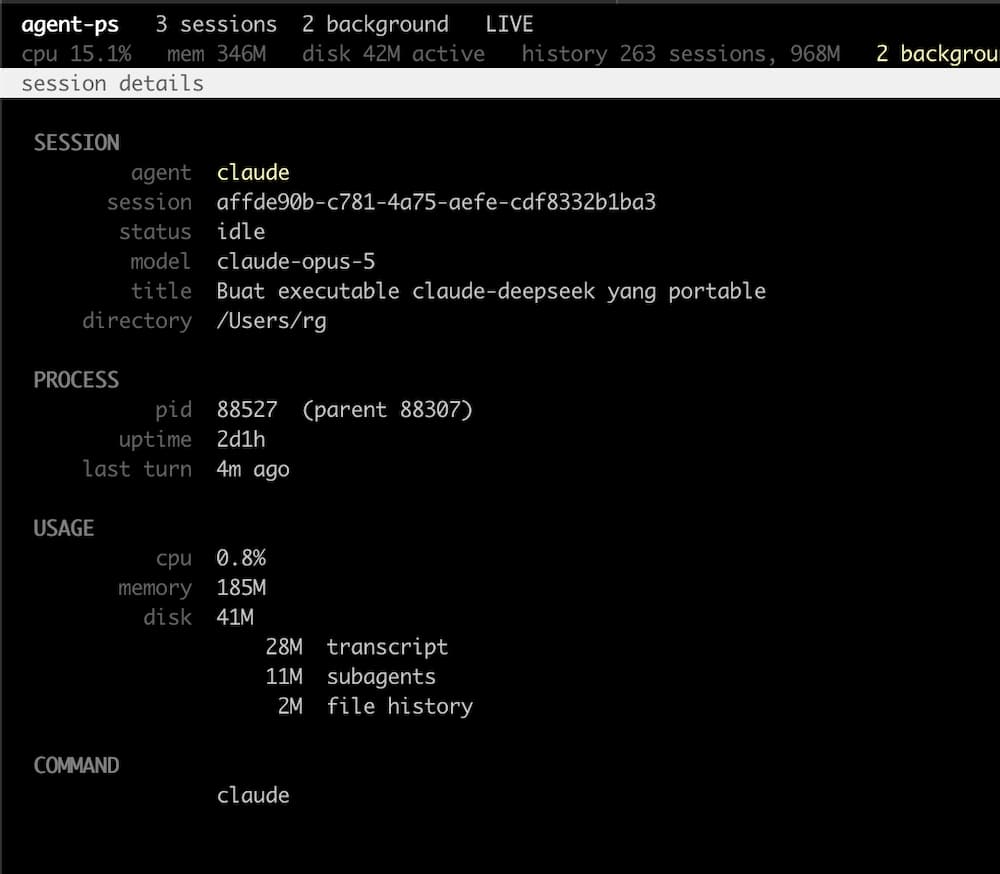
The disk total is broken down, because the number on its own is not something you can act on. Forty megabytes of transcript and forty of file history call for different answers, and until you can see which it is there is nothing to decide.
Where the agent counts tokens, they are here too. Hermes and OpenCode report cost, Copilot reports the credits a turn spent:
    provider  opencode-free
      tokens  in 24,608  out 242  reasoning 190
       calls  2 api, 6 messages, 0 tool calls
        cost  $0.0000 estimated
A paired line appears when the session was matched to the process by working
directory rather than reported, so you know before pressing k that the pairing
is a guess.
Enter on an ended session reopens it in a new terminal tab instead. Copilot chats live in the editor, so they have no reopen command and say so.
The advisory line
A line above the keys points out whatever is worth a look: background helpers left running, sessions untouched for a day, or ended sessions you could resume. It names the key that acts on it, and only ever shows one thing, since a wall of warnings teaches people to ignore the line.
Scripting
agent-ps list                     # print the table and exit
agent-ps list --all               # include ended sessions
agent-ps list --json              # machine readable, with idle seconds
agent-ps list --limit 100         # how many ended sessions (default 40)
agent-ps list --filter benchmark  # same match as the / key
agent-ps agents                   # which agents were found, and where
agent-ps --agent codex list       # one agent, or a comma separated list
agent-ps stop 32244               # stop one process tree
agent-ps stop 32244 --dry-run     # show what would be stopped
agent-ps stop-background          # stop daemons, warm spares, and servers
agent-ps stop-background --dry-run
agent-ps resume <session>         # a unique id prefix is enough
agent-ps resume <session> --print # print the command instead of running it
agent-ps --version
Piping works without a subcommand: with stdout not a terminal, agent-ps prints the table and exits.
What each column means
| Column | Meaning |
|---|---|
| PID | the process, or a dash where there is none |
| AGENT | which agent, and what sort of process when it is not a plain session |
| SESSION | the directory the session was started in |
| STATUS | busy, idle, ended, or a dash when nothing says |
| MODEL | what answered the last turn, or the launcher's routing alias |
| UPTIME | how long the process has been alive, from one ps call |
| ACTIVE | how long since the session last wrote a turn |
| CPU, MEM | the same ps call |
| DISK | everything that session left on disk |
| DIR | the working directory |
| TITLE | the session title, or its opening prompt where the agent keeps none |
UPTIME and ACTIVE often disagree, and that is the point. A process can be five days old and have answered a minute ago. UPTIME comes from the process table, ACTIVE from the modification time of the log, which is appended on every turn, so an ended session shows a dash under UPTIME and only ACTIVE says how stale it is.
Each agent gets its own colour in the AGENT column, assigned in registry order, and the same colours appear in the legend, which makes that line the key to the palette. A selected row keeps its own highlight rather than being broken up, so the cursor stays unmistakable. Terminals without colour fall back to plain text.
A PID marked with a question mark
Only Claude Code records which process is running which session, in
<config dir>/sessions/<pid>.json. For every other agent the two have to be
matched on working directory, and that cannot tell apart two sessions of the same
agent started in the same folder.
So an inferred pairing is shown as one:
32244   claude    form-guardian   idle   opus-5        ...
9666?   codex     agent-ps        idle   gpt-5.6-luna  ...
9666? means the process is certain and the session beside it is a guess. The
guess is the most recently active session in that directory, and where several
processes of one agent share a directory they are paired newest with newest, so
the process that started four minutes ago gets the session that has been active
for four minutes rather than the one from an hour ago.
It is still a guess, so the stop confirmation names the directory and says when the pairing was inferred:
Stop 1 process(es) in ~/projects/agent-ps, session matched by directory?
Where no session matches at all, the row still appears with whatever the process itself can answer. Nothing is invented to fill the gap.
How it works
The parts that are not obvious have their own page: where each agent keeps its sessions, how busy and idle are decided per agent, which processes count as background helpers, how a shim is told apart from a real session, and what the DISK column is adding up.
Stopping behaviour
Processes are stopped depth first, children before parents, so a supervisor does
not restart a worker you just killed. Each process gets SIGTERM, one second to
exit, then SIGKILL if it is still there.
agent-ps never lists or stops itself, or the shell that launched it, so running it from inside an agent session is safe.
Exit status is zero when everything asked for was stopped, and one when something survived, which makes it usable in scripts.
When something is missing
| Symptom | Cause |
|---|---|
| An agent you use is not listed | agent-ps only looks in the roots above. agent-ps agents prints what it found. |
| SESSION and MODEL are dashes on macOS | pairing needs lsof to read a process working directory. Linux reads /proc. |
| A row paired to the wrong session | see the question mark section above |
| No colour | the terminal reported none, so every row falls back to plain text |
| A Copilot chat has no PID | it never had one. Copilot runs inside VS Code. |
Build
The executable is a zipapp, built from the package by the standard library:
./build.sh
That writes a single agent-ps file with no dependencies, which is what the curl
install fetches. The build is reproducible: the same source always produces the
same bytes, so the committed executable can be checked against the tree.
d5f2e2bd6d35e148e461c60c7cb7bd80fce272a15efb462a7dd513955ef5a2b6 agent-ps
Adding an agent takes one class and one line in the registry. See CONTRIBUTING.md.
License
MIT. See LICENSE.
1 maintainer

Download files
Download the file for your platform. If you're not sure which to choose, learn more about installing packages.
Source Distribution
Built Distribution
Filter files by name, interpreter, ABI, and platform.
If you're not sure about the file name format, learn more about wheel file names.
Copy a direct link to the current filters
File details
Details for the file agent_ps-0.3.0.tar.gz.
File metadata
- Download URL: agent_ps-0.3.0.tar.gz
- Upload date:
- Size: 44.7 kB
- Tags: Source
- Uploaded using Trusted Publishing? Yes
- Uploaded via:
twine/7.0.0 CPython/3.13.14
File hashes
| Algorithm | Hash digest | |
|---|---|---|
| SHA256 |
9c3af2618d7031998f40ee4b8f463cc6dda10b11381cf99a439e902cad6b2e29
|
|
| MD5 |
34db8c534afa5a64c5d0cd74aba0767a
|
|
| BLAKE2b-256 |
f9e7c8782f4925b4cb9ac9eed7c6276d27ff3fc82b44e0b1bc5f27a66a0a6778
|
Provenance
The following attestation bundles were made for agent_ps-0.3.0.tar.gz:
Publisher:
release.yml on mkhuda/agent-ps
-
Statement:
-
Statement type:
https://in-toto.io/Statement/v1 -
Predicate type:
https://docs.pypi.org/attestations/publish/v1 -
Subject name:
agent_ps-0.3.0.tar.gz -
Subject digest:
9c3af2618d7031998f40ee4b8f463cc6dda10b11381cf99a439e902cad6b2e29 - Sigstore transparency entry: 2716176036
- Sigstore integration time:
-
Permalink:
mkhuda/agent-ps@cb16c9a5a0f04877ca251d72fbb0a93b91e8d8ce -
Branch / Tag:
refs/tags/v0.3.0 - Owner: https://github.com/mkhuda
-
Access:
public
-
Token Issuer:
https://token.actions.githubusercontent.com -
Runner Environment:
github-hosted -
Publication workflow:
release.yml@cb16c9a5a0f04877ca251d72fbb0a93b91e8d8ce -
Trigger Event:
push
-
Statement type:
File details
Details for the file agent_ps-0.3.0-py3-none-any.whl.
File metadata
- Download URL: agent_ps-0.3.0-py3-none-any.whl
- Upload date:
- Size: 46.8 kB
- Tags: Python 3
- Uploaded using Trusted Publishing? Yes
- Uploaded via:
twine/7.0.0 CPython/3.13.14
File hashes
| Algorithm | Hash digest | |
|---|---|---|
| SHA256 |
37a1d2e716387d5d970bae60234f27fdc39aa18f36f38d22607a929afff63ed4
|
|
| MD5 |
fdb290d04a82cd81ef9c1d02a96f9be8
|
|
| BLAKE2b-256 |
b690257babd7c1fb0875b415930d564af5c5acb44136663c2e1af723fb405eaa
|
Provenance
The following attestation bundles were made for agent_ps-0.3.0-py3-none-any.whl:
Publisher:
release.yml on mkhuda/agent-ps
-
Statement:
-
Statement type:
https://in-toto.io/Statement/v1 -
Predicate type:
https://docs.pypi.org/attestations/publish/v1 -
Subject name:
agent_ps-0.3.0-py3-none-any.whl -
Subject digest:
37a1d2e716387d5d970bae60234f27fdc39aa18f36f38d22607a929afff63ed4 - Sigstore transparency entry: 2716176082
- Sigstore integration time:
-
Permalink:
mkhuda/agent-ps@cb16c9a5a0f04877ca251d72fbb0a93b91e8d8ce -
Branch / Tag:
refs/tags/v0.3.0 - Owner: https://github.com/mkhuda
-
Access:
public
-
Token Issuer:
https://token.actions.githubusercontent.com -
Runner Environment:
github-hosted -
Publication workflow:
release.yml@cb16c9a5a0f04877ca251d72fbb0a93b91e8d8ce -
Trigger Event:
push
-
Statement type:














