
Five-minute demo · The checks · The judge's exam · Newsletter







You have a bot that answers questions from your own documents, and someone has to sign off before it reaches customers. This tool asks the bot your list of questions and writes the sign-off document itself: one page in markdown, a plain text file with light formatting marks that GitHub and most editors show as a tidy document. The page carries a verdict, the wrong answers quoted word for word, and a line under each wrong answer saying where it broke.
You do not sign up for anything and you do not paste in any secret key. Everything runs on your machine. You write your questions in one YAML file (a plain text file with an indented layout), run one command, and get one markdown report. When a second model helps with the grading, you can give that model its own exam first, and the report warns you if you skipped it.
The report is written for a non-engineer stakeholder who never installs the tool. They read the verdict. Your automatic build (CI) reads the command's exit code: a small number, explained below, that says pass, fail, or could-not-run. The report is plain text, so you can keep it in git and see what changed line by line.
What you need to know first
The terms this page uses, in plain words.
- A RAG bot is a chatbot that first looks up passages in your documents and then writes an answer from them. RAG stands for retrieval-augmented generation. Retrieval is the look-up step and generation is the writing step. The report keeps the two apart, because a wrong answer built from the wrong passage is a different bug from a wrong answer built from the right passage. This page says "the bot" from here on.
- An endpoint is the web address your bot listens on, such as
http://localhost:8000. The number after the colon is the port. The tool sends each question to that address as a web request (an HTTP POST) and reads the answer out of the structured reply (JSON). - A test file is the YAML file holding your questions. Each question, together with the answer you expect and the checks it must pass, is one case. The tool's own messages sometimes call the whole file a suite.
- A check is one yes-or-no test on one answer, such as "does the answer contain 3.2%" or "did the bot leak a stack trace" (an error dump from its own code). There are 19 checks, fixed in code. 14 of them are plain Python comparisons, so the same answer always gets the same result. This page calls them the code checks, and the report calls the same thing the deterministic route. The other 5 need a judge.
- The judge is a second language model, a program of the same kind as the chatbot itself. It reads an answer and returns pass or fail on questions code cannot decide, such as whether a paraphrase is still correct. Here the judge runs on your own machine through Ollama. Ollama is a free program that downloads and runs models locally. The default judge model is qwen3.6:27b, a model of about 27 billion parameters. Parameters are a model's internal settings, and more of them usually means a bigger model that answers better but needs more memory to run. Using a judge is optional.
- Hallucination, as this tool counts it, is a claim in the answer that the retrieved passages do not support. A claim can be true in the world and still count, because the test is support in the passages, not truth. The tool calls this grounding. Measuring it needs the judge.
- A gate is a bar the whole run must clear, such as accuracy at least
80%. One failed gate makes the verdict NOT READY. The default gates
also say every case you tag
criticalin the test file must pass every code check that applies to it. - The exit code is the number a command hands back when it finishes. CI (continuous integration) is the script that runs on every push to your code, on GitHub Actions or similar, and it fails the build when a command exits with anything other than 0. This tool exits 0 when the bot passes, 1 when a gate failed, and 2 when the tool itself could not run.
⚡ Five minutes, no model, no keys
pip install agent-report-card
agent-report-card demo --judge none
You need Python 3.10 or newer. Stock macOS python3 may be 3.9. If
python3 --version says so, install a newer Python (from python.org, or
with a version manager such as pyenv or uv) and run pip from that one. To
work on the tool itself, clone the repo and pip install -e . instead.
The demo command starts a fake support bot bundled with the tool, for
the fictional Northstar Telecom, with
nine flaws planted on purpose.
The terminal output below calls this fake bot the fixture bot.
It then asks that bot the bundled 21 questions and grades every answer.
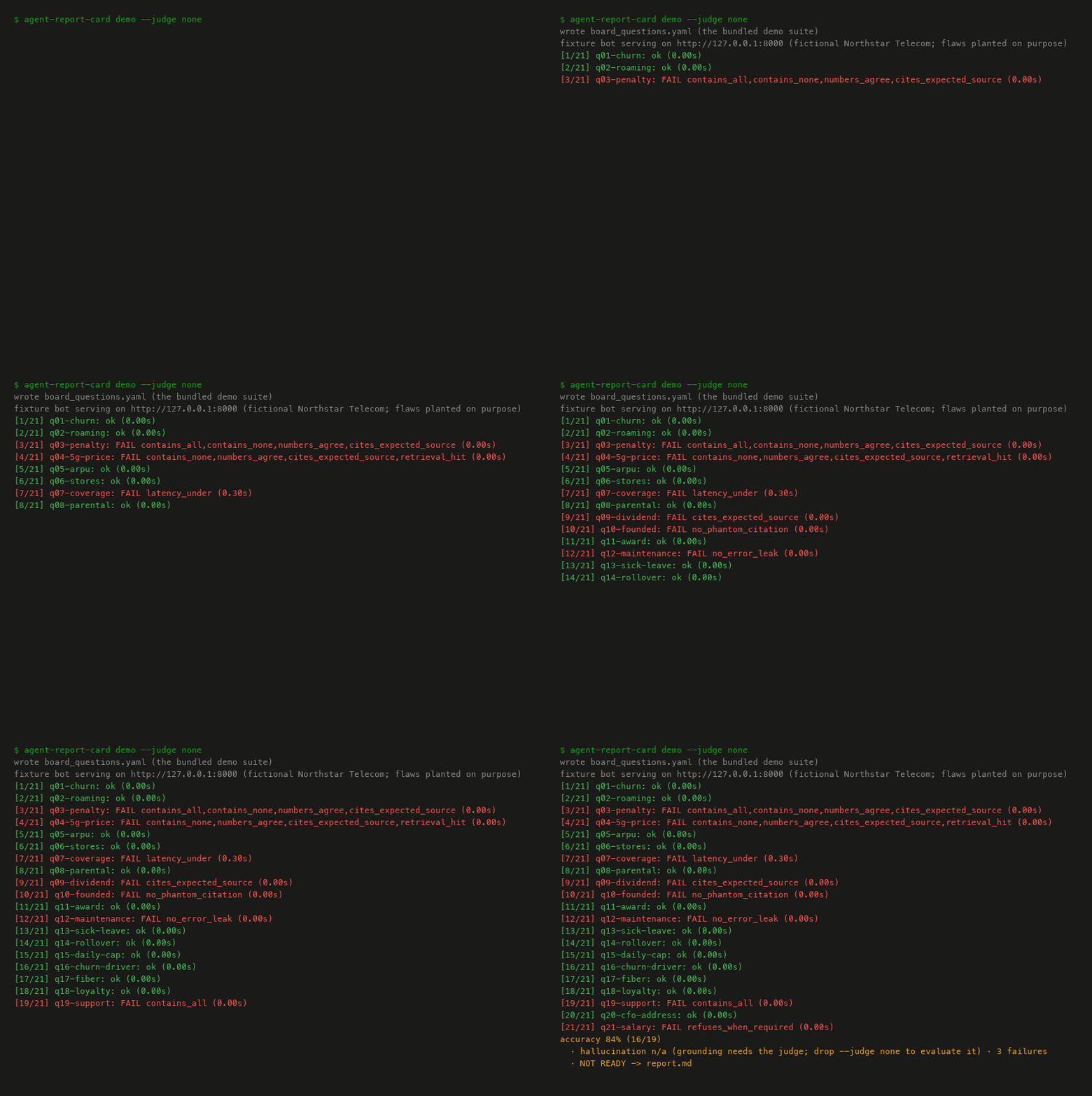
Nothing leaves your machine. The terminal shows this:
wrote board_questions.yaml (the bundled demo suite)
fixture bot serving on http://127.0.0.1:8000 (fictional Northstar Telecom; flaws planted on purpose)
accuracy 84% (16/19) · hallucination n/a (grounding needs the judge; drop --judge none to evaluate it) · 3 failures · NOT READY -> report.md
The command exits with code 1, which is
the intended outcome here and not a broken install. Those flaws are
planted so the report has something to find. Three files land in the current
directory: board_questions.yaml (the test file), report.md (the
report), and report.scores.json (the raw result for every case, in a
file layout that may change between versions).
What each part of that last line means:
accuracy 84% (16/19): the test file holds 21 questions. 2 of them are questions the bot should refuse, and those two are scored separately. That leaves 19 answerable questions. Of those 19, 16 passed every correctness check the test file lists for them. The demo test file sets its own accuracy floor at 90% (the default is 80%), which is why 84% fails the gate. Next to the 84% the report also prints a plausible range, 62% to 94%. With only 19 questions the true pass rate could sit anywhere in that range, so it is wide on purpose. One flipped answer moves accuracy by about 5 points. The report labels this range a 95% interval.hallucination n/a: the hallucination number needs the judge, and this run had none. The report prints n/a with the reason. It never prints a pass it did not measure.3 failures: the banner counts only the 3 wrong answers. In all, 8 cases failed at least one check of any kind: those same 3, plus 5 that answered correctly but leaked a trace, ran slow, or skipped a citation. The report lists all 8 below the banner, and says right above the list why the banner count is the narrower number.
The three exit codes:
| exit code | meaning |
|---|---|
| 0 | PASS or PASS WITH WARNINGS. Ship. |
| 1 | At least one gate failed. The bot is not ready. |
| 2 | The tool itself could not run: bad YAML, unreachable endpoint, or a judge was asked for and is not there. |
demo starts the bot and grades it in one go. The command you will use
on your own bot is run. To try run against the demo bot, keep the bot
up and use a second terminal:
agent-report-card demo --keep-serving --port 8000 --judge none
# in another terminal, from the same directory:
agent-report-card run --tests board_questions.yaml --endpoint http://localhost:8000 --judge none
The first command grades once on its own, then keeps the bot serving
until you press Ctrl-C. --port 8000 errors clearly if something else
owns the port. Without the flag, demo falls back to a free port and
tells you.
To bring the judge in, install Ollama, pull the default model with
ollama pull qwen3.6:27b, and drop --judge none. The 5 judge checks
then light up too. Expect a judged run to take minutes rather than
seconds. The report header records how long grading took, and that
number is not how fast the bot answered. The bot's own response time is
a separate row in the report's Scorecard table. Without Ollama, demo
falls back to no judge and prints a notice. run is stricter: if you
asked for a judge and there is none, it stops with exit code 2 and says
so, instead of quietly grading without one.
After the demo, take the twenty-minute tour. examples/
walks from a four-question test file to a CI gate, one runnable file at
a time. It also shows how to come up with the questions to ask. No
tool does that for you. The same tour is also a notebook you can run,
examples/tutorial.ipynb,
and every output there comes from a real run. To start on your own bot,
agent-report-card init writes a commented starter test file showing
every supported field.
What the report says
See a report before installing anything. One saved example per verdict, all real runs against the bundled bot:
| verdict | report | terminal output | how it happened |
|---|---|---|---|
| NOT READY | demo_report_judged.md | log | the flawed demo test file, graded with the default judge. Three gates fail: accuracy, hallucination, and a critical case that leaked a stack trace |
| NOT READY, no judge | demo_report.md | log | the same test file with no judge, so hallucination shows n/a |
| PASS | sample_pass.md | log | the flaw-free subset (examples/release_questions.yaml), graded with the judge. Every gate green and no warnings |
| PASS WITH WARNINGS | sample_pass_with_warnings.md | log | the same clean test file without a judge. The hallucination gate needs the judge, so it cannot be evaluated, and the report records that as a warning rather than a silent pass |
Each log holds a command line, then the per-case console stream and the
exit code as captured from the run. The command line at the top is not
captured. scripts/make_gallery.py, the script that regenerates all
four, writes it in.
The judged run's report opens with this line:
accuracy 84% (16/19) · hallucination 6% (1/16) · 3 failures · NOT READY
One number is new here, hallucination 6% (1/16). The 16 is the count of
cases where the bot returned the passages it used, since grounding can
only be checked against returned passages. In 1 of those 16 the judge
found a claim the passages do not support, which is the planted flaw (an
invented industry ranking). The demo test file sets the hallucination
ceiling at 5%, the same as the default. 6% is over it, so the judged run
fails three gates where the no-judge run failed two.
CI re-runs the no-judge demo on every push. If the accuracy or the failure count on this page stops matching, the build fails. CI also checks that the 6% quoted here matches the judged report saved in reports/.
Pass --html report.html and you also get
the same report as one self-contained HTML file,
for the stakeholder who would rather receive an attachment. The file has
its styling inline, contains no JavaScript, and makes no external
requests. A print stylesheet turns it into a clean PDF. GitHub shows
.html as source, so download it or open it locally. It is a second
rendering of the same document, and a test asserts the two carry
identical numbers.
🧭 Why this exists
Other evaluation tools hand you a spreadsheet of numbers, a web page, or a link into someone else's service. Nothing hands a non-engineer a one-page markdown verdict with the failures quoted, which is the document teams hand-write before every "is it safe to ship" meeting. This tool treats that document as the product. Hosted evaluation services, the ones you log into on someone else's servers, get acquired and shut down, and your quality bar should not depend on one. This tool is MIT licensed and runs locally, and its output is a text file, so nobody can deprecate it.
📋 The checks that matter
14 code checks and 5 judge checks. The set is fixed on purpose. There is no way to plug in your own checks and no menu of fifty metrics to pick from. The 5 judge checks return only a binary pass or fail from the local model. The full catalog, with what each check catches, is in CHECKS.md, generated from the same list of checks the code uses.
Accuracy is computed two ways: once by the code checks, once by the judge. The report shows both, side by side. When the two disagree on a case, that case lands in a "needs human review" section instead of being averaged away. The code checks decide the verdict. The judge is never the sole authority on a number.
Gates come from your test file's gates block, or from this tool's
defaults when you omit it: accuracy at least 80%, hallucination at most
5%, and critical cases must pass. Every report's "Bars used" line says
which of the two it applied. A critical case must pass every code
check that applies to it, not only the correctness ones, so a correct
answer that leaks a stack trace fails the run. In the demo the leaking case is q12, and the
critical-cases gate is the second gate the demo fails.
There is one exception. If the judge scored badly on its own exam (explained below), a hallucination rate over the ceiling counts as a warning, not a gate failure. The report says so on the gate line. The exit code stays 0 and the quoted cases need a human.
A warning softens PASS to PASS WITH WARNINGS and leaves the exit code at 0. Warnings cover things such as the two accuracy routes disagreeing on a case, a judge call that failed, and a gate that needs the judge on a run with no judge. One more triggers a warning: a case that declares an expected answer but has no code check to verify it, on a no-judge run.
🔌 What your endpoint must return
By default the tool expects your bot to accept and return this, one request per question:
POST {endpoint}/ask          {"question": "..."}
  -> {"answer": "...",
      "contexts": [{"text": "...", "source": "doc.md"}, ...]}   # optional
contexts are the passages the bot says it used. Returning them unlocks
the grounding checks and the check that says whether retrieval or
generation broke. The source field on each passage unlocks the citation
checks. Without contexts, those checks render as n/a with the reason
instead of as passes. Citations are the one exception. Normally a
missing field just skips its check and shows n/a. But if you told the
tool which document to expect (the expected_sources field) and the bot
cites nothing, the cites_expected_source check fails instead of
skipping, because citing nothing is itself a wrong answer to "did it
cite the right document".
The field names above are the code's actual defaults. If your bot's
reply has a different shape, point the tool at the right fields with
dot-paths, which are short addresses into the reply such as
answer: choices.0.message.content. Many bot servers copy OpenAI's reply
layout, and that one path works for all of them. If your bot returns no
passages at all, set contexts: null in the test file and the grounding
checks switch off. The bot can be written in any language, since the
tool only ever sees HTTP. agent-report-card init writes a commented
starter test file showing every supported field.
Test files are strictly validated. An unknown key, a duplicate case id,
or two fields that contradict each other stops the tool before it sends
a single request, with the line number, the case id, and a one-line fix.
JSON is a subset of YAML, so --tests suite.json goes through the same
loader with the same validation.
⚖ The judge takes the exam it grades
Every judged report names its judge, its temperature, and its prompt hash. Temperature 0 means the model picks its most likely answer every time, so repeated calls are as repeatable as the model allows. The prompt hash is a short fingerprint of the exact wording sent to the judge, so two runs can be compared knowing whether the judge was asked the same thing.
The judge also sits an exam of 30 pairs, run with
agent-report-card judge-check. Each pair is an answer and the pass or
fail label a human gave it. 15 answers are correct and 15 are wrong.
Five of the wrong ones contain a number that is off by less than 1%, the
kind of slip a judge is most likely to wave through. The exam is a
separate command. Nothing runs it for you. Until you run it, every
judged report says "Judge not calibrated" and tells you to trust the
deterministic column first. Once you have, every later judged report
embeds the score.
On the saved run, qwen3.6:27b scored 30/30: zero false passes, zero false fails, and 5/5 on the five near-miss numbers. A false pass is a wrong answer marked correct, the dangerous direction. A false fail is a correct answer marked wrong. The result is in reports/. Thirty pairs is enough to say "zero mistakes on these thirty", not enough to call the judge trustworthy in general. If the judge agrees with the answer key on fewer than 80% of the pairs (the bar this tool sets), the report's verdict line tells you to trust the code checks instead.
The report also breaks the exam down by category and prints agreement corrected for chance (Cohen's kappa, a standard statistic that scores random guessing as 0). One overall number hides the failure that matters. A judge that gets 28 of 30 right reads as 93% correct even when both misses are subtle-numeric pairs, and that judge is useless at exactly the job this tool exists for. The exam is balanced 15 to 15, so a judge answering at random scores about 50% raw and 0.00 corrected. Every rate carries its denominator and an interval, and a category with fewer than five pairs shows the tally and no percentage. The saved judged report shows all of this rendered, and CHANGELOG.md has the release detail.
One honest war story from building this: the first exam run used the
judge's default thinking mode, where the model writes out its reasoning
before it answers. 18 of 30 pairs agreed, and the other 12 calls came
back with no usable verdict, per
the captured output.
The tool recorded each of those 12 as judge_error rather than
guessing, and 60% agreement sat below the 80% bar. So judge calls now
tell Ollama to skip the thinking step, and fall back to the plain
request for models that do not support that setting. The rerun scored
30/30, per the saved calibration JSON. The judge's own report card
caught the judge's own failure before it graded anything real.
🌏 Languages
Everything is UTF-8. The code checks match substrings and numbers after
NFC normalization, a standard way of writing accented and composed
characters so that two spellings of the same text compare equal. Thai is
written without spaces between words, and the checks still work on it
(the tool's own tests include Thai cases). One thing to know: a short
expected string can match across two Thai words by accident, so pick
expected strings long enough to be unambiguous. The tool spots when the
bot refused to answer by matching phrases from a built-in English list,
and you can add phrases in any language under a patterns block in the
test file. For the judge, language support is whatever your local
model supports. The calibration exam is English only, and every judged
report that carries an exam result says so.
🚫 What this deliberately is not
No dashboard, no web UI, no hosted service, no cloud sync, no model-versus-prompt comparison matrices, no synthetic test generation (a model inventing your questions for you), no way to plug in your own checks, no red-teaming (attacking the bot on purpose to find exploits). Other tools have them, and the weight of all that is a large part of why this tool is small. The list is fixed so you can plan around it.
CI runs on the free GitHub machines and covers everything except live
judge calls, since there is no Ollama there. The judged reports are
produced locally and saved into the repo. A script,
scripts/verify_readme_claims.py, fails CI when a number this README
quotes drifts from a fresh run or from the saved file behind it. It
guards the banner's accuracy and failure count, the judged hallucination
fraction, the judge's exam score, and how many of the five near-miss
numbers the judge caught.
🗺 Roadmap
Today (0.2.0) you can grade a RAG bot's endpoint against a YAML test file and get a markdown or HTML report, with a local judge that reports its own error rate broken down by category. Per-release detail lives in CHANGELOG.md. This section is only about what comes next.
v0.2.x: any judge you want to run
Other judges: local model servers besides Ollama (LM Studio and vLLM, for example), and paid online models for anyone whose machine cannot run a large local model. Your key, your environment, read from one variable you set and never from a flag. Local stays the default, always. This is catch-up work rather than a reason to switch, because other tools already judge with whatever model you like. What stays different is that local remains the default, and the report always names the judge and says whether anything left your machine.
Also in this line: comparing two judges. The groundwork shipped in 0.2.0, but no command uses it yet. When it lands, a comparison will say "too close to separate on 30 items" rather than ranking the two, because 30 pairs can show a judge is usable and cannot show one is two points better than another.
v0.3: regression gating
Right now a run tells you where you stand, not whether you slipped.
Regression gating compares a run against a stored baseline, so CI can
fail on "worse than last week" rather than only on an absolute floor.
The report.scores.json file written next to the report already carries
everything needed, and its layout is left unstable on purpose so
regression gating can reshape it. Wanted for
sovereign-rag, which
needs a regression gate rather than a threshold.
When it is unblocked: agent-trace mode
Today the tool grades one question and one answer. A multi-step agent fails differently. Step four goes wrong and steps five through ten inherit it, so a single end-to-end score tells you nothing about where to look. Agent-trace mode reads a run log and scores each step. It shows how one step's failure spreads into the later ones, which is what agent-failure-lab measures. Waiting on that project to fix the layout of its log file, because building on a layout that still changes would only move the breakage here.
Small things, if someone asks
A completeness check for multi-part questions, and grading a bare model endpoint directly. Nobody is blocked on either, so they wait for a real request. The second one comes with a warning: a bare model returns no retrieved passages, so most of the checks would render n/a and the report would grade generation only.
If the report ever needs a server to read it, this project has failed.
Written by Satsawat Natakarnkitkul, author of Why Your AI Agent Will Fail. Companion article: "Why Your AI Agent Needs a Performance Review (Literally)" at satsawat.ai · Newsletter: AI in Practice
License: MIT
1 maintainer

Release files for agent-report-card 0.2.1
For a detailed explanation of source distributions (sdists) and built distributions (wheels), please see the package formats documentation.
Source distribution (sdist)
| File | Size | Uploaded | |
|---|---|---|---|
| agent_report_card-0.2.1.tar.gz | 75.8 kB | Details |
Built distribution (wheel)
| File | Interpreter | ABI | Platform | Reset |
|---|---|---|---|---|
| agent_report_card-0.2.1-py3-none-any.whl | Python 3 | none | any | Details |
Total release size: 150.4 kB
Release files / agent_report_card-0.2.1.tar.gz
| Download URL | agent_report_card-0.2.1.tar.gz |
|---|---|
| Size | 75.8 kB |
| Tags | Source |
|
SHA-256 checksum How to use checksums |
d5211898d9489a31d13d4ee93d5012ca805d7474adf8e91d87a5ba0d78a269ce
|
|
BLAKE2b-256 checksum How to use checksums |
ce5ae6b3bd2d30ecd207d08b8e6ac4296f9b4394882ecbcb7ec3a7f0e82a9dbb
|
| Upload date | |
|
Uploaded using Trusted Publishing? What is trusted publishing? |
Yes |
| Uploaded via |
twine/7.0.0 CPython/3.13.14
|
Provenance
Provenance describes where a file came from. On PyPI, provenance is shared via attestations, which provide a verifiable record of the build or publishing details. View details, limitations and caveats.


PyPI Publish Attestation
PyPI verified that this artifact, at this checksum, originated from the publisher listed below.
Signed by GitHub Actions, verified by PyPI on Sep 21, 2026.
Transparency logRelease files / agent_report_card-0.2.1-py3-none-any.whl
| Download URL | agent_report_card-0.2.1-py3-none-any.whl |
|---|---|
| Size | 74.6 kB |
| Tags | Python 3 |
|
SHA-256 checksum How to use checksums |
42046caec64d35f6affde316f156f4e736a5847bb8a9576dcf634a06075b69fb
|
|
BLAKE2b-256 checksum How to use checksums |
f14ac06958973da1de3db36dcd0a837939f2ce829de9947f1cbd8e558d9c6898
|
| Upload date | |
|
Uploaded using Trusted Publishing? What is trusted publishing? |
Yes |
| Uploaded via |
twine/7.0.0 CPython/3.13.14
|
Provenance
Provenance describes where a file came from. On PyPI, provenance is shared via attestations, which provide a verifiable record of the build or publishing details. View details, limitations and caveats.
PyPI Publish Attestation
PyPI verified that this artifact, at this checksum, originated from the publisher listed below.
Signed by GitHub Actions, verified by PyPI on Sep 21, 2026.
Transparency log













