
Agent Runtimes

Project description


🤖 Agent Runtimes


Agent Runtimes is a unified platform for deploying, managing, and interacting with AI agents across multiple protocols and frameworks. It provides both a Python server for hosting agents and React components for seamless integration into web and desktop applications.
🎯 What is Agent Runtimes?
Agent Runtimes solves the complexity of deploying AI agents by providing:
-
Protocol Abstraction: One agent, multiple protocols - deploy your agent once and access it through ACP, Vercel AI SDK, AG-UI, MCP-UI, or A2A without changing your code.
-
Framework Flexibility: Write agents using your preferred framework (Pydantic AI, LangChain, Jupyter AI) while maintaining a consistent API.
-
Cloud Runtime Management: Built-in integration with Datalayer Cloud Runtimes for launching and managing compute resources with Zustand-based state management.
-
UI Components: Pre-built React components (ChatBase, ChatSidebar, ChatFloating) that connect to agents and execute tools directly in the browser.
-
Tool Ecosystem: Seamless integration with MCP (Model Context Protocol) tools, custom tools, and built-in utilities for Jupyter notebooks and Lexical documents.
🌟 Features
Multi-Protocol Support
- ACP (Agent Client Protocol): WebSocket-based standard protocol
- Vercel AI SDK: Compatible with Vercel's AI SDK for React/Next.js
- AG-UI: Lightweight web interface (Pydantic AI native)
- MCP-UI: Interactive UI resources protocol with React/Web Components
- A2A: Agent-to-agent communication
Multi-Agent Support
- Pydantic AI: Type-safe agents (fully implemented)
- LangChain: Complex workflows (adapter ready)
- Jupyter AI: Notebook integration (adapter ready)
Built-in Features
- 🔌 Flexible Architecture: Easy to add new agents and protocols
- 🛠️ Tool Support: MCP, custom tools, built-in utilities
- 📊 Observability: OpenTelemetry integration
- 💾 Persistence: DBOS support for durable execution
- 🔒 Context Optimization: LLM context management
🏗️ Architecture
Agent Runtimes consists of three main components:
1. Python Server (agent_runtimes/)
The backend server that hosts AI agents and handles protocol routing:
- Agent Adapters: Unified interface for Pydantic AI, LangChain, and Jupyter AI
- Protocol Adapters: Convert between different agent protocols (ACP, AG-UI, Vercel AI, etc.)
- FastAPI Server: High-performance async server with automatic API documentation
- Tool Registry: Manages and executes tools from various sources (MCP, custom, built-in)
2. React Components (src/components/)
Pre-built UI components for interacting with agents:
- ChatBase: Core chat interface with customizable styling
- ChatSidebar: Collapsible sidebar for agent interactions
- ChatFloating: Floating chat widget for non-intrusive agent access
- All components support: Frontend tool execution, markdown rendering, code highlighting, and real-time streaming
3. Runtime Management (src/runtime/)
Cloud runtime lifecycle management with Zustand store:
- Launch & Connect: Create new cloud runtimes or connect to existing ones
- Agent Creation: Automatically create and configure agents on runtimes
- State Management: Track runtime status, agent connections, and errors
- Hooks: React hooks for easy integration (
useAgentRuntime,useRuntimeStore)
🚀 Use Cases
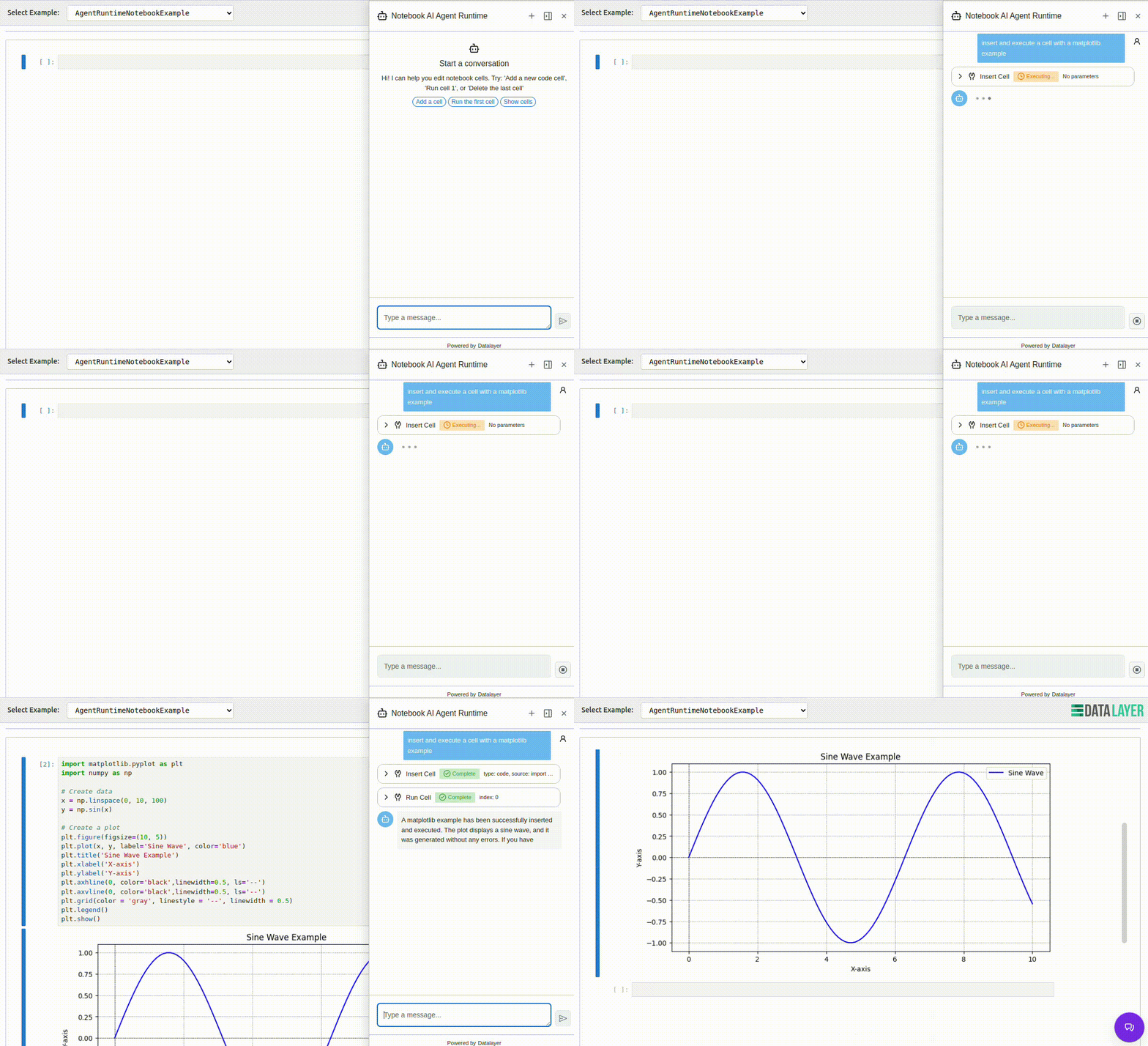
Notebook AI Assistant
Add an AI agent to Jupyter notebooks that can:
- Execute cells, insert code, and modify notebook content
- Explain code and data analysis
- Debug errors and suggest improvements
import { NotebookAgentsRuntime } from '@datalayer/agent-runtimes';

<NotebookAgentsRuntime
  notebookId={notebookId}
  environmentName="python-simple"
  runtimeName={runtimeName}
  serviceManager={serviceManager}
/>
Document Editor AI
Integrate AI into Lexical-based document editors:
- Insert headings, lists, code blocks, and formatted text
- Summarize content and proofread text
- Generate ideas and help with writing
import { DocumentAgentRuntime } from '@datalayer/agent-runtimes';

<DocumentAgentRuntime
  documentId={documentId}
  environmentName="python-simple"
  runtimeName={runtimeName}
  serviceManager={serviceManager}
/>
Custom Agent Deployment
Deploy your own Pydantic AI agent with custom tools:
from agent_runtimes import AgentRuntimesApp
from pydantic_ai import Agent

# Create your agent
agent = Agent(
    model='anthropic:claude-sonnet-4-5',
    system_prompt='You are a helpful assistant.',
)

# Launch the server
app = AgentRuntimesApp()
app.add_agent(agent, name='my-agent', transport='ag-ui')
app.run(port=8000)
🔧 Key Concepts
Protocols
Agent Runtimes supports multiple protocols for agent communication:
- AG-UI: Lightweight protocol for web UIs (POST-based, Pydantic AI native)
- ACP: WebSocket-based Agent Client Protocol for real-time interaction
- Vercel AI SDK: Compatible with Vercel's AI SDK streaming
- MCP-UI: Model Context Protocol with UI resources
- A2A: Agent-to-agent communication protocol
Tools
Tools extend agent capabilities by allowing them to perform actions:
- Frontend Tools: Execute in the browser (notebook editing, document manipulation)
- MCP Tools: Tools from Model Context Protocol servers
- Custom Tools: Your own Python functions decorated with tool metadata
- Built-in Tools: File operations, web search, code execution
- Code Mode: Tool discovery includes
output_schemaandinput_examplesfor reliable calls; code execution returnsstdout/stderrand a summarizedresult.
Runtime Management
Cloud runtimes provide compute resources for agents:
import { useAgentRuntime } from '@datalayer/agent-runtimes/lib/runtime';

const { isReady, endpoint, tools, launchRuntime } = useAgentRuntime({
  autoCreateAgent: true,
  agentConfig: {
    model: 'anthropic:claude-sonnet-4-5',
    systemPrompt: 'You are a helpful AI assistant.',
  },
});

// Launch a new runtime
await launchRuntime({
  environmentName: 'python-simple',
  creditsLimit: 100,
  type: 'notebook',
});


Download files
Download the file for your platform. If you're not sure which to choose, learn more about installing packages.
Source Distributions
Built Distribution
Filter files by name, interpreter, ABI, and platform.
If you're not sure about the file name format, learn more about wheel file names.
Copy a direct link to the current filters
File details
Details for the file agent_runtimes-0.0.7-py3-none-any.whl.
File metadata
- Download URL: agent_runtimes-0.0.7-py3-none-any.whl
- Upload date:
- Size: 157.4 kB
- Tags: Python 3
- Uploaded using Trusted Publishing? No
- Uploaded via: twine/6.2.0 CPython/3.11.14
File hashes
| Algorithm | Hash digest | |
|---|---|---|
| SHA256 |
4b53442f16dd97c049610da9ff8c362b8e0c8fce6c780f72a958ca3a4822c56b
|
|
| MD5 |
05078f1d6f772a7b6d2c4d039c0ceff0
|
|
| BLAKE2b-256 |
39d82309e0875870202c9657a4ac661ff3a6160980614c6f130930776a77db62
|






