
Voice AI agent simulator and evaluation harness


Project description
🧪 Agent Simulate SDK
A Python SDK for testing conversational voice AI agents through realistic customer simulations.
Built by Future AGI | Docs | Platform
🚀 Overview
Agent Simulate provides a powerful framework for testing deployed voice AI agents. It automates realistic customer conversations, records the full interaction, and integrates with evaluation pipelines to help you ship high-quality, reliable agents.
- 📞 Test Deployed Agents: Connect directly to your agent in a LiveKit room.
- 🎭 Persona-driven Scenarios: Define customer personas, situations, and goals.
- 🎙️ Full Audio & Transcripts: Capture complete conversation audio and text.
- 📊 Integrate Evaluations: Use
ai-evaluationto score agent performance.
Key Features
| Feature | Description |
|---|---|
| Agent Definition | Configure the connection to your deployed agent, including room, prompts, and credentials. |
| Scenario Creation | Programmatically define test cases with unique customer personas, situations, and desired outcomes. |
| Automated Test Runner | Orchestrates the simulation, connects the persona to the agent, and manages the conversation flow. |
| Audio/Transcript Capture | Automatically records individual and combined audio tracks, plus a full text transcript. |
| Evaluation Integration | Seamlessly pass test results (audio, transcripts) to the ai-evaluation library for scoring. |
| Extensible & Customizable | Customize STT, TTS, and LLM providers for the simulated customer. |
🔧 Installation
# Install through pip
pip install agent-simulate
If you want to fork the project and install it in editable mode, you can use the following command:
git clone https://github.com/future-agi/agent-simulate.git
cd agent-simulate
pip install -e . # poetry install if you want to use poetry
The project uses Poetry for dependency management.
Download VAD Model Weights
The SDK uses Silero VAD for voice activity detection. Download the required model weights by running this script once:
from livekit.plugins import silero

if __name__ == "__main__":
    print("Downloading Silero VAD model...")
    silero.VAD.load()
    print("Download complete.")
🧑💻 Quickstart
1. 🔐 Set Environment Variables
Create a .env file with your credentials:
# LiveKit Server Details
LIVEKIT_URL="wss://your-livekit-server.com"
LIVEKIT_API_KEY="your-api-key"
LIVEKIT_API_SECRET="your-api-secret"

# OpenAI API Key (for the default simulated customer)
OPENAI_API_KEY="your-openai-key"

# Future AGI Evaluation Keys (for running evaluations)
FI_API_KEY="your-fi-api-key"
FI_SECRET_KEY="your-fi-secret-key"
2. ✅ Run a Simulation
This example connects a simulated customer ("Alice") to your deployed agent.
import asyncio
import os
from dotenv import load_dotenv
from fi.simulate import AgentDefinition, Scenario, Persona, TestRunner
from fi.simulate.evaluation import evaluate_report

load_dotenv()

async def main():
    # 1. Define your deployed agent
    agent_definition = AgentDefinition(
        name="my-support-agent",
        url=os.environ["LIVEKIT_URL"],
        room_name="support-room",  # The room where your agent is waiting
        system_prompt="Helpful support agent", # The system prompt for the agent that defines its behavior
    )

    # 2. Create a test scenario
    scenario = Scenario(
        name="Customer Support Test",
        dataset=[
            Persona(
                persona={"name": "Alice", "mood": "frustrated"},
                situation="She cannot log into her account.",
                outcome="The agent should guide her through password reset.",
            ),
        ]
    )

    # 3. Run the test
    runner = TestRunner()
    report = await runner.run_test(
        agent_definition,
        scenario,
        record_audio=True,  # Capture WAV files
    )

    # 4. View results
    for result in report.results:
        print(f"Transcript: {result.transcript}")
        print(f"Combined Audio Path: {result.audio_combined_path}")

    # 5. Evaluate the Report
    # This helper runs evaluations for each test case in the report.
    # Map report fields (e.g., 'transcript') to the inputs required by the eval template.
    evaluated_report = evaluate_report(
        report,
        eval_specs=[
            {
                "eval_templates": ["task_completion"],
                "template_inputs": {"transcript": "transcript"},
            },
            {
                "eval_templates": ["audio_quality"],
                "template_inputs": {"audio": "audio_combined_path"},
            },
        ],
    )

    # View evaluation results
    for result in evaluated_report.results:
        for eval_result in result.evaluation_results:
            print(f"Evaluation for {eval_result.eval_template_name}:")
            print(f"  Score: {eval_result.score}")
            print(f"  Output: {eval_result.output}")


if __name__ == "__main__":
    asyncio.run(main())
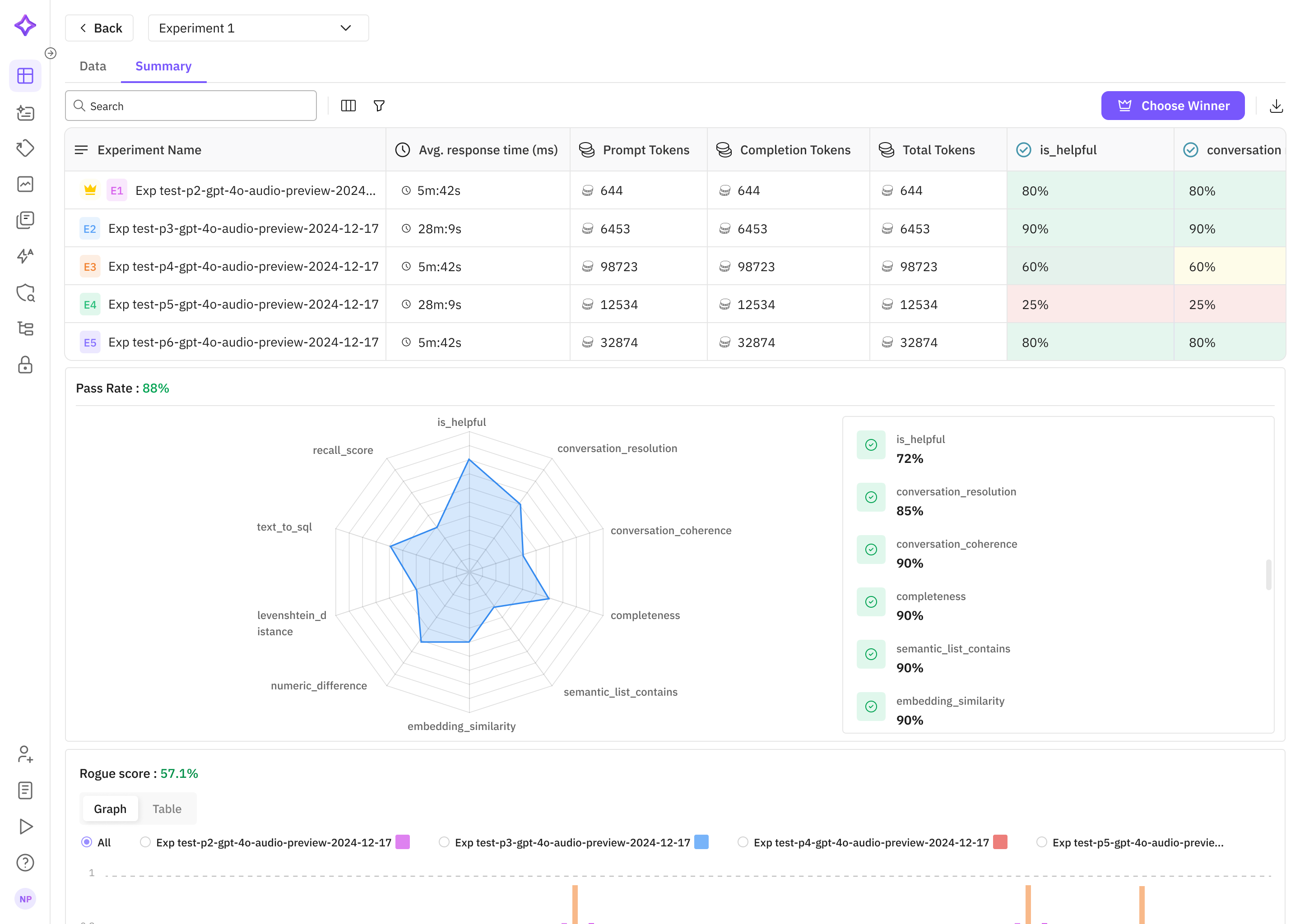
🚀 LLM Evaluation with Future AGI Platform
Future AGI delivers a complete, iterative evaluation lifecycle so you can move from prototype to production with confidence:
| Stage | What you can do |
|---|---|
| 1. Curate & Annotate Datasets | Build, import, label, and enrich evaluation datasets in‑cloud. Synthetic‑data generation and Hugging Face imports are built in. |
| 2. Benchmark & Compare | Run prompt / model experiments on those datasets, track scores, and pick the best variant in Prompt Workbench or via the SDK. |
| 3. Fine‑Tune Metrics | Create fully custom eval templates with your own rules, scoring logic, and models to match domain needs. |
| 4. Debug with Traces | Inspect every failing datapoint through rich traces—latency, cost, spans, and evaluation scores side‑by‑side. |
| 5. Monitor in Production | Schedule Eval Tasks to score live or historical traffic, set sampling rates, and surface alerts right in the Observe dashboard. |
| 6. Close the Loop | Promote real‑world failures back into your dataset, retrain / re‑prompt, and rerun the cycle until performance meets spec. |
Everything you need—including SDK guides, UI walkthroughs, and API references—is in the Future AGI docs.
🗺️ Roadmap
- Core Simulation Engine
- Persona-driven Scenarios
- Audio & Transcript Recording
-
ai-evaluationIntegration Helper - Advanced Scenarios (Conversation Graphs)
- Deeper Performance Metrics (Latency, Interruption Rates)
🤝 Contributing
We welcome contributions! To report issues, suggest templates, or contribute improvements, please open a GitHub issue or PR.


Download files
Download the file for your platform. If you're not sure which to choose, learn more about installing packages.
Source Distribution
Built Distribution
Filter files by name, interpreter, ABI, and platform.
If you're not sure about the file name format, learn more about wheel file names.
Copy a direct link to the current filters
File details
Details for the file agent_simulate-0.1.2.tar.gz.
File metadata
- Download URL: agent_simulate-0.1.2.tar.gz
- Upload date:
- Size: 29.8 kB
- Tags: Source
- Uploaded using Trusted Publishing? No
- Uploaded via: poetry/2.2.1 CPython/3.13.2 Darwin/24.6.0
File hashes
| Algorithm | Hash digest | |
|---|---|---|
| SHA256 |
fc3cbfc42b118a60eb3e0267cc30606d2d10f1e2fed56c3c6cfa84b5f1d1e4a7
|
|
| MD5 |
c84217f7f6c5f8254ebb48d8902602ec
|
|
| BLAKE2b-256 |
6e1821d96058a4eb40fd1bb9d4b1426e893c67caffc4402ff1b1f0c70d06aacc
|
File details
Details for the file agent_simulate-0.1.2-py3-none-any.whl.
File metadata
- Download URL: agent_simulate-0.1.2-py3-none-any.whl
- Upload date:
- Size: 35.9 kB
- Tags: Python 3
- Uploaded using Trusted Publishing? No
- Uploaded via: poetry/2.2.1 CPython/3.13.2 Darwin/24.6.0
File hashes
| Algorithm | Hash digest | |
|---|---|---|
| SHA256 |
fd2ad8d97419882b8c02376357e5f4bd545f00b282ad513bf1338c252c3b4077
|
|
| MD5 |
3f55c28c0a4c0a660df1cbc1b5b0aec4
|
|
| BLAKE2b-256 |
074db299000f440e2d255922b430c5d16219e8b9dd81df671d450726ea6795e9
|






