
agent-timelines


A pixel-art dashboard for Claude Code sessions. It shows which agent spawned which, the model and effort requested vs. what actually ran, tool calls, weighted token cost and dollars, handoffs and Workflow runs, live while the session works. Everything is read from your local transcripts; nothing leaves your machine.
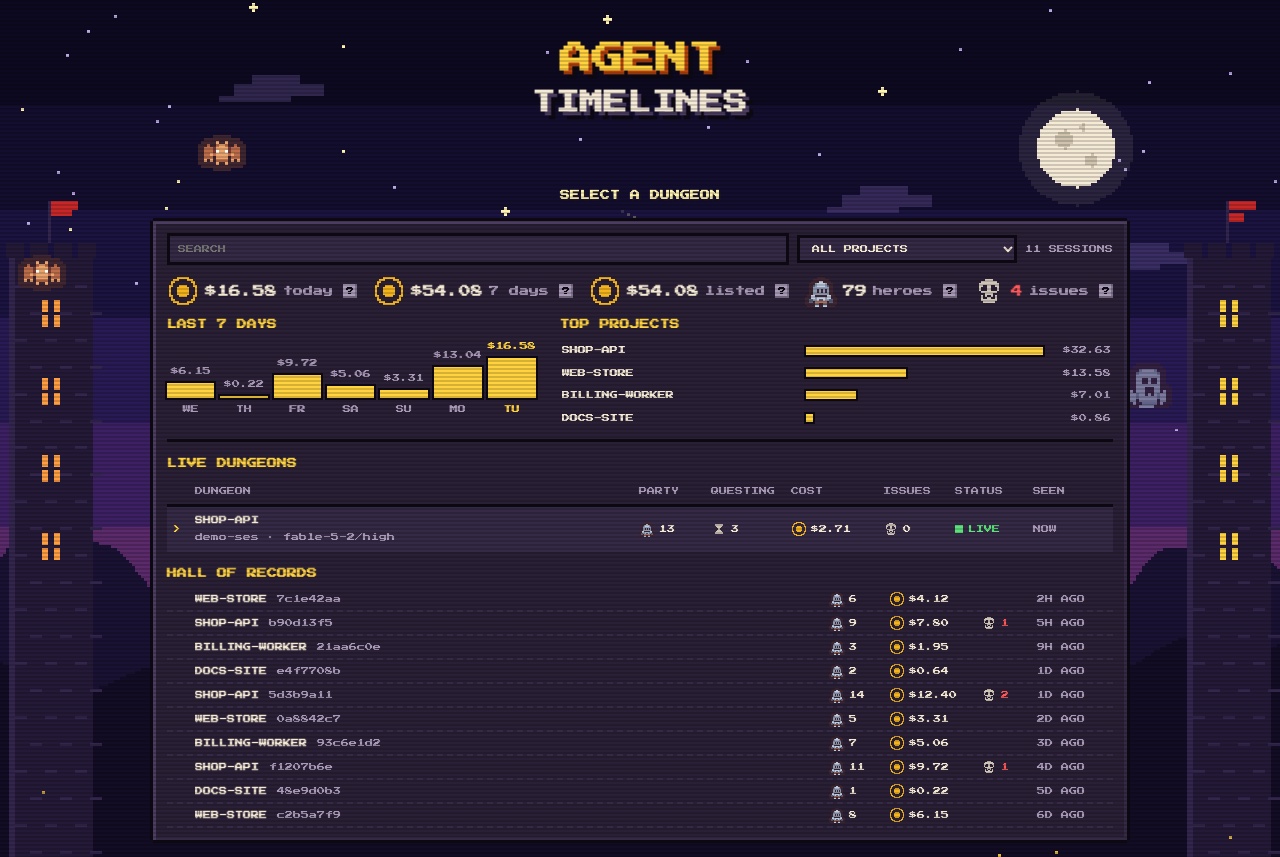
- Lobby: your 200 most recent sessions as a retro game-server list under a pixel night sky (a day sky in the light colour scheme).
Live dungeons get a full row; the hall of records is one short line per past session. There is search, a project filter and
paging (
/focuses the search box, left/right change the page). A ledger on top sums what the listed sessions cost: today, the last 7 days by day, and the costliest projects (click one to filter). - Trophy room: a box in the lobby with every achievement (
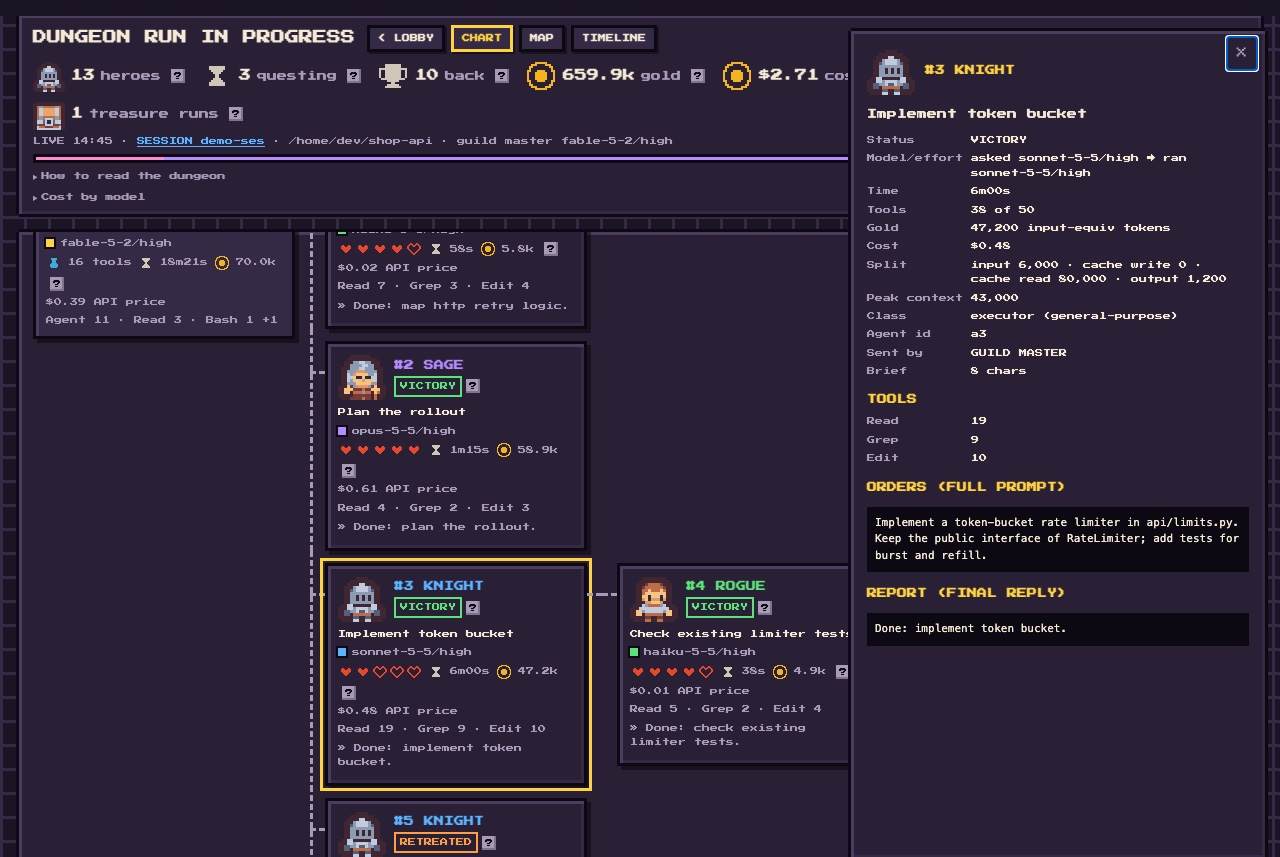
7/19): unlocked ones in gold with their date, locked ones dim with their condition, plus your lifetime heroes, sessions, spend and best streak. A session's own badges show under its title, and a toast announces an unlock this browser has not seen. See Achievements. - Chart view: the delegation tree as a party of heroes, with flags for rule breaks (no model set,
model mismatch, ignored tool limit, unanswered handoff, …).
Each card shows the agent's top tools and the start of its final reply; the detail panel lists every tool and the full report
(a running agent shows what it is saying now).
- Boss and elite: in a party of 3 or more heroes, the costliest one (by API price, ties to the earliest spawn) is the BOSS and any other hero costing at least half as much is ELITE. They get a chip, a Rank row in the detail panel and a map tooltip name; on the map an elite fights a double-size enemy, the boss a 3x red dragon under a crown, and the boss's room glows red while it fights. Rank follows cost, so it can change while a session runs; it only changes the drawing, never the map layout.
- Timeline view: one bar per agent on a shared clock, rows in party-tree order, so you can see who ran when and what overlapped. Running agents get a striped bar; zoom with + and -.
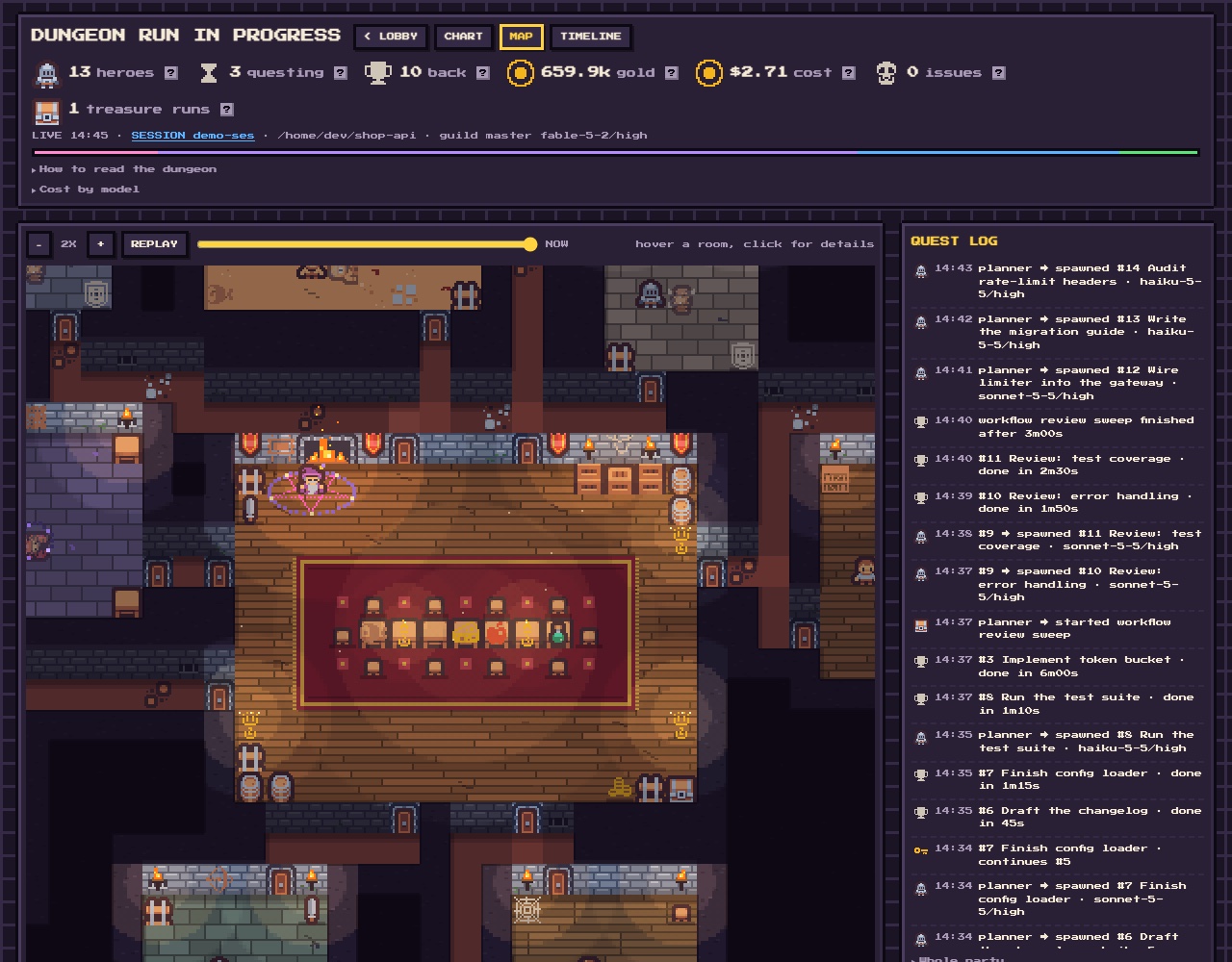
- Map view: the same session as a procedurally generated, torch-lit dungeon. The main session is the guild master
in the guild hall, casting over a pentagram while agents work; each agent has its own room and fights an enemy while it works, then celebrates.
- A room's look follows the agent's class: armory, library, lab, study, sand pit, vault for a workflow, crypt for the rest.
- Torches burn brighter while the agent works and turn green if the agent failed or ignored its tool limit.
- A new hero walks the corridors to its room, carrying a key if it continues a handoff.
- Hover a room for its agent, click it for details.
- REPLAY plays the whole session back on the map; drag the slider to see any moment.
(The screenshots show a synthetic demo session.)
Install
Needs Python 3.9+ on macOS or Linux (Windows is not supported). No other dependencies. Use one of the two options, not both.
Option A: the command-line tool from PyPI (needs uv or pipx)
uv tool install agent-timelines   # or: pipx install agent-timelines
agent-timelines install    # adds 6 hooks to ~/.claude/settings.json (writes a backup next to it first)
agent-timelines rebuild    # optional: fills the lobby with your sessions from the last 30 days
agent-timelines serve      # opens http://127.0.0.1:8765/index.html (localhost only)
Option B: the Claude Code plugin (no pip, no settings.json edit; the hooks come with the plugin)
claude plugin marketplace add jasondasuki/agent-timelines
claude plugin install agent-timelines@agent-timelines
Then ask for the dashboard with /agent-timelines:dashboard. The plugin's hooks run python3 from your PATH, so Python 3.9+ must be there.
If agent-timelines install hooks are also in settings.json, the plugin's hooks stay quiet so nothing is built twice.
Start or continue a Claude Code session; it appears in the lobby on its first hook event.
| Command | What it does |
|---|---|
install [--settings PATH] |
Add the hooks (replaces earlier agent-timelines hooks, keeps all others). |
uninstall [--settings PATH] |
Remove the hooks. Your data folder stays. |
serve [--port N] [--no-browser] |
Serve the dashboard on 127.0.0.1. |
open [SESSION-PREFIX] |
Build one session (newest by default) and open it from disk, no server. |
rebuild [--days N] |
Regenerate data for recent sessions from their transcripts (also fills the achievements save file). |
achievements |
List every achievement with its unlock state and your lifetime totals. |
list |
Recent sessions with their subagent counts. |
version (or --version) |
Print the version. |
--settings targets another Claude config dir, e.g. --settings ~/.claude-work/settings.json.
CLAUDE_CONFIG_DIR is respected for the default paths.
Data lives in ~/.claude/agent-timelines/ (one <session>.data.js and one <session>.prompts.js per session, removed after 30 days untouched,
and achievements.js, the save file, which is never removed).
The pages hold prompt text from your sessions, which is why serve binds to localhost only and refuses requests that come from other sites (wrong Host, or a cross-site script or fetch).
Achievements
achievements.js (next to the data files, loaded by the pages like them) is the save file: your unlocked achievements ({id: {t, sid}}, the earliest unlock wins),
a record per session younger than retain_days (heroes, spend), the totals of the older ones, and the days you were active (for the streak). Lifetime totals survive the
30-day purge and do not grow when a session is rebuilt, because a session's record is overwritten, not added. A session already older than retain_days is never entered,
so rebuild cannot count old transcripts twice; a session resumed after it was folded in counts its old part again (the known limit). Session achievements are judged
only once the session is settled (main session idle, no agent running). Writes take a lock and are atomic; a corrupt or missing file starts fresh. The rules are one
table, ACHIEVEMENTS in timeline.py, with the names and conditions copied into the file, so adding one is one line. Delete the file to reset your trophies.
| Achievement | Condition |
|---|---|
| First Blood | A hero finished its job |
| Full Party / Legion | 5 / 15 or more heroes in one session |
| Flawless | 5 or more heroes and no issue flags |
| Penny Pincher | 5 or more heroes for under $1 (every model priced) |
| Dragon's Hoard | A session over $50 |
| Boss Slayer | The boss finished with no issue flags and no handoff |
| Relay / Key Master | A handoff was continued / 3 or more in one session |
| Treasure Hunter | A Workflow run finished |
| Assemble | 4 or more classes in one session |
| Speedrun | A hero finished in under 30 s |
| Swarm | 5 or more heroes running at once |
| Haunted | A hero went berserk (needs tool_limit) |
| Centurion / Thousand Blades | 100 / 1000 heroes in total |
| Veteran | 100 sessions |
| Treasury | $1000 of API-price spend in total |
| Seven Days | Active 7 days in a row |
Config (optional)
~/.config/agent-timelines/config.json (or $AGENT_TIMELINES_CONFIG). Every key is optional:
{
  "out_dir": "~/.claude/agent-timelines",
  "ctx_limit": 200000,
  "tool_limit": 50,
  "brief_limit": 8000,
  "retain_days": 30,
  "lobby_limit": 200,
  "handover_dir": "~/.claude/handovers",
  "agents_dir": "~/.claude/agents",
  "guard_text": "Main session does not execute",
  "tiers": {"Explore": "scanner", "Plan": "plan", "general-purpose": "executor"},
  "rules": {"no-model": true, "no-effort": true},
  "prices": {"gpt-6": {"in": 1, "out": 2}}
}
tool_limit is unset by default, so there are no hearts, only a tool count; set it to the number your hand-off hook uses.
brief_limit, guard_text and handover_dir match optional hand-off and guard hooks of your own;
without such hooks those flags never fire. tiers maps agent types to character classes.
rules turns single flags on or off by name; a flag you do not list keeps its default. no-model and no-effort are off by default;
turn them on if your setup requires every spawn to name a model and effort. The flag names are no-model, no-effort, auto-filled,
frontmatter, model-mismatch, effort-mismatch, ctx (the context-size flag), handoff, tool-limit, ignored-limit, orphan
and handoff-not-continued; an unknown name is an error.
prices adds or changes entries of the built-in price table (USD per million tokens; the table is dated, see PRICES_ASOF in timeline.py).
The key is a model id prefix without claude-, the longest matching key wins, and the columns are in, cc5 (5-minute cache write),
cc1 (1-hour cache write), cr (cache read), out and an optional over ([prompt tokens, multiplier]); a missing column counts as 0.
Entries are merged per model, so you only list what you add or change. A model with no price is shown as unpriced ($0.00+ on its card),
never guessed.
Cost
Cost is computed per message from the full model id and the usage recorded in the transcript, at Anthropic first-party API list prices
(pricing page, table dated 2026-11-10). It is what those tokens would cost through the
API; a subscription plan is not billed per token. Not modelled: the 1.1x US-only inference_geo surcharge (the transcript does not say whether it
applied), batch discounts, Bedrock and Vertex prices, web-search and other server-tool fees. Gold is the same tokens weighted by cost, as before.
Development
python3 tests/test_timeline.py && python3 tests/test_cli.py   # Python
node tests/test_dungeon.js && node tests/test_actors.js && node tests/test_lobby.js && node tests/test_gantt.js && node tests/test_trophy.js   # viewer scripts (Node 18+)
open dev/dungeon-demo.html                                     # dungeon playground: agents, working, reset
Credits
- Sprites: Kenney "Tiny Dungeon" and "1-Bit Pack", CC0.
- Font: Press Start 2P by CodeMan38, SIL Open Font License 1.1.
Details in src/agent_timelines/assets/LICENSES.txt.
License
MIT, see LICENSE. Contributions welcome: see CONTRIBUTING.md. Security reports: SECURITY.md.
1 maintainer

Metadata
1 maintainer
Release files for agent-timelines 0.4.0
For a detailed explanation of source distributions (sdists) and built distributions (wheels), please see the package formats documentation.
Source distribution (sdist)
| File | Size | Uploaded | Provenance | Actions |
|---|---|---|---|---|
| agent_timelines-0.4.0.tar.gz | 164.8 kB | Without provenance | Details for agent_timelines-0.4.0.tar.gz |
Built distribution (wheel)
| File | Interpreter | ABI | Platform | Actions Reset |
|---|---|---|---|---|
| agent_timelines-0.4.0-py3-none-any.whl | Python 3 | none | any | Details for agent_timelines-0.4.0-py3-none-any.whl |
Total release size: 315.2 kB
Release files / agent_timelines-0.4.0.tar.gz
| Download URL | agent_timelines-0.4.0.tar.gz |
|---|---|
| Size | 164.8 kB |
| Tags | Source |
|
SHA-256 checksum How to use checksums |
bb277ba4ddf1f00d4665c2d0451e35a1f48999068495ff9f392e291effce52ae
|
|
BLAKE2b-256 checksum How to use checksums |
bb838efc76336ff16b9498c25a1852dc713ec925c8ce73f386b6f5ae04d33c0d
|
| Upload date | |
|
Uploaded using Trusted Publishing? What is trusted publishing? |
No |
| Uploaded via |
uv/0.12.21 {"installer":{"name":"uv","version":"0.12.21","subcommand":["publish"]},"python":null,"implementation":{"name":null,"version":null},"distro":{"name":"macOS","version":null,"id":null,"libc":null},"system":{"name":null,"release":null},"cpu":null,"openssl_version":null,"setuptools_version":null,"rustc_version":null,"ci":null}
|
Release files / agent_timelines-0.4.0-py3-none-any.whl
| Download URL | agent_timelines-0.4.0-py3-none-any.whl |
|---|---|
| Size | 150.4 kB |
| Tags | Python 3 |
|
SHA-256 checksum How to use checksums |
de3d6402d1b8dfef770955c7ece5107deee0be69e988416e2590291d13b0999f
|
|
BLAKE2b-256 checksum How to use checksums |
e2c75b0babe10c9e7694d04000a9857ec8f37067c6e327146c8e8faa4afaaf10
|
| Upload date | |
|
Uploaded using Trusted Publishing? What is trusted publishing? |
No |
| Uploaded via |
uv/0.12.21 {"installer":{"name":"uv","version":"0.12.21","subcommand":["publish"]},"python":null,"implementation":{"name":null,"version":null},"distro":{"name":"macOS","version":null,"id":null,"libc":null},"system":{"name":null,"release":null},"cpu":null,"openssl_version":null,"setuptools_version":null,"rustc_version":null,"ci":null}
|
Security for agent-timelines 0.4.0
Provenance
Provenance describes where a file came from. On PyPI, provenance is shared via attestations, which provide a verifiable record of the build or publishing details. View details, limitations and caveats.
No provenance found
None of the files in this release were uploaded with provenance metadata.
A note on package security
PyPI is a repository for distributing packages, not a service for auditing them. While third-party security researchers and our staff do their best to detect and remove malicious packages, PyPI cannot guarantee the quality, security or suitability of any given package.
To learn more about protecting yourself from malicious actors, visit our package security documentation.














