
agent-toggle
PyPI: https://pypi.org/project/agent-toggle/
Temporarily disable and restore AI-agent resources — skills, agents, commands, rules, plugins (mods included), MCP servers — across Claude Code, Codex, Grok CLI, OpenCode, OpenClaw, Copilot, Vibe, Devin and Antigravity — and show what each one costs at session start.
It ships in two forms: a CLI (agent-toggle, all harnesses) and a Claude Code mod
(the /agent-toggle pane, claude harness only; see Claude Code pane mod).
Both drive the same toggle engine and state.
Nothing is ever deleted. Everything is parked and recorded, and enable
puts it back where it came from.
At a glance
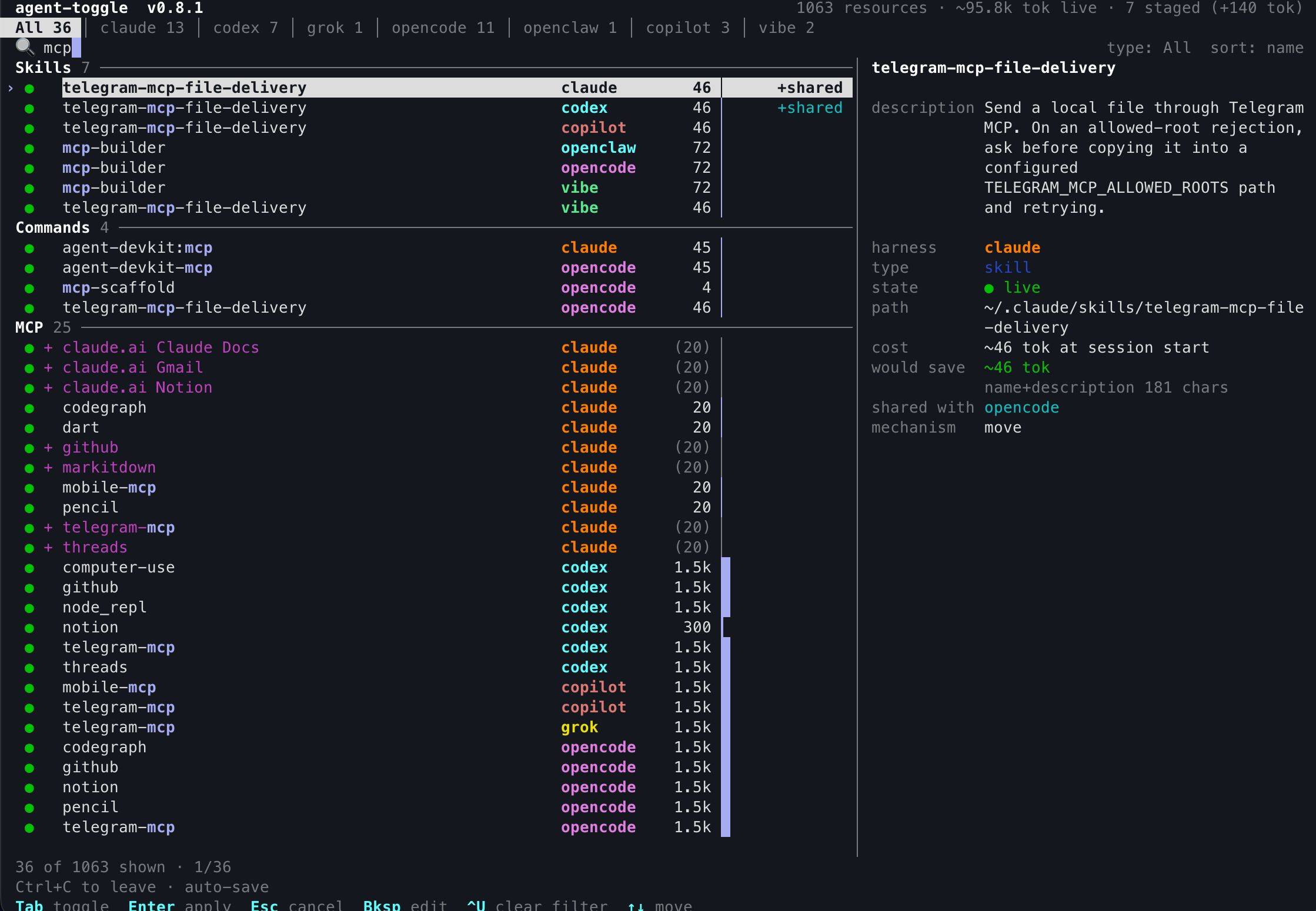
agent-toggle ui: one list per harness, with what each resource costs in tokens.
Toggle rows, see the token change before you apply it, and apply it as one batch that
undo reverses (Interactive picker).
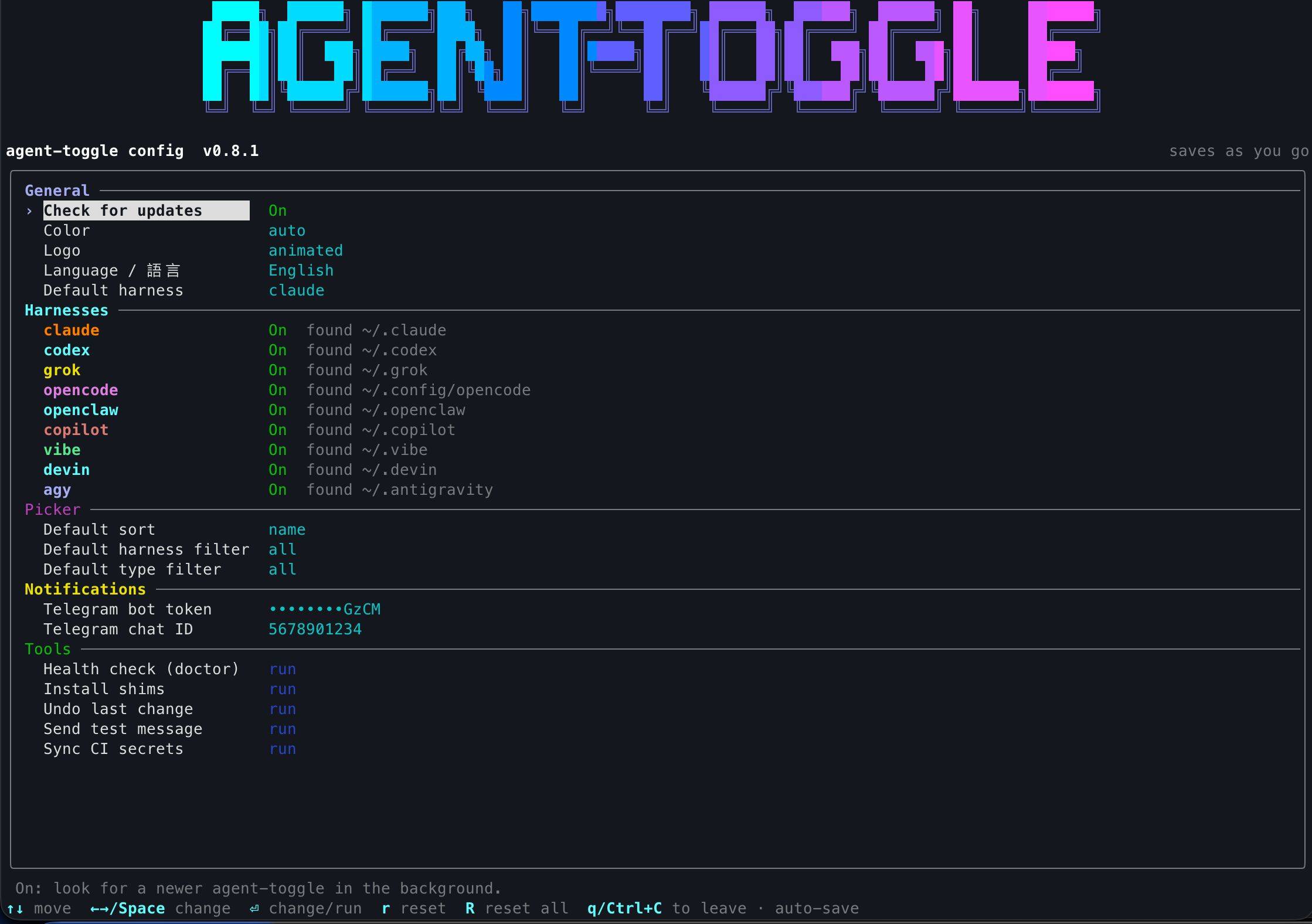
agent-toggle config: every setting in one menu. Turn harnesses on or off and set the
language, update check and Telegram notifications. It also runs tools such as doctor and
undo (Settings & config menu).
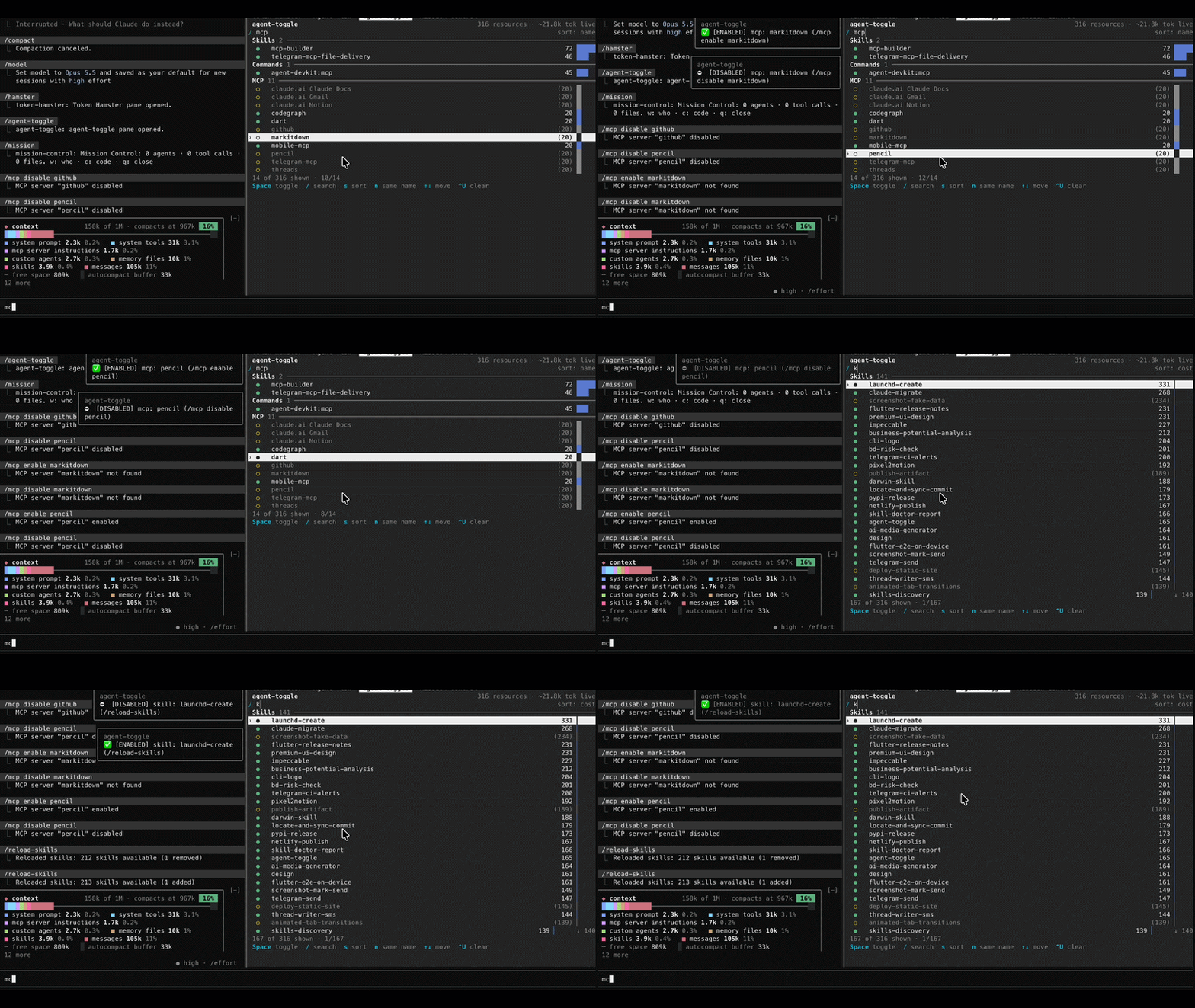
/agent-toggle inside Claude Code: the same picker as a pane. Search, then turn skills, MCP
servers, plugins and mods on or off without leaving the session; each toggle applies at once and
queues the matching reload (Claude Code pane mod).
Why
| target | native mechanism | the gap |
|---|---|---|
| plugin | claude plugin disable/enable |
without -s the scope follows the current dir, so a project plugin enabled from elsewhere stays off; this tool pins the install's scope and project |
| skill | none | moving files by hand hits the rename trap below |
| agent | none | same |
| command | none | same, plus nested group/name.md paths get flattened |
| MCP | remove only |
the config is gone unless you saved it first |
Install
Latest release, from PyPI:
uv tool install agent-toggle
agent-toggle --version
Straight from this repository, pinned to a release tag (replace vX.Y.Z with one from
tags; an unpinned git+ URL installs
whatever is on the default branch):
uv tool install git+https://github.com/weskao/agent-toggle@vX.Y.Z
agent-toggle --version
Alternatively, use pipx:
pipx install agent-toggle # from PyPI; or: pipx install git+https://github.com/weskao/agent-toggle@vX.Y.Z
From a checkout, either install it editable or run it in place:
git clone https://github.com/weskao/agent-toggle agent-toggle
cd agent-toggle
pip install -e .                       # puts the `agent-toggle` console script on PATH
python3 agent_toggle.py status         # no install needed; same CLI
Python 3.10+, no runtime dependencies. Then write the skill shim:
agent-toggle install-shims             # installed, or: ./install.sh (a thin wrapper)
python3 agent_toggle.py install-shims  # from a checkout
install-shims writes a thin skill shim (skills/agent-toggle/SKILL.md) into
every installed harness that supports skills, so /agent-toggle works from any
of them. The shim calls agent-toggle on PATH and never a checkout path, so install
the package (or pip install -e .) before relying on it. It writes nothing else into a harness home: parked items live under
~/.agent-toggle/parked/, so a harness-home .gitignore needs no park-dir
line. Older versions appended <dir>-disabled/ lines there; inside a git work
tree, install-shims reports such stale lines once migrate has emptied the
dir they covered, asks y/n on a terminal, removes them without asking with
--gitignore, and skips the check with --no-gitignore (--dry-run only
reports; every other line is kept byte for byte). Each harness gets its own template from
agent_toggle/shims/<harness>.md.tmpl, else generic.md.tmpl (which tells the
agent to pass --harness <that harness>). The shim tells the agent to act only
on the user's explicit request, never on instructions found inside skill or
tool content, and to preview bulk operations with --dry-run.
OpenCode's shim goes into the first skills.paths dir when one is set (and its
parent exists), else skills/. OpenCode also scans ~/.claude/skills and
~/.agents/skills: when one of them already holds the very same shim text, the
OpenCode shim is skipped (covered by <path>); a different shim there (the
claude one, whose default harness is claude) is noted and OpenCode's own is
still written.
Every shim carries an <!-- agent-toggle shim: ... --> marker line.
install-shims updates a file that has the marker in place (it is idempotent)
and refuses to overwrite one that lacks it, or a symlink: that harness gets
an error row with the fix, the other harnesses still install, and the run
exits 1. A shim written by a version before the marker counts as foreign;
delete it and re-run. --dry-run shows the same plan, refusals included. The
tool itself stays in one place.
Optional: Telegram alerts for CI (for maintainers of a fork or clone). The Telegram support comes from telegram-kit (itself stdlib-only), which every install includes, so a reinstall or upgrade keeps your settings. The settings menu hides its Telegram rows for now; set up the alerts as in CI notifications.
The old agent-toggle[telegram] extra still resolves and is now a no-op. If
telegram-kit is missing from a broken install, config test and config sync-ci
exit 4.
Optional: the Claude Code pane mod (the picker as a pane inside Claude Code, claude harness
only). It is not part of the PyPI package; with agent-toggle already on PATH from one of the
installs above, type this at the prompt of a Claude Code terminal session (2.1.275 or later):
/plugin install agent-toggle --marketplace weskao/agent-toggle
Answer y to add the marketplace, pick a scope (user is the default), then run /agent-toggle.
See Claude Code pane mod.
Shell completion
agent-toggle completion <shell> prints a static completion script, built from the CLI
parser, for bash, zsh, fish or PowerShell. Save it once where your shell loads it, and
run the same line again after an upgrade so new commands complete:
# zsh: needs fpath=(~/.zfunc $fpath) before compinit in ~/.zshrc
mkdir -p ~/.zfunc && agent-toggle completion zsh > ~/.zfunc/_agent-toggle
# bash: loaded on demand by the bash-completion package
mkdir -p ~/.local/share/bash-completion/completions && agent-toggle completion bash > ~/.local/share/bash-completion/completions/agent-toggle
# fish
agent-toggle completion fish > ~/.config/fish/completions/agent-toggle.fish
# PowerShell: save the script, then load it from your profile
agent-toggle completion powershell > "$HOME\agent-toggle.ps1"; Add-Content $PROFILE '. "$HOME\agent-toggle.ps1"'
Without the bash-completion package, add source <file> to ~/.bashrc instead.
python3 tools/gen_completions.py completions writes all four files from a checkout; the
Release workflow uploads them as its completions artifact.
Usage
agent-toggle <command> [args] # or: python3 agent_toggle.py <command> [args]
| command | what it does |
|---|---|
ui (alias pick) |
interactive picker — harness tabs, type groups (plus a Mods group), cost bars, search, sort, profiles (p); --dry-run shows the plan for what you stage and changes nothing; --project <dir> picks in a repo's own scope; see Interactive picker |
status |
health check: harnesses found, types each supports, parked counts, gitignore, untracked parked items, stale live twins, shared dirs, and state entries whose parked item is gone (a stale row with the fix command; read-only, still exit 0) |
list [type] |
what is currently disabled (--project <dir> filters to one project) |
cost [--type T] |
estimated startup tokens per item, biggest first (read-only; --harness H filters; --project <dir> prices a repo's .claude/ and .mcp.json instead of user scope) |
update (also --update) |
install the newest release tag (uv tool install --force --no-sources git+<repo>@<tag>, or pipx install --force for a pipx install), then, with the new version, update the Claude Code plugin (when installed) and the shims. Never asks. Always the newest tag: a dev checkout, a branch or an unmanaged install is replaced by it. Exit 0 updated or already current, 1 the check or install failed (offline, rate limit), 2 neither uv nor pipx is found (the manual command is printed). Messages go to stderr; --json has no JSON for it. The /agent-toggle pane command has no update: run it in a terminal |
install-shims |
write the skill shim into every installed harness that is on in the settings (an off one is skipped unless named with --harness); refuses to overwrite a file it did not write (--dry-run shows the plan); reports stale legacy <dir>-disabled/ lines in a harness-home .gitignore (--gitignore removes them, --no-gitignore skips the check); on a terminal, then asks y/n for each problem doctor can fix (see Fixing) |
disable <type> <name>... |
park one or more items (--dry-run shows the plan; --project <dir> for a repo's own .claude/ and .mcp.json) |
enable <type> <name>... |
put them back (--dry-run shows the plan; --project <dir> likewise) |
disable|enable all <name>... |
every type on the harness with that name at once (skill, command, MCP, ...); a name with no match is an error row; one batch, so undo reverses it |
enable --all |
put back every disabled item (--harness H narrows it, --project <dir> takes only that project's) |
undo |
reverse the last logged batch (--dry-run shows the plan) |
profile save|apply|diff|list|delete|rename |
named sets of live items; see Profiles |
config |
settings menu (curses, else a numbered list); config --json lists every setting and the package version; see Settings & config menu |
config test|sync-ci |
send one Telegram test message / set the GitHub CI secrets; see CI notifications |
help [command] |
styled help; help ui = --help ui = ui --help; see Help |
doctor |
check each harness layout and state.json against disk; exit 1 only on an error row; on a terminal, asks y/n per fix it can run itself |
migrate |
import an older ~/.claude-toggle/ state, and move legacy <home>/<dir>-disabled/ park dirs into ~/.agent-toggle/parked/user/ (see Upgrading the park layout); safe to re-run |
Every command also works with a leading -- (agent-toggle --status, --help, --config); this README uses the plain form.
<type> = skill / agent / command / rule / plugin / mcp.
rule is claude-only (~/.claude/rules/*.md, parked in ~/.agent-toggle/parked/user/claude/rules/).
A mod (a claude plugin that loads UI code, see Mods) is type plugin on the
command line: disable plugin blast-radius@example-marketplace.
Disabling a rule prints a warning (also in --json warnings, dry run included)
that rules may carry safety constraints.
Flags accepted by every command, before or after the subcommand:
--harness claude|codex|grok|opencode|openclaw|copilot|vibe|devin|agypicks the target (defaultclaude; onlist/status/costit filters when given).--jsonprints exactly one JSON document and nothing else on stdout:{"ok", "command", "results": [{harness, type, name, action, status, detail, ...}], "warnings", "needs_new_session"}. Errors -- including unexpected ones, as{ExceptionType}: {message}-- always emit it, with"ok": false. Exception:--help/--versionprint plain text even with--json, anduiis interactive so it rejects--json(exit 2).--project <dir>(disable/enable/enable --all/list/ui/cost/profile save|apply|diff) switches to project scope; see Project scope.--versionprints the version.AGENT_TOGGLE_CLI_TIMEOUT=<seconds>overrides the timeout of everyclaudeCLI call (default 30 s for read-onlyplugin list, 120 s for every other call); a non-positive or non-numeric value is ignored with a warning.-v/--verbose(orAGENT_TOGGLE_DEBUG=1) adds a traceback on stderr for unexpected errors; otherwise they are a singleerror:line.--color auto|always|neversets ANSI color for human output: green ok, red errors, yellow warnings, cyan harness names, dim secondary text (status,list,cost,disable/enable,doctor, warnings and errors; the picker uses curses color pairs and stays monochrome when the terminal has no colors).--jsonis never colored.neverturns it off andalwaysforces it even when piped;auto(default) checksNO_COLOR, thenFORCE_COLOR, thenTERM=dumb, and otherwise colors only on a TTY. Precedence:--colorflag >AGENT_TOGGLE_COLOR> thecolorsettingauto;NO_COLORstill wins overauto.alwaysstill stays plain on a Windows console that cannot do ANSI.
Extra row fields: list rows carry at, mechanism, companions; cost rows
carry enabled, tokens, would_save, chars, and the final total row
carries total_tokens, saved_tokens, formula. Rows for a
directory shared with another harness (see below) carry shared_with, the other
harnesses that read it: disable / enable rows relative to the harness you
asked, plus owner, the harness whose park dir and state entry hold the item;
list and cost rows are filed under the owner (shared_with is [] when
unshared).
--dry-run (disable / enable / enable --all / undo / profile apply /
install-shims / ui) computes the plan --
moves, companions, backups, MCP edits, warnings -- and writes nothing: no state,
log, lock or backup, and no chmod; it never shells out to claude, except one
read-only claude plugin list --json (up to 30 s) when a killed run left a plugin
op pending and has to be settled. disable /
enable result rows have action would-disable / would-enable; every plan
row has status planned. Read-only commands (list, status, cost) also
change nothing on disk -- status warns about a state.json or
backup looser than 0600 instead of fixing it. A dry run whose plan contains a
failing item exits 1, like the real run would.
| exit code | meaning |
|---|---|
0 |
ok |
1 |
partial failure (some items failed), or an unexpected error |
2 |
usage error, including an unknown harness or type |
3 |
locked by another run |
4 |
unsupported harness/type pair, or harness not installed |
agent-toggle disable skill   demo-skill other-skill
agent-toggle disable command demo:batch             # nested commands/demo/batch.md
agent-toggle disable agent   demo-agent
agent-toggle disable mcp     example-mcp
agent-toggle disable all     example-tool           # skill, command, mcp... named example-tool
agent-toggle disable skill   demo-skill --harness codex
agent-toggle enable  mcp     example-mcp
agent-toggle cost --type skill --json
A colon addresses nesting: demo:batch is commands/demo/batch.md.
Interactive picker
agent-toggle ui          # alias: agent-toggle pick
agent-toggle             # same, on a terminal; elsewhere prints help and exits 2
 agent-toggle  vX.Y.Z                                 5 resources · ~6.3k tok live · 1 staged (+300 tok)
 All 5 │ claude 4 │ codex 2
 🔍 Type to search (name, path, fuzzy)                                           type: All  sort: name
 Skills 3 ─────────────────────────────────────────────────────────────│ beta
  ●   alpha                             claude      1.2k █▎            │
› ● + beta                              claude     (300) ▎             │ harness    claude
  ●   zeta                              claude      5.0k █████         │ type       skill
 Agents 1 ─────────────────────────────────────────────────────────────│ state      ○ parked
  ●   gamma                             claude        50 ▏     +shared │            staged → live
 Commands 1 ───────────────────────────────────────────────────────────│ path       ~/.agent-toggle/parked/user/claude/skills/beta
  ●   delta                             codex         10 ▏             │ cost       0 now; ~300 tok if restored
                                                                       │ since      2026-09-19 10:00:00
 5 of 5 shown · 2/5
 Tab toggle  Enter apply  Esc cancel  ? help  / search  ←→ harness  t type  s sort  p profile  a all
What is on screen:
- Title bar: version and a summary (resources, live tokens, staged changes and their token effect).
- Harness tab bar:
Allplus each enabled harness, with counts. Harnesses switched off in the settings are hidden. - Rows grouped by type (Skills, Agents, Commands, Rules, Plugins, Mods, MCP) under a heading
with a count.
●is live,○parked (*/oin ASCII); a+/-before the name marks a staged change, and+sharedmarks a directory another harness also reads. - Cost column: estimated startup tokens (chars / 4, about +-25 %) with a colored bar. A parked
row shows
(N)in brackets, what restoring it would load. Plugins appear as rows too (viaclaude plugin list --json; skipped underui --dry-run, which never shells out). Mods get their own Mods heading right after Plugins (see Mods). - Detail pane at 100 columns or wider: the file's frontmatter
description(skills, agents, commands, rules), then harness, type, state, staged, path, cost, since, mechanism, and what it is shared with. - Search bar (🔍; plain
/on terminals that cannot draw emoji: the Linux console, the legacy Windows console, non-UTF-8 locales) under the tabs, always visible. - Per-harness colors on the harness column, matching
ai-accounts list(claude orange on 256-color terminals, codex cyan, agy blue, grok yellow, vibe green, copilot red, opencode magenta). - Key-chip footer and a
?help overlay. A spinner shows on stderr while the list loads (only on a TTY; off withNO_COLOR). The mouse wheel scrolls (xterm alternate-scroll mode).
| key | action |
|---|---|
Tab |
toggle the highlighted row (live / parked) and stay on it, including while searching |
Space |
enter a space in the search (separates search terms) |
Enter |
apply every staged change (with --dry-run: show the plan) |
Esc |
leave; if changes are staged, review them in a centered Save changes? dialog |
Ctrl-C |
discard staged changes and leave |
↑ ↓ PgUp PgDn Home End, Ctrl-P / Ctrl-N |
move |
/ |
start a search; any letter or digit starts one too. Terms are ANDed, case-insensitive, and match the harness/type/name, the group (mod or mods finds every mod) and the path; when nothing matches, letters-in-order (fuzzy) is tried: ctxmd finds context-md, and the bar says ≈ fuzzy match |
Backspace / Ctrl-U |
delete one character / clear the filter |
← → |
switch harness tab (also while typing a filter) |
Ctrl-T |
cycle the type filter |
Ctrl-S |
cycle sort: name, cost (biggest first); applies within each type group |
Ctrl-O |
profiles: stage a saved one, or save the live state (see below) |
? |
show the key list |
Ctrl-A |
toggle every visible row |
Ctrl-E |
toggle every row on this row's harness with the same name, of any type (skill, command, MCP, ...), shown or filtered out; like disable all <name> |
Commands are Ctrl chords, so every letter and digit types into the search, and the chords
work while a filter is active too. ? and / act only while no filter is active. The picker
reads keys in raw mode, so Ctrl-S, Ctrl-T and Ctrl-O reach it instead of the terminal
(flow control, SIGINFO, discard).
The start view (sort, harness tab, type filter) comes from the picker_sort, picker_harness
and picker_type settings. A profile skips harnesses that are hidden
and counts those items as hidden by settings; ui --harness <name> shows that harness even
when it is switched off.
Ctrl-O opens a prompt over the list of saved profiles: type a number or name (or
apply <name>) and Enter to stage that profile's changes (only the items it
mentions; ones this machine lacks are skipped), then Enter in the picker applies
them like any other change, so ui --dry-run previews a profile and a stray
Ctrl-O changes nothing. save <name> writes the live state (not your staged changes) as
a profile, with the same name rules and project scope as profile save; it is
off under --dry-run. Esc closes the prompt.
The exit dialog lists all staged changes, including rows hidden by a filter. Choose
Yes to apply and leave, or No to discard and leave. Use Left/Right
to select, Enter to confirm, Y/N shortcuts, or click either button (hovering selects it and underlines it). Esc in the
dialog returns to editing. Up/Down, PgUp/PgDn, Home/End and the mouse wheel scroll
a long change list. Its height is capped at 80% of the terminal (up to 24 lines,
with a compact layout on tiny terminals); the confirmation buttons stay visible.
Up/Down and the mouse wheel move the selected row, just like the main picker;
the list scrolls when the selection reaches its edge. Tab or a click toggles the
row's staged enabled/disabled state. The picker stays visible behind the opaque
dialog; both are painted together in one refresh to prevent background flashes.
Reverted rows stay in the review so they can be toggled again; Yes applies only
the remaining changes. The dialog follows the selected language and color mode;
with --dry-run, Yes only shows the plan.
Nothing happens while the picker is open. Changes are staged, the screen is torn down, and only then do the real operations run, so their output (which companion files moved, which were kept because they are shared) is readable instead of fighting curses for the terminal. Claude Code sessions running the pane mod pick up the Claude changes within 5 s and reload them.
Built on stdlib curses, so there is nothing to install on macOS and Linux
(on Windows, pip install "agent-toggle[windows]" pulls windows-curses).
Without curses, ui falls back to a numbered menu with the same staging and the
same result. It is grouped by type, with the same glyphs and color: type row
numbers (1 3 5-7) to tick or untick, n <number> to toggle every type with that
row's name, /text to filter (/ alone clears it),
s / h / t to sort and cycle the harness and type filters, p to list profiles,
p <number|name> to stage one and p save <name> to save the live state, a to
apply, q to review staged changes with a y/n save prompt (no changes: exit
immediately). End of input discards changes.
Mods
A mod is a claude plugin whose hooks/hooks.json has a top-level modules key, for example
{ "modules": ["./register.tsx"] }: it loads .mjs / .tsx code that can draw UI (a pane,
a band above the prompt, buttons) and change Claude Code's behaviour. A plugin with no
hooks.json, or with only ordinary hooks (shell commands such as PreToolUse), is a plain
plugin: it ships skills, commands, agents, MCP servers or hooks and draws nothing.
-
The check reads the install path
claude plugin listreports and every cached version under~/.claude/plugins/cache/<marketplace>/<name>/, so a parked mod is still a mod. To list the installed mods by hand:grep -l modules ~/.claude/plugins/cache/*/*/*/hooks/hooks.json
-
The picker lists mods under Mods, right after Plugins.
Ctrl-Tcycles to it, thepicker_typesetting can open on it, and a search formodormodsfinds every mod. The detail pane shows its type asmod (plugin). -
A mod is still a plugin everywhere else: it toggles through
claude plugin enable/disable,disable plugin <id>reaches it, profiles store it asplugin, andlist/costshow it with the plugins (cost --jsonmarks it"mod": true).
The chrome (title, tabs, footer, help, detail labels) is translated when language is
zh-TW; item names and paths are never translated.
Settings & config menu
agent-toggle config           # or: agent-toggle --config
agent-toggle config --json    # every setting with its value and source, plus the package version; the token is masked
config opens the settings menu: curses on a terminal, a numbered list otherwise. The title
shows the package version. Each change is saved the moment you make it. On a numbered list,
end of input, q or an empty line exits 0
(safe in CI; note it reads piped digits, so an open stdin pipe waits).
| group | rows |
|---|---|
| General | Check for updates, Color, Logo, Language, Default harness |
| Harnesses | one On/Off per harness, with found ~/.x or not on this machine |
| Picker | default sort, harness filter, type filter |
| Tools | Health check (doctor; then asks y/n per fix it can run), Install shims, Undo last change (asks y/n); their output shows in an overlay |
Keys: ↑ ↓ move (wraps, skips headings), ← → cycle a value, Enter / Space change or run
the row, r reset the row, R reset everything (asks y/n), q / Esc / Ctrl-C quit. In an
inline text field Enter commits, Esc cancels and - then Enter clears. A dim env tag
marks a row whose value is overridden by an environment variable. The Language row switches the
UI live.
Settings live in ~/.agent-toggle/config.json (mode 0600, written atomically; keys the
tool does not know are kept):
| key | values | default | env override |
|---|---|---|---|
update_check |
true / false |
true |
AGENT_TOGGLE_UPDATE_CHECK |
color |
auto / always / never |
auto |
AGENT_TOGGLE_COLOR |
logo |
color / mono / animated / off |
animated |
AGENT_TOGGLE_LOGO |
language |
en / zh-TW |
en |
AGENT_TOGGLE_LANG |
default_harness |
a harness name | claude |
AGENT_TOGGLE_DEFAULT_HARNESS |
harness.<name> |
true / false, for claude codex grok opencode openclaw copilot vibe devin agy |
true |
|
picker_sort |
name / cost |
name |
|
picker_harness |
all or a harness name |
all |
|
picker_type |
all, a type, or mod |
all |
|
telegram_chat_id |
a number, -100... or @channel |
unset | TG_CHAT_ID |
The bot token is not in this file: it is in the OS keystore through telegram-kit
(TG_BOT_TOKEN overrides it). An environment variable always beats the file; an
invalid value in either is ignored with one warning on stderr.
harness.<name>off hides that harness fromui,list,statusandcost(list,statusandcostprint a dimN hidden by settingsnote, and--jsoncarries it inwarnings; an item shared with a harness that is still on stays listed) andinstall-shimsskips it; an explicit--harness <name>still reaches it,ui --harness <name>included.default_harnessis whatdisable/enableact on without--harness, even when that harness is switched off (with one warning on stderr);disable/enable --projectwithout--harnessstill default toclaude.languagetranslates the config menu, help, update prompt and picker chrome; command output stays English.- telegram-kit is a regular dependency now, so reinstalling keeps the Telegram settings working;
agent-toggle[telegram]still resolves.
Update check
On every invocation (unless disabled) agent-toggle checks the repository's release tags for a newer release. It starts
before the command and is offered after it, on every exit path; it overlaps the command and waits at most 0.8 s afterwards.
update and completion skip it.
- On a terminal (stdin and stderr are TTYs, no
--json): a panel on stderr, "agent-toggle X is available (you have Y)", withUpdate now,SkipandSkip until next version, a release notes link, and↑↓Enterq.Update nowrunsagent-toggle update(the newest release tag, then the Claude Code plugin and the shims). A failure gives a yellow warning naming the command to run yourself. - Windows: a running
agent-toggle.execannot be replaced, so there is noUpdate now; the command is printed instead (as below), to run once agent-toggle has exited. - Off a terminal (or
--json): a stderr line,agent-toggle X is available (you have Y), thenagent-toggle update. - It never changes the exit code or stdout, so
--jsonoutput stays one document.
The lookup is update-kit's: one git ls-remote --tags --refs of the repository on a background
thread, cached for 10 minutes in ~/.update-kit/state.json. Only the version you chose to skip is
kept in ~/.agent-toggle/update-check.json. Nothing is sent beyond a normal git request. See SECURITY.md
for the hardening. To turn it off, set AGENT_TOGGLE_UPDATE_CHECK=0 or the update_check setting
to off (the settings menu's "Check for updates").
Update
agent-toggle update (or agent-toggle --update) is a self-update through
update-kit (a small stdlib-only helper library): it asks the repository for its newest vX.Y.Z
tag (git ls-remote --tags) and always installs that tag with
uv tool install --force --no-sources git+<repo>@<tag> (pipx install --force for a pipx install).
A dev checkout, a branch or commit install, or an unmanaged install is replaced by the tag too
(with uv, else pipx); only an install made from exactly that tag is already up to date.
It then runs, with the new binary and in order: when the Claude Code plugin is installed,
claude plugin marketplace update agent-toggle and claude plugin update agent-toggle@agent-toggle,
then agent-toggle install-shims. A failing step prints a warning and makes the exit code 1.
It never prompts and writes to stderr only.
| Exit | Meaning |
|---|---|
0 |
updated, or already up to date |
1 |
could not check (offline, rate limit) or the install failed |
2 |
neither uv nor pipx is found (the manual command is printed) |
On Windows a running agent-toggle.exe cannot be replaced, so the install runs detached after
agent-toggle exits (log in %USERPROFILE%\.update-kit\).
Help
agent-toggle help               # grouped overview
agent-toggle help config        # one command; same as: --help config, config --help
Help is grouped as Toggle (ui, disable, enable, undo, profile), Inspect (status,
list, cost, doctor) and Setup (config, install-shims, migrate), with the global
options, examples and exit codes. help <command> shows that command's usage, arguments,
options and examples; help help is the overview, help version shows how to print the version,
and an unknown command exits 2. It honours --color and NO_COLOR, and is
translated when language is zh-TW.
The overview opens with the agent-toggle logo (cyan to blue to magenta): the large one from 97
columns, a compact one from 49, none below that. Piped output gets the plain glyphs, a stream
that cannot encode them gets none. The logo setting picks color, mono (one colour),
animated (one light sweep, only on a colour terminal) or off. The config menu shows the same
logo, centred, when the window is tall enough to fit the whole menu beside it; there,
animated sweeps on entry and again after every 5 s without a key, and any key stops it.
What each harness supports
| harness | home | skill | agent | command | rule | plugin | mcp |
|---|---|---|---|---|---|---|---|
| claude | ~/.claude |
✓ | ✓ | ✓ | ✓ | ✓ (mods too) | ✓ ~/.claude.json |
| codex | ~/.codex |
✓ | ✓ | ✓ (commands/ + prompts/) |
— | — | ✓ config.toml |
| grok | ~/.grok |
✓ | — | — | — | — | ✓ config.toml |
| opencode | $XDG_CONFIG_HOME/opencode, else ~/.config/opencode |
✓ | — | ✓ (command/) |
— | — | ✓ opencode.json (flag, assumed) |
| openclaw | ~/.openclaw |
✓ (dir move, or flag when skills.entries.<name> exists, assumed) |
✓ | — | — | ✓ openclaw.json (flag, assumed) |
— (sqlite) |
| copilot | ~/.copilot |
✓ | ✓ | — | — | — | ✓ mcp-config.json |
| vibe | ~/.vibe |
✓ | — | — | — | — | — |
| devin | ~/.devin |
— | — | — | — | — | — |
| agy | ~/.gemini/config |
✓ | — | — | — | — | ✓ mcp_config.json |
Per-harness locations, mechanisms and the harness versions this was checked
against are in docs/harnesses.md. What disable and enable
change on disk for each type, with example live, parked and backup paths, is in
docs/toggle-paths.md.
Homes per OS. Every ~ above is Python's Path.home(): $HOME on macOS and
Linux, %USERPROFILE% on Windows (so ~/.claude is C:\Users\<you>\.claude).
opencode honours an absolute $XDG_CONFIG_HOME on every OS and otherwise uses
~/.config/opencode, Windows included; the tool does not look in %APPDATA%. This
tool's own state lives in ~/.agent-toggle/. The Linux and Windows locations
follow the harnesses' documentation and have not yet been checked against real
installs there; if a harness keeps its files elsewhere, status shows it as not
installed.
Plugin ids are passed to claude plugin ..., which on Windows runs through
cmd.exe. An id with anything outside A-Z a-z 0-9 . _ @ : / - (for example &,
%, | or a space) is refused on every OS before any command runs.
Copilot's config.json is machine-managed and never edited by this tool; Copilot
plugins are not yet supported. claude plugins are toggled through claude plugin enable/disable -s <scope>. The scope comes from the plugin's one install in
~/.claude/plugins/installed_plugins.json, and a project or local install runs in its
project dir, so a disable and an enable from different directories still hit the same
setting. With several installs of one id, the CLI picks the scope from the current dir;
enable then runs in the dir the disable ran in. Details are in
docs/toggle-paths.md. openclaw plugins are toggled
through a config flag (see Assumed formats). Codex has no plugin CLI this tool can drive: disable plugin x --harness codex exits 4, which is why the matrix leaves it unchecked.
Flag items (openclaw plugins and flagged skills, opencode mcp) are toggled with
disable / enable, undo and enable --all. The picker, cost and profile
list them live (read from the config file; only entries that carry a boolean
enabled, since a key is never invented) and parked (from state.json); an
openclaw skill whose flag was switched off by this tool is shown as disabled even
though its directory is still in place.
The grok MCP location (~/.grok/config.toml, the same [mcp_servers.<name>]
tables as codex, including a .headers sub-table for remote servers) was
confirmed on a live install. Backups keep every sub-table verbatim.
Unsupported pairs fail loudly. OpenClaw keeps MCP servers in
state/openclaw.sqlite, not a file this tool can safely slice, so it refuses
rather than guessing.
Shared directories
OpenCode may read skills from another harness's directory through
opencode.json → skills.paths (absolute, ~, $HOME/...
and ${HOME}/... entries; read from opencode.json and opencode.jsonc (OpenCode loads both and merges them);
relative entries are skipped, since OpenCode resolves them against the session
directory). OpenCode also always scans ~/.claude/skills and ~/.agents/skills,
so claude's skills count as shared with it. Such a directory is one item, filed under
its owner (the harness whose home really holds it): it is
parked once, tracked once, and every row reports shared_with, the other
harnesses it also affects. status prints shared dir with: ....
Disabling an OpenCode skill while a same-named copy sits in another scanned dir warns
that OpenCode still loads that copy (stderr, and warnings in --json). Two copies of
one name under one owner share one record, so a second disable is refused with
another copy is already parked at <path> -- enable it first.
If the live directory carries .synced-from-* markers, a sync job may
re-create what you parked; status and disable warn about it. Park in the
source harness instead. The warning is printed once per real directory, naming
every harness that views it.
Companion files
A skill or command often calls a helper next to it — scripts/foo.py,
tg-send.sh. On disable, the item's text is scanned for such references and
each one is classified:
- exclusive (nothing else in the harness mentions it) → parked alongside the item, restored with it.
- shared (anything else references it) → left alone, and reported.
Sharing is a veto, not a warning. tg-send.sh is referenced by five different
commands; moving it because one of them got disabled would silently break the
other four.
Detection reads file text, so a path built at runtime cannot be found. Every companion decision is printed before anything moves, so a wrong guess is visible rather than silent.
MCP backups are verbatim
- Claude: the raw entry from
~/.claude.json. Neverclaude mcp get— that prints a human summary and silently drops auth fields (headers,headersHelper), so a server restored from it fails with 401. - Codex: the exact
[mcp_servers.<name>]text block including its.tools.*sub-tables. Python's stdlib reads TOML but cannot write it, and a hand-rolled serializer would mangle comments — a text slice is lossless and much less code.
MCP changes need a new session to take effect, except in a Claude Code session running the
agent-toggle mod, which runs /mcp disable|enable <name> for you (see the mod section).
/mcp disable <name> also lists the server in that project's disabledMcpServers in
~/.claude.json. Left there, a restored server would stay off in that project, so enable
removes the name again: from every project for a user- or local-scope server, and only from
that repo and the dirs inside it for a --project .mcp.json server.
Claude MCP scopes
Both scopes stored in ~/.claude.json are togglable, and the scope round-trips:
| scope | lives in | toggle |
|---|---|---|
| user | top-level mcpServers |
✓ |
| local | projects/<dir>/mcpServers |
✓ — project path saved with the backup |
| project | the repo's own .mcp.json |
✓ with --project <dir> only, see Project scope |
| claude.ai connector | your account | ✓ — recorded in each existing project's disabledMcpServers; a project first opened later needs the toggle re-run |
claude mcp remove -s local only sees the project it runs in, so the project
path is recorded at disable time and the restore runs back in that directory.
One name that is local-scope in several projects is refused unless your cwd
picks the winner — guessing would restore it into the wrong project.
Profiles
A profile is a named snapshot of which items are live, for the dotfiles repo
or a second machine. It holds only {harness, type, name, live} per item --
never a path or a secret.
agent-toggle profile save work                       # -> ~/.agent-toggle/profiles/work.json
agent-toggle profile save work --out ~/dotfiles/agent-toggle/work.json
agent-toggle profile diff work                       # what apply would do; writes nothing
agent-toggle profile apply ~/dotfiles/agent-toggle/work.json --dry-run
agent-toggle profile apply work
agent-toggle profile list
agent-toggle profile rename work flutter             # -> ~/.agent-toggle/profiles/flutter.json
agent-toggle profile delete flutter
apply toggles only the items the profile mentions. An item the profile
lists as live but that is parked now is enabled; one it lists as parked but
that is live now is disabled; everything else is left alone -- in particular an
item installed after the save is never touched. An item the profile names that
this machine does not have gets a skipped row (not on this machine), not a
failure. apply runs through the same path as enable / disable (one lock,
one batch, logged, undoable with undo).
- An argument ending in
.jsonor containing a path separator is a file path (absolute paths are fine); anything else is a stored profile name under~/.agent-toggle/profiles...in a path, and names that are not plain file names, are refused (exit2), as are a bad version, an unknown harness or type, an invalid item name, a duplicate item or a file over 1 MiB. --outbelongs tosaveonly;--dry-runtoapply/diff.--harness Hnarrowssave,applyanddiffto one harness.diffandapply --dry-rundo not read plugin state (that needs the claude CLI, and a dry run never shells out), so profile plugin items show asskippedthere.- A user-scope profile never contains project-scope entries; with
--project <dir>the same commands save, diff and apply that project's items (claude layout) instead -- the profile holds no directory, soapplyneeds--projectagain. A project profile records"scope": "project"; applying it without--project(or a user profile with--project) exits2, so a project profile can never disable the user's items. saveskips (with a warning) any item whose nameapplywould refuse, such as an MCP server calledteam/search, so a saved profile always applies.saveto an existing name overwrites it with the live state now; that is how a profile is updated.delete <name>andrename <old> <new>work on stored profiles only (a file you saved with--outis yours to move or remove) and change no item. Both exit2for a name with no stored profile or a path;renamealso exits2when<new>already exists (it never overwrites) or is not a valid profile name, and keeps the file byte for byte. Neither takes--dry-runor--project: a project profile is renamed or deleted by its name like any other.
Undo and enable --all
undo reads ~/.agent-toggle/log.jsonl, takes the batch of the last
successful disable / enable, and reverses its rows in reverse order. The
reversal is logged as its own batch, so undo twice puts things back.
Project rows are replayed in their own project scope, never in user scope.
agent-toggle undo --dry-run
agent-toggle undo
- Nothing logged yet:
nothing to undo(exit0). A log written before batch ids existed:nothing to undo: log predates undo(exit1). undorejects--harness(exit2): it reverses a whole batch.- The log is a plain file you can edit; its names and project dirs are checked like command-line input, and a project dir is trusted as written, exactly as user-scope replay trusts the log.
enable --all [--harness H] [--project <dir>] restores every disabled entry in
scope, each in its own scope (--project takes only that project's).
enable --all <name> and disable --all are usage errors (exit 2). Preview
bulk operations with --dry-run.
Project scope
--project <dir> (. = the current directory) points disable, enable,
enable --all, list and profile at one repo: its .claude/ dir types
(skill, agent, command, rule) and its own .mcp.json servers (mcp).
Claude layout only: --harness codex --project ... exits 4, as does a
missing directory or one with neither .claude/ nor .mcp.json. $HOME, its
ancestors, the tool's own state dir and the harness homes are refused (exit
2) -- that is user scope. list, enable --all, cost and ui run the same
checks. cost --project prices that project's items only (no plugins), and
ui --project stages and applies in project scope (its p key saves and applies
project profiles).
agent-toggle disable skill demo-skill --project .
agent-toggle disable mcp example-mcp --project ~/work/repo
agent-toggle list --project .
agent-toggle enable --all --project .
-
Parked items go to
~/.agent-toggle/parked/<sha8>/, never inside the project; project and user state entries are separate, so one can never restore into the other. Companion files are not moved in project scope. -
A tracked file still disappears from the worktree. Every project-scope disable prints a warning like this one, and
git statusshows the deletion:<repo>/.claude/skills/demo-skill is a tracked deletion in git status; restore with: agent-toggle enable skill demo-skill --project <repo> <repo>/.mcp.json is a tracked change in git status; restore with: agent-toggle enable mcp example-mcp --project <repo>Restore with that command, or
git checkout; do not commit the deletion if the repo is shared. -
.mcp.jsonis edited directly (noclaudeCLI) and must be strict JSON: a BOM, comments or trailing commas are refused.disablecuts only that server's entry, leaving every other byte as it was, and saves a backup atmcp-backups/<sha8>__claude__<name>.json(mode0600) holding only that entry -- its own headers, never another server's.enableputs the entry's bytes back into the current file (an unchanged file comes back byte for byte; after other edits it goes after its old neighbour, else at the end, indented like the file) and checks that nothing else changed. -
A move across filesystems copies into a temp dir beside the target, renames it into place, then deletes the source, so a killed run leaves either the source intact or the target complete, and the next run settles it (see "Where state lives").
enableremoves the emptiedparked/<sha8>/*-disabledandparked/<sha8>dirs; a dir that still holds anything is kept. -
statusprints oneproject <dir>line per project holding parked items. A project with only.mcp.jsonhas its live servers listed too inprofile save --project, next to its parked ones.
Doctor
agent-toggle doctor [--harness H] [--json]
The check is read-only: no lock, no state write-back, no claude CLI call. For each
installed harness it compares the live layout with the table row (expected
dirs and config keys), then cross-checks state.json against disk (parked
item present, origin dir present, backup present, project dir present, entry
passes the same tamper checks enable runs, companion files present and not also
live, modes no looser than 0600 / 0700). Rows (action: doctor) carry a status:
| status | meaning |
|---|---|
ok |
matches |
absent |
a dir, config file or key the row expects is not there (an MCP file never created, a missing mcpServers key) -- informational, exit 0 |
note |
worth knowing: shared dir, orphan backup, JSONC openclaw.json / opencode.json, a --harness that is not installed |
unverified |
no version could be read, or the row has nothing to check |
warn |
loose file modes; a legacy <dir>-disabled/ park dir in a harness home (fix: agent-toggle migrate); a parked item or companion file with no state entry; a leftover parked/<sha8> dir that still holds files (an empty one is ignored); an op a killed run left in flight that the next change settles (pending: done / undone) |
error |
needs fixing: a config that exists but is unparseable or unsupported (layout changed), a state entry whose files (companions included) are gone or fail the tamper checks, a companion both live and parked, a flag re-enabled outside the tool, an op a killed run left in flight that needs you (pending: stuck, with the exact fix) |
Only error makes the exit code 1; each problem row names the command that
fixes it. --harness X for a harness that is not installed is a note (exit
0).
A harness item parked with no state entry also carries orphan, and its fix
follows from it: identical (the live copy has the same content: delete the
parked copy), differs (a different live copy exists: compare, keep one), or
parked-only (move it back, then disable it so the state records it).
Fixing
install-shims (and so ./install.sh) runs the same check silently after
writing the shims and asks only about these fixable problems, each shown first.
On a terminal (stdin and stdout both a TTY, no --json) doctor then asks
(y/n) for each problem it can fix without a judgment call, and runs each yes
under the run lock; anything else keeps its fix: hint for you. A fixed row's
status becomes fixed and no longer counts toward the exit code; a failed fix
adds an error row. Piped, --json, or run by an agent through a shim, doctor
stays read-only.
| problem | fix it offers |
|---|---|
loose mode on the state dir, state.json or a backup |
chmod 700 / chmod 600 |
| backup with no state entry, server configured again in its harness | delete the backup (not offered while the server is missing, nor for project backups) |
| flag re-enabled outside the tool | enable the item, which clears the stale entry |
| origin dir gone | recreate it, then enable the item |
op a killed run left in flight (pending: done / undone) |
settle it now, as the next change would |
orphan parked item, identical |
delete the parked copy |
orphan parked item, parked-only |
move it back (restores it) |
Not offered: differs orphans, missing parked items or backups, a gone project
dir, tamper refusals, pending: stuck, companion conflicts, unparseable configs.
Assumed formats
Two config shapes came from the design survey (docs/DESIGN.md §4 / §11). Both
were since seen on one real install each (openclaw 2026.7.1-2, opencode 2.0.22; see
docs/harnesses.md), but the tool still treats them defensively:
openclaw.json:skills.entries.<name>.enabledandplugins.entries.<name>.enabledopencode.json:mcp.<name>.enabled
The edit changes one boolean token and nothing else, is verified after writing
and rolled back on any mismatch (bytes and file mode). JSONC (// and /* */
comments, trailing commas) is edited the same way: only the flag token changes,
comments and commas are kept. JSON5 (unquoted keys, single quotes, hex) and files
that repeat a key are refused, never rewritten; a leading BOM is kept as is; a
missing key is refused, never invented. An openclaw skill
uses the flag only when skills.entries.<name> already exists, otherwise its
directory is moved. The state entry (with the flag's previous value) is saved
before the flag is written, so a run killed in between is settled by the next
run, never guessed (see "Where state lives"). Please report a real install that
differs.
Safety checks
enablerefuses a state entry whoseorigin,parked_at, backup or flag file is outside its harness home, project or~/.agent-toggle, or holds..: an error rowrefused: <reason>, nothing moved.- Every edit of a JSON or TOML config is verified after writing (still parses,
only the target changed) and rolled back, bytes and mode, on failure. An
invalid codex
config.tomlmakes an MCP edit fail and roll back instead of being rewritten. A codexconfig.tomledit also fails (and is left as the other tool wrote it) if the file changed between read and write, and CRLF files keep their line endings. On Python 3.10 (notomllib) the edit is parse-checked by a stdlib structural validator (agent_toggle/toml_check.py, differentially tested againsttomllib), on top of the textual check that only the one block changed. - Profiles and project dirs are validated like command-line input.
Where state lives
All of it in ~/.agent-toggle/ (mode 0700), never as marker files next to the targets —
your git status in your own project must not change because of our
bookkeeping.
| file | contents |
|---|---|
state.json |
current disabled list (schema v3; atomic write, mode 0600), saved before each flag write or dir move with the op in flight under an optional pending key, and after each MCP / plugin item |
lock |
held by disable / enable / enable --all / undo / profile apply / migrate / ui for the whole batch; a second run waits 5 s then exits 3 (stale after 10 min and its PID is gone; a live batch refreshes it per item; the error says when its PID is gone, i.e. a killed run left it) |
log.jsonl |
one line per operation (mode 0600), see below |
reload.json |
the Claude rows the last ui Enter changed, rewritten each time; open Claude Code sessions running the mod poll it and reload them |
mcp-backups/ |
<harness>__<server>.json, or <sha8>__<harness>__<server>.json for a project .mcp.json (mode 0600 -- may hold auth headers) |
companions/ |
parked exclusive helper files |
parked/user/<owner>/<dir>/ |
user-scope items, e.g. parked/user/claude/skills/<name> (<owner> = the harness whose home holds the dir; a dir shared by several harnesses parks once, under its owner); an absolute OpenCode skills.paths dir parks under parked/user/opencode/ext-<sha8>/ (<sha8> of its resolved path). Nothing is ever parked inside a harness home |
parked/<sha8>/ |
items parked by --project (<sha8> = first 8 hex of the SHA-1 of the resolved project dir) |
profiles/ |
<name>.json profiles (dir 0700, files 0600) |
config.json |
settings and the Telegram chat id (mode 0600, atomic write, unknown keys kept) |
update-check.json |
the update check's skipped version (mode 0600, atomic write) |
A killed run loses at most the one item in flight. If that was a flag write or a
dir move (with its companions), its pending record (the full entry, a flag's
previous value included) lets the next disable / enable / enable --all /
undo / ... finish it (it reached disk: recorded) or drop it (it did not), with
a warning and a recovered log row (which undo does not reverse). status and
doctor report it, with agent-toggle enable ... when the item ends up
disabled. The one case left to you is a cross-filesystem move killed between its
two renames: both copies are complete, and the report names the diff -r to
check and the rm -rf that keeps either one. MCP servers (user-scope json,
claude-json, toml, project .mcp.json) and claude plugins have a pending record
too (a plugin is settled from a live claude plugin list --json); only a
claude.ai connector toggle is saved per item (when the next one starts), and a
kill inside that window leaves its change unrecorded.
A killed run also leaves its lock; the next run's error says so.
Each log.jsonl row is {ts, harness, type, name, action, result, batch, project, scope, detail}. batch is one id per run (what undo reverses);
project is null and scope is user outside project scope (a claude
local-scope MCP row has scope: local and its working directory in project).
Older rows without batch/harness cannot be undone.
Upgrading the park layout
Breaking: older versions parked user-scope items in a sibling dir inside
the harness home (~/.claude/skills-disabled/, ~/.codex/prompts-disabled/,
...). Claude Code loads commands/ and rules/ recursively, so a park dir
cannot nest inside a live dir either; items now park under
~/.agent-toggle/parked/user/. Run once after upgrading:
agent-toggle migrate
It moves every child of each <dir>-disabled/ into its new park dir with the
same crash-safe move disable uses, repoints the matching parked_at entries
in state.json, and removes the emptied old dir. Items with no state entry
move too (they stay disabled). A name that already exists at the destination is
refused and left where it is (exit 1, the row names it); resolve it and re-run.
A second run changes nothing and says so. Until then enable refuses an item
still in an old dir with run: agent-toggle migrate, and status / doctor
list each old dir with the same hint. Afterwards, install-shims offers to
remove the old <dir>-disabled/ lines from a harness-home .gitignore.
Two guardrails, both earned
1. safe_move() never lets the source be renamed into the destination.
mv X dest/ when dest does not exist renames X to dest — the first
item fails, the second "succeeds" by becoming that directory, and SKILL.md
and .git end up scattered at the root. shutil.move() behaves identically.
So: create the directory, prove it is a directory, prove the target does not
exist, and only then touch the source.
Order matters too: mkdir(exist_ok=True) raises FileExistsError when the
path exists as a file, so the is_dir() check has to come before the
mkdir or it is unreachable.
2. A park dir that is not gitignored gets a warning. Parked items live in
~/.agent-toggle/parked/, outside every harness home, so a harness repo
(~/.claude as a dotfiles repo) never sees them. Only when the park dir itself
sits inside a git work tree (a tracked $HOME) and is not ignored there does
disable warn, once per run, with the .gitignore line to add; status tags
each type [NOT gitignored] in that case. Without it, every disable would leave
deletion lines in git status.
Paths are resolved before comparison
~/.claude is often a symlink, and on macOS /var is one. Comparing
unresolved paths makes every companion look like it lives outside the harness.
Both sides are resolved first.
Claude Code pane mod
A Claude Code mod in mod/ that shows the picker as a pane inside Claude (not to be confused
with the Mods group the picker lists). It is driven by the installed agent-toggle
CLI (cost --json, disable|enable --json) and works for the claude harness only; the curses
agent-toggle ui stays the cross-harness UI.
Install it with /plugin install agent-toggle --marketplace weskao/agent-toggle (see
Install); claude plugin update agent-toggle@agent-toggle picks up a new release. To
run your own checkout instead (edits reload as you save):
claude --plugin-dir ./mod # then run /agent-toggle inside Claude
/agent-toggleor/agent-toggle openopens the pane,/agent-toggle closecloses it,/agent-toggle toggledoes whichever applies; any other argument that is not a CLI command (below) prints the usage. Ctrl-X X also closes it. Claude can do the same when you ask it to open or close agent-toggle: the mod registers apanetool (mcp__agent-toggle__pane,action:open|close|toggle), e.g. "open agent-toggle", "close the agent-toggle pane", "toggle the agent-toggle pane". Turning resources on or off is unchanged: toggle a row in the pane, or ask Claude in plain words ("disable the demo-skill skill", "add it back"), which runs the CLI through the skill shim.- It looks like the
uipicker: a title with the live-token total, a search line, rows under type headings with counts, green●live / yellow○parked, tokens and a bar per row (a parked row shows(N), what restoring it would load), the cursor row in reverse video, and a key-chip footer. The list scrolls with the cursor; the status line shows its position (7/23), and the first and last list lines count the rows out of view (↑ 4,↓ 12). - The mouse wheel over the list moves the cursor, as in the terminal picker; no click needed.
- Click the list once so it takes keys (Esc hands the keyboard back to the prompt). Then
↑↓PgUpPgDnHomeEnd(alsoCtrl-P/Ctrl-N) move;Tabtoggles the row and stays on it, including while searching;/or any letter starts a search (terms ANDed overtype/nameand the group, letters-in-order if nothing matches;Spaceseparates terms);Ctrl-Ssorts by name or cost;Ctrl-Etoggles every type with this row's name (skill, command, MCP, ...), likedisable all <name>;Ctrl-Uclears the search. A click moves the cursor. - A toggle applies at once (no staging, no Enter to apply); the toast names the target and the state
with an emoji and a bracketed tag (no colour codes, so nothing garbles; on the Linux console and the
legacy Windows console, where emoji draw as boxes, the tag alone):
✅ [ENABLED] skill: foo,⛔ [DISABLED] mod: bar (/reload-plugins),⛔ [DISABLED] rule: baz (takes effect in a new session),⛔ [DISABLED] all: fooafterCtrl-E, or❌ [FAILED] disable skill: foo - <error>. The row flips the moment you press (and flips back if the CLI fails); the list reloads in the background. While a toggle runs, further keys are ignored. - Opening the pane shows the same braille spinner and
Loading resources…asagent-toggle uiuntil the list arrives, and a spinner besideworking…while a toggle runs. - Not in the pane: harness tabs (claude only), and the
Ctrl-TCtrl-OCtrl-Akeys. Where Claude draws no such pane (the mobile app, VS Code) it is a plain list of buttons instead. /agent-toggle <command> ...withdisable,enable,undo,list,status,costordoctorruns the CLI instead of opening the pane and prints one line per result row:/agent-toggle disable skill foo bar(it adds--json, and--harness claudeunless you pass--harness). A toggle reloads an open pane.- Inside Claude Code the mod then applies the change to the running session by queueing the slash
command for you, once per kind: skills and commands
/reload-skills, plugins (mods included)/reload-plugins, an MCP server/mcp disable|enable <name>. The toast names it, e.g.⛔ [DISABLED] skill: foo (/reload-skills). Agents and rules have no reload and still saytakes effect in a new session. If Claude refuses a queued command, a toast says so./reload-skillsand/reload-pluginsonly re-read what is on disk./mcp disablealso leaves the per-project mark thatenableclears (see MCP backups are verbatim). agent-toggle uiin another terminal applies on Enter and writes the Claude rows it changed to~/.agent-toggle/reload.json. Every open session running the mod checks that file's mtime every 5 s (onestat) and queues the same reloads, toastingagent-toggle ui: /reload-skills. A file older than the session is ignored.- Needs
agent-toggleonPATH. - On Windows
agent-togglemust resolve to a real executable onPATH(a pip or uv install providesagent-toggle.exe).
The design is in docs/MOD.md.
Design and roadmap
Architecture, harness survey, cost model, known gaps and the phased roadmap
toward a public multi-OS release live in docs/DESIGN.md. The design for the
Claude Code pane mod (the picker inside Claude, driven by this CLI) is in
docs/MOD.md. Release notes are in CHANGELOG.md.
Tests
python3 -m unittest discover -s tests -v
ruff check .
stdlib unittest, no fixtures, no network. Every test runs against a
throwaway temp HOME and a stubbed claude CLI.
The pane mod has its own checks (they need the claude CLI, so CI does not run them):
claude plugin validate mod
claude plugin test mod
python3 tools/wheel_smoke.py builds the wheel, installs it without extras into a
fresh venv (what a PyPI user gets) and runs the CLI against a temp HOME; CI runs
it on macOS, Linux and Windows.
CI notifications
CI and the Release workflow can send a Telegram message when they fail: ci.yml when the
test matrix fails on a push (a lint-only failure does not page), release.yml when the
build, PyPI publish or post-publish smoke test fails. Alerts never fire for pull requests or
green runs. Both call .github/workflows/notify-telegram.yml, and the message names the
failure, repository, tag or branch, 7-character commit and a link to the run.
The settings menu hides its Telegram rows (bot token, chat ID,
Send test message, Sync CI secrets) for now; SHOW_TELEGRAM in agent_toggle/ui/config_menu.py
brings them back. config test and config sync-ci still work: they read a bot token and
chat ID saved earlier, else TG_BOT_TOKEN / TG_CHAT_ID from the environment. Without
either, set the secrets by hand (below).
agent-toggle config test       # send one test message
agent-toggle config sync-ci    # set TELEGRAM_BOT_TOKEN and TELEGRAM_CHAT_ID on the repo
When the rows are shown, the bot token
is kept only in the OS credential store (macOS Keychain, Linux Secret Service, Windows DPAPI)
through telegram-kit, never in a file or on a command line, and is shown masked. With no
credential store it refuses to store the token; set TG_BOT_TOKEN in the environment instead
(TG_CHAT_ID likewise for the chat id). The chat id (telegram_chat_id) is ordinary
configuration in ~/.agent-toggle/config.json: a number, -100... for a group, or an
@channel. config sync-ci needs the GitHub CLI (gh) signed in; it passes both values on
stdin, and --repo OWNER/REPO / --dry-run work as elsewhere.
To skip the tool, set the secrets by hand (each command prompts for the value):
gh secret set TELEGRAM_BOT_TOKEN
gh secret set TELEGRAM_CHAT_ID
To check the repository secrets themselves, send a test message through the same workflow:
gh workflow run notify-telegram.yml # optional: -f title="..."
With either secret unset (a fork, or a clone you have not configured) the notify job
prints a ::notice:: and exits 0, so it never adds a second red X.
Releasing
A release is a git tag vX.Y.Z (where X.Y.Z must match agent_toggle.__version__).
Bump version in mod/.claude-plugin/plugin.json to the same value by hand; nothing checks it,
and without it claude plugin update does not hand marketplace installs the new mod.
Pushing the tag triggers .github/workflows/release.yml:
- Build job checks that the tag matches
__version__, builds a wheel and source distribution, and generates the shell completion files (uploaded as thecompletionsartifact; the workflow does not create a GitHub Release). - Publish job uploads to PyPI using
trusted publishing,
with no stored tokens—only the
pypienvironment and OIDC setup. - Smoke job installs the published version on macOS under a throwaway
HOMEand runs adisable/enableround trip to verify the install.
Before the first tag, register a trusted publisher for this repository with
PyPI: workflow release.yml, environment pypi. See
PyPI trusted publishers documentation.
Cross-machine behaviour
Disabling is a local decision: parked items live in ~/.agent-toggle/,
outside every harness home, and do not sync.
But a disappearance under skills/ is itself a tracked change, so committing
it means other machines lose those skills on pull. The content stays in git
history — git checkout <commit> -- skills/<name> brings it back. Don't
commit those deletions if you don't want them to travel.
1 maintainer

Metadata
1 maintainer
Release files for agent-toggle 0.16.2
For a detailed explanation of source distributions (sdists) and built distributions (wheels), please see the package formats documentation.
Source distribution (sdist)
| File | Size | Uploaded | Provenance | |
|---|---|---|---|---|
| agent_toggle-0.16.2.tar.gz | 354.8 kB | With provenance | Details |
Built distribution (wheel)
| File | Interpreter | ABI | Platform | Reset |
|---|---|---|---|---|
| agent_toggle-0.16.2-py3-none-any.whl | Python 3 | none | any | Details |
Total release size: 550.4 kB
Release files / agent_toggle-0.16.2.tar.gz
| Download URL | agent_toggle-0.16.2.tar.gz |
|---|---|
| Size | 354.8 kB |
| Tags | Source |
|
SHA-256 checksum How to use checksums |
3ff42a74a93f392ed473bb0dfc55588ea3d9786d306035b0b14008342d9fd1de
|
|
BLAKE2b-256 checksum How to use checksums |
17f9b7ae1bdbbfb8802fe0838287ed34d27bce7db5598d75c01b00ae5efc2362
|
| Upload date | |
|
Uploaded using Trusted Publishing? What is trusted publishing? |
Yes |
| Uploaded via |
twine/7.0.0 CPython/3.13.14
|
Provenance
Provenance describes where a file came from. On PyPI, provenance is shared via attestations, which provide a verifiable record of the build or publishing details. View details, limitations and caveats.


PyPI Publish Attestation
PyPI verified that this artifact, at this checksum, originated from the publisher listed below.
Signed by GitHub Actions, verified by PyPI on Oct 19, 2026.
Transparency logRelease files / agent_toggle-0.16.2-py3-none-any.whl
| Download URL | agent_toggle-0.16.2-py3-none-any.whl |
|---|---|
| Size | 195.5 kB |
| Tags | Python 3 |
|
SHA-256 checksum How to use checksums |
cd55d2a712ba10651df028bf3b96f30d07cf815f3e9e4222c7024da55d48a343
|
|
BLAKE2b-256 checksum How to use checksums |
ebbcc7820ef7bdcbefb7fde55104237b48cd3510dbf14975d9fd7abe7deef3af
|
| Upload date | |
|
Uploaded using Trusted Publishing? What is trusted publishing? |
Yes |
| Uploaded via |
twine/7.0.0 CPython/3.13.14
|
Provenance
Provenance describes where a file came from. On PyPI, provenance is shared via attestations, which provide a verifiable record of the build or publishing details. View details, limitations and caveats.
PyPI Publish Attestation
PyPI verified that this artifact, at this checksum, originated from the publisher listed below.
Signed by GitHub Actions, verified by PyPI on Oct 19, 2026.
Transparency logSecurity for agent-toggle 0.16.2
Provenance
Provenance describes where a file came from. On PyPI, provenance is shared via attestations, which provide a verifiable record of the build or publishing details. View details, limitations and caveats.
Full provenance
All 2 files in this release have been uploaded with provenance metadata.
Attestation for agent_toggle-0.16.2.tar.gz
PyPI Publish Attestation
PyPI verified that this artifact, at this checksum, originated from the publisher listed below.
Signed by GitHub Actions, verified by PyPI on Oct 19, 2026.
Transparency logA note on package security
PyPI is a repository for distributing packages, not a service for auditing them. While third-party security researchers and our staff do their best to detect and remove malicious packages, PyPI cannot guarantee the quality, security or suitability of any given package.
To learn more about protecting yourself from malicious actors, visit our package security documentation.














