
Composable AI agent toolkit — loops, skills, profiles, and MCP for Claude Code, Cursor, OpenCode, Windsurf, and more
Verified details
These details have been verified by PyPIProject links
GitHub Statistics
Maintainers

Project description
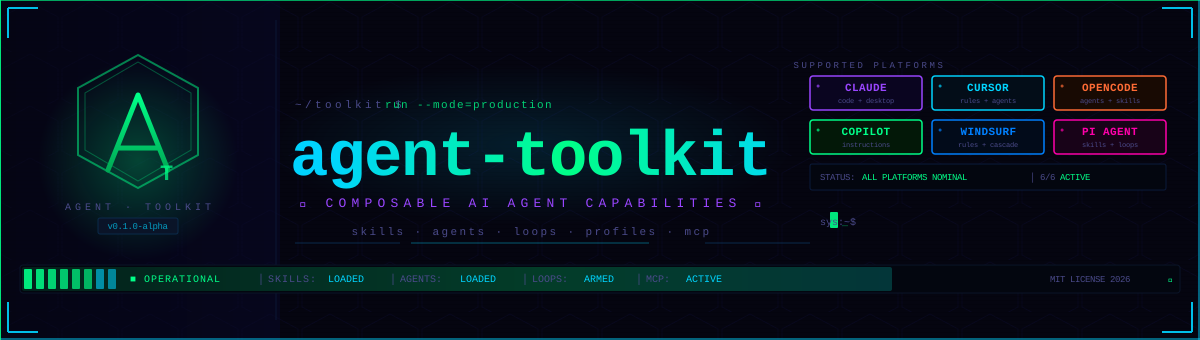
🛠️ agent-toolkit
Composable AI agent capabilities for every major coding assistant














📖 Documentation • 🚀 Quick Install • 🛠️ Skills • 🤖 Agents • 🔄 Loops • 🤝 Contributing
✨ What is agent-toolkit?
agent-toolkit is a modular collection of skills, agent personas, MCP configuration templates, and loop engineering patterns that work across all major AI coding assistants. Instead of maintaining separate prompt libraries for each tool, you keep one source of truth and deploy exactly what each tool needs.
One toolkit. Any coding assistant. Zero duplication.
# Get everything in one command
npx skills add ulises-jeremias/agent-toolkit -g
🚀 Quick Install
Method 1: Python CLI — uvx or pip (works with all tools)
# No install needed — run directly with uvx
uvx --from agent-toolkit-cli agent-toolkit install

# Or install persistently with pip
pip install agent-toolkit-cli
agent-toolkit install          # auto-detects Claude, Cursor, OpenCode, Windsurf, Pi
agent-toolkit doctor           # verify everything is set up
Method 2: Claude Code Plugin Marketplace
/plugin marketplace add ulises-jeremias/agent-toolkit
/plugin install agent-toolkit-core@agent-toolkit
/plugin install agent-toolkit-agents@agent-toolkit
/plugin install agent-toolkit-forge@agent-toolkit
Method 3: npx skills (Agent Skills standard — skills only)
npx skills add ulises-jeremias/agent-toolkit -g
Method 4: Homebrew / AUR
brew tap ulises-jeremias/homebrew-tap && brew install agent-toolkit
yay -S agent-toolkit   # Arch Linux
Method 5: Manual install (per tool)
git clone https://github.com/ulises-jeremias/agent-toolkit ~/.agent-toolkit

# Claude Code — reference in .claude/settings.json
# Cursor — copy profiles/cursor/rules/*.mdc → .cursor/rules/
# OpenCode — copy profiles/opencode/ → ~/.config/opencode/
# Copilot — copy profiles/copilot/copilot-instructions.md → .github/
# Windsurf — copy profiles/windsurf/ → ~/.codeium/windsurf/
# Pi Agent — copy profiles/pi/skills/ → ~/.pi/agent/skills/
Method 4: Auto-detect install script
git clone https://github.com/ulises-jeremias/agent-toolkit.git
bash agent-toolkit/scripts/install.sh
The script detects your active tools and deploys the right profiles automatically.
🖥️ Supported Tools
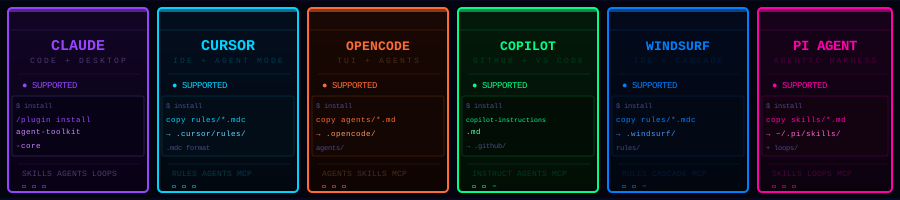
| Tool | Type | What's deployed |
|---|---|---|
| Claude Code | Plugin + CLI | Plugin manifest, skill references, settings |
| Cursor | IDE | .mdc rule files per domain |
| OpenCode | TUI | System prompt overlays, agent configs |
| GitHub Copilot | IDE | copilot-instructions.md with domain selection |
| Windsurf | IDE | Rules and memory files via Cascade |
| Pi Agent | Agentic harness | Skills and loop templates in Pi's native format |
🛠️ Skills — 52 across 9 domains
All skills use SKILL.md frontmatter only — no skill.json required. Fully compliant with the Agent Skills spec.
| Domain | Count | Key Skills |
|---|---|---|
🧠 core |
8 | memory, planning, context injection, session bootstrap |
🚀 delivery |
9 | code-review, github-cli-workflow, gh-fix-ci, pr-fallback, commit |
🎨 design |
6 | ui-ux-pro-max, figma-implement-design, design-system-rules |
⚡ forge |
7 | feature-dev, tdd, refactor-cleaner, simplify, code-connect |
🔗 integrations |
8 | jira, confluence, slack, linear, clickup, notion |
📊 data |
5 | dbt-validation, snowflake-validation, pipeline-review |
🔧 tooling |
6 | git-worktrees, docker, ci-cd, env-setup, keybindings |
🛡️ ops |
3 | incident, security-review, performance-optimizer |
🔄 loops |
10 | oss-pr-monitor, oss-triage, oss-daily-briefing |
Browse the full catalog: catalogs/skill-catalog.yaml
Loading skills in Claude Code
// .claude/settings.json
{
  "skills": [
    "ulises-jeremias/agent-toolkit/skills/delivery/code-review",
    "ulises-jeremias/agent-toolkit/skills/delivery/github-cli-workflow",
    "ulises-jeremias/agent-toolkit/skills/delivery/gh-fix-ci"
  ]
}
🤖 Agent Personas
16 tool-agnostic agent persona definitions in agents/. Any supported AI coding assistant can import these via its profile config.
| Persona | Role |
|---|---|
🏗️ architect |
System design, tradeoffs, ADR drafting |
📋 planner |
Task decomposition, sequencing, estimation |
🔍 code-reviewer |
Quality, maintainability, bug detection |
🔷 typescript-reviewer |
TypeScript-specific review patterns |
🛡️ security-reviewer |
Vulnerability audit, threat modeling |
🗄️ database-reviewer |
Schema design, query optimization, migration safety |
⚡ performance-optimizer |
Profiling, complexity analysis, benchmarking |
🧪 tdd-guide |
Test-first development, coverage strategy |
🧹 refactor-cleaner |
Dead code removal, simplification |
🔨 build-error-resolver |
CI failure diagnosis, dependency conflicts |
🎭 e2e-runner |
End-to-end test authoring and execution |
📚 docs-lookup |
Documentation and API reference navigation |
🔎 reference-lookup |
Cross-repo pattern and convention search |
🤝 assistant |
General-purpose project assistant |
⚙️ tech-assistant |
Stack-specific technical guidance |
🔭 explore |
Fast codebase search and discovery |
Full catalog: catalogs/agent-catalog.yaml
🔄 Loop Engineering
Loops are recurring agentic workflows that run on a schedule or cadence. They follow a three-tier model:
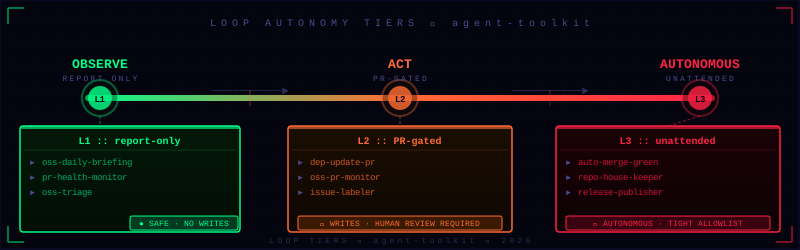
| Tier | Cadence | Purpose |
|---|---|---|
| L1 | Minutes to hours | Reactive, event-driven — PR monitoring, triage, CI alerts |
| L2 | Daily | Summaries, health checks, security sweeps, briefings |
| L3 | Weekly / monthly | Trend analysis, reporting, maintenance sweeps |
Loop Templates
| Template | Tier | Default Cadence | Description |
|---|---|---|---|
oss-pr-monitor |
L1 | Every 30 min | Monitor open PRs across OSS repos, flag stale or failing ones |
oss-triage |
L1 | Every hour | Triage new issues, apply labels, draft responses |
ci-health |
L1 | Every 15 min | Watch CI status, auto-diagnose failures |
oss-daily-briefing |
L2 | Daily | Summarize activity across all tracked OSS repos |
dependency-drift |
L2 | Daily | Detect outdated dependencies and open upgrade PRs |
security-sweep |
L2 | Daily | Run vulnerability scan across repos |
codeowner-review |
L2 | Daily | Remind code owners of pending reviews |
release-notes |
L3 | Weekly | Draft release notes from merged PRs |
stale-branch-cleanup |
L3 | Weekly | Identify and archive stale branches |
contributor-digest |
L3 | Weekly | Generate contributor activity digest |
Each loop template lives in loops/<name>/ and contains a request.md prompt template, report.md output template, and runbook.md for human operators.
🔗 MCP Templates
Ready-to-use Model Context Protocol configuration templates. Drop into your MCP config directory and substitute your credentials.
| Template | Services Covered |
|---|---|
github |
Repos, PRs, issues, releases, actions |
slack |
Channels, messages, reactions, canvases |
notion |
Pages, databases, blocks |
linear |
Issues, projects, cycles, comments |
figma |
Files, components, design tokens |
clickup |
Tasks, lists, spaces, docs, comments |
Templates live in mcp/templates/. Each file is a .json with clearly marked placeholder values.
📦 Plugins
Three plugins are available in the Claude Code and Cursor marketplaces:
| Plugin | What's included |
|---|---|
agent-toolkit-core |
Core, delivery, integrations, ops, and tooling domains — everyday coding workflows |
agent-toolkit-agents |
All 16 agent personas — architect, planner, reviewers, TDD guide, and more |
agent-toolkit-forge |
Design, forge, and data domains — code generation, UI/UX, TDD, dbt/Snowflake |
Plugin manifests: .claude-plugin/marketplace.json · .cursor-plugin/marketplace.json
🎯 Solution Packs
Packs bundle skills, agents, and loops for a specific team context. Load a pack to bring in everything a setup needs in one step.
| Pack | Description |
|---|---|
oss-ecosystem |
Full OSS maintainer setup: triage, PR monitor, briefings, contributor digest |
startup-delivery |
Fast delivery focus: code review, CI fix, PR automation, security sweep |
enterprise-ops |
Governance-heavy: incident response, security review, codeowner workflows |
Browse packs: packs/
📚 Documentation
| Guide | Description |
|---|---|
| 🔨 How to add a skill | Create a new skill with SKILL.md frontmatter |
| 🤖 How to add an agent | Define a new agent persona |
| 🔄 How to create a loop | Build a recurring agentic workflow |
| 🌐 OSS Maintenance example | Full walkthrough of the oss-ecosystem pack |
| 🚀 Project onboarding example | Bootstrap a new project with agent-toolkit |
🏗️ Architecture
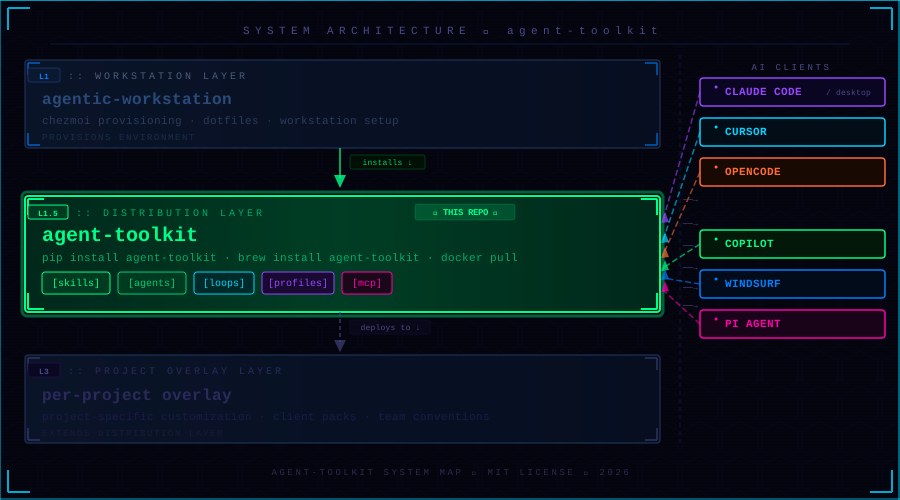
One source of truth, deployed per-tool. Each profile in profiles/ adapts the shared skills and agents to the conventions of its target tool.
agent-toolkit/
├── skills/              # 52 skills across 9 domains (SKILL.md frontmatter)
├── agents/              # 16 tool-agnostic agent persona definitions
├── profiles/
│   ├── claude-code/     # Plugin manifest, skill references, settings
│   ├── cursor/          # .mdc rule files per domain
│   ├── opencode/        # System prompt overlays, agent configs
│   ├── copilot/         # copilot-instructions.md with domain selection
│   ├── windsurf/        # rules.md and memory files
│   └── pi/              # Skill definitions in Pi's native format
├── loops/               # 10 recurring loop engineering templates
├── mcp/templates/       # 6 MCP config templates (JSON)
├── packs/               # 3 solution packs
├── catalogs/            # skill-catalog.yaml, agent-catalog.yaml
├── schemas/             # JSON schemas for validation
├── docs/                # How-to guides and reference docs
├── examples/            # Worked examples
└── scripts/             # Install and validation scripts
Automation tiers
| Tier | Trigger | Example |
|---|---|---|
| L1 | Event / short interval | oss-pr-monitor, ci-health |
| L1.5 | Scheduled short-cadence | oss-triage, dependency-drift |
| L3 | Weekly / monthly | release-notes, contributor-digest |
✅ Validation
bash scripts/validate-skills.sh
bash scripts/validate-loops.sh
Both scripts exit non-zero on failure with human-readable error messages. They run automatically in CI via the Validate and MegaLinter workflows.
🤝 Contributing
Contributions welcome. Please read CONTRIBUTING.md before opening a PR.
- Fork the repo and create a branch:
feat/my-skill - Add your skill under the appropriate domain in
skills/— useSKILL.mdfrontmatter only - Run
bash scripts/validate-skills.sh— all checks must pass - Open a PR with a clear description of what the skill does and which tools it supports
See How to add a skill for the full authoring guide.
📖 Docs · 🐛 Issues · 💬 Discussions · MIT License
Built for the agentic age — one toolkit, every assistant.
Project details
Verified details
These details have been verified by PyPIProject links
GitHub Statistics
Maintainers
Release history Release notifications | RSS feed


Download files
Download the file for your platform. If you're not sure which to choose, learn more about installing packages.
Source Distribution
Built Distribution
Filter files by name, interpreter, ABI, and platform.
If you're not sure about the file name format, learn more about wheel file names.
Copy a direct link to the current filters
File details
Details for the file agent_toolkit_cli-1.0.7.tar.gz.
File metadata
- Download URL: agent_toolkit_cli-1.0.7.tar.gz
- Upload date:
- Size: 539.6 kB
- Tags: Source
- Uploaded using Trusted Publishing? Yes
- Uploaded via: twine/7.0.0 CPython/3.13.14
File hashes
| Algorithm | Hash digest | |
|---|---|---|
| SHA256 |
7dba0266fa08758e1d05a1b4aca51b1dc834a5fd7a393b3545478f6072509cb8
|
|
| MD5 |
5b5907adc3eb8893dece6e825174b45b
|
|
| BLAKE2b-256 |
82eab25da7e6d631dacb9d1abc3cb7a281eca50741b18b04d1875ca34c1a3324
|
Provenance
The following attestation bundles were made for agent_toolkit_cli-1.0.7.tar.gz:
Publisher:
release.yml on ulises-jeremias/agent-toolkit
-
Statement:
-
Statement type:
https://in-toto.io/Statement/v1 -
Predicate type:
https://docs.pypi.org/attestations/publish/v1 -
Subject name:
agent_toolkit_cli-1.0.7.tar.gz -
Subject digest:
7dba0266fa08758e1d05a1b4aca51b1dc834a5fd7a393b3545478f6072509cb8 - Sigstore transparency entry: 2340790574
- Sigstore integration time:
-
Permalink:
ulises-jeremias/agent-toolkit@dbf00a4108c0d5b4153ce3f25b842b953055450e -
Branch / Tag:
refs/tags/v1.0.7 - Owner: https://github.com/ulises-jeremias
-
Access:
public
-
Token Issuer:
https://token.actions.githubusercontent.com -
Runner Environment:
github-hosted -
Publication workflow:
release.yml@dbf00a4108c0d5b4153ce3f25b842b953055450e -
Trigger Event:
push
-
Statement type:
File details
Details for the file agent_toolkit_cli-1.0.7-py3-none-any.whl.
File metadata
- Download URL: agent_toolkit_cli-1.0.7-py3-none-any.whl
- Upload date:
- Size: 1.0 MB
- Tags: Python 3
- Uploaded using Trusted Publishing? Yes
- Uploaded via: twine/7.0.0 CPython/3.13.14
File hashes
| Algorithm | Hash digest | |
|---|---|---|
| SHA256 |
9d5785d3cc625509e1663893da0519748f463f5bf2c5f78e9653c13c2c2eeaab
|
|
| MD5 |
0a513373fc7f5aee3f340d2ca03e5fe6
|
|
| BLAKE2b-256 |
929969a9ebde598a7a5433aadd12b5e71d5d3fb724fbaaccdfcdefebb8ab7cfa
|
Provenance
The following attestation bundles were made for agent_toolkit_cli-1.0.7-py3-none-any.whl:
Publisher:
release.yml on ulises-jeremias/agent-toolkit
-
Statement:
-
Statement type:
https://in-toto.io/Statement/v1 -
Predicate type:
https://docs.pypi.org/attestations/publish/v1 -
Subject name:
agent_toolkit_cli-1.0.7-py3-none-any.whl -
Subject digest:
9d5785d3cc625509e1663893da0519748f463f5bf2c5f78e9653c13c2c2eeaab - Sigstore transparency entry: 2340790615
- Sigstore integration time:
-
Permalink:
ulises-jeremias/agent-toolkit@dbf00a4108c0d5b4153ce3f25b842b953055450e -
Branch / Tag:
refs/tags/v1.0.7 - Owner: https://github.com/ulises-jeremias
-
Access:
public
-
Token Issuer:
https://token.actions.githubusercontent.com -
Runner Environment:
github-hosted -
Publication workflow:
release.yml@dbf00a4108c0d5b4153ce3f25b842b953055450e -
Trigger Event:
push
-
Statement type:






