

Tuner
Understand your AI usage. Tune your agent workflows.




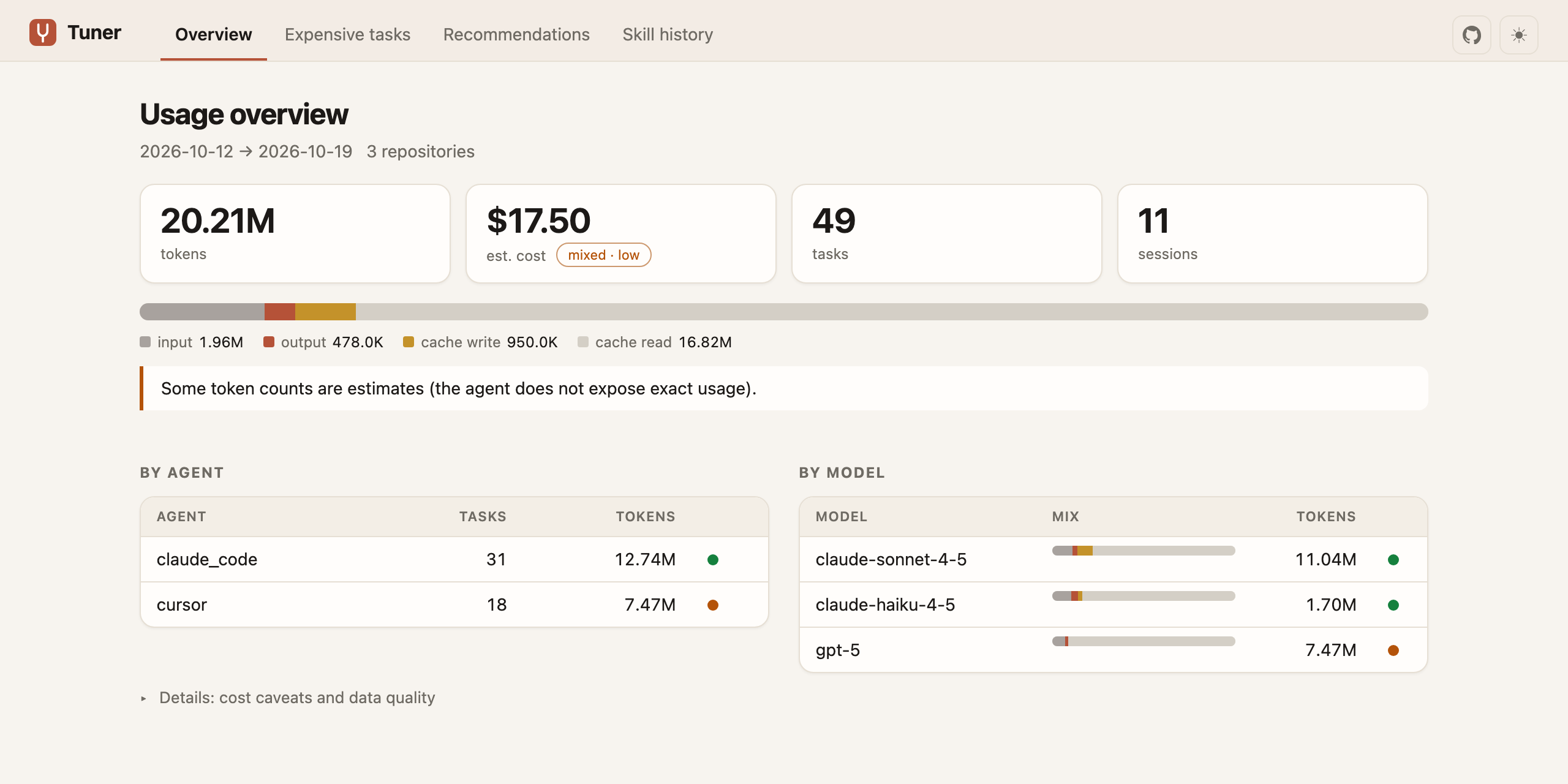
Tuner is a local-first tool that reads the session history of your coding agents (Cursor, Claude Code, OpenCode, Open WebUI, and Hermes), shows where your tokens went, and helps you turn the expensive patterns into better prompts, rules, and Agent Skills. It runs on macOS and Windows with Python 3.13 and has no runtime dependencies, no cloud service, and no API key.
Status: 1.0.0. See docs/PROGRESS.md for what is done, what is verified, and what is not.
Install
uv tool install agent-tuner   # installs the `tuner` command
tuner init                    # config, Cursor hooks, /tuner skill, schedule
(tuner is taken on PyPI, so the distribution is agent-tuner; the
command is tuner.) tuner init is explicit and reversible with
tuner uninstall; skip pieces with --no-hooks --no-skill --no-schedule.
Upgrade
tuner upgrade # upgrade the package, then refresh what Tuner installed
tuner upgrade detects how Tuner was installed (uv tool, pipx, or a
local checkout), upgrades it, then runs the new code to apply database
migrations and refresh the Cursor hooks, the /tuner skill, and the
schedule, but only the ones you already have. After a manual upgrade run
tuner upgrade --sync-only; tuner doctor warns when they are out of sync.
On Windows uv cannot replace a running tuner.exe, so tuner upgrade
prints the two commands to run instead.
Use
tuner report --open      # collect, build, and open that report
tuner open               # latest finished scheduled report
tuner open --generated   # the report written most recently
tuner doctor             # check sources, hooks, skill, schedule
Then, in Cursor or Claude Code, run /tuner. The agent reads a
redacted evidence bundle, explains why the expensive tasks were
expensive (productive complexity vs avoidable overhead vs insufficient
evidence), and proposes improvements. For each task it also writes a
title of at most 80 characters. The expensive-tasks list and the task
heading show that label; the prompt text stays on the task page. The
result is cached and appears in the report's Recommendations view.
Re-running /tuner on unchanged data reuses the cache instead of
spending tokens again.
Each human prompt is its own task, so per-prompt cost stays visible. A
short follow-up in the same sitting is linked, not merged: an
affirmation (yes, go ahead) or an exact plan approval (implement this, implement the plan, build this, do the plan). Extra words,
as in implement this new parser, stay a new task.
Reports land in reports/<period>/{usage.json,analysis.json,report.html}
inside Tuner's data directory. tuner open opens the latest finished
scheduled report. tuner open --generated (and tuner report --open)
opens the report just written, including a custom --since window. If
no finished report exists yet, tuner open uses that newest file and
says so. Reports are generated every Sunday at 18:00 local time by
default, with catch-up if the machine was off.
All commands
| Command | Purpose |
|---|---|
tuner init / uninstall |
set up / remove everything Tuner installed |
tuner collect |
incremental, idempotent import (no LLM) |
tuner report |
deterministic usage.json + offline report.html |
tuner analyze |
cache status, evidence, save analysis (used by /tuner) |
tuner skills |
list, diff, apply, reject, roll back skill changes |
tuner schedule |
install/inspect the OS job; run is idempotent |
tuner pricing |
price lookups and deterministic cost math |
tuner config |
show/edit validated TOML config |
tuner open |
latest finished scheduled report; --generated for the one just written |
tuner doctor |
diagnostics for sources, hooks, skill, and schedule |
What is measured and what is estimated
Claude Code transcripts contain provider usage, so those numbers are measured. OpenCode, Open WebUI, and Hermes keep token counts in a local database, so those numbers are measured too. Cursor does not store token counts locally, so Cursor numbers are estimates (labelled, with a method, confidence, and known gaps) and are never mixed with measured data without saying so. Costs are API-equivalent estimates from versioned prices, not billing; unknown models produce an explicitly incomplete estimate. See docs/DATA_SCHEMA.md.
Skills Tuner may create
Modes (tuner config set skills.mode review): suggest (record only),
review (default; you apply with tuner skills apply ID), auto (small,
validated changes only). Tuner only edits skills it created, backs up
before writing, detects conflicts, supports tuner skills rollback, and
never runs git add or git commit. See docs/PRIVACY.md.
Privacy in one paragraph
Everything stays on your machine. No telemetry. The only network request
Tuner can make is tuner pricing refresh (public price list, explicit and
opt-in). Transcripts are treated as untrusted data and are redacted for
secrets. The model only sees what tuner analyze evidence prints.
Docs
Research · Architecture · Data schema · Privacy · Development · Progress
License
MIT
1 maintainer

Metadata
1 maintainer
Release files for agent-tuner 1.0.0
For a detailed explanation of source distributions (sdists) and built distributions (wheels), please see the package formats documentation.
Source distribution (sdist)
| File | Size | Uploaded | Provenance | Actions |
|---|---|---|---|---|
| agent_tuner-1.0.0.tar.gz | 300.8 kB | With provenance | Details for agent_tuner-1.0.0.tar.gz |
Built distribution (wheel)
| File | Interpreter | ABI | Platform | Actions Reset |
|---|---|---|---|---|
| agent_tuner-1.0.0-py3-none-any.whl | Python 3 | none | any | Details for agent_tuner-1.0.0-py3-none-any.whl |
Total release size: 468.9 kB
Release files / agent_tuner-1.0.0.tar.gz
| Download URL | agent_tuner-1.0.0.tar.gz |
|---|---|
| Size | 300.8 kB |
| Tags | Source |
|
SHA-256 checksum How to use checksums |
aa20e45d070f9951eb887c291820b2cdbdebd24b1c70eb8d1b405948b2b5fbd6
|
|
BLAKE2b-256 checksum How to use checksums |
772d6131d3990d79150d1612df03577fbafbb28886a5301314782bb87d469cb5
|
| Upload date | |
|
Uploaded using Trusted Publishing? What is trusted publishing? |
Yes |
| Uploaded via |
twine/7.0.0 CPython/3.13.16
|
Provenance
Provenance describes where a file came from. On PyPI, provenance is shared via attestations, which provide a verifiable record of the build or publishing details. View details, limitations and caveats.


PyPI Publish Attestation
PyPI verified that this artifact, at this checksum, originated from the publisher listed below.
Signed by GitHub Actions, verified by PyPI on Nov 18, 2026.
Transparency logRelease files / agent_tuner-1.0.0-py3-none-any.whl
| Download URL | agent_tuner-1.0.0-py3-none-any.whl |
|---|---|
| Size | 168.1 kB |
| Tags | Python 3 |
|
SHA-256 checksum How to use checksums |
c7c4cf012f1a4bd986762374c5caac56e8a1904fc6518b5d5c35d79a9dd4a144
|
|
BLAKE2b-256 checksum How to use checksums |
475d95eee6252278c9a437c8326f1d1da79b25f3eaeecbbe49ebbd27d0e4bc75
|
| Upload date | |
|
Uploaded using Trusted Publishing? What is trusted publishing? |
Yes |
| Uploaded via |
twine/7.0.0 CPython/3.13.16
|
Provenance
Provenance describes where a file came from. On PyPI, provenance is shared via attestations, which provide a verifiable record of the build or publishing details. View details, limitations and caveats.
PyPI Publish Attestation
PyPI verified that this artifact, at this checksum, originated from the publisher listed below.
Signed by GitHub Actions, verified by PyPI on Nov 18, 2026.
Transparency logSecurity for agent-tuner 1.0.0
Provenance
Provenance describes where a file came from. On PyPI, provenance is shared via attestations, which provide a verifiable record of the build or publishing details. View details, limitations and caveats.
Full provenance
Both files in this release have been uploaded with provenance metadata.
Attestation for agent_tuner-1.0.0.tar.gz
PyPI Publish Attestation
PyPI verified that this artifact, at this checksum, originated from the publisher listed below.
Signed by GitHub Actions, verified by PyPI on Nov 18, 2026.
Transparency logA note on package security
PyPI is a repository for distributing packages, not a service for auditing them. While third-party security researchers and our staff do their best to detect and remove malicious packages, PyPI cannot guarantee the quality, security or suitability of any given package.
To learn more about protecting yourself from malicious actors, visit our package security documentation.













