
agent-usage-manager




A local htop-style dashboard for headless AI-agent processes. It groups each
agent's process tree, tracks CPU/RAM/GPU and sustained hot/idle/churn/leak
states, and provides an allowlisted, token-gated stop control.
Per-node only: AUM is not a scheduler or multi-host control plane. It runs on macOS and Linux; per-process GPU memory is currently NVIDIA/Linux only.
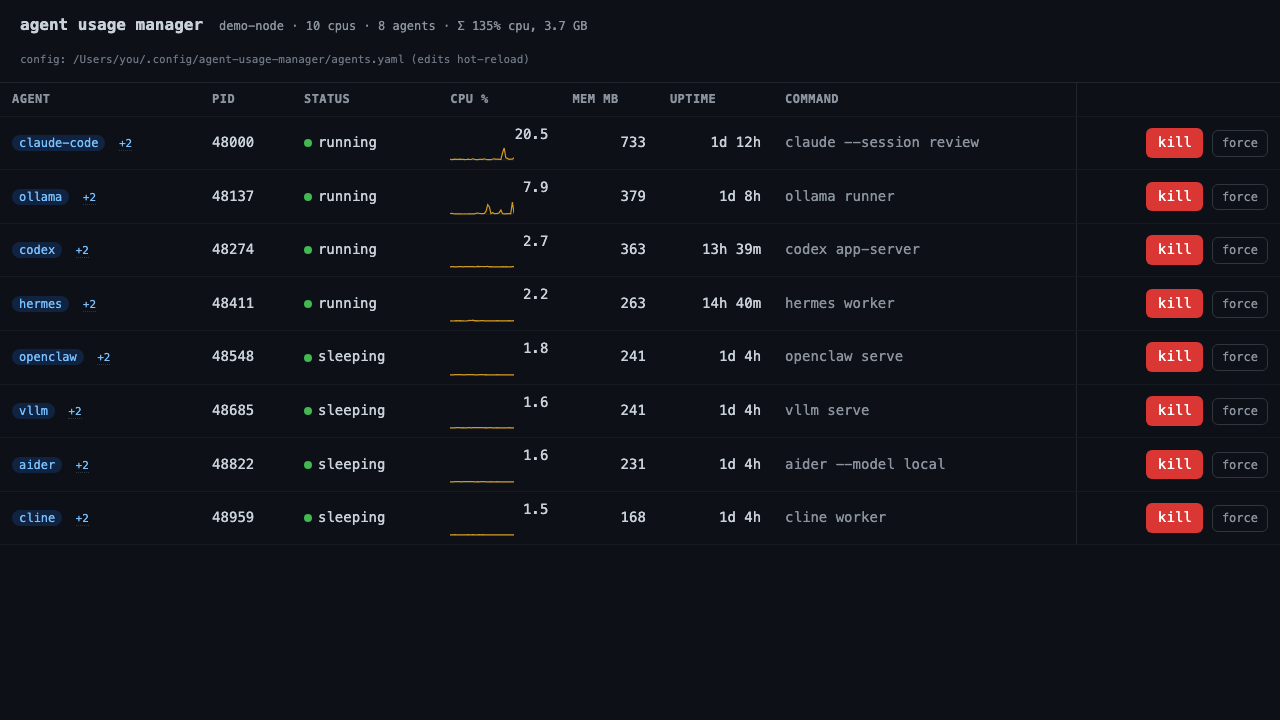
Sanitized capture from a real macOS run. Host, path, and command details are replaced; Apple Silicon does not expose per-process GPU memory.
Quick start
uvx agent-usage-manager
The dashboard opens at http://127.0.0.1:8765. No database or hosted service is
required. The bundled config recognizes common tools including Claude Code,
Codex, OpenClaw, Hermes, Ollama, vLLM, llama.cpp, Kiro, Aider, and Cline.
Other install options:
pipx install agent-usage-manager
# or, inside a virtual environment:
pip install agent-usage-manager
What it does
- One row per agent. Child inference processes, MCP servers, and helpers are rolled into the owning agent's row. CPU, memory, and GPU values are tree totals.
- Shows change over time. CPU sparklines and
hot,idle,churn, andleak?states surface sustained problems rather than one noisy sample. - Supports alerts. A state transition can call a local command with
$AUM_*environment variables.agent-usage-manager test-alertproves the path first. - Stops the process tree.
killsends SIGTERM and escalates after three seconds;forcesends SIGKILL. launchd-supervised jobs get the command that actually stops the service. - Exposes read-only telemetry. Use
agent-usage-manager list --json,GET /api/agents, or Prometheus-compatibleGET /metrics. - Keeps the control local. The default bind is
127.0.0.1; there is no account, remote collector, or central coordinator.
AUM complements process and telemetry tools:
htopsees processes, but not ownership of a spawned agent tree or agent states.- Grafana and Prometheus are useful fleet telemetry; AUM can feed them without requiring that stack for a single machine.
- GenAI traces describe sessions, tokens, and cost. AUM covers the host-process side: liveness, resource pressure, restart churn, and local stop control.
Configure agents
Create agents.yaml in the directory where you launch AUM, or pass
--config /path/to/agents.yaml:
agents:
  - label: claude-code
    match: "claude(\\s|$|-code)"
    regex: true
  - label: ollama
    match: ollama

protect:
  - uvicorn

ignore:
  - crashpad
Only matched processes are listed or stoppable. protect: keeps a matched
process visible but disables stopping it; ignore: removes a false match
entirely. Edits hot-reload while the server runs.
Advanced matching, per-instance tmux/launchd labels, alerts, API details, service setup, and troubleshooting are in the operator reference.
Safety boundary
A web page that can stop processes needs a narrow boundary:
- The server re-checks the allowlist before every signal. PID 1, AUM itself, and
configured
protect:matches are always refused. - Every stop request requires an
X-Kill-Token. AUM creates the token in a mode-0600state file and never serves it over HTTP. - Browser requests are checked for DNS-rebinding and cross-origin state changes.
- Non-loopback binds fail closed unless
--unsafe-exposeis explicit. - Every stop attempt and refusal is appended to a local action log.
- Common token and key shapes are redacted before command lines reach the UI. Redaction is not a substitute for reviewing screenshots and issue attachments.
- Read-only endpoints still expose process metadata. Keep AUM on a trusted machine or put an authenticated boundary in front of any proxy.
Report vulnerabilities privately through the security policy. Do not open a public issue for a kill-path, authorization, redaction, or package-privacy defect.
Limits
| Area | Current boundary |
|---|---|
| Process matching | Heuristic; use ignore: for false positives |
| GPU | Per-process values require nvidia-smi; unavailable on Apple Silicon |
| Supervision | launchd user jobs detected; systemd supervision is not |
| Permissions | AUM can only signal processes accessible to its OS user |
| History | In memory and reset when the server restarts |
| Windows | Untested; CI covers macOS and Linux |
Command-line and API entry points
agent-usage-manager                     # dashboard
agent-usage-manager list                # one-shot table
agent-usage-manager list --json         # scriptable snapshot
agent-usage-manager test-alert          # verify configured alert delivery
The HTTP surface is documented in the operator reference. External controllers should consume the read-only endpoints and own their own scheduling or irreversible decisions.
Project documentation
- Operator reference: configuration, alerts, API, services, proxying, and troubleshooting
- Changelog: current release and unreleased changes
- Security policy: supported versions and private reporting
- Contributing: setup, scope, and privacy requirements
- Architecture and implementation design
If AUM misclassifies a process or behaves differently on macOS or Linux, open a bug report with sanitized output. Never attach a live config, token file, or unreviewed process command line.
AUM is a personal open-source project. Maintenance and support are best-effort.
License
MIT
1 maintainer

Release files for agent-usage-manager 0.3.0
For a detailed explanation of source distributions (sdists) and built distributions (wheels), please see the package formats documentation.
Source distribution (sdist)
| File | Size | Uploaded | |
|---|---|---|---|
| agent_usage_manager-0.3.0.tar.gz | 57.7 kB | Details |
Built distribution (wheel)
| File | Interpreter | ABI | Platform | Reset |
|---|---|---|---|---|
| agent_usage_manager-0.3.0-py3-none-any.whl | Python 3 | none | any | Details |
Total release size: 111.2 kB
Release files / agent_usage_manager-0.3.0.tar.gz
| Download URL | agent_usage_manager-0.3.0.tar.gz |
|---|---|
| Size | 57.7 kB |
| Tags | Source |
|
SHA-256 checksum How to use checksums |
2d35cb6de85071675aa66648c185c439e373196a58081a81fbc60e6b221d7798
|
|
BLAKE2b-256 checksum How to use checksums |
380df33b8fa009719d174c0f7005e08e21ab0d3b8ab775b934e2ffd38e54bece
|
| Upload date | |
|
Uploaded using Trusted Publishing? What is trusted publishing? |
Yes |
| Uploaded via |
twine/7.0.0 CPython/3.13.14
|
Provenance
Provenance describes where a file came from. On PyPI, provenance is shared via attestations, which provide a verifiable record of the build or publishing details. View details, limitations and caveats.


PyPI Publish Attestation
PyPI verified that this artifact, at this checksum, originated from the publisher listed below.
Signed by GitHub Actions, verified by PyPI on Sep 13, 2026.
Transparency logRelease files / agent_usage_manager-0.3.0-py3-none-any.whl
| Download URL | agent_usage_manager-0.3.0-py3-none-any.whl |
|---|---|
| Size | 53.5 kB |
| Tags | Python 3 |
|
SHA-256 checksum How to use checksums |
c04d344547aabe9ea71cedb9102032ffd275ee35cdf8ab00cbac7cb806b0a584
|
|
BLAKE2b-256 checksum How to use checksums |
bc26034658998b81b2ed6a66fab612cd6f945fe52dcc45f22ad88ff231d48f87
|
| Upload date | |
|
Uploaded using Trusted Publishing? What is trusted publishing? |
Yes |
| Uploaded via |
twine/7.0.0 CPython/3.13.14
|
Provenance
Provenance describes where a file came from. On PyPI, provenance is shared via attestations, which provide a verifiable record of the build or publishing details. View details, limitations and caveats.
PyPI Publish Attestation
PyPI verified that this artifact, at this checksum, originated from the publisher listed below.
Signed by GitHub Actions, verified by PyPI on Sep 13, 2026.
Transparency log













