
Agent Usage Tracker (aut)


See where your coding agents spend tokens, how the work ends, and what keeps going wrong.
AUT reads the logs Claude Code, Codex, Cursor, and Pi already save. Start with a local usage report or CSV. Add your own database for session history across machines. The optional improvement workflow links recurring problems to the evidence and drafts changes you can review.
Quick start
With uv installed, try the demo with synthetic logs:
uvx agent-usage-tracker demo
The demo finds two agent records totaling 1,140 tokens. It shows input, output and cache separately, and reports missing model prices as unknown. Try the same report with your own logs, or export them as a CSV:
uvx agent-usage-tracker summary --period week --group-by agent
uvx agent-usage-tracker --agents claude_code,codex,cursor_cli,pi export --out usage.csv
Local reporting runs without a database, a provider account, or a model. The CLI runs on macOS, Linux, and Windows with Python 3.11 to 3.15. See first run for installation, source checks, and the private browser overview.
What you can track
| Question | Where to start |
|---|---|
| Which agents and models am I using? How much is cached? | Local summary and CSV export. |
| Which sessions belong to the same work? What happened to their commits? | Your own TimescaleDB and Grafana stack, with Git outcome tracking. |
| How much of my work is building, debugging, planning, or review? | Optional local models estimate work categories and leave uncertain cases unknown. |
| What if I lose this laptop? | Optional encrypted backups of agent logs and AUT settings with restic. |
From a repeated problem to a fix you can review
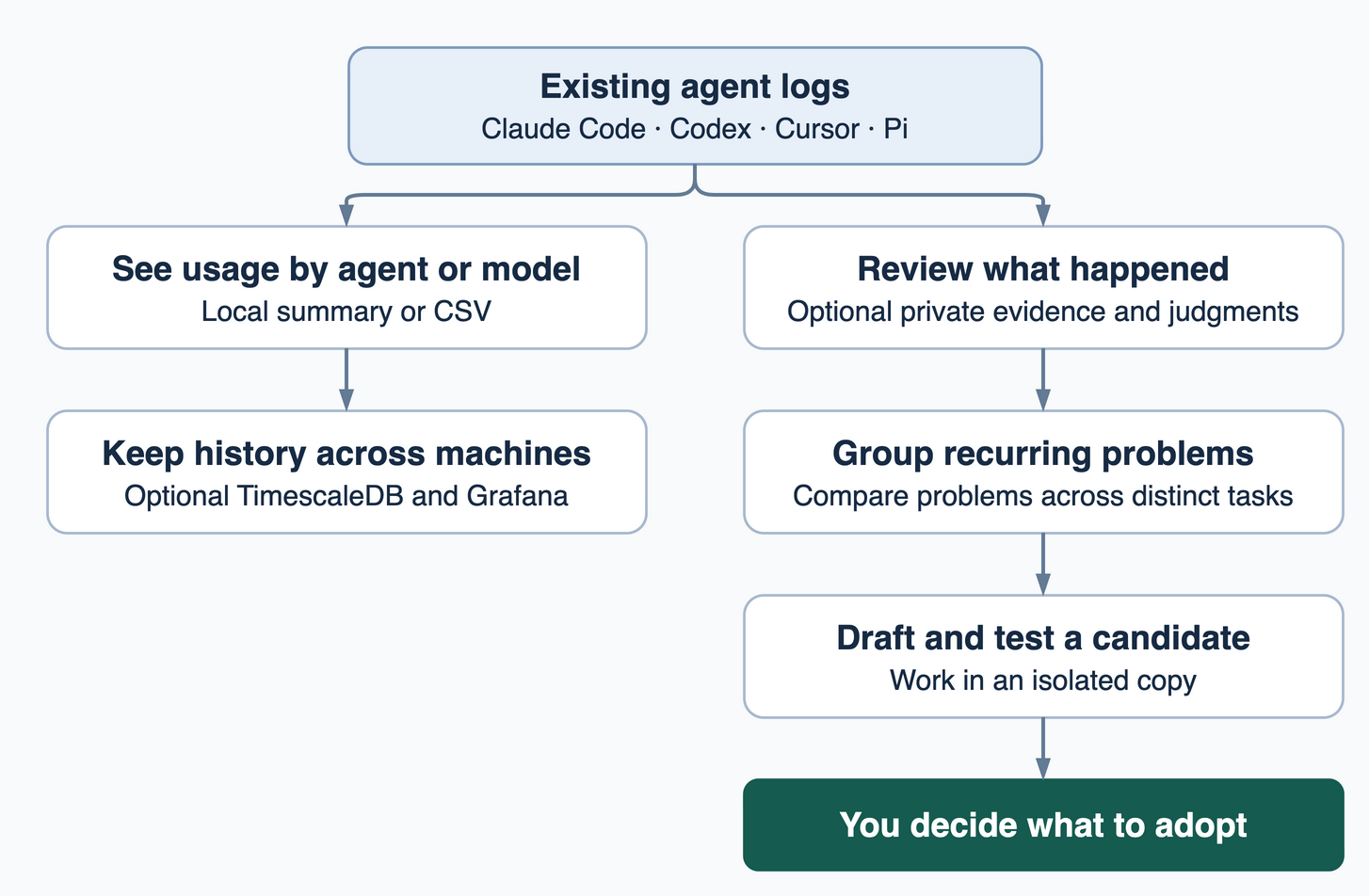
For example, an agent says the tests passed. AUT can surface the tool result behind that claim. If the result is missing, the judgment can stay unknown. When judgments identify the same problem across distinct tasks, AUT can group those cases and draft a small instruction or config change in an isolated copy. Run a check you trust against the original and the candidate, then decide whether to adopt it.
Start by freezing a small sample of recent sessions. This step runs locally without a model:
uvx agent-usage-tracker improve audit --days 7 --limit 30
The improvement guide covers private evidence, advisory judgments, drafts, and the review inbox. The study guide explains how to test a candidate. Source edits require an explicit decision. A passing check supports the tested change; measuring an improvement in real work requires comparable follow-up.
You can also ask a coding agent to explore that evidence directly. Run aut evidence capture for a private full-text audit, then search and compare runs through the CLI or MCP. Choose what the client can read and link useful findings to a repair you can test. See the agent evidence guide.
How I run AUT
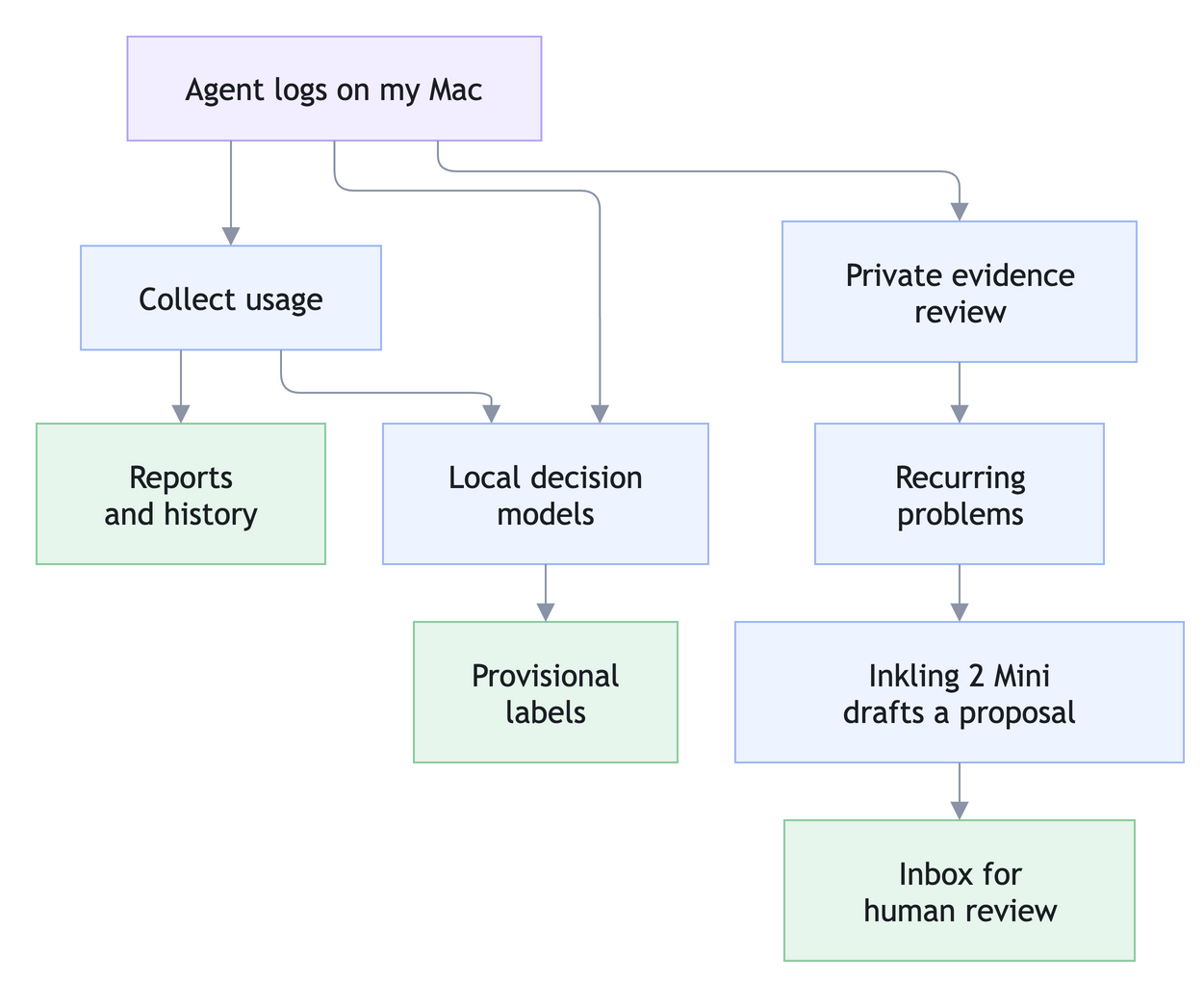
I run AUT on an Apple silicon Mac to track agent usage, classify work, and find recurring problems. AUT sends usage metadata to a self-hosted database. The local labeler combines that metadata with request and reply text on the Mac.
| Job | Models I use | Method |
|---|---|---|
| What my message is doing | Elephant 1, PPLX Decider Flash, Kev 4B | Weighted scores |
| What kind of work I’m doing | PPLX Decider Flash, Elephant 1, Clef Flash | Majority vote |
| Where work with no code changes stands | Elephant 1, Kev 4B, Clef Flash | Weighted scores |
| Draft a fix for a recurring problem | Inkling 2 Mini via llama.cpp | Low reasoning effort, then human review |
The label recipes leave uncertain cases unknown. I run the larger Inkling model only when a recurring problem is eligible for a draft. Each proposal goes to a private inbox for review.
You can adapt this setup by starting with one local decision model per job and checking it against examples you’ve reviewed. Add offline drafting when you have a recurring problem worth testing a fix for.
Collectors
Claude Code, Codex, and Pi supply native token records. Cursor CLI supplies prompts and activity. For Cursor token totals, choose one of the IDE, API, or SDK sources to avoid double-counting. T3 Code activity and ActivityWatch are optional. See the collector matrix and coverage guide.
Privacy model
Normal collection works from existing logs. If you configure a sink, it receives usage and activity metadata such as counts, project basenames, and commit IDs. Prompt text and tool output stay off that path. Optional remote drafting sends selected file text and review summaries after redaction. Remote drafting requires a separate opt-in for conversation excerpts. Evidence access uses the content mode you choose for that connection or export. See the privacy and network-call reference and drafting guide.
Usage is measured in tokens. Dollar estimates apply API list rates and are separate from subscription billing. AUT is a CLI with an optional self-hosted dashboard.
Documentation
- Set up: First run · Self-hosted stack · Deploy runbook · Timers
- Use it: Command and configuration reference · Local labels · Quota and statusline · Backup and recovery
- Improve it: Private improvement · Controlled studies · Observation imports · Development · Data contract
1 maintainer

Metadata
1 maintainer
Release files for agent-usage-tracker 0.3.0
For a detailed explanation of source distributions (sdists) and built distributions (wheels), please see the package formats documentation.
Source distribution (sdist)
| File | Size | Uploaded | Provenance | Actions |
|---|---|---|---|---|
| agent_usage_tracker-0.3.0.tar.gz | 1.4 MB | With provenance | Details for agent_usage_tracker-0.3.0.tar.gz |
Built distribution (wheel)
| File | Interpreter | ABI | Platform | Actions Reset |
|---|---|---|---|---|
| agent_usage_tracker-0.3.0-py3-none-any.whl | Python 3 | none | any | Details for agent_usage_tracker-0.3.0-py3-none-any.whl |
Total release size: 2.0 MB
Release files / agent_usage_tracker-0.3.0.tar.gz
| Download URL | agent_usage_tracker-0.3.0.tar.gz |
|---|---|
| Size | 1.4 MB |
| Tags | Source |
|
SHA-256 checksum How to use checksums |
39a667278e19c19b1b80b6a3414ca324316fbf143e34cce0940adf32526ee560
|
|
BLAKE2b-256 checksum How to use checksums |
892a15fdcac664eced9add1e79ee759fb524a8448b57f92744bdc97569d7b070
|
| Upload date | |
|
Uploaded using Trusted Publishing? What is trusted publishing? |
Yes |
| Uploaded via |
twine/7.0.0 CPython/3.13.16
|
Provenance
Provenance describes where a file came from. On PyPI, provenance is shared via attestations, which provide a verifiable record of the build or publishing details. View details, limitations and caveats.


PyPI Publish Attestation
PyPI verified that this artifact, at this checksum, originated from the publisher listed below.
Signed by GitHub Actions, verified by PyPI on Nov 22, 2026.
Transparency logRelease files / agent_usage_tracker-0.3.0-py3-none-any.whl
| Download URL | agent_usage_tracker-0.3.0-py3-none-any.whl |
|---|---|
| Size | 581.9 kB |
| Tags | Python 3 |
|
SHA-256 checksum How to use checksums |
d5e559a1a0721d0c01336969d5d937aa35bbbe0c17efd75d6b4599a780a135c5
|
|
BLAKE2b-256 checksum How to use checksums |
39743d7bdcf8d0b48748686f72984ed2c8d0c0705638afa4559659e0c6c87c17
|
| Upload date | |
|
Uploaded using Trusted Publishing? What is trusted publishing? |
Yes |
| Uploaded via |
twine/7.0.0 CPython/3.13.16
|
Provenance
Provenance describes where a file came from. On PyPI, provenance is shared via attestations, which provide a verifiable record of the build or publishing details. View details, limitations and caveats.
PyPI Publish Attestation
PyPI verified that this artifact, at this checksum, originated from the publisher listed below.
Signed by GitHub Actions, verified by PyPI on Nov 22, 2026.
Transparency logSecurity for agent-usage-tracker 0.3.0
Provenance
Provenance describes where a file came from. On PyPI, provenance is shared via attestations, which provide a verifiable record of the build or publishing details. View details, limitations and caveats.
Full provenance
Both files in this release have been uploaded with provenance metadata.
Attestation for agent_usage_tracker-0.3.0.tar.gz
PyPI Publish Attestation
PyPI verified that this artifact, at this checksum, originated from the publisher listed below.
Signed by GitHub Actions, verified by PyPI on Nov 22, 2026.
Transparency logA note on package security
PyPI is a repository for distributing packages, not a service for auditing them. While third-party security researchers and our staff do their best to detect and remove malicious packages, PyPI cannot guarantee the quality, security or suitability of any given package.
To learn more about protecting yourself from malicious actors, visit our package security documentation.














