
Arbora web UI

The browser workspace for governed agents, workflows, and knowledge in Arbora.
Conversations · approvals · workflows · fleet activity · Atlas knowledge views



















Documentation · Capabilities · Interfaces · Status

Overview
Arbora Agent Web UI is the browser workspace composed by Arbora. It brings agent conversations, approvals, workflows, fleet activity, and Epistemic Graph exploration into one React application. Its FastAPI host keeps privileged credentials and gateway delegation on the server side.
| Agent Web UI owns | Other components own |
|---|---|
| Browser presentation, local interaction state, accessible route composition, and the FastAPI boundary | Arbora owns public routing, identity, policy, and fleet supervision; Agent Utilities owns agent behavior; Epistemic Graph owns durable knowledge; connector services own external-system effects |
Current package Version: 2.8.0.
Key capabilities
- Stream agent responses with sources, governed tool activity, and approval prompts.
- Build and run workflows while observing sessions, goals, schedules, and fleet health.
- Explore property graphs, RDF, schemas, objects, tables, documents, code, and memories through Atlas and Epistemic Graph.
- Discover MCP Apps and connector capabilities without exposing service credentials to the browser.
- Apply one role-aware navigation and server authorization model across the complete workspace.
- Run as the Arbora-hosted browser co-service or as an independently deployed ASGI application.
Documentation
Start with the Agent Web UI documentation, then use the shared platform map to move between components:
| Component | Role | Documentation |
|---|---|---|
| Agent Web UI | Browser operator workspace and Atlas knowledge views | Docs |
| Agent Terminal UI | Terminal and headless client; REST operations are available, with no ACP conversational path | Docs |
| Geniusbot | Desktop cockpit for chat, graph, fleet, health, and operator workflows | Docs |
| Arbora messaging | Hosts chat and voice entrypoints; Agent Utilities supplies adapter and routing behavior | Docs |
| Arbora | Public MCP, REST, A2A, identity, policy, and runtime composition | Docs |
| Agent Utilities | Agent decisions, workflows, evaluation, and skills | Docs |
| Epistemic Graph | Durable multimodal data, reasoning, provenance, and transactions | Docs |
| Agent Connector SDK | Typed source adapters, connector serving, and write-back contracts | Docs |
Architecture
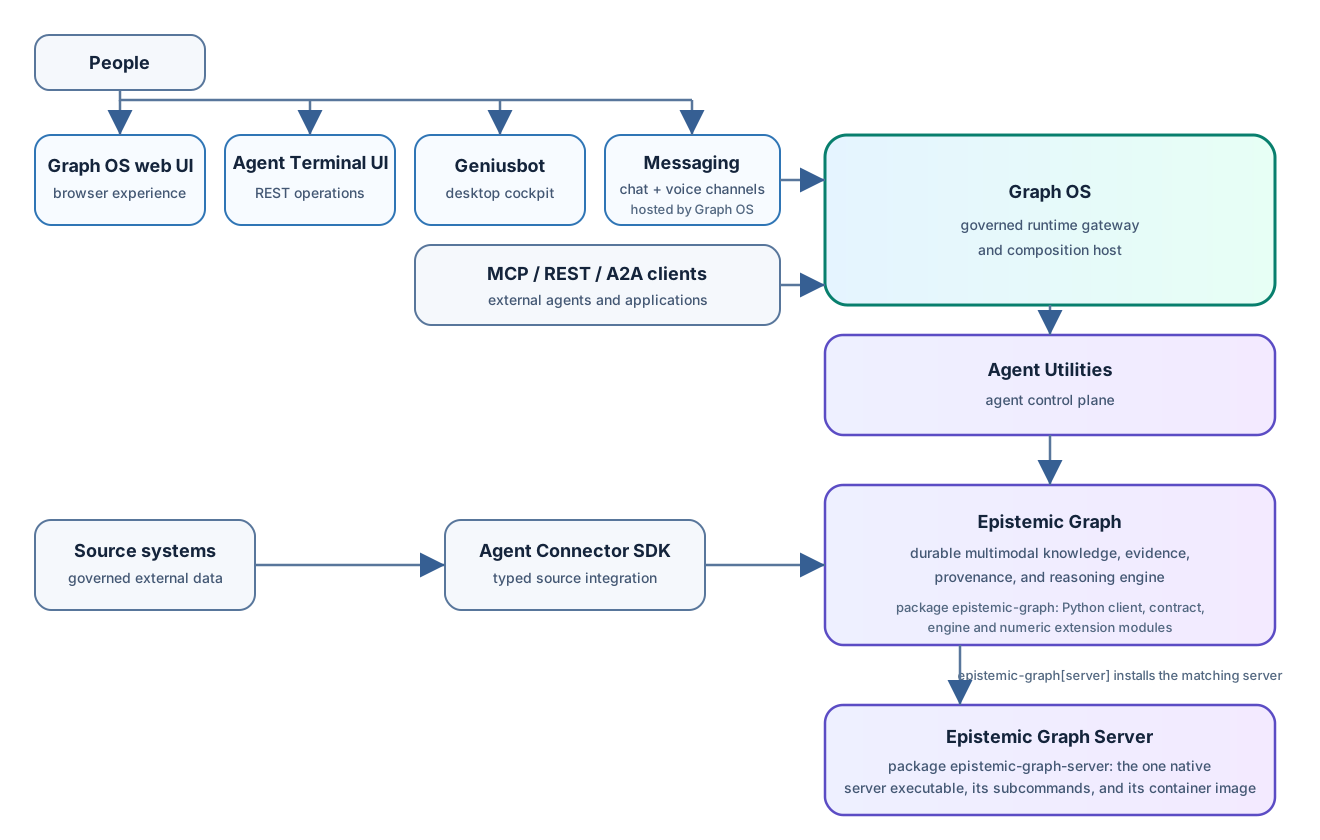
People also enter through Agent Terminal UI and Geniusbot or Arbora-hosted messaging; Agent Terminal UI exposes REST operations, with no ACP conversational path. External applications connect over MCP, REST, or A2A. The browser talks only to its same-origin FastAPI host. Arbora injects gateway routes and verified request context, then delegates agent behavior to Agent Utilities and durable knowledge to Epistemic Graph. Source systems connect through Agent Connector SDK directly to Epistemic Graph. Agent Web UI renders typed results and local presentation state while each service retains its own authority.
See the architecture guide for the request flow and trust boundaries.
Quick start
Generate a local profile and start Arbora with Agent Web UI enabled:
uvx --from "arbora[webui]" setup-config generate --profile tiny
export ENABLE_WEB_UI=true
uvx --from "arbora[webui]" arbora --transport streamable-http --host 127.0.0.1 --port 8000
Open http://127.0.0.1:8080. Arbora serves MCP on port 8000 and the Agent
Web UI co-service on port 8080. The start guide
covers local source development and deployment profiles.
Contributing
Issues and pull requests are welcome. Read AGENTS.md, keep browser and server authority boundaries intact, and run the repository validation suite before opening a pull request.
License
Arbora Agent Web UI is available under the MIT License.
1 maintainer

Metadata
1 maintainer
Release files for agent-webui 2.8.0
For a detailed explanation of source distributions (sdists) and built distributions (wheels), please see the package formats documentation.
Source distribution (sdist)
| File | Size | Uploaded | Provenance | |
|---|---|---|---|---|
| agent_webui-2.8.0.tar.gz | 2.3 MB | Without provenance | Details |
Built distribution (wheel)
| File | Interpreter | ABI | Platform | Reset |
|---|---|---|---|---|
| agent_webui-2.8.0-py3-none-any.whl | Python 3 | none | any | Details |
Total release size: 4.6 MB
Release files / agent_webui-2.8.0.tar.gz
| Download URL | agent_webui-2.8.0.tar.gz |
|---|---|
| Size | 2.3 MB |
| Tags | Source |
|
SHA-256 checksum How to use checksums |
20e4cb3b9eed163121f283c5034c082cf9e0ae82747226d7fc256359f8b530cb
|
|
BLAKE2b-256 checksum How to use checksums |
a1b14bd8efea241620086ab076fe8abe3bbc5aec7ce86b72f0fe8a8cfd189cd8
|
| Upload date | |
|
Uploaded using Trusted Publishing? What is trusted publishing? |
No |
| Uploaded via |
twine/7.0.0 CPython/3.14.4
|
Release files / agent_webui-2.8.0-py3-none-any.whl
| Download URL | agent_webui-2.8.0-py3-none-any.whl |
|---|---|
| Size | 2.4 MB |
| Tags | Python 3 |
|
SHA-256 checksum How to use checksums |
394c37770d76dcc18f7b45d48688005cb86f4de42c2f215a66e2aea07ae0c6ba
|
|
BLAKE2b-256 checksum How to use checksums |
cd4a1339f2f9b3191637c08dfccb51b0aabf6acff3f322b34dae71736f721d8e
|
| Upload date | |
|
Uploaded using Trusted Publishing? What is trusted publishing? |
No |
| Uploaded via |
twine/7.0.0 CPython/3.14.4
|
Security for agent-webui 2.8.0
Provenance
Provenance describes where a file came from. On PyPI, provenance is shared via attestations, which provide a verifiable record of the build or publishing details. View details, limitations and caveats.
No provenance found
None of the files in this release were uploaded with provenance metadata.
A note on package security
PyPI is a repository for distributing packages, not a service for auditing them. While third-party security researchers and our staff do their best to detect and remove malicious packages, PyPI cannot guarantee the quality, security or suitability of any given package.
To learn more about protecting yourself from malicious actors, visit our package security documentation.














