
AgentApps
A flexible multi-agent orchestration framework for building intelligent agent applications with a visual Flow Builder.
Screenshots
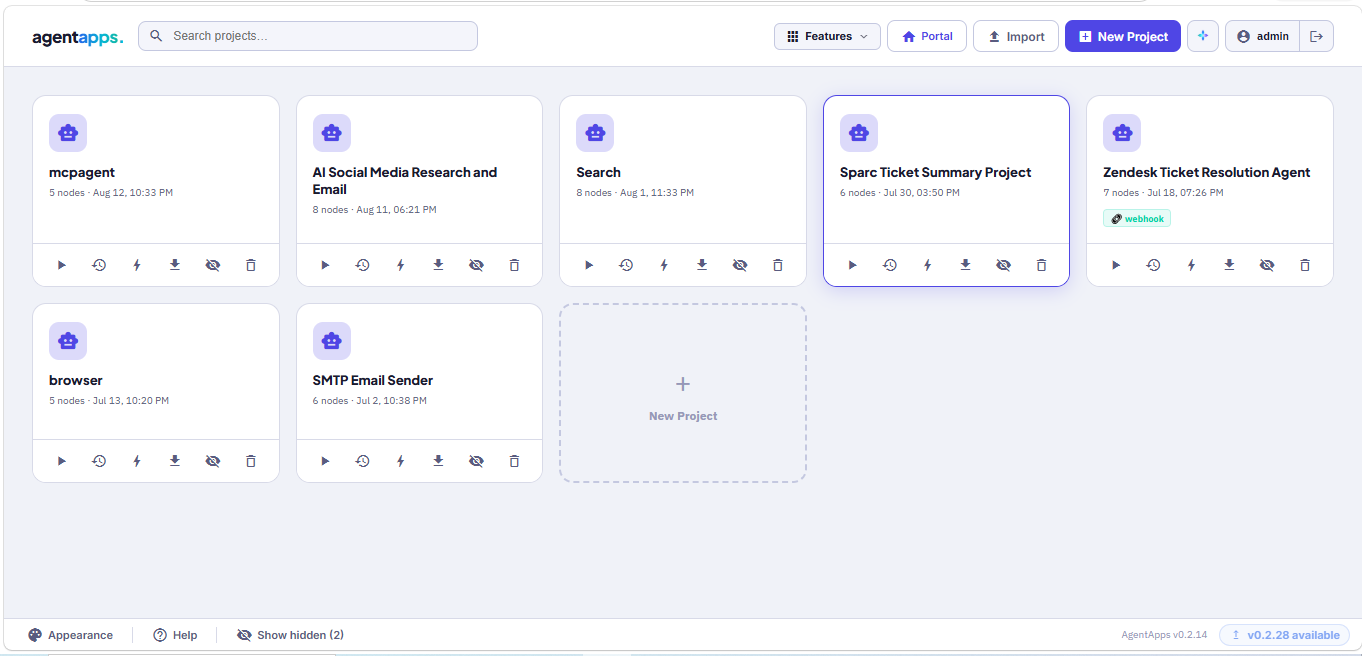
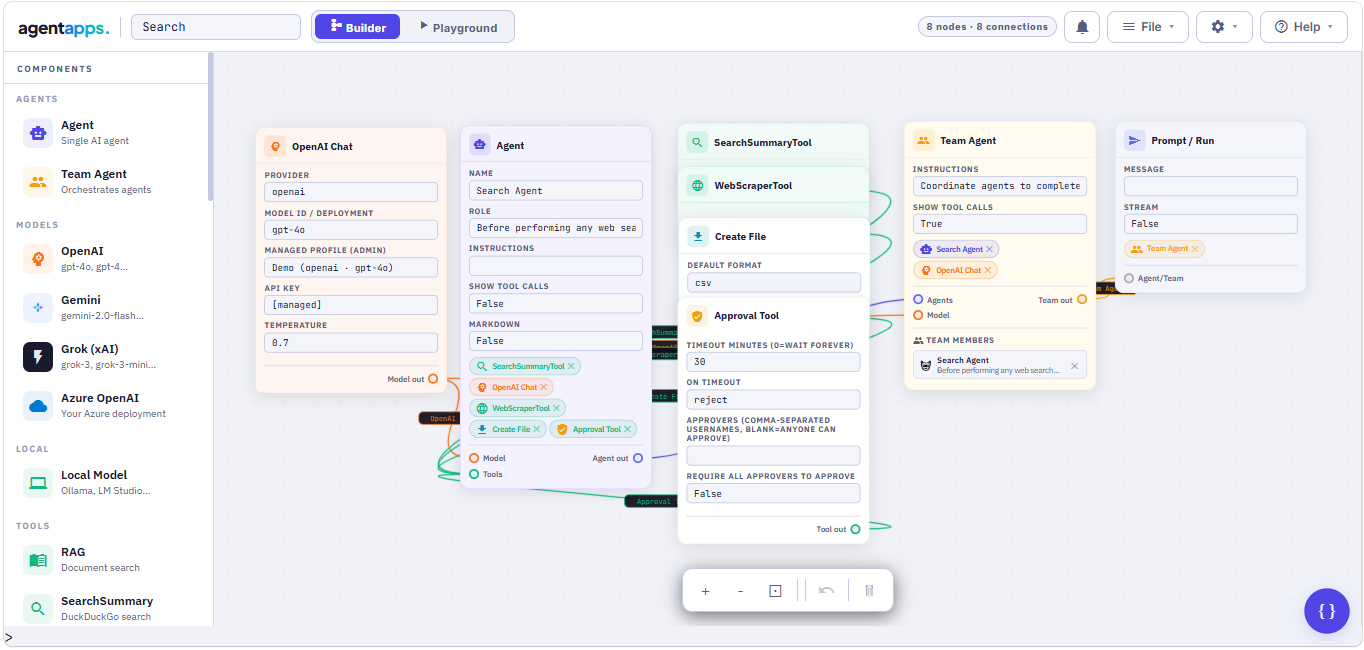
Features
🤖 Simple Agent Creation — Clean, intuitive agent setup
👥 Team Collaboration — Multiple agents working together
🔄 Sequential Workflows — Automatic multi-step execution
🛠️ Built-in Tools — Web search, scraping, calculations
🎯 Custom Tools — Easy 3rd-party integrations (Jira, Slack, GitHub, SMTP and more)
📊 Streaming Support — Real-time responses
🔍 Web Search — DuckDuckGo integration
🌐 Web Scraping — Extract content from any URL
🌟 Multi-Model Support — OpenAI, Google Gemini, xAI Grok, Ollama (local)
🗂️ Platform Tables — Built-in structured data storage
⏰ Triggers & Scheduler — Run agents on a schedule or via webhook
🐚 Shell Tool — Execute server commands from agents (opt-in)
🔐 Role-Based Access — Admin, Editor, Operator, Viewer roles
🔑 SSO / Microsoft Azure AD — Single Sign-On support
🏗️ AI Builder — Describe an agent in plain English and it builds itself
🌍 Portal — End-user chat interface for your deployed agents
🔌 MCP Client Tool — Connect to any MCP server and use its tools (New)
📌 Pinned Response Cards — Pin agent responses to the Portal hero page (New)
💾 Session Persistence — Responses saved even if you navigate away (New)
Links
- GitHub: https://github.com/91Abdul/agentapps
- PyPI: https://pypi.org/project/agentapps
- Website: https://www.agentappsai.com
- Issues: https://github.com/91Abdul/agentapps/issues
- Discord: https://discord.gg/xAUYb2vujP
- LinkedIn Group: https://www.linkedin.com/groups/14471903/
- Support: ak@agentappsai.com
Installation
pip install agentapps
Quick Start — Flow Builder UI
agentapps-flow
This starts the server and automatically opens the visual Flow Builder in your browser at http://localhost:7860.
# Custom port
agentapps-flow --port 8080

# Don't open browser automatically
agentapps-flow --no-browser

# Dev mode with hot-reload
agentapps-flow --reload
Secure Login
1. CLI flag
agentapps-flow --password mysecretpassword
2. Environment variable (recommended for servers)
export AGENTAPPS_PASSWORD=mysecretpassword
agentapps-flow
3. Auto-generated password
If no password is set, one is auto-generated and printed to the console:
╔══════════════════════════════════════════════╗
║   🔑 Auto-generated password:                ║
║      xK9mP2nQvR4sT7uW                        ║
╚══════════════════════════════════════════════╝
Passwords are stored as secure hashes — never in plaintext.
Shell Tool (opt-in)
Enable agents to run shell commands on the server (Windows cmd, Mac/Linux bash, PowerShell):
agentapps-flow --enable-shell
Or via environment variable:
AGENTAPPS_ENABLE_SHELL=true agentapps-flow
Optionally restrict the working directory:
AGENTAPPS_SHELL_DIR=/path/to/scripts agentapps-flow --enable-shell
Shell tool is disabled by default. All commands are logged and protected by a blocklist. Use with care on shared servers.
Supported Models
| Provider | Model IDs |
|---|---|
| OpenAI | gpt-4o, gpt-4-turbo, gpt-3.5-turbo, gpt-5.6-luna |
| Google Gemini | gemini-2.0-flash, gemini-1.5-pro |
| xAI Grok | grok-3, grok-3-mini |
| Ollama (local) | Any locally served model via http://localhost:11434 |
| Azure OpenAI | Any Azure-hosted OpenAI deployment |
Quick Start with OpenAI
from agentapps import Agent
from agentapps.model import OpenAIChat
from agentapps.tools import SearchSummaryTool

agent = Agent(
    name="Research Assistant",
    role="Search and analyze information",
    model=OpenAIChat(id="gpt-4o", api_key="your-openai-key"),
    tools=[SearchSummaryTool()],
    instructions=["Always include sources"],
    show_tool_calls=True
)

agent.print_response("What is the latest news about AI?")
Get an OpenAI API key: https://platform.openai.com/api-keys
Quick Start with Gemini
from agentapps import Agent
from agentapps.model import GeminiChat
from agentapps.tools import SearchSummaryTool

agent = Agent(
    name="Research Assistant",
    role="Search and analyze information",
    model=GeminiChat(id="gemini-2.0-flash-exp", api_key="your-google-api-key"),
    tools=[SearchSummaryTool()],
    instructions=["Always include sources"],
    show_tool_calls=True
)

agent.print_response("What is the latest news about AI?")
Get a Gemini API key: https://makersuite.google.com/app/apikey
Quick Start with Grok xAI
from agentapps import Agent
from agentapps.model import GrokChat
from agentapps.tools import SearchSummaryTool

agent = Agent(
    name="Research Assistant",
    role="Search and analyze information",
    model=GrokChat(id="grok-3-mini", api_key="your-xai-api-key"),
    tools=[SearchSummaryTool()],
    instructions=["Always include sources"],
    show_tool_calls=True
)

agent.print_response("What is the latest news about AI?")
Get a Grok API key: https://console.x.ai
Available Tools
SearchSummaryTool
Search the web and get detailed snippets:
from agentapps.tools import SearchSummaryTool

agent = Agent(
    name="Searcher",
    model=OpenAIChat(id="gpt-4o", api_key="key"),
    tools=[SearchSummaryTool()]
)
WebScraperTool
Scrape content from URLs:
from agentapps.tools import WebScraperTool

agent = Agent(
    name="Scraper",
    model=OpenAIChat(id="gpt-4o", api_key="key"),
    tools=[WebScraperTool()]
)
CalculatorTool
Perform calculations:
from agentapps.tools import CalculatorTool
agent = Agent(name="Calculator", model=OpenAIChat(id="gpt-4o", api_key="key"), tools=[CalculatorTool()])
MCPClientTool (New)
Connect to any MCP server and use its tools:
from agentapps.tools import MCPClientTool

tool = MCPClientTool(
    server_url="http://localhost:8000/mcp",
    tool_name="add_numbers",
    tool_description="Add two numbers together",
    auth_type="none"   # or "bearer" / "apikey"
)

agent = Agent(name="MCP Agent", model=OpenAIChat(id="gpt-4o", api_key="key"), tools=[tool])
agent.print_response("Add 42 and 58")
Or use the MCP Tool node in the Flow Builder — enter the server URL, click Discover Tools, select a tool, and it auto-fills all fields.
Team Agents
Create teams that work together sequentially:
from agentapps import Agent
from agentapps.model import OpenAIChat
from agentapps.tools import SearchSummaryTool, WebScraperTool

search_agent = Agent(
    name="Search Agent",
    role="Search the web",
    model=OpenAIChat(id="gpt-4o", api_key="your-key"),
    tools=[SearchSummaryTool()]
)

scraper_agent = Agent(
    name="Scraper Agent",
    role="Read web pages",
    model=OpenAIChat(id="gpt-4o", api_key="your-key"),
    tools=[WebScraperTool()]
)

team = Agent(
    team=[search_agent, scraper_agent],
    instructions=[
        "First, search for relevant URLs",
        "Then, scrape content from those URLs",
        "Finally, provide a comprehensive answer"
    ],
    show_tool_calls=True
)

team.print_response("Research NVIDIA's latest AI developments")
Custom Tools
Create your own tools easily:
from agentapps import Tool

class WeatherTool(Tool):
    def __init__(self):
        super().__init__(
            name="get_weather",
            description="Get weather for a city"
        )

    def execute(self, city: str) -> str:
        return f"Weather in {city}: Sunny, 72°F"

    def get_parameters(self):
        return {
            "type": "object",
            "properties": {
                "city": {"type": "string", "description": "City name"}
            },
            "required": ["city"]
        }

agent = Agent(
    name="Weather Agent",
    model=OpenAIChat(id="gpt-4o", api_key="key"),
    tools=[WeatherTool()]
)
You can also register custom tools via the Flow Builder UI — no restart required.
Portal — End User Interface (Enhanced)
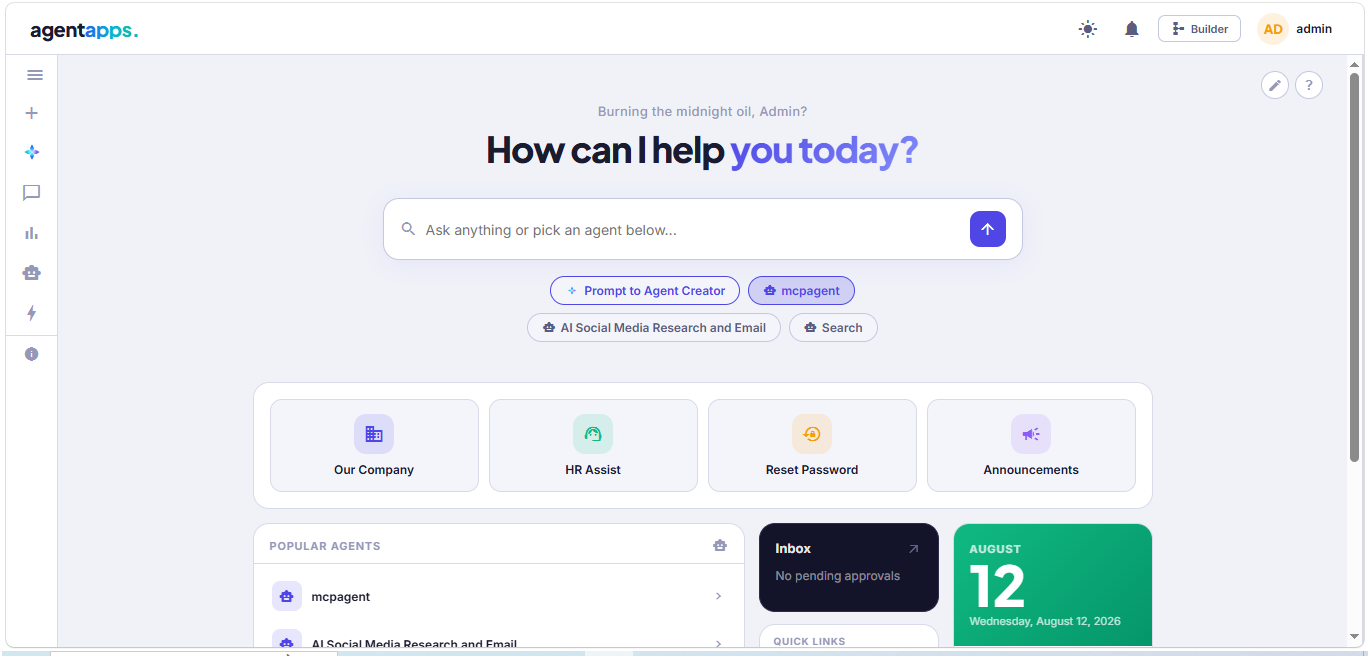
The Portal is the end-user interface for interacting with your deployed agents.
Hero Page
- Bento-grid layout — Quick Links, Popular Agents, Inbox, Calendar
- Agent chips — one-click access to agents, each starts a fresh chat
- Search bar — type a prompt and route to the right agent automatically
- Click the agentapps. logo to return to hero from any chat
Pinned Response Cards (New)
Pin any agent response directly to the hero page:
- Click the 📌 pin icon on any assistant message
- Pinned cards appear in a horizontal strip above the bento grid
- Expand (↗) to read the full response in a modal
- Refresh (🔄) to re-run the original prompt and update the card
- Unpin (✕) to remove the card
- Maximum 6 pinned cards per user
Session Persistence (Improved)
- Agent responses saved server-side regardless of client connection
- Navigate away during a long-running agent task — response appears when you return
- Works with approval workflows — approve from inbox, result saves automatically
- Execution logs and Recent Runs updated even after page refresh
Approvals Inbox
- Pending approval notifications visible on the hero page
- Approve or reject agent actions without staying on the chat page
Examples
Stock Analysis
agent = Agent(
    name="Stock Analyst",
    role="Analyze stocks",
    model=OpenAIChat(id="gpt-4o", api_key="key"),
    tools=[SearchSummaryTool()],
    instructions=["Include price targets and analyst ratings"]
)

agent.print_response("Analyze NVDA stock with latest news and recommendations")
Research Team
research_team = Agent(
    team=[search_agent, scraper_agent],
    instructions=[
        "Search for academic sources",
        "Read full articles",
        "Provide a comprehensive summary with citations"
    ]
)

research_team.print_response("What are the latest breakthroughs in quantum computing?")
API Reference
Agent
Agent(
    name: str = "Agent",
    role: str = "General Assistant",
    model: Model = None,
    tools: List[Tool] = None,
    instructions: List[str] = None,
    team: List[Agent] = None,
    show_tool_calls: bool = False,
    markdown: bool = False,
    temperature: float = None
)
Methods
| Method | Description |
|---|---|
run(message, stream=False) |
Execute agent |
print_response(message, stream=False) |
Print response to console |
clear_history() |
Clear conversation history |
add_tool(tool) |
Add a tool dynamically |
get_info() |
Get agent information |
Role-Based Access Control
The platform supports four roles assignable per user:
| Role | Description |
|---|---|
| Admin | Full access — users, settings, SSO, shell tool |
| Editor | Build and run — create/edit agents, tools, schedules |
| Operator | Run only — use agents via portal, view reports and approvals |
| Viewer | Read only — view projects, tables, reports |
Manage users and assign roles from the Admin → Users section in the Flow Builder.
Triggers & Scheduler
Run agents automatically on a schedule or via external webhook:
- Scheduler — run agents every N minutes, hourly, daily, or weekly
- Webhook — trigger agents via HTTP from any external service (Jira, Zapier, Slack, etc.)
- Email — poll IMAP inbox and trigger on new messages
- API Poll — monitor any external API and trigger on condition
MCP Client Tool (New)
Connect to any MCP (Model Context Protocol) server directly from the Flow Builder.
Supported transports: Streamable HTTP (JSON-RPC 2.0)
Auth options: None, Bearer Token, API Key
Compatible with: FastMCP, official MCP servers, any compliant server
In the Flow Builder:
- Drag MCP Tool node to canvas
- Enter server URL + auth settings
- Click Discover Tools — auto-connects and lists available tools
- Click a tool — Tool Name, Description, Schema auto-fill
- Connect to Agent node and save
In Python:
from agentapps.tools import MCPClientTool

tool = MCPClientTool(
    server_url="https://mcp.example.com",
    tool_name="search",
    tool_description="Search for information",
    tool_schema={
        "type": "object",
        "properties": {"query": {"type": "string"}},
        "required": ["query"]
    },
    auth_type="bearer",
    auth_value="your-token"
)
HTTPS / SSL
Secure HTTPS is required for production webhooks.
Option 1 — Auto self-signed certificate (easiest)
pip install cryptography
agentapps-flow --ssl-self-signed
Option 2 — Bring your own certificate (Let's Encrypt / purchased)
agentapps-flow --ssl-cert /path/to/cert.pem --ssl-key /path/to/key.pem
Option 3 — Let's Encrypt
pip install certbot
certbot certonly --standalone -d yourdomain.com

agentapps-flow \
  --ssl-cert /etc/letsencrypt/live/yourdomain.com/fullchain.pem \
  --ssl-key  /etc/letsencrypt/live/yourdomain.com/privkey.pem
Option 3 — Standard HTTPS port (443)
agentapps-flow --port 443 --ssl-self-signed
On Linux/macOS, binding to port 443 requires root or sudo. Consider using a reverse proxy (nginx, Caddy) for production.
Using with ngrok (recommended for local webhooks)
# Terminal 1
agentapps-flow

# Terminal 2
ngrok http 7860
Use the https://xxxx.ngrok-free.app URL as your webhook base URL.
Webhook URL format
https://your-domain.com/webhook/<project-name>?token=<bearer-token>
Tokens are generated in the Flow Builder under ☰ Menu → 🔗 Webhooks.
All CLI Flags
| Flag | Default | Description |
|---|---|---|
--port |
7860 |
Port to listen on |
--host |
0.0.0.0 |
Host to bind to |
--no-browser |
off | Don't auto-open browser |
--reload |
off | Hot-reload on file changes (dev mode) |
--password |
— | Set UI login password |
--ssl-self-signed |
off | Auto-generate self-signed certificate |
--ssl-cert |
— | Path to SSL certificate .pem file |
--ssl-key |
— | Path to SSL private key .pem file |
--enable-shell |
off | Enable ShellTool |
--enable-browser |
off | Enable BrowserTool |
Requirements
- Python >= 3.8
- An API key from OpenAI, Google Gemini, xAI Grok — or a local Ollama instance
License
MIT License
Contributing
Contributions welcome! Please feel free to submit a Pull Request on GitHub.
1 maintainer

Download files
Download the file for your platform. If you're not sure which to choose, learn more about installing packages.
Source Distributions
Built Distribution
Filter files by name, interpreter, ABI, and platform.
If you're not sure about the file name format, learn more about wheel file names.
Copy a direct link to the current filters
File details
Details for the file agentapps-0.2.32-py3-none-any.whl.
File metadata
- Download URL: agentapps-0.2.32-py3-none-any.whl
- Upload date:
- Size: 589.7 kB
- Tags: Python 3
- Uploaded using Trusted Publishing? No
- Uploaded via:
twine/6.1.0 CPython/3.13.14
File hashes
| Algorithm | Hash digest | |
|---|---|---|
| SHA256 |
ac3cf6c02f51e308334523c03f87f3ae1ea86bca0df24940831b4b36fbc3db93
|
|
| MD5 |
099fc9c8485196ee0052d5bbc3b2c315
|
|
| BLAKE2b-256 |
c061b9de5298a492e6e574b68a9779399f2b8bfaabb41f63419c74cdd126830c
|














