
agentbell



How many times today have you checked whether your AI agent is done yet?
agentbell tells your phone when an agent finishes, fails, or needs you, and lets you answer from there.
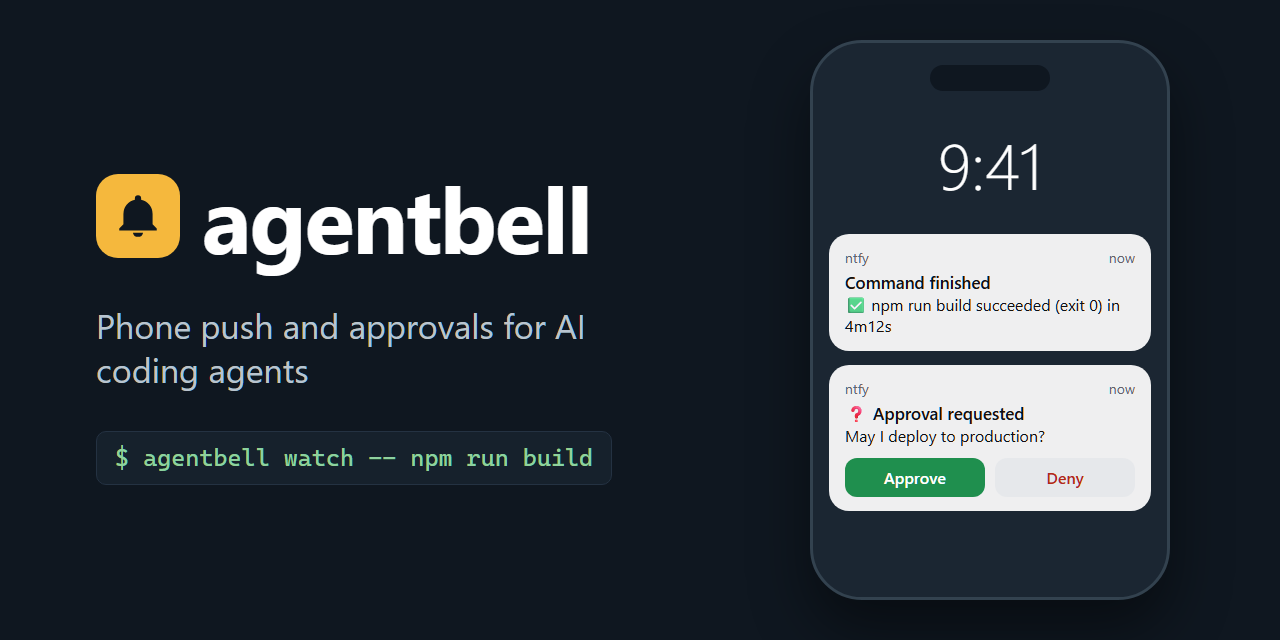
It is a command-line tool in a single Python file with no dependencies. The free path needs no account and no server of your own. Pushes go through ntfy, either the public ntfy.sh or your own server. Telegram is an optional paid extra.
What it does
- Pushes to your phone when an agent turn finishes (with its duration), fails, or waits for your input. Where agentbell can measure a turn, turns shorter than a minute stay silent.
- Approvals from the phone.
agentbell ask "Deploy to production?"shows Approve and Deny buttons and waits. Your answer comes back as an exit code and as JSON. - Watches any command.
agentbell watch -- npm run buildpushes the result, exit code and duration, and passes the exit code through. - Wires up agents for you. Hooks for Claude Code, Codex, OpenCode, Gemini CLI, Kimi Code and Qwen Code, and rule files for Cursor, Windsurf, Cline, Continue, Zed and Aider. Any other agent can wire itself up from
agentbell integrate. - MCP server with
notifyandask_approvaltools for desktop apps and editors. - Webhook server (
/notify,/ask) for CI jobs and machines without agentbell installed. - Quiet hours, a retry queue, history and
doctor: a push that cannot be sent is queued and retried later, anddoctorprints the command that fixes a problem.
Status: beta. The Claude Code, Codex and OpenCode hooks have been in daily use since August 2026 (versions 1.6.x), and the Kimi Code hooks on two days. Much of the rest, including everything that changed in 1.7.0, has only been tested by the automated test suite so far. The status and limits section lists which parts.
Install
You need Python 3.9 or newer and the free ntfy app on your phone (Android and iOS).
pipx install agentbell # recommended: isolated, and on your PATH
Other ways:
pip install agentbell         # inside a virtual environment

# from a checkout (macOS, Linux): tries pipx, then pip --user, then a plain copy
git clone https://github.com/MoodTechBasti/agentbell
cd agentbell && ./install.sh
On Windows (PowerShell):
py -m pip install --user agentbell
py -m agentbell init
py -m agentbell doctor     # if `agentbell` is not found, this prints the PATH fix
The test suite runs on Windows in CI, but these steps have not been run by hand on a Windows machine yet.
60-second setup
agentbell init
The wizard does the following:
- It suggests ntfy.sh and a long random topic, or takes your own server and topic.
- It shows the two topics to subscribe to in the ntfy app, for example
my-agentbell-topic-7f3aandmy-agentbell-topic-7f3a-responses(the second one carries your answers). Your topic will be a different random name. - It asks about Telegram (premium, optional).
- It asks for quiet hours, which are optional.
- It offers hooks for the agents it finds.
- It sends a test push and prints the next steps.
Then:
-
Make sure the ntfy app is subscribed to both topics.
initprints them again at the end. -
Check both directions:
agentbell test                                            # push + delivery check
agentbell ask "Did this reach my phone?" --timeout 60     # tap Approve
-
Anything wrong:
agentbell doctor.
For scripts, init --non-interactive takes everything as flags (--server, --topic, --ntfy-auth, --quiet-hours, --quiet-hours-mode, --no-test, --no-hooks, …). See agentbell init --help.
Agents
agentbell hooks install claude codex opencode   # or: agentbell hooks install all
agentbell hooks                                 # status: what is wired, and how
hooks install all also writes the six rule files (see below) into the current directory.
| Agent | What agentbell writes | Scope | Pushes | Real-world use |
|---|---|---|---|---|
| Claude Code | hooks in ~/.claude/settings.json |
global | finished (with duration), failed, needs input, permission dialog | yes, daily since Aug 2026; the permission-dialog push is new in 1.7.0 and not field-tested |
| Codex | hook block in ~/.codex/config.toml |
global | finished (with duration) | yes, daily since Aug 2026 |
| OpenCode | plugin ~/.config/opencode/plugin/agentbell.js |
global (--project: that repo) |
finished (with duration), failed, permission asked | yes, daily since Aug 2026 with the 1.6 plugin; the 1.7.0 plugin is not re-tested yet |
| Kimi Code | hook block in ~/.kimi-code/config.toml |
global | finished (with duration), failed | yes, on two days in Aug 2026 |
| Gemini CLI | AfterAgent hook in ~/.gemini/settings.json |
global | finished (every turn: Gemini has no failure event, and no duration is measured) | not yet |
| Qwen Code | hooks in ~/.qwen/settings.json |
global | finished (with duration), failed | not yet |
| Cursor | .cursor/rules/agentbell.mdc |
per project | finished, needs input, failed (rule) | not yet |
| Windsurf | .windsurf/rules/agentbell.md (plus a legacy .mdc) |
per project | same (rule) | not yet |
| Cline | .clinerules/agentbell.md |
per project | same (rule) | not yet |
| Continue | .continue/rules/agentbell.md |
per project | same (rule) | not yet |
| Zed | a marked block in .rules |
per project | same (rule) | not yet |
| Aider | an Aider-only block in AGENTS.md |
per project | same (rule) | not yet |
The "real-world use" column comes from FIELD_TEST.md. "Not yet" means untested, not known good: the installer and the config format are covered by the automated tests, but no real agent turn has been recorded.
Global hooks (the first six) apply in every repository. They are deterministic lifecycle hooks: the agent host runs them, and the model has no say in it.
Rule-file agents (the last six) have no hook agentbell uses. For each of them, agentbell writes an instruction telling the agent to call agentbell hook … when it finishes, needs input or fails. This works only as well as the model follows the rule. It is also per project. hooks install cursor writes into the current directory, or into --project <dir>, and nowhere else, so run it once in every repository you want covered. agentbell init wires these agents only in the directory you run it from.
Details that apply to the hooks:
- No spam for short turns. For Claude Code, Codex, OpenCode, Kimi Code and Qwen Code, the finished push carries
--min-duration 60, so a turn shorter than a minute stays silent. It is recorded ashook.skipped_shortinagentbell history. Failures and turns of unknown duration always push. You can edit the number in the hook. For Claude Code, Codex, Kimi Code and Qwen Code, re-runninghooks installkeeps your value. - No doubles. The same push (same agent, event and text) within 5 seconds is sent once. The repeat is recorded as
hook.skipped_duplicate. - Hooks do not hold up the agent for long. Claude Code, Codex and Qwen Code run them in the background. Gemini CLI, Kimi Code and the OpenCode plugin wait for the hook, so every hook caps its sending at 6 seconds, below Kimi Code's 10-second and Gemini CLI's 15-second hook timeouts. What does not fit is queued and sent later.
- Your config stays yours. Existing files are merged.
hooks uninstallremoves only the entries agentbell generated. A config agentbell cannot edit safely is left unchanged, and the command exits 1. Examples are asettings.jsonwith comments, or TOML with inline hook tables.
Reference copies of what the installers write are in examples/.
Any other agent
Any agent that can run a shell command or use an MCP server can use agentbell:
agentbell integrate               # prints a self-integration guide; changes nothing
agentbell verify --agent <slug> --since 10m   # did real events arrive? read-only
Give the integrate output to the agent. The guide tells it to wire itself up in its own config files and to ask for your approval first. agentbell itself never edits configs it has no installer for. verify then checks history for real lifecycle events. It flags possible double integrations, and it does not count a --force smoke test as proof. GitHub Copilot CLI 1.0.80 integrated itself this way on 2026-08-21. It is so far the only self-integration with a recorded test protocol.
Scripts can also fire the events directly:
agentbell hook run_completed --agent my-agent --duration 312
agentbell hook run_failed --agent my-agent
Approvals
agentbell ask "Deploy to production?" --timeout 600
The phone shows ❓ Approval requested with Approve and Deny buttons. ask blocks until you answer or the timeout ends. The default timeout is approval_timeout from the config, 300 seconds. The answer travels through ntfy itself: the buttons post to <topic>-responses, where ask is listening. Nothing on your machine has to accept incoming connections.
How replies are read
| Reply | Result | Exit | approved |
|---|---|---|---|
Approve button; typed APPROVED <id>; a bare yes, y, ok, okay, yep, yeah, ja, approve, approved, 👍; or the yes button's label alone |
approved | 0 | true |
Deny button; typed DENIED <id>; a no, refusal or postponement such as no, nein, stop, not now, wait, later, später, 👎, ❌, ⏳, also with a reason after it (no, not before the release); a yes followed by one of these (yes, but wait) |
denied | 1 | false |
any other text, such as staging, yes, but use staging or not staging |
answered: the text is printed on stdout | 0 | false |
| nothing before the timeout | timeout | 2 | false |
| not configured, the question could not be sent, or no answer channel left | error | 3 | (no output) |
Only an explicit yes approves. Free text exits 0 so that an agent can use the answer, but it is not an approval. An unreadable config file also exits 1. Treat any non-zero exit as no.
To type an answer, send a message to <topic>-responses in the ntfy app, or write in the Telegram bot chat.
Which question a reply answers. A button always answers its own question. So do a typed APPROVED <id> / DENIED <id> and Telegram's Reply on the question. A typed reply that names no question is used only when exactly one approval question can still be on the phone. A question counts while its ask is still waiting (its process holds a lock on the question's marker file). One that ended without an answer on that channel (its timeout ran out, its send timed out, it was killed, or it was answered on the other channel) counts for 60 seconds after it ended. One the server rejected (an HTTP 4xx error, or Telegram's ok: false) never reached the phone and does not count; after a server error or a timeout it may have, and it counts. What counts is judged at the moment the reply was sent: a reply that reaches agentbell more than 30 seconds after it was sent (after a lost connection, or from a Telegram bot that was down) is refused, and a clock difference between your machine and the server does not change that. "Sent" means when the server received it: a reply typed while the phone was offline is judged when it arrives, and can reach an ask that is by then the only one open. With two questions that count, or when the only one has already ended, agentbell refuses the reply and does not guess. It sends a notice on the same channel ("Reply not used" on ntfy; the Telegram bot sends at most one per reason a minute) and records stale_answer in history. Use the buttons, Telegram's Reply or APPROVED <id> / DENIED <id> in that case.
Gating a script on an approval
Gate on approved, never on "an answer came back". agentbell ask "Deploy?" && ./deploy.sh is not a gate: it deploys on any free-text reply, for example yes, but use staging.
answer=$(agentbell ask "Deploy to production?" --timeout 600 --json) || exit $?   # 1 denied, 2 timeout, 3 error
if printf '%s' "$answer" | python3 -c 'import json,sys; sys.exit(0 if json.load(sys.stdin).get("approved") is True else 1)'; then
    ./deploy.sh
else
    echo "not approved: $answer" >&2
    exit 1
fi
--json prints one object:
{"approved": false, "answer": "yes, but use staging", "denied": false, "timeout": false, "channel": "ntfy"}
On a timeout the object has no channel key. The same object comes back from the MCP tool ask_approval and from the webhook's /ask. /ask returns HTTP 200 for every answer and for a timeout, so a successful HTTP status is not an approval either. It returns 400 for a bad request and 500 with an error when the question cannot be asked.
Other options: --yes-label / --no-label rename the buttons, --no-buttons asks for a typed answer only, and --channel ntfy|telegram picks one channel.
Watch any command
agentbell watch -- npm run build
- On success: ✅ npm run build succeeded (exit 0) in 4m12s, at normal priority.
- On failure: 🔴 npm run build failed (exit 1) in 12s, at urgent priority.
Use --priority and --fail-priority to change the priorities, and --title or --tags to label the push.
watchexits with the command's own exit code. A command ended by signal N exits 128+N (not on Windows). A command that could not be started exits 127. A failed push never changes the exit code.- The command runs without a shell, so pass it as separate words. For pipes,
&&or redirects, useagentbell watch -- sh -c 'make && make test'. - The command keeps the terminal:
sudopassword prompts work, and Ctrl-C and Ctrl-Z reach the command.watchthen waits for the command to end and sends the push anyway. If the push itself hangs, Ctrl-C queues it and exits (not on Windows). - On Windows,
watchfinds.cmdand.battools such as npm onPATH. It refuses arguments to them that contain%,"or a line break (exit 127), becausecmd.exewould reinterpret them.
This terminal and signal handling is new in 1.7.0 and covered by tests, but not yet checked by hand (FIELD_TEST rows 26–31 and 40).
MCP: desktop apps and editors
agentbell mcp add                    # every supported client found on this machine
agentbell mcp add claude-desktop     # just one
agentbell mcp add --print            # print the snippets, write nothing
Supported clients:
- Claude Code
- Claude Desktop
- ChatGPT Desktop (shares
~/.codex/config.tomlwith Codex) - Codex
- Gemini CLI
- Qwen Code
- Kimi Code
- Cursor
- OpenCode
- VS Code
--project <dir> writes a project config for Cursor, OpenCode, Qwen Code and Kimi Code. For other clients, --print includes the JSON, TOML and Zed (context_servers) shapes. Restart the client after adding the server.
The server exposes two tools:
notify(message, title?, priority?, tags?, agent?)ask_approval(message, timeout_seconds?, yes_label?, no_label?)waits for the answer and returns the JSON shown above. The timeout defaults to 120 seconds and is limited to 10–600 seconds, because clients cancel long tool calls.
The MCP path has been checked once with a real host (GitHub Copilot CLI, 2026-08-21). The desktop-app registrations have not been field-tested yet.
Webhook for CI and remote machines
export WEBHOOK_TOKEN="$(python3 -c 'import secrets; print(secrets.token_urlsafe(24))')"
agentbell config set webhook.token "$WEBHOOK_TOKEN"
agentbell server        # 127.0.0.1:8756 by default
curl -fsS -X POST http://127.0.0.1:8756/notify \
  -H "Authorization: Bearer $WEBHOOK_TOKEN" -H "Content-Type: application/json" \
  -d '{"message":"CI pipeline finished","priority":"normal"}'
POST /ask blocks until you answer (timeout_seconds from 1 to 3600) and returns the ask --json object. Gate on "approved": true. GET /healthz reports the version.
To listen on another address or port, edit webhook.listen and webhook.port in the config file. The server refuses a non-loopback address without a token. It also rejects requests that carry a browser Origin header. examples/webhook.sh has a full example.
Priorities and quiet hours
| Event | Priority | Push starts with |
|---|---|---|
run_completed |
normal (3) | ✅ |
run_failed |
urgent (5) | 🔴 |
input_required |
high (4) | 🔵 |
permission_required |
high (4) | 🔐 |
started |
low (2) | ▶️ (the installed hooks record it silently) |
Quiet hours hold back pushes below quiet_hours_min_priority. The default is normal, so only min and low pushes are held. Finished, failed, needs-input and permission pushes still arrive at night. To hold finished turns overnight as well:
agentbell config set quiet_hours 22:00-07:30          # several: 22:00-07:30,13:00-14:00
agentbell config set quiet_hours_min_priority high    # hold min, low and normal; high and urgent still arrive
agentbell config set quiet_hours_mode defer           # or: suppress (the default)
suppressdrops held pushes and records them inhistory.deferstores held pushes and delivers them after the window. Delivery happens with the next push, withagentbell queue flush, or through the Telegram bot. It does not happen exactly at the end of the window. If 4 or more are due at once, they arrive as one summary.notify --forceignores quiet hours, andnotify --deferdefers a single push. Approval questions are never held.
Commands
agentbell init                           # setup wizard (re-run any time)
agentbell notify "Build finished" --priority high --tags build
agentbell ask "Deploy?" --json           # approval; exit 0/1/2/3
agentbell watch -- <command> [args...]   # run and push the result

agentbell hook <event> --agent <slug>    # fire an event yourself (scripts, other agents)
agentbell hooks                          # status of all twelve agents
agentbell hooks install <agent...>|all   # --project <dir> for rule files
agentbell hooks uninstall <agent...>|all
agentbell mcp add [client...]            # --print, --project <dir>
agentbell mcp                            # the stdio MCP server that clients start
agentbell integrate [--json]             # contract for any other agent
agentbell verify [--agent <slug>] [--since 10m]

agentbell test                           # real push + delivery check
agentbell doctor [--send]                # health check with fix commands
agentbell history --limit 20             # what agentbell did, and why
agentbell queue list | flush | status    # queued and deferred pushes

agentbell config show | path | set <key> <value>
agentbell server                         # webhook: POST /notify, POST /ask, GET /healthz
agentbell license activate <key> | status
agentbell bot | bot status | bot install-service   # Telegram (premium)
agentbell uninstall [--yes] [--project <dir>]   # dry run unless --yes
Every command has --help.
Configuration
The config file is ~/.config/agentbell/config.json, created with mode 600. agentbell config path shows where yours is. agentbell config show prints it with credentials redacted.
| Key | Meaning | config set |
|---|---|---|
ntfy.server |
ntfy server URL (default https://ntfy.sh) |
yes |
ntfy.topic |
your topic: letters, digits, - and _, at most 54 characters (ask adds -responses, and ntfy allows 64), a warning below 16 |
yes |
ntfy.auth |
user:pass or a token for a protected server (none clears it) |
yes |
ntfy.action_auth |
publish-only token that the approval buttons use (see Security) | yes |
channels |
ntfy, os (desktop notification), telegram, comma-separated |
yes |
quiet_hours / quiet_hours_mode / quiet_hours_min_priority |
see above | yes |
approval_timeout |
default seconds for ask (300) |
yes |
webhook.token |
bearer token for agentbell server |
yes |
webhook.listen / webhook.port |
server address (127.0.0.1, 8756) |
edit the file |
telegram.chat_id |
Telegram chat | yes |
telegram.bot_token |
Telegram bot token | via agentbell init |
license |
premium key | via agentbell license activate |
State lives in ~/.local/state/agentbell/: history, the queue, deferred pushes and bot state. XDG_CONFIG_HOME and XDG_STATE_HOME are respected. You can override the locations with AGENTBELL_CONFIG_DIR, AGENTBELL_CONFIG (the file itself) and AGENTBELL_STATE_DIR. AGENTBELL_LICENSE supplies a key.
A failed push is retried, then kept in a local queue: up to 100 items, for up to 24 hours. The queue is replayed after the next successful push, by agentbell queue flush, or by the Telegram bot. A push that is still undelivered after 24 hours, or pushed out by a full queue, is dropped. A queued push counts as sent for now: notify exits 0 and prints a warning on stderr. notify exits 3 only when a channel fails for good, for example when the server rejects the request.
Security and trust model
Read this before you gate anything that matters on a phone tap.
-
On the free path, the topic name is the only credential. Anyone who knows it can read your pushes, send fake ones and answer your approval questions.
initgenerates a long random topic for that reason. Topics shorter than 16 characters get a warning. Treat the topic like a password. -
ntfy.sh is a third-party relay. It can read your message text, and hook pushes include the project directory. If that matters, run your own ntfy server with access control and point agentbell at it:
agentbell config set ntfy.server https://ntfy.example.com
agentbell config set ntfy.auth 'user:password'      # or an access token
agentbell config set ntfy.action_auth tk_...        # token that may only publish to <topic>-responses
-
The buttons carry their credential inside the message. Every subscriber of the topic can see it. So agentbell never puts
ntfy.authinto a button. On a protected server withoutntfy.action_auth, questions go out without buttons, and a typed reply still works. -
Changing the server clears the credentials.
config set ntfy.serverandinitdropntfy.authandntfy.action_authwhen the server really changes, so a password is never sent to a new server. -
Sensitive-looking questions (a production deploy, deleting a database, rotating credentials, …) print a warning when ntfy has no authentication. This is only a reminder, not a safety check.
-
Output that is safe to share:
agentbell verifynever prints your topic, server or paths.agentbell doctorprints the full topic, andconfig showprints its first characters. Keep both out of public issues. -
The webhook accepts anything from loopback unless you set
webhook.token. Set one even locally. -
No telemetry. agentbell connects only to the ntfy server you configure and, if you use it, the Telegram API. License keys are checked offline.
-
Delivery is best effort. agentbell retries and queues, but neither agentbell nor ntfy.sh guarantees delivery.
To report a vulnerability, see SECURITY.md.
Uninstall
agentbell uninstall          # dry run: lists everything, deletes nothing
agentbell uninstall --yes
This removes the following:
- the Telegram bot service
- the package or copied binary (pipx, pip
--user) - the config and state
- the global hooks and the OpenCode plugin
- the MCP entries
- the rule files and
AGENTS.mdblocks in the current directory, or in--project <dir>
For each other repository with rule files, run agentbell hooks uninstall <agent> --project <repo> first. Only agentbell's own entries are removed: your other hooks, MCP servers and rules stay.
Some things are not removed. Delete them yourself if you want them gone:
- the subscription in the ntfy app
- a Telegram bot you created with BotFather
AGENTBELL_*variables in your shell profile- wiring that a self-integrated agent added to its own config
Troubleshooting
Start with agentbell doctor. It checks the install, PATH, config, server, quiet hours, license, hooks, MCP, queue and state directory, and it prints a fix command for each problem.
| Symptom | Check |
|---|---|
| Nothing arrives | Are you subscribed to the topic in the ntfy app? Run agentbell test, then agentbell doctor. |
| Nothing arrives, no error | agentbell history --limit 10 shows suppressed, deferred, queued or hook.skipped_short. |
| Pushes are waiting | agentbell queue list, then agentbell queue flush. |
| An agent never pushes | agentbell hooks (for a rule-file agent, run it inside that repo), then agentbell verify --agent <slug> --since 1h after one real turn. |
| No buttons on the question | On a protected ntfy server, set ntfy.action_auth. On Telegram, the bot must be running (agentbell bot status). |
| A typed reply was ignored | Another question was open, one had ended unanswered less than a minute before, or the reply reached agentbell more than 30 seconds after it was sent. Tap the button, use Reply, or send APPROVED <id>. history shows stale_answer with the reason. |
| Upgraded and something is off | Re-run agentbell hooks install <agent> for each wired agent, and agentbell bot install-service if you use it. Restart a bot that is still running from the old version. |
When you open an issue, include agentbell --version and the output of agentbell verify, not doctor.
Status and limits
agentbell is in beta. FIELD_TEST.md records what has been checked on a real machine with a real phone, and what has not.
Used for real (Linux/WSL2, August–September 2026, versions 1.6.x):
- ntfy pushes, and
askanswered and approved from the phone. - Telegram in parallel with ntfy.
- The Claude Code, Codex, OpenCode and Kimi Code hooks in daily use.
pip install agentbellfrom PyPI in a clean venv, and pipx with a locally built wheel.- Self-integration by GitHub Copilot CLI (hooks, MCP only, and rules only).
Covered by the automated tests, not yet checked on a real machine:
- Everything 1.7.0 changed (FIELD_TEST rows 26–46), including:
watchsignal and terminal handling- the Claude Code permission-dialog push
- refusing typed replies while two questions are open, or when they arrive late
- bot service stop and restart
- Codex configs with other tables
- clearing credentials on a server change
- the new OpenCode plugin
- The Gemini CLI and Qwen Code hooks.
- The six rule-file agents.
- The MCP registrations for desktop apps.
pipx installfrom PyPI.bot install-serviceunder a real systemd or launchd.- Windows: CI and WSL-interop tests only.
- macOS: CI only.
Known limits:
- Rule-file agents are best effort and per project. The model can skip the rule.
- Zed's agent reads only the first project instruction file it finds, and
.rulesis first in its list, ahead ofAGENTS.mdandCLAUDE.md(Zed docs). In a repository without a.rulesfile,hooks install zedcreates one, and Zed then ignores those other files there. - Codex and Gemini CLI push no failures: agentbell wires no failure hook for Codex, and Gemini CLI has no failure event. Gemini CLI turns carry no duration, so every turn pushes.
- Among the hook agents, only Claude Code (needs input, permission dialog) and OpenCode (permission asked) push when the agent is waiting for you. The rule-file agents do so only when the model follows the rule.
- A timed-out send may still have reached the server, so a retry can very rarely produce a duplicate push.
- The queue and deferred pushes live on this machine only. Deferred pushes go out with the next activity, not exactly at the end of the window.
bot install-serviceis not available on Windows. Runagentbell botin a terminal there instead.- MCP pushes are attributed to an agent only when the client passes
agent. askandbotneed file locks in the state directory. On a filesystem without them (some network mounts)askexits 3 with an error and the bot does not start.
Premium: Telegram
The free version includes ntfy and desktop notifications, all agent hooks, approvals with buttons and typed replies, watch, MCP, the webhook, quiet hours, the queue, doctor, verify and uninstall. A premium key adds Telegram:
- Telegram as a channel, alone or in parallel with ntfy. Questions go to both, and the first answer wins.
- Telegram approvals with inline buttons, answered through the
agentbell botdaemon (long polling, no public endpoint). Only the private chat you configured can answer. A Telegram chat belongs to your account, while an ntfy topic can be answered by anyone who knows its name.
agentbell license activate AB1-...
agentbell init                  # paste the bot token from BotFather, then message your bot so init finds the chat id
agentbell bot install-service   # systemd user unit or launchd; or run `agentbell bot`
agentbell bot status
A key is a one-time purchase and is not tied to a machine. It is an Ed25519 signature that is checked offline against the public key in agentbell.py, with no network call. There is no online checkout at the moment. To get a key, e-mail basti@moodtechsolutions.com or open a GitHub issue. The project is MIT-licensed: the check is a few lines you can read. DECISIONS.md (§2b) explains the scheme.
Contributing
python3 -m unittest discover -s tests -v   # macOS / Linux, no dependencies
py -m unittest discover -s tests -v        # Windows
- CONTRIBUTING.md: how to propose a change
- CODE_OF_CONDUCT.md
- CHANGELOG.md: what changed in each version; read it before upgrading
- DECISIONS.md: why it is built this way
- FIELD_TEST.md: what has been checked by hand
- Field reports are welcome, especially for the agents marked "not yet".
License
MIT. See LICENSE.
1 maintainer

Release files for agentbell 1.7.0
For a detailed explanation of source distributions (sdists) and built distributions (wheels), please see the package formats documentation.
Source distribution (sdist)
| File | Size | Uploaded | |
|---|---|---|---|
| agentbell-1.7.0.tar.gz | 174.2 kB | Details |
Built distribution (wheel)
| File | Interpreter | ABI | Platform | Reset |
|---|---|---|---|---|
| agentbell-1.7.0-py3-none-any.whl | Python 3 | none | any | Details |
Total release size: 328.1 kB
Release files / agentbell-1.7.0.tar.gz
| Download URL | agentbell-1.7.0.tar.gz |
|---|---|
| Size | 174.2 kB |
| Tags | Source |
|
SHA-256 checksum How to use checksums |
dfc8d33571abbbdb225f4144a35a3ad47c80436bab76ca68ea13ad2915b91f16
|
|
BLAKE2b-256 checksum How to use checksums |
2b7c94f5c8ff34e68b158d14b872cbd15abd2faf0737f55107dc839c5bf4975b
|
| Upload date | |
|
Uploaded using Trusted Publishing? What is trusted publishing? |
Yes |
| Uploaded via |
twine/7.0.0 CPython/3.13.14
|
Provenance
Provenance describes where a file came from. On PyPI, provenance is shared via attestations, which provide a verifiable record of the build or publishing details. View details, limitations and caveats.


PyPI Publish Attestation
PyPI verified that this artifact, at this checksum, originated from the publisher listed below.
Signed by GitHub Actions, verified by PyPI on Sep 24, 2026.
Transparency logRelease files / agentbell-1.7.0-py3-none-any.whl
| Download URL | agentbell-1.7.0-py3-none-any.whl |
|---|---|
| Size | 154.0 kB |
| Tags | Python 3 |
|
SHA-256 checksum How to use checksums |
3684a747f6e1c22fb5ed8c7dfa481acce5bbad480480c5c416e5dd80dc99c743
|
|
BLAKE2b-256 checksum How to use checksums |
dd8a965e1768bc24ff45a3c13edf796f417b4cfdd9fa930978601919509b28bc
|
| Upload date | |
|
Uploaded using Trusted Publishing? What is trusted publishing? |
Yes |
| Uploaded via |
twine/7.0.0 CPython/3.13.14
|
Provenance
Provenance describes where a file came from. On PyPI, provenance is shared via attestations, which provide a verifiable record of the build or publishing details. View details, limitations and caveats.
PyPI Publish Attestation
PyPI verified that this artifact, at this checksum, originated from the publisher listed below.
Signed by GitHub Actions, verified by PyPI on Sep 24, 2026.
Transparency log













