

🌉 Claude, Codex, and OpenRouter through one API 🔌


AgentBridge is a local API server that lets developers use Claude Code, Codex, and OpenRouter in chat apps built for OpenAI. Run it from the command line or the macOS menu-bar app, connect your chat client, and choose a backend with a provider-prefixed model ID.
It supports streaming and non-streaming responses, image and PDF inputs where the backend accepts them, native Codex image editing, strict JSON Schema output, OpenAI-style tool calls, a live dashboard, and local JSON session logs.
Legal notice: agentbridge can use Claude Code SDK and Codex CLI access through your local subscriptions, and can forward requests to OpenRouter when configured. You are responsible for determining whether your use complies with each service's terms. Use it conservatively and at your own risk.
Install
Command line
Requires Python 3.12+ and uv:
uv tool install agentbridge-cli
agentbridge
If you installed an earlier release under the previous PyPI distribution name, migrate once with:
uv tool uninstall agentbridge-py
uv tool install agentbridge-cli
The Python import and executable remain agentbridge.
Open the dashboard, try the built-in chat, or use http://localhost:8082/api/v1 as an OpenAI-compatible base URL.
Before sending requests, install Claude Code or Codex CLI for the backend you use. Authenticate in another terminal if AgentBridge is already running:
claude auth login  # for claudecode/* models
codex login        # for codex/* models
For OpenRouter, start agentbridge once and add OPENROUTER_API_KEY to ~/.config/agentbridge/.env.
macOS menu-bar app
On an Apple silicon Mac running macOS 13+, download the arm64 DMG from the
latest release, drag
AgentBridge.app to Applications, and open it. The app is ad-hoc signed and
not Apple-notarized; macOS may require you to Control-click the app, choose
Open, and confirm on first launch. Intel Macs are not supported.
The menu-bar window starts and stops the server, shows health and activity,
opens the dashboard, and configures the port, worker count, and launch at login.
It bundles Python 3.12 and AgentBridge dependencies. Install and authenticate
provider tools separately as above; configuration and logs stay under
~/.config/agentbridge/.
From source
git clone https://github.com/tsilva/agentbridge.git
cd agentbridge
uv sync --frozen --extra test
uv run agentbridge
To build the macOS app from the same checkout, install the Xcode Command Line Tools and run:
scripts/build_macos_app.sh
open build/macos/arm64/AgentBridge-*.dmg
This requires an Apple silicon Mac running macOS 13+ and no Apple Developer account. See macOS development instructions for details.
Usage
curl http://localhost:8082/api/v1/chat/completions \
  -H "Content-Type: application/json" \
  -d '{"model":"claudecode/sonnet","messages":[{"role":"user","content":"Hello!"}]}'
Every request requires a model with one of these provider namespaces:
| Model format | Backend |
|---|---|
claudecode/<model> |
Claude Code: opus, sonnet, haiku, or a Claude slug containing one of those names |
codex/<model> |
Model ID passed directly to Codex CLI |
openrouter/default |
User's OpenRouter default; DeepSeek V4.1 Flash unless overridden |
openrouter/<provider>/<model> |
Provider and model ID passed to the official OpenRouter Python SDK |
The dashboard chat defaults to codex/gpt-6.1-sol. Set AGENTBRIDGE_DEFAULT_MODEL
in your user configuration to choose another default for new chats, such as
openrouter/default. That alias uses deepseek/deepseek-v4.1-flash unless
OPENROUTER_DEFAULT_MODEL is set to another upstream model. An explicit model in
an API request always selects that provider and model. A previously selected model
is restored when returning to an existing chat. Monitor error cards use Refresh
to reload saved request details; chat error cards use Retry to resend the failed request,
including after navigating away or reloading. Chat drafts are preserved within the browser
session. Enter sends a message; Shift+Enter or Alt+Enter inserts a newline. Interrupted
streams are recorded as cancelled requests in Monitor, and Codex subprocesses are stopped.
Incomplete or malformed response streams show a retryable error and leave chat history unchanged.
Codex chat defaults to low reasoning effort for gpt-6-astra and high for
gpt-6.1-sol, gpt-5.6-sol, and gpt-5.5; requests can override this. Astra image generation
also uses low reasoning effort.
With the OpenAI Python SDK installed, connect using any placeholder API key:
from openai import OpenAI

client = OpenAI(base_url="http://localhost:8082/api/v1", api_key="not-needed")
response = client.chat.completions.create(
    model="codex/gpt-6-astra",
    reasoning_effort="high",
    messages=[{"role": "user", "content": "Hello from Codex!"}],
)
print(response.choices[0].message.content)
Codex can also edit one PNG, JPEG, or WebP reference through the image route. The request returns one base64-encoded image without saving session logs. Run this example from a repository checkout using the included sample image:
PAGE_DATA="$(base64 < tests/fixtures/ocr_test_document.png | tr -d '\n')"
curl http://localhost:8082/api/v1/images \
  -H "Content-Type: application/json" \
  -d "{\"model\":\"codex/gpt-6-astra\",\"prompt\":\"Make this look like a scanner capture without changing any content.\",\"input_references\":[{\"type\":\"image_url\",\"image_url\":{\"url\":\"data:image/png;base64,$PAGE_DATA\"}}],\"n\":1,\"store\":false}"
GET /api/v1/capabilities reports whether the local Codex CLI is available,
authenticated, and supports the strict image and JSON-schema profiles.
Commands
agentbridge                                             # start on 127.0.0.1:8082
agentbridge --port 8083                                  # choose another port
agentbridge --workers 3                                  # set Claude pool and Codex concurrency to 3
agentbridge --version                                    # print package and git version
uv run --frozen --extra test pytest -q                    # run tests
uv run --frozen --extra test ruff check agentbridge tests  # lint Python
swift test --package-path macos                          # test the macOS app
scripts/build_macos_app.sh                               # build a local signed app and DMG
uv lock --check                                         # verify the lockfile
uv build                                                # build wheel and source distribution
Notes
- The server listens on
127.0.0.1:8082by default and accepts any placeholder client API key. - Public routes include
POST /api/v1/chat/completions,POST /api/v1/images,GET /api/v1/models,GET /api/v1/capabilities,GET /health,/dashboard, and/dashboard/chat. - Monitor live text uses
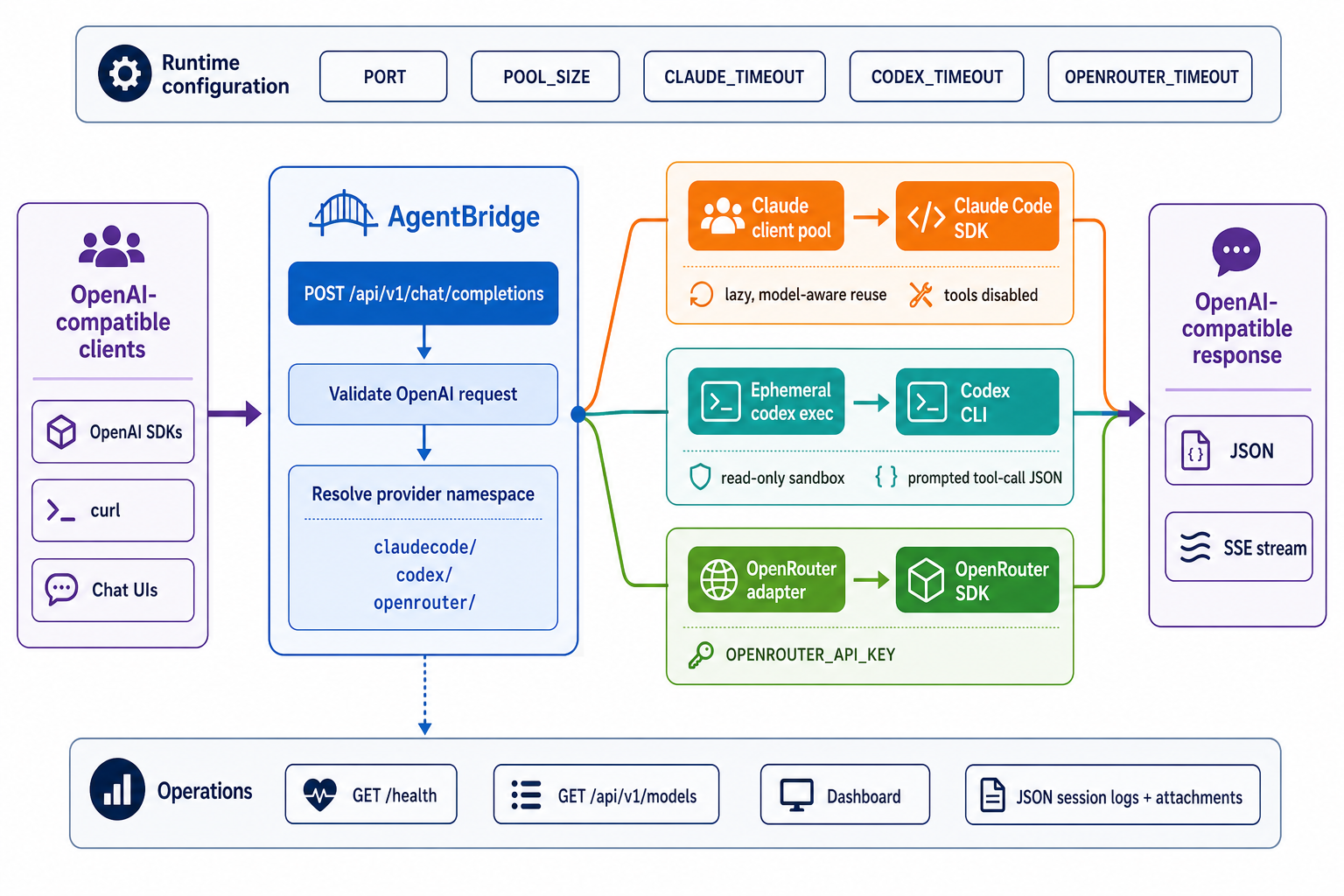
GET /dashboard/stream/{request_id}. Its optionaloffsetcounts already-rendered characters; buffered text after that offset is replayed before new chunks. GET /healthincludes safe operator status used by the menu-bar app: version, start time, uptime, configured workers, active requests, and pool state when initialized.- Claude clients are created lazily, reused by model, and capped by the worker count. Claude sessions do not load filesystem settings and run with built-in tools disabled.
- Codex runs one ephemeral
codex execprocess per request in a temporary directory with read-only sandboxing, no approvals, and project rules ignored. Multimodal structured-output calls also ignore user config and disable execution and image-generation tools. Native image calls use the same strict profile, keep execution disabled, and enable the image-generation capability needed for the edit. - Claude and Codex function calls are represented through prompted JSON; OpenRouter tool calls pass through its SDK. Session logs and extracted image or PDF attachments are saved under
~/.config/agentbridge/logs/sessionsby default. - Streaming provider failures emit an OpenAI-shaped
errorobject as an SSEdataevent before[DONE]; they are not returned as assistant message text. - Set
store: falseon chat requests to suppress session-log artifacts. The native image route requiresstore: false, accepts data URLs only, validates both rasters, locates the result from the structured Codex thread ID, and removes that thread's generated-image directory after the request.
Configuration lives in ~/.config/agentbridge/.env. Process environment
variables take precedence. CLI flags override the configured port and worker
count.
| Variable | Default or purpose |
|---|---|
PORT |
8082 |
POOL_SIZE |
1; overridden by --workers |
CLAUDE_TIMEOUT |
120 seconds |
CODEX_TIMEOUT, CODEX_IMAGE_TIMEOUT |
600 seconds each |
OPENROUTER_TIMEOUT |
Falls back to CLAUDE_TIMEOUT (120 seconds by default) |
MAX_IMAGE_INPUT_BYTES, MAX_IMAGE_OUTPUT_BYTES |
67108864 (64 MiB) input, 33554432 (32 MiB) output |
MAX_IMAGE_PIXELS |
40000000 (40 million pixels) |
AGENTBRIDGE_CONFIG_DIR |
Moves the configuration directory from ~/.config/agentbridge/ |
LOG_DIR |
Moves session logs from the configuration directory's logs/sessions/ |
MAX_LOG_FILES |
Retains up to 1000 JSON session logs |
OPENROUTER_API_KEY |
Required for OpenRouter requests |
OPENROUTER_DEFAULT_MODEL |
Upstream model for openrouter/default; defaults to deepseek/deepseek-v4.1-flash |
AGENTBRIDGE_DEFAULT_MODEL |
Model selected for new dashboard chats; defaults to codex/gpt-6.1-sol |
OPENROUTER_PROXY_URL |
Optional HTTP/HTTPS forward proxy URL for OpenRouter only; supports proxy authentication in the URL |
OPENROUTER_CA_FILE |
Optional PEM CA certificate file to trust in addition to system certificates for OpenRouter only; supports ~ |
OPENROUTER_SITE_URL, OPENROUTER_APP_NAME |
Optional OpenRouter attribution; app name defaults to agentbridge |
OpenRouter through a proxy
Keep OpenRouter's normal API URL. Set the forward proxy separately in the process
environment or ~/.config/agentbridge/.env, then restart AgentBridge. These
settings work with the CLI and the macOS app, for streaming and non-streaming
requests. Existing configuration files can add the optional settings manually.
OPENROUTER_API_KEY=agent-vault-placeholder
OPENROUTER_PROXY_URL=http://SESSION_PROXY_AUTH@127.0.0.1:PROXY_PORT
OPENROUTER_CA_FILE=/absolute/path/to/proxy-ca.pem
Replace the proxy URL with the authenticated URL supplied for your session.
Proxy authentication is separate from the placeholder OpenRouter API key. Keep
the proxy session credential private and out of Git. The proxy must allow
POST /api/v1/chat/completions on openrouter.ai and inject the real API key.
TLS verification stays enabled. A proxy or certificate failure returns an error;
AgentBridge does not retry through a direct connection.
AgentBridge also supports standard HTTPS_PROXY and SSL_CERT_FILE environment
variables through the OpenRouter SDK. Infisical's launcher supplies these settings:
OPENROUTER_API_KEY=agent-vault-placeholder \
  infisical agent-vault run --access-bundle YOUR_BUNDLE --ttl 15m \
  --proxy 127.0.0.1:PROXY_PORT --ca-file /absolute/path/to/proxy-ca.pem \
  --ca-fingerprint YOUR_PROXY_CA_FINGERPRINT -- agentbridge
Leave OPENROUTER_PROXY_URL and OPENROUTER_CA_FILE unset to use the launcher's
settings. Provider-specific settings override the corresponding standard settings
for OpenRouter. Standard proxy variables can also affect other network clients in
the process. Proxy configuration does not provide network isolation; enforced
egress restrictions belong in the execution environment.
Publishing
Releases use the Release GitHub Actions workflow and PyPI Trusted Publishing
for the agentbridge-cli project. The publisher is scoped to owner tsilva,
repository agentbridge, workflow release.yml, and environment pypi; no
PyPI API token is required. GitHub Releases contain the Python distributions
plus an ad-hoc-signed arm64 macOS DMG and SHA-256 checksum. The DMG is not
Apple-notarized and requires no Apple Developer credentials. Release
and validation builds run in GitHub Actions, including Python package audits
and macOS application checks. $build-release prepares version metadata locally
and monitors Actions; it does not require a local application build. A manual
dispatch with publish=false and attach_macos=false builds both artifact sets
without publishing them. Releases
through 0.1.10 remain available under the previous agentbridge-py
distribution name.
Architecture
License
Secret scanning
GitHub Actions runs the pinned Infisical CLI on new push and pull-request commits.
No Infisical login or application credentials are required. Findings fail the check;
the job summary lists locations and rules without matched source or secret values.
Use Actions → Secret scanning → Run workflow for a current-files scan, or enable
full_history to audit all Git history. There is no schedule or automatic retry.
Rotate real exposed credentials before removing them; review fixture false positives
individually. Results stay in GitHub, outside Infisical's Findings dashboard.
1 maintainer

Metadata
1 maintainer
Release files for agentbridge-cli 0.1.19
For a detailed explanation of source distributions (sdists) and built distributions (wheels), please see the package formats documentation.
Source distribution (sdist)
| File | Size | Uploaded | |
|---|---|---|---|
| agentbridge_cli-0.1.19.tar.gz | 13.9 MB | Details |
Built distribution (wheel)
| File | Interpreter | ABI | Platform | Reset |
|---|---|---|---|---|
| agentbridge_cli-0.1.19-py3-none-any.whl | Python 3 | none | any | Details |
Total release size: 14.2 MB
Release files / agentbridge_cli-0.1.19.tar.gz
| Download URL | agentbridge_cli-0.1.19.tar.gz |
|---|---|
| Size | 13.9 MB |
| Tags | Source |
|
SHA-256 checksum How to use checksums |
9f1a4bbb231658cdc4adff887ab6e4e7bd55fac78893f8a837c19fcd90c0fcf7
|
|
BLAKE2b-256 checksum How to use checksums |
ab99bfc036ee92e5d75f3247975deaf2e4b357f295adbd6353530c7db35c0466
|
| Upload date | |
|
Uploaded using Trusted Publishing? What is trusted publishing? |
Yes |
| Uploaded via |
uv/0.12.23 {"installer":{"name":"uv","version":"0.12.23","subcommand":["publish"]},"python":null,"implementation":{"name":null,"version":null},"distro":{"name":"Ubuntu","version":"24.04","id":"noble","libc":null},"system":{"name":null,"release":null},"cpu":null,"openssl_version":null,"setuptools_version":null,"rustc_version":null,"ci":true}
|
Release files / agentbridge_cli-0.1.19-py3-none-any.whl
| Download URL | agentbridge_cli-0.1.19-py3-none-any.whl |
|---|---|
| Size | 368.6 kB |
| Tags | Python 3 |
|
SHA-256 checksum How to use checksums |
612e551ac965f707aa8a4d8538e0ed5144f14b21f057c57f0dac9ad27c5d649c
|
|
BLAKE2b-256 checksum How to use checksums |
ca02fd0324c9a69de3ba4fe5216e51dd66bbb4959dd3745701a33902267c004c
|
| Upload date | |
|
Uploaded using Trusted Publishing? What is trusted publishing? |
Yes |
| Uploaded via |
uv/0.12.23 {"installer":{"name":"uv","version":"0.12.23","subcommand":["publish"]},"python":null,"implementation":{"name":null,"version":null},"distro":{"name":"Ubuntu","version":"24.04","id":"noble","libc":null},"system":{"name":null,"release":null},"cpu":null,"openssl_version":null,"setuptools_version":null,"rustc_version":null,"ci":true}
|














