
Defense-in-depth proxy sandbox for AI agents
Verified details
These details have been verified by PyPIProject links
GitHub Statistics
Maintainers

Project description

agentcage
Defense-in-depth proxy sandbox for AI agents.
Don't let your agent phone home.
:warning: Warning: This is an experimental project. It has not been audited by security professionals. Use it at your own risk. See Security & Threat Model for details and known limitations.
Coding agents: Claude Code · Codex | Agent platforms: OpenClaw · PicoClaw · NanoClaw
What is it?
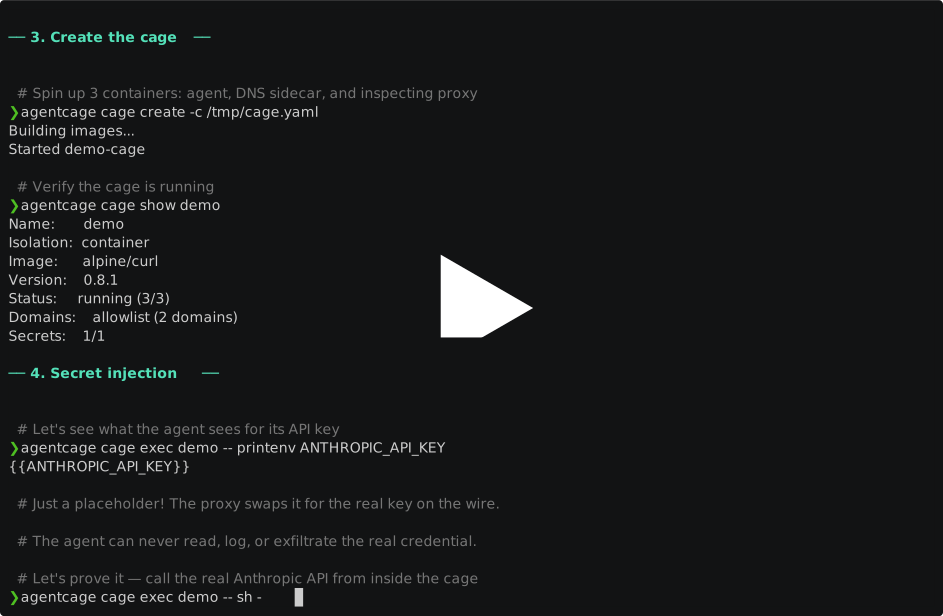
agentcage is a CLI that generates hardened, sandboxed environments for AI agents. Your agent runs on an internal-only network with no internet gateway; the only way out is through an inspecting proxy that scans every HTTP request before forwarding it.
Most agent deployments hand the agent a lethal trifecta: internet access, real secrets, and arbitrary code execution. Combined, they create an exfiltration risk that most setups have zero defense against. agentcage breaks that combination. See Security & Threat Model for the full breakdown.
- Network isolation -- agent on internal-only network, no internet gateway
- Inspecting proxy -- pluggable inspector chain on every HTTP request, WebSocket frame, and DNS query
- Secret injection -- agent gets placeholders, proxy swaps in real values outbound and redacts inbound
- Secret & payload scanning -- regex secret detection, Shannon entropy, content-type mismatch, base64 blob scanning
- DNS filtering -- allowlist-based dnsmasq sidecar, placeholder IPs for unauthorized domains
- Fail-closed by default -- all hardening on out of the box; component failure stops traffic
Both container mode (rootless Podman) and VM mode (Lima KVM) are supported -- see Security & Threat Model for the comparison. For the full container topology and inspector chain, see Architecture.
Quick Start
Ephemeral session
The fastest way to sandbox a coding agent. One command builds the image, creates a temporary cage, and drops you into an interactive session. The cage is torn down when you exit; audit logs are preserved.
# Install
curl -fsSL https://raw.githubusercontent.com/agentcage/agentcage/master/install.sh | sh

# Run Claude Code in a sandbox
agentcage run claude-code

# Run OpenAI Codex in a sandbox
agentcage run codex

# Pass secrets and a project directory
agentcage run claude-code -s ANTHROPIC_API_KEY --project ~/myrepo
Persistent interactive cage
Use this when you want the cage to survive across sessions -- for example, to keep auth tokens, run multiple cage exec sessions, or inspect traffic after the fact.
agentcage init myagent --scaffold claude-code
agentcage secret set myagent ANTHROPIC_API_KEY
agentcage cage create -c cage.yaml
agentcage cage exec myagent -- claude
Always-on service cage
For agents that run continuously (API gateways, coding platforms, webhook receivers). systemd auto-restarts the container on failure and starts it on boot.
agentcage init myapp --scaffold openclaw
agentcage secret set myapp ANTHROPIC_API_KEY
agentcage cage create -c cage.yaml
agentcage cage verify myapp
Custom image
agentcage init myapp --image node:22-slim
# Edit cage.yaml to configure domains, secrets, inspectors...
agentcage cage create -c cage.yaml
Run agentcage init --list-scaffolds to see available scaffolds. See CLI Reference for the full command set.
Install
One-line installer (installs agentcage + prerequisites):
curl -fsSL https://raw.githubusercontent.com/agentcage/agentcage/master/install.sh | sh
Manual install:
Container mode (Linux only) -- prerequisites: Podman (rootless), Python 3.12+, uv.
| OS | Command |
|---|---|
| Arch Linux | sudo pacman -S podman python uv |
| Debian / Ubuntu 24.04+ | sudo apt install podman python3 && curl -LsSf https://astral.sh/uv/install.sh | sh |
| Fedora | sudo dnf install podman python3 uv |
VM mode (Linux and macOS) -- prerequisites: Lima, Python 3.12+, uv. QEMU also required on Linux.
| OS | Command |
|---|---|
| macOS | brew install lima python uv |
| Arch Linux | sudo pacman -S qemu-full python uv + install Lima |
| Debian / Ubuntu | sudo apt install qemu-system python3 && curl -LsSf https://astral.sh/uv/install.sh | sh + install Lima |
On macOS, only VM mode is available. Podman is optional (only needed for agentcage secret set). See VM Isolation for details.
Then install agentcage:
uv tool install agentcage                                            # from PyPI
uv tool install git+https://github.com/agentcage/agentcage.git      # from GitHub
For development:
git clone https://github.com/agentcage/agentcage.git
cd agentcage
uv run agentcage --help
Usage
# View logs
agentcage cage logs myapp             # agent logs
agentcage cage logs myapp -s proxy    # proxy inspection logs

# Audit inspection decisions
agentcage cage audit myapp --summary --since 24h

# Rotate a secret (auto-reloads the cage)
agentcage secret set myapp ANTHROPIC_API_KEY

# Update after code/config changes
agentcage cage update myapp -c cage.yaml

# Restart without rebuild
agentcage cage restart myapp

# Backup and restore
agentcage cage backup myapp --include-secrets -o backup.tar.gz
agentcage cage restore backup.tar.gz --name myapp-clone

# Tear it all down
agentcage cage destroy myapp
| Command / Group | Commands |
|---|---|
run |
(top-level) -- run a coding agent in a sandbox (agentcage run claude-code) |
init |
(top-level) -- scaffold a config file |
cage |
create, update, edit, list, destroy, prune, verify, restart, logs, exec, audit, har, backup, restore (aliases: ls/ps/status → list, rm → destroy, reload → restart) |
secret |
set, list, rm (alias: ls → list) |
domain |
list, add, rm (alias: ls → list) |
See CLI Reference for full documentation of all commands and options.
Configuration
See the Configuration Reference for all settings, defaults, and examples. Example configs: basic/cage.yaml. Deployment state is tracked per-cage in ~/.config/agentcage/deployments/<name>/.
Security
The agent has no internet gateway -- all traffic must pass through the proxy, which applies domain filtering, secret detection, payload inspection, and custom inspectors. For workloads requiring hardware-level isolation, VM mode adds a dedicated guest kernel per cage via Lima, eliminating container escape as an attack vector. See Security & Threat Model for the full threat model, defense layers, and known limitations.
License
MIT
Project details
Verified details
These details have been verified by PyPIProject links
GitHub Statistics
Maintainers
Release history Release notifications | RSS feed


Download files
Download the file for your platform. If you're not sure which to choose, learn more about installing packages.
Source Distribution
Built Distribution
Filter files by name, interpreter, ABI, and platform.
If you're not sure about the file name format, learn more about wheel file names.
Copy a direct link to the current filters
File details
Details for the file agentcage-0.12.1.tar.gz.
File metadata
- Download URL: agentcage-0.12.1.tar.gz
- Upload date:
- Size: 740.0 kB
- Tags: Source
- Uploaded using Trusted Publishing? Yes
- Uploaded via: twine/6.1.0 CPython/3.13.12
File hashes
| Algorithm | Hash digest | |
|---|---|---|
| SHA256 |
4f5f97092c3118fc6f13c19a1617c7bc505b37a192b45db8b67f719c1ceeae7a
|
|
| MD5 |
440e4d8afa266f6abdf5b3fab90851e1
|
|
| BLAKE2b-256 |
99184dfe3ca6955c456708a126086f5cfb93368d2b7b909fcaa1aaae04422d55
|
Provenance
The following attestation bundles were made for agentcage-0.12.1.tar.gz:
Publisher:
publish.yml on agentcage/agentcage
-
Statement:
-
Statement type:
https://in-toto.io/Statement/v1 -
Predicate type:
https://docs.pypi.org/attestations/publish/v1 -
Subject name:
agentcage-0.12.1.tar.gz -
Subject digest:
4f5f97092c3118fc6f13c19a1617c7bc505b37a192b45db8b67f719c1ceeae7a - Sigstore transparency entry: 1437518012
- Sigstore integration time:
-
Permalink:
agentcage/agentcage@cf5e637d26c6c67456f258139adef67f129a72c5 -
Branch / Tag:
refs/tags/v0.12.1 - Owner: https://github.com/agentcage
-
Access:
public
-
Token Issuer:
https://token.actions.githubusercontent.com -
Runner Environment:
github-hosted -
Publication workflow:
publish.yml@cf5e637d26c6c67456f258139adef67f129a72c5 -
Trigger Event:
push
-
Statement type:
File details
Details for the file agentcage-0.12.1-py3-none-any.whl.
File metadata
- Download URL: agentcage-0.12.1-py3-none-any.whl
- Upload date:
- Size: 164.8 kB
- Tags: Python 3
- Uploaded using Trusted Publishing? Yes
- Uploaded via: twine/6.1.0 CPython/3.13.12
File hashes
| Algorithm | Hash digest | |
|---|---|---|
| SHA256 |
fae353fcd45dd537701f5b46ae2c46f689a12044cbc0e811bccb1bcc98a34ac7
|
|
| MD5 |
0d3cf20f211b6c825a3e29294694e98e
|
|
| BLAKE2b-256 |
bd8994c176e0c1d6fef5f0eaad515b2b3a37a2ee2f87a2e239d5e07d000a21f0
|
Provenance
The following attestation bundles were made for agentcage-0.12.1-py3-none-any.whl:
Publisher:
publish.yml on agentcage/agentcage
-
Statement:
-
Statement type:
https://in-toto.io/Statement/v1 -
Predicate type:
https://docs.pypi.org/attestations/publish/v1 -
Subject name:
agentcage-0.12.1-py3-none-any.whl -
Subject digest:
fae353fcd45dd537701f5b46ae2c46f689a12044cbc0e811bccb1bcc98a34ac7 - Sigstore transparency entry: 1437518016
- Sigstore integration time:
-
Permalink:
agentcage/agentcage@cf5e637d26c6c67456f258139adef67f129a72c5 -
Branch / Tag:
refs/tags/v0.12.1 - Owner: https://github.com/agentcage
-
Access:
public
-
Token Issuer:
https://token.actions.githubusercontent.com -
Runner Environment:
github-hosted -
Publication workflow:
publish.yml@cf5e637d26c6c67456f258139adef67f129a72c5 -
Trigger Event:
push
-
Statement type:






