
AgentCap
Stop Claude Code and Codex runs that loop or eat your weekly quota. AgentCap stops a run
that repeats the same tool call or keeps failing, and stops a job at its share of your
Claude Max/Pro or ChatGPT weekly / 5-hour quota, with an evidence receipt of why. Free
agentcap waste shows where your tokens already went: subagents, Opus, cache misses,
tool loops and error streaks.
$ agentcap waste --since 7d
SUBAGENTS                $41.20    25% of spend  in 31 subagent/forked threads
OPUS                     $38.90    24% of spend
CACHE MISSES              $6.10  57 cache re-writes after the TTL ran out (5 min since the last request, or 1 h)
   main session     $2.30  21x    subagents     $3.80  36x
   Tip: idle subagents re-wrote their own context 36x (~$3.80). Set subagentPromptCacheTtl: "1h" ...
STARTING CONTEXT     31 subagents, first request median 38.2k tok, largest 131.0k (7f3a91c2/a1b2c3d4)
REPEATED TOOL CALLS       $9.80  12 streaks of >= 3 identical calls in a row
TOOL ERROR STREAKS        $4.30  5 streaks of >= 3 failing calls in a row
Pro would have stopped this run at $3.12 / at 4 repeats (Bash x11 in 7f3a91c2, $2.40 after that).
(illustrative numbers; run it on your own logs, it is read-only)
Stop loops and quota burn (Pro)
agentcap run --quota 5% -- claude                 # subscription: stop at 5% of the weekly quota, or on a loop
agentcap run --quota 10% --window 5h -- codex     # same for Codex on a ChatGPT plan
agentcap run --cap 2 -- codex exec "fix tests"    # API key: $2 cap + loop/burn breaker
agentcap approve                                  # raise a stopped job's limit by 50% (at most twice)
On a $20/month Codex plan, two code-review prompts used the whole 5-hour limit
(Povilas Korop: $7.70 + $1.43 at API prices).
--quota 10% --window 5h -- codex stops the job before that.
Free tools like claude-code-spend-stop and RelayPlane give you a free $ cap. AgentCap adds the loop breaker, a cap on your subscription quota % and Codex support.
- Loop breaker. Same tool call (name + input) 4 times in a row, or 8 failing tool calls in a
row: the run is stopped (exit 4). On subscriptions it works without touching your login or
traffic: Claude Code via an official
PreToolUsehook (denies the 4th identical call and ends the turn; an interactive session stays open so you canagentcap approveor quit; headlessclaude -pruns get SIGINT if they keep going); Codex by reading its own rollout file (SIGINT). On API keys the proxy also catches identical requests and--max-burn$/min spikes. - Per-job quota %. Stop one job at its share of the account's weekly or 5-hour limit.
- Evidence receipt. Each stop prints and saves why (
same tool call 4 times in a row (Bash),this job used 5.1% of the weekly quota) and the last tool call's name, as numbers and tool names only, never prompts or tool inputs. - Approve. After a stop,
agentcap approve(or/agentcap:approvein the plugin) raises the limit by 50%, at most twice, and the run continues. - Free runs the same detectors in observe-only mode and prints what Pro would have done.
Honest limits: Claude tool-error streaks are only caught on API-key runs (the subscription hook sees the call, not its result); the stop can be one request late; quota % is account-level; verified on fixtures, fake CLIs and real Claude Code 2.1.197 hooks, not yet on a real Max/ChatGPT account.
The API-key cap
AgentCap runs
the CLI behind a local proxy on 127.0.0.1 and applies a local spend cap to the
run. Before each request it reserves the worst-case cost; when the budget is gone
it kills the local process and tells you why. No dashboard, no account, no code
changes for tools that honour a base-URL environment variable.
Claude Code and Codex CLI are routed automatically (Gemini CLI too). AgentCap meters API-key
traffic — POST /v1/responses and /v1/chat/completions (Codex CLI uses the
Responses API) plus Gemini generateContent / streamGenerateContent and Anthropic POST /v1/messages. ChatGPT
or Google sign-in (OAuth/subscription) traffic is not metered.
What it is
AgentCap is a small, local, serverless spend-cap proxy. You give it a command and a cap:
agentcap run --cap 2 -- codex exec "fix the failing tests"
Everything the child sends to OpenAI or Gemini is routed through a proxy on
127.0.0.1. AgentCap reserves the worst-case cost of each request before it is
forwarded, settles the real usage afterwards, and terminates the agent's process
group if the cap would be exceeded. This is a local spend cap, not a
mathematical guarantee: with conservative reservation it reserves worst-case
cost before each request, so overshoot is rare but possible when providers count
more tokens than estimated.
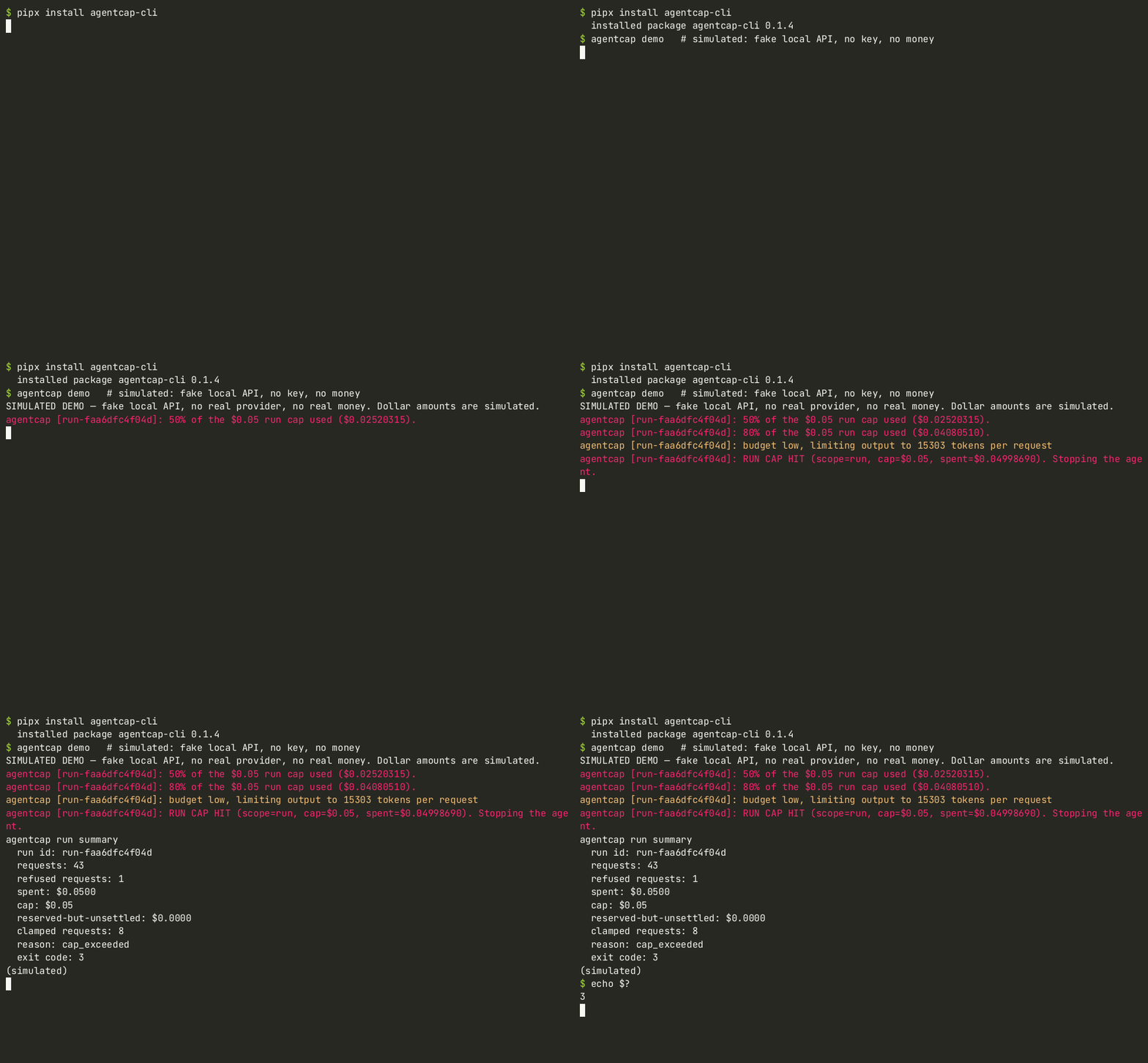
Simulated demo — fake local API, no key, no money.
Install
The package is published on PyPI as agentcap-cli (the name agentcap is
taken), but the command it installs is still agentcap.
# install the command globally
pipx install agentcap-cli

# or into the current environment
pip install agentcap-cli
No pipx? macOS: brew install pipx && pipx ensurepath; Linux: python3 -m pip install --user pipx && python3 -m pipx ensurepath.
From a checkout:
uv venv .venv
uv pip install -e .

# or install this checkout as the global command
pipx install .
Install in VS Code / Cursor
The AgentCap editor extension (0.2.0) starts Claude Code or Codex in an
integrated terminal behind agentcap run --cap, shows live run spend in the
status bar, warns at 80% / 95%, and shows a modal when the cap (exit 3) or Pro's
loop breaker (exit 4) stops the run. It needs the agentcap CLI above.
It is not on the VS Code Marketplace or Open VSX yet. Download agentcap-0.2.0.vsix
(sha256 175213b0979019cb472752ad71e613a48c6a22e7d899b761093ab7eac9867e70) and install it:
curl -LO https://agentcap.launchbench.studio/agentcap-0.2.0.vsix
sha256sum agentcap-0.2.0.vsix   # compare with the sha256 above
code --install-extension agentcap-0.2.0.vsix     # VS Code
cursor --install-extension agentcap-0.2.0.vsix   # Cursor
or Extensions → … → Install from VSIX…. Then run AgentCap: Start Codex with cap (or Claude Code) from the command palette; set the cap with AgentCap: Set cap.

Real VS Code recording; the agent is a fake Codex script talking to AgentCap's local fake upstream, so no real API call or spend is involved.
Quickstart
# Codex CLI under a $2 cap (API-key mode: uses OPENAI_API_KEY)
agentcap run --cap 2 -- codex exec "fix the failing tests"

# Gemini CLI under a $2 cap (API-key mode: uses GEMINI_API_KEY)
agentcap run --cap 2 -- gemini -p "refactor utils.py"

# Gemini CLI in a folder you have not trusted yet
agentcap run --cap 2 --trust-workspace -- gemini -p "refactor utils.py"

# Run your own Python agent (it must honour OPENAI_BASE_URL)
agentcap run --cap 1 -- python my_agent.py

# Keep a proxy open for several terminals
agentcap serve --port 8787 --cap 5

# Simulated, fully local demo (fake API, no key, no money)
agentcap demo

# Inspect spend
agentcap status --port 8787
agentcap status --db

# Inspect the bundled price table
agentcap pricing
agentcap pricing google/gemini-4-argon
Uses your API key (OPENAI_API_KEY / GEMINI_API_KEY). ChatGPT or Google
sign-in (OAuth/subscription) traffic is not metered.
agentcap run accepts --cap (default $5, or $AGENTCAP_CAP),
--hour-cap / --day-cap and --max-burn (Pro), --allow-unmetered, --no-clamp, --port,
--trust-workspace and --quiet.
CLI routing
- Codex CLI 0.163 ignores
OPENAI_BASE_URL, so AgentCap passes-c model_provider=agentcapand amodel_providers.agentcapblock (Responses API over HTTP, websockets disabled) right after the executable. If your command already setsmodel_provider,model_providers.*oropenai_base_urlwith-c/--config, AgentCap refuses to start (exit code 2) rather than let traffic bypass the proxy. - Gemini CLI 0.58–0.66 needs an auth type in headless mode, and from 0.60 it
also refuses system settings files that are not root-owned. AgentCap therefore
runs Gemini with a temporary
GEMINI_CLI_HOME: its.geminidirectory links your real entries (history,trustedFolders.json, credentials) and holds a copiedsettings.jsonwith the auth type forced togemini-api-key. The overlay is removed afterwards; nothing in your real~/.geminiis modified.--trust-workspaceaddsGEMINI_CLI_TRUST_WORKSPACE=truefor Gemini. npx @openai/codex ...andnpx @google/gemini-cli ...are recognised too.
Add --trust-workspace for Gemini CLI runs in folders you have not trusted yet;
without it, headless Gemini may refuse the workspace.
At the end of a run AgentCap warns “no model requests observed — protection not verified” if the proxy saw no model traffic. That means the agent may have bypassed the proxy, so check the command and auth mode.
Claude Code (new in 0.1.5)
export ANTHROPIC_API_KEY=sk-ant-...
agentcap run --cap 3 -- claude -p "fix the failing tests"
# Pro: agentcap run --cap 3 --hour-cap 10 --day-cap 25 -- npx @anthropic-ai/claude-code -p "..."
AgentCap points Claude Code at its local proxy (ANTHROPIC_BASE_URL=http://127.0.0.1:<port>/anthropic)
and meters every POST /v1/messages, streamed or not:
- Prices come from Anthropic's published table (docs.claude.com pricing, checked 2026-10-30):
input, cache reads, 5-minute cache writes (1.25x input), 1-hour cache writes (2x input) and output.
Thinking tokens are billed as output and are covered by
max_tokens. - Before a request goes out, AgentCap reserves its worst case (
max_tokensof output, all prompt tokens as 1-hour cache writes). If that does not fit the remaining budget it lowersmax_tokens(and a manual thinking budget) or refuses the request. It never raises a limit. - Unknown models, unknown
inference_geovalues and fast mode (speed: "fast", not priced yet) are blocked (fail-closed).inference_geo: "us"is charged at 1.1x. count_tokensandGET /v1/modelspass through for free. Other Anthropic endpoints are blocked unless you pass--allow-unmetered.- AgentCap refuses to start Claude Code when
CLAUDE_CODE_USE_BEDROCK,_VERTEXor_FOUNDRYis set, or when a Claude settings file sets its ownANTHROPIC_BASE_URLinenv. Those would send traffic around the cap.
Limits:
- With a Claude subscription login instead of an API key, the cap counts API-list-price equivalents, not your plan's billing.
- Costs are estimates from provider-reported usage. Your Anthropic invoice is authoritative.
- A large first request needs a cap that fits it. Claude Code's first request often reserves
about $0.50–$1. AgentCap prints a suggested
--capwhen it refuses one.
Install as a Claude Code plugin (Max / Pro subscriptions)
The easiest path on a Claude Max or Pro plan. Inside Claude Code:
/plugin marketplace add Blitz00X/agentcap
/plugin install agentcap@agentcap
/agentcap:setup          # once: adds AgentCap's read-only statusLine (your own line keeps showing)
/agentcap:quota 5%       # this session may use 5% of the weekly quota (`2% 5h` for the 5-hour window)
/agentcap:status         # session 3.1% / 5% (weekly)
/agentcap:off            # clear it;  /agentcap:unsetup restores your old statusLine
No pip install: the plugin is stdlib Python (python3 on PATH). How it works:
- Claude Code only exposes the subscription
rate_limits% to the statusLine command, and a plugin can't set the main statusLine. So/agentcap:setupasks once and writes it to~/.claude/settings.json(backupsettings.json.agentcap-backup, previous line chained,/agentcap:unsetupundoes it). - Plugin hooks:
PreToolUsewarns at 80% and, on Pro, denies tool calls at the limit;Stopprints a receipt (session 4.2% / 5% (weekly)). Free: live meter + one notice at the limit (Pro would stop the agent here). Pro is read from the licence theagentcapCLI stores afteragentcap license activate(paste the key at the hidden prompt). - Loop breaker (works with or without
/agentcap:quota):PreToolUsehashes each tool call (name + input, per session and per subagent; polling tools likeTaskOutput/BashOutputare ignored). The 4th identical call in a row is denied withcontinue: falseon Pro; Free gets one notice per streak.PostToolUse/PostToolUseFailurecount failing tool calls: 8 in a row stops the agent on Pro (continue: false), Free gets a notice. Tool input and output are never stored, only a 16-char hash and counts; these per-session files are deleted after 7 days (onSessionStart). - Read-only: no OAuth token, credentials file or API traffic is touched.
Honest limits: the % is account-level (parallel sessions count), the stop can be one request
late, and the share updates when the statusLine refreshes. Verified with real Claude Code
2.1.197 (plugin install from the marketplace, hooks loaded, /agentcap:quota executed,
PreToolUse deny blocked the tool) against a local fake API and synthetic rate_limits;
not yet checked against a real Max account.
Works with Claude Max / ChatGPT subscriptions (quota mode)
On a subscription there is no dollar bill, but there is a weekly and a 5-hour usage limit. Quota mode caps one job's share of it:
agentcap run --quota 5% -- claude              # stop this job after 5% of the weekly quota
agentcap run --quota 10% --window 5h -- codex  # or 10% of the 5-hour window
agentcap quota                                 # read-only: last seen usage (Free)
- Read-only, ToS-safe. AgentCap never proxies, reads or reuses your subscription login or tokens, and never touches subscription traffic. The official, unmodified CLI talks to Anthropic/OpenAI directly.
- Claude Code: for this run only, AgentCap adds a settings layer with
claude --settings <file>(your~/.claude/settings.jsonand project settings are never edited). It contains a statusline command that records the officialrate_limits(five_hour/seven_dayused_percentage,resets_at) and then runs your own statusline command unchanged, plus aPreToolUsehook that denies further tool calls with a clear reason once the job's share reaches the limit and ends the turn (continue: false). An interactive session stays open (runagentcap approveto continue, or quit). Headlessclaude -pruns, and sessions where the hook never fired, get SIGINT. Exit code 3. - Codex CLI: AgentCap tails the
token_countevents Codex writes to~/.codex/sessions/**/rollout-*.jsonl(rate_limits.primary/secondary.used_percent,window_minutes,resets_at) and sends SIGINT at the limit. Exit code 3. - Baseline at job start (exact when a reading from the last 15 minutes exists, otherwise the
first response is not counted), window resets mid-job are handled, 80% warning,
per-job receipt:
this job used 4.2% of the weekly quota. Pro alerts (Telegram/webhook) and receipt files work the same as for dollar caps. - Free:
agentcap quotaand observe-only runs that print the job's share andPro's quota mode would have stopped this job at 5%. Pro: stopping at the limit.
Honest limits. The percentage is account-level: a parallel session or claude.ai/chatgpt.com
use in the same window counts against the job (AgentCap warns when it sees another session).
Values arrive once per model response, so a job can overshoot by up to one request.
Claude Code only reports rate_limits for Pro/Max logins and only in interactive sessions
(the statusline does not run in claude -p). Codex's rollout format is undocumented and may change.
Verified so far on fixtures and fake CLIs only (plus real Claude Code 2.1.197: the --settings
layer, the chained statusline and the PreToolUse deny were checked against a local fake API);
a check on a real Max / ChatGPT account is still pending.
Try it without an API key
agentcap demo is a simulated demo. It starts a fake API on a random loopback
port, runs a tiny child against it with a 5-cent cap, and prints (simulated) at
the end. It needs no API key, makes no real provider calls, and works from a
plain pipx install agentcap-cli. Exit code 3 means the cap stopped the child.
Simulated demo (fake local API, no real money)
$ agentcap demo
SIMULATED DEMO — fake local API, no real provider, no real money. Dollar amounts are simulated.
agentcap [run-3bc1257940cb]: 50% of the $0.05 run cap used ($0.0252).
agentcap [run-3bc1257940cb]: 80% of the $0.05 run cap used ($0.0408).
agentcap [run-3bc1257940cb]: budget low, limiting output to 15303 tokens per request
agentcap [run-3bc1257940cb]: RUN CAP HIT (scope=run, cap=$0.05, spent=$0.0499). Stopping the agent.
agentcap run summary
  run id: run-3bc1257940cb
  requests: 44
  refused requests: 2
  spent: $0.0500
  cap: $0.05
  reserved-but-unsettled: $0.0000
  clamped requests: 8
  reason: cap_exceeded
  exit code: 3
(simulated)
From a checkout, python -m agentcap.devtools.fake_upstream --port 9000 still
starts the bundled fake upstream on loopback for manual metering experiments; the
test suite uses httpx.MockTransport and never calls the network.
Supported & tested
| Tool | Verified version | Command and auth | Routing |
|---|---|---|---|
| Codex CLI | 0.163 | codex exec "…" with OPENAI_API_KEY; ChatGPT sign-in is not metered. |
Automatically, via an injected custom provider (-c model_provider=agentcap …). |
| Gemini CLI | 0.58–0.66 | gemini -p "…" with GEMINI_API_KEY; Google sign-in is not metered. |
Automatically, via a temporary GEMINI_CLI_HOME overlay (your ~/.gemini is linked, its settings.json is copied with the auth type forced to gemini-api-key; nothing in ~/.gemini is modified). Add --trust-workspace to agentcap run for untrusted folders. |
| Claude Code | 2.1.197 | claude -p "…" with ANTHROPIC_API_KEY; Claude subscription sign-in is not metered. |
Automatically, via ANTHROPIC_BASE_URL. Tested end-to-end against a local fake Anthropic API only (not against Anthropic billing yet). |
| Your own script | Any | Uses the OpenAI or Gemini SDK with base-URL environment variables. | No code changes: AgentCap sets OPENAI_BASE_URL, GOOGLE_GEMINI_BASE_URL and ANTHROPIC_BASE_URL. |
Tested with a real Gemini API key on Gemini CLI 0.66 (spend metered from Google's usageMetadata, output clamped to the cap). Codex CLI 0.165 verified against real OpenAI-compatible upstreams: Ollama Cloud (gpt-oss:20b) and OpenRouter (free model poolside/laguna-s-2.1:free via the Responses API) — real responses, ledger token counts matched OpenRouter's reported usage exactly, cap stop with exit 3; not against OpenAI billing. Gemini CLI 0.58 and Codex CLI 0.163 are tested end-to-end against a local fake API only.
Models without a bundled price (for example OpenRouter or Ollama ids) are blocked until you add a price via AGENTCAP_PRICING_FILE.
Platforms: Linux and macOS. Windows: not yet (use WSL2).
How it works
-
agentcap runstarts the proxy on a random free port, bound only to127.0.0.1, and waits for/_agentcap/status. -
The child process is started in its own process group with:
OPENAI_BASE_URL=http://127.0.0.1:PORT/openai/v1
GOOGLE_GEMINI_BASE_URL=http://127.0.0.1:PORT/gemini
GEMINI_API_BASE_URL=http://127.0.0.1:PORT/gemini
AGENTCAP_RUN_ID=...
AGENTCAP_PROXY=http://127.0.0.1:PORT
-
Before forwarding a request, the proxy estimates the prompt size and the maximum output size, then atomically reserves that worst-case USD amount in a local SQLite ledger. The input estimate is padded by a conservative
input_safety_factor(1.25 by default) to cover system prompts, tool schemas, images and tokenizer differences that the local estimate cannot see. Concurrent requests reserve against the same budget. -
After the upstream responds, the real usage is parsed and the reservation is settled to the actual cost (rounded up to the micro-dollar). Settlement uses the provider's reported tokens, never the padded estimate. If the provider bills more input tokens than estimated, that one settlement can exceed its reservation; AgentCap emits an
overshootalert and the run's spend may end slightly above the cap. -
If the worst case does not fit the remaining budget but the prompt itself does, the proxy clamps the output limit to exactly what fits (at least
256tokens by default) and reserves only that amount. The agent keeps running; real usage still settles the reservation. Clamping is on by default and can be disabled with--no-clamp. -
If even a minimal clamped request cannot fit, the request is blocked and the whole child process group is terminated (
SIGTERM, thenSIGKILLafter 5s).agentcap runexits with code3. Pro's loop/burn breaker exits with4(same step 4 times in a row, 8 failing tool results in a row, or a burn rate above--max-burn$/min; see Free vs Pro). The kill and its red alert fire at most once per run; later rejected requests just receive429responses. -
Unknown models and unparseable bodies are rejected (fail-closed); the request is never forwarded unmetered.
The proxy makes only two kinds of request-body change: it adds
stream_options.include_usage to OpenAI Chat Completions streams so final
usage is available, and (unless --no-clamp is given) it lowers the request's
output limit when the worst-case reservation would cross the remaining budget.
For OpenAI that is max_completion_tokens (or the legacy max_tokens if the
body already used it) or max_output_tokens for the Responses API; for Gemini
it is generationConfig.maxOutputTokens. An existing smaller limit is never
raised. Everything else is forwarded byte-for-byte, including credentials.
Reasoning/thinking tokens are billed as output and count against the same output limit, so a clamp also caps them.
Metered endpoints
| Provider | Endpoints |
|---|---|
| OpenAI | POST /v1/chat/completions, /v1/responses, /v1/completions, /v1/embeddings |
| Gemini | generateContent, streamGenerateContent (other Gemini endpoints pass through) |
Token counting (countTokens) and GET requests are free passthroughs.
Request bodies are billed at price-book rates; embeddings are input-only.
Limitations
- Tools that AgentCap can route (Codex CLI, Gemini CLI) or that honour
OPENAI_BASE_URL/GOOGLE_GEMINI_BASE_URLand send API keys can be metered. OAuth or subscription logins are not metered. - Prices are a local table, not a live feed. Check them with
agentcap pricing; override any entry in~/.config/agentcap/pricing.json(or$AGENTCAP_PRICING_FILE). - The proxy rewrites a request only to add
stream_options.include_usageto OpenAI chat streams and, unless--no-clampis set, to lower its output limit to what the remaining budget can afford. Prompts are never changed. - Estimates are deliberately conservative, so a reservation can be larger than
the eventual cost. The cap is enforced before each request with a worst-case
reservation and concurrent requests reserve against the same budget. This is
not a mathematical guarantee: if a provider bills more input tokens than
estimated (for example server-side system prompts, tool schemas, images or
tokenizer differences), the final spend can exceed the cap by that one
request's estimation error. AgentCap emits an
overshootalert when a settlement exceeds its reservation. - The ledger lives at
~/.local/share/agentcap/ledger.sqlite3(override with$AGENTCAP_DB).
Privacy
Prompts and keys pass through the local proxy in memory; AgentCap never stores or uploads them. Free sends nothing anywhere. Pro sends alert metadata (run id, spend, reason) only to webhook/Telegram destinations you configure, and validates your licence key with Polar about once a week.
The ledger keeps token counts, costs, model names, timestamps and request hashes — never prompts, response contents, API keys or Authorization headers.
Pro licence checks: activating a Pro key (and the periodic re-check) sends
only the licence key, the Polar organization id and an anonymous machine
fingerprint hash (SHA-256; it contains no hostname and no username) to Polar's
public licence API at api.polar.sh. Free users make no licence requests at
all.
agentcap waste and usage history (Free, new in 0.2)
agentcap waste                       # subagent + Opus share, cache misses, tool loops, error streaks ($ each)
agentcap report --by agent           # session -> subagent tree with $ and Opus share
agentcap import                      # read-only: ~/.claude/projects, ~/.codex/sessions, AgentCap's ledger
agentcap report --by day             # Free: day | session | model | project, tokens + API-equivalent $
agentcap report --by model --since 7d --csv

agentcap budget set --task-usd 2 --day-usd 20 --task-quota 5% --window 5h
agentcap run -- codex exec "..."     # uses the $2 task cap from the budget
agentcap run --quota -- claude       # uses the 5% / 5h quota from the budget
Tools like agent-tree show you what your subagents are doing; AgentCap also stops them when they loop
(same tool call 4x in a row or 8 tool errors in a row, Pro). agentcap waste lists cache misses first:
resuming a session after the cache expired re-writes the whole prompt cache, so start a new session (or /clear) after a break.
Misses are split into main session and subagents. An idle subagent re-writes only its own context
(not the whole conversation, unless it is a forked subagent), at 1.25x normal input. If your
subagents sit idle for more than 5 minutes, set subagentPromptCacheTtl: "1h". A 1 h write costs
2x input, so it only pays off when the subagent is reused. STARTING CONTEXT shows how many tokens
each subagent's first request carries.
- Store:
~/.local/share/agentcap/usage.db($XDG_DATA_HOMErespected, mode 600).importis idempotent; it reads only*.jsonlsession logs and AgentCap's own files. It never opens auth or credential files, never stores prompt or response text, and never touches network or OAuth traffic. Unknown or changed log lines are skipped and counted, not fatal. - Budget: one file,
~/.config/agentcap/budget.json. Scopes: task (oneagentcap run= one agent session) in $, hour/day across runs in $ (Pro), and per-job % of the subscription quota (Pro stops). A flag orAGENTCAP_CAPalways beats the budget. On Free, a budget hour/day cap is ignored with a note. - Early warning: when the current burn rate would hit the run cap within ~10 minutes, AgentCap
prints (and on Pro sends) one
cap_etaalert: "cap is hit in ~N min". - $ is API-equivalent: what the same tokens would cost at list API prices — not your subscription bill.
- Subagents: Claude Code
<session>/subagents/agent-*.jsonlandisSidechainlines; Codexsession_metasource.subagent.thread_spawn.parent_thread_idandforked_from_id. These formats are undocumented and change between CLI versions. wasteheuristics: a cache miss is a cache write larger than the cache read after the prompt cache TTL ran out (5 min; 1 h when written withephemeral_1h; Codex: a big uncached prompt after5 min idle). Its $ is what the re-write cost above a cache read: 5 min writes at 1.25x input, 1 h writes at 2x input (Anthropic list prices). Tool inputs are hashed, never printed. Not in local logs:
agent_summary/ title background calls and HTTP retries (planned: local OTel receiver).
Pro extras: analytics (agentcap report <view>)
| view | what you get |
|---|---|
forecast |
5h / weekly quota: "limit hits at Tue 14:20 (~1.5h)", with an early-warning mark |
calibration |
"this week 1% of quota = 1.4M tokens ≈ $1.49", tracked per reset period so you can see if your limit shrank |
savings |
cache-write waste ($ of cache writes never read) and API-vs-plan breakeven with a plan recommendation (plan prices: agentcap/plans.py, override in ~/.config/agentcap/plans.json) |
receipts |
per job / session / repo receipts, --csv export, plus AgentCap run receipts |
Calibration pairs quota % samples (Codex rate_limits in rollouts; Claude statusline readings recorded
during agentcap run --quota) with the tokens imported in the same window. It is an estimate; small %
steps are noisy. No team aggregation: everything stays on your machine.
Free vs Pro (0.2)
Free (MIT License, forever): the per-run spend cap.
- Per-run
--cap(--hour-cap/--day-capexit 2 on Free with a clear message) - Output clamping, fail-closed metering, terminal alerts
- Claude Code, Codex, any SDK script (and Gemini CLI)
agentcap waste,agentcap report --by agent(subagent tree),agentcap import,agentcap reportby day/session/model/project,agentcap budget, thecap_etaearly warning
When the Pro detectors below would have fired on a Free run, AgentCap does not stop it.
It prints one line: Pro's loop breaker would have stopped this at $X.XX.
Pro, $12 one-time (launch week, until 10 Nov; then $19): stop runs that loop or eat your quota.
Get Pro: buy at https://agentcap.launchbench.studio/#pricing (Polar checkout). Polar then
emails you an Access purchase link; the key is in the Polar customer portal (not in the
email body). Run agentcap license activate, paste the key at the hidden prompt, and check agentcap license status (tier: pro). One key works on up to 3 machines; agentcap license deactivate frees one.
The VS Code/Cursor extension and the Claude Code plugin use the same CLI licence.
- Subscription quota mode + loop breaker:
agentcap run --quota 5% -- claude|codexstops a job at its share of your Claude Max/Pro or ChatGPT quota, or when it repeats the same tool call 4 times / fails 8 tool calls in a row (see above). - API-key loop/burn breaker: stops the agent (exit 4) before the next request is sent when
(a) the same step repeats 4 times in a row (the last tool call + its result, normalised;
the growing conversation history is ignored), (b) 8 consecutive tool results are errors, or
(c) spend exceeds
--max-burnUSD/minute over a rolling 2-minute window (default2.00,--max-burn offdisables). Byte-identical repeats are still caught too. - Hour and day caps: cross-run
--hour-capand--day-cap. - Phone and webhook alerts: Telegram (
AGENTCAP_TELEGRAM_BOT_TOKEN,AGENTCAP_TELEGRAM_CHAT_ID) and webhook (AGENTCAP_WEBHOOK_URL) alerts for cap hits, loop kills and the end-of-run receipt. Tokens are read from the environment and are never printed or logged. - Extras — usage analytics:
agentcap report forecast | calibration | savings | receipts(see above). - Spend receipt: a JSON file per run (
~/.local/state/agentcap/receipts/<run>.json, orAGENTCAP_RECEIPT_DIR) with requests, spend, caps, the stop reason and the exit code. It contains numbers only, never prompts. The same one-line receipt is sent to Telegram and the webhook.
Buy AgentCap Pro — $12 launch week
Purchase terms
- Pro is $12 one-time (launch week, until 10 Nov; then $19), no subscription.
- 14-day no-questions refund — email kutaykarahan6@gmail.com.
- One licence key activates on up to 3 machines.
- The key is checked with Polar about once a week.
- If the licence server is unreachable your Pro keeps working (fail-open); only an explicit Polar rejection of a refunded or revoked key downgrades it.
- If AgentCap is discontinued, Pro keeps working and you can ask for a refund within 14 days of purchase.
- The Free tier (per-run cap) needs no key and makes no network calls.
After purchase you receive a licence key by email (via Polar). Activate it with
agentcap license activate (paste the key at the hidden prompt). agentcap license deactivate asks the
license server to release this activation (freeing the slot for another
machine) and then removes the local license; if the server cannot be reached the
local license is kept and the command exits 1 so you can retry. Use
agentcap license deactivate --local-only to remove just the local file — the
activation then still counts toward your 3 machines until you release it in the
Polar customer portal.
How it compares
| Tool | What it does and how it enforces a cap |
|---|---|
| RelayPlane | relayplane.com: free, MIT-licensed local proxy with daily/hourly/per-request/per-run caps, routing and a kill switch. It enforces budgets at the proxy — blocking or warning on breach — and is aimed at Anthropic/OpenAI chat routing. A good fit for gateway-style setups. |
| LoopGuard | tryloopguard.com: free MIT CLI that integrates with Claude Code, Codex CLI and Cursor (no proxy, works with subscriptions) with per-session/daily caps and a no-progress loop killer; paid tier ($9/month) adds phone/Slack alerts and remote pause. A good fit if you use subscriptions or Claude Code. |
| LiteLLM budgets | Budgets per key, user or team in the LiteLLM proxy; budgets need its database. A good fit if you already run a LiteLLM gateway; it is a server you deploy and configure. |
| OpenRouter credit limits / provider spend caps | Account- or key-level and typically monthly (OpenRouter credit limits, OpenAI and Google spend caps). Provider caps are evaluated with a delay — Google has described about 10 minutes for the Gemini API cap — so a fast loop can overshoot. |
| AgentCap | Local proxy for API-key traffic from Claude Code, Codex CLI, Gemini CLI or your own script: run cap (Free) with conservative reservation and output clamping, kills the process group at the cap and prints why. Pro (unattended pack): hour/day caps, loop/burn breaker, Telegram/webhook alerts, spend receipt, $19 one-time. |
The comparison above is from public pages; see the RelayPlane detail below.
AgentCap vs RelayPlane
RelayPlane is a good tool. If it fits you, use it. The facts below come from RelayPlane's own website as of 2026-10-30. We have not tested RelayPlane hands-on.
| RelayPlane (per its site) | AgentCap | |
|---|---|---|
| License | MIT | MIT License (the whole open-source CLI; Pro features are unlocked by a paid licence key) |
| Per-run / session / hour / day caps | Free | Run cap Free; hour/day caps Pro |
| Kill switch | Yes | Yes. Stops the agent's process group (exit 3) |
| Over-budget response | HTTP 429 budget_exceeded |
HTTP 429, and the request is never sent |
| Output reservation | Capped at 4096 output tokens | Full max_tokens worst case, plus clamping to fit |
| Loop breaker | Not listed on their site | Pro |
| Telegram / webhook alerts, spend receipt | Not listed on their site | Pro |
The difference that matters for runaway bills: AgentCap reserves the worst case each request can cost before sending it, so a single long response cannot overshoot the cap.
Pick what matches your setup — these tools can also be combined.
FAQ
Does clamping output hurt quality? Yes, it can: when the budget is tight
AgentCap lowers max output tokens so the call fits; answers can be shorter or
cut off. Use --no-clamp to refuse instead.
Does stopping roll back what the agent did? No. At the cap AgentCap sends SIGTERM then SIGKILL; files or remote changes already made stay. Use git / small steps.
Is the ledger my provider bill? No. It is a local estimate from published prices and reported usage; when usage is missing it charges the full reservation (conservative). Your provider invoice is authoritative.
Is the day cap shared across machines? No. Hour/day caps are per machine (local SQLite ledger). A license covers 3 machines, each with its own budget.
What does one-time purchase include? $12 once in launch week ($19 after 10 Nov), all 0.x updates; not a promise of future major versions. 14-day refund window per purchase terms.
License
MIT — see LICENSE. Copyright (c) 2026 Kutay Karahan.
After purchase, copy your license key from your Polar order (purchase email / Polar customer portal), then run agentcap license activate, paste the key at the hidden prompt, and check with agentcap license status (expect tier: pro).
The Pro licence key is separate from the source licence. How it is checked:
- On activation the key is validated against Polar's public licence API
(
api.polar.sh). After that it is re-checked at most about once every 7 days. - The result is cached in
~/.config/agentcap/license.json(overridable with$AGENTCAP_LICENSE_FILE). - The licence check fails open: if you are offline, or Polar cannot be reached, a previously validated licence keeps working. Network failures (timeouts, connection errors, 5xx, unexpected responses) never downgrade it, and revalidation is retried about every 7 days. Only an explicit rejection from Polar (for example a refunded or revoked key) falls back to the free tier.
AGENTCAP_POLAR_ORG_IDselects the Polar organization the key belongs to.
Development
uv venv .venv
uv pip install -e '.[dev]'
.venv/bin/pytest -q
Tests use mocked upstreams (httpx.MockTransport) and never make real network
calls; no real API keys are required.
1 maintainer

Metadata
1 maintainer
Release files for agentcap-cli 0.2.1
For a detailed explanation of source distributions (sdists) and built distributions (wheels), please see the package formats documentation.
Source distribution (sdist)
| File | Size | Uploaded | Provenance | Actions |
|---|---|---|---|---|
| agentcap_cli-0.2.1.tar.gz | 214.2 kB | Without provenance | Details for agentcap_cli-0.2.1.tar.gz |
Built distribution (wheel)
| File | Interpreter | ABI | Platform | Actions Reset |
|---|---|---|---|---|
| agentcap_cli-0.2.1-py3-none-any.whl | Python 3 | none | any | Details for agentcap_cli-0.2.1-py3-none-any.whl |
Total release size: 353.5 kB
Release files / agentcap_cli-0.2.1.tar.gz
| Download URL | agentcap_cli-0.2.1.tar.gz |
|---|---|
| Size | 214.2 kB |
| Tags | Source |
|
SHA-256 checksum How to use checksums |
42be3d724e51b31ebd82d04af446bca2cf26b681e53ed0d3d2257f3172315dc4
|
|
BLAKE2b-256 checksum How to use checksums |
32fd8f1a9a8508bb5016cf2b8be8d37a129f1c4183f76392fb1441b572471cc3
|
| Upload date | |
|
Uploaded using Trusted Publishing? What is trusted publishing? |
No |
| Uploaded via |
twine/7.0.0 CPython/3.12.3
|
Release files / agentcap_cli-0.2.1-py3-none-any.whl
| Download URL | agentcap_cli-0.2.1-py3-none-any.whl |
|---|---|
| Size | 139.3 kB |
| Tags | Python 3 |
|
SHA-256 checksum How to use checksums |
58230348958eafe1e6db572b72db65d9605b7ea27584ac0674a744dd8738044b
|
|
BLAKE2b-256 checksum How to use checksums |
803e0e33c65be3c30b2e44d5ffc2e8779d04aaaed6cb26790aa7777ccbcb48d6
|
| Upload date | |
|
Uploaded using Trusted Publishing? What is trusted publishing? |
No |
| Uploaded via |
twine/7.0.0 CPython/3.12.3
|
Security for agentcap-cli 0.2.1
Provenance
Provenance describes where a file came from. On PyPI, provenance is shared via attestations, which provide a verifiable record of the build or publishing details. View details, limitations and caveats.
No provenance found
None of the files in this release were uploaded with provenance metadata.
A note on package security
PyPI is a repository for distributing packages, not a service for auditing them. While third-party security researchers and our staff do their best to detect and remove malicious packages, PyPI cannot guarantee the quality, security or suitability of any given package.
To learn more about protecting yourself from malicious actors, visit our package security documentation.














