
AgentCLPR





简介
- 一个基于 ONNXRuntime、AgentOCR 和 License-Plate-Detector 项目开发的中国车牌检测识别系统。
车牌识别效果
-
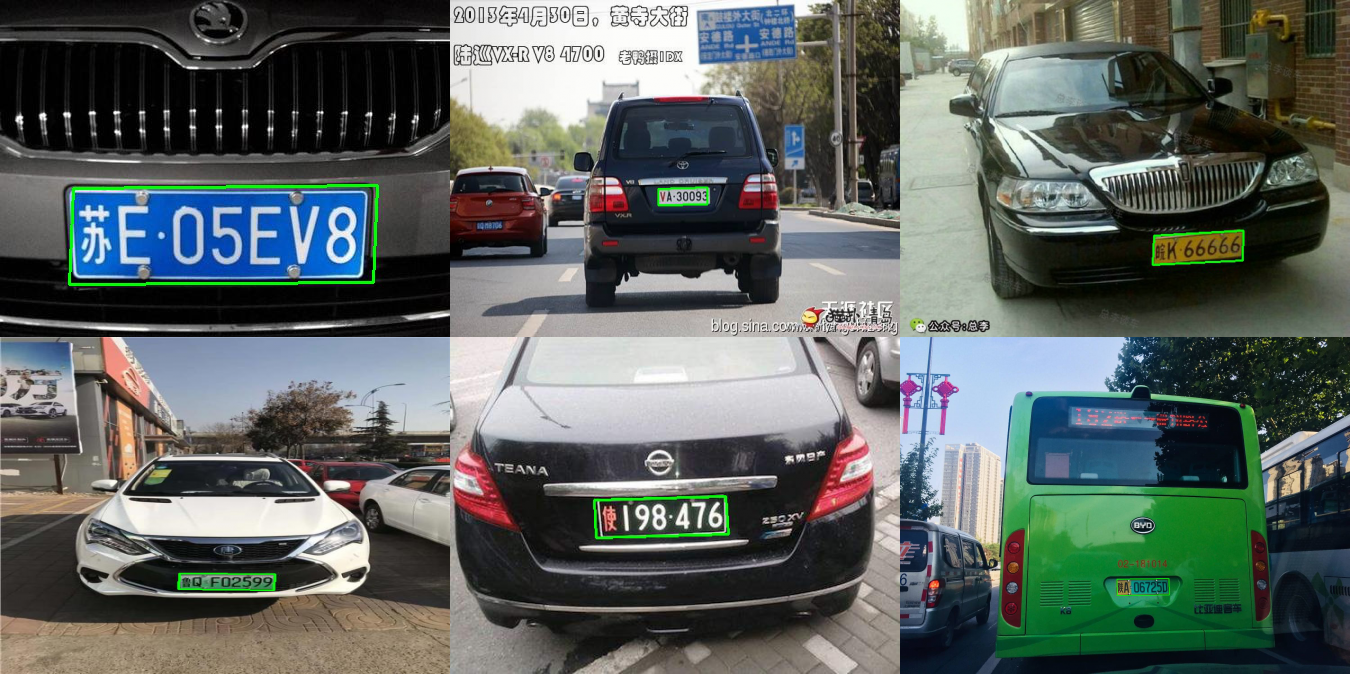
支持多种车牌的检测和识别(其中单层车牌识别效果较好):
-
单层车牌:
[[[[373, 282], [69, 284], [73, 188], [377, 185]], ['苏E05EV8', 0.9923506379127502]]] [[[[393, 278], [318, 279], [318, 257], [393, 255]], ['VA30093', 0.7386096119880676]]] [[[[[487, 366], [359, 372], [361, 331], [488, 324]], ['皖K66666', 0.9409016370773315]]]] [[[[304, 500], [198, 498], [199, 467], [305, 468]], ['鲁QF02599', 0.995299220085144]]] [[[[309, 219], [162, 223], [160, 181], [306, 177]], ['使198476', 0.9938704371452332]]] [[[[957, 918], [772, 920], [771, 862], [956, 860]], ['陕A06725D', 0.9791222810745239]]] -
双层车牌:
  [[[[399, 298], [256, 301], [256, 232], [400, 230]], ['浙G66666', 0.8870148431461757]]]
  [[[[398, 308], [228, 305], [227, 227], [398, 230]], ['陕A00087', 0.9578166644088313]]]
  [[[[352, 234], [190, 244], [190, 171], [352, 161]], ['宁A66666', 0.9958433652812175]]]
-

快速使用
-
快速安装
# 安装 AgentCLPR
$ pip install agentclpr

# 根据设备平台安装合适版本的 ONNXRuntime

# CPU 版本(推荐非 win10 系统,无 CUDA 支持的设备安装)
$ pip install onnxruntime

# GPU 版本(推荐有 CUDA 支持的设备安装)
$ pip install onnxruntime-gpu

# DirectML 版本(推荐 win10 系统的设备安装,可实现通用的显卡加速)
$ pip install onnxruntime-directml

# 更多版本的安装详情请参考 ONNXRuntime 官网
-
简单调用:
# 导入 CLPSystem 模块
from agentclpr import CLPSystem

# 初始化车牌识别模型
clp = CLPSystem()

# 使用模型对图像进行车牌识别
results = clp('test.jpg')
-
服务器部署:
-
启动 AgentCLPR Server 服务
$ agentclpr server
-
Python 调用
import cv2
import json
import base64
import requests

# 图片 Base64 编码
def cv2_to_base64(image):
    data = cv2.imencode('.jpg', image)[1]
    image_base64 = base64.b64encode(data.tobytes()).decode('UTF-8')
    return image_base64

# 读取图片
image = cv2.imread('test.jpg')
image_base64 = cv2_to_base64(image)

# 构建请求数据
data = {
    'image': image_base64
}

# 发送请求
url = "http://127.0.0.1:5000/ocr"
r = requests.post(url=url, data=json.dumps(data))

# 打印预测结果
print(r.json())
-
1 maintainer

Release files for agentclpr 1.1.0
For a detailed explanation of source distributions (sdists) and built distributions (wheels), please see the package formats documentation.
Source distribution (sdist)
| File | Size | Uploaded | |
|---|---|---|---|
| agentclpr-1.1.0.tar.gz | 9.6 MB | Details |
Built distribution (wheel)
| File | Interpreter | ABI | Platform | Reset |
|---|---|---|---|---|
| agentclpr-1.1.0-py3-none-any.whl | Python 3 | none | any | Details |
Total release size: 19.3 MB
Release files / agentclpr-1.1.0.tar.gz
| Download URL | agentclpr-1.1.0.tar.gz |
|---|---|
| Size | 9.6 MB |
| Tags | Source |
|
SHA-256 checksum How to use checksums |
a7cf329c3f4f13ff8bb96775206fe32cb69c6aa17c3ee4c7c7aea00e4cf4878c
|
|
BLAKE2b-256 checksum How to use checksums |
9695de0856c39a77e13871ae94c55fe2777e8eb9f2ede86509361e3e5f8994ea
|
| Upload date | |
|
Uploaded using Trusted Publishing? What is trusted publishing? |
No |
| Uploaded via |
twine/3.4.2 importlib_metadata/4.6.4 pkginfo/1.7.1 requests/2.25.1 requests-toolbelt/0.9.1 tqdm/4.61.2 CPython/3.9.1
|
Release files / agentclpr-1.1.0-py3-none-any.whl
| Download URL | agentclpr-1.1.0-py3-none-any.whl |
|---|---|
| Size | 9.6 MB |
| Tags | Python 3 |
|
SHA-256 checksum How to use checksums |
0b5f86d9599692156a997a17be3a6536a8ba07c285f634cc9af7c982c8cee4d3
|
|
BLAKE2b-256 checksum How to use checksums |
51116cbc13b449f29b4f008bb7427cfd2f5e60959cd722aec31d5b184e5bedf7
|
| Upload date | |
|
Uploaded using Trusted Publishing? What is trusted publishing? |
No |
| Uploaded via |
twine/3.4.2 importlib_metadata/4.6.4 pkginfo/1.7.1 requests/2.25.1 requests-toolbelt/0.9.1 tqdm/4.61.2 CPython/3.9.1
|














