
Native agent-graph runtime with C++ execution, explicit state patches, resumable checkpoints, and Python bindings.

Project description
AgentCore

Native agent graphs for fast, inspectable, long-running workflows.
AgentCore is a C++20 agent-graph runtime with a compact Python API for stateful workflows, persistent subgraphs, structured memory, replay, MCP interoperability, and OpenTelemetry.




Install · Quick Start · Python Guide · API Reference · Benchmarks · Docs
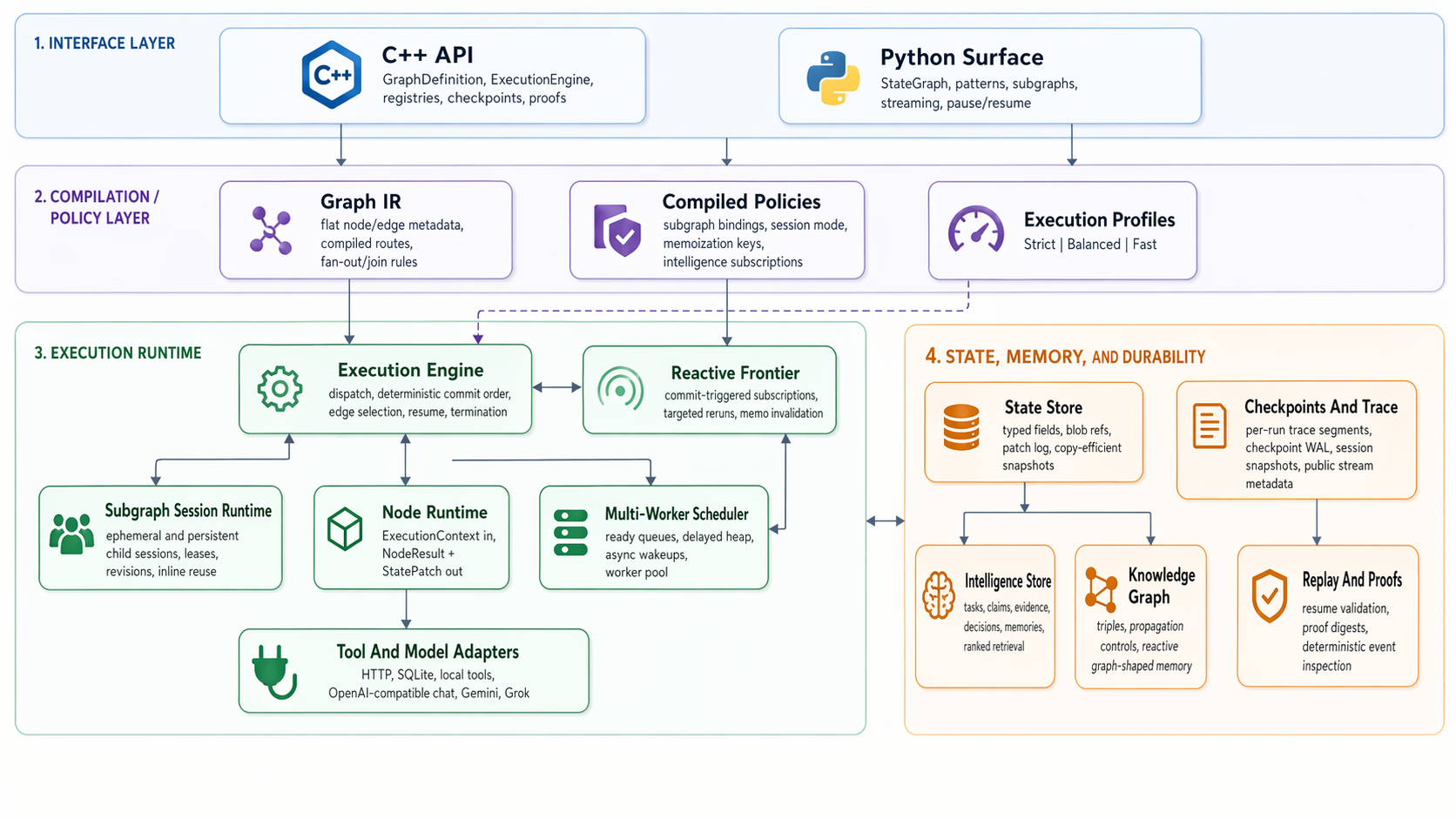
AgentCore is designed for graph-shaped agent systems where latency, durability, and state visibility matter at the same time. The runtime keeps graph execution native, makes state mutation explicit through patches, and records checkpoints and traces from the same execution path used by normal runs.
The Python surface is intentionally familiar: define a StateGraph, add nodes and edges, compile it, and invoke it. The difference is underneath. Graph metadata, state commits, scheduling, checkpointing, message merging, persistent subgraph sessions, and supported intelligence queries run through the native runtime instead of being rebuilt in Python at each step.
AgentCore is an independent project. It is not affiliated with Amazon Web Services, AWS AgentCore, or any related AWS-branded product or service.
Start Here
| Use it from Python | Install, then follow the quick start or the full Python guide. |
| Migrate graph code | Use the migration guide for builder patterns, reducers, message state, and current compatibility notes. |
| Understand the runtime | Read the runtime model for state patches, scheduler behavior, checkpointing, sessions, intelligence records, and knowledge-graph state. |
| Integrate with tools | See MCP, OpenTelemetry, and the API reference. |
| Validate performance | Use the validation guide and current benchmark notes. |
Why This Exists
Many agent workflows start simple and then become expensive in the wrong places: message history grows, branches join, tools wait, subgraphs need memory, and replay becomes a separate problem from execution. AgentCore tries to keep those concerns in one runtime model.
The core design choices are:
- compiled graph metadata instead of ad hoc per-step graph interpretation
- explicit state patches instead of hidden shared mutation
- typed hot state plus blob references for larger payloads
- deterministic commit ordering for branches, joins, checkpoints, and replay
- persistent child sessions for reusable subgraphs without shared mutable child state
- native knowledge-graph and intelligence records for workflows that need structured context
- opt-in observability and durability profiles so metadata does not always dominate the hot path
This does not make AgentCore a planner, prompt framework, vector database, or agent marketplace. It is the execution layer those pieces can sit on.
Install
python3 -m pip install agentcore-graph
The package published to PyPI is agentcore-graph; the Python import package is agentcore.
For OpenTelemetry dependencies:
python3 -m pip install "agentcore-graph[otel]"
The package also installs MCP helper commands:
agentcore-mcp
agentcore-mcp-server
agentcore-mcp-config
Current published wheels target Linux x86_64 for CPython 3.9 through 3.12. Source builds remain available from this repository.
Quick Start
from agentcore.graph import END, START, StateGraph


def step(state, config):
    return {"count": int(state.get("count", 0)) + 1}


def route(state, config):
    return END if state["count"] >= 3 else "step"


graph = StateGraph(dict, name="counter", worker_count=2)
graph.add_node("step", step)
graph.add_edge(START, "step")
graph.add_conditional_edges("step", route, {END: END, "step": "step"})

compiled = graph.compile()
final_state = compiled.invoke({"count": 0})
print(final_state["count"])
From the same compiled graph you can also stream events, inspect metadata, pause and resume, register tools and models, mirror MCP tools, emit OpenTelemetry spans, and compose persistent subgraphs.
Useful next reads:
What Is Implemented
AgentCore currently includes:
- native C++ runtime with Python bindings
StateGraph-style Python builder with conditional edges, joins, subgraphs, streaming, batch execution, and pause/resume- native join reducers for list concatenation and ID-aware message history merging
- multi-worker scheduling with async wait handling
- checkpointing, trace events, proof digests, and replay-oriented metadata
- persistent subgraph sessions with isolated child state and deterministic session revisions
- structured intelligence state for tasks, claims, evidence, decisions, and memories
- graph-native context assembly from messages, intelligence records, native knowledge-graph triples, and state fields
- knowledge-graph-backed state and reactive execution hooks
- deterministic memoization for supported pure nodes
- prompt templates for text, chat, and MCP-rendered prompts
- tool and model registries with built-in HTTP JSON, SQLite-style, local model, OpenAI-compatible, xAI Grok, and Gemini adapters
- MCP over
stdio, including tools, prompts, resources, completions, roots, sampling, elicitation, logging, subscriptions, and installable MCP server launchers - opt-in OpenTelemetry spans and metrics
- native and Python benchmark and smoke-test coverage
Core Python Features
Message State
Agent workflows often keep conversation history in a messages field. AgentCore exposes MessagesState and add_messages so message joins can run in the native merge path: messages with matching non-empty id values replace earlier messages in place, while messages without ids append.
from agentcore.graph import MessagesState, StateGraph


class AgentState(MessagesState, total=False):
    summary: str


graph = StateGraph(AgentState, name="agent", worker_count=4)
See the Python quickstart and API reference.
Persistent Subgraphs
Persistent subgraph sessions let the same child graph run across many session_id values with isolated child state, checkpoints, task journal, knowledge graph, and stream metadata. Distinct sessions can run concurrently; concurrent reuse of the same session is rejected deterministically.
See the runtime model and Python quickstart.
Context Assembly
Nodes can declare a ContextSpec and then call runtime.context.view() to assemble a deterministic context view from message history, intelligence records, native knowledge-graph triples, selected state fields, and optional graph-shaped state carried by the workflow. The returned ContextView includes citations, provenance, budget stats, conflict metadata, prompt/message rendering helpers, and a stable digest that is surfaced through invoke_with_metadata(...).
from agentcore.graph import ContextSpec


graph.add_node(
    "answer",
    answer,
    context=ContextSpec(
        goal_key="question",
        include=["messages.recent", "claims.supported", "evidence.relevant"],
        budget_tokens=2400,
        require_citations=True,
    ),
)


def answer(state, config, runtime):
    context = runtime.context.view()
    prompt = context.to_prompt(system="Answer using cited evidence.")
    result = runtime.invoke_model("default", prompt, decode="text")
    return {"answer": result, "context_digest": context.digest}
See the Python quickstart and runtime model.
Intelligence State
The intelligence layer stores operational records inside runtime state:
- tasks
- claims
- evidence
- decisions
- memories
Python nodes use runtime.intelligence to write and query those records. The records participate in normal patch commits, checkpoints, replay, and persistent subgraph sessions.
def analyze(state, config, runtime):
    runtime.intelligence.upsert_task(
        "triage",
        title="Triage incoming request",
        owner="planner",
        status="in_progress",
        priority=5,
    )
    runtime.intelligence.upsert_claim(
        "needs-followup",
        subject="request",
        relation="requires",
        object="followup",
        confidence=0.72,
    )
    next_task = runtime.intelligence.next_task(owner="planner")
    return {"next_task": None if next_task is None else next_task["key"]}
See the runtime model and Python guide.
MCP Interoperability
AgentCore can consume MCP servers and expose AgentCore-owned tools, prompts, resources, and graph surfaces through MCP.
compiled.tools.register_mcp_stdio(
    ["python3", "./my_mcp_server.py"],
    prefix="remote",
)
Installed helper commands can also produce client configuration snippets for common MCP clients:
agentcore-mcp-config claude --name local-agentcore --target ./server.py:build_server
agentcore-mcp-config codex --name local-agentcore --target ./server.py:build_server
agentcore-mcp-config gemini --name local-agentcore --target ./server.py:build_server
See the MCP integration guide.
OpenTelemetry
Telemetry is opt-in. Passing telemetry=True or an OpenTelemetryObserver emits run spans, optional node spans, and run/node metrics using the Python OpenTelemetry API.
from agentcore.observability import OpenTelemetryObserver


observer = OpenTelemetryObserver()
details = compiled.invoke_with_metadata({"count": 0}, telemetry=observer)
See the OpenTelemetry guide.
Performance
AgentCore's performance work is focused on native graph execution, branch/join overhead, persistent subgraph sessions, resume behavior, and structured state operations. Current benchmark snapshots and exact reproduction commands live in the comparison document.
The latest snapshot in this repository was generated on April 22, 2026. On that machine and workload set, AgentCore's compatibility surface was about 2.22x to 3.01x faster on the same-code builder path, while native persistent-session workloads were about 2.50x to 13.11x faster with lower measured memory use. Treat those as workload-specific measurements, not universal claims.
For local validation, start with:
ctest --test-dir build --output-on-failure
python3 python/benchmarks/langgraph_head_to_head.py
See the validation guide for release, sanitizer, replay, and benchmark commands.
Related Ideas And Papers
AgentCore is an implementation project, not a research paper. Its design is influenced by several lines of work and industry practice:
- Context graphs argue that production agents need durable, connected decision context rather than only chat history. AgentCore's intelligence records and knowledge-graph state are a runtime substrate for that style of workflow, with explicit commits and replay.
- ReAct frames agents as interleaved reasoning and action. In AgentCore, that loop is represented as graph structure, node outputs, tool/model calls, and inspectable state transitions.
- Reflexion explores feedback and memory for language agents. AgentCore's memories, decisions, evidence, and persistent sessions give applications a structured place to store those artifacts.
- Retrieval-Augmented Generation and GraphRAG motivate external knowledge and graph-shaped retrieval. AgentCore does not replace a retrieval system, but it can carry retrieved evidence, claims, and graph memory through a deterministic workflow.
- Pregel and Apache Beam inform the broader design language around graph execution, deterministic progress, durable state, and replayable dataflow.
Build From Source
For a normal local build:
cmake -S . -B build
cmake --build build -j
ctest --test-dir build --output-on-failure
For optimized validation and benchmarks:
cmake --preset release-perf
cmake --build --preset release-perf -j
ctest --preset release-perf
./build/release-perf/agentcore_runtime_benchmark
./build/release-perf/agentcore_persistent_subgraph_session_benchmark
The repository also includes relwithdebinfo-perf, asan, ubsan, and tsan presets.
Documentation Map
The main docs index is docs/README.md.
| Area | Document |
|---|---|
| Python workflow authoring | docs/quickstarts/python.md |
| Native C++ embedding | docs/quickstarts/cpp.md |
| Runtime semantics | docs/concepts/runtime-model.md |
| Python and C++ API surface | docs/reference/api.md |
| MCP integration | docs/integrations/mcp.md |
| OpenTelemetry | docs/integrations/opentelemetry.md |
| Migration notes | docs/migration/langgraph-to-agentcore.md |
| Validation and benchmarks | docs/operations/validation.md |
| Head-to-head benchmark notes | docs/comparisons/langgraph-head-to-head.md |
Repository Map
agentcore/includeandagentcore/src: native runtimeagentcore/adapters: built-in tool and model adaptersagentcore/testsandagentcore/benchmarks: native tests and benchmark entry pointspython/agentcore: Python package layered over the native modulepython/testsandpython/benchmarks: Python smoke tests and benchmark entry pointsdocs: guides, concepts, reference material, migration notes, and validation docsassets: README and documentation images
Acknowledgements
AgentCore is independent and is not affiliated with or endorsed by LangChain Inc.
I am grateful to the projects and ideas that helped clarify the design space for graph-oriented agent runtimes:
- LangGraph and its documentation for making graph-based agent orchestration concrete and accessible
- NetworkX for graph-first modeling vocabulary
- Model Context Protocol for a practical interoperability layer for tools, prompts, and resources
- OpenTelemetry for the standard observability vocabulary AgentCore plugs into
License
This repository is licensed under the MIT License. See LICENSE and NOTICE.
Release history Release notifications | RSS feed


Download files
Download the file for your platform. If you're not sure which to choose, learn more about installing packages.
Source Distribution
Built Distributions
Filter files by name, interpreter, ABI, and platform.
If you're not sure about the file name format, learn more about wheel file names.
Copy a direct link to the current filters
File details
Details for the file agentcore_graph-0.1.10.tar.gz.
File metadata
- Download URL: agentcore_graph-0.1.10.tar.gz
- Upload date:
- Size: 2.2 MB
- Tags: Source
- Uploaded using Trusted Publishing? No
- Uploaded via: twine/6.2.0 CPython/3.9.18
File hashes
| Algorithm | Hash digest | |
|---|---|---|
| SHA256 |
e106a3255186cfe8a8599c93c8bbebfad3a1d8b3055c77bcab3579cbd435da42
|
|
| MD5 |
297d8436caaf711d7d56cc9109ac9f61
|
|
| BLAKE2b-256 |
925b39d79eae328fe56b92d581e86edbd8d274d91926d0366937d2086f3901b8
|
File details
Details for the file agentcore_graph-0.1.10-cp312-cp312-manylinux_2_28_x86_64.whl.
File metadata
- Download URL: agentcore_graph-0.1.10-cp312-cp312-manylinux_2_28_x86_64.whl
- Upload date:
- Size: 1.5 MB
- Tags: CPython 3.12, manylinux: glibc 2.28+ x86-64
- Uploaded using Trusted Publishing? No
- Uploaded via: twine/6.2.0 CPython/3.9.18
File hashes
| Algorithm | Hash digest | |
|---|---|---|
| SHA256 |
8ea13907b34355694f7f82a1b010887345242915fe41ddd09ec36ff3652d8965
|
|
| MD5 |
671e0e3099c2ae3b955744457cdf5c5e
|
|
| BLAKE2b-256 |
1111f33f99cc80afc41f4645ad57be756965b12ba165dd8d3b899b2dbc3d72ac
|
File details
Details for the file agentcore_graph-0.1.10-cp311-cp311-manylinux_2_28_x86_64.whl.
File metadata
- Download URL: agentcore_graph-0.1.10-cp311-cp311-manylinux_2_28_x86_64.whl
- Upload date:
- Size: 1.5 MB
- Tags: CPython 3.11, manylinux: glibc 2.28+ x86-64
- Uploaded using Trusted Publishing? No
- Uploaded via: twine/6.2.0 CPython/3.9.18
File hashes
| Algorithm | Hash digest | |
|---|---|---|
| SHA256 |
32ac0dfaf51fadb18c290826385b4d322d55bc07336579c7730bf110640fa7e7
|
|
| MD5 |
e39f9dc98f631cc5fef9416704b84f1e
|
|
| BLAKE2b-256 |
3b5f8d51a9eeaf7e70ec4c730c5060b6bbea0b3453922b0d6814281a84e43663
|
File details
Details for the file agentcore_graph-0.1.10-cp310-cp310-manylinux_2_28_x86_64.whl.
File metadata
- Download URL: agentcore_graph-0.1.10-cp310-cp310-manylinux_2_28_x86_64.whl
- Upload date:
- Size: 1.5 MB
- Tags: CPython 3.10, manylinux: glibc 2.28+ x86-64
- Uploaded using Trusted Publishing? No
- Uploaded via: twine/6.2.0 CPython/3.9.18
File hashes
| Algorithm | Hash digest | |
|---|---|---|
| SHA256 |
884ea19f5a9e46fe89bb62737420286cdd102ae1a30ca434faaa44722035fb32
|
|
| MD5 |
77130243695c3757f56d397044d12e13
|
|
| BLAKE2b-256 |
390aa3049a1009c29d03c27982e288de4a83c81cb834640c239002ddc17c1a34
|
File details
Details for the file agentcore_graph-0.1.10-cp39-cp39-manylinux_2_28_x86_64.whl.
File metadata
- Download URL: agentcore_graph-0.1.10-cp39-cp39-manylinux_2_28_x86_64.whl
- Upload date:
- Size: 1.5 MB
- Tags: CPython 3.9, manylinux: glibc 2.28+ x86-64
- Uploaded using Trusted Publishing? No
- Uploaded via: twine/6.2.0 CPython/3.9.18
File hashes
| Algorithm | Hash digest | |
|---|---|---|
| SHA256 |
9e2f04291f5a72c1dd02051958f5e3f80d25c999793067dedb9e5fe3497ec387
|
|
| MD5 |
0e6f8de27139dfa3aabcb43c77f3bd43
|
|
| BLAKE2b-256 |
7919f865ddd5625e680e902b4627c3c6521da7a841312dfc04ae74837fc6b2a5
|






