

AgentForeman
Approve, steer, and stop every Claude Code agent from one page.
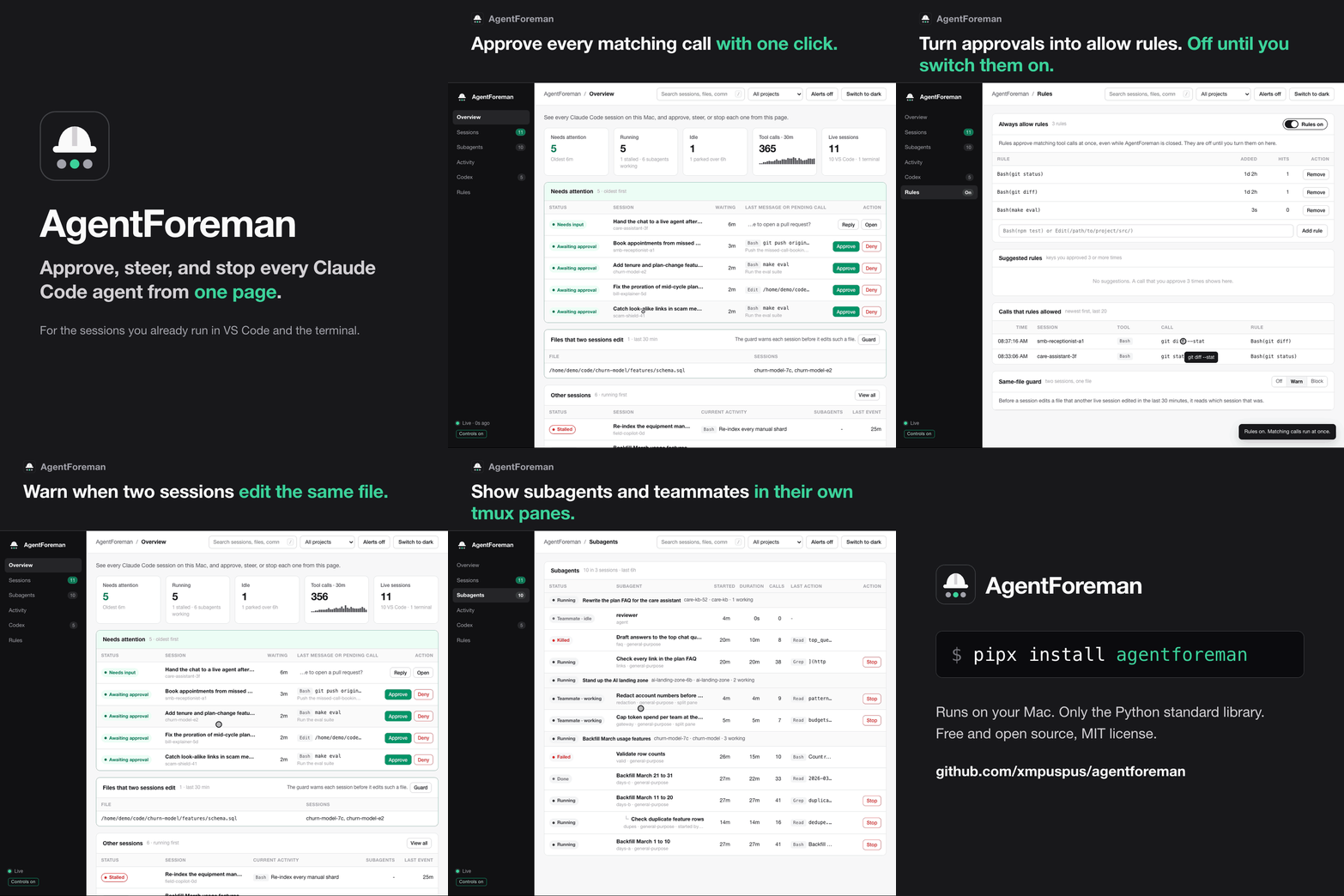
AgentForeman is a local web page for the Claude Code sessions on your Mac. It shows sessions in VS Code panels and in terminals, their subagents, and your recent Codex threads. It shows which sessions wait for you, and what every agent does now. With its hooks on, you can answer and steer those agents from the same page. It runs on your Mac, and only you can open it.
Why AgentForeman
AgentForeman works on the sessions that you already run, and it acts on all of them from one page:
- Works on the sessions you already run. It finds every Claude Code session on your Mac. You start nothing through it.
- Approve with the whole command and its diff. The card shows the full command, or the diff of an edit.
- Approve every matching call at once. One click answers every waiting call of the same kind, across sessions.
- Allow rules from your approvals. It suggests a rule after repeat approvals. Rules start off, and they fail closed.
- Steer a running session. The agent reads your note at its next tool call, and keeps working.
- Stop one subagent or a whole session. The stop takes effect at the next tool call.
- Warn when two sessions edit one file. The second session gets a warning, or Claude Code asks you first.
- Show split-pane teammates. Agent Teams teammates in their own tmux pane show under their lead.
- Local, with nothing to build. Only the Python standard library. No account and no cloud service.
Compared with other tools shows how 59 other tools differ.
Install
With pipx:
pipx install agentforeman
With uv, without an install:
uvx agentforeman --open
From source:
git clone https://github.com/xmpuspus/agentforeman
cd agentforeman
python3 -m agentforeman --open
Quick start
-
See it on sample sessions first. The demo changes no file outside a temporary folder:
agentforeman demoOpen the link that it prints. Press
Ctrl+Cto stop the demo. -
Watch your own sessions:
agentforeman --openThe page opens in your browser, and the browser stays signed in. To open it again later, or in another browser, run
agentforeman open. Until you turn on the controls, the page only reads your sessions. -
Turn on the controls, so you can approve, reply, steer, and stop from the page:
agentforeman installIt saves a backup of
~/.claude/settings.json, then adds four hooks. Running sessions get them without a restart. To remove them, runagentforeman uninstall.
serve is the default command, so agentforeman --port 4330 works too. Its options:
--port: the port of the page. The default is4320.--open: open the page in your browser.--claude-dir: where Claude Code keeps its session files. The default is~/.claude.--codex-dir: where Codex keeps its thread files. The default is~/.codex.--control-dir: the folder that the page and the hooks share. The default is~/.agentforeman.--dry-open: the button Open in VS Code returns its commands and runs nothing.
open takes --port, --control-dir, and --print. With --print, it prints the sign-in link instead of opening it.
install and uninstall take --settings and --control-dir.
Features
See which sessions wait for you
The Overview counts the sessions that wait for you, the running and idle sessions, the recent tool calls, and the live sessions. The table Needs attention lists each session that waits for you, oldest first. The badge Needs input means that the session ended its turn with a question. The badge Awaiting approval means that a tool call waits for your permission. The browser tab title starts with the count, for example "(3) AgentForeman".
Approve or deny a tool call
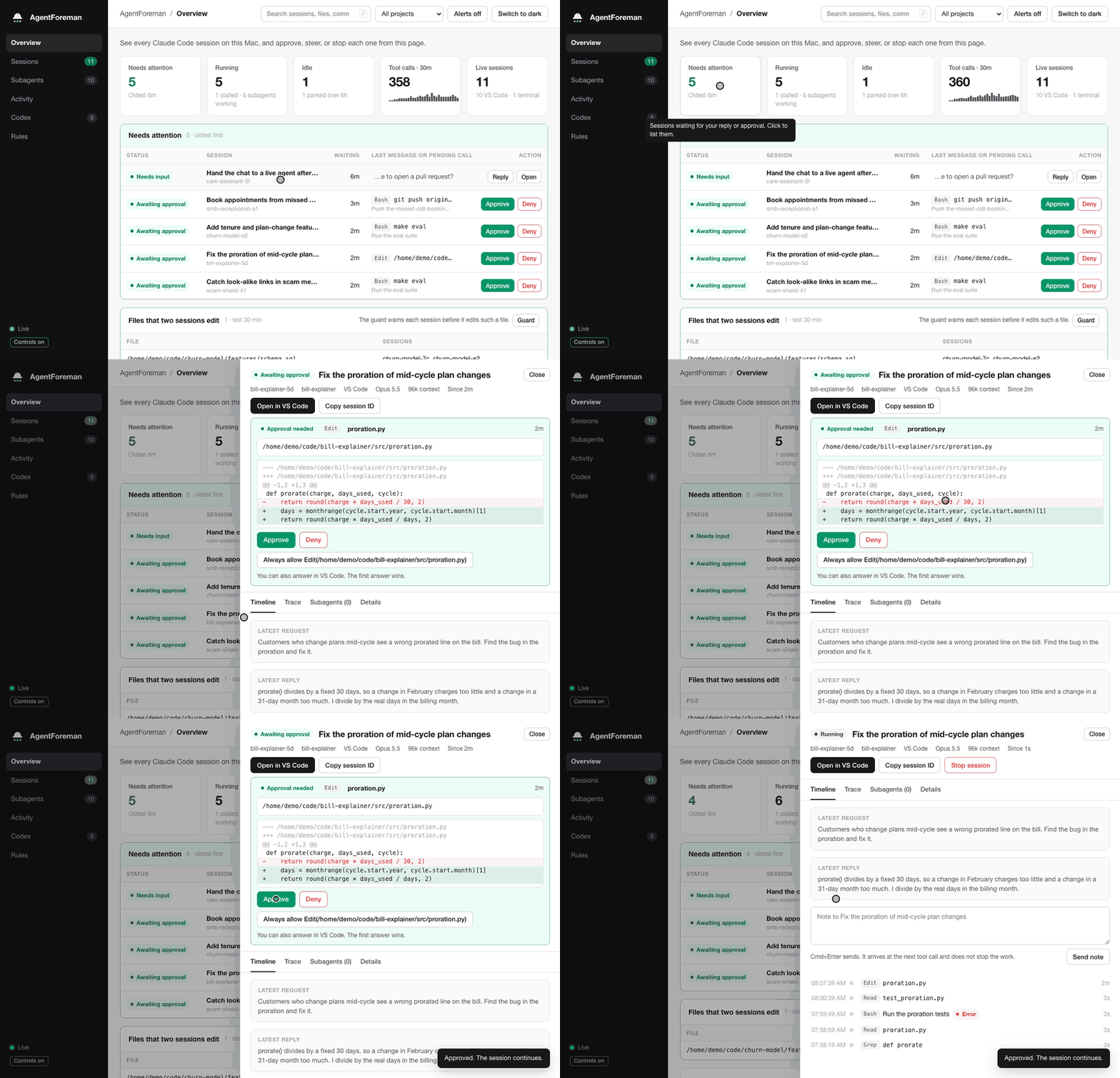
The card shows the whole command that waits, with its line breaks. For an Edit or a Write, it shows the diff. Click Approve or Deny. You can also answer in VS Code, the terminal, or the Claude app. The first answer wins, and the card goes away.
Approve similar calls at once
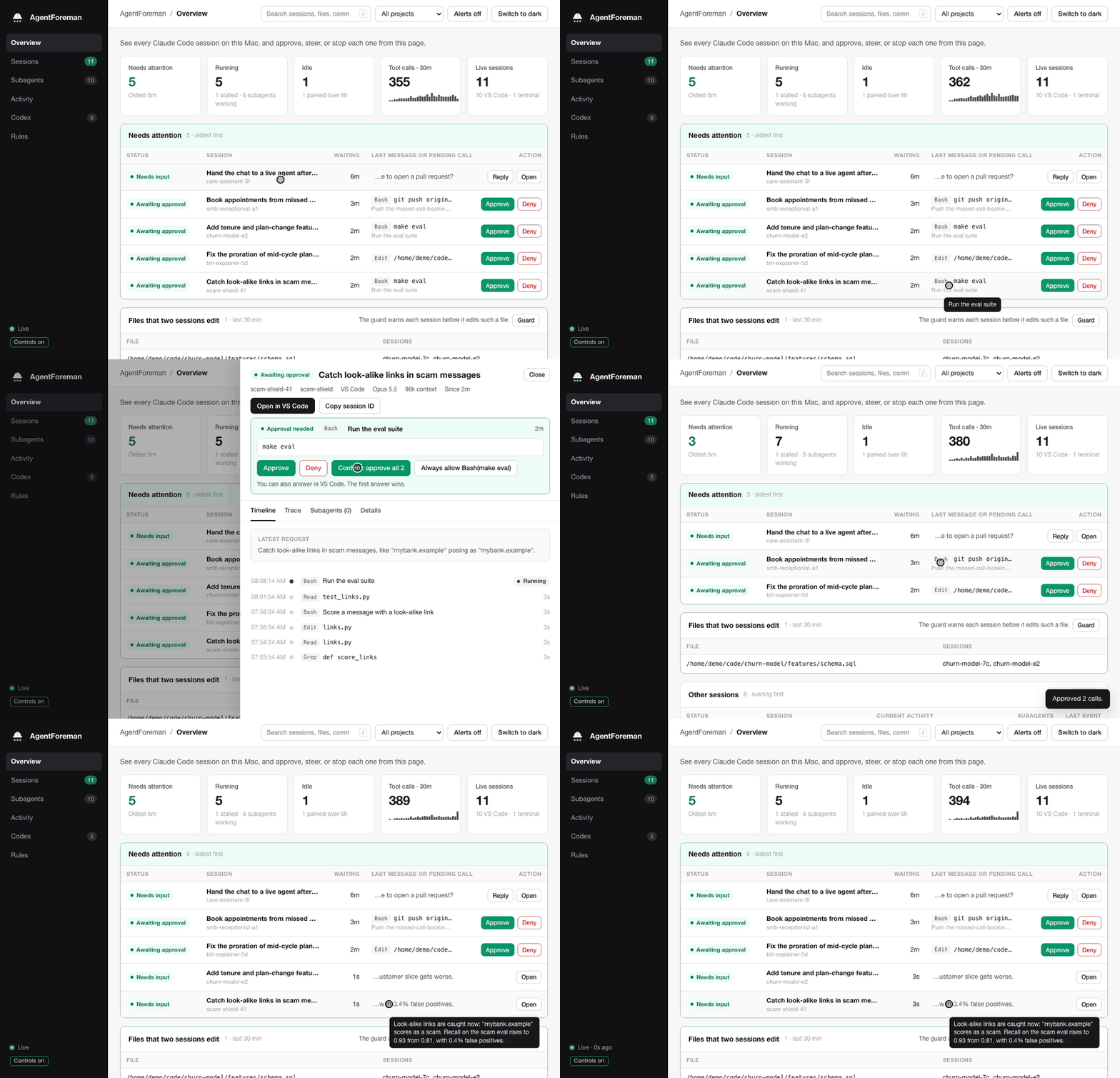
When other sessions wait for the same kind of call, the card shows Approve all N. Click it, then click Confirm within 4 seconds.
Always allow rules
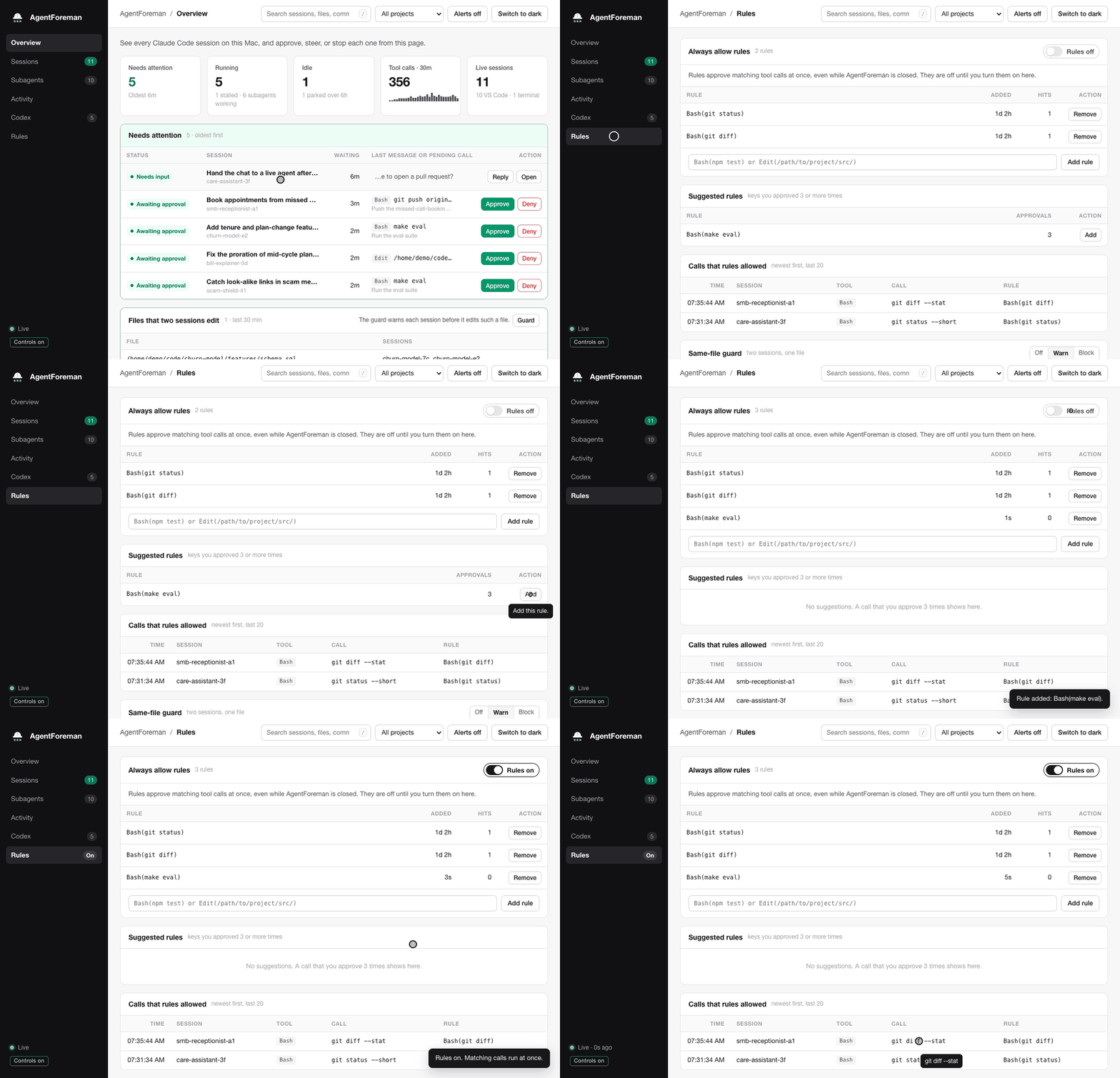
The card names a rule for the call, for example Always allow Bash(make eval). Click it to add the rule. Adding a rule never turns rules on. Turn rules on with the switch on the Rules page.
While rules are on, a matching call runs at once, also while the page does not run. The Rules page lists each rule with its hits, and the last 20 calls that rules allowed. A rule never matches a command with $, a redirect, or a part that no rule covers. Such a call comes to you.
Reply to a session
When a session ends its turn, its panel shows a reply box. Type your reply, then click Send reply or press Cmd+Enter. The session wakes up and reads your text.
Steer a running agent
A running session, subagent, or teammate has a note box in its panel. The agent gets the note at its next tool call, as extra context, and keeps working. The panel shows when the note arrives. A chip such as "Repeating: Read config.toml x5" marks an agent that makes the same call again and again.
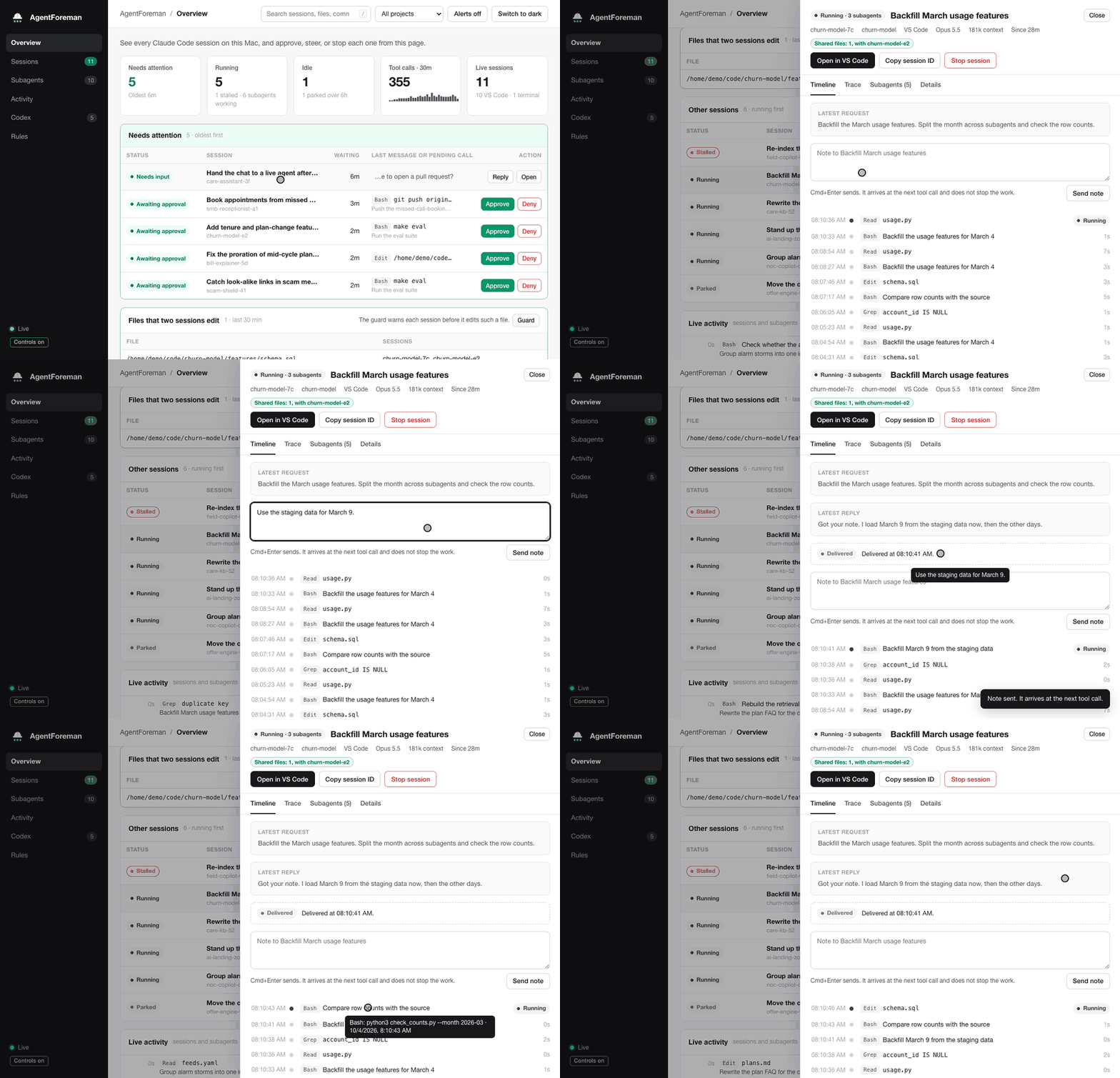
Stop a subagent or a session
Each running subagent has a Stop button. A running session has the button Stop session. Click, then confirm within 4 seconds. The agent stops at its next tool call. A command that already runs keeps running until it ends.
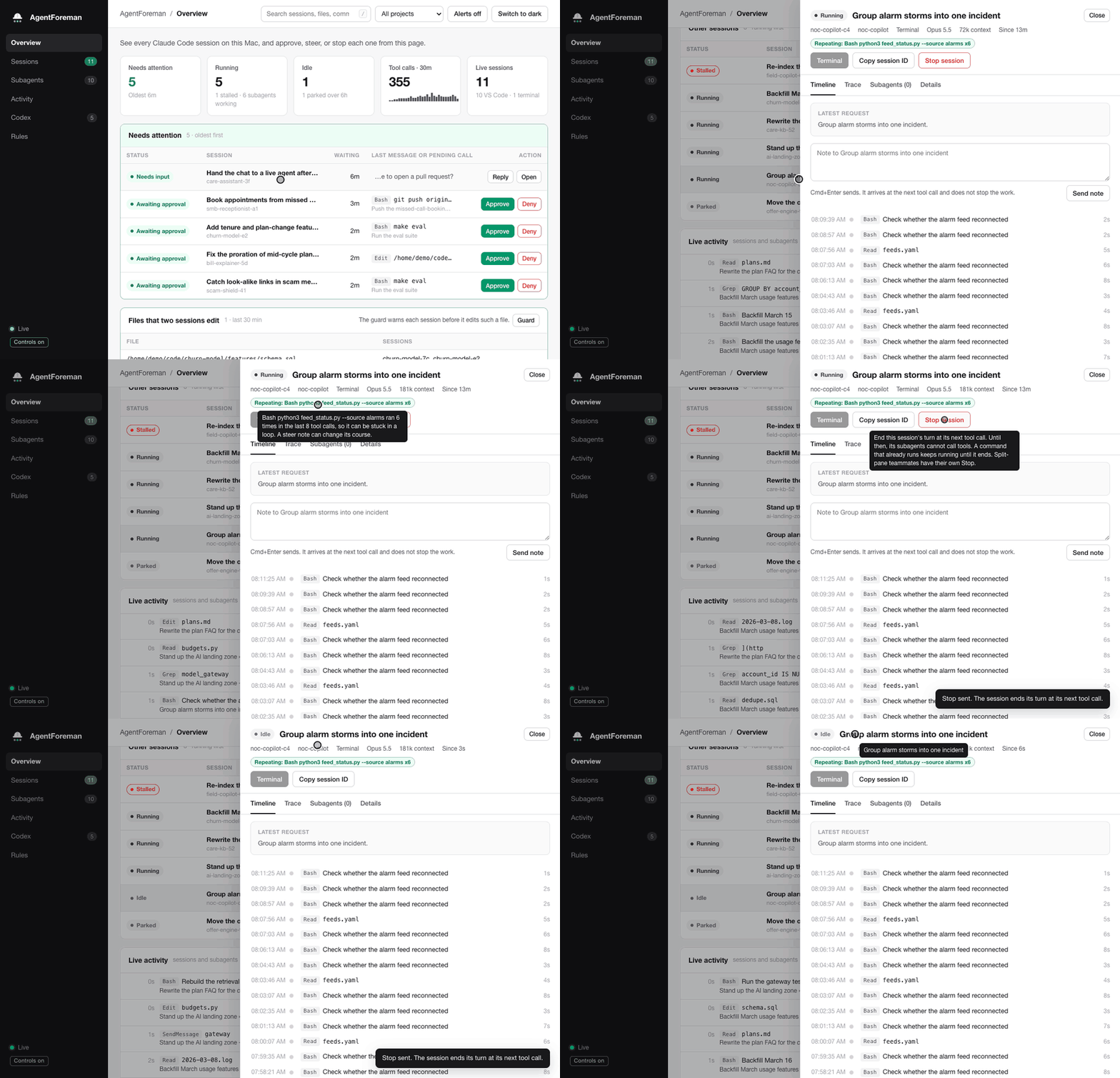
Same-file guard
When two sessions edit one file, the Overview shows the file and both sessions. The guard warns the second session before its edit. On the Rules page, choose Off, Warn, or Block. The mode Block makes Claude Code ask you before such an edit.
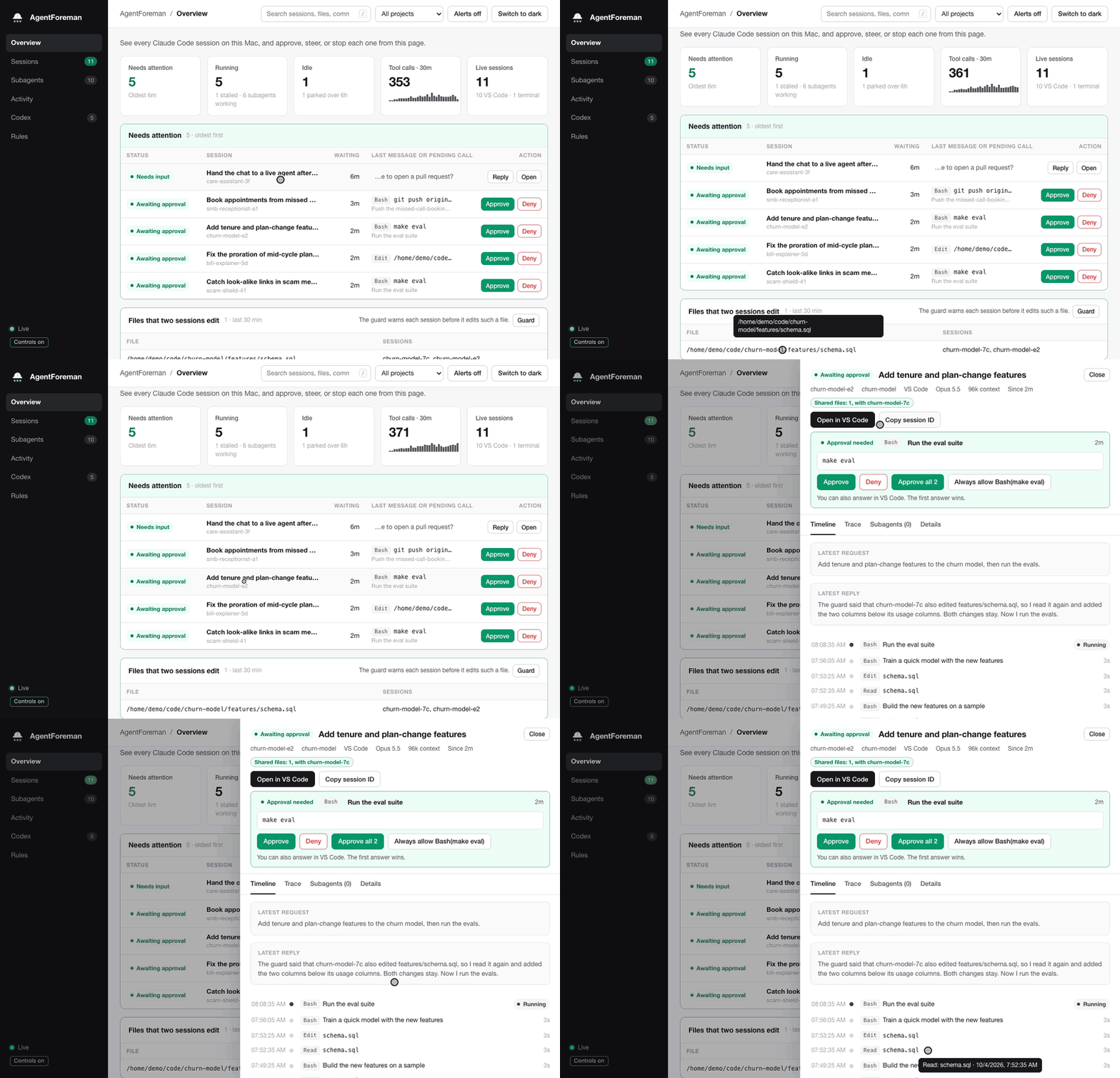
Subagents and teammates
The Subagents page groups subagents by session, for the last 6 hours. A subagent that another subagent started sits under its parent. Agent Teams teammates show here too, also the ones in their own split pane.
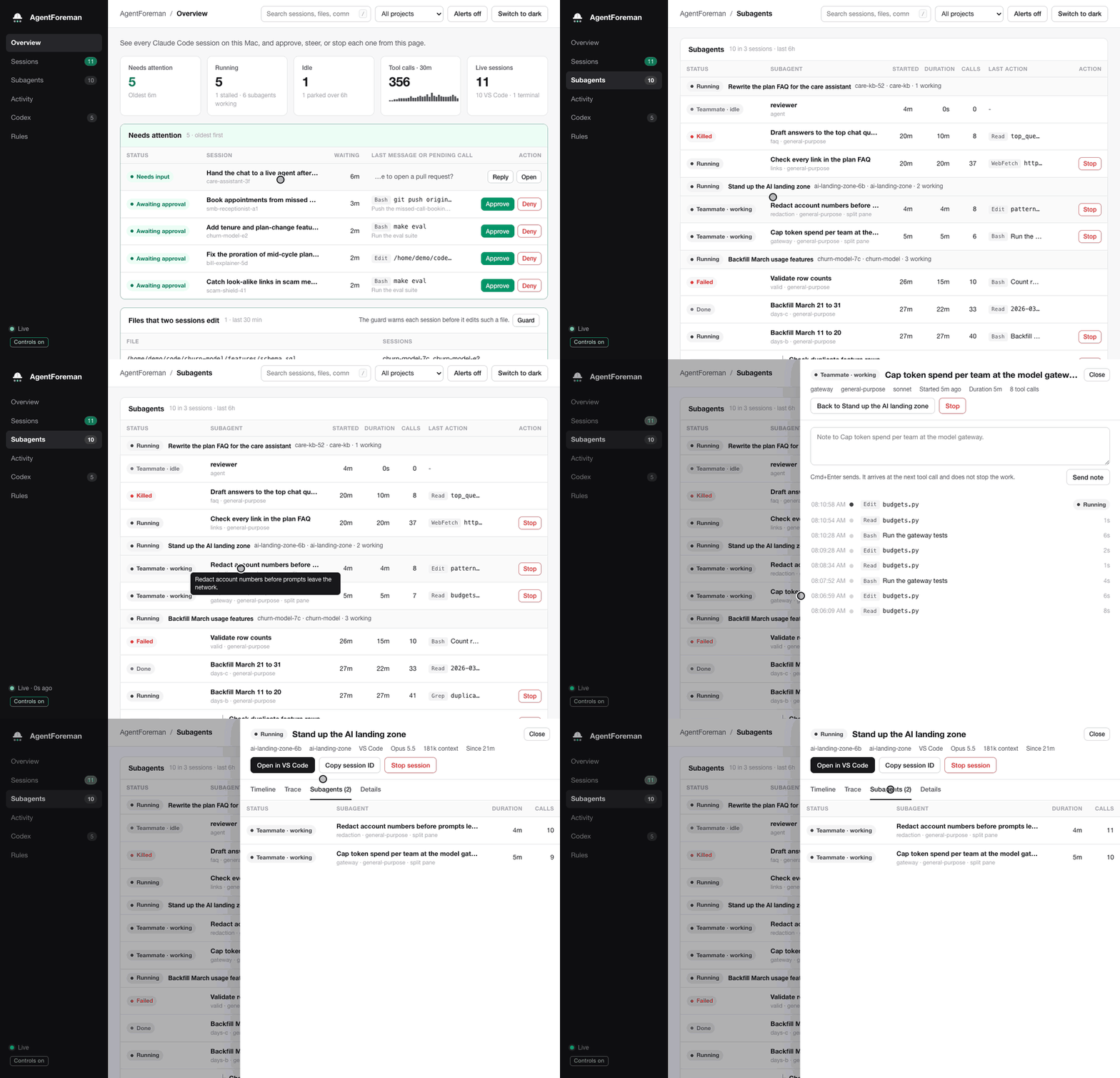
Session panel
Click a session row to open its panel. The panel shows a timeline of tool calls, a trace on one clock, the subagents, and the details. The button Open in VS Code brings the window of that session forward. The button Open in Claude app opens its Remote Control page on claude.ai.
Search and keys
Search finds sessions by title, folder, message, file, command, or subagent. The project menu shows one project folder. Keys: / searches, j and k move, Enter opens, o opens VS Code, and Esc closes.
Activity and Codex
The page Activity shows tool calls per minute for the last 30 minutes, with an event log. The page Codex lists Codex threads from the last 48 hours. The theme follows your system until you pick one. With Alerts on, a desktop alert shows when a session starts to wait for you.
Compared with other tools
We read the README or the docs of 59 tools on 4 October 2026. Most of them fall into three groups:
- Dashboards show sessions, costs, and logs. A few of them also approve tool calls.
- Session managers start agents for you, often each in its own git worktree. Your sessions run inside them.
- Remote approvers send permission prompts to your phone or a chat app.
AgentForeman works on the sessions that you already run, and it acts on all of them from one page. The table shows the tools that have at least one of these features. A dot means that the README or the docs do not mention the feature. It does not prove that the tool lacks it.
| Tool | Finds the sessions you run | Approve a call | Note to a running agent | Stop one subagent | Same-file warning | Rules from approvals |
|---|---|---|---|---|---|---|
| AgentForeman | Yes | Yes, with the diff | Yes | Yes | Yes | Yes |
| Claude Code Remote Control | One session per connection | Yes | Yes | Yes | · | · |
| Claude Code agent view | Only after /bg |
No, attach to answer | Queued | Whole session only | · | · |
| claude.ai/code | Cloud sessions only | · | Queued | · | · | · |
| nikitadoudikov/claude-pulse | Yes | Yes | · | · | · | · |
| bruceyxli/claude-code-monitor | Yes | Yes | · | · | · | · |
| tombelieber/claude-view | Yes | · | · | · | · | · |
| sverrirsig/claude-control | · | Yes | · | · | · | · |
| d-kimuson/claude-code-viewer | · | Yes | · | · | · | · |
| tiann/hapi | · | Yes | · | · | · | · |
| Justin0504/Aegis | · | Yes | · | · | · | · |
| mercurialsolo/claudectl | · | Its local model decides | Between its own agents | · | Prevents it in its own swarm | · |
| hahahahahahahahah6/edit-guard | · | · | · | · | Blocks stale edits | · |
| gantrol/AgentController | · | · | Codex only | · | · | · |
| Seven phone and chat approvers, listed below | · | Yes | · | · | · | · |
Stars and dates in the lists below come from GitHub on 4 October 2026.
Official tools (5)
| Tool | What it does |
|---|---|
| Claude Code agent view | One screen for your background Claude Code sessions, with claude agents |
| Claude Code Remote Control | Continues one local session from claude.ai/code or the Claude mobile app |
| Claude Code desktop app | Parallel sessions with git isolation, panes, a terminal, and a file editor |
| claude.ai/code | Claude Code sessions that run in the cloud |
| Codex app | The OpenAI client for parallel Codex agents |
Dashboards and monitors (10)
| Tool | Stars | What it does |
|---|---|---|
| disler/claude-code-hooks-multi-agent-observability | 1,545 | Shows Claude Code agents live through hook events |
| hoangsonww/Claude-Code-Agent-Monitor | 1,039 | Tracks Claude Code and Codex sessions in a dashboard |
| nikitadoudikov/claude-pulse | 246 | Watches every local Claude Code and Codex session, with approvals from a phone |
| tombelieber/claude-view | 110 | Live dashboard with cost tracking, search, and subagents |
| FlorianBruniaux/ccboard | 96 | Terminal and web dashboard for sessions, costs, and settings |
| bruceyxli/claude-code-monitor | 13 | Live dashboard for Claude Code sessions, with remote approval |
| szaher/claude-monitor | 6 | Shows token use, costs, and tool calls of your sessions |
| appaquet/ccmon | 0 | Live dashboard for Claude Code sessions |
| londondan/AgentConductor | 0 | Claude Code plugin that shows a live agent tree |
| Doogit/AgentWrangler | 0 | Shows token spend and session outcomes |
Session managers that start the agents (26)
| Tool | Stars | What it does |
|---|---|---|
| stablyai/orca | 84,439 | Runs many coding agents side by side, each in its own worktree |
| BloopAI/vibe-kanban | 28,256 | Kanban board for coding agents. Its README says that it is ending |
| manaflow-ai/cmux | 27,599 | macOS terminal with tabs and alerts for coding agents |
| winfunc/opcode | 22,425 | Desktop app and toolkit for Claude Code |
| superset-sh/superset | 14,852 | Agent workspace with terminals, code review, and previews |
| siteboon/claudecodeui | 13,922 | Web and mobile client for Claude Code, Codex, and others |
| Untrivial-ai/agent-orchestrator | 12,688 | Plans, runs, and supervises teams of coding agents |
| smtg-ai/claude-squad | 8,566 | Terminal app for many agents in separate workspaces |
| stravu/crystal | 3,123 | Parallel sessions in git worktrees. It is now Nimbalyst |
| omnara-ai/omnara | 2,878 | Platform to run and manage agents |
| nimbalyst/nimbalyst | 1,828 | Visual workspace for parallel coding agents |
| d-kimuson/claude-code-viewer | 1,292 | Full web client for Claude Code, with inline approvals |
| kbwo/ccmanager | 1,257 | Command line manager for sessions across worktrees |
| sugyan/claude-code-webui | 1,137 | Web chat for the Claude CLI. Archived |
| asheshgoplani/agent-deck | 995 | Terminal session manager for coding agents |
| Ark0N/Codeman | 783 | Self-hosted control center for agents in tmux |
| built-by-as/FleetCode | 424 | Runs command line agents in parallel worktrees |
| craftzdog/tmux-claude-hatch | 395 | tmux plugin with one Claude Code popup per project |
| imbue-ai/sculptor | 235 | Parallel coding agents in isolated containers |
| mercurialsolo/claudectl | 202 | Runs a swarm of agents with a local model that approves calls |
| sverrirsig/claude-control | 135 | macOS app that starts and manages sessions, with approvals |
| vultuk/claude-code-web | 97 | Web interface for the Claude Code CLI |
| OneStepAt4time/aegis | 12 | Starts and manages Claude Code sessions through an API |
| superkoh/koloft | 2 | macOS app that runs and manages sessions |
| StanislavBG/claude-code-session-manager | 1 | Schedules sessions and watches the token budget |
| Conductor | Closed source | Runs parallel agents in isolated workspaces on your Mac |
Remote and mobile control (14)
| Tool | Stars | What it does |
|---|---|---|
| slopus/happy | 23,999 | Mobile and web client for Claude Code and Codex |
| tiann/hapi | 5,174 | Controls agent sessions from a phone, the web, or Telegram |
| overwirehq/claude-code-telegram | 2,798 | Telegram bot for Claude Code |
| gbasin/agentboard | 418 | Web interface for tmux, made for agent terminals |
| onikan27/claude-code-monitor | 310 | Watches sessions from a terminal or a phone |
| yuuichieguchi/claude-remote-approver | 74 | Approves permission prompts from a phone |
| gantrol/AgentController | 44 | Controls Codex with a game controller |
| jsayubi/ccgram | 27 | Controls Claude Code from Telegram |
| coa00/claude-push | 7 | Sends permission requests to a phone through ntfy |
| nickknissen/claude-ntfy-hook | 6 | Allow or Deny from a phone through ntfy |
| tsyche/hookline | 0 | Approves permission prompts from a phone through ntfy |
| ssarnecki/claude-code-phone-notifications | 0 | Phone alerts with Approve, Approve All, and Deny |
| heywood8/claude-mobile-buddy | 0 | Approves prompts from an Android phone over Bluetooth |
| wolfpeter/claude-session-manager | 0 | Runs and watches sessions in tmux from a phone |
Policy and safety tools (4)
| Tool | Stars | What it does |
|---|---|---|
| Justin0504/Aegis | 479 | Policy rules, approvals, and a kill switch for agents |
| anipotts/cc | 2 | Tools for many Claude Code sessions. Archived |
| LoveCppp/AgentReins | 0 | Safety checks and recovery for coding agents on macOS |
| hahahahahahahahah6/edit-guard | 0 | A hook that blocks stale edits across sessions |
Usage trackers such as ccusage, Claude-Code-Usage-Monitor, ccflare, and better-ccusage count tokens and costs. They do not control sessions, so they are not in the count.
If a tool is missing or a row is wrong, open an issue.
Security
AgentForeman can approve tool calls, so it guards its own page:
- The server listens on
127.0.0.1only. Other computers cannot connect. - The page and its data open only with a sign-in link. Other accounts on your Mac cannot use them.
- The link holds a token from
~/.agentforeman/token, which only you can read. The token stays the same across restarts. - The browser keeps the token in a cookie that page scripts cannot read.
- Each button also sends the token. The server refuses a request with a different host name or from another web site.
- No other page can show AgentForeman inside a frame.
- AgentForeman trusts other programs of the same macOS user. They can read the same files.
- Rules are off by default, and they fail closed.
SECURITY.md has the full threat model and tells you how to report a problem.
How it works
- Claude Code writes one small file for each live session in
~/.claude/sessions/. - AgentForeman keeps the sessions whose process is still alive.
- For each session, it reads the end of its transcript in
~/.claude/projects/, then only new lines. - It reads the subagent files of each session, and the team files of Agent Teams.
- For Codex, it reads the thread tables in
~/.codexin read-only mode. - About every 1.5 seconds, the server sends any change to the open page.
AgentForeman never writes to these folders. The controls work through small files in ~/.agentforeman, which only you can read. A hook writes a file when a tool call waits or a turn ends. The page shows it. When you click, the server writes your answer as a file, and the hook gives it to the session.
Each hook fails open, so a broken hook never blocks Claude Code. SPEC.md holds the full contract.
Requirements
- macOS. The tests do not cover Linux.
- Python 3.11 or later. Check with
python3 --version. - Claude Code.
- Codex is optional. The Codex page needs it.
- VS Code is optional. The button Open in VS Code needs it.
Fix common problems
- "Address already in use": AgentForeman already runs. Run
agentforeman open, or use--port 4330. - The page says "Open AgentForeman from your terminal": run
agentforeman open. - The sidebar says "Signed out": someone deleted
~/.agentforeman/token. Runagentforeman open. - No sessions show: start a Claude Code session, then wait two seconds.
- Still no sessions: check that
~/.claude/sessions/holds files. - Open in VS Code fails: install VS Code in
/Applications. - Open in VS Code still fails: in VS Code, run "Shell Command: Install 'code' command in PATH".
- The button says Terminal: that session runs in a terminal, so switch to that terminal window.
- The sidebar says Controls off: run
agentforeman install. - The sidebar says Controls outdated: the hook changed in an update. Run
agentforeman installagain. - A question shows no reply box: its turn ended before the install. Answer in the session this time.
- Approve does nothing: someone answered in VS Code, the terminal, or the Claude app first.
- A note never arrives: the agent makes no tool call now. The note goes away when the turn ends.
- A rule does not allow a call: check that rules are on.
- A rule still does not allow it: a rule never matches a command that it cannot read safely.
- Always allow is missing on a card: that rule grants too much, for example
Bash(sudo apt). - Alerts stay off: allow notifications for
127.0.0.1in your browser, then click Alerts off again. - The first load is slow: security software on some Macs scans each file that AgentForeman opens.
- A hook seems to do nothing: create the file
~/.agentforeman/debug, then read~/.agentforeman/hook.log.
Development
Every change starts in SPEC.md. CONTRIBUTING.md has the details.
python3 -m venv .venv
. .venv/bin/activate
pip install -e ".[dev]"
python -m playwright install chromium
ruff check .
ruff format --check .
pytest -q
To record the GIFs again, install ffmpeg and run python tools/record_gifs.py. To record the one-minute tour, also install Pillow and run python tools/record_showcase.py.
License
MIT. See LICENSE.
1 maintainer

Metadata
1 maintainer
Release files for agentforeman 0.1.0
For a detailed explanation of source distributions (sdists) and built distributions (wheels), please see the package formats documentation.
Source distribution (sdist)
| File | Size | Uploaded | |
|---|---|---|---|
| agentforeman-0.1.0.tar.gz | 159.6 kB | Details |
Built distribution (wheel)
| File | Interpreter | ABI | Platform | Reset |
|---|---|---|---|---|
| agentforeman-0.1.0-py3-none-any.whl | Python 3 | none | any | Details |
Total release size: 254.2 kB
Release files / agentforeman-0.1.0.tar.gz
| Download URL | agentforeman-0.1.0.tar.gz |
|---|---|
| Size | 159.6 kB |
| Tags | Source |
|
SHA-256 checksum How to use checksums |
22dcb9a3786143b7c381653e08ee563badfbfe5cc00ef75817f40899c8058ce1
|
|
BLAKE2b-256 checksum How to use checksums |
cc4a115b17037ecef17ad143f28d1f8ee5e6967d8ff6c75aa940521ababcd1c1
|
| Upload date | |
|
Uploaded using Trusted Publishing? What is trusted publishing? |
No |
| Uploaded via |
twine/7.0.0 CPython/3.13.9
|
Release files / agentforeman-0.1.0-py3-none-any.whl
| Download URL | agentforeman-0.1.0-py3-none-any.whl |
|---|---|
| Size | 94.6 kB |
| Tags | Python 3 |
|
SHA-256 checksum How to use checksums |
8edd46fb6fb5ff27fdbd3116900e747500cf79c1d26b9f45ca94ee46b85d7bd5
|
|
BLAKE2b-256 checksum How to use checksums |
0525d63954d1d55fb87d943712fcb90c70de23077dccd5596aa9f817f20a0f54
|
| Upload date | |
|
Uploaded using Trusted Publishing? What is trusted publishing? |
No |
| Uploaded via |
twine/7.0.0 CPython/3.13.9
|













