
AgentHandler






Every agent needs a handler.
AgentHandler is the governance layer for AI agents. Wrap tool calls with timeouts, budgets, circuit breakers, guardrails, and audit logging — so one bad tool call doesn't drain your wallet or loop forever. MCP-native, with adapters for OpenAI Agents SDK and Claude Agent SDK.
Zero dependencies. Works with any agent framework — OpenAI Agents SDK, Claude Agent SDK, Mastra, LangChain, CrewAI, your own custom loop, whatever. Just wrap your tool calls. Includes durable sessions that survive restarts, a REST control plane, MCP server mode, and a dashboard for managing everything in one place.
AgentHandler is built for long-duration agents — agents that run for hours or days, not minutes. Read the manifesto for the full vision.
Why
You deploy an agent. It calls a flaky API in a loop. 47 times. At $0.03 per call. At 3am. Nobody's watching.
Or: your agent decides to "keep researching" and burns through your entire token budget in one conversation. Or: a tool hangs for 90 seconds and your user stares at a spinner.
AgentHandler is the guardrail layer between your agent and its tools. Every tool call goes through supervision — timeouts, budgets, circuit breakers — so you can deploy agents without white-knuckling it.

No arbitrary code downloads
Most agent platforms want you to install skills from a community marketplace — arbitrary code that runs unsandboxed in your agent's process. One bad plugin and your agent has full access to your filesystem, credentials, and network.
AgentHandler takes a different approach. You define skills and agents declaratively — what tools are available, what parameters they accept, what supervision limits apply. No downloading stranger code. No hoping someone reviewed that community plugin before you installed it. You control exactly what your agents can do, and every tool call goes through supervision whether you built it or someone else did.
Install
pip install agenthandler
Quick start
import asyncio
from agenthandler import Supervisor, Policy

# Define limits
policy = Policy(
    max_iterations=5,       # max tool call rounds
    tool_timeout=15.0,      # seconds per tool call
    token_budget=10_000,    # total token cap
)

supervisor = Supervisor(policy)

# Your tool function (any async callable)
async def web_search(query: str) -> str:
    # ... your implementation ...
    return f"Results for: {query}"

async def main():
    # Supervise a tool call
    result = await supervisor.call("web_search", web_search, query="python async")

    if result.succeeded:
        print(result.output)
    else:
        print(f"Failed: {result.error.user_message()}")

    # Track token usage from your LLM calls
    supervisor.record_tokens(1500)

    # Finish and get final stats
    snapshot = supervisor.finish()
    print(f"Used {snapshot.tokens_used} tokens in {snapshot.iterations} iterations")

asyncio.run(main())
Dashboard
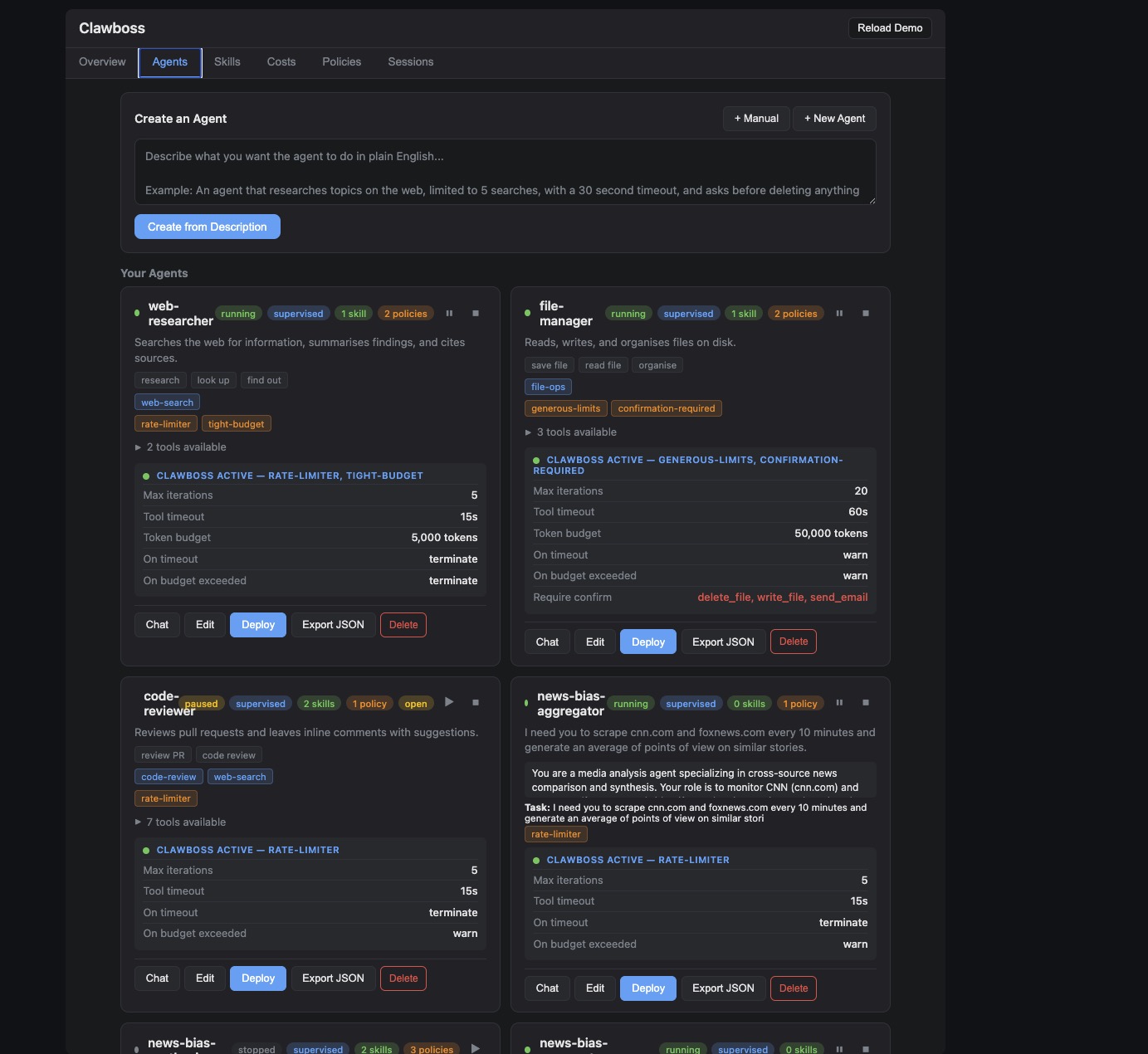
Open dashboard.html in a browser for a full management UI:
- Agents — create, edit, deploy, and manage agents. Each agent has a system prompt, task, assigned skills, policies, budget overrides, and an optional POML pipeline. Agents persist to localStorage across refreshes.
- LLM-powered agent builder — describe what you want in plain English. Claude generates a system prompt, picks the right skills and policies, sets a schedule, suggests budgets, and creates a multi-step pipeline — all auto-applied. Hit "Refine" to iterate on the prompt.
- Live chat — open a conversation with any agent directly from the dashboard. Messages go through a real LLM with full agenthandler supervision (budgets, iterations, timeouts, circuit breakers). Tool calls are visible in the chat.
- Deploy — click Deploy on an agent card to create a supervised session and auto-run the agent's task. The chat panel opens and shows the agent working.
- Skills — define reusable capabilities (tool collections) and assign them to agents
- Pipeline editor — visual step builder with drag-to-reorder, or describe the pipeline in natural language and let Claude generate the POML. Toggle between visual and raw POML views.
- Budget overrides — set token budget, dollar budget, max iterations, and tool timeout directly on each agent. Values override assigned policies. Live cost estimates update as you type.
- Sessions — live view of running agent sessions from the REST API, with pause/resume/stop controls, budget usage, and audit logs. Updates in real time via WebSocket.
- Approvals — pending tool approvals show as yellow cards with Approve/Deny buttons
- Costs — track spend, set budgets with hard stops, view usage over time
- Policies — see all active supervision rules at a glance
The Sessions tab connects to the REST control plane (uvicorn agenthandler.server:app) and shows real-time session data. Agent cards show live status and controls work against the real API. The LLM features (prompt generation, chat, pipeline generation) require a backend with an LLM API key — use Artemis or provide your own /chat and /generate-prompt endpoints.
What it does
| Feature | What it prevents |
|---|---|
| Tool timeout | A single tool call hanging forever |
| Token budget | Runaway LLM costs blowing through your budget |
| Iteration limit | Agent loops that never converge |
| Circuit breaker | Hammering a tool that keeps failing |
| Dead man's switch | Agent going silent (no activity for N seconds) |
| Confirmation gates | Dangerous tools running without human approval |
| Audit log | Not knowing what your agent did |
| Privacy shielding | PII leaking through tool calls to LLMs or APIs |
| Observability + cost attribution | No visibility into tool latency, error rates, or real dollar cost per agent/session/model |
| Context compression | Agent forgetting its instructions mid-conversation |
| Tool scoping | Agents calling tools with dangerous arguments |
| Durable sessions | Agent dies mid-task, loses all progress |
| Crash loop protection | Agent keeps crashing and restarting forever |
| 16 guardrails | No layered safety — rule-based + LLM-backed checks for every tool call |
| Reflection loops | Agents looping without thinking about whether they're making progress |
| Session replay | No way to reconstruct what an agent did after the fact |
| Streaming inputs | No way to react to real-time events (Kafka/Kinesis/Redis) |
| Triggers & scheduling | No way to run agents on schedule or on data events |
| Pipeline orchestration | No structured way to chain tool calls |
| REST control plane | No way to pause/resume/stop agents remotely |
Works with any agent framework
AgentHandler doesn't care what framework you use. It supervises tool calls — any async or sync callable. If your agent calls tools, AgentHandler can wrap them.
# OpenAI Agents SDK? Wrap your tools.
# Claude Agent SDK? Wrap your tools.
# Mastra? Wrap your tools.
# LangChain / CrewAI? Wrap your tools.
# MCP server? Built-in (see below).
# Custom loop? Wrap your tools.

result = await supervisor.call("my_tool", my_tool_fn, **kwargs)
Tool scoping
Scopes are policies that validate tool arguments before execution. Instead of just "can this agent call write_file?" you control "can this agent call write_file with this path?"
policy = Policy.from_dict({
    "tool_scopes": [
        {
            "tool_name": "write_file",
            "rules": [
                {"param": "path", "constraint": "allow", "values": ["/tmp/*", "/home/user/output/*"]},
            ],
        },
        {
            "tool_name": "send_email",
            "rules": [
                {"param": "recipient", "constraint": "allow", "values": ["*@mycompany.com"]},
            ],
        },
        {
            "tool_name": "web_search",
            "rules": [
                {"param": "query", "constraint": "block", "values": ["internal", "confidential"]},
            ],
            "max_calls_per_minute": 10,
        },
    ],
})
Scopes are just another type of policy. Assign them to agents the same way — a scope-only policy has zero supervision fields and one or more tool scope rules. Stack them with budget and rate-limit policies on the same agent.
Constraint types:
- allow — parameter must match at least one pattern (glob with
*and?) - block — parameter must NOT match any pattern
- match — parameter must match at least one regex
Context compression
Long-running agents drift. They forget their original instructions, blow past constraints, and hallucinate prior context. AgentHandler solves this with supervision-anchored compression — a novel approach that only works because you have a supervision layer.
The key insight: supervised agents can compress more aggressively than unsupervised ones. Safety-critical state (policies, budgets, circuit breakers) is enforced by the supervisor, not by the LLM's memory. So you never need to keep that in context — it's reconstructed fresh every turn.
from agenthandler import Supervisor, Policy
from agenthandler.context import ContextWindow

supervisor = Supervisor(Policy(max_iterations=10, token_budget=10000))
ctx = ContextWindow(supervisor, max_recent_turns=10, skill_name="research")

# Add turns as the conversation progresses
ctx.add_turn("user", "Search for quantum computing breakthroughs")
ctx.add_turn("assistant", "Searching...", tool_calls=[...])

# Get the full context for your LLM prompt
prompt = ctx.to_prompt()

# When context gets long, compress older turns
result = await ctx.compress()
prompt = result.to_prompt()
The context has three zones:
| Zone | What it contains | Fidelity |
|---|---|---|
| Anchored state | Budget, circuit breakers, policies, confirmed tools | Always fresh from supervisor |
| Compressed history | Older turns summarized by tool calls and snippets | Lossy but safe |
| Recent turns | Last N turns | Full fidelity |
The anchored state is never compressed — it's rebuilt from the supervisor's live state every turn. Even if the LLM "forgets" its budget limit, the supervisor still enforces it. Bring your own LLM summarizer for richer compression, or use the built-in audit-based extraction.
Pipeline orchestration
Chain tool calls into supervised sequential pipelines. Output flows from one step to the next — every step goes through full AgentHandler supervision (timeouts, budgets, circuit breakers, PII redaction, approvals).
from agenthandler import Pipeline, SessionManager, MemoryStore

store = MemoryStore()
mgr = SessionManager(store)

result = await (
    Pipeline(mgr, "researcher", policy_dict={"max_iterations": 10, "token_budget": 50000})
    .add_step("web_search", search_fn, query="quantum computing")
    .add_step("summarize", summarize_fn)
    .add_step("write_report", write_fn, title="Research Report")
    .run()
)

print(result.completed)     # True
print(result.final_output)  # The report
print(result.total_duration_ms)
Pipelines stop early if a step fails, the budget is exceeded, or a tool needs approval. Each step is recorded in the observer, audit trail, and session payload.
Build pipelines from natural language
Describe what you want in plain English. The LLM generates POML, which gets parsed into an executable pipeline.
from agenthandler import PipelineBuilder

# Auto-discover schema so the LLM writes correct SQL
schema = await sql.discover_schema()
builder = PipelineBuilder(my_llm, available_tools, mgr, db_schema=schema)

pipeline = await builder.create(
    "Check the alerts table. If there are more than 10 critical alerts, "
    "escalate to the on-call team. Otherwise log that everything is fine."
)
result = await pipeline.run()
The intermediate POML is human-readable, editable, and version-controllable. Condition expressions use an AST-based evaluator (no eval()) — safe against injection even with untrusted POML inputs:
<pipeline>
  <step tool="sql.query">
    SELECT count(*) as cnt FROM alerts WHERE severity='critical'
  </step>
  <threshold key="rows.0.cnt" value="10">
    <above tool="escalate">Notify on-call team</above>
    <below tool="log_ok">Log all clear</below>
  </threshold>
</pipeline>
You can also generate just the POML for review, then parse and run it:
poml = await builder.create_poml("Check alerts and escalate if critical")
# Review/edit the POML...
pipeline = parse_pipeline_poml(poml, tools, mgr, "agent-1", policy)
result = await pipeline.run()
Refine with feedback:
updated_poml = await builder.refine(poml, "Add an email notification step at the end")
Conditional routing
Add branching logic — route to different steps based on the previous output:
result = await (
    Pipeline(mgr, "monitor", policy)
    .add_step("check_alerts", sql.query, sql="SELECT count(*) as cnt FROM alerts")
    .add_condition(
        lambda output: output["rows"][0]["cnt"] > 10,
        then_step=("escalate", escalate_fn),
        else_step=("log_ok", log_fn),
    )
    .run()
)
Or use the threshold shorthand:
pipeline.add_threshold(
    key="rows.0.cnt",     # dot-notation path into previous output
    threshold=10,
    above_step=("escalate", escalate_fn),
    below_step=("log_ok", log_fn),  # or None to skip
)
Database connectors
Query SQL and NoSQL databases as supervised tool calls. Results flow through PII redaction, audit logging, and observability like any other tool.
from agenthandler.connectors import SqlConnector

sql = SqlConnector("sqlite:///data.db")  # also: postgresql://, mysql://

# In a pipeline
result = await (
    Pipeline(mgr, "analyst", policy)
    .add_step("get_orders", sql.query, sql="SELECT * FROM orders")
    .add_step("analyze", analyze_fn)
    .add_step("report", write_fn)
    .run()
)
Read-only by default — SqlConnector("...", allow_write=True) to enable writes. Supports parameterized queries and configurable max_rows.
Also ships MongoConnector for MongoDB (find, insert).
Schema auto-discovery
Connectors introspect the database and expose the schema to the LLM so it writes correct SQL:
sql = SqlConnector("sqlite:///data.db")
schema = await sql.discover_schema()
# {"tables": [{"name": "orders", "columns": [{"name": "id", "type": "INTEGER", "pk": true}, ...], "row_count": 1500}]}

# Human-readable format for prompts
print(sql.schema_to_text(schema))
# Table: orders (1500 rows)
#   - id INTEGER (PK)
#   - product TEXT
#   - amount REAL
When using PipelineBuilder, pass the schema and the LLM sees the actual tables:
schema = await sql.discover_schema()
builder = PipelineBuilder(my_llm, tools, mgr, db_schema=schema)
pipeline = await builder.create("Show me total revenue by region")
# LLM writes: SELECT region, sum(amount) FROM orders GROUP BY region
The REST endpoint GET /pipelines/schema returns the schema for all registered connectors. The dashboard shows it in the pipeline editor.
Reflection loops (agents that actually think)
Long-duration agents don't just loop run() forever. They think → act → observe → reflect → think again. Each phase is its own LLM call, each phase is audited, and the reflection output feeds into the next think phase.
from agenthandler import ReflectionLoop, SessionManager, MemoryStore

mgr = SessionManager(MemoryStore())

loop = ReflectionLoop(
    manager=mgr,
    agent_id="research-agent",
    goal="Write a report on quantum computing in 2026",
    llm=my_llm,
    tools={"search": search_fn, "take_notes": notes_fn, "write": write_fn},
)

result = await loop.run(max_cycles=20)
print(result.final_answer)
print(result.cycles_used)
for c in result.cycles:
    print(f"  {c.thought} → {c.tool_called} → {c.reflection}")
Each cycle is fully supervised. Guardrails apply. Crashes are recoverable. Every reflection is in the audit log. This is what distinguishes "agent ran for 72 hours doing useful work" from "agent ran in circles for 72 hours."
See examples/long_running_agent.py for a full reference implementation.
Session replay
Every session's audit log is a complete record of what the agent did. SessionReplay reconstructs the timeline step by step — every tool call, every decision, every guardrail check, every state change.
from agenthandler import SessionReplay

replay = SessionReplay(mgr, session_id)
summary = replay.summary()
print(f"{summary.total_tool_calls} calls over {summary.duration_ms}ms")
print(f"Unique tools: {summary.unique_tools}")

# Walk through the timeline
for frame in replay.frames():
    print(frame.summary)

# Jump to a specific point
state_at_cycle_10 = replay.state_at(frame_index=10)

# Filter to just tool calls
tool_frames = replay.filter(phase="tool_call", outcome="allowed")
Available via REST at GET /sessions/{id}/replay. No new storage — it's built from the audit log you already have.
LLM decisions (agents that actually decide)
Rule-based threshold routing is fine for known conditions. For agents that need to interpret input and decide what to do, use add_llm_decision() — a pipeline step that calls your LLM with a prompt template, parses structured JSON output, and feeds it to the next step for routing.
pipeline = (
    Pipeline(mgr, "fraud-detector", policy)
    .add_step("enrich", enrich_fn)
    .add_llm_decision(
        my_llm,
        prompt_template="""
        Transaction: {input}
        Historical context: {context}

        Decide the action. Return JSON:
        {"action": "block|approve|escalate", "reason": "..."}
        """,
        include_context=True,  # passes session payload as {context}
    )
    .add_condition(
        lambda out: out["action"] == "block",
        then_step=("block", block_fn),
        else_step=("approve", approve_fn),
    )
)

await pipeline.run(initial_input=stream_message)
The LLM sees the previous step's output as {input} and (optionally) the session payload as {context}. It returns structured JSON, which the pipeline routes on. Bring your own LLM — same pattern as SkillBuilder.
Stateful context with with_context()
Stream agents that need to see history — the last N messages, running averages, user state — can reuse a single session across multiple pipeline runs. The session payload accumulates automatically.
# Start a long-lived session
sid = mgr.start("stream-agent", policy)

# Each stream message runs through the pipeline with shared context
async def on_message(msg):
    return await (
        Pipeline(mgr, "stream-agent", policy)
        .with_context(sid)          # reuse session, don't auto-stop
        .add_step("enrich", enrich_fn)
        .add_llm_decision(my_llm, prompt, include_context=True)
        .add_condition(...)
        .run(initial_input=msg)     # stream message flows into first step
    )

kafka = KafkaStreamConnector(..., on_message=on_message)
await kafka.start()
The pipeline keeps a rolling history (last 20 runs) in session.payload["history"], visible to LLM decision steps via {context}. Each message's decision builds on the accumulated state.
Streaming inputs
Subscribe agents to real-time event streams. Each message fires the agent pipeline with the message payload as input.
from agenthandler import KafkaStreamConnector

async def on_message(payload):
    # Run pipeline with the message as input
    return await pipeline.run()

kafka = KafkaStreamConnector(
    bootstrap_servers="localhost:9092",
    topic="agent-events",
    group_id="my-agent",
    on_message=on_message,
)
await kafka.start()
Three streaming backends — install only what you need:
| Connector | Install | Use for |
|---|---|---|
KafkaStreamConnector |
pip install agenthandler[kafka] |
Self-hosted, enterprise, replay, consumer groups |
KinesisStreamConnector |
pip install agenthandler[kinesis] |
AWS-native event streams |
RedisStreamConnector |
pip install agenthandler[redis] |
Simpler deployments, already-have-Redis |
Or install all three: pip install agenthandler[streams]
All three use at-least-once delivery — messages are acknowledged only after the handler completes successfully. If the agent crashes mid-processing, the message is redelivered.
Triggers and scheduling
Run pipelines on a schedule, on webhook, or when data changes.
from agenthandler import Scheduler, WebhookTrigger

scheduler = Scheduler()

# Every 15 minutes
scheduler.add_interval("check-alerts", pipeline.run, minutes=15)

# Cron schedule (every day at 9am)
scheduler.add_cron("morning-report", pipeline.run, cron="0 9 * * *")

# When a database condition fires
scheduler.add_db_watch(
    "new-orders",
    pipeline.run,
    connector=sql,
    query="SELECT count(*) as cnt FROM orders WHERE processed=false",
    condition=lambda r: r["rows"][0]["cnt"] > 0,
    poll_seconds=60,
)

scheduler.start()  # runs in background thread
Webhooks fire when an HTTP endpoint is called:
curl -X POST http://localhost:8000/triggers/deploy-notify/fire
REST endpoints:
| Method | Path | Description |
|---|---|---|
| GET | /triggers |
List all triggers |
| GET | /triggers/history |
Trigger firing history |
| POST | /triggers/{name}/fire |
Fire a webhook trigger |
| POST | /triggers/{name}/enable |
Enable a trigger |
| POST | /triggers/{name}/disable |
Disable a trigger |
| DELETE | /triggers/{name} |
Remove a trigger |
The dashboard shows trigger mode selection in the agent creation flow — on-demand, interval, cron, webhook, or DB watch.
Durable sessions
Long-running agents survive process restarts. AgentHandler checkpoints supervisor state (iterations, token usage, circuit breaker states) to a pluggable store after every operation.
from agenthandler import SessionManager, SqliteStore

store = SqliteStore("sessions.db")  # or MemoryStore() for testing
mgr = SessionManager(store)

# Start a session
session_id = mgr.start("my-agent", {
    "max_iterations": 20,
    "tool_timeout": 30,
    "token_budget": 50000,
})

# Get the supervisor and use it in your agent loop
sv = mgr.get_supervisor(session_id)
result = await sv.call("web_search", search_fn, query="python async")
sv.record_tokens(1500)

# Pause — the supervisor raises AgentPaused on next call()
mgr.pause(session_id)

# Resume later (even after a crash / restart)
sv = mgr.resume(session_id)   # budget, iterations, circuit breakers all restored
result = await sv.call("web_search", search_fn, query="continue research")

# Stop when done
mgr.stop(session_id)
Pluggable storage
Implement the StateStore protocol for your own backend:
from agenthandler import StateStore, Checkpoint

class RedisStore:
    def save_checkpoint(self, checkpoint: Checkpoint) -> None: ...
    def load_checkpoint(self, session_id: str) -> Checkpoint | None: ...
    def list_sessions(self) -> list[Checkpoint]: ...
    def delete_session(self, session_id: str) -> bool: ...
Ships with SqliteStore (production default, stdlib sqlite3) and MemoryStore (testing).
Crash loop protection
If an agent keeps crashing and being resumed, max_resumes stops it from looping forever. Default is 3 — after that, the session is marked as failed with a reason.
session_id = mgr.start("my-agent", {
    "max_iterations": 10,
    "max_resumes": 5,     # allow up to 5 crash recoveries (default: 3)
})

# After 5 crashes and resumes, the next resume() raises:
# AgentHandlerError("max_resumes_exceeded", "Crash loop: resumed 5 times (limit: 5)")
# Session is automatically marked as FAILED.
Failed sessions can be restarted fresh (same policy, new session):
new_session_id = mgr.restart(session_id) # or POST /sessions/{id}/restart
The dashboard shows the failure reason on failed/stopped session cards and offers a Restart button.
Stateless sessions
Not every agent needs crash recovery. Pass stateless=True to skip auto-checkpointing — you still get supervision, audit logging, and pause/stop controls, but no disk writes on each tool call and no crash recovery.
# In-memory only — no checkpoints, no crash recovery
session_id = mgr.start("quick-agent", policy_dict, stateless=True)
Via the REST API:
curl -X POST http://localhost:8000/sessions \
  -H "Content-Type: application/json" \
  -d '{"agent_id": "quick-agent", "policy": {...}, "stateless": true}'
Stateless sessions can be paused and stopped normally. They cannot be resumed after a process restart — if the process dies, the session is gone.
REST control plane
Manage agent sessions remotely over HTTP. Optional dependency — install with:
pip install agenthandler[server]
Start the server:
uvicorn agenthandler.server:app
With API key auth:
# Pick any string as your secret — there's no signup or external service
AGENTHANDLER_API_KEY=my-secret-key uvicorn agenthandler.server:app
Clients pass the key as a Bearer token:
curl -H "Authorization: Bearer my-secret-key" http://localhost:8000/sessions
WebSocket connections pass it as a query param: ws://localhost:8000/sessions/{id}/events?token=my-secret-key
The default uvicorn agenthandler.server:app rejects all requests unless AGENTHANDLER_API_KEY or OAuth is configured. For local dev without auth, create the app in code: create_app() (no require_auth).
OAuth2 (GitHub, Google)
For production deployments, configure OAuth2 via environment variables:
AGENTHANDLER_OAUTH_PROVIDER=github \
AGENTHANDLER_OAUTH_CLIENT_ID=your-client-id \
AGENTHANDLER_OAUTH_CLIENT_SECRET=your-client-secret \
uvicorn agenthandler.server:app
This adds /auth/login (get the OAuth redirect URL), /auth/callback (exchange code for session token), and /auth/me (current user info). Session tokens are Bearer tokens — use them the same way as API keys. Supported providers: github, google.
Endpoints:
| Method | Path | Description |
|---|---|---|
| POST | /sessions |
Create a new agent session |
| GET | /sessions |
List all sessions with status |
| GET | /sessions/{id} |
Session detail (budget, checkpoint time, policy) |
| POST | /sessions/{id}/pause |
Pause an agent |
| POST | /sessions/{id}/resume |
Resume a paused agent |
| POST | /sessions/{id}/stop |
Stop an agent |
| POST | /sessions/{id}/restart |
Restart a stopped/failed agent (new session, same policy) |
| GET | /sessions/{id}/audit |
Audit log entries for this session |
| GET | /sessions/{id}/approvals |
List pending/resolved approval requests |
| POST | /sessions/{id}/approvals/{aid}/approve |
Approve a pending tool call |
| POST | /sessions/{id}/approvals/{aid}/deny |
Deny a pending tool call |
| GET | /metrics/tools |
Aggregated metrics for all tools |
| GET | /metrics/sessions/{id} |
Metrics for a specific session |
| GET | /metrics/recent |
Recent tool call log |
| WS | /sessions/{id}/events |
Stream status changes, audit, and approvals |
| GET | /pipelines/tools |
List available tools for pipeline building |
| GET | /pipelines/schema |
Auto-discovered database schema |
| POST | /pipelines/generate |
Natural language → POML (requires LLM) |
| POST | /pipelines/validate |
Validate POML and return step structure |
| POST | /pipelines/run |
Parse POML and run pipeline immediately |
| GET | /auth/login |
OAuth2 login redirect URL |
| GET | /auth/callback |
OAuth2 callback (exchange code for token) |
| GET | /auth/me |
Current authenticated user info |
# Create a session
curl -X POST http://localhost:8000/sessions \
  -H "Content-Type: application/json" \
  -d '{"agent_id": "researcher", "policy": {"max_iterations": 10, "token_budget": 50000}}'

# Pause it
curl -X POST http://localhost:8000/sessions/{id}/pause

# Check status
curl http://localhost:8000/sessions/{id}
Security model
AgentHandler is designed to supervise untrusted agent behavior. The stateful session layer enforces several invariants:
Policy is immutable and integrity-checked. The supervision policy is frozen at start() and cannot be changed by the agent. An HMAC checksum is stored alongside the policy — on resume(), the checksum is verified and the session is rejected if it doesn't match. Even if someone edits the SQLite file directly, they can't downgrade supervision without the HMAC key (configurable via AGENTHANDLER_POLICY_KEY).
Payload is untrusted. The payload field is agent-writable storage for intermediate work. It is validated for size (1 MB limit) and serializability, but its contents should be treated like user input. If your agent reads from payload after a resume, sanitize it.
Session IDs are cryptographic. 128-bit random IDs via secrets.token_hex — not guessable or enumerable.
The REST API supports API key and OAuth2 auth. Set AGENTHANDLER_API_KEY for simple Bearer token auth, or configure OAuth2 (GitHub/Google) for production. The default uvicorn agenthandler.server:app rejects all requests unless auth is configured. CORS is restricted to localhost by default.
SQLite files are owner-only. The default SqliteStore creates database files with 0600 permissions.
Audit logs survive crashes. Entries are persisted to the checkpoint store on pause() and stop(), so you don't lose the trail if the process dies.
Sessions can expire. Call SqliteStore.delete_expired(max_age_seconds) to clean up old sessions.
MCP server mode
Expose supervised tools via Model Context Protocol. Any MCP client — Claude Desktop, Claude Code, Cursor — gets governed tool access with full supervision.
pip install agenthandler[mcp]
from agenthandler import SupervisedMCPServer, UrlGuard, RecursionDetector

server = SupervisedMCPServer(
    name="my-tools",
    tools={
        "search": search_fn,
        "write": write_fn,
        "send_email": email_fn,
    },
    policy={
        "tool_timeout": 30,
        "token_budget": 50000,
        "require_confirm": ["send_email"],
    },
    pre_guardrails=[
        UrlGuard(allowlist=["*.example.com"]),
        RecursionDetector(max_repeats=3),
    ],
)

server.run()  # stdio for Claude Desktop
# server.run(transport="streamable-http")  # network mode
Every tool call through MCP goes through the Supervisor — timeouts, budgets, circuit breakers, PII redaction, guardrails, approvals, audit, cost tracking. A capability manifest is available at agenthandler://manifest.
See examples/mcp_server.py for a full working example.
Policy from config
Load policy from a dictionary (YAML, JSON, database — whatever you use):
policy = Policy.from_dict({
    "max_iterations": 10,
    "tool_timeout": 30,
    "token_budget": 50000,
    "on_timeout": "return_error",
    "on_budget_exceeded": "respond_with_best_effort",
    "require_confirm": ["delete_file", "send_email"],
})
Sync support
No event loop? No problem:
result = supervisor.call_sync("calculator", my_sync_fn, x=42)
Audit logging
Every supervised action is recorded. Write to JSONL, stdout, or implement your own sink:
from agenthandler import Supervisor, Policy, AuditLog, JsonlAuditSink

# Log to file
sink = JsonlAuditSink.file("audit.jsonl")
audit = AuditLog("request-123", [sink])
supervisor = Supervisor(policy, audit)

# Or log to stdout
sink = JsonlAuditSink.stdout()
Custom sink — implement the AuditSink interface:
from agenthandler import AuditSink, AuditEntry

class MyDatabaseSink(AuditSink):
    def write(self, entry: AuditEntry) -> None:
        db.insert(entry.to_dict())
Guardrails
AgentHandler ships 16 guardrails that hook into every supervised tool call. Eight are deterministic (rule-based, fast, zero-overhead when disabled). Eight are LLM-backed (bring-your-own-LLM, opt-in).
from agenthandler import (
    SessionManager, UrlGuard, SchemaValidator, RecursionDetector,
    PromptInjectionDetector, IntentDriftDetector,
)

mgr = SessionManager(
    store,
    pre_guardrails=[
        UrlGuard(allowlist=["*.mycompany.com"]),
        RecursionDetector(max_repeats=3),
        PromptInjectionDetector(llm=my_llm),
        IntentDriftDetector(llm=my_llm),
    ],
    post_guardrails=[
        SchemaValidator({"search": {"type": "object", "required": ["rows"]}}),
    ],
)
Deterministic (rule-based)
| Guardrail | What it does |
|---|---|
SchemaValidator |
Enforce JSON schema on tool outputs — catches broken tools, corrupted data, hallucinations |
CategoryRateLimit |
Rate limit across tool categories (e.g., all "network" tools combined ≤ 100/min) |
RecursionDetector |
Detect tool call loops — block if same (tool, args) repeats within a window |
IdempotencyGuard |
Cache results of mutating tool calls (send_email, charge_card) to dedupe retries |
ResourceQuota |
CPU time and memory caps per session |
OutputLengthLimit |
Block outputs exceeding size limit — prevents context blowup attacks |
UrlGuard |
Allowlist / blocklist URLs and domains for web tools |
ActiveHours |
Time-of-day and day-of-week restrictions (compliance) |
LLM-backed (bring-your-own-LLM)
| Guardrail | What it does |
|---|---|
PromptInjectionDetector |
Classifier for jailbreak attempts, instruction overrides, role hijacks |
SafetyClassifier |
Scan outputs for toxic content, hate, harassment, bias, illegal activities |
IntentDriftDetector |
Compare action to original task — flag agents that wandered off |
SemanticPiiRedactor |
NLP-based PII detection (spaCy NER) — catches names, locations, orgs that regex misses |
AnomalyScorer |
Score tool calls against session history — flag unusual behavior |
GoalVerifier |
Before risky actions, verify alignment with stated goal |
ExplanationRequired |
Force the agent to generate a written justification for risky calls (audit log) |
EnsembleDecision |
Require multiple LLMs to agree before allowing critical actions |
How guardrails work
- Pre-call guardrails run before the tool executes. Can block the call or replace the result (e.g.,
IdempotencyGuardreturns cached output). - Post-call guardrails run after the tool returns. Can block the output from reaching the agent, or modify it (e.g.,
SemanticPiiRedactorreplaces with redacted text). - All guardrails return a
GuardrailResult(allowed, reason, replacement_output)— uniform interface. - LLM-backed guardrails use the same bring-your-own-LLM pattern as
SkillBuilderandPipelineBuilder. - Everything is opt-in. No guardrails configured = zero overhead.
Privacy shielding (PII redaction)
Automatically detect and mask sensitive data flowing through tool calls. Configure which categories to redact in the policy:
policy = Policy(
    redact=["email", "phone", "ssn", "api_key", "credit_card", "ip_address"],
    redact_direction="both",  # "inbound", "outbound", or "both"
)
Outbound: Before a tool executes, args are scanned and PII is replaced with placeholders ([EMAIL], [PHONE], etc.) so sensitive data never reaches external services.
Inbound: After a tool returns, output is scanned before the agent sees it — preventing PII from web scrapes or API responses from leaking into the LLM context.
# Standalone usage
from agenthandler import Redactor

r = Redactor(categories=["email", "phone"])
result = r.redact("Contact bob@example.com or call 555-123-4567")
print(result.text)  # "Contact [EMAIL] or call [PHONE]"
Categories: email, phone, ssn, credit_card, api_key, ip_address, national_id, iban, passport. Pass redact=None to enable all.
Includes international patterns — UK/EU phone numbers, UK National Insurance Numbers, German Tax IDs, IBANs, and passport numbers.
For context-dependent PII (names, addresses, organizations), enable optional NLP augmentation:
r = Redactor(use_nlp=True)  # requires: pip install spacy && python -m spacy download en_core_web_sm
result = r.redact("John Smith lives in London")
# "John Smith" → [PERSON], "London" → [LOCATION]
Regex is always-on (fast, zero deps). NLP is opt-in (slower, needs spaCy).
Confirmation gates (human-in-the-loop approval)
Mark tools as requiring human approval before execution. When an agent tries to call a confirmed tool, the call is queued instead of blocked — a human can review and approve or deny it via the dashboard, REST API, or any WebSocket client.
policy = Policy(
    require_confirm=["delete_file", "send_email"],
)
When the agent calls delete_file, instead of executing:
- The Supervisor returns
SupervisedResult(error=AgentHandlerError("approval_pending"))with anapproval_id - The approval appears in the dashboard (yellow notification) and on the WebSocket events stream
- A human reviews and clicks Approve or Deny (or calls the REST endpoint)
- The agent calls
sv.execute_approved(approval_id, fn)to run the approved tool
# Agent calls a dangerous tool
result = await sv.call("delete_file", delete_fn, path="/data")
if result.error and result.error.kind == "approval_pending":
    approval_id = result.error.details["approval_id"]
    # ... wait for human to approve via dashboard/API ...
    result = await sv.execute_approved(approval_id, delete_fn)
REST endpoints:
| Method | Path | Description |
|---|---|---|
| GET | /sessions/{id}/approvals |
List all approvals for a session |
| POST | /sessions/{id}/approvals/{aid}/approve |
Approve a pending tool call |
| POST | /sessions/{id}/approvals/{aid}/deny |
Deny (with optional reason) |
WebSocket clients receive {"type": "approval_required", "data": {...}} events for real-time notifications. This is the hook for Slack/email integrations — listen on the WebSocket and forward to your messaging tool.
Circuit breaker
Per-tool circuit breakers stop your agent from hammering a broken tool:
CLOSED    ->  failures < threshold, calls pass through
OPEN      ->  failures >= threshold, calls blocked
HALF_OPEN ->  after reset period, allow one test call
policy = Policy(
    circuit_breaker_threshold=3,   # open after 3 consecutive failures
    circuit_breaker_reset=60.0,    # try again after 60 seconds
)
Failure handlers
Control what happens when limits are hit:
from agenthandler import Policy, OnFailure, Action

policy = Policy(
    on_timeout=OnFailure(Action.RETURN_ERROR),
    on_budget_exceeded=OnFailure(Action.RESPOND_WITH_BEST_EFFORT),
    on_max_iterations=OnFailure(Action.RETURN_ERROR, retries=2),
)
Actions:
RETURN_ERROR— stop and return the errorRESPOND_WITH_BEST_EFFORT— return what you have so farKILL— hard stop, no graceful handling
Skill Builder
Create skills from natural language. Bring your own LLM — pass any async function that takes a prompt and returns text.
from agenthandler import SkillBuilder, SkillStore

# Bring your own LLM (OpenAI, Anthropic, local, whatever)
async def my_llm(prompt: str) -> str:
    response = await openai.chat.completions.create(
        model="gpt-4", messages=[{"role": "user", "content": prompt}]
    )
    return response.choices[0].message.content

builder = SkillBuilder(my_llm)

# Describe what you want in plain English
skill = await builder.create(
    "A skill that researches topics on the web, limited to 5 searches, "
    "with a 30 second timeout, and asks before deleting anything"
)

# Inspect what was generated
print(skill.name)           # "web_research"
print(skill.supervision)    # {"max_iterations": 5, "tool_timeout": 30, ...}
print(skill.instructions)   # ["Always cite sources", ...]

# Refine it with feedback
skill = await builder.refine(skill, "Add a rule about preferring recent sources")

# Save it
store = SkillStore("~/.agenthandler/skills")
store.save(skill)
Managing skills
store = SkillStore("~/.agenthandler/skills")

# List all skills
for s in store.list():
    print(f"{s['name']}: {s['description']}")

# Load a full skill
skill = store.get("web_research")

# Delete
store.delete("web_research")

# Export to POML format (for frameworks that use it)
poml_text = store.export_poml("web_research")

# Export all skills as .poml files
store.export_all_poml("./poml_output/")
Skill format
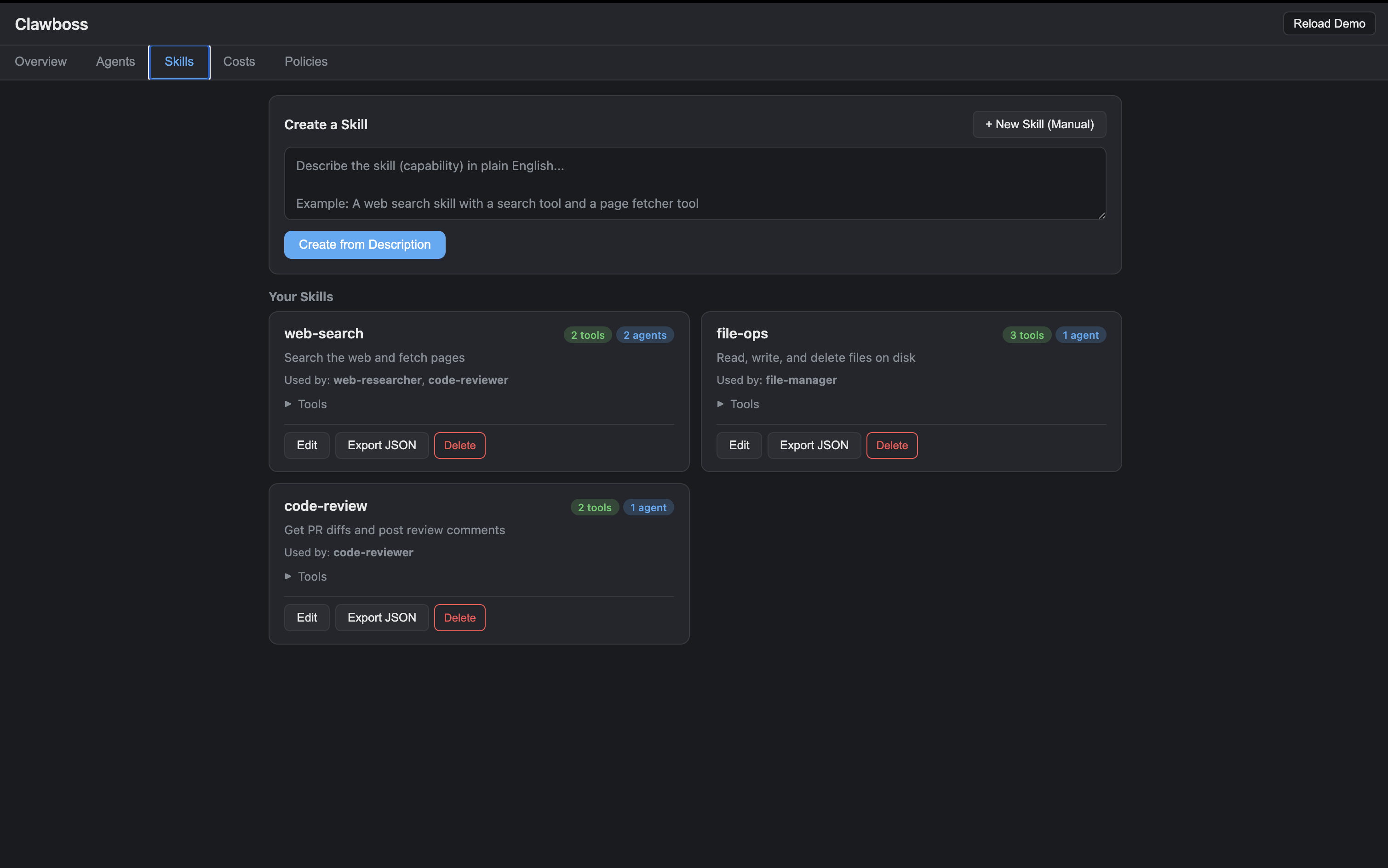
Skills are stored as JSON and can be exported to POML. The format includes:
- name, description, triggers — identity and activation
- role, task, instructions, examples — what the agent should do
- tools — what tools are available (with parameter schemas)
- supervision — agenthandler limits (maps directly to
Policy.from_dict())
API
Policy
Dataclass with all configuration. Every field has a sensible default.
Supervisor(policy, audit=None, store=None, session_id=None, agent_id=None)
call(tool_name, fn, **kwargs)— supervise an async tool callcall_sync(tool_name, fn, **kwargs)— supervise a sync tool callexecute_approved(approval_id, fn)— run a previously-approved tool callrecord_iteration()— record an agent loop iterationrecord_tokens(n)— record token usagebudget()— get currentBudgetSnapshotfinish()— mark request complete, return final snapshotto_checkpoint_data()— export state for persistencerestore_from_checkpoint(checkpoint)— rebuild from a checkpoint
SupervisedResult
output— the tool's return value (if succeeded)error—AgentHandlerError(if failed)succeeded— boolduration_ms— how long the call tookbudget—BudgetSnapshotat time of completionuser_message()— always returns a string (output or error message)
OpenClawBridge(policy, audit, host, port)
register_tool(tool, fn)— register a tool with its async callableregister_skill(skill, tool_impls)— register all tools from a skillserve()— start the bridge (blocking)serve_background()— start the bridge in a background threadshutdown()— stop the bridge
SkillBuilder(llm)
create(description)— generate a skill from natural languagerefine(skill, feedback)— modify a skill with natural language feedback
SkillStore(directory)
save(skill)— save a skill to diskget(name)— load a skill by namelist()— list all skills (name + description)delete(name)— delete a skillexport_poml(name)— export a skill as POML textexport_all_poml(output_dir)— export all skills as.pomlfiles
ToolScope
tool_name— name of the tool this scope applies torules— list ofScopeRuleobjectsmax_calls_per_minute— optional rate limit for this specific tool
ScopeRule
param— parameter name to constrainconstraint—"allow","block", or"match"values— list of patterns or regexes to check against
Skill
to_dict()/from_dict(d)— serialize/deserializeto_poml()— render as POML formatto_json()— serialize to JSON string
SessionManager(store)
start(agent_id, policy_dict, payload, stateless=False)— create a new session, returnssession_idpause(session_id)— pause (supervisor raisesAgentPausedon next call)resume(session_id)— rehydrate supervisor from last checkpointstop(session_id)— stop and finalizerestart(session_id)— restart a stopped/failed session (new session, same policy)status(session_id)— get current checkpointlist_sessions()— list all sessionsget_supervisor(session_id)— get the active supervisorget_audit_entries(session_id)— get audit log entriesupdate_payload(session_id, payload)— update opaque agent payload
StateStore (protocol)
save_checkpoint(checkpoint)— persist a checkpointload_checkpoint(session_id)— load by ID (returnsNoneif missing)list_sessions()— list all checkpointsdelete_session(session_id)— delete a checkpoint
Implementations: SqliteStore(db_path), MemoryStore()
Redactor(categories=None, use_nlp=False)
redact(text)— redact PII from a string, returnsRedactionResultredact_dict(d)— redact all string values in a dict
Observer(otlp_endpoint=None)
record_tool_call(tool_name, ...)— record a tool call observationtool_summary(tool_name)— aggregated metrics for one toolsession_summary(session_id)— aggregated metrics for one sessionall_tools_summary()— metrics for all toolsrecent_calls(limit=50)— recent call log
ApprovalQueue()
submit(tool_name, tool_args, session_id)— queue a tool call for approvalapprove(approval_id)— approve a pending requestdeny(approval_id, reason="")— deny a pending requestlist_pending(session_id=None)— list pending approvalslist_all(session_id=None)— list all approvals
Pipeline(manager, agent_id, policy_dict=None)
add_step(tool_name, fn, **kwargs)— add a step (returns self for chaining)add_condition(predicate, then_step, else_step)— conditional branchadd_threshold(key, threshold, above_step, below_step)— threshold branchadd_llm_decision(llm, prompt_template, include_context=False)— LLM-backed decision step that returns structured JSONwith_context(session_id)— reuse an existing session for stateful multi-run agentsrun(initial_input=None)— execute the pipeline, optionally seeded with an initial input (e.g., a stream message)
PipelineBuilder(llm, tools, manager, db_schema=None)
create(description)— natural language to executable Pipelinecreate_poml(description)— natural language to POML text (for review)refine(current_poml, feedback)— modify POML with natural language feedback
parse_pipeline_poml(poml_text, tools, manager, agent_id, policy_dict)
Parses a POML document with <pipeline> tags into a Pipeline object.
SqlConnector(connection_string, allow_write=False, max_rows=1000)
query(sql, params)— execute a query, returns{"rows": [...], "row_count": N}execute(sql, params)— execute a write statementdiscover_schema()— introspect tables, columns, types, row countsschema_to_text(schema)— format schema as human-readable text- Supports:
sqlite:///path,postgresql://...,mysql://...
MongoConnector(uri, database, allow_write=False)
find(collection, filter, projection, sort, limit)— query documentsinsert(collection, documents)— insert documents (requiresallow_write)discover_schema()— sample documents to infer field structures
PipelineResult
completed— True if all steps succeededsteps— list ofStepResultobjectsfinal_output— output of the last successful steptotal_duration_ms— sum of all step durationsstopped_at— step name where pipeline stopped (on failure)error— error description (on failure)
Observability and cost attribution
Structured telemetry for agent behavior — latency, success rates, token counts, dollar cost, per tool, per session, per agent, per model. Optional OpenTelemetry export for Datadog, Grafana, Honeycomb, etc.
from agenthandler import Observer, PricingTable

# PricingTable.default() ships with common models
obs = Observer(pricing=PricingTable.default())

obs.record_tool_call(
    "llm_call",
    duration_ms=120,
    input_tokens=1000,
    output_tokens=500,
    model="claude-sonnet-4-6",
)
print(obs.tool_summary("llm_call"))
# {"calls": 1, "total_cost_usd": 0.0105, ...}
When using SessionManager, the observer is wired in automatically with default pricing — every tool call is recorded. Tools that report {"input_tokens": N, "output_tokens": M, "model": "..."} in their output get real dollar attribution:
mgr = SessionManager(store)  # defaults to PricingTable.default()

async def llm_call(prompt: str) -> dict:
    # Your LLM wrapper
    response = await client.chat(...)
    return {
        "result": response.text,
        "input_tokens": response.usage.input_tokens,
        "output_tokens": response.usage.output_tokens,
        "model": "claude-sonnet-4-6",
    }

# Cost attribution just works
await sv.call("llm_call", llm_call, prompt="...")
mgr.observer.cost_summary()
# {"total_cost_usd": 0.0105, "by_agent": [...], "by_model": [...]}
Built-in pricing for Anthropic (Claude Opus/Sonnet/Haiku), OpenAI (GPT-4o, GPT-4o-mini, GPT-4 Turbo), and Google (Gemini Pro/Flash). Add your own via pricing.set_model("my-model", 1.0, 2.0).
The dashboard Costs tab reads from this data live — real spend by agent, session, tool, and model, updated as your agents run.
REST endpoints:
| Method | Path | Description |
|---|---|---|
| GET | /metrics/tools |
Aggregated metrics for all tools |
| GET | /metrics/sessions/{id} |
Metrics for a specific session |
| GET | /metrics/recent |
Recent tool call log |
| GET | /metrics/costs |
Full cost breakdown (by agent, session, tool, model) |
| GET | /metrics/pricing |
Current pricing table |
OpenTelemetry export (optional — requires opentelemetry-sdk):
obs = Observer(otlp_endpoint="http://localhost:4317")
# Spans and metrics exported automatically to your collector
Contributing
# Install dev dependencies
pip install -e ".[dev]"

# Run tests
pytest tests/ -v

# Lint
ruff check .
ruff format --check .

# Type check
mypy agenthandler/
License
Apache 2.0
1 maintainer

Metadata
1 maintainer
Release files for agenthandler 0.93.0
For a detailed explanation of source distributions (sdists) and built distributions (wheels), please see the package formats documentation.
Source distribution (sdist)
| File | Size | Uploaded | |
|---|---|---|---|
| agenthandler-0.93.0.tar.gz | 243.5 kB | Details |
Built distribution (wheel)
| File | Interpreter | ABI | Platform | Reset |
|---|---|---|---|---|
| agenthandler-0.93.0-py3-none-any.whl | Python 3 | none | any | Details |
Total release size: 373.4 kB
Release files / agenthandler-0.93.0.tar.gz
| Download URL | agenthandler-0.93.0.tar.gz |
|---|---|
| Size | 243.5 kB |
| Tags | Source |
|
SHA-256 checksum How to use checksums |
f1b9151faaa99c664662176777494fc1f9d0b4165e833789c26ddf69f53b5fb3
|
|
BLAKE2b-256 checksum How to use checksums |
1b73d237b2d60167b181096b3cfe3887b5bffad0352b8706a73f936a518a853b
|
| Upload date | |
|
Uploaded using Trusted Publishing? What is trusted publishing? |
No |
| Uploaded via |
twine/6.2.0 CPython/3.9.6
|
Release files / agenthandler-0.93.0-py3-none-any.whl
| Download URL | agenthandler-0.93.0-py3-none-any.whl |
|---|---|
| Size | 129.9 kB |
| Tags | Python 3 |
|
SHA-256 checksum How to use checksums |
cc20993bfc45175b85cbf8fe9e0ce050b8b36fe2da3720445f69a9b179bfa2a7
|
|
BLAKE2b-256 checksum How to use checksums |
d43ac7ac98351db9e16fcfeb71c6ccb2978e135bed112ceae3e8e7116ab2bfc8
|
| Upload date | |
|
Uploaded using Trusted Publishing? What is trusted publishing? |
No |
| Uploaded via |
twine/6.2.0 CPython/3.9.6
|













