
agentic-preflight



Check your coding agent's work before a push.
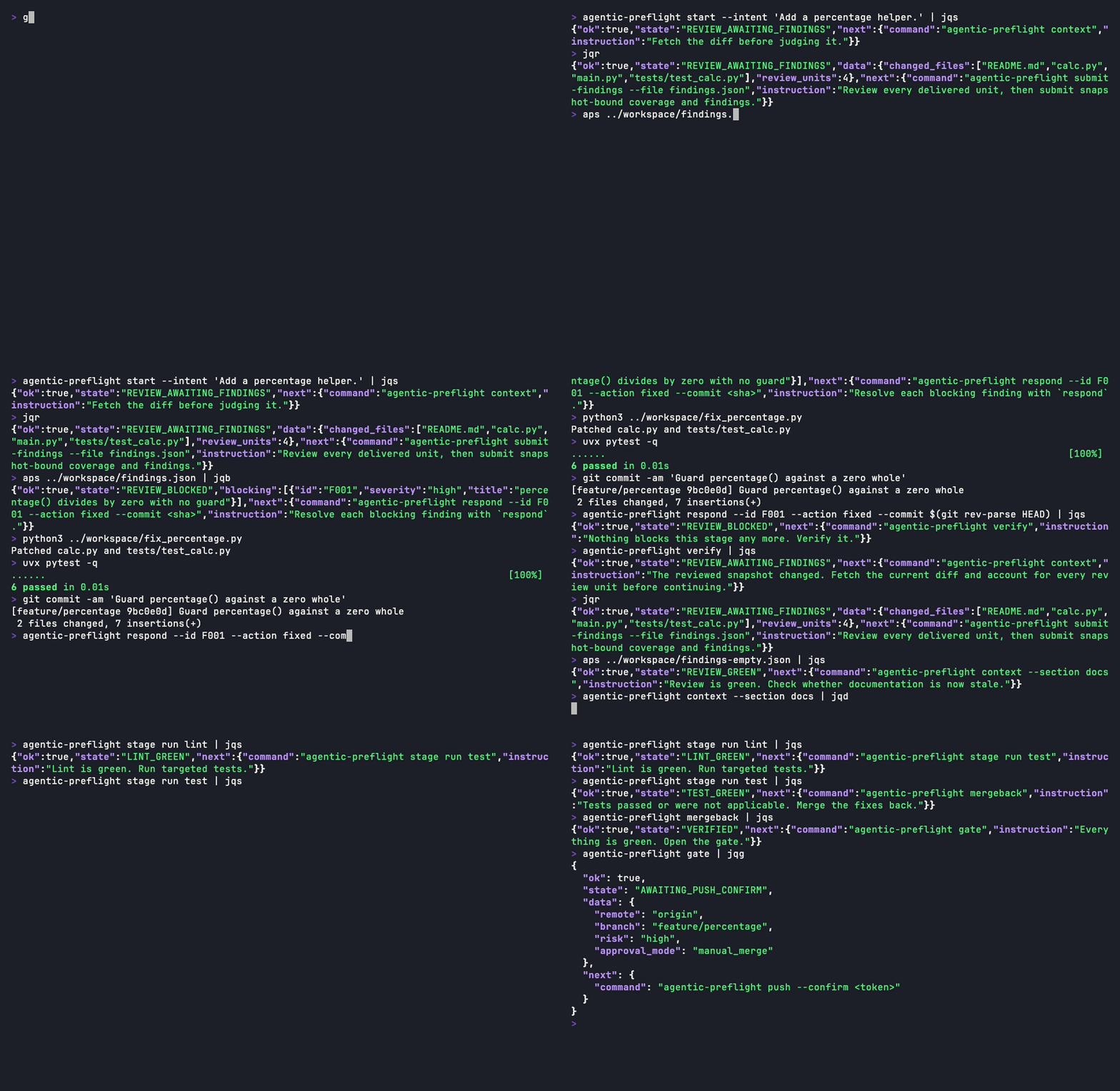
Agentic Preflight checks a coding agent's work before the agent pushes a commit. It works with Codex, Claude Code, Cursor, OpenCode, and Amp. It guides your coding agent through review, documentation, lint, and test stages. It records the results for the exact commit. The pre-push hook blocks a normal push if this evidence is missing or no longer valid.
- Use your current agent. The core CLI calls no model and needs no model API key.
- Inspect each stage. The run record includes skipped stages, failures, findings, and approvals.
- Keep results with their inputs. A changed commit, configuration, or intent cannot use unrelated evidence.
The dogfooding case study found the same failure in three independent codebases: a green result stayed valid after an input that shaped it changed. Green evidence must bind every decision-making input, including code, configuration, intent, model, and prompts. The study also describes the limits of its evidence.
The problem
A coding agent that reports "tests passed" may be describing a different revision, a different configuration, or a different intent from the commit it is about to push. Nothing in a normal push connects that claim to the exact inputs that produced it. Agentic Preflight records each result with a fingerprint of those inputs and refuses the push when they no longer match.
How it fits together
flowchart LR
    A[Coding agent] --> S[Skill]
    S --> C[JSON-envelope CLI<br/>and state machine]
    C --> R[(Run store)]
    R --> N[Git-note attestation]
    N --> H[Pre-push hook]
    H --> V[CI verifier]
Design highlights
- Fingerprint contract: which inputs a result is bound to, and what invalidates it.
- Context grounding: how review is tied to the repository's own facts.
- State machine: the stages, transitions, and when a run may publish.
- Regression eval: the scripted cases that guard workflow behavior.
Quickstart
You need Git 2.38+, Python 3.11 through 3.13, and
uv.
-
Install the CLI and the integrations for your coding agents:
uv tool install agentic-preflight
agentic-preflight integrations install codex claude cursor opencode amp
Remove unused integration names from the command.
-
Initialize each repository that you want to protect:
cd your-repo
agentic-preflight init
git add .agentic-preflight.toml
git commit -m "Configure Agentic Preflight"
initwrites a configuration file with comments and installs an advisory pre-push hook. Pass--no-hookto write only the configuration file. -
Review the generated configuration before you start a run.
Setup, lint, test, and optional command-review entries execute with your user privileges.
-
Make and commit your product change.
-
Ask your coding agent to invoke
$agentic-preflightin Codex or/agentic-preflightin Claude Code.The installed skill controls the run and presents findings. It follows each command that the CLI returns.
The hook stops a push if the changed commit has not passed its run. The hook tells you how to start or resume verification. After the run passes, the agent shows the target remote, branch, commits, and risk.
The agent pushes only with your request or permission from your standing instructions.
See push and pull-request authorization.
Set [gate] mode = "manual" if only a person must run the final Git command.
The installation guide includes source installations, upgrades, project skills, other Agent Skills clients, and removal.
What Agentic Preflight adds
Agentic Preflight works with prompts, ordinary Git hooks, hosted CI, and human review. It does not replace these checks.
A prompt can ask an agent to review work and run tests. The conversation does not bind those results to a commit. Ordinary hooks run deterministic commands. Hosted CI validates code after publication.
Agentic Preflight puts these checks in an ordered workflow before a push. It records the results for the commit that passed. You can resume an interrupted workflow.
These records help in the following conditions:
- An agent reports a successful command from an earlier revision.
- A fix changes code after review or testing.
- Repository policy requires documentation review or independent review.
- A rebase changes the commit identity.
- A high-risk path requires a specified human-approval mode.
Agentic Preflight is advisory. It shows missing or invalid evidence in the normal workflow.
It is not a security boundary. A person can bypass the local hook with git push --no-verify.
What happens during a run
Agentic Preflight moves the change through this workflow:
review -> documentation -> lint -> test -> merge-back -> gate -> push
At the start, the agent supplies your objective and acceptance criteria.
If origin exists, Agentic Preflight fetches it.
It rebases the validation worktree onto the current base before review.
If a rebase would change the content that the branch introduces, it merges the base instead.
Each agent-facing workflow command returns one JSON object with the next permitted command.
This recorded state lets an interrupted run resume.
Each stage has a specified purpose:
- Review lists changed hunks and non-text files. The reviewer must account for the complete snapshot. The record keeps findings and their dispositions.
- Documentation checks configured documents for claims that the change makes incorrect.
- Lint and test run configured commands and record exit codes and output hashes. Changes that affect only documentation or CI configuration skip the software test command. An explicit transition records the skip. Applicable tests complete locally before publication. Hosted CI separately validates the proposed integration.
- Merge-back and approval check that reviewed content matches the source branch. They calculate risk from repository policy and findings. They show the publication target.
- Push publishes the branch and its Git-note attestation in one atomic operation. An attestation is a record of the checks for a commit. Automatic PR mode lets the agent create or reuse a GitHub pull request and monitor its checks. Manual PR mode returns a compare URL.
A rebase with equivalent content can reuse review and documentation evidence if its inputs still match. Applicable lint and test stages run again in each new run, even for identical trees. Keep the producer and protected verifier on the same version. See the fingerprint contract.
Pull-request merge polling and cleanup after merge are disabled by default.
Set [pr] automated_cleanup = true to enable them.
Run agentic-preflight status in the source worktree to inspect or resume its run.
Use agentic-preflight status --all to list runs across linked worktrees.
Configure repository policy
Commit .agentic-preflight.toml at the repository root.
Each section replaces the complete matching section in the user configuration, ~/.config/agentic-preflight/config.toml.
Use the file to set these options:
- Protected base branch and lint/test commands
- Blocking finding severities and independent command-review policy
- Documentation paths and generated-file exclusions
- Path-based risk and required human-approval mode
- In-place, reusable, or strict validation worktrees
- Automatic or manual push and pull-request behavior
Unknown keys cause errors.
The retired [ci] and [reuse] sections cause a warning and have no effect.
When you upgrade from 0.6.0, remove those sections and [hook] enabled.
See the 0.7 upgrade guide.
Commit configuration changes before you start the affected run.
Each run saves its resolved configuration.
The configuration reference
lists all options and gives a complete example.
Warning: Repository commands execute with your privileges. These commands can include setup, lint, test, and independent review. Run Agentic Preflight only where you are willing to execute the repository's code and build commands.
Choose a validation worktree
The default in_place mode validates the current checkout.
Use a clean worktree with one agent and one pull request.
This mode can reuse dependencies installed in that checkout.
Set [worktree] mode to reusable or strict to validate without changes to the source checkout.
Isolated validation worktrees do not inherit .venv, node_modules, .env, or other ignored files.
Configure setup_command to install dependencies. Configure copy_files for required ignored files.
The worktree-modes guide
explains mode selection, concurrent runs, secrets, and recovery.
Enforce attestations in CI
A successful merge-back writes a versioned JSON attestation as a Git note on the exact commit. The attestation records review coverage, finding dispositions, stage results, and policy. It also records inputs used to check whether evidence remains valid after a history rewrite.
The local hook checks the commit for the push.
A GitHub workflow from the protected base can also verify the attestation.
It can enforce the configured high-risk approval mode before merge.
This requires forge configuration. A committed .agentic-preflight.toml file alone does not change branch protection.
See Portable attestations and CI enforcement
for setup and verification commands.
Architecture, evaluation, and evidence
Design records, executable tests, and published evaluations support this workflow. Use this table to find more information:
| Question | Design or evidence |
|---|---|
| How does this workflow compare with its inspiration? | Prior art and differentiation |
| Where does responsibility pass between the coding agent, CLI, and shell commands? | ADR 0001: orchestration boundaries |
| How can linked worktrees run independently and safely? | ADR 0002: worktree-scoped run ownership |
| What repository context reaches review, and how is untrusted content bounded? | Grounded context |
| When can evidence survive a rebase or restack? | Fingerprint contract |
| How are attestations enforced in CI? | CI enforcement |
| What does a second reviewer add, and how are reviewers compared? | Independent review and agreement |
| What public evidence supports the project, and what does it not prove? | Dogfooding case study and public regression eval |
| What did real Claude and Codex smoke runs measure? | Opus 5.5 and GPT-6.1 Sol at low effort: runtime, findings, states, and tokens (2026-10-17) |
| What does the tool record about my own runs, and where? | Local run telemetry |
| How do I summarize my runs across repositories? | Read the report |
| Which pushes did the pre-push hook allow or block, and why? | Hook decisions |
Integration tests use real Git repositories. They do not simulate Git behavior.
CI rejects overall test coverage below 85%.
It also installs the built wheel as a uv tool before it invokes the CLI.
The contributor guide
describes local development.
Limits
Agentic Preflight is an advisory pre-push check. It is not a security boundary.
- A person can bypass the local hook with
git push --no-verify. - The push-confirmation token is not a secret. It prevents an accidental tool-driven push. It does not stop an agent with shell access from a direct Git invocation.
- An attestation proves what the configured stages reported. It does not prove that the reviewer understood the change. It does not replace hosted CI or human review.
- Git notes can change. Anyone with permission to update the notes ref can replace an attestation.
Set [gate] mode = "manual" if the CLI must refuse to perform the final push.
Read the limits guide
before you use attestations or evidence reuse to enforce policy.
Requirements
- A supported macOS, Linux, or Windows and Python combination from the compatibility policy
- Git 2.38+
- A POSIX shell if a configured command needs shell interpretation or its program cannot be resolved directly
ghif the agent will create pull requests, inspect hosted checks, or verify merges
Git for Windows supplies a POSIX shell on Windows.
Help and development
Use the support guide for help and security reports. Contributors should start with the contributor guide.
Agentic Preflight uses the Apache 2.0 license. @elanthus created it with development contributions from OpenAI Codex and Anthropic Claude.
1 maintainer

Metadata
1 maintainer
Release files for agentic-preflight 0.8.1
For a detailed explanation of source distributions (sdists) and built distributions (wheels), please see the package formats documentation.
Source distribution (sdist)
| File | Size | Uploaded | Provenance | Actions |
|---|---|---|---|---|
| agentic_preflight-0.8.1.tar.gz | 636.7 kB | With provenance | Details for agentic_preflight-0.8.1.tar.gz |
Built distribution (wheel)
| File | Interpreter | ABI | Platform | Actions Reset |
|---|---|---|---|---|
| agentic_preflight-0.8.1-py3-none-any.whl | Python 3 | none | any | Details for agentic_preflight-0.8.1-py3-none-any.whl |
Total release size: 973.4 kB
Release files / agentic_preflight-0.8.1.tar.gz
| Download URL | agentic_preflight-0.8.1.tar.gz |
|---|---|
| Size | 636.7 kB |
| Tags | Source |
|
SHA-256 checksum How to use checksums |
afe926f4b58b6e23cb4690aba16eeba756a1d433ddabdbf77a1a0b63aee47258
|
|
BLAKE2b-256 checksum How to use checksums |
978dd7649d5c87d27d328059ec0bae14bc9167e4e7130547b9e7cb3ca214ed0b
|
| Upload date | |
|
Uploaded using Trusted Publishing? What is trusted publishing? |
Yes |
| Uploaded via |
twine/7.0.0 CPython/3.13.14
|
Provenance
Provenance describes where a file came from. On PyPI, provenance is shared via attestations, which provide a verifiable record of the build or publishing details. View details, limitations and caveats.


PyPI Publish Attestation
PyPI verified that this artifact, at this checksum, originated from the publisher listed below.
Signed by GitHub Actions, verified by PyPI on Oct 28, 2026.
Transparency logRelease files / agentic_preflight-0.8.1-py3-none-any.whl
| Download URL | agentic_preflight-0.8.1-py3-none-any.whl |
|---|---|
| Size | 336.7 kB |
| Tags | Python 3 |
|
SHA-256 checksum How to use checksums |
acfa1f6789fcd46f3d454280bac84176b0de765143631901bec52e6c16e80d72
|
|
BLAKE2b-256 checksum How to use checksums |
1cf847a9f4f17f8180885794bd4350625312181faa5038a42aa8d4d079363577
|
| Upload date | |
|
Uploaded using Trusted Publishing? What is trusted publishing? |
Yes |
| Uploaded via |
twine/7.0.0 CPython/3.13.14
|
Provenance
Provenance describes where a file came from. On PyPI, provenance is shared via attestations, which provide a verifiable record of the build or publishing details. View details, limitations and caveats.
PyPI Publish Attestation
PyPI verified that this artifact, at this checksum, originated from the publisher listed below.
Signed by GitHub Actions, verified by PyPI on Oct 28, 2026.
Transparency logSecurity for agentic-preflight 0.8.1
Provenance
Provenance describes where a file came from. On PyPI, provenance is shared via attestations, which provide a verifiable record of the build or publishing details. View details, limitations and caveats.
Full provenance
Both files in this release have been uploaded with provenance metadata.
Attestation for agentic_preflight-0.8.1.tar.gz
PyPI Publish Attestation
PyPI verified that this artifact, at this checksum, originated from the publisher listed below.
Signed by GitHub Actions, verified by PyPI on Oct 28, 2026.
Transparency logA note on package security
PyPI is a repository for distributing packages, not a service for auditing them. While third-party security researchers and our staff do their best to detect and remove malicious packages, PyPI cannot guarantee the quality, security or suitability of any given package.
To learn more about protecting yourself from malicious actors, visit our package security documentation.














