
Agentic RAG over any PDF — grounded, cited answers from research reports, ESG/sustainability disclosures, contracts, manuals, and filings. Multi-agent LangGraph workflow with hybrid retrieval, RAPTOR summaries, NL→SQL over extracted tables, CRAG corrective loops, and a defense-in-depth hallucination stack.

Project description
PdfAgent — Agentic RAG over any PDF
Grounded answers from your PDFs, with source citations.







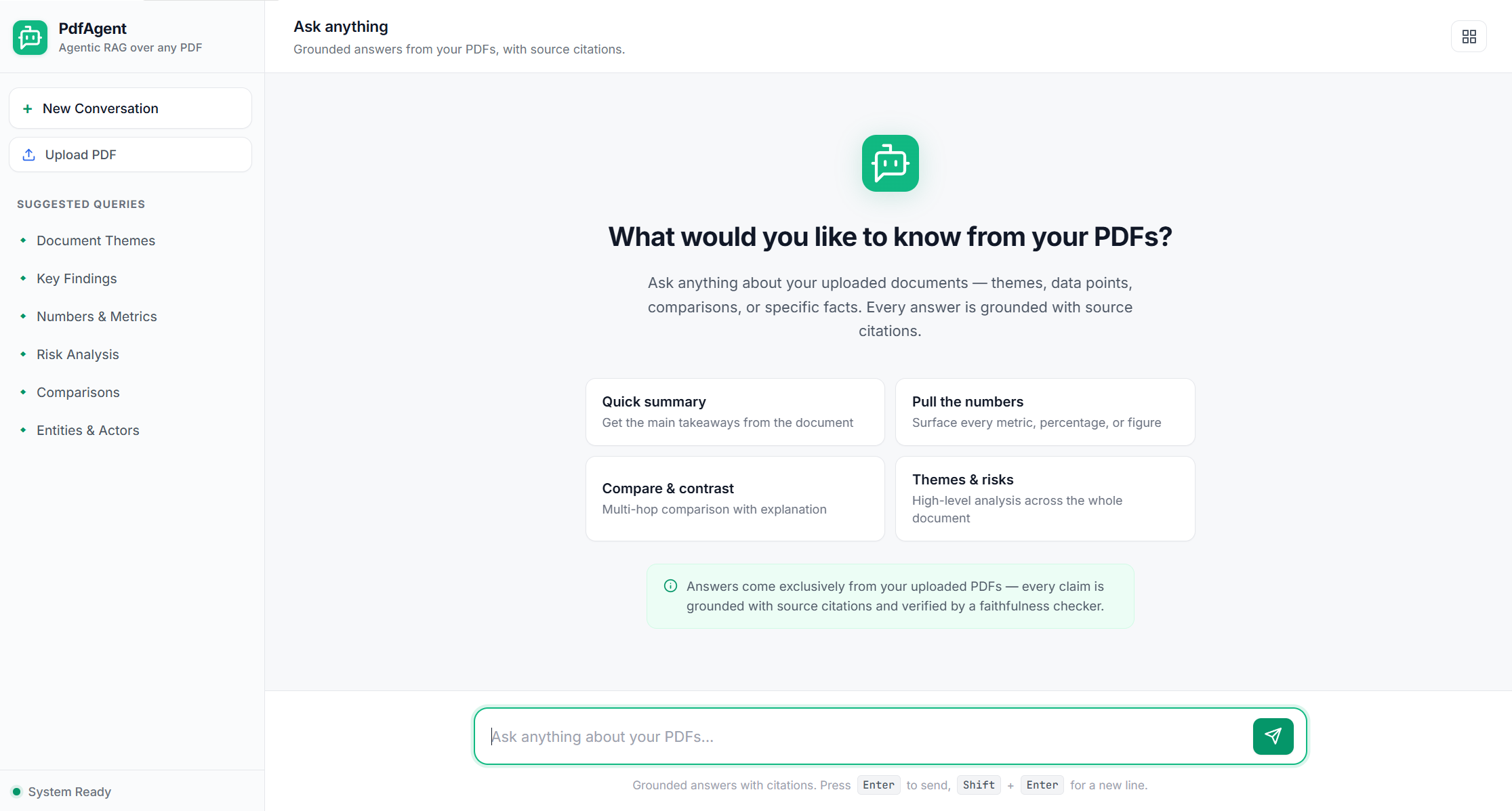
Ask questions about any PDF — research reports, contracts, manuals, ESG / sustainability filings — and get grounded, cited answers. Drop a PDF into the browser UI and start asking.
Quick Start
# 1. Install
pip install agentic-rag-pdf

# 2. Install + start Ollama (https://ollama.com/download), pull the embedding model
ollama pull mxbai-embed-large
ollama signin                       # only if using cloud models (e.g. gpt-oss:120b-cloud)

# 3. Launch the UI
pdfagent
Open http://localhost:8000 → click Upload PDF → drop a file → ask questions.
The PyPI distribution name is
agentic-rag-pdf(the barepdfagentname is owned by an unrelated project). The console command ispdfagent.
What it does
- Multi-modal ingestion — text, tables (extracted into SQLite), images (OCR + optional vision captions).
- Hybrid retrieval — BM25 + FAISS dense, merged with Reciprocal Rank Fusion, with optional cross-encoder reranking.
- RAPTOR hierarchical summaries for global queries; Map-Reduce for exhaustive aggregation.
- Schema-aware NL → SQL for tabular queries (SELECT-only, sandboxed).
- Hallucination defense (CRAG + 7 layers) — pre-synthesis entity-metric fact extraction, deterministic attribution check, citation verification, claim-level faithfulness, cross-chunk contradiction detection, arithmetic verification of delta tables.
- Three interfaces — browser UI (SSE-streamed agent steps), REST API, CLI.
See docs/ARCHITECTURE.md for the workflow diagram, full feature breakdown, configuration reference, REST API, and project structure.
Other ways to install
From the latest GitHub commit (handy between releases):
pip install git+https://github.com/bhagatdas/PdfAgent-Agentic-RAG-over-any-PDF.git
For development (editable, clone the repo):
git clone https://github.com/bhagatdas/PdfAgent-Agentic-RAG-over-any-PDF.git
cd PdfAgent-Agentic-RAG-over-any-PDF
pip install -e .
pdfagent --reload
Command-line usage
The wheel installs two console scripts:
pdfagent                              # launch the browser UI (uvicorn on :8000)
pdfagent --host 0.0.0.0 --port 8080   # custom bind

pdfagent-cli ingest                   # CLI ingest (drop files in data/pdfs/ first)
pdfagent-cli query "..."              # one-shot question
pdfagent-cli chat                     # interactive REPL
pdfagent-cli schema                   # print the table schema catalog
Override defaults via a .env file in your working directory. The full settings reference lives in config/settings.py.
REST API at a glance
| Method | Path | Purpose |
|---|---|---|
POST |
/query |
Run the pipeline; JSON response |
POST |
/query/stream |
Same, streamed via SSE (one event per agent) |
POST |
/upload-ingest/stream |
Wipe + ingest a single PDF |
GET |
/health |
Vector store doc count + table count |
GET |
/ollama/health |
Probe Ollama readiness + per-OS install help |
Full endpoint table and request/response shape: docs/ARCHITECTURE.md#rest-api.
Tech stack
LangGraph + LangChain · Ollama (gpt-oss:120b-cloud, mxbai-embed-large) · FAISS + rank-bm25 · cross-encoder reranker · SQLite for tables · FastAPI (SSE) · PyMuPDF · EasyOCR.
Publishing
Releases go to PyPI as agentic-rag-pdf on every v* tag push. See PUBLISHING.md for the one-time trusted-publisher setup and the tag → release flow.
License
Proprietary — see repository owner.
Built by Bhagat Kumar Das.


Download files
Download the file for your platform. If you're not sure which to choose, learn more about installing packages.
Source Distribution
Built Distribution
Filter files by name, interpreter, ABI, and platform.
If you're not sure about the file name format, learn more about wheel file names.
Copy a direct link to the current filters
File details
Details for the file agentic_rag_pdf-0.1.3.tar.gz.
File metadata
- Download URL: agentic_rag_pdf-0.1.3.tar.gz
- Upload date:
- Size: 134.8 kB
- Tags: Source
- Uploaded using Trusted Publishing? No
- Uploaded via: twine/6.2.0 CPython/3.11.14
File hashes
| Algorithm | Hash digest | |
|---|---|---|
| SHA256 |
34067d2fd0d0455fc12827db8a5426b83a846010f6a49b5ada9236ea2b60b8dd
|
|
| MD5 |
1eed880cabf03764ced649f60737f1ae
|
|
| BLAKE2b-256 |
2e7e4ca5b005c28625b3274861a97f1c23a7518ee0f628594c412e4fb5300473
|
File details
Details for the file agentic_rag_pdf-0.1.3-py3-none-any.whl.
File metadata
- Download URL: agentic_rag_pdf-0.1.3-py3-none-any.whl
- Upload date:
- Size: 158.6 kB
- Tags: Python 3
- Uploaded using Trusted Publishing? No
- Uploaded via: twine/6.2.0 CPython/3.11.14
File hashes
| Algorithm | Hash digest | |
|---|---|---|
| SHA256 |
49a80918bf5bd4fd3d632a0618dec63a387fa36138ec99c2ccfd9683ced2a0aa
|
|
| MD5 |
fbc4c98701fe1557736d3aa34fa0d837
|
|
| BLAKE2b-256 |
3d9e2c5b3fb6b4109537798ba9878a0963201393b711843999bc5f8150afedc4
|






