

Scan, install, update, and analyze AI agent skills without trusting them blindly.





Skills Manager installs and manages agent skills for Claude, Cursor, Codex, and OpenCode. Before any skill touches your config, it scans the source.
I built it because installing a skill is riskier than it looks. A skill is a folder of Markdown and scripts that your coding agent reads and runs. Install one from someone else's repo and you're running their instructions inside your agent, with your files and your shell. That's a supply-chain problem, so Skills Manager treats it like one: scan the source first, block the obvious traps, and optionally hand the rest to an AI reviewer before a single file hits disk.
One file. No dependencies. Python standard library only.
Features
AI-powered security scanning
[!IMPORTANT] Use the agent you already trust to inspect a skill before installing it. Add
--ai-checksand Skills Manager sends the complete source inventory to Claude, Cursor, Codex, or OpenCode in a restricted sandbox. The AI reviewer looks for unsafe behavior and prompt-level threats that simple pattern matching cannot reliably identify, then its findings are merged with the deterministic security report.
# Static security scan followed by an independent Claude review
skills scan https://github.com/owner/repo --ai-checks --agent claude

# Ask Codex for a second opinion even when the static scan already blocked the source
skills scan https://github.com/owner/repo --force-run-ai-checks --agent codex
AI review adds another layer; it never weakens the built-in security gate. A high or critical static finding still blocks installation, even when the AI review considers the source safe.
Everything Skills Manager can do
| Feature | What it gives you |
|---|---|
| Scan before installing | Inspect GitHub repositories or local folders without copying anything into an agent's configuration. |
| Deterministic security checks | Detect exposed secrets, dangerous shell execution, persistence hooks, registry hijacks, native loading, opaque payloads, filesystem tricks, and scanner evasion. |
| AI security scanning | Run Claude, Cursor, Codex, or OpenCode as a sandboxed second reviewer and merge its findings into one verdict. |
| Safe installation | Install only after security checks pass, using atomic copies that avoid leaving half-installed skills behind. |
| Recursive skill discovery | Find and install every SKILL.md beneath a repository root, including skills stored in monorepos. |
| Multi-agent management | Use the same workflow for Claude, Cursor, Codex, and OpenCode, with agent-specific install locations. |
| Installed-skill inventory | List skills across one or every supported agent, with optional descriptions and installation paths. |
| Tracked updates | Re-fetch original sources, compare them with installed copies, rescan changes, and apply only approved updates. |
| Safe uninstall | Preview removals by default, target one agent or all agents, and require explicit confirmation before deleting anything. |
| Context-cost analysis | Estimate metadata, activated-skill, and full-directory token usage while validating front matter, links, names, and file sizes. |
| CI enforcement | Emit a machine-readable JSON verdict, send findings to stderr, save full reports as artifacts, and fail the job when a source is unsafe. |
| Flexible sources | Work with GitHub repository URLs, tree URLs, SSH remotes, branches, tags, subdirectories, and local folders. |
| Automation-friendly output | Save normalized security reports with --output and cost reports with --json. |
| Zero-dependency CLI | Run the single Python file directly or install the package and use any of its four command names. |
See it catch a bad skill
Here's Skills Manager refusing a skill that ships a private key, a curl | sh bootstrap, and an rm -rf. The install is blocked and nothing is copied to disk:
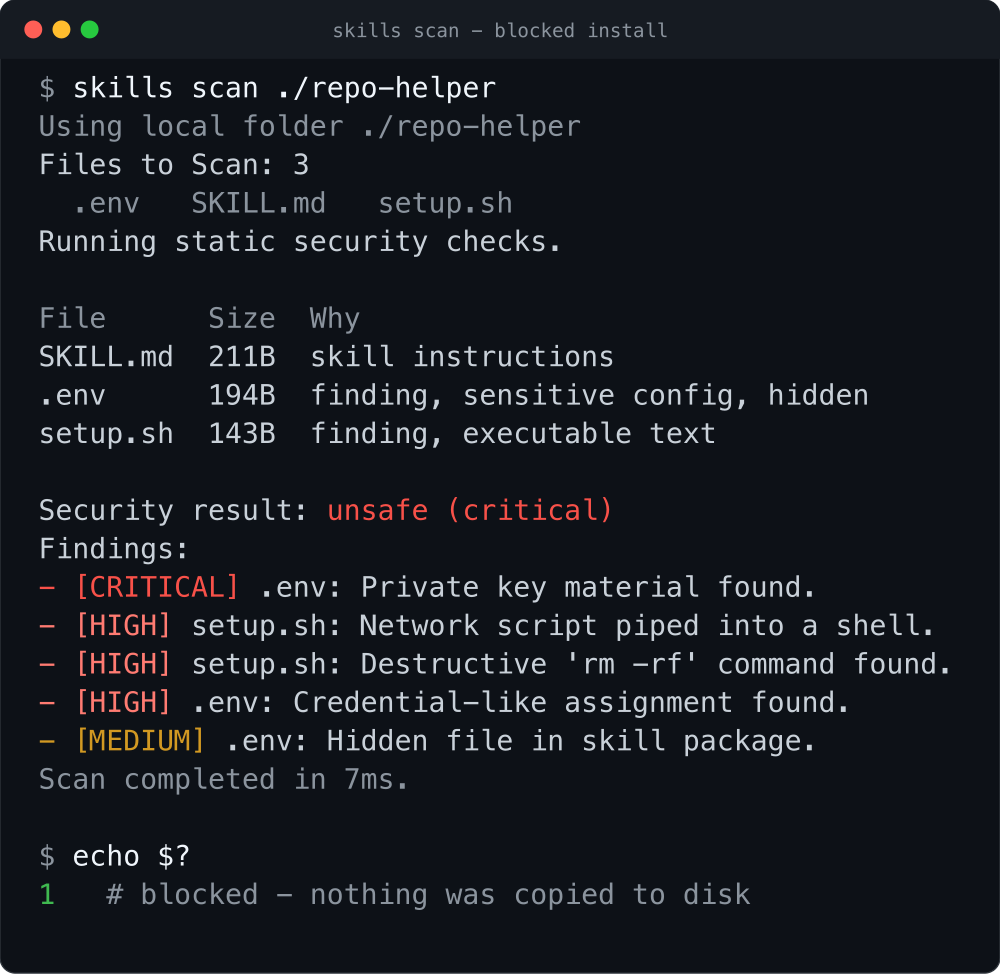
The static scanner explains every finding, returns a non-zero exit code, and leaves the agent's skills directory untouched.
Why Skills Manager
A skill can hide a lot in plain sight: a private key, a curl | sh one-liner, a git hook that reinstalls itself after you delete it, a binary blob a text scanner skips, or instructions buried behind padding or opaque files. Once that folder is in ~/.claude/skills/, your agent reads it and acts on it like any other instruction.
Skills Manager puts a checkpoint in front of the copy step:
- Static checks run on every command and block high and critical findings. No flag to remember.
- AI checks are opt-in (
--ai-checks). A sandboxed agent reviews the source on its own and writes a JSON verdict. - Skills have to be source-readable text. If a package ships binaries, archives, native libraries, bytecode, symlinks, or hard links, Skills Manager rejects it.
Inspect first. Install second. Keep every skill traceable.
Install
Install from PyPI with pip. You get a skills command on your PATH:
pip install agentic-skills-manager
skills --help
Prefer an isolated install? Use pipx:
pipx install agentic-skills-manager
Or skip the install. It's one file with no dependencies, so you can run it straight from source:
curl -O https://raw.githubusercontent.com/mazen160/skills-manager/main/skills_manager.py
python3 skills_manager.py --help
The PyPI distribution is
agentic-skills-manager. The product is still Skills Manager, and installing it gives you four equivalent commands:skill,skills,skill-manager, andskills-manager. If you're running from source, usepython3 skills_manager.py.
Run skills with no arguments for the full command surface:
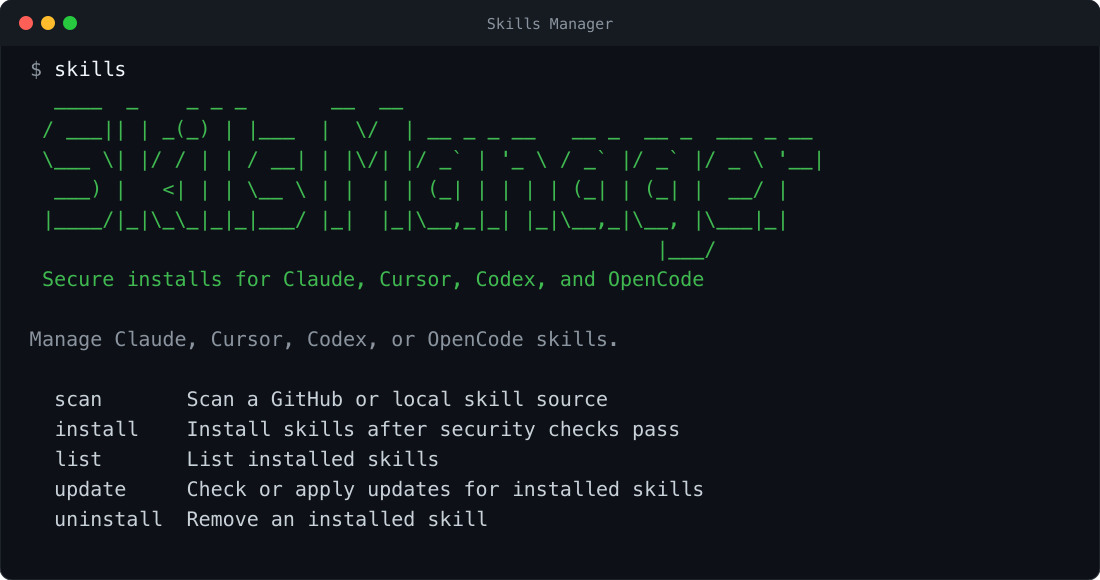
One CLI manages the same workflow across Claude, Cursor, Codex, and OpenCode.
Quickstart
# Scan a skill source without installing anything
skills scan https://github.com/owner/repo

# Print the Skills Manager banner
skills --banner

# Print the installed version
skills --version

# Scan, then run a second-round AI review with Claude
skills scan https://github.com/owner/repo --ai-checks

# Run the AI review even when static checks already failed (for visibility)
skills scan https://github.com/owner/repo --force-run-ai-checks

# Scan in CI: machine-readable verdict on stdout, findings on stderr, non-zero exit when unsafe
skills scan https://github.com/owner/repo --ci

# Save the full result JSON as a CI artifact
skills scan https://github.com/owner/repo --ci --output result.json

# Install into Claude (default) after checks pass
skills install https://github.com/owner/repo

# Install into Cursor instead
skills install https://github.com/owner/repo --agent cursor

# Install one skill from a subfolder of a monorepo
skills install https://github.com/owner/repo/tree/main/skills/my-skill

# Install every skill under a root (recursive SKILL.md discovery)
skills install https://github.com/owner/repo --recursive

# See what's installed across all agents
skills list

# Show descriptions and install paths
skills list --verbose

# Check tracked skills for upstream changes, then apply them
skills update
skills update --apply

# Remove a skill (dry-run first; -y to actually delete)
skills uninstall my-skill
skills uninstall my-skill -y

# Analyze the context (token) cost of installed or local skills
skills analyze cost ~/.claude/skills
skills analyze cost ~/.claude/skills ~/.codex/skills --load-mode metadata
skills analyze cost ./path/to/skill --json
CLI reference
| Command | Description |
|---|---|
skills scan SOURCE |
Inspect a GitHub or local source with deterministic checks and optional AI review. |
skills install SOURCE |
Scan and atomically install one skill or recursively discovered skills. |
skills list |
List installed skills for one agent or across every supported agent. |
skills update [SKILL] |
Re-fetch tracked sources, show changes, rescan them, and optionally apply approved updates. |
skills uninstall SKILL |
Preview or confirm removal from one agent or all supported agents. |
skills analyze cost ROOT... |
Estimate context usage and validate local or installed skill definitions. |
skills --banner |
Print the Skills Manager banner and exit. |
skills --version |
Print the installed Skills Manager version. |
Every installed command name is equivalent: skill, skills, skill-manager, and skills-manager.
skills scan prints the full file list before scanning, then a compact relevant-files table after static checks, including SKILL.md, executable scripts, dependency manifests, hidden files, symlinks, archives, compiled payloads, and files with deterministic findings.
What it checks
The static pass walks the whole source tree and focuses on deterministic supply-chain techniques rather than trying to guess intent from prose:
| Category | Examples |
|---|---|
| Secrets & keys | BEGIN PRIVATE KEY, id_rsa, .pem/.key, api_key = "…" |
| Execution surfaces | curl … | sh, rm -rf /, chmod +x, eval/exec, subprocess, os.system |
| Non-text payloads | binaries, images, archives, Office docs, .pyc, .so/.dll, .jar, .node |
| Archive indirection | path traversal inside archives, embedded bytecode/native files, embedded scripts, hidden config files |
| Filesystem tricks | symlinks, absolute/escaping links, hard links, hard links that point outside the scanned tree, embedded .git metadata, hidden files |
| Persistence | .git/hooks, core.hooksPath, .husky, package lifecycle scripts |
| Registry hijacks | .npmrc/.yarnrc rewrites, PIP_INDEX_URL, extra index URLs |
| Native loading | LD_PRELOAD, DYLD_INSERT_LIBRARIES, ctypes.CDLL, dlopen, runtime .so compilation |
| Scanner evasion | long whitespace padding, more than 2,000 lines, more than 140,000 chars, files too large to fully scan |
| Credential harvesting surface | executable code that reads environment variables |
High and critical findings block the install. The verdict is printed by default; pass --output PATH when you want to save the normalized JSON report.
The static pass does not try to detect prompt injection by matching phrases like "ignore previous instructions" or "exfiltrate tokens." Those checks are too easy to bypass and too noisy to trust. The AI pass (--ai-checks) hands the inventory and source to the agent CLI you pick (--agent claude|cursor|codex|opencode). It runs in a restricted sandbox, reviews the source on its own, and merges its findings with the static ones. Normal output hides the large prompt and inventory; use --show-ai-inputs when you need to debug the exact AI-review inputs.
The AI pass runs only after static checks pass, so a source that already failed static checks never reaches it. Add --force-run-ai-checks (on scan or install) to run the AI review anyway when you want its verdict for a blocked source. It implies --ai-checks and is for visibility only: it never overrides a static block, so scan still reports unsafe and install still refuses.
Use in CI
Add --ci to scan to run the scanner in a pipeline. CI mode drops the banner, file tables, and colored progress output and emits only the result:
- A machine-readable verdict (one line of JSON) on stdout, so a job can capture and parse it.
- Human-readable findings and a summary on stderr, so they still show up in the build log.
- Exit code
0when safe and1when unsafe, so the step fails on a bad skill.
# Fail the job if the source is unsafe
skills scan https://github.com/owner/repo --ci

# Also write the full result JSON to a file for use as a build artifact
skills scan https://github.com/owner/repo --ci --output result.json

# Include the AI review in CI (needs the agent CLI on PATH)
skills scan https://github.com/owner/repo --ci --ai-checks
The stdout verdict looks like:
{"ai_skipped": false, "findings": 6, "review_type": "static", "risk_level": "critical", "safe": false, "source": "https://github.com/owner/repo", "tool": "skills-manager"}
ai_skipped is true when you asked for --ai-checks but static checks failed first, so the AI review never ran (use --force-run-ai-checks to run it anyway).
--output writes the full normalized result (verdict, risk level, summary, and every finding) so later steps can read it without re-scanning. It works on any scan, with or without --ci.
Analyze context usage
Skills cost context. A catalog of skills looks cheap, but activating a large SKILL.md or following its references into companion files can quietly burn tens of thousands of tokens. skills analyze cost makes those layers visible and flags invalid skills at the same time.
# Estimate context usage for a skills root
skills analyze cost ~/.claude/skills

# Analyze several roots at once
skills analyze cost ~/.claude/skills ~/.codex/skills

# Machine-readable output for scripts and CI
skills analyze cost ~/.claude/skills --json

# Exit non-zero when an invalid skill is found (useful in CI)
skills analyze cost ~/.claude/skills --fail-on-invalid
It treats every directory containing a SKILL.md as a skill and reports three load estimates, because not every skill is fully loaded at once:
| Mode | What it measures |
|---|---|
metadata |
Catalog footprint from name, description, and path |
skill |
Footprint of the activated SKILL.md |
full |
Upper bound: every file under the skill directory |
Use --load-mode {metadata,skill,full} to choose which estimate sorts and headlines the report (default: full). Token counts use a simple characters / 4 heuristic, so they are estimates, not exact tokenizer counts.
Beyond cost, the same pass validates skills and reports errors (missing/empty/non-UTF-8 SKILL.md, missing or unclosed YAML front matter, missing name/description, broken relative markdown links) and warnings (name/folder mismatch, oversized skills or files). Errors make a skill invalid; warnings do not.
| Flag | Effect |
|---|---|
--json |
Print machine-readable JSON instead of the terminal report |
--no-files |
Omit per-file records from JSON output |
--load-mode MODE |
Sort/headline by metadata, skill, or full |
--include-hidden |
Include hidden files and directories (except known build/cache dirs) |
--max-skill-tokens N |
Warn when a full skill directory exceeds N estimated tokens (default: 50000) |
--max-file-tokens N |
Warn when a single file exceeds N estimated tokens (default: 10000) |
--top N |
Number of largest skills, extensions, and files to show (default: 10) |
--fail-on-invalid |
Exit 1 when invalid skills are found (root errors always exit 2) |
Sources
Skills Manager installs from:
- a GitHub repo URL:
https://github.com/owner/repo - a GitHub tree URL:
https://github.com/owner/repo/tree/<branch>/<path> - an SSH remote:
git@github.com:owner/repo.git - a local folder:
./path/to/skill
Use --path to pick a subfolder and --branch to target a branch or tag. GitHub sources are fetched with a sparse, blobless clone when a path is given.
Where skills are installed
| Agent | Default location | Override |
|---|---|---|
| Claude | ~/.claude/skills |
CLAUDE_SKILLS_DIR |
| Codex | ~/.codex/skills |
CODEX_SKILLS_DIR |
| Cursor | ~/.cursor/skills-cursor (or ~/.cursor/skills) |
CURSOR_SKILLS_DIR |
| OpenCode | ~/.opencode/skills |
OPENCODE_SKILLS_DIR |
Installed skills carry a small .skills-install.json record of where they came from, which is what makes skills update able to re-fetch and diff them later.
Under the hood
Skills Manager is a single standard-library Python module. It resolves untrusted sources into a temporary workspace, inventories the filesystem before reading content, and keeps the security decision separate from the copy step.
- Resolve. Fetch the source into a temporary directory using a sparse clone for GitHub paths or a direct read for local folders.
- Inventory. Walk the complete tree and classify regular files, links, archives, binaries, executable surfaces, and skill roots.
- Gate. Run deterministic checks every time, then add the sandboxed AI review when
--ai-checksis set. High or critical findings stop the workflow. - Install. Copy approved
SKILL.mddirectories atomically and record their source metadata for future update checks.
Requirements
- Python 3.9+
giton yourPATH(for GitHub sources)- For
--ai-checks: the chosen agent's CLI on yourPATH(claude,cursor,codex, oropencode)
Tests
The test suite is standard-library only. From the repo root:
python3 -m unittest discover -s tests
It covers the deterministic static checks (including a bytecode-poisoning regression), source/URL parsing, argument validation, and the cost analyzer.
Found this useful?
If Skills Manager keeps an unsafe skill out of your agent, please star the repository. It helps other developers discover the project.
Share it:




Author
Mazin Ahmed
- Website: mazinahmed.net
- Twitter: @mazen160
- LinkedIn: linkedin.com/in/infosecmazinahmed
- GitHub: github.com/mazen160
License
MIT © Mazin Ahmed
1 maintainer

Download files
Download the file for your platform. If you're not sure which to choose, learn more about installing packages.
Source Distribution
Built Distribution
Filter files by name, interpreter, ABI, and platform.
If you're not sure about the file name format, learn more about wheel file names.
Copy a direct link to the current filters
File details
Details for the file agentic_skills_manager-1.0.0.tar.gz.
File metadata
- Download URL: agentic_skills_manager-1.0.0.tar.gz
- Upload date:
- Size: 46.0 kB
- Tags: Source
- Uploaded using Trusted Publishing? No
- Uploaded via: twine/7.0.0 CPython/3.14.6
File hashes
| Algorithm | Hash digest | |
|---|---|---|
| SHA256 |
e12963f439176216341422c8b10df2bfd819eadfcf6f9cc9ed5f8edb6cd9b255
|
|
| MD5 |
c5d5f01dfc5c9c6697c36b8eab0cf892
|
|
| BLAKE2b-256 |
7df93f028e4f24d9f770251c2bb9d2b6461bb6628ec9b0d8e69856d30b408c7c
|
File details
Details for the file agentic_skills_manager-1.0.0-py3-none-any.whl.
File metadata
- Download URL: agentic_skills_manager-1.0.0-py3-none-any.whl
- Upload date:
- Size: 40.2 kB
- Tags: Python 3
- Uploaded using Trusted Publishing? No
- Uploaded via: twine/7.0.0 CPython/3.14.6
File hashes
| Algorithm | Hash digest | |
|---|---|---|
| SHA256 |
3142e966bd2a5dde2bcdd4a6ad88daf8b93cc2a9be7bdeaecefe8443487fbedc
|
|
| MD5 |
094b88325e31b9d9ef70385132029ca0
|
|
| BLAKE2b-256 |
edb05d8c6f180a777158443f8482381c772599e0394e71ae20921c2352ded0a4
|







