
Agentic Threat Hunting Framework - Memory and AI for threat hunters
Verified details
These details have been verified by PyPIProject links
GitHub Statistics
Maintainers

Project description
Agentic Threat Hunting Framework (ATHF)




Quick Start • Installation • Documentation • Examples
Give your threat hunting program memory and agency.
The Agentic Threat Hunting Framework (ATHF) is the memory and automation layer for your threat hunting program. It gives your hunts structure, persistence, and context - making every past investigation accessible to both humans and AI.
ATHF works with any hunting methodology (PEAK, TaHiTI, or your own process). It's not a replacement; it's the layer that makes your existing process AI-ready.
What is ATHF?
ATHF provides structure and persistence for threat hunting programs. It's a markdown-based framework that:
- Documents hunts using the LOCK pattern (Learn → Observe → Check → Keep)
- Maintains a searchable repository of past investigations
- Enables AI assistants to reference your environment and previous work
- Works with any SIEM/EDR platform
- NEW: Includes AI-powered research and hypothesis generation agents (v0.3.0+)
The Problem
Most threat hunting programs lose valuable context once a hunt ends. Notes live in Slack or tickets, queries are written once and forgotten, and lessons learned exist only in analysts' heads.
Even AI tools start from zero every time without access to your environment, your data, or your past hunts.
ATHF changes that by giving your hunts structure, persistence, and context.
Read more: docs/why-athf.md
The LOCK Pattern
Every threat hunt follows the same basic loop: Learn → Observe → Check → Keep.
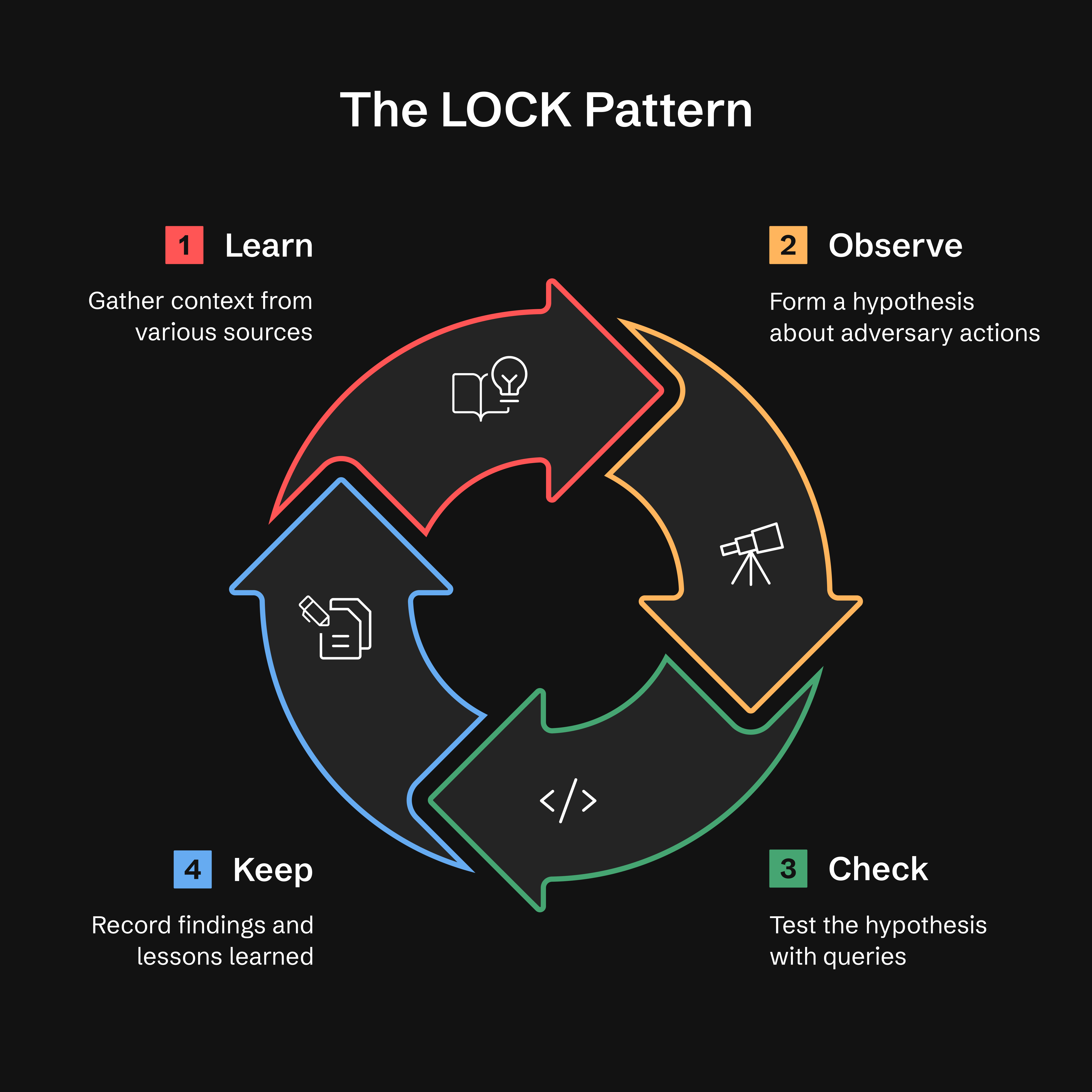
- Learn: Gather context from threat intel, alerts, or anomalies
- Observe: Form a hypothesis about adversary behavior
- Check: Test hypotheses with targeted queries
- Keep: Record findings and lessons learned
Why LOCK? It's small enough to use and strict enough for agents to interpret. By capturing every hunt in this format, ATHF makes it possible for AI assistants to recall prior work and suggest refined queries based on past results.
Read more: docs/lock-pattern.md
The Five Levels of Agentic Hunting
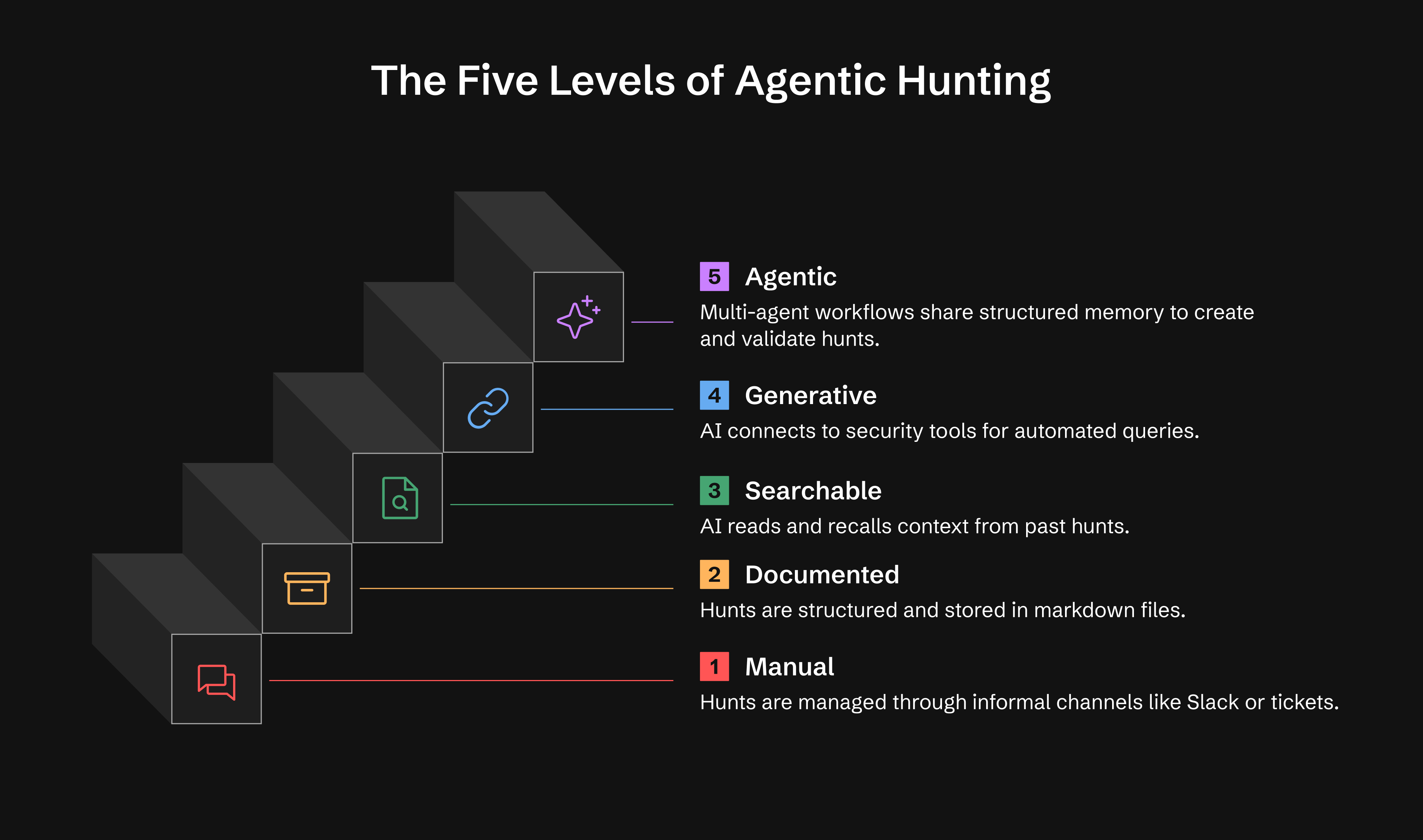
ATHF defines a simple maturity model. Each level builds on the previous one.
Most teams will live at Levels 1–2. Everything beyond that is optional maturity.
| Level | Capability | What You Get |
|---|---|---|
| 0 | Ad-hoc | Hunts exist in Slack, tickets, or analyst notes |
| 1 | Documented | Persistent hunt records using LOCK |
| 2 | Searchable | AI reads and recalls your hunts |
| 3 | Generative | AI executes queries via MCP tools, conducts research |
| 4 | Agentic | Autonomous agents monitor and act, generate hypotheses |
Level 1: Operational within a day Level 2: Operational within a week Level 3: 2-4 weeks (optional) Level 4: 1-3 months (optional)
Read more: docs/maturity-model.md
🚀 Quick Start
Option 1: Install from PyPI (Recommended)
# Install ATHF
pip install agentic-threat-hunting-framework

# Initialize your hunt program
athf init

# NEW: Conduct research before hunting (5-skill methodology)
athf research new --topic "LSASS dumping" --technique T1003.001

# Create your first hunt (link to research)
athf hunt new --technique T1003.001 --title "LSASS Credential Dumping" --research R-0001
Option 2: Install from Source (Development)
# Clone and install from source
git clone https://github.com/Nebulock-Inc/agentic-threat-hunting-framework
cd agentic-threat-hunting-framework
pip install -e .

# Initialize and start hunting
athf init
athf hunt new --technique T1003.001
Option 3: Pure Markdown (No Installation)
# Clone the repository
git clone https://github.com/Nebulock-Inc/agentic-threat-hunting-framework
cd agentic-threat-hunting-framework

# Copy a template and start documenting
mkdir -p hunts
cp athf/data/templates/HUNT_LOCK.md hunts/H-0001.md

# Customize AGENTS.md with your environment
# Add your SIEM, EDR, and data sources
Choose your AI assistant: Claude Code, GitHub Copilot, or Cursor - any tool that can read your repository files.
Full guide: docs/getting-started.md
🔧 CLI Commands
ATHF includes a full-featured CLI for managing your hunts. Here's a quick reference:
Initialize Workspace
athf init                           # Interactive setup
athf init --non-interactive         # Use defaults
Research & Hypothesis Generation (NEW in v0.3.0)
# Conduct thorough pre-hunt research (15-20 min)
athf research new --topic "LSASS dumping" --technique T1003.001

# Quick research for urgent hunts (5 min)
athf research new --topic "Pass-the-Hash" --depth basic

# Generate AI-powered hypothesis from threat intel
athf agent run hypothesis-generator --threat-intel "APT29 targeting SaaS"

# List research and agents
athf research list
athf agent list
Create Hunts
athf hunt new                       # Interactive mode
athf hunt new \
  --technique T1003.001 \
  --title "LSASS Dumping Detection" \
  --platform windows \
  --research R-0001                 # Link to research document
List & Search
athf hunt list                      # Show all hunts
athf hunt list --status completed   # Filter by status
athf hunt list --directory test     # Filter by environment (test/production)
athf hunt list --output json        # JSON output
athf hunt search "kerberoasting"    # Full-text search
athf hunt search "credential" --directory production  # Search with directory filter
athf research search "credential"   # Search research docs
Validate & Stats
athf hunt validate                  # Validate all hunts
athf hunt validate H-0001           # Validate specific hunt
athf hunt stats                     # Show statistics
athf hunt coverage                  # MITRE ATT&CK coverage
athf research stats                 # Research metrics
Full documentation: CLI Reference
📺 See It In Action
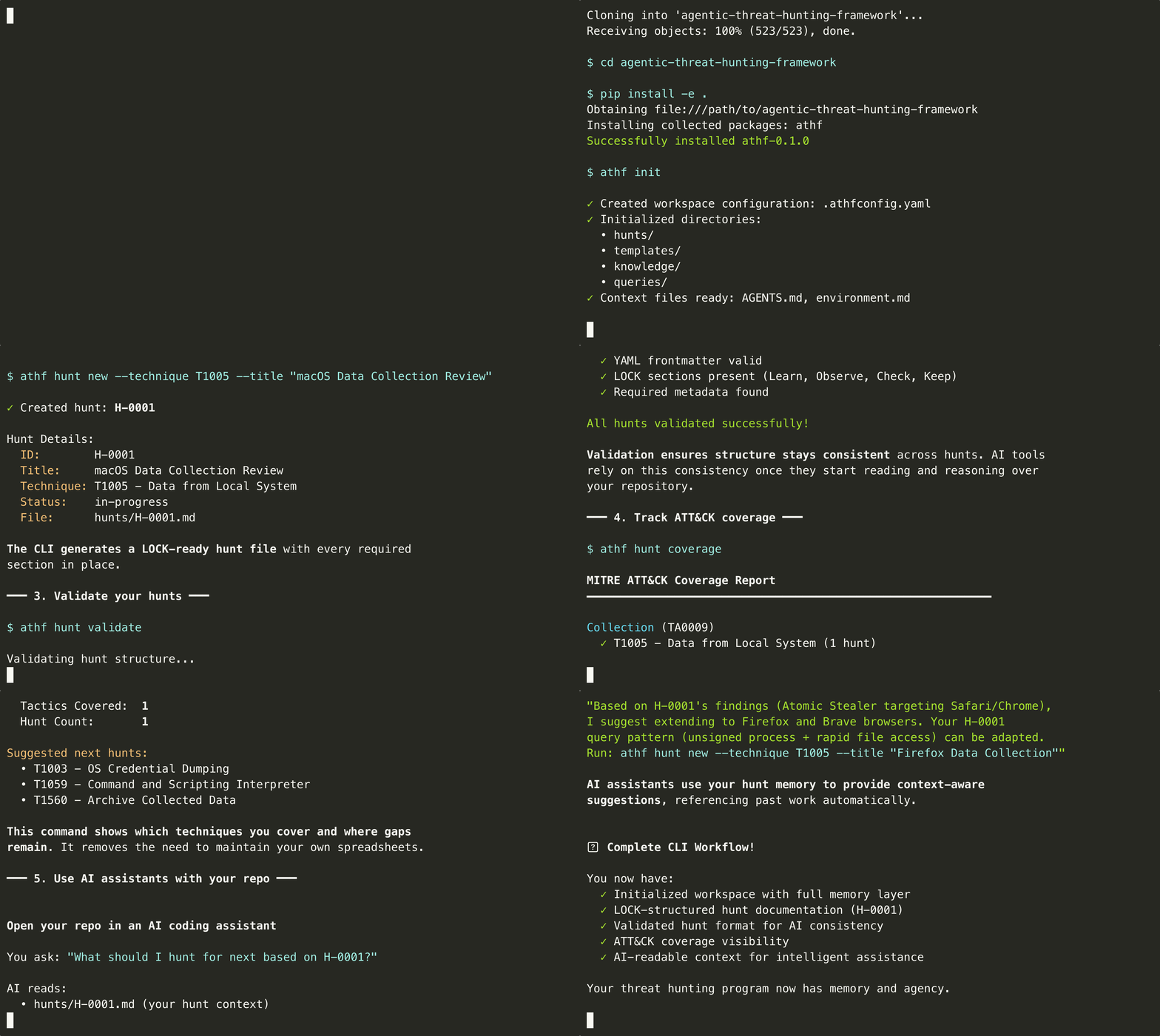
Watch ATHF in action: initialize a workspace, create hunts, and explore your threat hunting catalog in under 60 seconds.
Installation
See the Quick Start section above for installation options (PyPI, source, or pure markdown).
Prerequisites:
- Python 3.8-3.13 (for CLI option)
- Your favorite AI code assistant
Documentation
Core Concepts
- Why ATHF Exists - The problem and solution
- The LOCK Pattern - Structure for all hunts
- Maturity Model - The five levels explained
- Getting Started - Step-by-step onboarding
Level-Specific Guides
- Level 1: Documented Hunts
- Level 2: Searchable Memory
- Level 3: Generative Capabilities
- Level 4: Agentic Workflows
Integration & Customization
- Installation & Development - Setup, fork customization, testing
- MCP Catalog - Available tool integrations
- Quickstart Guides - Setup for specific tools
- Using ATHF - Adoption and customization
🎖️ Featured Hunts
H-0001: macOS Information Stealer Detection
Detected Atomic Stealer collecting Safari cookies via AppleScript. Result: 1 true positive, host isolated before exfiltration.
Key Insight: Behavior-based detection outperformed signature-based approaches. Process signature validation identified unsigned malware attempting data collection.
View full hunt → | See more examples →
Why This Matters
You might wonder how this interacts with frameworks like PEAK. PEAK gives you a solid method for how to hunt. ATHF builds on that foundation by giving you structure, memory, and continuity. PEAK guides the work. ATHF ensures you capture the work, organize it, and reuse it across future hunts.
Agentic threat hunting is not about replacing analysts. It's about building systems that can:
- Remember what has been done before
- Learn from past successes and mistakes
- Support human judgment with contextual recall
When your framework has memory, you stop losing knowledge to turnover or forgotten notes. When your AI assistant can reference that memory, it becomes a force multiplier.
💬 Community & Adoption
- GitHub Discussions: Ask questions, share hunts
- Issues: Report bugs or request features
- LinkedIn: Nebulock Inc. - Follow for updates
Using ATHF in Your Organization: ATHF is a framework to internalize, not a platform to extend. Fork it, customize it, make it yours. See USING_ATHF.md for adoption guidance. Your hunts stay yours—sharing back is optional but appreciated.
Repository: https://github.com/Nebulock-Inc/agentic-threat-hunting-framework
The goal is to help every threat hunting team move from ad-hoc memory to structured, agentic capability.
🛠️ Development & Customization
ATHF is designed to be forked and customized for your organization.
See docs/INSTALL.md#development--customization for:
- Setting up your fork for development
- Pre-commit hooks for code quality
- Testing and type checking
- Customization examples
- CI/CD integration
Quick start:
pip install -e ".[dev]"       # Install dev dependencies
pre-commit install            # Set up quality checks
pytest tests/ -v              # Run tests
👤 Author
Created by Sydney Marrone © 2025
Start small. Document one hunt. Add structure. Build memory.
Memory is the multiplier. Agency is the force. Once your program can remember, everything else becomes possible.
Happy hunting!
Project details
Verified details
These details have been verified by PyPIProject links
GitHub Statistics
Maintainers
Release history Release notifications | RSS feed


Download files
Download the file for your platform. If you're not sure which to choose, learn more about installing packages.
Source Distribution
Built Distribution
Filter files by name, interpreter, ABI, and platform.
If you're not sure about the file name format, learn more about wheel file names.
Copy a direct link to the current filters
File details
Details for the file agentic_threat_hunting_framework-0.7.1.tar.gz.
File metadata
- Download URL: agentic_threat_hunting_framework-0.7.1.tar.gz
- Upload date:
- Size: 15.5 MB
- Tags: Source
- Uploaded using Trusted Publishing? Yes
- Uploaded via: twine/6.1.0 CPython/3.13.7
File hashes
| Algorithm | Hash digest | |
|---|---|---|
| SHA256 |
a82a61055b0c06199d6bb8778739a17dd8cce8dab63898e90716361abf566172
|
|
| MD5 |
984679e7dcbe804e29a5c84fe8514123
|
|
| BLAKE2b-256 |
69b4e8b5e497cc3bb373f093595f74ee824bd994ba59dbf62d0c64224fa2bdaf
|
Provenance
The following attestation bundles were made for agentic_threat_hunting_framework-0.7.1.tar.gz:
Publisher:
publish.yml on Nebulock-Inc/agentic-threat-hunting-framework
-
Statement:
-
Statement type:
https://in-toto.io/Statement/v1 -
Predicate type:
https://docs.pypi.org/attestations/publish/v1 -
Subject name:
agentic_threat_hunting_framework-0.7.1.tar.gz -
Subject digest:
a82a61055b0c06199d6bb8778739a17dd8cce8dab63898e90716361abf566172 - Sigstore transparency entry: 928974598
- Sigstore integration time:
-
Permalink:
Nebulock-Inc/agentic-threat-hunting-framework@6a7bd5f68e9b1fa605e1c5956ad87954eb981fc0 -
Branch / Tag:
refs/tags/v0.7.1 - Owner: https://github.com/Nebulock-Inc
-
Access:
public
-
Token Issuer:
https://token.actions.githubusercontent.com -
Runner Environment:
github-hosted -
Publication workflow:
publish.yml@6a7bd5f68e9b1fa605e1c5956ad87954eb981fc0 -
Trigger Event:
release
-
Statement type:
File details
Details for the file agentic_threat_hunting_framework-0.7.1-py3-none-any.whl.
File metadata
- Download URL: agentic_threat_hunting_framework-0.7.1-py3-none-any.whl
- Upload date:
- Size: 228.3 kB
- Tags: Python 3
- Uploaded using Trusted Publishing? Yes
- Uploaded via: twine/6.1.0 CPython/3.13.7
File hashes
| Algorithm | Hash digest | |
|---|---|---|
| SHA256 |
4b9ed3f94028ba64735dd1fff43891901c36942884e03f6fe5384cfcfda4e721
|
|
| MD5 |
6a65115de492c80cf3c46e09abddbd82
|
|
| BLAKE2b-256 |
3d9bd1fd5eed810ed03637b8e5bcb76ed2ab63d1b46e8c0e71b0055459255834
|
Provenance
The following attestation bundles were made for agentic_threat_hunting_framework-0.7.1-py3-none-any.whl:
Publisher:
publish.yml on Nebulock-Inc/agentic-threat-hunting-framework
-
Statement:
-
Statement type:
https://in-toto.io/Statement/v1 -
Predicate type:
https://docs.pypi.org/attestations/publish/v1 -
Subject name:
agentic_threat_hunting_framework-0.7.1-py3-none-any.whl -
Subject digest:
4b9ed3f94028ba64735dd1fff43891901c36942884e03f6fe5384cfcfda4e721 - Sigstore transparency entry: 928974610
- Sigstore integration time:
-
Permalink:
Nebulock-Inc/agentic-threat-hunting-framework@6a7bd5f68e9b1fa605e1c5956ad87954eb981fc0 -
Branch / Tag:
refs/tags/v0.7.1 - Owner: https://github.com/Nebulock-Inc
-
Access:
public
-
Token Issuer:
https://token.actions.githubusercontent.com -
Runner Environment:
github-hosted -
Publication workflow:
publish.yml@6a7bd5f68e9b1fa605e1c5956ad87954eb981fc0 -
Trigger Event:
release
-
Statement type:






