
agentic-video
agentic-video lets an AI agent that reads text and images, but not video, work with video files on your own machine. It is a Python library plus a stdio MCP server. The agent asks small, targeted questions ("show me 12 frames from 0:40 to 1:10", "when is 'launch' spoken?") and gets back measurements, transcripts and contact sheets: grids of frames, each with its timestamp burned into the pixels. Nothing is uploaded; everything runs locally with FFmpeg, Whisper and optional local models.
Install: brew install ffmpeg, then add it to Claude Code with claude mcp add -s user agentic-video -- uvx agentic-video (or pipx install agentic-video). Other clients: Run the MCP server.
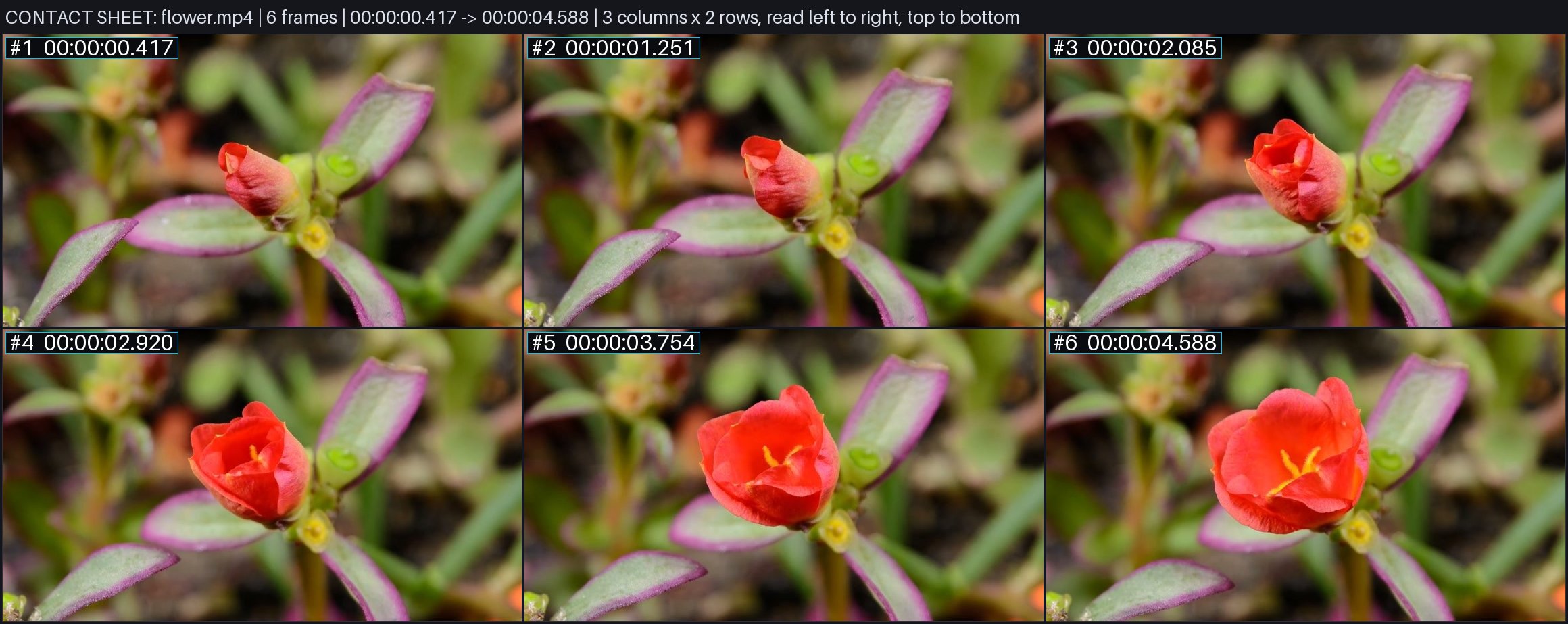
One contact_sheet call on a 5-second clip: six frames, each stamped with its time, as a single image the agent can read.
In 2 minutes (macOS) your agent can answer "what happens in this video?" and "when is X said?" for a local video file. You get the length and size, a contact sheet image with timestamps, the cuts, a loudness summary and searchable speech. Nothing leaves your machine. Setup for Claude Code:
brew install ffmpeg uv
git clone https://github.com/tlq5l/agentic-video.git && cd agentic-video
uv venv --python 3.12 .venv && uv pip install --python .venv/bin/python -r requirements.txt
claude mcp add -s user agentic-video -e PYTHONPATH="$PWD" -- "$PWD/.venv/bin/python" -m src.executor.mcp_server
Then ask: "Use agentic-video to review /path/to/video.mp4." Other clients and details: Run the MCP server.
Status: experimental. The author uses it every day; support is best-effort. Issues and pull requests are welcome, but expect slow replies.
What it gives an agent
The MCP server exposes 22 tools (full schemas in src/adapters/mcp_schemas.json):
- Look:
review_video(first look in one call: metadata, contact sheet, cuts and a loudness summary),probe_video(duration, fps, size, codecs, audio),contact_sheet,overview_chunks(consecutive sheets across a long video),inspect_window/inspect_windows(dense frames for short ranges),inspect_moments(frames around given instants),refine_temporal_beam(zoom into candidate windows). - Listen:
transcribe(timestamped speech, cached),search_transcript(find when words are spoken). - Find:
detect_cuts(hard cuts and animated scene changes),check_frame_cadence(stretches where frames repeat so the picture updates less often than the frame rate, such as 30 fps padded to 60),build_visual_index+search_visual(local CLIP search for things that are visible, optional). - Count and track:
count_occurrences(separate appearances of an object or on-screen text),count_repetitions(cycles of a repeated action),track_region_changes/track_region_events(changes inside one fixed rectangle). - Audio and sync:
audio_onsets,loudness_timeline,spectrogram_window,sync_check(cuts and sound cues against measured audio).
There is also a command-line checker for rendered videos: python -m src.loop check <video> measures sync, loudness, onsets, cuts and some picture faults, then writes report.md plus evidence images. python -m src.loop cadence <video> prints the check_frame_cadence result as JSON.
AGENTS.md is a guide for agents on which tool to use when. FEATURES.md maps each feature to its code and tests.
Install (macOS)
You need Homebrew, FFmpeg, Git and uv. Tested with Python 3.12 on Apple silicon.
brew install ffmpeg uv
git clone https://github.com/tlq5l/agentic-video.git
cd agentic-video
uv venv --python 3.12 .venv
uv pip install --python .venv/bin/python -r requirements.txt pytest
.venv/bin/python -m pytest -q   # optional: about 3 minutes
The test run is optional for users.
To lint before every commit (uvx ruff check ., the core rules in ruff.toml), turn the hook on once per clone: git config core.hooksPath .githooks.
What is macOS-only:
- On-screen text matching in
count_occurrences(text=) uses Apple Vision through pyobjc. - The bench-v1 harness uses
sandbox-exec; some tests and generators usesay. Tests that need a missing tool skip themselves.
The core tools should also work on Linux with FFmpeg installed, but the author has not tested that.
Optional: faster, more accurate speech (whisper.cpp turbo)
By default transcribe uses faster-whisper on the CPU (tiny, base or small; weights are downloaded on first use). On Apple silicon, whisper.cpp with the large-v3-turbo model is much faster and more accurate:
brew install whisper-cpp
mkdir -p ~/.cache/whisper.cpp
curl -L -o ~/.cache/whisper.cpp/ggml-large-v3-turbo-q5_0.bin \
  https://huggingface.co/ggerganov/whisper.cpp/resolve/main/ggml-large-v3-turbo-q5_0.bin
Set AGENTIC_VIDEO_WHISPER_CPP_MODEL if you keep the model somewhere else. When it is installed, turbo becomes the default model.
Optional: visual search (CLIP) and on-screen text
uv pip install --python .venv/bin/python -r requirements-visual.txt
.venv/bin/python -c 'from huggingface_hub import snapshot_download; snapshot_download(repo_id="openai/clip-vit-base-patch32", revision="3d74acf9a28c67741b2f4f2ea7635f0aaf6f0268", allow_patterns=["*.json", "*.txt", "pytorch_model.bin"])'
This installs PyTorch, Transformers and (on macOS) the Apple Vision bindings, and downloads about 605 MB of CLIP weights. The server only loads local files and never calls a paid API. Without these, search_visual and build_visual_index return an error that explains the setup.
Run the MCP server
The server speaks MCP over stdio, one JSON message per line:
.venv/bin/python -m src.executor.mcp_server
To add it to an MCP client (Claude Code, Claude Desktop, Cursor and others), use the venv's Python and put the repository on PYTHONPATH, so the server starts from any folder:
{
  "mcpServers": {
    "agentic-video": {
      "command": "/absolute/path/to/agentic-video/.venv/bin/python",
      "args": ["-m", "src.executor.mcp_server"],
      "env": { "PYTHONPATH": "/absolute/path/to/agentic-video" }
    }
  }
}
Give tools absolute video paths. Results are cached under ~/.cache/agentic-video (change it with AGENTIC_VIDEO_CACHE_DIR).
Add it to Claude Code (one command)
Run this from the cloned folder (it uses the current folder's path). -s user makes the tool available in every project, not only this folder:
claude mcp add -s user agentic-video -e PYTHONPATH="$PWD" -- "$PWD/.venv/bin/python" -m src.executor.mcp_server
By default results stay small enough for Claude Code: images are saved as JPEG files and the result gives their file_path (the agent opens the file), and a long transcribe result lists the first part of the transcript plus a transcript_path file for the rest. A client that renders images from the result itself can add -e AGENTIC_VIDEO_INLINE_IMAGES=1; results then carry base64 images and can pass 1 MB. Changed: earlier versions included base64 images by default; if you relied on that, set AGENTIC_VIDEO_INLINE_IMAGES=1 to restore it.
Tell your agent to use it (paste into your AGENTS.md or CLAUDE.md)
An always-loaded note works better than hoping the agent finds the tool:
## Video files (agentic-video MCP)
You cannot watch video. For any .mp4/.mov/.webm question, use the agentic-video MCP tools; never guess from the filename.
- First look: `review_video` with an absolute path. It returns metadata, a contact sheet, cuts and loudness. Open the JPEG at `file_path` to see the frames.
- Spoken words: `search_transcript` (when is X said) or `transcribe`. Do this before looking at frames.
- A short range: `inspect_window` (start_sec, end_sec). Counting: `count_occurrences`. Sync and audio faults: `sync_check`, `loudness_timeline`.
- Sampling can miss brief events and a missing hit is not proof. Quote the burned-in timestamps. Full guide: AGENTS.md in the agentic-video repo.
Five-line example
From the repository folder: a handshake, the video's metadata, and a 6-frame contact sheet (its JPEG path is in file_path):
printf '%s\n' \
  '{"jsonrpc":"2.0","id":1,"method":"initialize","params":{}}' \
  '{"jsonrpc":"2.0","id":2,"method":"tools/call","params":{"name":"probe_video","arguments":{"source":"fixtures/reference_videos/flower.mp4"}}}' \
  '{"jsonrpc":"2.0","id":3,"method":"tools/call","params":{"name":"contact_sheet","arguments":{"source":"fixtures/reference_videos/flower.mp4","samples":6,"cols":3}}}' \
  | .venv/bin/python -m src.executor.mcp_server
The same from Python:
from src.retrieval.engine import AgenticVideoEngine

engine = AgenticVideoEngine("fixtures/reference_videos/flower.mp4")
print(engine.metadata.duration_sec)                  # 5.005
print(engine.overview(samples=6, cols=3).file_path)  # contact sheet JPEG
Results so far
These are the author's own small tests, not independent benchmarks. The raw runs are not part of this repository.
- Planted faults: in promo videos with 20 deliberately planted faults, the checker (
python -m src.loop check) found 14 of 20, with 2 false alarms. Gemini in agentic video mode found 4 of 20. - bench-v1 (
benchmarks/bench_v1): on the author's small benchmark, Claude using these tools beat Gemini's agentic video mode at counting, finding moments and long-video search. - LVBench (public long-video benchmark): it scored about 86%. Gemini's published score is 88.6%, so it does not beat Gemini there.
It does not beat Gemini's video understanding in general.
Limits
- Images come back as files. Image tools return
file_path, not an MCP image content block; the base64 copy instructuredContentis off by default (setAGENTIC_VIDEO_INLINE_IMAGES=1to include it). Many clients show the agent only the JSON text, so the agent has to open the JPEG atfile_pathitself (for example with its file-reading tool). - Sampling can miss things. Contact sheets and visual search look at sampled frames; something brief between samples can be missed, and a missing hit does not prove absence. Visual search runs CLIP on the CPU and is slow on long videos.
- Transcripts can invent lines. Whisper (especially turbo) can invent lines over music or silence. A line repeated 3 or more times in a row is flagged
suspect; a single invented line is not. - Cuts can be missed. A hard cut between two similar pictures that scores under the 0.25 threshold can be missed.
- Counting and sync use heuristics tuned on the author's videos. Treat their output as evidence to check, not as ground truth.
- The fix loop needs extra tools.
python -m src.loop runcalls the Codex CLI as its fixer (default model ladder insrc/loop.py). The optional--judge jevneedsTYPESAFE_API_KEYorOPENROUTER_API_KEYin the environment. - bench-v1 needs accounts. Running it needs the Codex CLI,
GEMINI_API_KEYin the environment, Node.js and macOSsandbox-exec; seebenchmarks/bench_v1/README.md. - No stable API. Tool names and outputs may change between commits.
Repository layout
src/: the library (media/,transcript/,retrieval/,core/), the MCP server (executor/mcp_server.py), the checker (loop.py) and tool schemas (adapters/).tests/: the pytest suite.evals/adversarial_runner.pyholds the failure-injection checks thattests/test_adversarial_failures.pyruns.benchmarks/bench_v1/: the blind three-contestant benchmark harness. Its data and answer key live outside the repo.benchmarks/dev/count_dev/: a small development set for the counting tools.scripts/generate_synthetic_benchmark.py: regenerates the synthetic fixture video.fixtures/: small test videos (see Media credits).docs/: architecture notes and per-feature pages.
Media credits
fixtures/reference_videos/sample_10s.mp4: a 10-second excerpt, with no audio, of Big Buck Bunny (Sunflower version). (c) 2008 Blender Foundation, www.bigbuckbunny.org / peach.blender.org; Sunflower version by Janus Bager Kristensen, 2013 (bbb3d.renderfarming.net). Licensed under Creative Commons Attribution 3.0.fixtures/reference_videos/flower.mp4: a sample video from MDN Web Docs, released under CC0 (public domain).fixtures/synthetic_bench_60s.mp4with.srt,.vttandfixtures/synthetic_ground_truth.json: generated by this repository'sscripts/generate_synthetic_benchmark.py. Same license as the code.
License
MIT. See LICENSE.
1 maintainer

Metadata
1 maintainer
Release files for agentic-video 0.1.0
For a detailed explanation of source distributions (sdists) and built distributions (wheels), please see the package formats documentation.
Source distribution (sdist)
| File | Size | Uploaded | Provenance | |
|---|---|---|---|---|
| agentic_video-0.1.0.tar.gz | 243.7 kB | With provenance | Details |
Built distribution (wheel)
| File | Interpreter | ABI | Platform | Reset |
|---|---|---|---|---|
| agentic_video-0.1.0-py3-none-any.whl | Python 3 | none | any | Details |
Total release size: 508.5 kB
Release files / agentic_video-0.1.0.tar.gz
| Download URL | agentic_video-0.1.0.tar.gz |
|---|---|
| Size | 243.7 kB |
| Tags | Source |
|
SHA-256 checksum How to use checksums |
d83b5758bca499664f9b90a2f1068c6ab20e68103d1ead3e956b28dd71c6a51c
|
|
BLAKE2b-256 checksum How to use checksums |
01b06ed7d1a136499527c77f6219fd83304cd92812f6677905e6dd12500b2b1a
|
| Upload date | |
|
Uploaded using Trusted Publishing? What is trusted publishing? |
Yes |
| Uploaded via |
twine/7.0.0 CPython/3.13.16
|
Provenance
Provenance describes where a file came from. On PyPI, provenance is shared via attestations, which provide a verifiable record of the build or publishing details. View details, limitations and caveats.


PyPI Publish Attestation
PyPI verified that this artifact, at this checksum, originated from the publisher listed below.
Signed by GitHub Actions, verified by PyPI on Oct 22, 2026.
Transparency logRelease files / agentic_video-0.1.0-py3-none-any.whl
| Download URL | agentic_video-0.1.0-py3-none-any.whl |
|---|---|
| Size | 264.8 kB |
| Tags | Python 3 |
|
SHA-256 checksum How to use checksums |
68b264e99746d923b9c05e5e0bb1316ae23e5890882cf0903a319aabdf579594
|
|
BLAKE2b-256 checksum How to use checksums |
469c7f4c619877a8e08d74e1978f6a806a9f9387220f4df9e92c9b18304befd3
|
| Upload date | |
|
Uploaded using Trusted Publishing? What is trusted publishing? |
Yes |
| Uploaded via |
twine/7.0.0 CPython/3.13.16
|
Provenance
Provenance describes where a file came from. On PyPI, provenance is shared via attestations, which provide a verifiable record of the build or publishing details. View details, limitations and caveats.
PyPI Publish Attestation
PyPI verified that this artifact, at this checksum, originated from the publisher listed below.
Signed by GitHub Actions, verified by PyPI on Oct 22, 2026.
Transparency logSecurity for agentic-video 0.1.0
Provenance
Provenance describes where a file came from. On PyPI, provenance is shared via attestations, which provide a verifiable record of the build or publishing details. View details, limitations and caveats.
Full provenance
All 2 files in this release have been uploaded with provenance metadata.
Attestation for agentic_video-0.1.0.tar.gz
PyPI Publish Attestation
PyPI verified that this artifact, at this checksum, originated from the publisher listed below.
Signed by GitHub Actions, verified by PyPI on Oct 22, 2026.
Transparency logA note on package security
PyPI is a repository for distributing packages, not a service for auditing them. While third-party security researchers and our staff do their best to detect and remove malicious packages, PyPI cannot guarantee the quality, security or suitability of any given package.













