

agentkai





An open-source personal AI agent that runs on your own computer.
agentkai is model-agnostic by design: bring your own model — Claude, Gemini, GPT, a local Ollama model, GLM, or anything LiteLLM speaks — and the agent keeps the same tools, memory, scheduler, and dashboard. Everything runs locally first; your data stays on your machine.
60-second quickstart
pip install agentkai

export ANTHROPIC_API_KEY=...   # or GEMINI_API_KEY / OPENAI_API_KEY / ZHIPUAI_API_KEY
agentkai run "summarize what's in ~/Documents" --model claude
agentkai dashboard             # local UI at http://127.0.0.1:8931/
No key? Install Ollama, ollama pull qwen3:32b,
then agentkai run "hello" --model local — fully offline.
⭐ If agentkai helped you, a star means a lot — it helps other developers find the project.
Why agentkai
Cloud assistants rent you a brain. agentkai gives you the whole animal: one agent loop with real tools, a memory that persists in plain markdown, a scheduler that works while you sleep, and a local dashboard — all wired to whichever model you choose, on your own machine.
- Model-agnostic, BYOK. Aliases (
claude,gemini,gpt,glm,local) with fallbacks and capability probing. Keys are yours, never logged, never leave your machine except to the provider you chose. - Real tools, permission-gated. Shell/filesystem (root-scoped, blocklisted), a real Chromium browser, an MCP client (stdio + SSE), and 12 bundled skills: Gmail, Calendar, GitHub, Spotify, places, images, voice, media, payments, shopping, travel, health. Every tool call passes a risk-based allow/ask/deny gate, audited — unattended jobs can never run high-risk tools.
- Markdown memory.
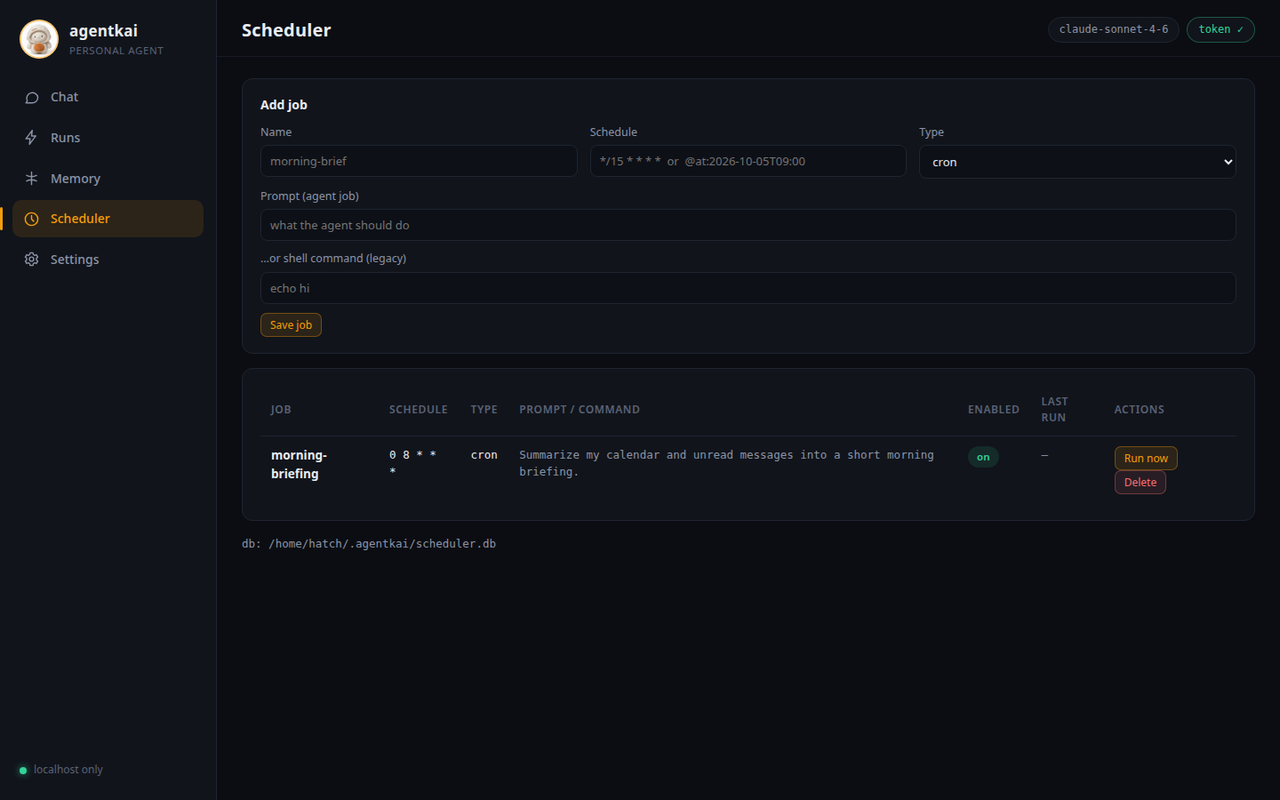
SOUL.md/USER.md/MEMORY.md, daily logs, people & groups, keyword search. Plain files you can read, edit, and git — no black-box vector store. - Scheduler. Cron, one-shot, heartbeat check-ins, and nightly dreaming (memory consolidation), all in SQLite. Manage jobs from the CLI or the dashboard — create, delete, run now.
- Messaging gateway. Telegram, Discord, built-in WebChat, and an
experimental WhatsApp bridge. Per-session isolation; owner approvals
via
APPROVE/DENY. - Voice & media. Speech-to-text/TTS via faster-whisper or OpenAI; image generation via OpenAI or a local Stable Diffusion server. Honest errors when nothing is configured — nothing faked.
- Devices & goals. Pair your phone via the companion-app contract; durable goals and tracked items with a daily briefing prompt.
CLI reference
| Command | What it does |
|---|---|
agentkai run PROMPT |
run one agent task with live streaming output |
agentkai chat PROMPT |
send one prompt, print the final answer |
agentkai models |
show model aliases and what they resolve to |
agentkai doctor |
check the setup: config, provider keys, scheduler DB, memory, tools, media providers, dashboard assets (exits 1 on any [FAIL]) |
agentkai runs list/show RUN_ID |
inspect past runs from the event log: status, model, tools, full replay |
agentkai dashboard |
launch the local web dashboard (127.0.0.1 only, token-secured) |
agentkai gateway |
run the messaging gateway daemon (Telegram/Discord/WebChat/WhatsApp) |
agentkai scheduler add/list/remove/run-once/run-due |
manage scheduled agent jobs |
agentkai devices |
pair phones/laptops and reach them from the agent |
agentkai goals |
durable user goals: create, track, close |
agentkai track |
tracked items: reservations, deliveries, reminders |
agentkai skills list/show/install |
manage SKILL.md playbooks |
Run agentkai <command> --help for flags on any command.
Web dashboard
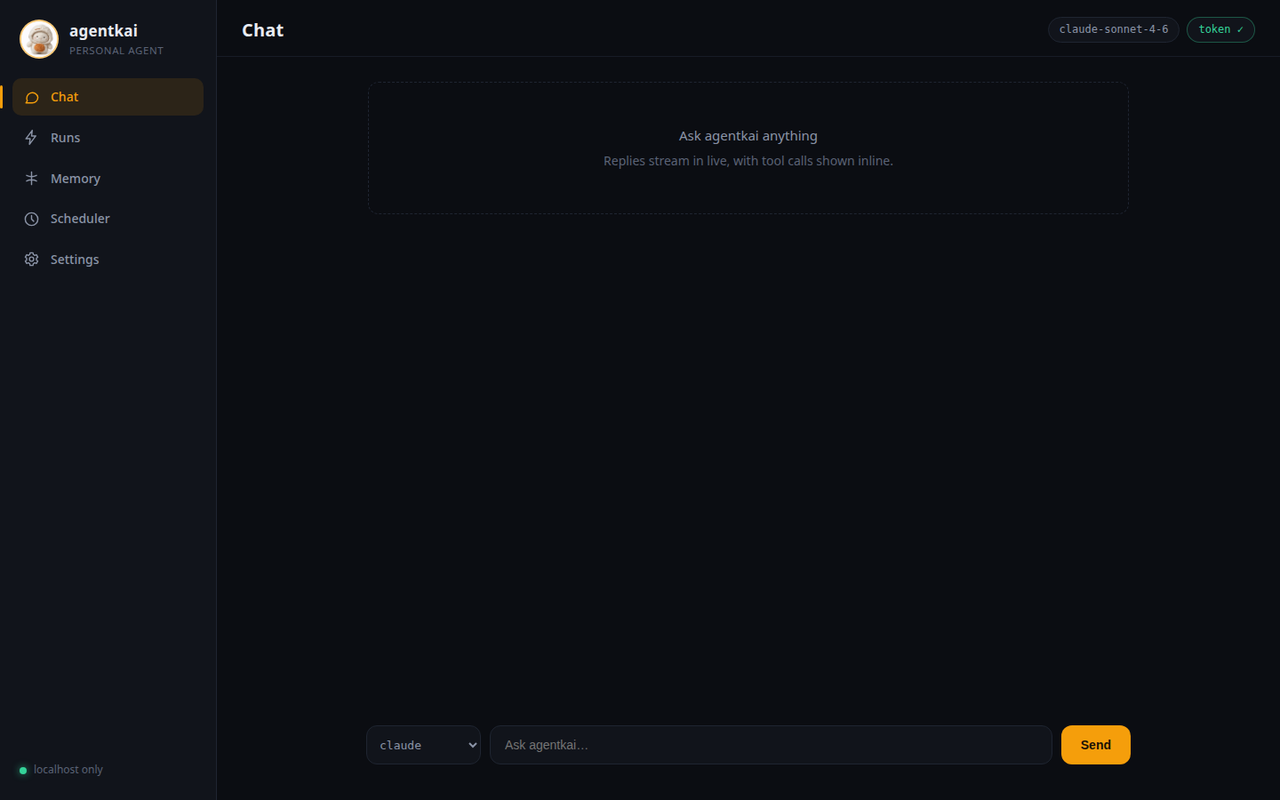
Prefer a UI? agentkai dashboard launches a local web app: chat with
the agent, watch runs stream in with tool calls inline, browse and edit
memory, inspect the tool registry,
and manage scheduled jobs — create, delete, or trigger a run now.
agentkai dashboard
# → http://127.0.0.1:8931/?token=<fresh-token-every-launch>
It binds only to 127.0.0.1 (never exposed to the network), generates
a fresh login token on every launch, and loads zero third-party
resources — the entire UI is packaged with agentkai and works fully
offline. Same agent, same tools underneath.
Docs
📚 Documentation: docs/
Quickstart · Models · Tools · Browser · Memory · Scheduler · Channels · Skills · Voice · Media · Devices · Goals · Dashboard · Privacy · Troubleshooting
Honest scope note: this is early-stage software (v0.3.0). Core flows — agent runs, tools, memory, scheduler, dashboard, channels — are implemented and tested. Areas marked experimental in the docs are real code with real limits; they are labeled, not hidden.
Development
git clone https://github.com/Bilal-Junaid-Jiwani/agentkai
cd agentkai
python -m venv .venv && .venv/bin/pip install -e ".[test,voice]"
.venv/bin/python -m pytest tests/   # full suite
License
Apache-2.0. See LICENSE.
1 maintainer

Metadata
1 maintainer
Release files for agentkai 0.5.3
For a detailed explanation of source distributions (sdists) and built distributions (wheels), please see the package formats documentation.
Source distribution (sdist)
| File | Size | Uploaded | Provenance | |
|---|---|---|---|---|
| agentkai-0.5.3.tar.gz | 5.5 MB | Without provenance | Details |
Built distribution (wheel)
| File | Interpreter | ABI | Platform | Reset |
|---|---|---|---|---|
| agentkai-0.5.3-py3-none-any.whl | Python 3 | none | any | Details |
Total release size: 10.9 MB
Release files / agentkai-0.5.3.tar.gz
| Download URL | agentkai-0.5.3.tar.gz |
|---|---|
| Size | 5.5 MB |
| Tags | Source |
|
SHA-256 checksum How to use checksums |
420d25a07ea3cd745e7f85fa349da3ee1e4219a370cb26901eca95ac362a45c2
|
|
BLAKE2b-256 checksum How to use checksums |
261678059cf6aefb8ff9b23609e5794ec6297dfd968810b8dfcfe6b7d496f0f3
|
| Upload date | |
|
Uploaded using Trusted Publishing? What is trusted publishing? |
No |
| Uploaded via |
okfsmith-pypi-skill/1.0
|
Release files / agentkai-0.5.3-py3-none-any.whl
| Download URL | agentkai-0.5.3-py3-none-any.whl |
|---|---|
| Size | 5.4 MB |
| Tags | Python 3 |
|
SHA-256 checksum How to use checksums |
7d5273f7b77be111d92acac821e98f6c90555a79f12ea69646f73f992ea05535
|
|
BLAKE2b-256 checksum How to use checksums |
4110d97f8e0965ece0f1c40e018e48ca7f45d983c489b268bee6862c26f5b014
|
| Upload date | |
|
Uploaded using Trusted Publishing? What is trusted publishing? |
No |
| Uploaded via |
okfsmith-pypi-skill/1.0
|
Security for agentkai 0.5.3
Provenance
Provenance describes where a file came from. On PyPI, provenance is shared via attestations, which provide a verifiable record of the build or publishing details. View details, limitations and caveats.
No provenance found
None of the files in this release were uploaded with provenance metadata.
A note on package security
PyPI is a repository for distributing packages, not a service for auditing them. While third-party security researchers and our staff do their best to detect and remove malicious packages, PyPI cannot guarantee the quality, security or suitability of any given package.














