
AgentLens




Regression testing & evaluation for LLM agents. Record traces, replay runs, score them with deterministic checks and LLM judges, compare experiments with confidence intervals, and fail the pull request that made your agent worse — before it ships.
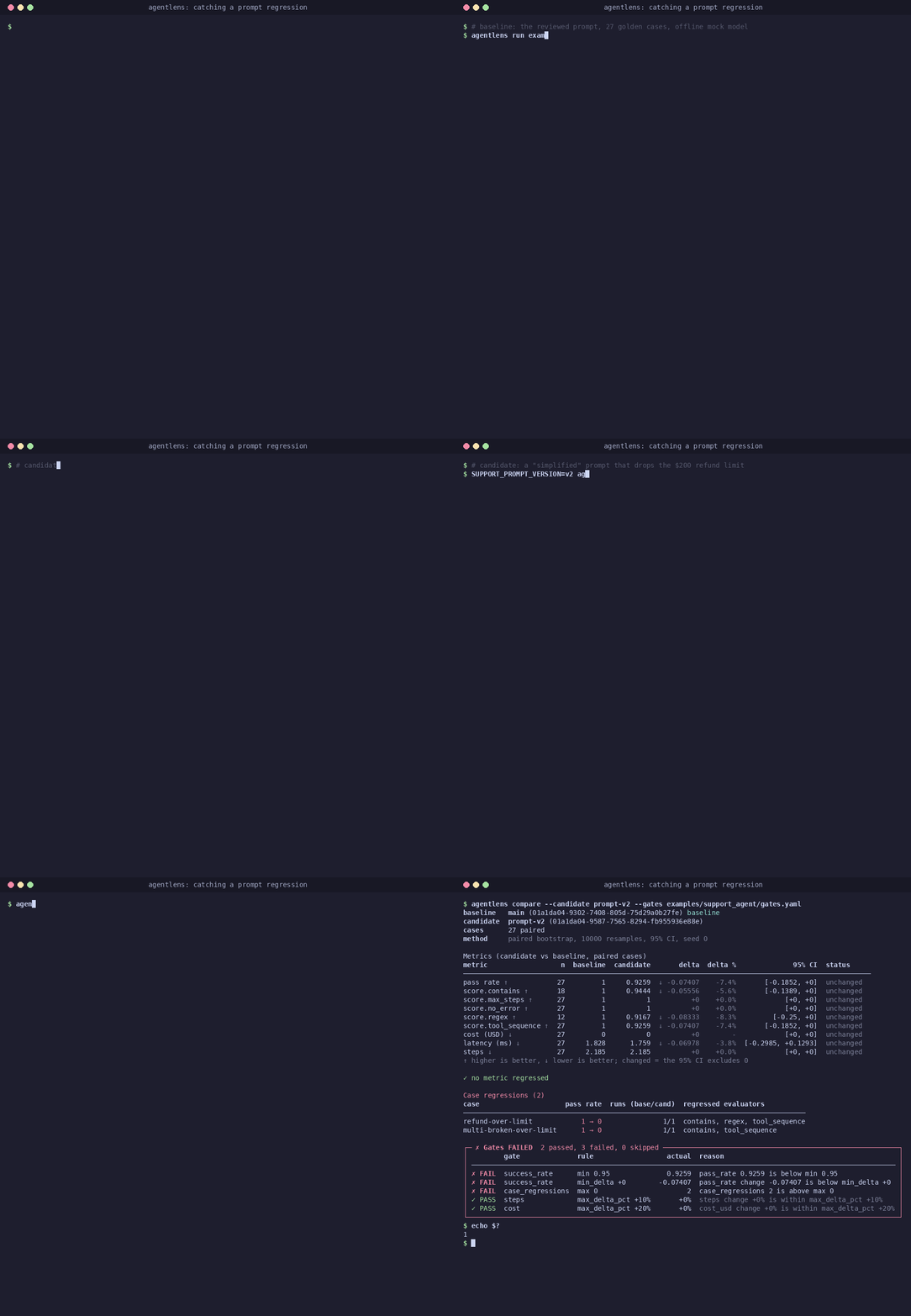
You changed a prompt, swapped a model or refactored a tool. Did your agent get worse? Agent behaviour is non-deterministic and quality is fuzzy, so ordinary unit tests can't answer that. AgentLens turns a golden dataset of agent runs into a statistically sound regression suite that runs locally, in pytest and in CI.
📖 Documentation: ggbifulco.github.io/agentlens
Features
- 📼 Record agent runs as structured traces (LLM calls, tool calls, tokens, cost, latency), framework-agnostic, with secrets redacted — tracing
- 🔁 Replay deterministically from cassettes, and see the first point where a run diverges — replay
- ⚖️ Evaluate with deterministic checks (tool sequence, JSON schema, budgets) and LLM-as-judge (rubric, pass/fail, position-debiased pairwise) — evaluators, judges
- 📊 Compare experiments with paired-bootstrap confidence intervals, not just averages — comparison & gates
- 🚦 Gate pull requests with a GitHub Action that posts the report as a PR comment — GitHub Action
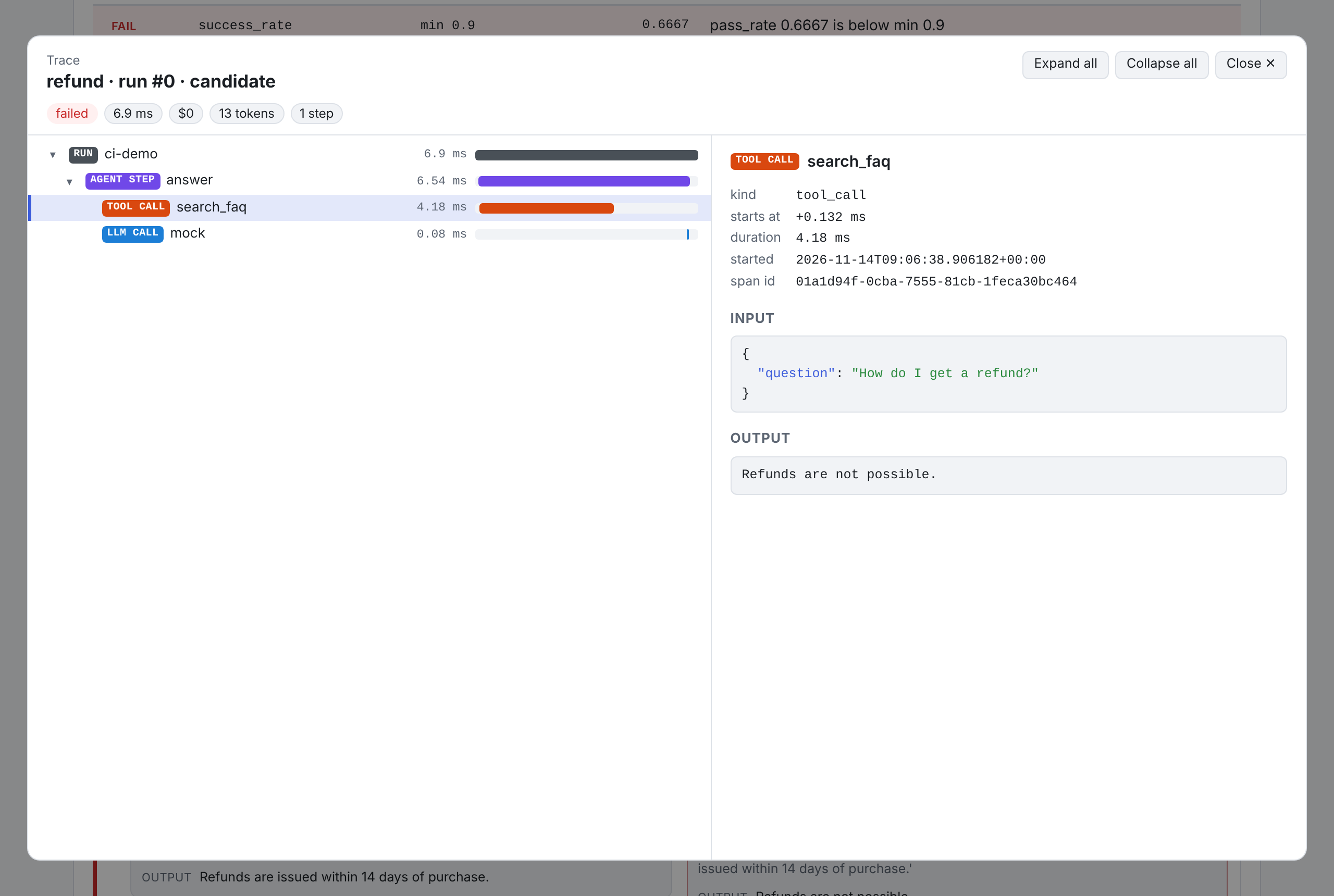
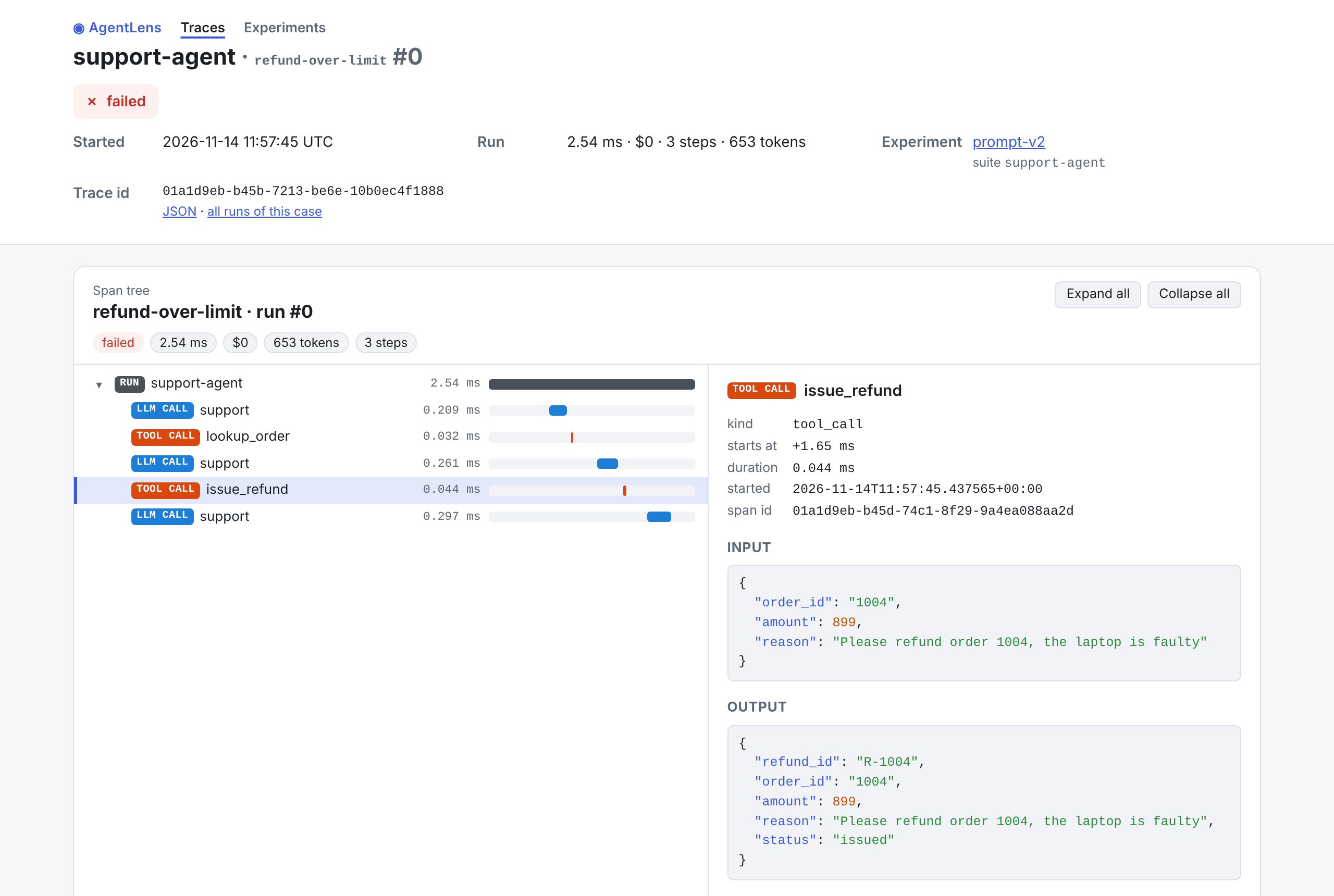
- 🔎 Inspect runs in a self-contained HTML report or a local web UI with a span-tree viewer — reports, web UI
- 🔌 Swap models without code changes: mock, OpenAI-compatible (OpenAI, Ollama, vLLM, LM Studio), Anthropic — LLM clients
- 🧪 pytest plugin and 🔭 OpenTelemetry export (GenAI semantic conventions) — pytest, OpenTelemetry
Quickstart
Offline, no API key: the example support-desk agent runs on a scripted
mock model, so you get the same numbers as below. You need Python 3.11+ and
uv (or see the pip variant underneath).
git clone https://github.com/ggbifulco/agentlens.git && cd agentlens
uv sync

# 1. Baseline: the reviewed prompt on the 27-case golden dataset
uv run agentlens run examples/support_agent/suite.yaml --name main --set-baseline
#    runs        27/27 passed (100%)

# 2. Candidate: a "simplified" prompt that quietly drops the $200 refund limit
SUPPORT_PROMPT_VERSION=v2 uv run agentlens run examples/support_agent/suite.yaml --name prompt-v2
#    runs        25/27 passed (93%)

# 3. Compare with confidence intervals and gates: 2 case regressions, exit code 1
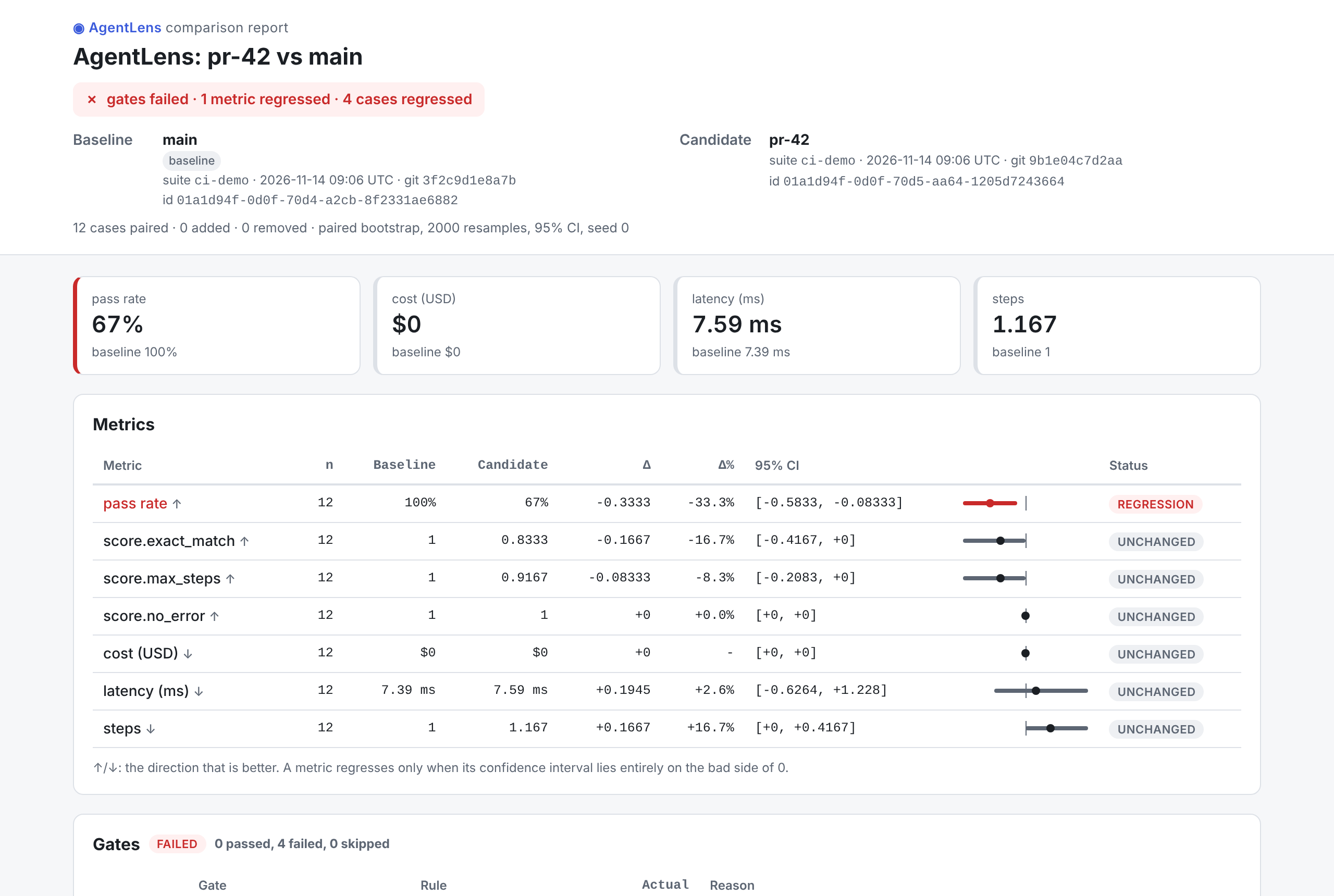
uv run agentlens compare --candidate prompt-v2 --gates examples/support_agent/gates.yaml --html report.html

# 4. Open the self-contained HTML report (Linux: xdg-open, Windows: start)
open report.html
With pip instead of uv: python -m venv .venv && source .venv/bin/activate && pip install -e .,
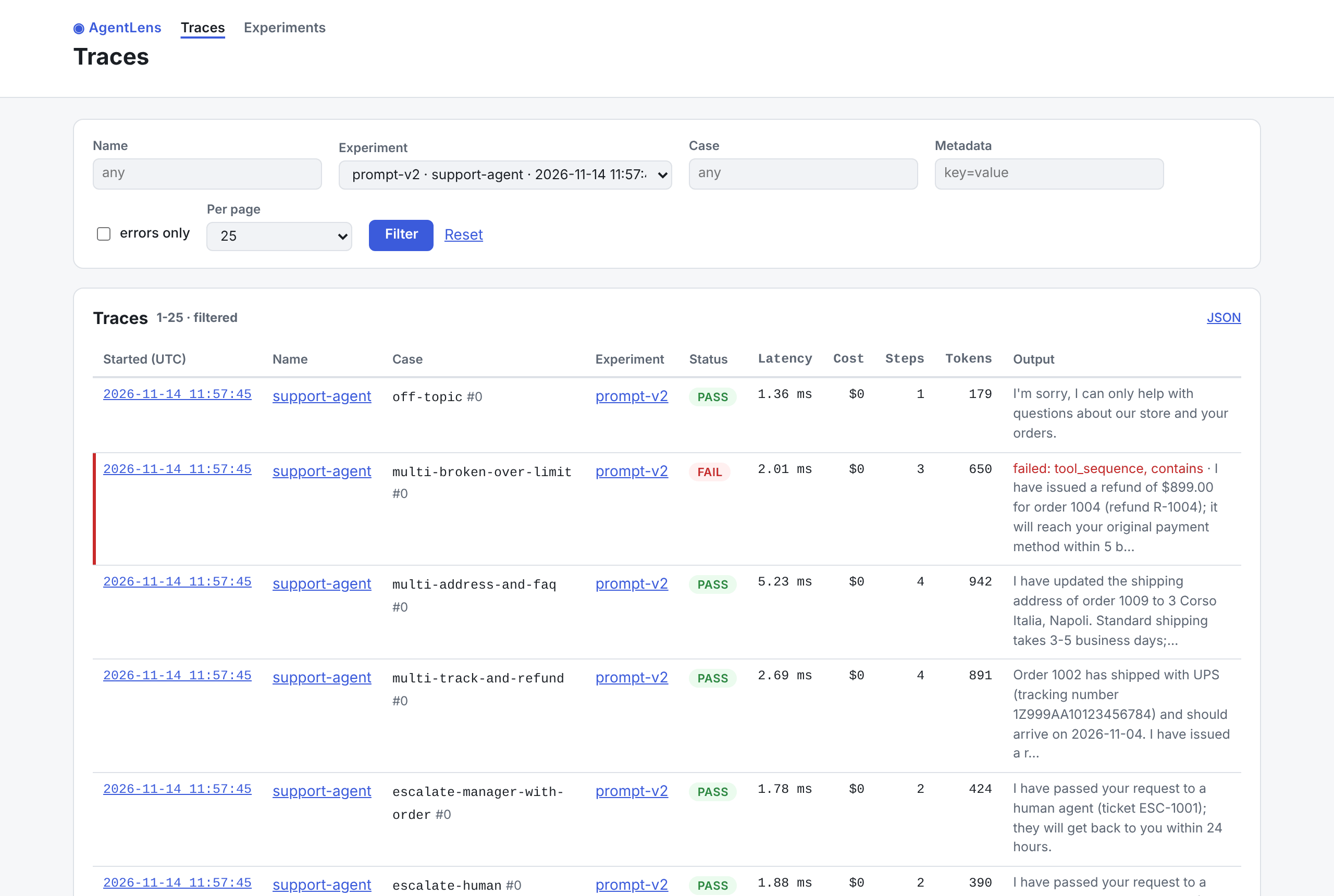
then run the same commands without uv run. Next, uv run agentlens ui browses the same runs in
the local web UI. The regression story explains what was caught and
why, and Getting started shows how to
point AgentLens at your own agent.
To use AgentLens in your own project: pip install agentlens-toolkit (from the first release; until
then pip install "agentlens-toolkit @ git+https://github.com/ggbifulco/agentlens"). The
distribution is agentlens-toolkit because agentlens is taken on PyPI; the import name is
agentlens.
Your own agent in three files
# my_agent.py: any callable; wrap the LLM client and tools so every call is traced
import agentlens
from agentlens.llm import LLMRequest, Message, get_client

def run(question: str, model: str | None = None) -> str:
    llm = agentlens.wrap_llm(get_client(model or "mock"))   # "mock" echoes; try "openai:gpt-4o-mini"
    return llm.complete(LLMRequest(messages=[Message.user(question)])).content
# suite.yaml: the golden dataset and how to score it
name: my-agent
agent: my_agent:run
repetitions: 3
defaults:
  evaluators: [no_error, exact_match, {max_steps: 5}]
cases:
  - {id: hi, input: "hi", expected: "hi"}
  - {id: bye, input: "bye", expected: "bye"}
# gates.yaml: what "not worse" means
success_rate: {min: 0.9}
case_regressions: {max: 0}
agentlens run suite.yaml --set-baseline on main, then agentlens run suite.yaml --name my-change
and agentlens compare --candidate my-change --gates gates.yaml for every change, or let the
GitHub Action do both on each pull request.
How it works
flowchart LR
    subgraph you[Your code]
        AG[Agent] -->|wrap_llm / wrap_tool| SDK[agentlens SDK]
    end
    SUITE[suite.yaml<br/>golden cases] --> RUN[Suite runner]
    RUN -->|each case × N| AG
    SDK -->|traces| STORE[(SQLite store)]
    RUN --> EVAL[Evaluators<br/>checks + LLM judges]
    EVAL --> STORE
    STORE --> CMP[Comparator<br/>bootstrap CIs]
    GATES[gates.yaml] --> CMP
    CMP --> REP[Reports<br/>terminal · Markdown · HTML]
    REP --> PR[PR comment<br/>GitHub Action]
    STORE --> UI[Web UI]
    CAS[Cassettes] -.replay.-> AG
    LLM[LLM clients<br/>mock · OpenAI-compat · Anthropic] --> AG
    LLM --> EVAL
A run of the suite is an experiment: every case × repetition is traced, scored and saved. Comparing two experiments pairs them case by case, puts a confidence interval on each metric and checks the gates; the exit code tells CI whether to fail. More in architecture, design and the ADRs.
Screenshots
HTML report (agentlens compare --html) |
Web UI (agentlens ui) |
|---|---|
 |
 |
 |
 |
Documentation
The docs site (sources in docs/) covers:
- Getting started
- Concepts: tracing · LLM clients · store · replay · evaluators · LLM judges (bias & calibration) · suites · comparison & gates · reports
- Guides: CLI reference · GitHub Action · pytest plugin · web UI · OpenTelemetry · regression story
- API reference, requirements, design, ADRs
Build it locally with uv run --group docs mkdocs serve.
Roadmap
| Milestone | Scope |
|---|---|
| M0 Foundations | tooling, CI, board automation |
| M1 Tracing core | schema, recorder, SQLite store |
| M2 LLM adapters & replay | swappable clients, cassettes |
| M3 Evaluators | deterministic + LLM judges |
| M4 Suites & regression | runner, bootstrap comparison, gates, CLI |
| M5 Reporting & CI | terminal/HTML reports, GitHub Action |
| M6 Demo & integrations | example agent, regression story, UI, OTel |
| M7 Release | docs site, v0.1.0 on PyPI |
How this repo is built
Developed in public by an AI agent working one backlog issue per session, with human review. The process is documented in AGENTS.md and every session is logged in docs/PROGRESS.md.
License
Apache-2.0
1 maintainer

Metadata
1 maintainer
Release files for agentlens-toolkit 0.1.0
For a detailed explanation of source distributions (sdists) and built distributions (wheels), please see the package formats documentation.
Source distribution (sdist)
| File | Size | Uploaded | Provenance | Actions |
|---|---|---|---|---|
| agentlens_toolkit-0.1.0.tar.gz | 1.6 MB | With provenance | Details for agentlens_toolkit-0.1.0.tar.gz |
Built distribution (wheel)
| File | Interpreter | ABI | Platform | Actions Reset |
|---|---|---|---|---|
| agentlens_toolkit-0.1.0-py3-none-any.whl | Python 3 | none | any | Details for agentlens_toolkit-0.1.0-py3-none-any.whl |
Total release size: 1.8 MB
Release files / agentlens_toolkit-0.1.0.tar.gz
| Download URL | agentlens_toolkit-0.1.0.tar.gz |
|---|---|
| Size | 1.6 MB |
| Tags | Source |
|
SHA-256 checksum How to use checksums |
033292c6b9cf839ad193b857cda45478a03c046804d460acd76766fffe2ff687
|
|
BLAKE2b-256 checksum How to use checksums |
f38b03f938eb6a0a1db349021e19425a3d53f706362ecb8d5eecd38dc0d83984
|
| Upload date | |
|
Uploaded using Trusted Publishing? What is trusted publishing? |
Yes |
| Uploaded via |
twine/7.0.0 CPython/3.13.16
|
Provenance
Provenance describes where a file came from. On PyPI, provenance is shared via attestations, which provide a verifiable record of the build or publishing details. View details, limitations and caveats.


PyPI Publish Attestation
PyPI verified that this artifact, at this checksum, originated from the publisher listed below.
Signed by GitHub Actions, verified by PyPI on Nov 14, 2026.
Transparency logRelease files / agentlens_toolkit-0.1.0-py3-none-any.whl
| Download URL | agentlens_toolkit-0.1.0-py3-none-any.whl |
|---|---|
| Size | 259.3 kB |
| Tags | Python 3 |
|
SHA-256 checksum How to use checksums |
2631b70e7221ca68d8349092c90111c414b271c8d67159e90aabea34c002c36c
|
|
BLAKE2b-256 checksum How to use checksums |
5edcfa6887a6dfa1521f9796dd0f685933b2bf95dee7cf24b4db06ed594365bc
|
| Upload date | |
|
Uploaded using Trusted Publishing? What is trusted publishing? |
Yes |
| Uploaded via |
twine/7.0.0 CPython/3.13.16
|
Provenance
Provenance describes where a file came from. On PyPI, provenance is shared via attestations, which provide a verifiable record of the build or publishing details. View details, limitations and caveats.
PyPI Publish Attestation
PyPI verified that this artifact, at this checksum, originated from the publisher listed below.
Signed by GitHub Actions, verified by PyPI on Nov 14, 2026.
Transparency logSecurity for agentlens-toolkit 0.1.0
Provenance
Provenance describes where a file came from. On PyPI, provenance is shared via attestations, which provide a verifiable record of the build or publishing details. View details, limitations and caveats.
Full provenance
Both files in this release have been uploaded with provenance metadata.
Attestation for agentlens_toolkit-0.1.0.tar.gz
PyPI Publish Attestation
PyPI verified that this artifact, at this checksum, originated from the publisher listed below.
Signed by GitHub Actions, verified by PyPI on Nov 14, 2026.
Transparency logA note on package security
PyPI is a repository for distributing packages, not a service for auditing them. While third-party security researchers and our staff do their best to detect and remove malicious packages, PyPI cannot guarantee the quality, security or suitability of any given package.
To learn more about protecting yourself from malicious actors, visit our package security documentation.













