
🚀 EasyAgent
Build inspectable AI agents with ordinary Python functions and no workflow DSL.



EasyAgent 是一个面向研究人员和学生的极简 AI Agent 脚手架。我们相信构建 AI 代理应该像写一个普通函数一样简单——不需要学习新的领域语言,不需要理解复杂的抽象层。
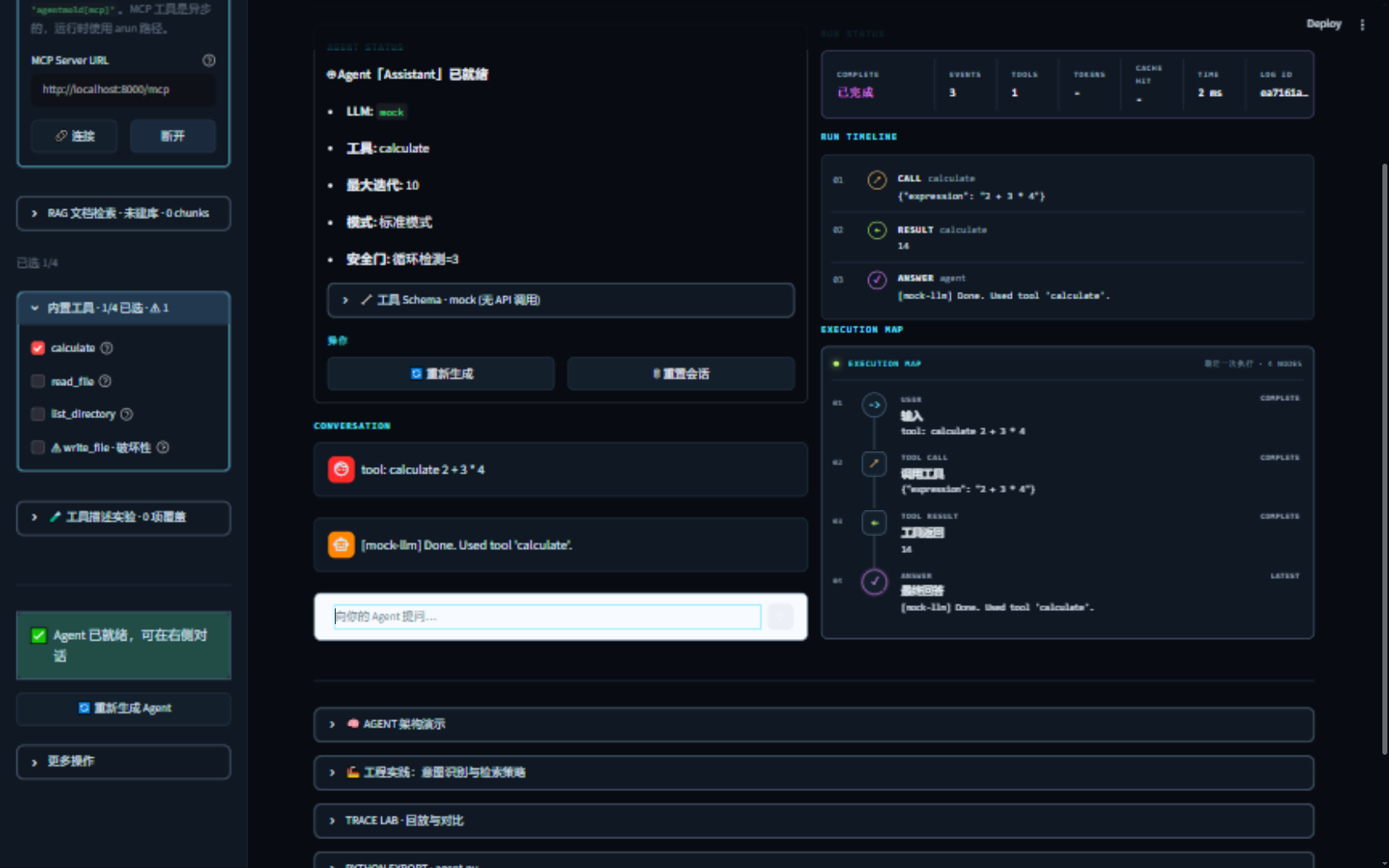
顶部直达五种 Agent 架构;ReAct 工作台保留配置、对话与实时执行地图。
✨ 特性
- 🎯 小型公开 API — 用
Agent、@tool和普通 Python 完成主要路径 - 🔌 多 LLM 支持 — OpenAI、Anthropic、Ollama(本地模型)等,统一接口
- 🛠️ 工具系统 —
@tool装饰器定义工具,自动生成调用 Schema - 🧠 记忆管理 — 短期对话历史 + 长期向量存储(可选)
- 📊 内置可观测性 — 开箱即用的日志与追踪,无需额外基础设施
- 🎨 可视化实验室 — 在浏览器中配置 Agent,并查看带动画的执行地图
- 📦 零依赖友好 — 核心仅需
httpx,按需安装扩展依赖 - 🎓 教育透明 — 离线运行、逐事件观察,并公开解释内部执行循环
🎬 快速开始
安装
需要 Python 3.10 或更高版本。
pip install agentmold
10 行代码创建你的第一个 Agent
基础安装默认使用离线 mock 模型,无需 API Key 即可运行示例。使用托管模型时,再安装对应 extra 并设置 API Key。
from agentmold import Agent, tool

@tool
def search_web(query: str) -> str:
    """Search the web for information."""
    return f"Search results for: {query}"

agent = Agent(
    name="Research Assistant",
    instructions="You are a helpful research assistant.",
    tools=[search_web],
    llm="mock",
)

response = agent.run("What are the latest advances in AI agents?")
print(response)
使用本地模型(无需 API Key)
EasyAgent 通过 Ollama 支持本地模型。EasyAgent 不会自动下载或部署模型——你需要先安装 Ollama 并拉取一个模型,之后 EasyAgent 才能调用它。
第一步:安装依赖和 Ollama 模型(仅需做一次)
pip install "agentmold[ollama]"
# 1. 安装 Ollama
#    macOS / Linux:
curl -fsSL https://ollama.com/install.sh | sh
#    Windows: 从 https://ollama.com/download 下载安装包

# 2. 从 Ollama 模型库选择适合本机的模型 ID,然后拉取
ollama pull MODEL_ID_FROM_OLLAMA_LIBRARY

# 3. 确认 Ollama 服务正在运行(默认监听 localhost:11434)
#    Ollama Desktop 通常会自动运行;否则请在另一个终端执行:
ollama serve
ollama serve通常会持续占用当前终端,请保留该窗口并在另一个终端继续下面的步骤。 模型 ID 更新较快,请以ollama list的输出为准,不要依赖 EasyAgent 文档里的推荐名单。
第二步:设置模型 ID
# macOS/Linux
export EASYAGENT_MODEL=MODEL_ID_FROM_OLLAMA_LIST
# Windows PowerShell
$env:EASYAGENT_MODEL = "MODEL_ID_FROM_OLLAMA_LIST"
# Windows cmd
set EASYAGENT_MODEL=MODEL_ID_FROM_OLLAMA_LIST
第三步:在 EasyAgent 中使用
import os

from agentmold import Agent

agent = Agent(
    name="Local Agent",
    llm={
        "provider": "ollama",
        "model": os.environ["EASYAGENT_MODEL"],  # 使用 ollama list 中的 ID
    },
)

response = agent.run("Hello! What can you do?")
这里的 llm 使用明确的 provider + model 配置;EASYAGENT_MODEL 必须是 ollama list 中的实际 ID。
切换模型只需修改该变量,Agent、工具和记忆代码不需要变化。
可视化实验室(五种 Agent 架构直达)
安装 Streamlit extra 后,顶部可以直接切换 ReAct、Plan-and-Execute、Reflection、
Multi-Agent 和 Routing。ReAct 保留可配置的单 Agent 工作台;其余四种架构默认进入 无网络练习(预设回答):不需要 API Key,只演示 Python 控制流和 Trace 结构。
切换到 真实模型执行 前,页面会要求确认联网和潜在 provider 费用;Planner 的输出决定步骤,
Critic 的反馈决定修订,Router 的输出决定唯一专家,Coordinator 的真实 tool calls 才会产生
Researcher/Analyst child traces。页面、结果 metadata 和导出文件都会标明执行方式,不会混称。
真实运行期间页面持续显示阶段进度:Plan 的规划/逐步执行/综合,Reflection 的生成/审查/修订, Routing 的分类/专家处理,以及 Multi-Agent 的 Coordinator 委派、专家返回和最终综合。失败会 保留已发生的进度与错误;运行完成后进度也进入实验 JSON metadata。
每个教学页把两类信息明确分开:
- 概念示意 · 非本次运行:解释预期架构和普通 Python 控制流。
- 实际观测:展示
TeachingEvent、真实AgentTrace、模型轮次、工具调用和父子 run。
顶部的 运行回放 用于查看单次运行时间线、配置、父子 family 和 bundle; 对比与评测 分成两个任务:
- 已记录运行对照:选择 2-4 个已记录运行并排比较。记录可能来自 Mock、无网络练习、真实模型、 失败或 partial 运行;Multi-Agent 实验可同时选择 Coordinator、Researcher 和 Analyst。
- Mock 输出回归:只检查内置 Mock Agent 是否包含指定字符串,不调用网络、不使用当前 ReAct 配置,也不是多个 Agent 的质量排行榜。
# 1. 安装可视化依赖
pip install "agentmold[visual]"

# 2. 启动可视化编辑器(自动打开浏览器)
easyagent visual

# 直接加载代码定义的 Agent
easyagent visual --file agent.py
直接从源码运行(无需 PyPI 安装)
克隆仓库后,安装可视化依赖即可启动,不需要先 pip install agentmold:
git clone https://github.com/dreamsxin/EasyAgent.git
cd EasyAgent
pip install -e ".[visual]"
easyagent visual
-e 会以可编辑模式安装本地源码,修改 src/agentmold/ 后重启实验室即可看到变化。
也可以跳过 easyagent 命令,直接用 Streamlit 启动:
pip install -e ".[visual]"
streamlit run src/agentmold/visual/app.py
实验室采用深色研究控制台主题:对话、执行事件时间线和行为优先的执行地图会同时保留,方便快速定位
工具调用、结果与最终回答之间的关系。执行地图只绘制已经发生的事件;实时运行时当前节点会脉冲高亮,
回放时节点按事件顺序逐步出现,避免把不可见的“规划”误画成执行事实。
运行状态面板会持续显示当前阶段、事件数、工具调用数、token、缓存命中率、耗时和 Log ID;
失败时保留错误摘要。
顶部进入 运行回放 可导入或导出 JSONL Trace、拖动回放进度,并把两个运行的
输入、模型、延迟、token、缓存命中率、提供商返回的成本和工具调用并排比较。父子 run 会
按 family 层级排列,可相互跳转并导出多 run bundle。当前会话中的新运行会自动进入回放;
旧版 JSONL 也可读取。
可视化运行还会把成功和失败 Trace 追加到本地 .agentmold/visual_runs.jsonl;界面显示的
Log ID 就是 run_id,可用来回查一次失败的输入、事件、模型配置、usage 和诊断摘要。
展开 PYTHON EXPORT · agent.py 可预览并下载当前配置对应的 build_agent() 文件;
API Key 不会写入源码,导出时会改用对应的环境变量。下载后运行 python agent.py
即可进入交互模式,也可以用 python agent.py "你的问题" 完成一次提问,无需再写启动代码。
侧栏的 接口提供商 支持 Mock、DeepSeek、OpenAI/Anthropic 兼容接口、Ollama
和自定义提供商。选择自定义提供商后,只需选择接口类型并填写模型、API Key、Base URL、
Temperature、超时和最大输出 tokens。点击“保存配置”后,接口参数和 API Key 会保存到
项目的 .agentmold/visual_profiles.json,下次切换到同一接口类型时自动填充;“清除配置”
可删除对应记录。该文件不会提交到 Git,但 API Key 在其中以明文存储,请限制文件访问权限。
Agent 名称、指令、接口类型、最大迭代次数、工具选择和上传模块会自动保存到
.agentmold/visual_agent.json。再次启动实验室时会恢复这些控件并生成上次 Agent。
窄屏窗口会自动收起侧栏,并在左上角显示 Agent 配置 按钮;点击即可重新展开配置。
架构练习、运行回放和对比与评测这三类页面也保留左侧栏,但只显示 实验导航(当前视图、
当前架构、操作步骤和返回 ReAct 工作台的入口);Agent 配置面板仍然只属于 ReAct 工作台,
避免让教学页看起来可以改写单 Agent 配置。
自定义工具模块 支持上传 UTF-8 .py 文件;模块必须显式导出 TOOLS 或零参数
build_tools(),返回由 @tool 创建的工具列表。上传 Python 会以 Streamlit 服务的本地权限
执行,只应加载可信代码。完整格式和安全边界见 自定义工具模块。
选择 mock 模型即可零配置体验——无需任何 API Key。执行地图中:
- 👤 蓝色节点 = 用户输入
- 🔧 橙色节点 = 工具调用
- ✅ 绿色节点 = 工具返回结果
- 💬 紫色节点(更大)= 最终回答
💡 想用代码控制执行流?
Agent.run_stream()会逐步 yield 每个执行事件,方便你自定义可视化或日志:for step in agent.run_stream("问题"): if step["type"] == "tool_call": print(f"调用工具: {step['name']}")
这里的“流”是 text_delta(可选)、tool_call、tool_result、answer、
approval_request 和 loop_detected 组成的执行事件流。approval_request 是运行时确认请求,
不会持久化;text_delta 也是瞬态显示片段,不保证等于一个 token。其余事件会进入 Trace,
loop_detected 记录后会抛出 LoopDetectedError。OpenAI、DeepSeek、Anthropic、
DeepSeek Anthropic 和 Ollama 支持同步与异步原生文本流;mock 以及未实现流式接口的扩展
Provider 仍只产生完整响应。工具调用轮次可能没有可见文本片段。
easyagent visual --file agent.py 会调用文件中的 build_agent(),并在文件修改后重新加载;
这样可视化层观察的就是代码里实际运行的 Agent。命令行运行也使用同一个加载器:
easyagent run --file agent.py。
异步应用可以使用同样的接口:await agent.arun("问题") 或
async for step in agent.arun_stream("问题")。同步工具会在线程中运行,异步工具会直接等待。
模型配置支持 timeout、max_retries 和 retry_delay;整次异步运行可以直接使用
Python 标准库的 asyncio.wait_for() 或任务取消。
交互式创建项目
pip install agentmold
easyagent init my-agent-project
cd my-agent-project
pip install -e .
easyagent run
easyagent run 不带参数时会用一个在任意模板上都能跑通的能力提示,并提示如何触发这个
项目自己的工具。离线 mock 模型不做自然语言推理,需要用 tool: 前缀显式触发工具:
easyagent run "tool: search_web latest AI agent advances"
pip install -e . 安装生成项目自己声明的依赖。用离线 mock 模型时这一步可以跳过;
换成托管或本地 Provider 后必须执行,否则缺少对应的 provider extra。
托管或本地模型由用户分别选择 Provider 与模型 ID:
easyagent init hosted-agent --provider deepseek --model MODEL_ID_FROM_PROVIDER
生成的 agent.py 会保存显式的 {"provider": "deepseek", "model": "..."} 配置;
EasyAgent 不从模型名称推断 Provider。
通过 --template 可以直接生成可离线运行、方便修改的教学项目:
easyagent init literature-lab --template research-assistant
easyagent init rag-lab --template rag
easyagent init data-lab --template data-analysis
easyagent init citation-lab --template citation-aware
这些模板分别提供本地研究笔记检索、透明的内存 RAG、标准库 CSV 汇总和来源 ID 引用;
另外保留 default、coder 与 chatbot 模板。所有模板默认使用 mock,无需 API Key。
精选 Cookbook
Cookbook 提供十个经过测试的渐进配方,包括内部循环、Trace、离线 RAG、 批量评测、安全门、MCP、可复现检索和五种 Agent 架构。它们都是可直接运行的普通 Python 脚本:
python cookbook/00_understand_the_agent_loop.py
python cookbook/01_trace_a_research_run.py
python cookbook/02_offline_rag.py
python cookbook/03_batch_evaluation.py
python cookbook/04_scoped_workspace.py
🧩 核心概念
主要使用路径只有三个概念;Provider、消息格式和执行事件属于需要扩展或研究内部机制时 才接触的第二层接口:
| 概念 | 说明 | 示例 |
|---|---|---|
| Agent | 带有工具和记忆的智能函数 | agent = Agent(...) |
| Tool | 用 @tool 装饰的普通函数 |
@tool def f(x): ... |
| Memory | 管理对话上下文的对象 | agent.memory |
from agentmold import Agent, Memory, tool

# 1. 定义工具 —— 就是一个普通函数
@tool
def study_hint(topic: str) -> str:
    """Return a deterministic study hint for a topic."""
    hints = {"trace": "Record inputs, tool calls, results, and model settings."}
    return hints.get(topic.lower(), "Break the topic into a small reproducible example.")

# 2. 创建 Agent —— 像实例化一个类一样简单
agent = Agent(
    name="Study Assistant",
    instructions="Explain mechanisms with reproducible examples.",
    tools=[study_hint],
    llm="mock",
    memory=Memory(max_messages=20),  # 可选:自定义记忆
)

# 3. 运行 Agent —— 就像调用一个函数
answer = agent("Explain an execution trace.")
🔌 多 LLM 支持
EasyAgent 通过统一的接口支持多个 LLM 提供商:
import os

from agentmold import Agent

agent = Agent(
    llm={
        # 可选:openai / anthropic / deepseek / deepseek-anthropic / ollama
        "provider": os.environ["EASYAGENT_PROVIDER"],
        # 从提供商控制台或本地模型列表复制,不由 EasyAgent 猜测
        "model": os.environ["EASYAGENT_MODEL"],
        "temperature": 0.7,
    }
)
每个提供商需要安装对应的可选依赖,例如
pip install "agentmold[ollama]"。详见下方安装选项。
DeepSeek 配置会读取 DEEPSEEK_API_KEY,默认分别使用
https://api.deepseek.com 和 https://api.deepseek.com/anthropic。也可以在配置字典中
显式传入 api_key、base_url 和 temperature。模型可用性和弃用节奏由提供商控制;
EasyAgent 要求显式填写模型 ID,不维护容易过期的推荐模型名单。
🛠️ 工具系统
任何函数加上 @tool 装饰器就能成为 Agent 可调用的工具,装饰后的对象仍然可以像普通函数一样调用:
from agentmold import tool
import datetime

@tool
def get_current_time() -> str:
    """Get the current date and time."""
    return datetime.datetime.now().strftime("%Y-%m-%d %H:%M:%S")

@tool
def read_file(file_path: str) -> str:
    """Read the contents of a file.

    Args:
        file_path: Path to the file to read.
    """
    with open(file_path, "r") as f:
        return f.read()
EasyAgent 会自动从函数的类型注解和docstring生成工具描述,无需手动维护 JSON Schema。
第三方包可以通过标准 Python Entry Points 提供 Provider 与 Tool,不需要修改 EasyAgent:
from agentmold import Agent, discover_providers, discover_tools

discover_providers()
agent = Agent(
    llm={"provider": "my-provider", "model": "my-model"},
    tools=discover_tools(),
)
扩展只会在显式调用发现函数时加载。入口点声明和错误处理见 Provider 与 Tool 扩展。
内置工具与权限策略
calculate 是唯一默认导出的无副作用工具。文件和网络工具必须由应用显式配置权限:
from agentmold import Agent
from agentmold.tools import calculate, http_tools, workspace_tools

tools = [
    calculate,
    *workspace_tools("./research", allow_write=True),
    *http_tools({"api.example.com"}),
]
agent = Agent(
    name="Research Assistant",
    instructions="You are a careful research assistant.",
    tools=tools,
    llm="mock",
)
workspace_tools(root)将读文件和列目录限制在root,allow_write=True才会加入写文件工具。http_tools(allowed_hosts)只允许精确匹配的主机,默认拒绝私有/非公网地址并禁用重定向。calculate使用 AST 白名单和资源上限,仅允许+ - * / // % **与括号,拒绝变量和函数调用。
完整策略说明见 内置工具权限。
MCP 工具(外部工具服务)
通过 MCP 协议连接外部工具服务器,把它的工具变成普通 Tool 对象。下面示例使用 OpenAI provider,
需要安装 pip install "agentmold[mcp,openai]",且 MCP 工具是异步的(用 await agent.arun()):
import asyncio
from agentmold import Agent
from agentmold.mcp import mcp_tools

async def main() -> None:
    toolset = await mcp_tools(
        "https://mcp.example.com/mcp",
        allowed_hosts={"mcp.example.com"},
        tool_allowlist={"search"},  # 只暴露指定工具
        confirm_all=True,           # 每次调用前确认
    )
    agent = Agent(tools=[*toolset], llm={"provider": "openai", "model": "gpt-4o"})
    print(await agent.arun("搜索 AI agent"))

asyncio.run(main())
MCP 复用 http_tools 的 SSRF 防护,并提供工具白名单、确认门和工具投毒检测。
详见 MCP 工具文档。
实验性 Agent 组合
需要研究多 Agent 行为时,可以显式地把一个 Agent 转成普通工具,而不引入编排框架:
from agentmold import Agent
from agentmold.experimental import agent_as_tool

specialist = Agent(name="Evidence Analyst", llm="mock")
coordinator = Agent(tools=[agent_as_tool(specialist)], llm="mock")
answer = coordinator("tool: inspect this claim")
该 API 位于 agentmold.experimental,尚不属于稳定顶层接口。同步/异步委托、记忆语义、
父子 Trace 的 run_id 关联和递归深度限制见
实验性 Agent 组合。
🧠 记忆管理
import os

from agentmold import Agent, Memory

# 短期记忆(对话历史,默认)
agent = Agent(memory=Memory(max_messages=20))

# 长期记忆(需要 agentmold[memory];默认 embedding 会调用 OpenAI)
# 请先设置 OPENAI_API_KEY 和 EASYAGENT_EMBED_MODEL,或注入离线 embedder。
from agentmold.memory import VectorMemory
agent = Agent(memory=VectorMemory(
    collection="literature-review",
    storage_path="./.agentmold/memory",
    embed_model=os.environ["EASYAGENT_EMBED_MODEL"],
))
不联网的最小方式是传入自己的确定性 embedder,例如:
from agentmold import Agent, VectorMemory

memory = VectorMemory(
    collection="offline-demo",
    storage_path="./.agentmold/memory",
    embed_model="local-hash",
    embedder=lambda text: [float((sum(map(ord, text)) + i) % 17) for i in range(8)],
)
agent = Agent(memory=memory, llm="mock")
📊 可观测性
EasyAgent 内置轻量级日志与追踪,无需配置任何外部服务:
from agentmold import Agent, LogLevel

agent = Agent(
    name="Debuggable Agent",
    llm="mock",
    log_level=LogLevel.DEBUG,  # 打印每一步执行事件
)

# 保存本次运行的研究记录(包含输入、Agent 配置、事件、耗时和可用的 usage)
agent.run("问题")
if agent.last_trace is not None:
    agent.last_trace.to_jsonl("runs/experiment.jsonl")

# 显式使用 LogLevel.DEBUG 时会打印执行事件;默认调用保持静默:
# [THOUGHT] Iteration 1: calling tool search_web(...)
# [ACTION] Calling tool: search_web(...)
# [OBSERVATION] Search results: ...
# [ANSWER] Here's what I found about AI agents...
🎓 为什么选择 EasyAgent?
适用边界
| 适合 EasyAgent | 当前不承诺 |
|---|---|
| 学习 Agent 的模型、工具、记忆循环 | 生产级分布式运行时 |
| 离线完成第一次实验 | 稳定的多 Agent 工作流与编排 DSL |
| 记录、回放和比较研究运行 | 内置逐 token/逐字输出 |
| 用普通 Python 编写单 Agent 原型 | 托管平台、权限沙箱或集中式工具市场 |
EasyAgent 不靠覆盖更多框架功能取胜。它的差异化目标是:首次运行无需凭据、核心循环可以 顺着源码和事件记录读懂、教学示例可离线复现。超出这些边界时,应直接选用更成熟的专用系统。
Trace 会尽量保留 provider 返回的 usage 计数。Streamlit 会把常见字段归一化为总 token、
输入/输出 token 和缓存命中率;例如 DeepSeek 的 prompt_cache_hit_tokens /
prompt_cache_miss_tokens、OpenAI 兼容响应里的 cached_tokens、Anthropic 的
cache_read_input_tokens。若 provider 不返回缓存明细,缓存命中率显示为 —。
如果错误类似 exceeded max_iterations=1 without producing a final answer,通常表示模型
第一轮调用了工具,但 Agent 没有第二轮机会读取工具结果并总结;把最大迭代次数调到 2 或更高即可。
设计哲学
- 单一核心抽象 —
Agent本质上是"一个带有工具和记忆的函数" - 无工作流 DSL — 配置和组合保持为普通 Python,不发明第二套编程语言
- 合理默认值 — 开箱即用,但一切可配置
- 单代理优先 — 多代理是可选的高级扩展
- 教育透明 — 每一步都可观察、可解释
📦 安装选项
# 基础安装(核心功能,默认使用 mock)
pip install agentmold

# OpenAI 兼容 provider
pip install "agentmold[openai]"

# DeepSeek OpenAI 兼容 provider
pip install "agentmold[deepseek]"

# Anthropic 兼容 provider
pip install "agentmold[anthropic]"

# DeepSeek Anthropic 兼容 provider
pip install "agentmold[deepseek-anthropic]"

# Ollama 本地 provider
pip install "agentmold[ollama]"

# 向量记忆(默认 embedding 路径调用 OpenAI,也可注入自定义 embedder)
pip install "agentmold[memory]"

# MCP 异步工具
pip install "agentmold[mcp]"

# 可视化实验室
pip install "agentmold[visual]"

# 全功能安装(不包含 dev 测试工具)
pip install "agentmold[all]"
🗺️ 路线图
- 单代理核心循环、工具系统与短期记忆
- 离线 mock、OpenAI、Anthropic、Ollama 适配器
- DeepSeek OpenAI/Anthropic 兼容端点配置
- CLI 项目模板与执行事件流
- VectorMemory Collection 与内置工具权限策略
- Streamlit 可视化实验室原型
- 可复现 trace、评测与批量实验(v0.3)
- 稳定的异步 API 与工具策略(v0.2)
- Python Entry Point 扩展与实验性 agent-as-tool 组合(v0.5)
- 教学透明度审计、安全示例与事件流语义说明(v0.6)
- Provider-neutral
text_delta契约与同步/异步 Agent 管道 - Streamlit 显示 token 用量和 provider 缓存命中率
- 内置 Provider 同步/异步原生文本流实现
完整计划见 ROADMAP.md。
通用多 Agent 调度器、工作流 DSL 和编排运行时不是目标;研究性组合继续使用显式的
agent_as_tool(),避免扩大核心学习面。
v1.0 之后的前瞻工作按优先级排成四个版本,全部保持在“普通 Python + 可追踪执行事件、 无 DSL、无强制基础设施”的边界内:
- v1.1 更安全的工具:人工确认门、重复调用检测、异步路径并行工具调用、工具调用审计日志
- v1.2 外部工具生态(MCP):把 MCP server 作为工具来源接入,复用现有网络安全策略并防御工具投毒
- v1.3 可复现检索:透明的 RAG 管线(切分/混合检索/rerank)、多用户记忆隔离、实验性摘要压缩记忆
- v1.4 成本感知评测与多模型:多次采样评测、主动 prompt caching、实验性模型路由、成本预算
各版本的发布门槛和与产品边界的关系见 ROADMAP.md 的 Forward roadmap 小节。
批量实验与回归评测使用 Agent 工厂隔离每个 case 的记忆:
from agentmold import Agent, EvalCase, evaluate

def build_agent():
    return Agent(llm="mock")

report = evaluate(
    build_agent,
    [EvalCase(input="hello", expected="[mock-llm] hello")],
)
print(report.mean_score)
🧠 Agent 架构模式
EasyAgent 的默认执行循环就是 ReAct(模型轮次 → 行动 → 观察 → 重复)。其他主流架构
——计划-执行、反思、多智能体协作、路由分发——都是用 Agent、@tool 和普通 Python
组合出来的,不需要工作流 DSL 或编排运行时。
在可视化实验室(easyagent visual)顶部可以直接进入五种架构。Plan-and-Execute、
Reflection、Multi-Agent 和 Routing 默认由保存的真实模型驱动,并保留明确分开的确定性离线
runner。两种执行方式都导出 Python 控制流事件、Agent traces、JSON、JSONL 和 example.py。
离线 example.py 可直接运行;live 版本需要先把 provider/model/credential JSON 放入受保护的
EASYAGENT_LLM_CONFIG 环境变量,并安装对应 provider extra。Multi-Agent 使用 experimental
agent_as_tool,不是稳定协调器 API。详见
Agent 架构模式文档和 Cookbook 示例。
📚 文档
先看 文档地图:16 篇文档按「首次运行 → 动手写 → 学架构 → 做研究 → 上生产」分层排序,并标注每篇的语言。下面是平铺清单:
- 快速开始
- 能力状态:已交付、实验性与非目标
- 核心概念
- 执行模型与流式边界
- Agent 架构模式
- 工程实践:意图识别与检索策略
- API 参考
- 批量实验与评测
- 长期记忆 Collection
- 内置工具权限
- Provider 与 Tool 扩展
- 生产部署实践
- 故障排除手册
- 精选 Cookbook
- 教程与示例
- Notebook 实验
🤝 贡献
欢迎贡献!请阅读 CONTRIBUTING.md 了解如何参与。
📄 许可证
MIT License — 详见 LICENSE
1 maintainer

Metadata
1 maintainer
Release files for agentmold 0.14.0
For a detailed explanation of source distributions (sdists) and built distributions (wheels), please see the package formats documentation.
Source distribution (sdist)
| File | Size | Uploaded | |
|---|---|---|---|
| agentmold-0.14.0.tar.gz | 314.6 kB | Details |
Built distribution (wheel)
| File | Interpreter | ABI | Platform | Reset |
|---|---|---|---|---|
| agentmold-0.14.0-py3-none-any.whl | Python 3 | none | any | Details |
Total release size: 499.3 kB
Release files / agentmold-0.14.0.tar.gz
| Download URL | agentmold-0.14.0.tar.gz |
|---|---|
| Size | 314.6 kB |
| Tags | Source |
|
SHA-256 checksum How to use checksums |
957018fe765ddc593bb30c5fd61deb26f842b5ead7135650c3c2df8e13a5c384
|
|
BLAKE2b-256 checksum How to use checksums |
7a4c6ae1afd839c6ce8d17c016e02a5a2d0dcf5252472febd5e30acd74c76d12
|
| Upload date | |
|
Uploaded using Trusted Publishing? What is trusted publishing? |
Yes |
| Uploaded via |
twine/7.0.0 CPython/3.13.14
|
Provenance
Provenance describes where a file came from. On PyPI, provenance is shared via attestations, which provide a verifiable record of the build or publishing details. View details, limitations and caveats.


PyPI Publish Attestation
PyPI verified that this artifact, at this checksum, originated from the publisher listed below.
Signed by GitHub Actions, verified by PyPI on Sep 8, 2026.
Transparency logRelease files / agentmold-0.14.0-py3-none-any.whl
| Download URL | agentmold-0.14.0-py3-none-any.whl |
|---|---|
| Size | 184.7 kB |
| Tags | Python 3 |
|
SHA-256 checksum How to use checksums |
f489ad1c95caae166732aab39029bb02bfcd6e1d85542659ad091c9b6f02007f
|
|
BLAKE2b-256 checksum How to use checksums |
d151a75acd097257dc53845a077a8f76fb00474dbbbcd5e316a8c69891f68cc4
|
| Upload date | |
|
Uploaded using Trusted Publishing? What is trusted publishing? |
Yes |
| Uploaded via |
twine/7.0.0 CPython/3.13.14
|
Provenance
Provenance describes where a file came from. On PyPI, provenance is shared via attestations, which provide a verifiable record of the build or publishing details. View details, limitations and caveats.
PyPI Publish Attestation
PyPI verified that this artifact, at this checksum, originated from the publisher listed below.
Signed by GitHub Actions, verified by PyPI on Sep 8, 2026.
Transparency log













