
AgentOps CLI for standardized evaluation workflows


Project description
AgentOps Toolkit
AgentOps CLI for evaluation, observability, and operational workflows for Microsoft Foundry Agents and Models.





Overview
AgentOps Toolkit is a CLI built on Microsoft Foundry that standardizes evaluation and operational workflows for AI agents and models, helping teams run, monitor, and automate AgentOps processes.
The project enables:
- Consistent local and CI execution of agent evaluations
- Reusable evaluation policies through bundles
- Operational observability through tracing, monitoring, and run inspection
- Stable machine-readable outputs for automation
- Human-readable reports for PR reviews and quality gates
Operational capabilities include:
- Standardized evaluation workflows
- Run history and result inspection
- Tracing and observability
- Monitoring (dashboards and alerts)
- CI/CD automation
- Operational reporting and analysis
Core outputs:
results.json(machine-readable)report.md(human-readable)
Exit code contract:
0execution succeeded and all thresholds passed2execution succeeded but one or more thresholds failed1runtime or configuration error
Quickstart
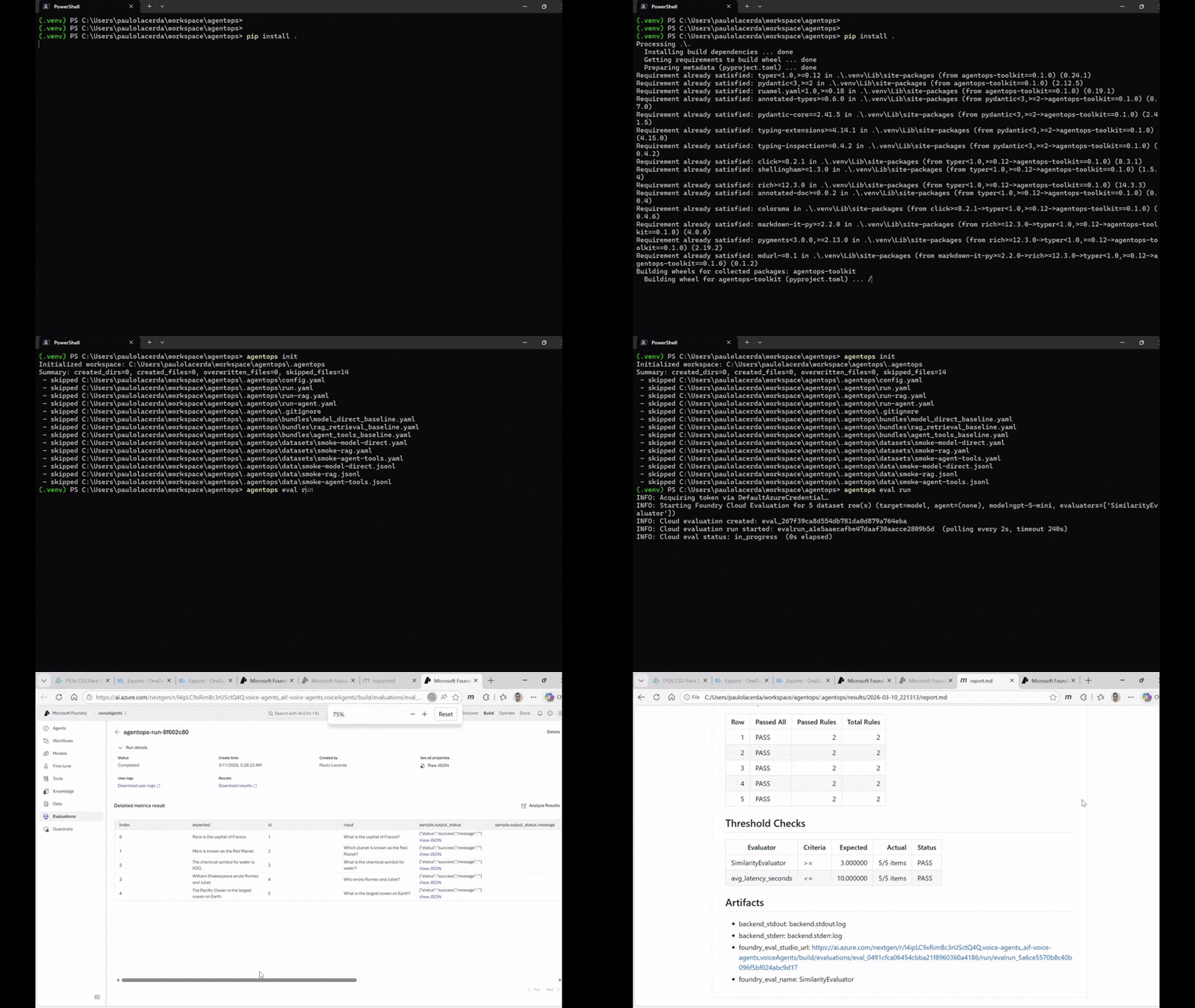
1) Install
python -m venv .venv
# activate your venv in the current shell
python -m pip install -U pip
python -m pip install agentops-toolkit
2) Initialize and Configure
agentops init
This creates .agentops/ with starter bundles, datasets, and run configs for common scenarios (model quality, RAG, agent workflow, content safety).
Set your Foundry project endpoint:
export AZURE_AI_FOUNDRY_PROJECT_ENDPOINT="https://<resource>.services.ai.azure.com/api/projects/<project>"
Then edit .agentops/run.yaml to set your agent_id and model deployment name.
Authentication uses
DefaultAzureCredential— runaz loginlocally, or use service principal env vars in CI.
3) Run Evaluation
agentops eval run
Results are written to .agentops/results/latest/:
results.json— machine-readable scoresreport.md— human-readable summary
To run a different scenario:
agentops eval run --config .agentops/run-rag.yaml
To regenerate the report from existing results:
agentops report generate
See Concepts for an overview of bundles, datasets, evaluators, backends, and the configuration model.
Commands
| Command | Description | Status |
|---|---|---|
agentops --version |
Show installed version | ✅ |
agentops init [--path DIR] |
Scaffold project workspace, starter files, and coding agent skills | ✅ |
agentops eval run [--config PATH] |
Evaluate a dataset against a bundle | ✅ |
agentops eval compare --runs ID1,ID2 |
Compare two past runs | ✅ |
agentops report generate [--in FILE] |
Regenerate report.md from results.json |
✅ |
agentops workflow generate |
Generate GitHub Actions workflow | ✅ |
agentops skills install [--platform <p>] |
Install coding agent skills (Copilot, Claude) | ✅ |
agentops run list|show |
List or inspect past runs | 🚧 |
agentops bundle list|show |
Browse bundle catalog | 🚧 |
agentops dataset validate|describe |
Dataset utilities | 🚧 |
agentops trace init |
Tracing setup | 🚧 |
agentops monitor setup|show|configure |
Monitoring operations | 🚧 |
Planned commands return a friendly message indicating they are not yet implemented.
Documentation
Concepts and Architecture
- Concepts — bundles, datasets, evaluators, backends, configuration model
- How It Works — architecture, request flow, full schema reference
- Bundles — bundle authoring and evaluator configuration
Tutorials
- Model-direct evaluation
- Foundry agent evaluation
- RAG evaluation
- HTTP-deployed agent evaluation
- Conversational agent evaluation
- Agent workflow evaluation
- Baseline comparison
Operations
Contributing
See CONTRIBUTING.md for architecture rules, testing expectations, and contribution workflow.


Download files
Download the file for your platform. If you're not sure which to choose, learn more about installing packages.
Source Distribution
Built Distribution
Filter files by name, interpreter, ABI, and platform.
If you're not sure about the file name format, learn more about wheel file names.
Copy a direct link to the current filters
File details
Details for the file agentops_toolkit-0.1.6.tar.gz.
File metadata
- Download URL: agentops_toolkit-0.1.6.tar.gz
- Upload date:
- Size: 6.9 MB
- Tags: Source
- Uploaded using Trusted Publishing? No
- Uploaded via: twine/6.2.0 CPython/3.12.9
File hashes
| Algorithm | Hash digest | |
|---|---|---|
| SHA256 |
f6076c0a8d448498dade8b08477ff55904ce7f0b42007a7c44f6e432ff9b74bc
|
|
| MD5 |
e490d18d8f56b35d6134113ab5d3c082
|
|
| BLAKE2b-256 |
0393a1ff2e560ae107235a30113483f8e69679351de267013f5d2e4441e527da
|
File details
Details for the file agentops_toolkit-0.1.6-py3-none-any.whl.
File metadata
- Download URL: agentops_toolkit-0.1.6-py3-none-any.whl
- Upload date:
- Size: 132.7 kB
- Tags: Python 3
- Uploaded using Trusted Publishing? No
- Uploaded via: twine/6.2.0 CPython/3.12.9
File hashes
| Algorithm | Hash digest | |
|---|---|---|
| SHA256 |
8a436bbc9e47095885d229070e745f194e447d43c97d5bd80c89f4c3b3e1a003
|
|
| MD5 |
fb547d6f633ff82fee474947a756c8a8
|
|
| BLAKE2b-256 |
50f5b089307eb37b70d807112a31394041e07ae50e9362cf8340052ed2f153bc
|






