
This release is a pre-release and may not be stable for production use.








AgentOps helps developers build, evaluate, and monitor AI agents. From prototype to production.
| 📊 Replay Analytics and Debugging | Step-by-step agent execution graphs |
| 💸 LLM Cost Management | Track spend with LLM foundation model providers |
| 🧪 Agent Benchmarking | Test your agents against 1,000+ evals |
| 🔐 Compliance and Security | Detect common prompt injection and data exfiltration exploits |
| 🤝 Framework Integrations | Native Integrations with CrewAI, AutoGen, & LangChain |
Quick Start ⌨️
pip install agentops
Session replays in 2 lines of code
Initialize the AgentOps client and automatically get analytics on all your LLM calls.
import agentops

# Beginning of your program (i.e. main.py, __init__.py)
agentops.init( < INSERT YOUR API KEY HERE >)

...

# End of program
agentops.end_session('Success')
All your sessions can be viewed on the AgentOps dashboard
Agent Debugging


Session Replays

Summary Analytics


First class Developer Experience
Add powerful observability to your agents, tools, and functions with as little code as possible: one line at a time.
Refer to our documentation
# Automatically associate all Events with the agent that originated them
from agentops import track_agent

@track_agent(name='SomeCustomName')
class MyAgent:
  ...
# Automatically create ToolEvents for tools that agents will use
from agentops import record_tool

@record_tool('SampleToolName')
def sample_tool(...):
  ...
# Automatically create ActionEvents for other functions.
from agentops import record_action

@agentops.record_action('sample function being record')
def sample_function(...):
  ...
# Manually record any other Events
from agentops import record, ActionEvent

record(ActionEvent("received_user_input"))
Integrations 🦾
CrewAI 🛶
Build Crew agents with observability with only 2 lines of code. Simply set an AGENTOPS_API_KEY in your environment, and your crews will get automatic monitoring on the AgentOps dashboard.
pip install 'crewai[agentops]'
AutoGen 🤖
With only two lines of code, add full observability and monitoring to Autogen agents. Set an AGENTOPS_API_KEY in your environment and call agentops.init()
Langchain 🦜🔗
AgentOps works seamlessly with applications built using Langchain. To use the handler, install Langchain as an optional dependency:
Installation
pip install agentops[langchain]
To use the handler, import and set
import os
from langchain.chat_models import ChatOpenAI
from langchain.agents import initialize_agent, AgentType
from agentops.partners.langchain_callback_handler import LangchainCallbackHandler

AGENTOPS_API_KEY = os.environ['AGENTOPS_API_KEY']
handler = LangchainCallbackHandler(api_key=AGENTOPS_API_KEY, tags=['Langchain Example'])

llm = ChatOpenAI(openai_api_key=OPENAI_API_KEY,
                 callbacks=[handler],
                 model='gpt-3.5-turbo')

agent = initialize_agent(tools,
                         llm,
                         agent=AgentType.CHAT_ZERO_SHOT_REACT_DESCRIPTION,
                         verbose=True,
                         callbacks=[handler], # You must pass in a callback handler to record your agent
                         handle_parsing_errors=True)
Check out the Langchain Examples Notebook for more details including Async handlers.
Cohere ⌨️
First class support for Cohere(>=5.4.0). This is a living integration, should you need any added functionality please message us on Discord!
Installation
pip install cohere
import cohere
import agentops

# Beginning of program's code (i.e. main.py, __init__.py)
agentops.init(<INSERT YOUR API KEY HERE>)
co = cohere.Client()

chat = co.chat(
    message="Is it pronounced ceaux-hear or co-hehray?"
)

print(chat)

agentops.end_session('Success')
import cohere
import agentops

# Beginning of program's code (i.e. main.py, __init__.py)
agentops.init(<INSERT YOUR API KEY HERE>)

co = cohere.Client()

stream = co.chat_stream(
    message="Write me a haiku about the synergies between Cohere and AgentOps"
)

for event in stream:
    if event.event_type == "text-generation":
        print(event.text, end='')

agentops.end_session('Success')
Anthropic ﹨
Track agents built with the Anthropic Python SDK (>=0.32.0).
Installation
pip install anthropic
import anthropic
import agentops

# Beginning of program's code (i.e. main.py, __init__.py)
agentops.init(<INSERT YOUR API KEY HERE>)

client = anthropic.Anthropic(
    # This is the default and can be omitted
    api_key=os.environ.get("ANTHROPIC_API_KEY"),
)

message = client.messages.create(
        max_tokens=1024,
        messages=[
            {
                "role": "user",
                "content": "Tell me a cool fact about AgentOps",
            }
        ],
        model="claude-3-opus-20240229",
    )
print(message.content)

agentops.end_session('Success')
Streaming
import anthropic
import agentops

# Beginning of program's code (i.e. main.py, __init__.py)
agentops.init(<INSERT YOUR API KEY HERE>)

client = anthropic.Anthropic(
    # This is the default and can be omitted
    api_key=os.environ.get("ANTHROPIC_API_KEY"),
)

stream = client.messages.create(
    max_tokens=1024,
    model="claude-3-opus-20240229",
    messages=[
        {
            "role": "user",
            "content": "Tell me something cool about streaming agents",
        }
    ],
    stream=True,
)

response = ""
for event in stream:
    if event.type == "content_block_delta":
        response += event.delta.text
    elif event.type == "message_stop":
        print("\n")
        print(response)
        print("\n")
Async
import asyncio
from anthropic import AsyncAnthropic

client = AsyncAnthropic(
    # This is the default and can be omitted
    api_key=os.environ.get("ANTHROPIC_API_KEY"),
)


async def main() -> None:
    message = await client.messages.create(
        max_tokens=1024,
        messages=[
            {
                "role": "user",
                "content": "Tell me something interesting about async agents",
            }
        ],
        model="claude-3-opus-20240229",
    )
    print(message.content)


await main()
Mistral 〽️
Track agents built with the Anthropic Python SDK (>=0.32.0).
Installation
pip install mistralai
Sync
from mistralai import Mistral
import agentops

# Beginning of program's code (i.e. main.py, __init__.py)
agentops.init(<INSERT YOUR API KEY HERE>)

client = Mistral(
    # This is the default and can be omitted
    api_key=os.environ.get("MISTRAL_API_KEY"),
)

message = client.chat.complete(
        messages=[
            {
                "role": "user",
                "content": "Tell me a cool fact about AgentOps",
            }
        ],
        model="open-mistral-nemo",
    )
print(message.choices[0].message.content)

agentops.end_session('Success')
Streaming
from mistralai import Mistral
import agentops

# Beginning of program's code (i.e. main.py, __init__.py)
agentops.init(<INSERT YOUR API KEY HERE>)

client = Mistral(
    # This is the default and can be omitted
    api_key=os.environ.get("MISTRAL_API_KEY"),
)

message = client.chat.stream(
        messages=[
            {
                "role": "user",
                "content": "Tell me something cool about streaming agents",
            }
        ],
        model="open-mistral-nemo",
    )

response = ""
for event in message:
    if event.data.choices[0].finish_reason == "stop":
        print("\n")
        print(response)
        print("\n")
    else:
        response += event.text

agentops.end_session('Success')
Async
import asyncio
from mistralai import Mistral

client = Mistral(
    # This is the default and can be omitted
    api_key=os.environ.get("MISTRAL_API_KEY"),
)


async def main() -> None:
    message = await client.chat.complete_async(
        messages=[
            {
                "role": "user",
                "content": "Tell me something interesting about async agents",
            }
        ],
        model="open-mistral-nemo",
    )
    print(message.choices[0].message.content)


await main()
Async Streaming
import asyncio
from mistralai import Mistral

client = Mistral(
    # This is the default and can be omitted
    api_key=os.environ.get("MISTRAL_API_KEY"),
)


async def main() -> None:
    message = await client.chat.stream_async(
        messages=[
            {
                "role": "user",
                "content": "Tell me something interesting about async streaming agents",
            }
        ],
        model="open-mistral-nemo",
    )

    response = ""
    async for event in message:
        if event.data.choices[0].finish_reason == "stop":
            print("\n")
            print(response)
            print("\n")
        else:
            response += event.text


await main()
LiteLLM 🚅
AgentOps provides support for LiteLLM(>=1.3.1), allowing you to call 100+ LLMs using the same Input/Output Format.
Installation
pip install litellm
# Do not use LiteLLM like this
# from litellm import completion
# ...
# response = completion(model="claude-3", messages=messages)

# Use LiteLLM like this
import litellm
...
response = litellm.completion(model="claude-3", messages=messages)
# or
response = await litellm.acompletion(model="claude-3", messages=messages)
LlamaIndex 🦙
AgentOps works seamlessly with applications built using LlamaIndex, a framework for building context-augmented generative AI applications with LLMs.
Installation
pip install llama-index-instrumentation-agentops
To use the handler, import and set
from llama_index.core import set_global_handler

# NOTE: Feel free to set your AgentOps environment variables (e.g., 'AGENTOPS_API_KEY')
# as outlined in the AgentOps documentation, or pass the equivalent keyword arguments
# anticipated by AgentOps' AOClient as **eval_params in set_global_handler.

set_global_handler("agentops")
Check out the LlamaIndex docs for more details.
Llama Stack 🦙🥞
AgentOps provides support for Llama Stack Python Client(>=0.0.53), allowing you to monitor your Agentic applications.
Time travel debugging 🔮

Agent Arena 🥊
(coming soon!)
Evaluations Roadmap 🧭
| Platform | Dashboard | Evals |
|---|---|---|
| ✅ Python SDK | ✅ Multi-session and Cross-session metrics | ✅ Custom eval metrics |
| 🚧 Evaluation builder API | ✅ Custom event tag tracking | 🔜 Agent scorecards |
| ✅ Javascript/Typescript SDK | ✅ Session replays | 🔜 Evaluation playground + leaderboard |
Debugging Roadmap 🧭
| Performance testing | Environments | LLM Testing | Reasoning and execution testing |
|---|---|---|---|
| ✅ Event latency analysis | 🔜 Non-stationary environment testing | 🔜 LLM non-deterministic function detection | 🚧 Infinite loops and recursive thought detection |
| ✅ Agent workflow execution pricing | 🔜 Multi-modal environments | 🚧 Token limit overflow flags | 🔜 Faulty reasoning detection |
| 🚧 Success validators (external) | 🔜 Execution containers | 🔜 Context limit overflow flags | 🔜 Generative code validators |
| 🔜 Agent controllers/skill tests | ✅ Honeypot and prompt injection detection (PromptArmor) | 🔜 API bill tracking | 🔜 Error breakpoint analysis |
| 🔜 Information context constraint testing | 🔜 Anti-agent roadblocks (i.e. Captchas) | 🔜 CI/CD integration checks | |
| 🔜 Regression testing | 🔜 Multi-agent framework visualization |
Why AgentOps? 🤔
Without the right tools, AI agents are slow, expensive, and unreliable. Our mission is to bring your agent from prototype to production. Here's why AgentOps stands out:
- Comprehensive Observability: Track your AI agents' performance, user interactions, and API usage.
- Real-Time Monitoring: Get instant insights with session replays, metrics, and live monitoring tools.
- Cost Control: Monitor and manage your spend on LLM and API calls.
- Failure Detection: Quickly identify and respond to agent failures and multi-agent interaction issues.
- Tool Usage Statistics: Understand how your agents utilize external tools with detailed analytics.
- Session-Wide Metrics: Gain a holistic view of your agents' sessions with comprehensive statistics.
AgentOps is designed to make agent observability, testing, and monitoring easy.
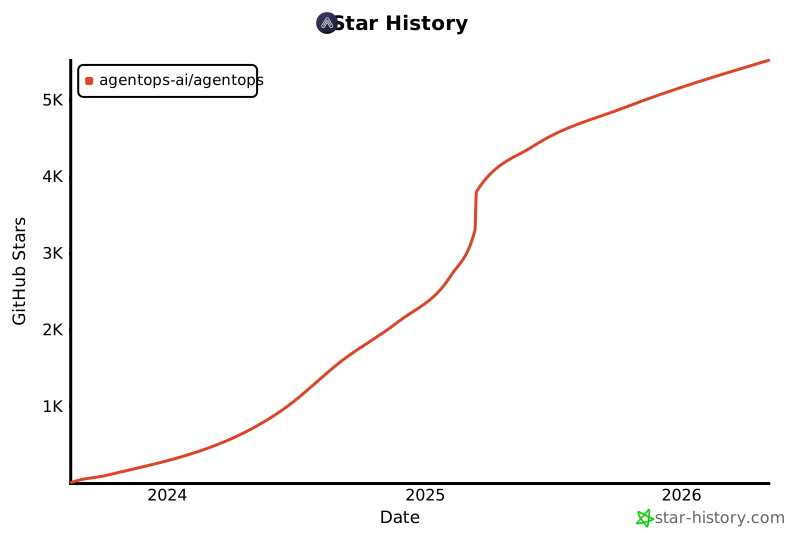
Star History
Check out our growth in the community:
Popular projects using AgentOps
| Repository | Stars |
|---|---|
 geekan / MetaGPT geekan / MetaGPT |
42787 |
 run-llama / llama_index run-llama / llama_index |
34446 |
 crewAIInc / crewAI crewAIInc / crewAI |
18287 |
 camel-ai / camel camel-ai / camel |
5166 |
 superagent-ai / superagent superagent-ai / superagent |
5050 |
 iyaja / llama-fs iyaja / llama-fs |
4713 |
 BasedHardware / Omi BasedHardware / Omi |
2723 |
 MervinPraison / PraisonAI MervinPraison / PraisonAI |
2007 |
 AgentOps-AI / Jaiqu AgentOps-AI / Jaiqu |
272 |
 strnad / CrewAI-Studio strnad / CrewAI-Studio |
134 |
 alejandro-ao / exa-crewai alejandro-ao / exa-crewai |
55 |
 tonykipkemboi / youtube_yapper_trapper tonykipkemboi / youtube_yapper_trapper |
47 |
 sethcoast / cover-letter-builder sethcoast / cover-letter-builder |
27 |
 bhancockio / chatgpt4o-analysis bhancockio / chatgpt4o-analysis |
19 |
 breakstring / Agentic_Story_Book_Workflow breakstring / Agentic_Story_Book_Workflow |
14 |
 MULTI-ON / multion-python MULTI-ON / multion-python |
13 |
Generated using github-dependents-info, by Nicolas Vuillamy


Download files
Download the file for your platform. If you're not sure which to choose, learn more about installing packages.
Source Distribution
Built Distribution
Filter files by name, interpreter, ABI, and platform.
If you're not sure about the file name format, learn more about wheel file names.
Copy a direct link to the current filters
File details
Details for the file agentops-0.3.20rc11.tar.gz.
File metadata
- Download URL: agentops-0.3.20rc11.tar.gz
- Upload date:
- Size: 59.7 kB
- Tags: Source
- Uploaded using Trusted Publishing? No
- Uploaded via: twine/6.0.1 CPython/3.9.21
File hashes
| Algorithm | Hash digest | |
|---|---|---|
| SHA256 |
9211489c6a01bc9cda4061826f8b80d0989cfcd7fbabe1dd2ed5a5cb76b3d6f0
|
|
| MD5 |
ca5279f4cb6ad82e06ef542a2d08d06e
|
|
| BLAKE2b-256 |
210642e51fff6a4537fb811a15bc22d00343145285c6246dc069433d61436e1b
|
File details
Details for the file agentops-0.3.20rc11-py3-none-any.whl.
File metadata
- Download URL: agentops-0.3.20rc11-py3-none-any.whl
- Upload date:
- Size: 60.3 kB
- Tags: Python 3
- Uploaded using Trusted Publishing? No
- Uploaded via: twine/6.0.1 CPython/3.9.21
File hashes
| Algorithm | Hash digest | |
|---|---|---|
| SHA256 |
3e5d4c19de6c58ae684693f47a2f03db35eaf4cd6d8aafc1e804a134462c2b55
|
|
| MD5 |
d9ab67a850aefcb5bf9467b48f74675d
|
|
| BLAKE2b-256 |
8dbf598ec2532b713a228f4041c9b2c10358cd43e6aecf6128d0988a0b5f103e
|







