
agents-tree
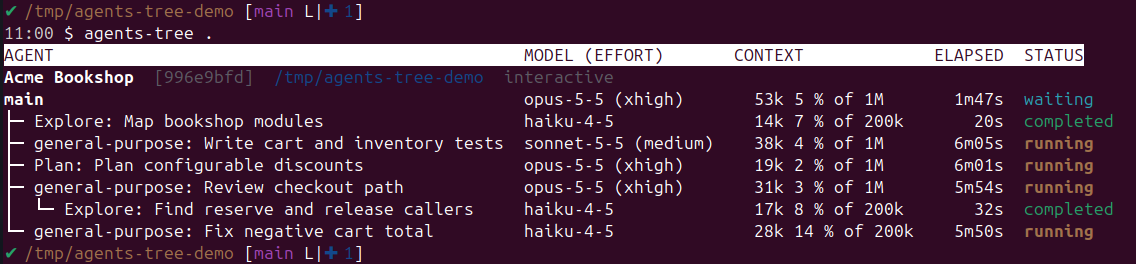
See what your coding agents are doing. agents-tree shows every running Claude
Code session and the subagents it spawned as a tree, with each agent's model and
effort, how full its context window is, how long it has been running, and its
status.
In a terminal, agents-tree .:
As a live overlay in herdr, one key away (prefix+a):

It reads the transcripts Claude Code keeps on disk and never talks to a session, so nothing it prints ends up in an agent's context. It has no dependencies beyond Python 3.10.
Claude Code is supported today; Codex and Grok are planned.
Install
uv tool install agents-tree # or: pipx install agents-tree
From a checkout: uv tool install ., or run it in place with
PYTHONPATH=src python3 -m agents_tree.
Use
agents-tree                 # every running session on this machine
agents-tree .               # sessions running in this directory (or its newest session)
agents-tree ~/src/api       # same, for another directory
agents-tree 1a2b3c4d        # one session, by id or a unique prefix (an ambiguous one lists the matches)
agents-tree -r              # only running subagents and their parents
agents-tree -w              # live view like top, refreshed every 2 s (-n 5 for 5 s)
In the live view:
| Key | Does |
|---|---|
↑ ↓ / j k / wheel |
select an agent |
Enter / → / click |
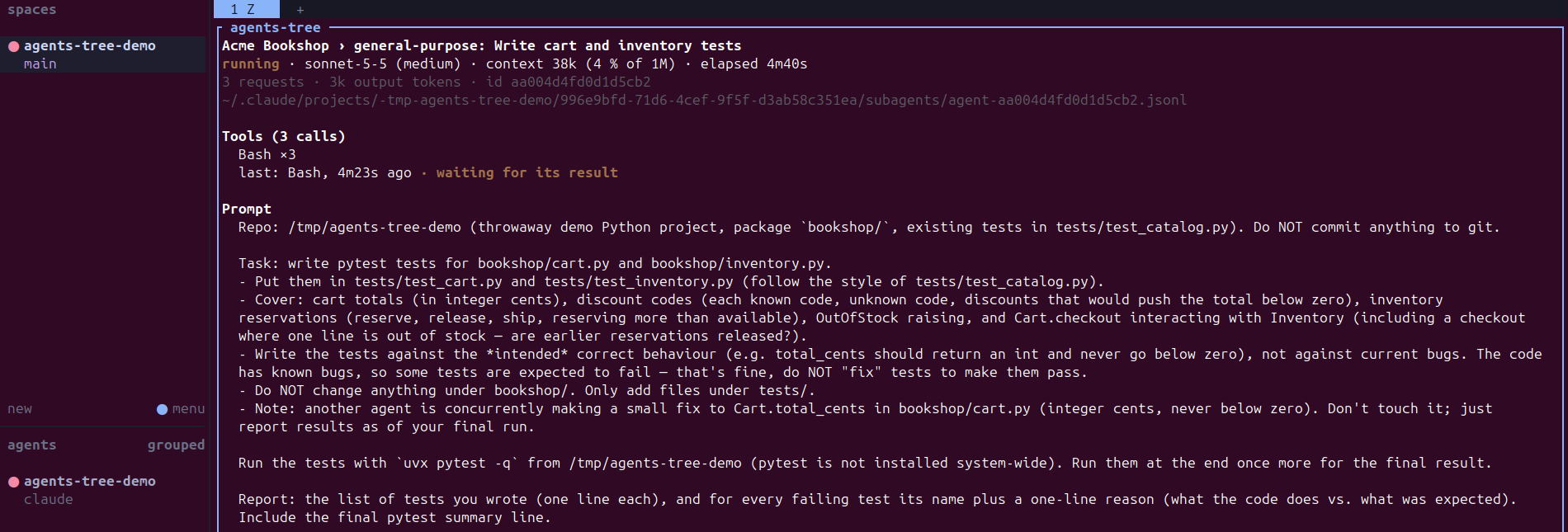
open its detail: the prompt it was given, its tool calls (and the one it is waiting on), its last message, request and token counts, transcript path |
Esc / ← / q |
back to the tree (in the tree: clear the selection, then quit) |
PgUp PgDn Home End |
scroll the detail, or jump through the tree |
r |
toggle running-only |
Ctrl+C |
quit |
The live view takes the mouse for clicks and the wheel; most terminals still
select text with Shift held, or start it with --no-mouse. When the tree is
taller than the terminal, the oldest finished agents are folded into a
"… N older finished agents hidden" line.
Enter on a row opens that agent's detail:
| Column | Meaning |
|---|---|
| label | agent-type: description as the spawning agent gave it; main for the session itself |
| model (effort) | model of the agent's latest request, and its effort level (models without effort show none) |
| context | tokens in the latest request (input + cache + output), and that as a share of the context window |
| elapsed | first to last transcript entry; up to now while the agent runs |
| status | subagents: running (active in the last 2 minutes, or waiting on a tool call), completed / failed (as Claude Code reported), done (finished, no outcome recorded), idle (a teammate waiting for its next message), stale (no sign of life and no completion marker); main: the session's own state, or not running |
Caveats
- Context window is inferred. Claude Code does not record it, so it is taken
from the model family: 1M for Claude 5 models (Opus, Sonnet, Fable), 200k
otherwise. Override with
--window 200000orAGENTS_TREE_WINDOW. - Transcript format is internal to Claude Code and may change between
releases. Unknown lines are skipped, but a field that moves makes its column
show
-until agents-tree is updated. - Elapsed spans wall-clock time, so a session resumed over several days, or a subagent woken up again by a message, shows that whole span.
- Running sessions come from
claude agents --json; withoutclaudeonPATH, agents-tree falls back to~/.claude/sessions/(interactive sessions only).
herdr plugin
herdr shows your agents, not their subagents. The plugin in this repository opens the live tree for the focused agent pane over that pane; closing it gives the layout back:
herdr integration install claude                 # herdr learns each pane's session id
herdr plugin install blavka/agents-tree
herdr plugin action invoke agents-tree.setup-keys
| Key | Action |
|---|---|
prefix+a |
live tree of the focused agent's session; q or the same key closes it |
prefix+shift+a |
live tree of every running session |
On a pane without an agent, prefix+a shows every running session. The plugin
runs the copy of agents-tree bundled in the repository, so it needs only
python3 3.10+ (or AGENTS_TREE_PYTHON pointing at one). setup-keys writes
one marked block into your herdr config.toml (backed up first) and leaves keys
you already use alone; agents-tree.remove-keys takes it out again. The
open-split and open-tab actions show the same tree in a split or a tab.
For development, link a checkout instead: herdr plugin link /path/to/agents-tree.
Development
uv sync
uv run pytest
uv run pylint src
uv run pylint tests --disable=redefined-outer-name,protected-access,unused-argument
uv run pyright
CI (.github/workflows/test.yaml) runs the same on every push and pull request:
lint and types on Python 3.12, then the tests, a test run and a package build on
3.10 to 3.14.
To release, bump version in pyproject.toml, src/agents_tree/__init__.py and
herdr-plugin.toml, then push a matching tag (git tag v0.2.0 && git push origin v0.2.0). .github/workflows/publish.yaml checks the tag against the version,
tests, builds and publishes to PyPI through trusted publishing.
Providers live in src/agents_tree/providers/: each turns one agent CLI's files
into the provider-neutral Session/Agent model in model.py, which
render.py draws.
License
MIT
1 maintainer

Metadata
1 maintainer
Release files for agents-tree 0.1.1
For a detailed explanation of source distributions (sdists) and built distributions (wheels), please see the package formats documentation.
Source distribution (sdist)
| File | Size | Uploaded | |
|---|---|---|---|
| agents_tree-0.1.1.tar.gz | 24.1 kB | Details |
Built distribution (wheel)
| File | Interpreter | ABI | Platform | Reset |
|---|---|---|---|---|
| agents_tree-0.1.1-py3-none-any.whl | Python 3 | none | any | Details |
Total release size: 52.5 kB
Release files / agents_tree-0.1.1.tar.gz
| Download URL | agents_tree-0.1.1.tar.gz |
|---|---|
| Size | 24.1 kB |
| Tags | Source |
|
SHA-256 checksum How to use checksums |
242c031a7e73bc2602dc9a4b28bf64203628eb093c386ccf6fddb9d6c192e902
|
|
BLAKE2b-256 checksum How to use checksums |
d17cee16b26a7dbbe1181ce42232308a0cd52de5329a5cea59b4be6a5a76469f
|
| Upload date | |
|
Uploaded using Trusted Publishing? What is trusted publishing? |
Yes |
| Uploaded via |
twine/7.0.0 CPython/3.13.14
|
Provenance
Provenance describes where a file came from. On PyPI, provenance is shared via attestations, which provide a verifiable record of the build or publishing details. View details, limitations and caveats.


PyPI Publish Attestation
PyPI verified that this artifact, at this checksum, originated from the publisher listed below.
Signed by GitHub Actions, verified by PyPI on Oct 7, 2026.
Transparency logRelease files / agents_tree-0.1.1-py3-none-any.whl
| Download URL | agents_tree-0.1.1-py3-none-any.whl |
|---|---|
| Size | 28.4 kB |
| Tags | Python 3 |
|
SHA-256 checksum How to use checksums |
32293534508234731ccddbd2f5e066ad506cfa26001e0e0ac600fcacb5dcaa6e
|
|
BLAKE2b-256 checksum How to use checksums |
af8ee0db5ed6ef31f16521e8ff16d9b0e34061cf863153038dca71f16701eecd
|
| Upload date | |
|
Uploaded using Trusted Publishing? What is trusted publishing? |
Yes |
| Uploaded via |
twine/7.0.0 CPython/3.13.14
|
Provenance
Provenance describes where a file came from. On PyPI, provenance is shared via attestations, which provide a verifiable record of the build or publishing details. View details, limitations and caveats.
PyPI Publish Attestation
PyPI verified that this artifact, at this checksum, originated from the publisher listed below.
Signed by GitHub Actions, verified by PyPI on Oct 7, 2026.
Transparency log













