
agentscan
Security scanner for AI agents. It finds risky MCP server setups in Claude, Cursor, VS Code and Windsurf configs before they leak a credential or run a malicious package.


pip install agentscan-si
agentscan scan
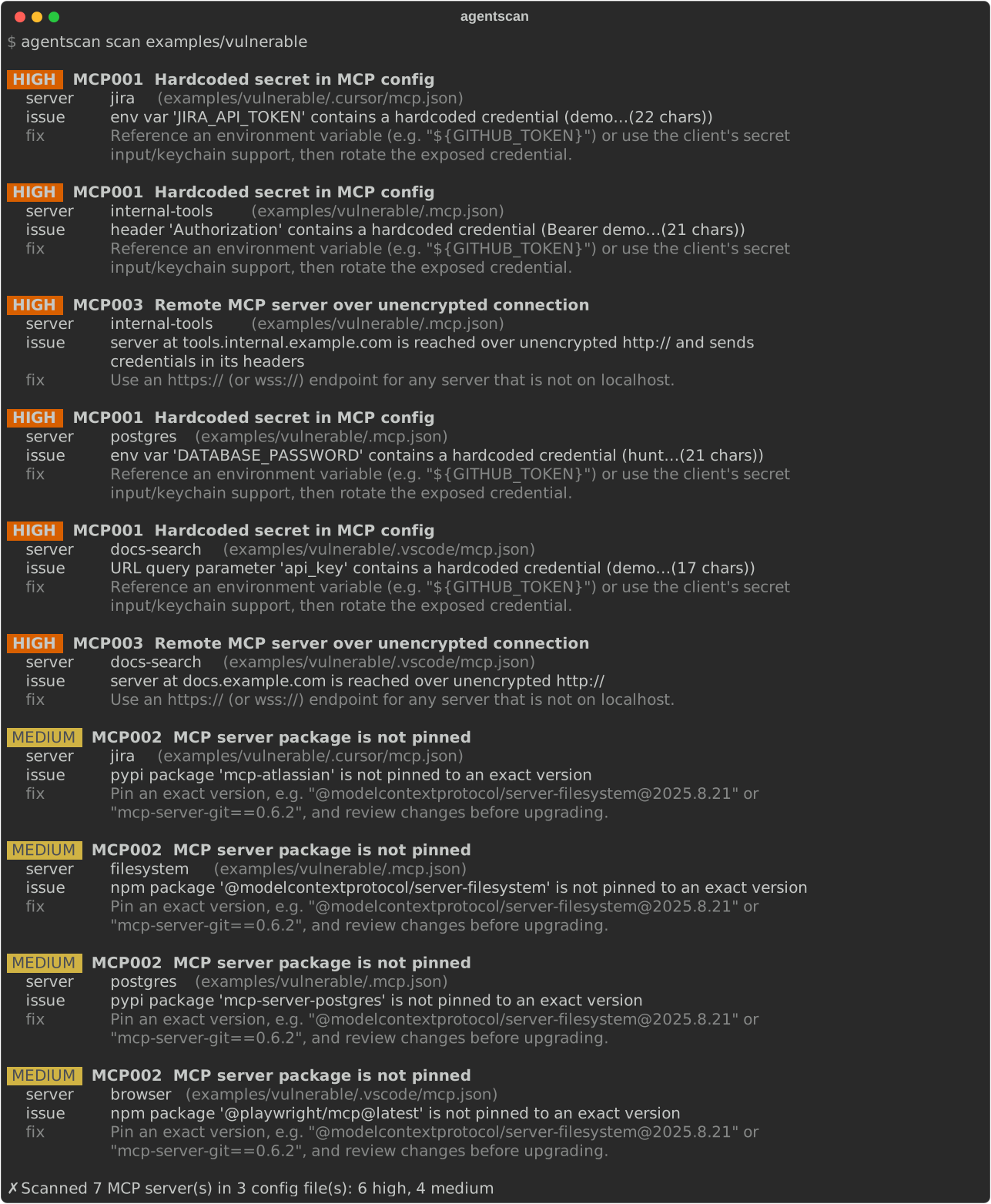
See it in action: notebooks/agentscan-demo.ipynb walks through a scan of a multi-client setup, what each rule catches, charts of the findings, and the fixed configs.
Quick start
Prerequisites: uv (it installs a suitable Python automatically). agentscan supports Python 3.10 and newer.
# 1. Install uv (macOS / Linux)
curl -LsSf https://astral.sh/uv/install.sh | sh

# 2. Get the code and set up the environment
git clone https://github.com/SonawaneMayur/agentscan.git
cd agentscan
uv sync

# 3. Scan the bundled example, then your own configs
uv run agentscan scan examples/vulnerable
uv run agentscan scan
Scanning runs entirely on your machine; config files and findings are never sent anywhere.
Install as a command
The package is published on PyPI as agentscan-si ("super intelligence"); the command it
installs is agentscan.
uv tool install agentscan-si      # or: pipx install agentscan-si / pip install agentscan-si
agentscan --version

# latest development version from GitHub
uv tool install git+https://github.com/SonawaneMayur/agentscan
Usage
agentscan scan                    # current directory + your user-level client configs
agentscan scan path/to/project    # only configs inside that directory
agentscan scan ~/.cursor/mcp.json # a single config file
agentscan scan --format json      # machine-readable output
agentscan scan --fail-on medium   # exit 1 on medium or worse (default: high), for CI
agentscan rules                   # list rules
Exit codes: 0 no findings at or above --fail-on, 1 findings at or above it, 2 bad path.
Config files it reads:
| Client | Locations |
|---|---|
| Claude Desktop | ~/Library/Application Support/Claude/claude_desktop_config.json |
| Claude Code | ~/.claude.json, .mcp.json |
| Cursor | ~/.cursor/mcp.json, .cursor/mcp.json |
| VS Code | .vscode/mcp.json, .vscode/settings.json, user mcp.json |
| Windsurf | ~/.codeium/windsurf/mcp_config.json |
Rules
| ID | Severity | Finds |
|---|---|---|
| MCP001 | high | API keys, tokens and passwords written directly in env, headers, arguments or URLs |
| MCP002 | medium | npx/uvx/pipx packages without an exact version, so every client restart runs the latest release |
| MCP003 | high | Remote servers reached over plain http:// or ws:// |
Fixing findings
Complete before/after configs are in examples/vulnerable/ and examples/fixed/.
MCP001: hardcoded secret. Reference an environment variable instead of pasting the value, then rotate the exposed credential.
// before
"env": { "DATABASE_PASSWORD": "hunter2-prod-password" }
// after: the client reads the value from your environment
"env": { "DATABASE_PASSWORD": "${DATABASE_PASSWORD}" }
In VS Code, an inputs prompt is another option: the client asks for the value and stores it
securely.
"inputs": [{ "type": "promptString", "id": "docs-api-key", "password": true }],
"servers": {
  "docs-search": { "url": "https://docs.example.com/mcp", "headers": { "X-API-Key": "${input:docs-api-key}" } }
}
MCP002: unpinned package. Pin an exact version and upgrade deliberately.
// before
"args": ["-y", "@modelcontextprotocol/server-filesystem", "/Users/me/projects"]
// after
"args": ["-y", "@modelcontextprotocol/server-filesystem@2025.8.21", "/Users/me/projects"]

// uvx: use ==
"args": ["mcp-server-git==0.6.2"]
MCP003: insecure transport. Use https:// for any server that isn't on localhost.
// before
"url": "http://tools.internal.example.com/mcp"
// after
"url": "https://tools.internal.example.com/mcp"
Re-run agentscan scan to confirm: ✓ ... no issues found and exit code 0.
Use in CI
Fail a pull request that adds a risky MCP config, using GitHub Actions:
# .github/workflows/agentscan.yml
name: agentscan
on: [pull_request]
jobs:
  scan:
    runs-on: ubuntu-latest
    steps:
      - uses: actions/checkout@v4
      - uses: astral-sh/setup-uv@v6
      - run: uv tool install agentscan-si
      - run: agentscan scan . --fail-on medium
Demo notebook
notebooks/agentscan-demo.ipynb is saved with its outputs, so you can read it on GitHub without running anything. To run it yourself:
uv sync --group demo
-
VS Code: open the notebook, click Select Kernel (top right) → Python Environments →
.venv, then Run All. VS Code may ask to install its Jupyter extension. -
Browser:
uv run --group demo jupyter lab notebooks/agentscan-demo.ipynb, then Run → Run All Cells. -
Re-run and save outputs from the command line, e.g. after changing a rule:
uv run --group demo jupyter nbconvert --to notebook --execute --inplace notebooks/agentscan-demo.ipynb
The notebook only scans the files in examples/, never your own configs.
Roadmap
- MCP config scanning (secrets, unpinned packages, insecure transport)
- SARIF output and a GitHub Action
- Tool-description pinning to detect "rug pull" changes
- Live scan: connect to MCP servers and check tool descriptions for prompt injection
- Agent code analysis (LangChain, CrewAI, OpenAI/Anthropic SDKs)
- Findings mapped to OWASP LLM Top 10 and OWASP Agentic AI threats
Research
research/mcp-config-census/ runs agentscan over MCP configs committed to public GitHub repositories, to measure how common these risks are in practice. The method, ethics rules and safety measures are in its README; results are published once the full run has been reviewed.
Development
uv sync
git config core.hooksPath .githooks
uv sync creates .venv with the dev dependencies. The second command enables a pre-commit
hook that blocks commits containing credentials, .env files, databases or research data.
| Task | Command |
|---|---|
| Tests | uv run pytest and uv run pytest research/mcp-config-census |
| Lint and format | uv run ruff check and uv run ruff format |
| Secret check (whole repo) | uv run python scripts/check_secrets.py |
| Refresh the README screenshot | uv run python scripts/render_demo.py |
Releasing: bump __version__ in src/agentscan/__init__.py, add a CHANGELOG.md entry, then
push a matching tag (git tag v0.1.1 && git push origin v0.1.1). The release workflow tests,
builds and publishes to PyPI.
Adding a rule: write a generator in src/agentscan/rules/ that takes an MCPServer, yields one
message per problem, and register it with the @rule(...) decorator. Add tests in tests/.
License
MIT
1 maintainer

Metadata
1 maintainer
Release files for agentscan-si 0.1.1
For a detailed explanation of source distributions (sdists) and built distributions (wheels), please see the package formats documentation.
Source distribution (sdist)
| File | Size | Uploaded | |
|---|---|---|---|
| agentscan_si-0.1.1.tar.gz | 19.1 kB | Details |
Built distribution (wheel)
| File | Interpreter | ABI | Platform | Reset |
|---|---|---|---|---|
| agentscan_si-0.1.1-py3-none-any.whl | Python 3 | none | any | Details |
Total release size: 36.5 kB
Release files / agentscan_si-0.1.1.tar.gz
| Download URL | agentscan_si-0.1.1.tar.gz |
|---|---|
| Size | 19.1 kB |
| Tags | Source |
|
SHA-256 checksum How to use checksums |
646e1b6f58b5cdd750d572f03995b3e14e3c53c32e9d8a16ecdd0d7d18a12fd6
|
|
BLAKE2b-256 checksum How to use checksums |
1095fce66146c746cf1c93dfd353d847b3758d118bfcd9aa7b5cf55d828e2e5e
|
| Upload date | |
|
Uploaded using Trusted Publishing? What is trusted publishing? |
Yes |
| Uploaded via |
twine/7.0.0 CPython/3.13.14
|
Provenance
Provenance describes where a file came from. On PyPI, provenance is shared via attestations, which provide a verifiable record of the build or publishing details. View details, limitations and caveats.


PyPI Publish Attestation
PyPI verified that this artifact, at this checksum, originated from the publisher listed below.
Signed by GitHub Actions, verified by PyPI on Oct 18, 2026.
Transparency logRelease files / agentscan_si-0.1.1-py3-none-any.whl
| Download URL | agentscan_si-0.1.1-py3-none-any.whl |
|---|---|
| Size | 17.4 kB |
| Tags | Python 3 |
|
SHA-256 checksum How to use checksums |
ae82ddadc38bb7f1d31a0f37173ab6bb2a245643ed47b0d2e2e2774059759102
|
|
BLAKE2b-256 checksum How to use checksums |
a0da2dd8e39e3f00b98350a3d34bbe4dc969a653d3efeaafa517fa60737969be
|
| Upload date | |
|
Uploaded using Trusted Publishing? What is trusted publishing? |
Yes |
| Uploaded via |
twine/7.0.0 CPython/3.13.14
|
Provenance
Provenance describes where a file came from. On PyPI, provenance is shared via attestations, which provide a verifiable record of the build or publishing details. View details, limitations and caveats.
PyPI Publish Attestation
PyPI verified that this artifact, at this checksum, originated from the publisher listed below.
Signed by GitHub Actions, verified by PyPI on Oct 18, 2026.
Transparency log













